Update your Win 7 installation media

:-)


It is going to be difficult to include all the possible drivers for the newer boards, because there could be clashes.


The DRIVERS and UPDATES folders are there so users can add whatever they need.


Hi SIW2,


just wanted to post back and say many thanks for your efforts. The method worked great for me with no hiccups. Instructions were concise and easily followed.


Regarding the Asus TUF board I posted about earlier, EZinstall did the trick. There is a device driver missing in device manager that should have been provided in the chipset drivers, but I think Win 7 on Z370 may be the issue. I'll post a thread in the hardware forum later, but just wanted to mention it here in case any others have similar issues.


Again, thanks very much for making it so simple to do. It saved me loads of time stumbling around trying to make it work.
 

My Computers My Computers

System One System Two

  • Computer type
    PC/Desktop
    OS
    7 X64
    CPU
    i5 8400
    Motherboard
    gigabyte b365m ds3h
    Memory
    2x8gb 3200mhz
    Hard Drives
    various
    PSU
    pure power 11 400w cm
    Case
    Coolermaster
    Cooling
    cryorig m9i
  • Computer type
    PC/Desktop
    OS
    7x64
    CPU
    g5400
    Motherboard
    ga b365m ds3h
    Memory
    8gb ddr4 2400
    PSU
    xfx pro 450w
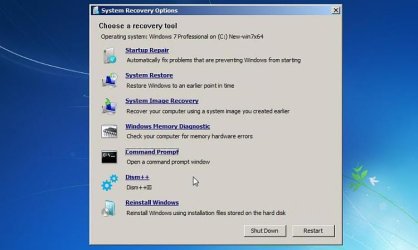
The latest version (7upv45 ) should integrate dism++ into the bootable wims which could be used to install/uninstall extra drivers/updates into an offline system if necessary.

Dism++ should show in the system recovery options screen.


Sys-rec-opt-dism++.jpg
 

My Computers My Computers

System One System Two

  • Computer type
    PC/Desktop
    OS
    7 X64
    CPU
    i5 8400
    Motherboard
    gigabyte b365m ds3h
    Memory
    2x8gb 3200mhz
    Hard Drives
    various
    PSU
    pure power 11 400w cm
    Case
    Coolermaster
    Cooling
    cryorig m9i
  • Computer type
    PC/Desktop
    OS
    7x64
    CPU
    g5400
    Motherboard
    ga b365m ds3h
    Memory
    8gb ddr4 2400
    PSU
    xfx pro 450w
They are in the "Gigabyte utility". You can extract them from the "HOTFIX" folder:

Windows6.1-KB2990941-v3-x64.msu
Windows6.1-KB3087873-v2-x64.msu
AHA! I already had them available.


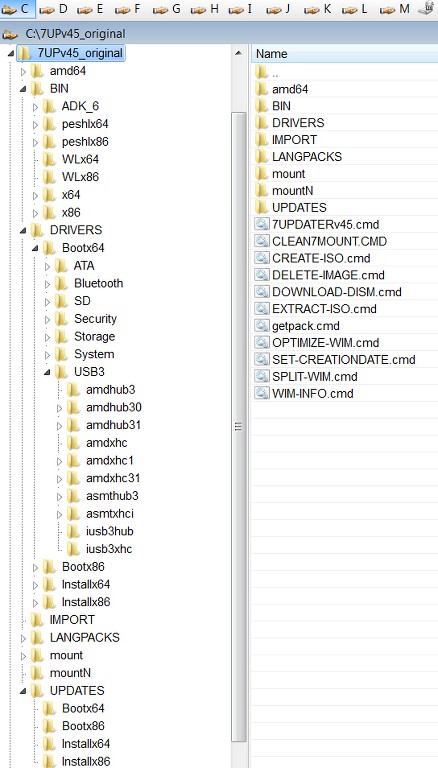
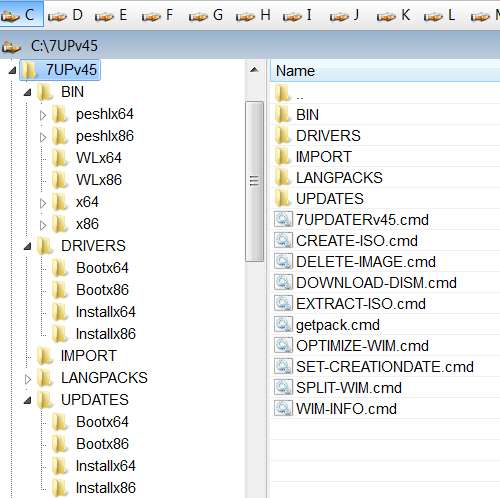
UPDATES\Bootx64 folder
UPDATES\Installx64 folder
Now I know where they go.


WA files go here:
Now I understand what you meant.

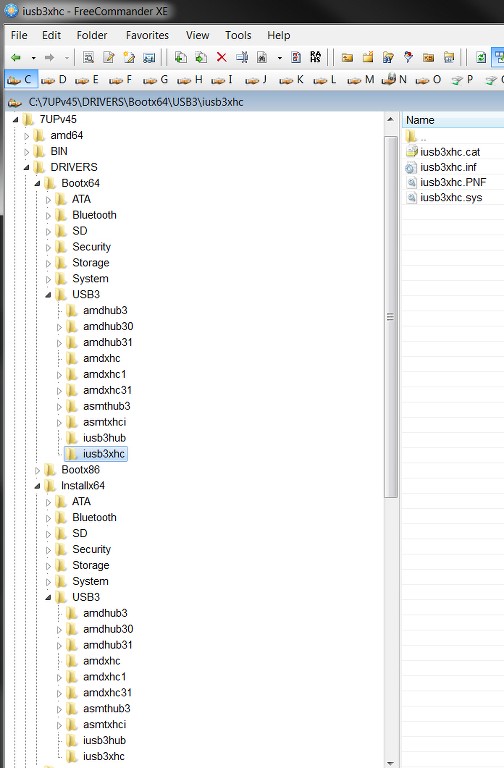
So all mysteries are now cleared up. However I still have the issue of the "missing USB3 drivers" in the resulting installation folder/ISO. They are indeed present in your driver folders, so they should have been slip-streamed into the result.

And yet after running your CREATE-ISO command, and then running RUFUS to produce bootable USB media, and using that USB flash drive to begin a test Win7 install on my P70 laptop, there clearly were no USB3 drivers in the install media. There was no usable mouse or keyboard at the very first screen put out by the install. I'm guessing the NVMe drivers are probably similarly missing which would prevent choosing an NVMe target drive for the install.

Nor was there USB3 drivers installed in a successfully completed Win7 install into Win7-VM by direct use of the ISO itself. This completed Win7-VM install did reflect all of the SIMPLIX Windows Updates, but it did not reflect your USB3 drivers.

So these are both pointing to something not working properly here, at least for me. And the effect is that the bootable USB media is unusable at the moment, lacking USB3 and NVMe drivers. Any thoughts about things I should look at in the final folder for a diagnostic clue?

The LOG put out by the process is HUGE, but is there something in it I should look for which would be helpful to you?

Is there a way to expand the WIM (or two SWM fractions, which is what I have) to examine the internal content to see if the drivers actually are there or not? Looks like there is a 3rd-party non-free product named PowerISO which can do this, and perhaps there are other free products as well.


NOTE: all of your links and attached JPG images appeared perfectly in your latest post, and were 100% visible and usable to me. You must have used a different technique this time than you used in your earlier posts (e.g. post #1) whose links and attached JPGs are still not usable or visible.

But this latest post of yours was problem-free. If you could explain what you did differently this time I could pass it on to Brink, whose team is still investigating why the earlier post attachments and links are causing problems. I'm sure knowing whatever you did this time that was different would be hugely helpful to them.

Thank you again for this tool, and for your assistance helping me push through past these issues.

 

My Computer My Computer

Computer type
PC/Desktop
Computer Manufacturer/Model Number
Home-built, two systems (1) and (2)
OS
Windows 7 Pro x64 (1), Win7 Pro X64 (2)
CPU
i5-3350p 3.1Ghz/6MB-cache (1); E8400 3.0Ghz/6MB-cache (2)
Motherboard
ASUS P8Z77-V Pro (1); ASUS P5Q3 (2)
Memory
8GB PC3-12800 DDR3 (1); 4GB PC3-10600 DDR3 (2)
Graphics Card(s)
ATI HD7750 (1), (see TV cards); ATI R7 250 (2)
Sound Card
Realtek ALC892 HD Audio (1); Realtek ALC1200 HD Audio (2)
Monitor(s) Displays
Eizo HD2441W LCD, Eizo S2433W (1); Eizo 24" S2433W (2)
Screen Resolution
1920x1200, 1920x1200 (1); 1920x1200 (2)
Hard Drives
(1) 1TB SATA-II (7200RPM), 2x2TB SATA-III (7200RPM), 250GB SATA-III (10000RPM) for OS; 2x2TB external USB 3.0

(2) 320GB SATA-II (7200RPM), 750GB SATA-II (7200RPM), 150GB SATA-II (10000RPM) for OS; 2TB external USB 3.0
PSU
Nesteq ECS-6001 600W (1); Nesteq ECS-5001 500W (2)
Case
Acousti-Case 360 (1) and (2)
Cooling
Noctua NH-U12P SE2 for CPU, 2x120mm case fans (1) and (2)
Keyboard
IBM PS/2 (1) and (2)
Mouse
Logitech MX Revolution wireless (1); Microsoft wired (2)
Internet Speed
100mbps down / 10mbps up
Antivirus
Microsoft Security Essentials; Malwarebyte Anti-Malware Pro
Browser
Firefox
Other Info
Ceton InfiniTV 4-tuner cablecard-enabled TV card as well as Hauppauge HVR-2250 OTA/ATSC 2-tuner TV card in (1), running under Win7 WMC
You could use 7-zip to extract the usb folder from the gigabyte tool.

Copy them into DRIVERS\bootx64 and DRIVERS\Installx64 folders.

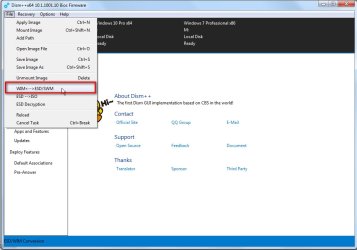
If you dont want to rebuild the whole thing from scratch, you could use dism++ to mount boot.wim image 2, integrate those drivers, save the image ( overwrite not a new image ). Unmount the image.

Do the same for Install.wim - select whichever image you are going to use - e.g. image 3 for Pro. But you need the full install.wim for servicing like that. Can't do it to split wims.

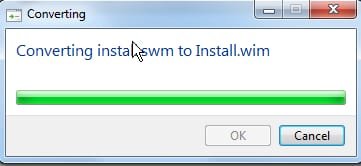
I assume you kept the full Install.wim? If not, you can stitch the .swm files back into one

You will find dism++ in BIN\x64\tools folder.

If you are using x86 dism++ is in the BIN\x86\tools folder

wim-esd-swm.jpg


swm-wim.jpg
 

My Computers My Computers

System One System Two

  • Computer type
    PC/Desktop
    OS
    7 X64
    CPU
    i5 8400
    Motherboard
    gigabyte b365m ds3h
    Memory
    2x8gb 3200mhz
    Hard Drives
    various
    PSU
    pure power 11 400w cm
    Case
    Coolermaster
    Cooling
    cryorig m9i
  • Computer type
    PC/Desktop
    OS
    7x64
    CPU
    g5400
    Motherboard
    ga b365m ds3h
    Memory
    8gb ddr4 2400
    PSU
    xfx pro 450w
Maybe also unistall any conflicting usb3 drivers first.

Dism++:

mount the image

( make sure it is highlighted in blue in top pane - if not, click on it)

Click "open session"

Click Drivers in left pane

Have a look at the usb and system devices. Any possible conflicts, Remove, then ADD the new drivers.

Save and Unmount
 

My Computers My Computers

System One System Two

  • Computer type
    PC/Desktop
    OS
    7 X64
    CPU
    i5 8400
    Motherboard
    gigabyte b365m ds3h
    Memory
    2x8gb 3200mhz
    Hard Drives
    various
    PSU
    pure power 11 400w cm
    Case
    Coolermaster
    Cooling
    cryorig m9i
  • Computer type
    PC/Desktop
    OS
    7x64
    CPU
    g5400
    Motherboard
    ga b365m ds3h
    Memory
    8gb ddr4 2400
    PSU
    xfx pro 450w
You could use 7-zip to extract the usb folder from the gigabyte tool.

Copy them into DRIVERS\bootx64 and DRIVERS\Installx64 folders.
No need for that, you've already included them in your 7UP expansion.

sI7Fqn.jpg


The problem is not that they weren't available INTO the process... because they clearly were present, in your very folders as now clearly documented. So presumably they SHOULD have been included in the entire process of producing new install media (i.e. slip-streamed into the result, same as the Gigabyte utility does).

The problem is that empirically it appears that didn't happen, based on the results of trying to use the ISO produced by your CREATE-ISO command. I used RUFUS to produce a bootable USB from your output ISO, but using that bootable USB the very first screen had no mouse or keyboard, a dead giveaway that USB3 drivers are not present in the install media.

I ask if this is a very recent improvement in your new 7UP command and included content? And if so do you know that it works properly? Have you tried creating a bootable USB drive from the ISO, and actually performing an install on a Skylake machine that needs these critical USB3 drivers?


If you dont want to rebuild the whole thing from scratch...
I don't mind regenerating the whole thing. I actually did delete the complete INSTALL.WIM and only kept the two SWM parts.

And I probably will get PowerISO for my "bag of tricks", to investigate what's actually inside it, to confirm that your provided USB3 drivers that are absolutely present in your 7UP folders did or did not end up in the resulting WIM. They definitely were not present in the bootable USB media (built from ISO) that I tried to use to test with.

Again, is there something in the huge log from the process I can look at to tell you whether or not your provided USB3 drivers actually got picked up and included, or not? That information is available right this second.
 

My Computer My Computer

Computer type
PC/Desktop
Computer Manufacturer/Model Number
Home-built, two systems (1) and (2)
OS
Windows 7 Pro x64 (1), Win7 Pro X64 (2)
CPU
i5-3350p 3.1Ghz/6MB-cache (1); E8400 3.0Ghz/6MB-cache (2)
Motherboard
ASUS P8Z77-V Pro (1); ASUS P5Q3 (2)
Memory
8GB PC3-12800 DDR3 (1); 4GB PC3-10600 DDR3 (2)
Graphics Card(s)
ATI HD7750 (1), (see TV cards); ATI R7 250 (2)
Sound Card
Realtek ALC892 HD Audio (1); Realtek ALC1200 HD Audio (2)
Monitor(s) Displays
Eizo HD2441W LCD, Eizo S2433W (1); Eizo 24" S2433W (2)
Screen Resolution
1920x1200, 1920x1200 (1); 1920x1200 (2)
Hard Drives
(1) 1TB SATA-II (7200RPM), 2x2TB SATA-III (7200RPM), 250GB SATA-III (10000RPM) for OS; 2x2TB external USB 3.0

(2) 320GB SATA-II (7200RPM), 750GB SATA-II (7200RPM), 150GB SATA-II (10000RPM) for OS; 2TB external USB 3.0
PSU
Nesteq ECS-6001 600W (1); Nesteq ECS-5001 500W (2)
Case
Acousti-Case 360 (1) and (2)
Cooling
Noctua NH-U12P SE2 for CPU, 2x120mm case fans (1) and (2)
Keyboard
IBM PS/2 (1) and (2)
Mouse
Logitech MX Revolution wireless (1); Microsoft wired (2)
Internet Speed
100mbps down / 10mbps up
Antivirus
Microsoft Security Essentials; Malwarebyte Anti-Malware Pro
Browser
Firefox
Other Info
Ceton InfiniTV 4-tuner cablecard-enabled TV card as well as Hauppauge HVR-2250 OTA/ATSC 2-tuner TV card in (1), running under Win7 WMC
Check with dism++ if they are in the installation you just did.

I can only test the intel usb3 drivers - they integrate and work perfectly for me.

The log lists the updates that were integrated.
 
Last edited:

My Computers My Computers

System One System Two

  • Computer type
    PC/Desktop
    OS
    7 X64
    CPU
    i5 8400
    Motherboard
    gigabyte b365m ds3h
    Memory
    2x8gb 3200mhz
    Hard Drives
    various
    PSU
    pure power 11 400w cm
    Case
    Coolermaster
    Cooling
    cryorig m9i
  • Computer type
    PC/Desktop
    OS
    7x64
    CPU
    g5400
    Motherboard
    ga b365m ds3h
    Memory
    8gb ddr4 2400
    PSU
    xfx pro 450w
:-)


It is going to be difficult to include all the possible drivers for the newer boards, because there could be clashes.


The DRIVERS and UPDATES folders are there so users can add whatever they need.


Yes, unfortunately none of the drivers were accepted, not the integrated drivers or even TUF board drivers (tried win 7 & 10). I haven't had time to look into it yet. It appears the device is the mid-board usb 3 (& 3.1), since it's the only device that isn't working.
 

My Computer My Computer

Computer type
PC/Desktop
Computer Manufacturer/Model Number
custom
OS
windows 7 Pro 64 Bit
CPU
i5 4670K
Motherboard
Asus Max Hero 1150 socket
Memory
16GB DDR3@933mhz
Graphics Card(s)
Radeon R9 390 8192mb
Monitor(s) Displays
Dell U2415 x3
Screen Resolution
1920 (5760) x 1200 x3
Hard Drives
System: Kingston 128GB SSD

Installing to Samsung 860 EVO 500GB
WD Black 2 TB & 1 TB
PSU
Corsair CX750M
Cooling
Hyper 312
Internet Speed
50mbps
Yes, unfortunately none of the drivers were accepted, not the integrated drivers or even TUF board drivers (tried win 7 & 10). I haven't had time to look into it yet. It appears the device is the mid-board usb 3 (& 3.1), since it's the only device that isn't working

Could be it won't work with win7 and you would need a pcie to usb3 card. Some of the 300 series and newer are like that.


There are modded drivers for amd which can use the matisse cpu usb3 controller. It gets complicated because the sha256 drivers need the sha updates. There are also some modded sha1 signed drivers around for amd matisse
 

My Computers My Computers

System One System Two

  • Computer type
    PC/Desktop
    OS
    7 X64
    CPU
    i5 8400
    Motherboard
    gigabyte b365m ds3h
    Memory
    2x8gb 3200mhz
    Hard Drives
    various
    PSU
    pure power 11 400w cm
    Case
    Coolermaster
    Cooling
    cryorig m9i
  • Computer type
    PC/Desktop
    OS
    7x64
    CPU
    g5400
    Motherboard
    ga b365m ds3h
    Memory
    8gb ddr4 2400
    PSU
    xfx pro 450w
Yes, unfortunately none of the drivers were accepted, not the integrated drivers or even TUF board drivers (tried win 7 & 10). I haven't had time to look into it yet. It appears the device is the mid-board usb 3 (& 3.1), since it's the only device that isn't working.
Sounds very suspiciously identical to my own current problem, where USB3 drivers were also omitted.

Sounds like a real issue with 7UP.
 

My Computer My Computer

Computer type
PC/Desktop
Computer Manufacturer/Model Number
Home-built, two systems (1) and (2)
OS
Windows 7 Pro x64 (1), Win7 Pro X64 (2)
CPU
i5-3350p 3.1Ghz/6MB-cache (1); E8400 3.0Ghz/6MB-cache (2)
Motherboard
ASUS P8Z77-V Pro (1); ASUS P5Q3 (2)
Memory
8GB PC3-12800 DDR3 (1); 4GB PC3-10600 DDR3 (2)
Graphics Card(s)
ATI HD7750 (1), (see TV cards); ATI R7 250 (2)
Sound Card
Realtek ALC892 HD Audio (1); Realtek ALC1200 HD Audio (2)
Monitor(s) Displays
Eizo HD2441W LCD, Eizo S2433W (1); Eizo 24" S2433W (2)
Screen Resolution
1920x1200, 1920x1200 (1); 1920x1200 (2)
Hard Drives
(1) 1TB SATA-II (7200RPM), 2x2TB SATA-III (7200RPM), 250GB SATA-III (10000RPM) for OS; 2x2TB external USB 3.0

(2) 320GB SATA-II (7200RPM), 750GB SATA-II (7200RPM), 150GB SATA-II (10000RPM) for OS; 2TB external USB 3.0
PSU
Nesteq ECS-6001 600W (1); Nesteq ECS-5001 500W (2)
Case
Acousti-Case 360 (1) and (2)
Cooling
Noctua NH-U12P SE2 for CPU, 2x120mm case fans (1) and (2)
Keyboard
IBM PS/2 (1) and (2)
Mouse
Logitech MX Revolution wireless (1); Microsoft wired (2)
Internet Speed
100mbps down / 10mbps up
Antivirus
Microsoft Security Essentials; Malwarebyte Anti-Malware Pro
Browser
Firefox
Other Info
Ceton InfiniTV 4-tuner cablecard-enabled TV card as well as Hauppauge HVR-2250 OTA/ATSC 2-tuner TV card in (1), running under Win7 WMC
Sounds very suspiciously identical to my own current problem, where USB3 drivers were also omitted.

Sounds like a real issue with 7UP.


Doubtful, since 7up can't support all devices, even though general drivers are integrated. I would have expected the Asus chipset to have provided the driver, but the board expects win 10, so that is the likely issue. The USB 3.1 (gen 1 & 2) ports on the back panel work fine (those drivers came from the board USB 3.1 drivers). I actually tried so many drivers that the ISO size grew to almost 6GB! I may try some different chipset drivers (I think that's the issue) to see if the issue is resolved.

If not, no big deal. I believe it will come out in the wash, but if not, as SIW2 says, I can always use a pcie board to do the job.
 

My Computer My Computer

Computer type
PC/Desktop
Computer Manufacturer/Model Number
custom
OS
windows 7 Pro 64 Bit
CPU
i5 4670K
Motherboard
Asus Max Hero 1150 socket
Memory
16GB DDR3@933mhz
Graphics Card(s)
Radeon R9 390 8192mb
Monitor(s) Displays
Dell U2415 x3
Screen Resolution
1920 (5760) x 1200 x3
Hard Drives
System: Kingston 128GB SSD

Installing to Samsung 860 EVO 500GB
WD Black 2 TB & 1 TB
PSU
Corsair CX750M
Cooling
Hyper 312
Internet Speed
50mbps
Ok. Almost there, but some new "minor" mysteries that don't diminish the success.

First, I have now been successful in building a bootable USB drive that when used to install Win7 on my P70 actually does have a functional mouse and keyboard. That means the USB3 drivers must now be present, whereas they weren't before.

So what did I change or re-do differently? Well the experiment yesterday was (in the interests of speed to produce the result) when I only selected one Windows version (Pro) from the 4-version installation folder from expanding the MS ISO that I have. That was the one which apparently did not carry across the USB3 drivers present in 7UP.

Today I examined the USB3 and NVMe drivers provided in 7UP, and decided to replace what was there for Intel USB and Samsung NVMe with what I currently have in my working Win7 Pro systems. Turns out the Intel USB driver provided with 7UP is DriverVer=05/11/2017,5.0.5.55. In contrast, my own working up-to-date Win7 systems use an Intel USB driver DriverVer=05/11/2017,5.0.4.43. Don't ask me to explain this different driver versions with the same date, but just to see if it made any difference I replaced the provided 7UP driver files with my own.

So today I re-ran the complete 7UP process, this time for all four versions ("*"), and this time with the replaced USB3 driver. And from the resulting finished folder I created an ISO using CREATE-ISO. And then I used RUFUS to build two different bootable USB drives for the following target systems: (1) GPT and UEFI (no CSM), and (2) MBR and BIOS or UEFI (CSM). I tried both of these on my P70, and they both worked (first setting the BIOS in the P70 for each test to be compatible with the USB format).

As to why it worked today and not yesterday, I can't be sure. Was it the somewhat different USB3 drivers? Was it the 4-version build rather than the 1-version build, given that I was starting with an installation folder produced from the 4-version MS ISO? I don't know. All I know is that today I was able to start the install and have a working mouse and cursor at that first screen, whereas yesterday I didn't.

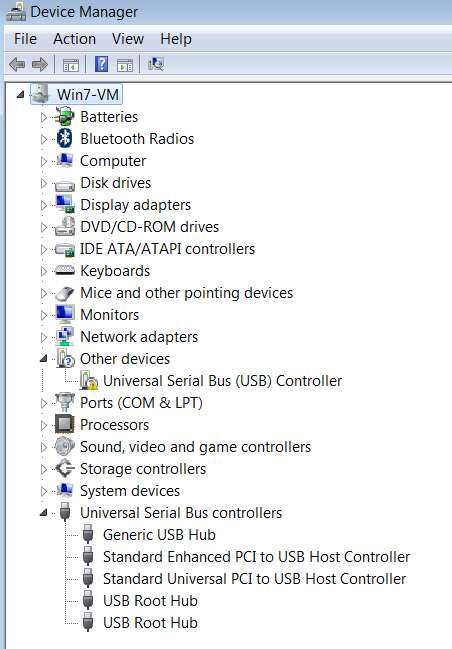
Now as to my second test, installing Win7 in VMWare Win7-VM using the ISO, it still appears that there are no USB3 drivers installed even though my VM definition provides USB3 capability. I'm puzzled, because Device Manager still shows the USB3 controller (based on Hardware ID) without a driver. So why didn't it get installed, assuming it was on the installation ISO same as it was on the bootable USB drive. I don't know the answer yet, but I'm going to ignore this mystery for now.

As far as including the two WA files (for DotNET 4.8 and VCREDIST), that seems to have eliminated only the one Windows Update (from yesterday) for DotNET. There are still the other seven updates which still were retrieved when I ran check for Windows Update. Once again, I'm going to ignore this, assuming perhaps SIMPLIX will maybe address this.

Bottom line: I have now produced a usable ISO and bootable USB drive, which DOES include USB3 drivers (and probably also NVMe drivers).
 

My Computer My Computer

Computer type
PC/Desktop
Computer Manufacturer/Model Number
Home-built, two systems (1) and (2)
OS
Windows 7 Pro x64 (1), Win7 Pro X64 (2)
CPU
i5-3350p 3.1Ghz/6MB-cache (1); E8400 3.0Ghz/6MB-cache (2)
Motherboard
ASUS P8Z77-V Pro (1); ASUS P5Q3 (2)
Memory
8GB PC3-12800 DDR3 (1); 4GB PC3-10600 DDR3 (2)
Graphics Card(s)
ATI HD7750 (1), (see TV cards); ATI R7 250 (2)
Sound Card
Realtek ALC892 HD Audio (1); Realtek ALC1200 HD Audio (2)
Monitor(s) Displays
Eizo HD2441W LCD, Eizo S2433W (1); Eizo 24" S2433W (2)
Screen Resolution
1920x1200, 1920x1200 (1); 1920x1200 (2)
Hard Drives
(1) 1TB SATA-II (7200RPM), 2x2TB SATA-III (7200RPM), 250GB SATA-III (10000RPM) for OS; 2x2TB external USB 3.0

(2) 320GB SATA-II (7200RPM), 750GB SATA-II (7200RPM), 150GB SATA-II (10000RPM) for OS; 2TB external USB 3.0
PSU
Nesteq ECS-6001 600W (1); Nesteq ECS-5001 500W (2)
Case
Acousti-Case 360 (1) and (2)
Cooling
Noctua NH-U12P SE2 for CPU, 2x120mm case fans (1) and (2)
Keyboard
IBM PS/2 (1) and (2)
Mouse
Logitech MX Revolution wireless (1); Microsoft wired (2)
Internet Speed
100mbps down / 10mbps up
Antivirus
Microsoft Security Essentials; Malwarebyte Anti-Malware Pro
Browser
Firefox
Other Info
Ceton InfiniTV 4-tuner cablecard-enabled TV card as well as Hauppauge HVR-2250 OTA/ATSC 2-tuner TV card in (1), running under Win7 WMC
But here's the really baffling mystery. I can no longer correclty unzip the 7UPv45.ZIP file downloaded from OneDrive using the link provided in the first post on this thread. Lower level sub-folder structures and the files within them are not being extracted properly.

Of course I have first done the right-click -> Properties -> UNBLOCK on the downloaded ZIP file, because in my experience ths is usually the explanation for why sub-folders and files within folders don't expand properly using unzip. Once you UNBLOCK to eliminate the security protections installed in the ZIP file, now the extraction runs fine.

So, here is the expansion of the original ZIP file downloaded two days ago, which unzipped just fine two days ago.

6O3avS.jpg


For some reason, when I unzip it today it does not expand the same way. Thinking perhaps it had gotten corrupted I did the download again, to obtain a fresh copy. Doesn't fix anything, and the unzip failure persists. I've tried the unzip on three different machines and they all fail the same way!! It's almost as if the internal contents are "protected" now, to make them "invisible" to the unzip engine.

Here's what it looks like now, no matter what I do. Note that the lower-level sub-folders are simply not extracted. Note that even in the files directly under 7UPv45 the CLEAN7MOUNT.CMD file is also missing!!!

2rL4xB.jpg


Again, I did the UNBLOCK on the ZIP file. And yet it no longer expands today the way it did two days ago. Fresh download from your OneDrive site doesn't correct it.

What could cause this?
 

My Computer My Computer

Computer type
PC/Desktop
Computer Manufacturer/Model Number
Home-built, two systems (1) and (2)
OS
Windows 7 Pro x64 (1), Win7 Pro X64 (2)
CPU
i5-3350p 3.1Ghz/6MB-cache (1); E8400 3.0Ghz/6MB-cache (2)
Motherboard
ASUS P8Z77-V Pro (1); ASUS P5Q3 (2)
Memory
8GB PC3-12800 DDR3 (1); 4GB PC3-10600 DDR3 (2)
Graphics Card(s)
ATI HD7750 (1), (see TV cards); ATI R7 250 (2)
Sound Card
Realtek ALC892 HD Audio (1); Realtek ALC1200 HD Audio (2)
Monitor(s) Displays
Eizo HD2441W LCD, Eizo S2433W (1); Eizo 24" S2433W (2)
Screen Resolution
1920x1200, 1920x1200 (1); 1920x1200 (2)
Hard Drives
(1) 1TB SATA-II (7200RPM), 2x2TB SATA-III (7200RPM), 250GB SATA-III (10000RPM) for OS; 2x2TB external USB 3.0

(2) 320GB SATA-II (7200RPM), 750GB SATA-II (7200RPM), 150GB SATA-II (10000RPM) for OS; 2TB external USB 3.0
PSU
Nesteq ECS-6001 600W (1); Nesteq ECS-5001 500W (2)
Case
Acousti-Case 360 (1) and (2)
Cooling
Noctua NH-U12P SE2 for CPU, 2x120mm case fans (1) and (2)
Keyboard
IBM PS/2 (1) and (2)
Mouse
Logitech MX Revolution wireless (1); Microsoft wired (2)
Internet Speed
100mbps down / 10mbps up
Antivirus
Microsoft Security Essentials; Malwarebyte Anti-Malware Pro
Browser
Firefox
Other Info
Ceton InfiniTV 4-tuner cablecard-enabled TV card as well as Hauppauge HVR-2250 OTA/ATSC 2-tuner TV card in (1), running under Win7 WMC
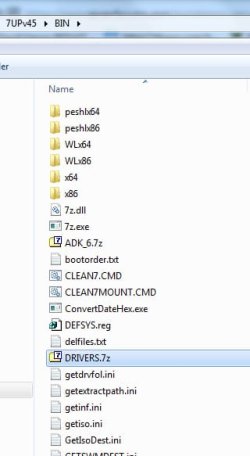
They are extracted when you fire up 7updater.cmd.

If you don't want to use the included drivers, delete the BIN\Drivers.7z file before running 7updater.cmd

drivers-7z-file.jpg
 

My Computers My Computers

System One System Two

  • Computer type
    PC/Desktop
    OS
    7 X64
    CPU
    i5 8400
    Motherboard
    gigabyte b365m ds3h
    Memory
    2x8gb 3200mhz
    Hard Drives
    various
    PSU
    pure power 11 400w cm
    Case
    Coolermaster
    Cooling
    cryorig m9i
  • Computer type
    PC/Desktop
    OS
    7x64
    CPU
    g5400
    Motherboard
    ga b365m ds3h
    Memory
    8gb ddr4 2400
    PSU
    xfx pro 450w
They are extracted when you fire up 7updater.cmd.
Why didn't I think of that explanation? Now I understand. Thank you.

If you don't want to use the included drivers, delete the BIN\Drivers.7z file before running 7updater.cmd[
Sure.

thanks.


Note that all of your recent pictures have been perfectly visible. Once again I ask if you could please tell me what method you're now using as contrasted to what you did previously, which could account for the fact that all of these very new attachments TODAY are working perfectly where older ones failed.

I'd like to pass the information on to Brink, so that his investigators can make progress. Please describe what you've changed in your method, since it definitely now works perfectly whereas your older attachments fail for me.
 

My Computer My Computer

Computer type
PC/Desktop
Computer Manufacturer/Model Number
Home-built, two systems (1) and (2)
OS
Windows 7 Pro x64 (1), Win7 Pro X64 (2)
CPU
i5-3350p 3.1Ghz/6MB-cache (1); E8400 3.0Ghz/6MB-cache (2)
Motherboard
ASUS P8Z77-V Pro (1); ASUS P5Q3 (2)
Memory
8GB PC3-12800 DDR3 (1); 4GB PC3-10600 DDR3 (2)
Graphics Card(s)
ATI HD7750 (1), (see TV cards); ATI R7 250 (2)
Sound Card
Realtek ALC892 HD Audio (1); Realtek ALC1200 HD Audio (2)
Monitor(s) Displays
Eizo HD2441W LCD, Eizo S2433W (1); Eizo 24" S2433W (2)
Screen Resolution
1920x1200, 1920x1200 (1); 1920x1200 (2)
Hard Drives
(1) 1TB SATA-II (7200RPM), 2x2TB SATA-III (7200RPM), 250GB SATA-III (10000RPM) for OS; 2x2TB external USB 3.0

(2) 320GB SATA-II (7200RPM), 750GB SATA-II (7200RPM), 150GB SATA-II (10000RPM) for OS; 2TB external USB 3.0
PSU
Nesteq ECS-6001 600W (1); Nesteq ECS-5001 500W (2)
Case
Acousti-Case 360 (1) and (2)
Cooling
Noctua NH-U12P SE2 for CPU, 2x120mm case fans (1) and (2)
Keyboard
IBM PS/2 (1) and (2)
Mouse
Logitech MX Revolution wireless (1); Microsoft wired (2)
Internet Speed
100mbps down / 10mbps up
Antivirus
Microsoft Security Essentials; Malwarebyte Anti-Malware Pro
Browser
Firefox
Other Info
Ceton InfiniTV 4-tuner cablecard-enabled TV card as well as Hauppauge HVR-2250 OTA/ATSC 2-tuner TV card in (1), running under Win7 WMC
I am doing exactly the same.
 

My Computers My Computers

System One System Two

  • Computer type
    PC/Desktop
    OS
    7 X64
    CPU
    i5 8400
    Motherboard
    gigabyte b365m ds3h
    Memory
    2x8gb 3200mhz
    Hard Drives
    various
    PSU
    pure power 11 400w cm
    Case
    Coolermaster
    Cooling
    cryorig m9i
  • Computer type
    PC/Desktop
    OS
    7x64
    CPU
    g5400
    Motherboard
    ga b365m ds3h
    Memory
    8gb ddr4 2400
    PSU
    xfx pro 450w
I am doing exactly the same.
Fascinating. That actually may be the "giant clue", though not the explanation.

Last word from Brink: "So far, it appears to mostly be happening with older images. The investigation is still ongoing for why this is only happening to a few."

Anyway, the good news is that it looks like the issue is now history.
 

My Computer My Computer

Computer type
PC/Desktop
Computer Manufacturer/Model Number
Home-built, two systems (1) and (2)
OS
Windows 7 Pro x64 (1), Win7 Pro X64 (2)
CPU
i5-3350p 3.1Ghz/6MB-cache (1); E8400 3.0Ghz/6MB-cache (2)
Motherboard
ASUS P8Z77-V Pro (1); ASUS P5Q3 (2)
Memory
8GB PC3-12800 DDR3 (1); 4GB PC3-10600 DDR3 (2)
Graphics Card(s)
ATI HD7750 (1), (see TV cards); ATI R7 250 (2)
Sound Card
Realtek ALC892 HD Audio (1); Realtek ALC1200 HD Audio (2)
Monitor(s) Displays
Eizo HD2441W LCD, Eizo S2433W (1); Eizo 24" S2433W (2)
Screen Resolution
1920x1200, 1920x1200 (1); 1920x1200 (2)
Hard Drives
(1) 1TB SATA-II (7200RPM), 2x2TB SATA-III (7200RPM), 250GB SATA-III (10000RPM) for OS; 2x2TB external USB 3.0

(2) 320GB SATA-II (7200RPM), 750GB SATA-II (7200RPM), 150GB SATA-II (10000RPM) for OS; 2TB external USB 3.0
PSU
Nesteq ECS-6001 600W (1); Nesteq ECS-5001 500W (2)
Case
Acousti-Case 360 (1) and (2)
Cooling
Noctua NH-U12P SE2 for CPU, 2x120mm case fans (1) and (2)
Keyboard
IBM PS/2 (1) and (2)
Mouse
Logitech MX Revolution wireless (1); Microsoft wired (2)
Internet Speed
100mbps down / 10mbps up
Antivirus
Microsoft Security Essentials; Malwarebyte Anti-Malware Pro
Browser
Firefox
Other Info
Ceton InfiniTV 4-tuner cablecard-enabled TV card as well as Hauppauge HVR-2250 OTA/ATSC 2-tuner TV card in (1), running under Win7 WMC
Ok. Almost there, but some new "minor" mysteries that don't diminish the success.

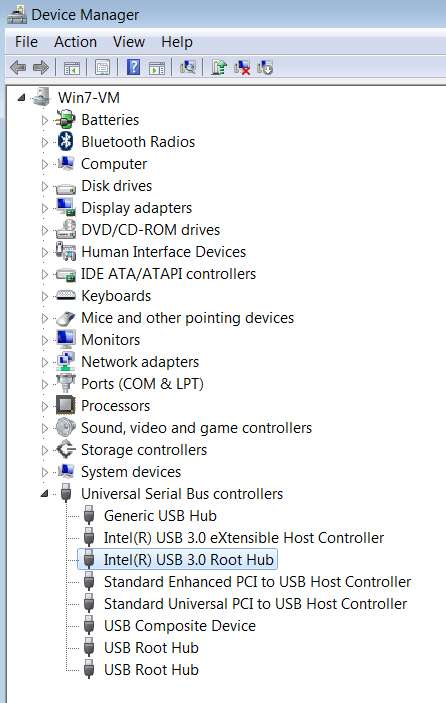
Now as to my second test, installing Win7 in VMWare Win7-VM using the ISO, it still appears that there are no USB3 drivers installed even though my VM definition provides USB3 capability. I'm puzzled, because Device Manager still shows the USB3 controller (based on Hardware ID) without a driver. So why didn't it get installed, assuming it was on the installation ISO same as it was on the bootable USB drive. I don't know the answer yet, but I'm going to ignore this mystery for now.
I don't know how to explain why there was no USB3 driver installed automatically during the WIn7-VM install. Presumably the driver in the \Drivers folder is present in the new all-updated installer, and yet it didn't get installed.

IXrsf9.jpg


I've now just gone into Device Manager (in the Win7-VM) and right-clicked on that "other device" (without an installed driver), and performed the update driver wizard. I selected the "browse my computer" option and navigated to the very IUSB3XHC folder that is in the 7UP \Drivers folder (and whose contents should also be on the updated Win7 installer ISO I built). Because the USB3 driver needs a "root hub" as xell as "XHCI controller", the first driver update wasn't successful, only completing the XHCI part. So then I repeated it, this time navigating to the "IUSB3HUB" folder in the 7UP \Drivers folder.

And, sure enough, now both pieces of the USB driver group was installed, and all is well. No more "other device" and correct devices now in USB.

lzPQQL.jpg


So, although I've resolved the "no driver" problem, I really would have expected both of these device drivers to have been installed automatically during the original Win7 install in the Win7-VM. If the hardware was "visible" so that it showed up as "other hardware", why wasn't the driver found originally?

I'm going to repeat this whole series of steps, to see what is in File Repository after the Win7 install completes using the new ISO. If IUSB3HUB and IUSB3XHC aren't in File Repository, then that's the explanation for the symptom. Then the question is why didn't the driver files in \Drivers get handled proprely? The drivers are definitely in both \Bootx64 as well as \Installx64.
 

My Computer My Computer

Computer type
PC/Desktop
Computer Manufacturer/Model Number
Home-built, two systems (1) and (2)
OS
Windows 7 Pro x64 (1), Win7 Pro X64 (2)
CPU
i5-3350p 3.1Ghz/6MB-cache (1); E8400 3.0Ghz/6MB-cache (2)
Motherboard
ASUS P8Z77-V Pro (1); ASUS P5Q3 (2)
Memory
8GB PC3-12800 DDR3 (1); 4GB PC3-10600 DDR3 (2)
Graphics Card(s)
ATI HD7750 (1), (see TV cards); ATI R7 250 (2)
Sound Card
Realtek ALC892 HD Audio (1); Realtek ALC1200 HD Audio (2)
Monitor(s) Displays
Eizo HD2441W LCD, Eizo S2433W (1); Eizo 24" S2433W (2)
Screen Resolution
1920x1200, 1920x1200 (1); 1920x1200 (2)
Hard Drives
(1) 1TB SATA-II (7200RPM), 2x2TB SATA-III (7200RPM), 250GB SATA-III (10000RPM) for OS; 2x2TB external USB 3.0

(2) 320GB SATA-II (7200RPM), 750GB SATA-II (7200RPM), 150GB SATA-II (10000RPM) for OS; 2TB external USB 3.0
PSU
Nesteq ECS-6001 600W (1); Nesteq ECS-5001 500W (2)
Case
Acousti-Case 360 (1) and (2)
Cooling
Noctua NH-U12P SE2 for CPU, 2x120mm case fans (1) and (2)
Keyboard
IBM PS/2 (1) and (2)
Mouse
Logitech MX Revolution wireless (1); Microsoft wired (2)
Internet Speed
100mbps down / 10mbps up
Antivirus
Microsoft Security Essentials; Malwarebyte Anti-Malware Pro
Browser
Firefox
Other Info
Ceton InfiniTV 4-tuner cablecard-enabled TV card as well as Hauppauge HVR-2250 OTA/ATSC 2-tuner TV card in (1), running under Win7 WMC
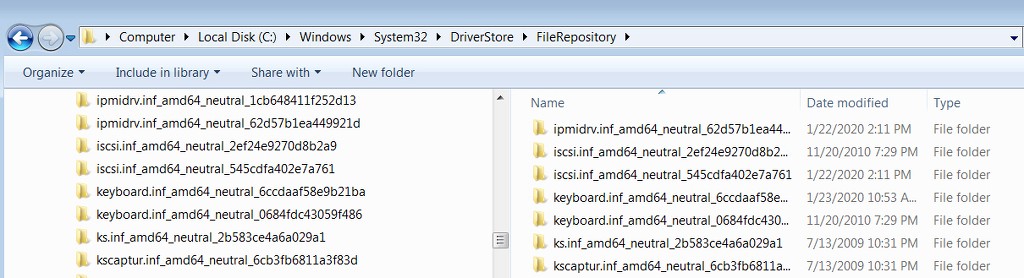
Please tell me where the drivers incorporated through placement in the \Drivers folder are supposed to end up in the final resulting objects. I am assuming that they will be added to C:\Windows\System32\DriverStore\FileRepository as the appropriately named folders, which is where all driver installer files are located... either from MS, or manually installed later.

This does NOT seem to be the case (for me), for ANY of the drivers located in the \Drivers folder.

Yes, it would seem that at least the USB3 drivers get incorporated into the bootable install media (produced by RUFUS from the ISO produced by CREATE-ISO.CMD), so that mouse and keyboard is functional during a real physical Wn7 install.

But if I look at the actual \FileRepository folder in the actual installed Win7 (using Win7-VM, for research, installed directly from the ISO itself), NONE OF THE DRIVERS FROM \DRIVERS ARE FOUND!

pmwuOw.jpg


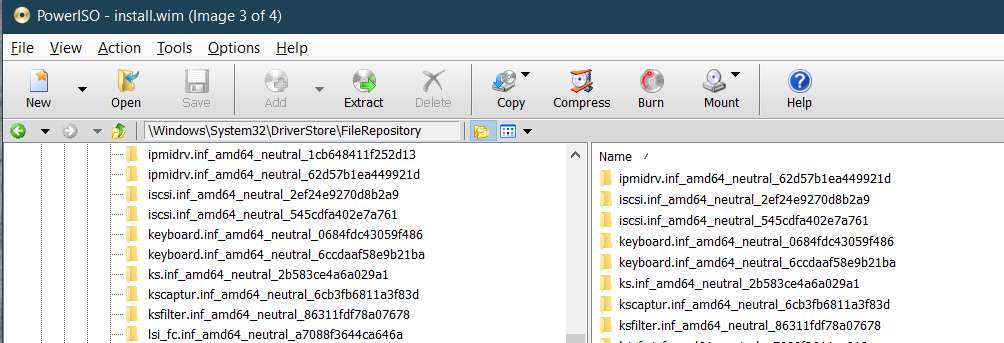
I've also looked inside INSTALL.WIM (using PowerISO), and as expected it shows the identical fact, that the imbedded \FileRepository in the install meda IS IDENTICAL TO WHAT ACTUALLY GOT BUILT (into the Win7-VM).

4OGKIG.jpg


So NONE of the 7UP \Drivers folders appear to have been incorporated into \FileRepository. This is why the USB3 driver was not automatically installed during the Win7-VM install.

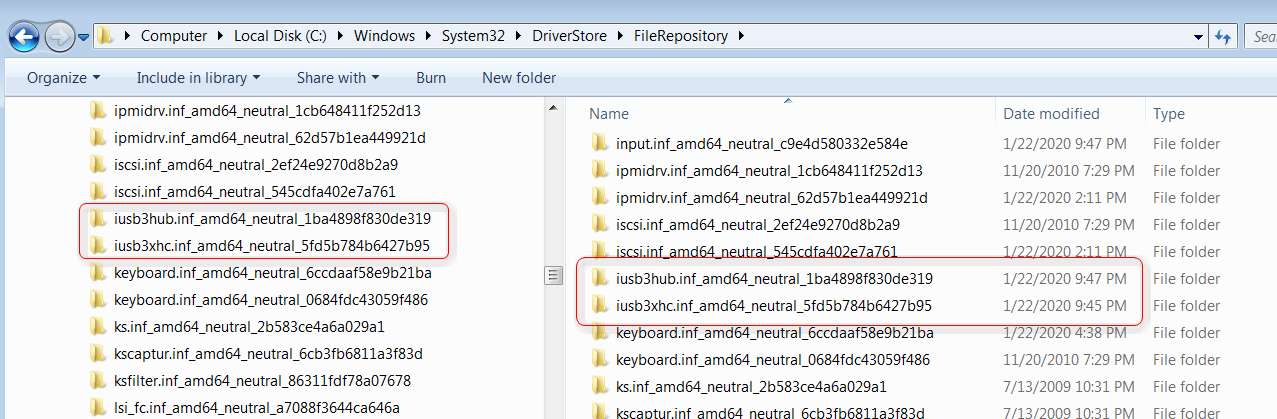
Note that after manually installing the very two USB3 drivers (IUSB3XHC and IUSB3HUB), sure enough the expected driver folders now appear in \FileRepository.

x0nFI1.jpg


What am I missing? Why are no drivers from \Drivers actually ending up in INSTALL.WIM (actually split into two SWM parts in the ISO)?
 

My Computer My Computer

Computer type
PC/Desktop
Computer Manufacturer/Model Number
Home-built, two systems (1) and (2)
OS
Windows 7 Pro x64 (1), Win7 Pro X64 (2)
CPU
i5-3350p 3.1Ghz/6MB-cache (1); E8400 3.0Ghz/6MB-cache (2)
Motherboard
ASUS P8Z77-V Pro (1); ASUS P5Q3 (2)
Memory
8GB PC3-12800 DDR3 (1); 4GB PC3-10600 DDR3 (2)
Graphics Card(s)
ATI HD7750 (1), (see TV cards); ATI R7 250 (2)
Sound Card
Realtek ALC892 HD Audio (1); Realtek ALC1200 HD Audio (2)
Monitor(s) Displays
Eizo HD2441W LCD, Eizo S2433W (1); Eizo 24" S2433W (2)
Screen Resolution
1920x1200, 1920x1200 (1); 1920x1200 (2)
Hard Drives
(1) 1TB SATA-II (7200RPM), 2x2TB SATA-III (7200RPM), 250GB SATA-III (10000RPM) for OS; 2x2TB external USB 3.0

(2) 320GB SATA-II (7200RPM), 750GB SATA-II (7200RPM), 150GB SATA-II (10000RPM) for OS; 2TB external USB 3.0
PSU
Nesteq ECS-6001 600W (1); Nesteq ECS-5001 500W (2)
Case
Acousti-Case 360 (1) and (2)
Cooling
Noctua NH-U12P SE2 for CPU, 2x120mm case fans (1) and (2)
Keyboard
IBM PS/2 (1) and (2)
Mouse
Logitech MX Revolution wireless (1); Microsoft wired (2)
Internet Speed
100mbps down / 10mbps up
Antivirus
Microsoft Security Essentials; Malwarebyte Anti-Malware Pro
Browser
Firefox
Other Info
Ceton InfiniTV 4-tuner cablecard-enabled TV card as well as Hauppauge HVR-2250 OTA/ATSC 2-tuner TV card in (1), running under Win7 WMC
BTW, my "missing" device is 'PCI Simple Communications Controller'.
 

My Computer My Computer

Computer type
PC/Desktop
Computer Manufacturer/Model Number
custom
OS
windows 7 Pro 64 Bit
CPU
i5 4670K
Motherboard
Asus Max Hero 1150 socket
Memory
16GB DDR3@933mhz
Graphics Card(s)
Radeon R9 390 8192mb
Monitor(s) Displays
Dell U2415 x3
Screen Resolution
1920 (5760) x 1200 x3
Hard Drives
System: Kingston 128GB SSD

Installing to Samsung 860 EVO 500GB
WD Black 2 TB & 1 TB
PSU
Corsair CX750M
Cooling
Hyper 312
Internet Speed
50mbps
Back
Top