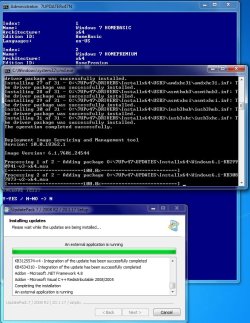
Update your Win 7 installation media

To try and figure out what I'm supposed to be seeing in \FileRepository after running 7UP, I've now run the Gigabyte utility again... which is a similar concept. The difference is that the Gigabyte utility only slipstreams the USB3 and NVMe drivers into the Win7 install media whereas 7UP supports a generalized set of \Drivers and \Updates, along with the SIMPLIX collection of Windows Updates. But otherwise they concept is the same.

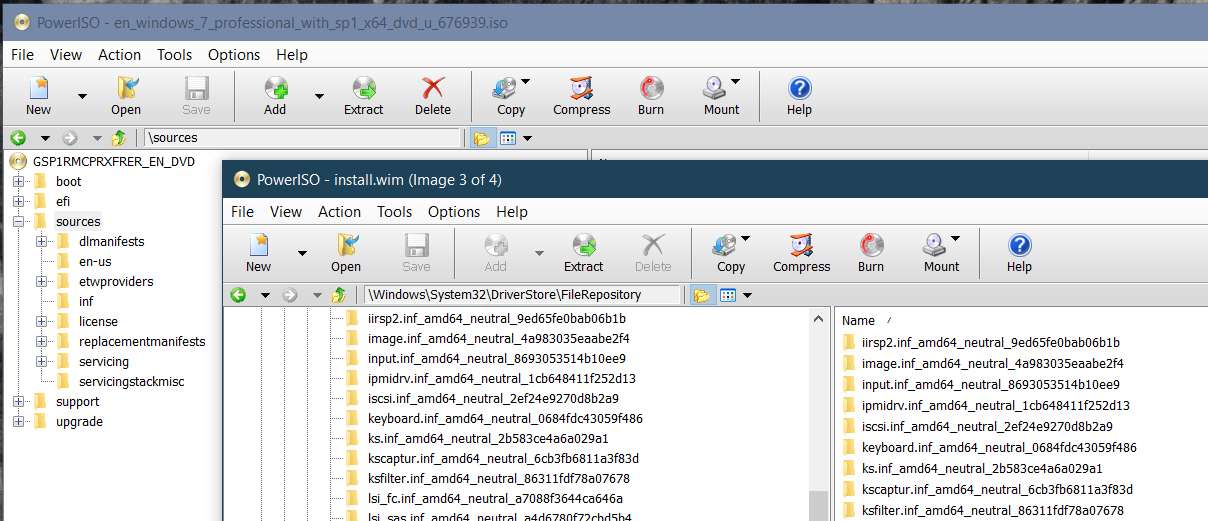
Using the very same 4-version Win7 ISO from MS as I used with 7UP, I analyzed \FileRepository before and after the update (looking at INSTALL.WIM before and after with PowerISO). This is the same thing I did for 7UP.

To keep things simple, let's consider just the USB3 drivers, and look at what the original MS ISO has in \FileRepository (around the IUSB3 alphabetically). Note that there is no IUSB3* folder, since USB3 drivers are not present in the MS Win7 ISO.
WSiOGb.jpg


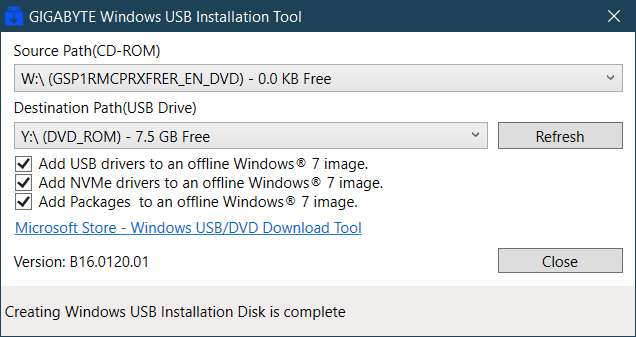
After mounting the MS bootable ISO into a virtual-W drive, I then ran the Gigabyte utility, creating a physical bootable USB on output drive Y:
Cl0WjZ.jpg


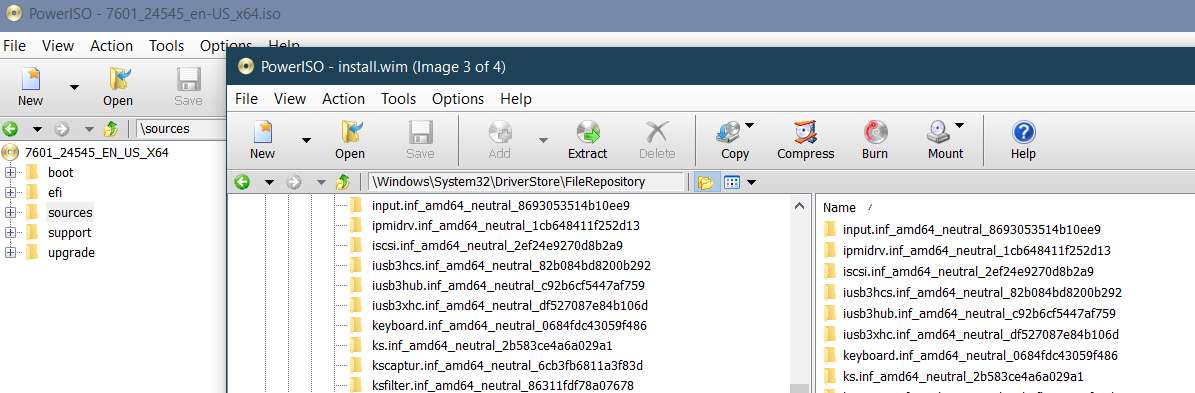
I then used IMGBurn to create a new bootable ISO file from the physical bootable USB I just created with the Gigabyte utility. I then used PowerISO to look at INSTALL.WIM in the ISO, and then further looked at \FileRepository inside of INSTALL.WIM, to examine that same alphabetical section where IUSB3* should appear. And sure enough IT DOES APPEAR!! Note that this INSTALL.WIM is less than 4GB, so that it is retained.
eYe5Kj.jpg


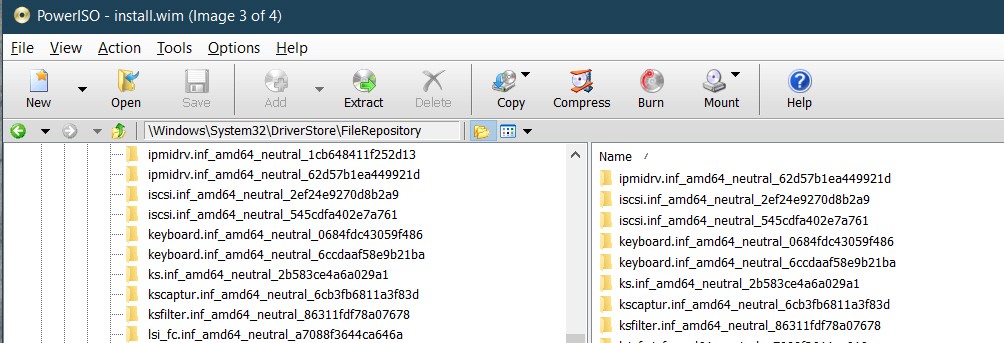
In contrast, as I showed in a previous post, the output of 7UP does NOT have the IUSB3* folders present in \FileRepository inside the originally created 4.8GB INSTALL.WIM (which was split by SPLIT-ISO.CMD into two SWM fractions each smaller than 4GB, which are actually present in \Sources and thus used to do the actual Win7 install into Win7-VM).
8oLCn6.jpg


So what's going on? All driver folders ARE present in the correct \7UP folders as produced by running 7UPDATERv45.CMD.

Apparently the USB3 drivers DID get installed from \Drivers into the boot media so that the physical Win7 install could be performed since mouse and keyboard were functional.

And yet, these same USB3 drivers DID NOT get incorporated properly to build the proper new IUSB3* folders in \FileRepository inside of INSTALL.WIM.

So what's not right here?

With the possibility that in all of my confusion over the past few days perhaps I've somehow used the "empty" expanded folder (with no drivers in it) instead of the "fully populated" folder (accomplished by running 7UPDATERv45.CMD which expands the 7Z driver files), I am going to repeat the entire 7UP process again being very careful I follow where I am and what's inside of \Drivers.

But for now, there's no question that the large 4.8GB INSTALL.WIM (which must be the output from 7UP, since the input INSTALL.WIM was only 2.8GB) doesn't have IUSB3* folders in it. The only question is did I have proper non-empty \Drivers folders when I started. I don't see how that could possibly have been true, but I'll re-run this whole thing one more time.

Can I ask that you please look inside of your own INSTALL.WIM out of 7UP, to examine \FileRepository ot see if you do or do not have IUSB3* folder? If you do, then the problem I'm having must be my own problem. If you do not, then the problem is with 7UP.
 

My Computer My Computer

Computer type
PC/Desktop
Computer Manufacturer/Model Number
Home-built, two systems (1) and (2)
OS
Windows 7 Pro x64 (1), Win7 Pro X64 (2)
CPU
i5-3350p 3.1Ghz/6MB-cache (1); E8400 3.0Ghz/6MB-cache (2)
Motherboard
ASUS P8Z77-V Pro (1); ASUS P5Q3 (2)
Memory
8GB PC3-12800 DDR3 (1); 4GB PC3-10600 DDR3 (2)
Graphics Card(s)
ATI HD7750 (1), (see TV cards); ATI R7 250 (2)
Sound Card
Realtek ALC892 HD Audio (1); Realtek ALC1200 HD Audio (2)
Monitor(s) Displays
Eizo HD2441W LCD, Eizo S2433W (1); Eizo 24" S2433W (2)
Screen Resolution
1920x1200, 1920x1200 (1); 1920x1200 (2)
Hard Drives
(1) 1TB SATA-II (7200RPM), 2x2TB SATA-III (7200RPM), 250GB SATA-III (10000RPM) for OS; 2x2TB external USB 3.0

(2) 320GB SATA-II (7200RPM), 750GB SATA-II (7200RPM), 150GB SATA-II (10000RPM) for OS; 2TB external USB 3.0
PSU
Nesteq ECS-6001 600W (1); Nesteq ECS-5001 500W (2)
Case
Acousti-Case 360 (1) and (2)
Cooling
Noctua NH-U12P SE2 for CPU, 2x120mm case fans (1) and (2)
Keyboard
IBM PS/2 (1) and (2)
Mouse
Logitech MX Revolution wireless (1); Microsoft wired (2)
Internet Speed
100mbps down / 10mbps up
Antivirus
Microsoft Security Essentials; Malwarebyte Anti-Malware Pro
Browser
Firefox
Other Info
Ceton InfiniTV 4-tuner cablecard-enabled TV card as well as Hauppauge HVR-2250 OTA/ATSC 2-tuner TV card in (1), running under Win7 WMC
1.Does it work if move the updatepack somewhere else and let it just integrate the drivers into boot.wim and install.wim? If there is no updatepack in the folder, it will offer to download it - say N

2. If you are using the updatepack, This version should leave a file called UpdatePack7R2Finish.log .

It is just the 7updaterv45-A.cmd file. Needs to be placed in the 7upv45 folder. Run it instead of the original

View attachment 7UPDATERv45-A.zip
 

My Computers My Computers

System One System Two

  • Computer type
    PC/Desktop
    OS
    7 X64
    CPU
    i5 8400
    Motherboard
    gigabyte b365m ds3h
    Memory
    2x8gb 3200mhz
    Hard Drives
    various
    PSU
    pure power 11 400w cm
    Case
    Coolermaster
    Cooling
    cryorig m9i
  • Computer type
    PC/Desktop
    OS
    7x64
    CPU
    g5400
    Motherboard
    ga b365m ds3h
    Memory
    8gb ddr4 2400
    PSU
    xfx pro 450w
I have been unsuccessful in getting a new ISO file created from the resulting folder that I end up with at the end of the process, which then is usable as an ISO file attached to a Win7-VM as CD/DVD in VMWare Workstation Player. The complaint seems to be "no operating system", like there is no MBR to start the boot process from. Probably due to how I've been trying to generate a "bootable ISO" from the finished folder.
Just for closure on this one...

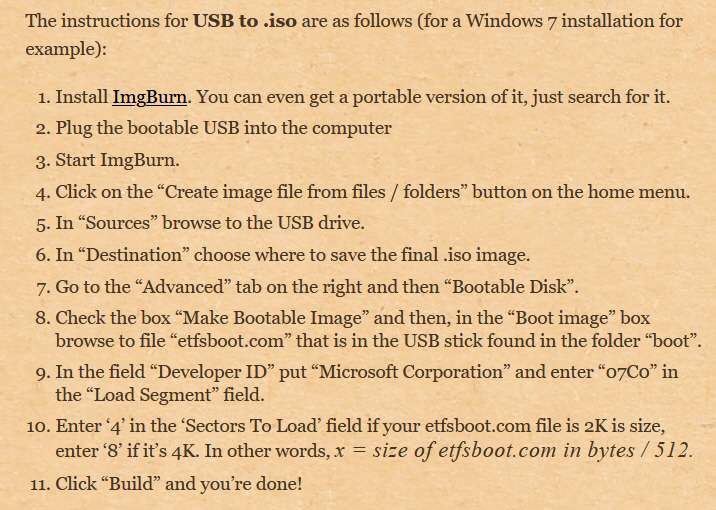
As it turns out, IMGBurn CAN in fact produce a "bootable ISO" (i.e. like a bootable CD/DVD) from a folder, suitable for use attaching to Win7-VM as CD/DVD, so that it works exactly like the real MS ISO does. I wasn't aware that a special "advanced" option needed to be checked to "make ISO bootable", filling in some fields.

A bit of research on the Interweb revealed the following simple set of steps which in fact DOES make use of IMGBurn to produce a bootable ISO. So IMGBurn can be used for this purpose, just as your CREATE-ISO can.

Note that the wording of the instructions suggest that it is a way to produce a bootable ISO from a bootable USB drive, and this certainly works. I used it to produce a bootable ISO from the bootable USB produced by RUFUS, which produced a bootable USB from a bootable ISO. But you actually can point to the Windows install folder (e.g. updated by 7UP) instead of the physical bootable USB, and accomplish exactly the same result, namely a bootable ISO.

S8CvMB.jpg
 

My Computer My Computer

Computer type
PC/Desktop
Computer Manufacturer/Model Number
Home-built, two systems (1) and (2)
OS
Windows 7 Pro x64 (1), Win7 Pro X64 (2)
CPU
i5-3350p 3.1Ghz/6MB-cache (1); E8400 3.0Ghz/6MB-cache (2)
Motherboard
ASUS P8Z77-V Pro (1); ASUS P5Q3 (2)
Memory
8GB PC3-12800 DDR3 (1); 4GB PC3-10600 DDR3 (2)
Graphics Card(s)
ATI HD7750 (1), (see TV cards); ATI R7 250 (2)
Sound Card
Realtek ALC892 HD Audio (1); Realtek ALC1200 HD Audio (2)
Monitor(s) Displays
Eizo HD2441W LCD, Eizo S2433W (1); Eizo 24" S2433W (2)
Screen Resolution
1920x1200, 1920x1200 (1); 1920x1200 (2)
Hard Drives
(1) 1TB SATA-II (7200RPM), 2x2TB SATA-III (7200RPM), 250GB SATA-III (10000RPM) for OS; 2x2TB external USB 3.0

(2) 320GB SATA-II (7200RPM), 750GB SATA-II (7200RPM), 150GB SATA-II (10000RPM) for OS; 2TB external USB 3.0
PSU
Nesteq ECS-6001 600W (1); Nesteq ECS-5001 500W (2)
Case
Acousti-Case 360 (1) and (2)
Cooling
Noctua NH-U12P SE2 for CPU, 2x120mm case fans (1) and (2)
Keyboard
IBM PS/2 (1) and (2)
Mouse
Logitech MX Revolution wireless (1); Microsoft wired (2)
Internet Speed
100mbps down / 10mbps up
Antivirus
Microsoft Security Essentials; Malwarebyte Anti-Malware Pro
Browser
Firefox
Other Info
Ceton InfiniTV 4-tuner cablecard-enabled TV card as well as Hauppauge HVR-2250 OTA/ATSC 2-tuner TV card in (1), running under Win7 WMC
1.Does it work if move the updatepack somewhere else and let it just integrate the drivers into boot.wim and install.wim? If there is no updatepack in the folder, it will offer to download it - say N
I ran this way, using a fresh unzip folder of the 7UPv45 zip file. No updatepack, no WA files, no HOTFIXES, no changes to anything. And I responded N when it came time to the download offer.

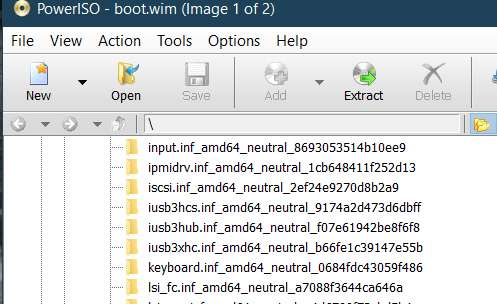
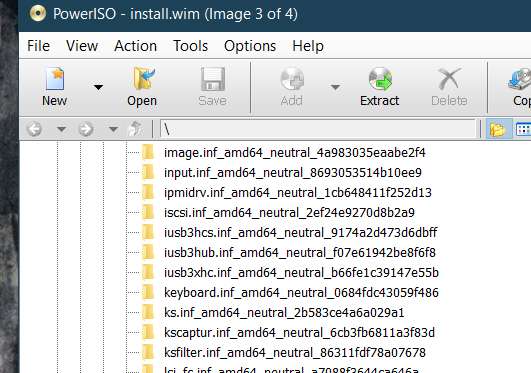
And in fact it DID WORK FINE! I looked at both BOOT.WIM and INSTALL.WIM, and as you can see the IUSB3* folders were installed in \FileRepository in both WIMs.

BOOT.WIM:

7zKKVJ.jpg


INSTALL.WIM:

6Uj4jD.jpg


2. If you are using the updatepack, This version should leave a file called UpdatePack7R2Finish.log .

It is just the 7updaterv45-A.cmd file. Needs to be placed in the 7upv45 folder. Run it instead of the original
I used your 7UPDATERV45-A.CMD. The resulting UpdatePack7R2Finish.log was not very big and doesn't seem to provide much information, but perhaps this is what you wanted to see. Maybe it will tell you what got run and what didn't get run. Anyway, here is that log.

NOTE: I don't see any reference to running DISM to "/add-driver" for \Bootx64. Maybe this is the "giant clue" you were looking for as to what is wrong.

Code:
@[URL="https://www.sevenforums.com/members/echo.html"]echo[/URL] off
Dism.exe /Image:"O:\7UPv45\mount\UpdatePack7Wim" /Add-Driver /Driver:"O:\7UPv45\DRIVERS\Installx64" /Recurse /ForceUnsigned @[URL="https://www.sevenforums.com/members/echo.html"]echo[/URL] off
Dism.exe /Image:"O:\7UPv45\mount\UpdatePack7Wim" /ADD-PACKAGE /PACKAGEPATH:"O:\7UPv45\UPDATES\Installx64" /IgnoreCheck  @[URL="https://www.sevenforums.com/members/echo.html"]echo[/URL] off
COPY /Y "O:\7UPv45\WINRE.WIM" "O:\7UPv45\mount\UpdatePack7Wim\Windows\System32\Recovery"
To keep things simple, this time I only performed 7UP for one of the four Windows versions contained in the ISO/folder, namely Win7 Professional. So the resulting BOOT.WIM and INSTALL.WIM presumably were updated only to produce a usable installable Win7 Pro with all Windows Updates, drivers, etc.

But the really important thing is that THERE WERE NO DRIVERS INSTALLED INTO \FILEREPOSITORY OF INSTALL.WIM!!!

In contrast, THERE WERE DRIVERS INSTALLED INTO \FILEREPOSITORY OF BOOT.WIM!!!

This absolute explains my previously observed and reported symptoms, namely that (a) mouse/keyboard were fully functional during the Win7 install, but (b) the finished completed installed Win7 (in my Win7-VM) actually didn't have USB3 drivers in it.

Here is BOOT.WIM for Win7 Pro. Note that IUSB3* driver folders are present in \FileRepository

IX2Kdt.jpg


And here is INSTALL.WIM for Win7 Pro. Note that IUSB3* driver folders ARE NOT PRESENT in \FileRepository.

SQtQMQ.jpg


Obviously something's not quite right with the script. Again, everything was present into 7UP, namely the SIMPLIX update pack, both WA files, both MS HOTFIXES, and all of your drivers.
 

My Computer My Computer

Computer type
PC/Desktop
Computer Manufacturer/Model Number
Home-built, two systems (1) and (2)
OS
Windows 7 Pro x64 (1), Win7 Pro X64 (2)
CPU
i5-3350p 3.1Ghz/6MB-cache (1); E8400 3.0Ghz/6MB-cache (2)
Motherboard
ASUS P8Z77-V Pro (1); ASUS P5Q3 (2)
Memory
8GB PC3-12800 DDR3 (1); 4GB PC3-10600 DDR3 (2)
Graphics Card(s)
ATI HD7750 (1), (see TV cards); ATI R7 250 (2)
Sound Card
Realtek ALC892 HD Audio (1); Realtek ALC1200 HD Audio (2)
Monitor(s) Displays
Eizo HD2441W LCD, Eizo S2433W (1); Eizo 24" S2433W (2)
Screen Resolution
1920x1200, 1920x1200 (1); 1920x1200 (2)
Hard Drives
(1) 1TB SATA-II (7200RPM), 2x2TB SATA-III (7200RPM), 250GB SATA-III (10000RPM) for OS; 2x2TB external USB 3.0

(2) 320GB SATA-II (7200RPM), 750GB SATA-II (7200RPM), 150GB SATA-II (10000RPM) for OS; 2TB external USB 3.0
PSU
Nesteq ECS-6001 600W (1); Nesteq ECS-5001 500W (2)
Case
Acousti-Case 360 (1) and (2)
Cooling
Noctua NH-U12P SE2 for CPU, 2x120mm case fans (1) and (2)
Keyboard
IBM PS/2 (1) and (2)
Mouse
Logitech MX Revolution wireless (1); Microsoft wired (2)
Internet Speed
100mbps down / 10mbps up
Antivirus
Microsoft Security Essentials; Malwarebyte Anti-Malware Pro
Browser
Firefox
Other Info
Ceton InfiniTV 4-tuner cablecard-enabled TV card as well as Hauppauge HVR-2250 OTA/ATSC 2-tuner TV card in (1), running under Win7 WMC
I have been investigating. More testing to do - it could be an either/or.

Possibly the way the updatepack operates seems to have changed.

Maybe Either it will integrate the add-ons Or it will run the extra command files ( e.g to integrate drivers).

If it no longer runs those extra .cmd files that adds complications and extra time to the process.
 
Last edited:

My Computers My Computers

System One System Two

  • Computer type
    PC/Desktop
    OS
    7 X64
    CPU
    i5 8400
    Motherboard
    gigabyte b365m ds3h
    Memory
    2x8gb 3200mhz
    Hard Drives
    various
    PSU
    pure power 11 400w cm
    Case
    Coolermaster
    Cooling
    cryorig m9i
  • Computer type
    PC/Desktop
    OS
    7x64
    CPU
    g5400
    Motherboard
    ga b365m ds3h
    Memory
    8gb ddr4 2400
    PSU
    xfx pro 450w
I have been investigating. More testing to do - but at this point it looks like an either/or.

The way the updatepack operates seems to have changed.

Either it will integrate the add-ons Or it will run the extra command files ( e.g to integrate drivers)
Obviously, I'm sure you'd like to get this fixed so as to work as originally expected.

But note that there is a "trick" workaround (a bit time-consuming, but it will work). TWO PASSES.

Pass 1: run 7UP with all updates, hotfixes, WA, to produce updated contents in the install folder. .

Pass 2: run 7UP again, this time with NO UPDATES, NO HOTFIXES, NO WA, but all drivers present. Use as input the updated folder from Pass 1. This should now incorporate the drivers into the folder already updated for Windows Updates, etc.

The net result of both runs should be the objective: Windows Updates etc. all applied, as well as all drivers added.

Obviously this shouldn't be necessary. But it does seem like it could be a temporary workaround. Perhaps this could actually be incorporated into your script, to run the job in two parts as I suggest. The user runs your command, and your command applies everything in two steps.

Anyway I'm sure you'll get it figured out and fix things to work properly all-at-once in a single run, as you intended.
 

My Computer My Computer

Computer type
PC/Desktop
Computer Manufacturer/Model Number
Home-built, two systems (1) and (2)
OS
Windows 7 Pro x64 (1), Win7 Pro X64 (2)
CPU
i5-3350p 3.1Ghz/6MB-cache (1); E8400 3.0Ghz/6MB-cache (2)
Motherboard
ASUS P8Z77-V Pro (1); ASUS P5Q3 (2)
Memory
8GB PC3-12800 DDR3 (1); 4GB PC3-10600 DDR3 (2)
Graphics Card(s)
ATI HD7750 (1), (see TV cards); ATI R7 250 (2)
Sound Card
Realtek ALC892 HD Audio (1); Realtek ALC1200 HD Audio (2)
Monitor(s) Displays
Eizo HD2441W LCD, Eizo S2433W (1); Eizo 24" S2433W (2)
Screen Resolution
1920x1200, 1920x1200 (1); 1920x1200 (2)
Hard Drives
(1) 1TB SATA-II (7200RPM), 2x2TB SATA-III (7200RPM), 250GB SATA-III (10000RPM) for OS; 2x2TB external USB 3.0

(2) 320GB SATA-II (7200RPM), 750GB SATA-II (7200RPM), 150GB SATA-II (10000RPM) for OS; 2TB external USB 3.0
PSU
Nesteq ECS-6001 600W (1); Nesteq ECS-5001 500W (2)
Case
Acousti-Case 360 (1) and (2)
Cooling
Noctua NH-U12P SE2 for CPU, 2x120mm case fans (1) and (2)
Keyboard
IBM PS/2 (1) and (2)
Mouse
Logitech MX Revolution wireless (1); Microsoft wired (2)
Internet Speed
100mbps down / 10mbps up
Antivirus
Microsoft Security Essentials; Malwarebyte Anti-Malware Pro
Browser
Firefox
Other Info
Ceton InfiniTV 4-tuner cablecard-enabled TV card as well as Hauppauge HVR-2250 OTA/ATSC 2-tuner TV card in (1), running under Win7 WMC
If you follow those instructions re etfsboot.com, it will only be bios bootable.

I already posted posted a boot image that will handle bios and efi in case you wanted it.


Just for closure on this one...

As it turns out, IMGBurn CAN in fact produce a "bootable ISO" (i.e. like a bootable CD/DVD) from a folder, suitable for use attaching to Win7-VM as CD/DVD, so that it works exactly like the real MS ISO does. I wasn't aware that a special "advanced" option needed to be checked to "make ISO bootable", filling in some fields.

A bit of research on the Interweb revealed the following simple set of steps which in fact DOES make use of IMGBurn to produce a bootable ISO. So IMGBurn can be used for this purpose, just as your CREATE-ISO can.

Note that the wording of the instructions suggest that it is a way to produce a bootable ISO from a bootable USB drive, and this certainly works. I used it to produce a bootable ISO from the bootable USB produced by RUFUS, which produced a bootable USB from a bootable ISO. But you actually can point to the Windows install folder (e.g. updated by 7UP) instead of the physical bootable USB, and accomplish exactly the same result, namely a bootable ISO.

S8CvMB.jpg
 

My Computers My Computers

System One System Two

  • Computer type
    PC/Desktop
    OS
    7 X64
    CPU
    i5 8400
    Motherboard
    gigabyte b365m ds3h
    Memory
    2x8gb 3200mhz
    Hard Drives
    various
    PSU
    pure power 11 400w cm
    Case
    Coolermaster
    Cooling
    cryorig m9i
  • Computer type
    PC/Desktop
    OS
    7x64
    CPU
    g5400
    Motherboard
    ga b365m ds3h
    Memory
    8gb ddr4 2400
    PSU
    xfx pro 450w
Yes, I am already aware of that.

Takes more time, and gets complicated when processing all images.

If necessary might have to do two mounts - but the other way round - because of the method for all images and also in case of adding langpacks and optional updates.

The method for processing all images involves integrating updates, drivers, etc into only one image. It is then upgraded to the higher editions. Much faster than doing them individually - saves hours.

Obviously, I'm sure you'd like to get this fixed so as to work as originally expected.

But note that there is a "trick" workaround (a bit time-consuming, but it will work). TWO PASSES.

Pass 1: run 7UP with all updates, hotfixes, WA, to produce updated contents in the install folder. .

Pass 2: run 7UP again, this time with NO UPDATES, NO HOTFIXES, NO WA, but all drivers present. Use as input the updated folder from Pass 1. This should now incorporate the drivers into the folder already updated for Windows Updates, etc.

The net result of both runs should be the objective: Windows Updates etc. all applied, as well as all drivers added.

Obviously this shouldn't be necessary. But it does seem like it could be a temporary workaround. Perhaps this could actually be incorporated into your script, to run the job in two parts as I suggest. The user runs your command, and your command applies everything in two steps.

Anyway I'm sure you'll get it figured out and fix things to work properly all-at-once in a single run, as you intended.
 

My Computers My Computers

System One System Two

  • Computer type
    PC/Desktop
    OS
    7 X64
    CPU
    i5 8400
    Motherboard
    gigabyte b365m ds3h
    Memory
    2x8gb 3200mhz
    Hard Drives
    various
    PSU
    pure power 11 400w cm
    Case
    Coolermaster
    Cooling
    cryorig m9i
  • Computer type
    PC/Desktop
    OS
    7x64
    CPU
    g5400
    Motherboard
    ga b365m ds3h
    Memory
    8gb ddr4 2400
    PSU
    xfx pro 450w
If you follow those instructions re etfsboot.com, it will only be bios bootable.

I already posted posted a boot image that will handle bios and efi in case you wanted it.
Can you please post a link to that post in which you provided a link to download that boot image? I did a search of this thread for "boot image" and can't seem to find something from you that seems relevant. I certainly do want to be able to have a usable bootable USB installer that can target either an MBR drive or a GPT drive for a Win7 install (requiring CSM=YES in BIOS, with UEFI also set).

Is this a single file which supports both? Or are there two different files, one of which is for BIOS and the other of which is for UEFI?

RUFUS has a GUI toggle that probably is the same thing. You specify the target drive, either MBR or GPT, and it builds the bootable USB appropriately. I am guessing you are talking about the same thing here, but again I ask if you provide two different versions of "boot image" of which one must be selected? Or do you have a "magic boot image" which is somehow usable for both worlds?

Again, if you provide a link to that post in this thread where you made it available, I'd like to look at it.
 

My Computer My Computer

Computer type
PC/Desktop
Computer Manufacturer/Model Number
Home-built, two systems (1) and (2)
OS
Windows 7 Pro x64 (1), Win7 Pro X64 (2)
CPU
i5-3350p 3.1Ghz/6MB-cache (1); E8400 3.0Ghz/6MB-cache (2)
Motherboard
ASUS P8Z77-V Pro (1); ASUS P5Q3 (2)
Memory
8GB PC3-12800 DDR3 (1); 4GB PC3-10600 DDR3 (2)
Graphics Card(s)
ATI HD7750 (1), (see TV cards); ATI R7 250 (2)
Sound Card
Realtek ALC892 HD Audio (1); Realtek ALC1200 HD Audio (2)
Monitor(s) Displays
Eizo HD2441W LCD, Eizo S2433W (1); Eizo 24" S2433W (2)
Screen Resolution
1920x1200, 1920x1200 (1); 1920x1200 (2)
Hard Drives
(1) 1TB SATA-II (7200RPM), 2x2TB SATA-III (7200RPM), 250GB SATA-III (10000RPM) for OS; 2x2TB external USB 3.0

(2) 320GB SATA-II (7200RPM), 750GB SATA-II (7200RPM), 150GB SATA-II (10000RPM) for OS; 2TB external USB 3.0
PSU
Nesteq ECS-6001 600W (1); Nesteq ECS-5001 500W (2)
Case
Acousti-Case 360 (1) and (2)
Cooling
Noctua NH-U12P SE2 for CPU, 2x120mm case fans (1) and (2)
Keyboard
IBM PS/2 (1) and (2)
Mouse
Logitech MX Revolution wireless (1); Microsoft wired (2)
Internet Speed
100mbps down / 10mbps up
Antivirus
Microsoft Security Essentials; Malwarebyte Anti-Malware Pro
Browser
Firefox
Other Info
Ceton InfiniTV 4-tuner cablecard-enabled TV card as well as Hauppauge HVR-2250 OTA/ATSC 2-tuner TV card in (1), running under Win7 WMC
I cba trawling back thorugh the posts.

Here it is View attachment win7x64-bifx.zip


I don't use imgburn. The boot image works with winiso and the program I suggested previously - gburner and probably many others. I had a copy of poweriso a while back, which was pretty similar as well.
 

My Computers My Computers

System One System Two

  • Computer type
    PC/Desktop
    OS
    7 X64
    CPU
    i5 8400
    Motherboard
    gigabyte b365m ds3h
    Memory
    2x8gb 3200mhz
    Hard Drives
    various
    PSU
    pure power 11 400w cm
    Case
    Coolermaster
    Cooling
    cryorig m9i
  • Computer type
    PC/Desktop
    OS
    7x64
    CPU
    g5400
    Motherboard
    ga b365m ds3h
    Memory
    8gb ddr4 2400
    PSU
    xfx pro 450w
I cba trawling back thorugh the posts.
Now that you've mentioned GBurner, searching this thread for that reveals you provided info about that product in your post #630, in response to my previous post which talked about the fact that my use of IMGBurn (not quite correctly, as it turns out) had produced a non-bootable ISO.

In that post you first pointed me to try CREATE-ISO.CMD included with 7UP. You also talked about GBurner.

But actually in that post you really provided a detail that escaped me. The instructions I posted for how to use IMGBurn to create a bootable ISO... obviously that was composed by the author to produce a BIOS bootable result, suitable only for MBR. He should have added another sentence providing a how-to for the alternative boot image for UEFI/GPT target, exactly as you very precisely did in that post #630 (having nothing to do with GBurner or BIFX).

Here is what you said, which is really the "edit addition" to instruction (8) in what I posted previously.

"The bootsector binaries are expected to be installation_media\boot\etfsboot.com and installation_media\efi\Microsoft\boot\efisys.bin"

In other words for BIOS/MBR target, ETFSBOOT.COM is the correct boot image to insert in that field for IMGBurn. And for UEFI/GPT target, EFISYS.BIN is the correct boot image to insert.

I haven't actually tried this yet with IMGBurn, building two bootable USB and bootable ISO to try out, but I will. But I will defer that experiment until you decide how you want to fix 7UP to deal with the major problem that's now been uncovered. Of course I could manually run 7UP in the two passes I proposed earlier, but I'll just wait until you provide your own update to 7UP.
 

My Computer My Computer

Computer type
PC/Desktop
Computer Manufacturer/Model Number
Home-built, two systems (1) and (2)
OS
Windows 7 Pro x64 (1), Win7 Pro X64 (2)
CPU
i5-3350p 3.1Ghz/6MB-cache (1); E8400 3.0Ghz/6MB-cache (2)
Motherboard
ASUS P8Z77-V Pro (1); ASUS P5Q3 (2)
Memory
8GB PC3-12800 DDR3 (1); 4GB PC3-10600 DDR3 (2)
Graphics Card(s)
ATI HD7750 (1), (see TV cards); ATI R7 250 (2)
Sound Card
Realtek ALC892 HD Audio (1); Realtek ALC1200 HD Audio (2)
Monitor(s) Displays
Eizo HD2441W LCD, Eizo S2433W (1); Eizo 24" S2433W (2)
Screen Resolution
1920x1200, 1920x1200 (1); 1920x1200 (2)
Hard Drives
(1) 1TB SATA-II (7200RPM), 2x2TB SATA-III (7200RPM), 250GB SATA-III (10000RPM) for OS; 2x2TB external USB 3.0

(2) 320GB SATA-II (7200RPM), 750GB SATA-II (7200RPM), 150GB SATA-II (10000RPM) for OS; 2TB external USB 3.0
PSU
Nesteq ECS-6001 600W (1); Nesteq ECS-5001 500W (2)
Case
Acousti-Case 360 (1) and (2)
Cooling
Noctua NH-U12P SE2 for CPU, 2x120mm case fans (1) and (2)
Keyboard
IBM PS/2 (1) and (2)
Mouse
Logitech MX Revolution wireless (1); Microsoft wired (2)
Internet Speed
100mbps down / 10mbps up
Antivirus
Microsoft Security Essentials; Malwarebyte Anti-Malware Pro
Browser
Firefox
Other Info
Ceton InfiniTV 4-tuner cablecard-enabled TV card as well as Hauppauge HVR-2250 OTA/ATSC 2-tuner TV card in (1), running under Win7 WMC
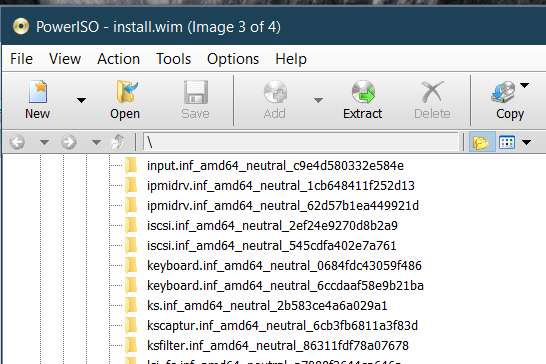
The reason for using the extra .cmd files was to minimize the number of mounts. If Alex has changed the updatepack functionality, that might no longer be possible.
 

My Computers My Computers

System One System Two

  • Computer type
    PC/Desktop
    OS
    7 X64
    CPU
    i5 8400
    Motherboard
    gigabyte b365m ds3h
    Memory
    2x8gb 3200mhz
    Hard Drives
    various
    PSU
    pure power 11 400w cm
    Case
    Coolermaster
    Cooling
    cryorig m9i
  • Computer type
    PC/Desktop
    OS
    7x64
    CPU
    g5400
    Motherboard
    ga b365m ds3h
    Memory
    8gb ddr4 2400
    PSU
    xfx pro 450w
The reason for using the extra .cmd files was to minimize the number of mounts. If Alex has changed the updatepack functionality, that might no longer be possible.
Is it not possible for you to implement a 2-pass approach:

(a) one of which "only sees" the update folders and the presence of the SIMPLIX pack etc. (since this successfully applies all updates to the install media folder), and

(b) the second of which "only sees" the driver folders (since it was proven that running your 7UP command this way WILL get your drivers placed properly into \FileRepository)

so that at the end BOTH tasks have been accomplished?

If you believe you can't do it programmatically and internally within the command, I can certainly accomplish it myself manually, by running your command twice using two different folders with the correct appropriate setups of the contents in your \7UPv45 folder.
 

My Computer My Computer

Computer type
PC/Desktop
Computer Manufacturer/Model Number
Home-built, two systems (1) and (2)
OS
Windows 7 Pro x64 (1), Win7 Pro X64 (2)
CPU
i5-3350p 3.1Ghz/6MB-cache (1); E8400 3.0Ghz/6MB-cache (2)
Motherboard
ASUS P8Z77-V Pro (1); ASUS P5Q3 (2)
Memory
8GB PC3-12800 DDR3 (1); 4GB PC3-10600 DDR3 (2)
Graphics Card(s)
ATI HD7750 (1), (see TV cards); ATI R7 250 (2)
Sound Card
Realtek ALC892 HD Audio (1); Realtek ALC1200 HD Audio (2)
Monitor(s) Displays
Eizo HD2441W LCD, Eizo S2433W (1); Eizo 24" S2433W (2)
Screen Resolution
1920x1200, 1920x1200 (1); 1920x1200 (2)
Hard Drives
(1) 1TB SATA-II (7200RPM), 2x2TB SATA-III (7200RPM), 250GB SATA-III (10000RPM) for OS; 2x2TB external USB 3.0

(2) 320GB SATA-II (7200RPM), 750GB SATA-II (7200RPM), 150GB SATA-II (10000RPM) for OS; 2TB external USB 3.0
PSU
Nesteq ECS-6001 600W (1); Nesteq ECS-5001 500W (2)
Case
Acousti-Case 360 (1) and (2)
Cooling
Noctua NH-U12P SE2 for CPU, 2x120mm case fans (1) and (2)
Keyboard
IBM PS/2 (1) and (2)
Mouse
Logitech MX Revolution wireless (1); Microsoft wired (2)
Internet Speed
100mbps down / 10mbps up
Antivirus
Microsoft Security Essentials; Malwarebyte Anti-Malware Pro
Browser
Firefox
Other Info
Ceton InfiniTV 4-tuner cablecard-enabled TV card as well as Hauppauge HVR-2250 OTA/ATSC 2-tuner TV card in (1), running under Win7 WMC
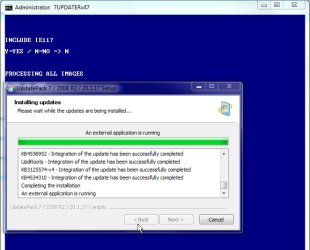
Yes, of course it is possible.

I designed it to try and avoid that. Unless the updatepack functionality can be restored, then reluctantly might have to use the less efficient method. It also complicates the all images process and the cleanup.
 
Last edited:

My Computers My Computers

System One System Two

  • Computer type
    PC/Desktop
    OS
    7 X64
    CPU
    i5 8400
    Motherboard
    gigabyte b365m ds3h
    Memory
    2x8gb 3200mhz
    Hard Drives
    various
    PSU
    pure power 11 400w cm
    Case
    Coolermaster
    Cooling
    cryorig m9i
  • Computer type
    PC/Desktop
    OS
    7x64
    CPU
    g5400
    Motherboard
    ga b365m ds3h
    Memory
    8gb ddr4 2400
    PSU
    xfx pro 450w
Ran the UpdatePack7R2-20.1.17.exe without WA addons and it picked up up the final external command. That is the very last thing before it unmounts the image.

12.jpg

Will do more testing in due course.
 

My Computers My Computers

System One System Two

  • Computer type
    PC/Desktop
    OS
    7 X64
    CPU
    i5 8400
    Motherboard
    gigabyte b365m ds3h
    Memory
    2x8gb 3200mhz
    Hard Drives
    various
    PSU
    pure power 11 400w cm
    Case
    Coolermaster
    Cooling
    cryorig m9i
  • Computer type
    PC/Desktop
    OS
    7x64
    CPU
    g5400
    Motherboard
    ga b365m ds3h
    Memory
    8gb ddr4 2400
    PSU
    xfx pro 450w
I've now emerged victorious using my manual 2-step approach. The first run is a drivers-only setup, using the items provided in Drivers.7z along with additional drivers intended to pre-install all the drivers needed by my ASUS Z170-Deluxe machine.

P4crjk.jpg


I added the 1.16.56.1 driver for the Asmedia USB 3.1 Controller and the 3.2.3.0 driver for the Asmedia 106x SATA AHCI controller. I also changed the USB3.0 drivers provided with 7UP to be the latest Intel 5.0.4.43v2, which was pointed to by VMWare as the correct driver to install for proper support of USB 3.0 devices within Win7-VM. I also added two network adapter drivers for the Intel I211 and I219-V, both of which are on my motherboard. I also added the driver for the Broadcom 802.11ac wireless network adapter, and also the BCM2070 Bluetooth device.

i've used the resulting bootable (MBR) ISO file as input to do an install in VMWare/Win7-VM and there are no longer the USB 3.0 device without a matching driver. It now installs properly.

I've also used the resulting bootable (MBR) USB media to do a real physical Win7 install on my Z170-Deluxe machine, using USB mouse/keyboard and targeting a Samsung 960 Pro NVMe SSD (MBR). Went perfectly, and Device Manager was just about clean. The only extra thing I had to do following the install to clear up three Device Manager items was to run the 10.1.17 Intel Chipset INF Utility for Win7.

Once 7UP is run for this drivers-only set of input producing the intermediate state of updated install folder content which has these drivers added to \FileRepository, I then ran my second 7UP job which has not drivers in it but only has the SIMPLIX pack, WA files. and MSU hotfixes. When it finishes, the install folders now contain BOTH (a) all of my drivers, and (b) all of the updates.

Success, via 2-step.
 

My Computer My Computer

Computer type
PC/Desktop
Computer Manufacturer/Model Number
Home-built, two systems (1) and (2)
OS
Windows 7 Pro x64 (1), Win7 Pro X64 (2)
CPU
i5-3350p 3.1Ghz/6MB-cache (1); E8400 3.0Ghz/6MB-cache (2)
Motherboard
ASUS P8Z77-V Pro (1); ASUS P5Q3 (2)
Memory
8GB PC3-12800 DDR3 (1); 4GB PC3-10600 DDR3 (2)
Graphics Card(s)
ATI HD7750 (1), (see TV cards); ATI R7 250 (2)
Sound Card
Realtek ALC892 HD Audio (1); Realtek ALC1200 HD Audio (2)
Monitor(s) Displays
Eizo HD2441W LCD, Eizo S2433W (1); Eizo 24" S2433W (2)
Screen Resolution
1920x1200, 1920x1200 (1); 1920x1200 (2)
Hard Drives
(1) 1TB SATA-II (7200RPM), 2x2TB SATA-III (7200RPM), 250GB SATA-III (10000RPM) for OS; 2x2TB external USB 3.0

(2) 320GB SATA-II (7200RPM), 750GB SATA-II (7200RPM), 150GB SATA-II (10000RPM) for OS; 2TB external USB 3.0
PSU
Nesteq ECS-6001 600W (1); Nesteq ECS-5001 500W (2)
Case
Acousti-Case 360 (1) and (2)
Cooling
Noctua NH-U12P SE2 for CPU, 2x120mm case fans (1) and (2)
Keyboard
IBM PS/2 (1) and (2)
Mouse
Logitech MX Revolution wireless (1); Microsoft wired (2)
Internet Speed
100mbps down / 10mbps up
Antivirus
Microsoft Security Essentials; Malwarebyte Anti-Malware Pro
Browser
Firefox
Other Info
Ceton InfiniTV 4-tuner cablecard-enabled TV card as well as Hauppauge HVR-2250 OTA/ATSC 2-tuner TV card in (1), running under Win7 WMC
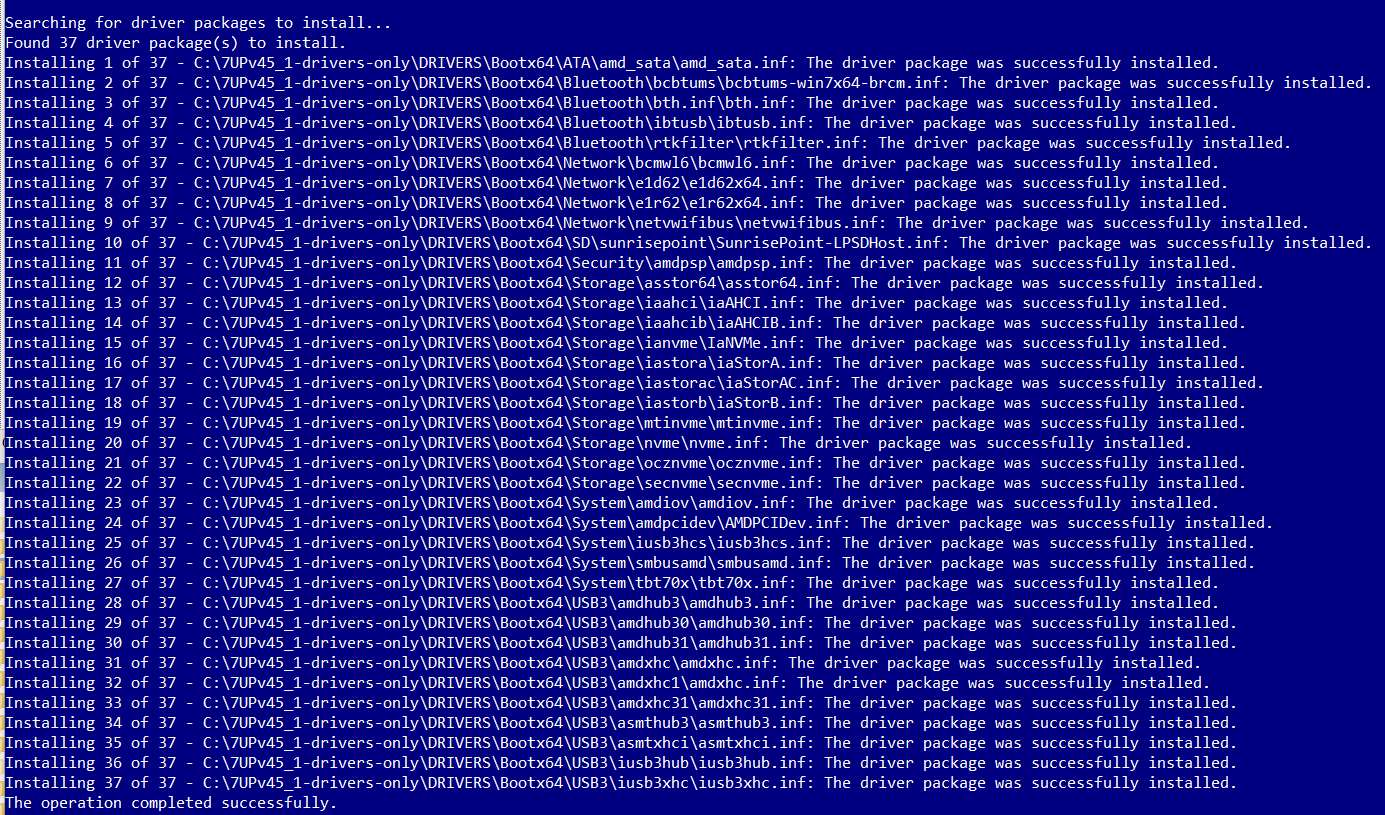
There isn't any need to change the intel usb drivers. 5.0.5.55 are widely compatible and you had them working on your vm previously.

Glad you got it all working in the end.
 

My Computers My Computers

System One System Two

  • Computer type
    PC/Desktop
    OS
    7 X64
    CPU
    i5 8400
    Motherboard
    gigabyte b365m ds3h
    Memory
    2x8gb 3200mhz
    Hard Drives
    various
    PSU
    pure power 11 400w cm
    Case
    Coolermaster
    Cooling
    cryorig m9i
  • Computer type
    PC/Desktop
    OS
    7x64
    CPU
    g5400
    Motherboard
    ga b365m ds3h
    Memory
    8gb ddr4 2400
    PSU
    xfx pro 450w
It also picks up the final commands with wa addons included

23.jpg
 

My Computers My Computers

System One System Two

  • Computer type
    PC/Desktop
    OS
    7 X64
    CPU
    i5 8400
    Motherboard
    gigabyte b365m ds3h
    Memory
    2x8gb 3200mhz
    Hard Drives
    various
    PSU
    pure power 11 400w cm
    Case
    Coolermaster
    Cooling
    cryorig m9i
  • Computer type
    PC/Desktop
    OS
    7x64
    CPU
    g5400
    Motherboard
    ga b365m ds3h
    Memory
    8gb ddr4 2400
    PSU
    xfx pro 450w
Can now integrate contents of DRIVERS folder and UPDATES folder at end of updatepack

4-2020-01-27_154619.jpg

(this method might not be suitable for integrating language pack- which is an extremely rare request )

New version will be uploaded soon.
 

My Computers My Computers

System One System Two

  • Computer type
    PC/Desktop
    OS
    7 X64
    CPU
    i5 8400
    Motherboard
    gigabyte b365m ds3h
    Memory
    2x8gb 3200mhz
    Hard Drives
    various
    PSU
    pure power 11 400w cm
    Case
    Coolermaster
    Cooling
    cryorig m9i
  • Computer type
    PC/Desktop
    OS
    7x64
    CPU
    g5400
    Motherboard
    ga b365m ds3h
    Memory
    8gb ddr4 2400
    PSU
    xfx pro 450w
7UPv47 on first post.

Right click and run as admin on the 7UPDATER.cmd

If you want to integrate language packs, right click and run as admin on 7UPLANGPACKS.cmd instead.
 

My Computers My Computers

System One System Two

  • Computer type
    PC/Desktop
    OS
    7 X64
    CPU
    i5 8400
    Motherboard
    gigabyte b365m ds3h
    Memory
    2x8gb 3200mhz
    Hard Drives
    various
    PSU
    pure power 11 400w cm
    Case
    Coolermaster
    Cooling
    cryorig m9i
  • Computer type
    PC/Desktop
    OS
    7x64
    CPU
    g5400
    Motherboard
    ga b365m ds3h
    Memory
    8gb ddr4 2400
    PSU
    xfx pro 450w
Back
Top