Update your Win 7 installation media

I did an update of all my drivers with DriverEasy and then create a backup of these with Double Driver (DD).
I have now a zipped automatic installer made by DD, this have the folders "hdc", "System" and "USB" and various files wich are the drivers, but i wonder how to include these files, sinse are many, ini, cat, sys, inf, 64bit, etc
I would like know how to include these drivers in my windows 7 installation media, at the same time as I use 7UPdater and simplix.
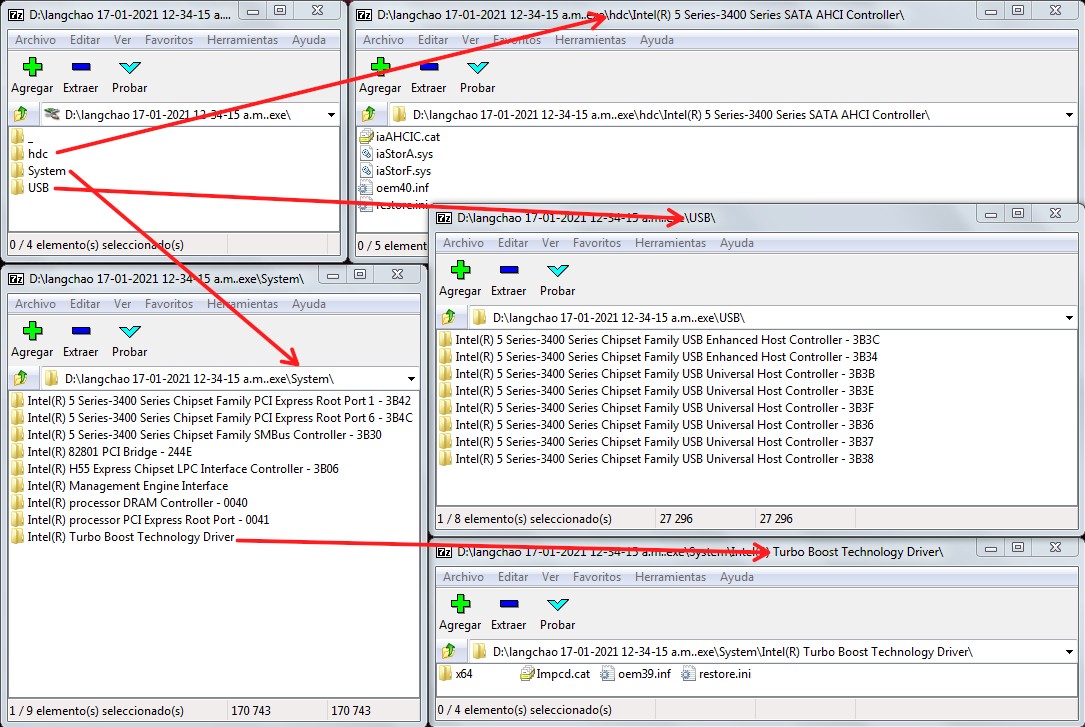
drivers-langchao.jpg
 

My Computer My Computer

Computer type
PC/Desktop
OS
Windows 7 Home Basic x64
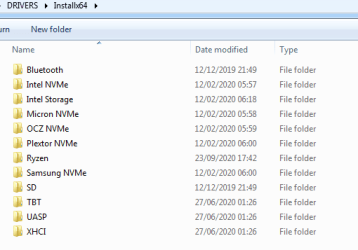
Put them in the DRIVERS\Installx64 folder

It is recursed, so you can put folders in there.

2021-05-06_010707.png
 

My Computers My Computers

System One System Two

  • Computer type
    PC/Desktop
    OS
    7 X64
    CPU
    i5 8400
    Motherboard
    gigabyte b365m ds3h
    Memory
    2x8gb 3200mhz
    Hard Drives
    various
    PSU
    pure power 11 400w cm
    Case
    Coolermaster
    Cooling
    cryorig m9i
  • Computer type
    PC/Desktop
    OS
    7x64
    CPU
    g5400
    Motherboard
    ga b365m ds3h
    Memory
    8gb ddr4 2400
    PSU
    xfx pro 450w
Great, thank you so much SIW2 :D
 

My Computer My Computer

Computer type
PC/Desktop
OS
Windows 7 Home Basic x64
SIW2:

I just wanted to let you know that I used 7UPv60 and UpdatePack7R2-21.5.12(with 3 add-ons) earlier today to create a 4.92 GB-size bootable install DVD+R DL disc for Windows 7 Professional SP1 64-bit.

I didn't add anything that would complicate the process and would be beyond my expertise, so the entire integration process went fine and finished in less than an hour.

I'll be doing a test install with the disc over the weekend, but I feel confident it'll work fine.

Thanks again for all the hard work that you do.

:thumbsup:
 

My Computer My Computer

Computer type
PC/Desktop
Computer Manufacturer/Model Number
Dell OptiPlex 9020
OS
Windows 7 Professional SP1 64-bit
CPU
Intel Core i7-4790 3.60 GHz
Memory
32 GB DDR3-1600 MHz
Graphics Card(s)
Integrated Intel HD Graphics 4600
Monitor(s) Displays
Viewsonic 32" LCD
Hard Drives
Kingston SATA 3 240 GB SSD
Internet Speed
Spectrum Internet 1000 Mbps
:-)
 

My Computers My Computers

System One System Two

  • Computer type
    PC/Desktop
    OS
    7 X64
    CPU
    i5 8400
    Motherboard
    gigabyte b365m ds3h
    Memory
    2x8gb 3200mhz
    Hard Drives
    various
    PSU
    pure power 11 400w cm
    Case
    Coolermaster
    Cooling
    cryorig m9i
  • Computer type
    PC/Desktop
    OS
    7x64
    CPU
    g5400
    Motherboard
    ga b365m ds3h
    Memory
    8gb ddr4 2400
    PSU
    xfx pro 450w
Here is a way to get your installation media up to date: Includes "universal" usb3 , sata drivers, standard oem nvme drivers and MS nvme updates

NOTE: It is not required to use the simplix update pack. If you only want to integrate usb3 and nvme support, Run 7updater.cmd without simplix update pack present.


7Updater regular :
7UPv57.zip

7Updater with sha2 support :
7UPv60.zip


If you want to include the simplix pack:
Download:
Small downloader which can be run to download the latest Simplix updatepack ( about 850mb).
https://update7.simplix.info/UpdatePack7R2.exe


1. Extract the 7UPv57.zip directly to the root of the drive, so you have C:\7UPv57 folder.

2.If you want to include simplix update pack, put the UpdatePack7R2-date.exe in the C:\7UPv57 folder.

3. Copy and paste your installation media to a hard drive.
(Or use ISO-EXTRACT.cmd to extract your windows 7 iso file.)

4. Right click and Run as administrator on the the 7UPDATERv50.cmd

View attachment 412324

NOTE: Strongly recommend including the latest Net framework 4.8 add-on (see next post)


SCREENSHOTS HERE

What is a simplix pack?

What is sha2 support? Why might you need it?
 

My Computer My Computer

Computer type
PC/Desktop
Computer Manufacturer/Model Number
Asus P6X58D-E, Lenovo
OS
Windows 7, Windows 10 Pro
CPU
Intel Core i7 930
Motherboard
Asus X58 P6X58D-E
Memory
G.SKILL F3-12800CL9T-6GBNQ 6GB DDR3 3X2GB DDR3-1600 CL 9-9-9
Graphics Card(s)
ATI Radeon HD 5700
Hard Drives
Seagate Barracuda 1TB x2 SATA3 6GB/S 7200RPM 64MB
WD 1TB SATA3
PSU
Coolermaster Silent Pro 700W Modular Power Supply
Thanks SIW2
Media updated thanks to your guide.
 

My Computer My Computer

Computer type
PC/Desktop
Computer Manufacturer/Model Number
Main WKS/Gaming Sloth
OS
W10 Pro
CPU
AMD Ryzen 5 2600X
Motherboard
Asus TUF B450M-PRO-GAMING
Memory
32 GB DDR4
Graphics Card(s)
AMD Radeon RX 5600 XT
Sound Card
Generic Motherboard
Monitor(s) Displays
2 x Dell 24" LED P2415Q
Screen Resolution
2 x 3840 x 2160
Hard Drives
Samsung NVME
PSU
750 W
Case
Fractal Design
Cooling
Fractal Design
Keyboard
Roccat Horde AIMO
Mouse
Logitech G703
Internet Speed
ADSL 30 MBit
Antivirus
Bitdefender
Browser
Firefox
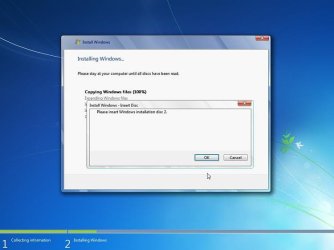
If anybody wants to use optical media, the install.wim can be split and the installtion media burnt to 2 dvds.

The first dvd is bootable and contains the entire installation media - except sources install.wim is replaced by install.swm.

The second dvd not bootable and contains only a folder called sources inside which is only install2.swm

To install, boot the first dvd , run setup and it will prompt for the second disc when it wants it..

WIN7-CD.jpg
 

My Computers My Computers

System One System Two

  • Computer type
    PC/Desktop
    OS
    7 X64
    CPU
    i5 8400
    Motherboard
    gigabyte b365m ds3h
    Memory
    2x8gb 3200mhz
    Hard Drives
    various
    PSU
    pure power 11 400w cm
    Case
    Coolermaster
    Cooling
    cryorig m9i
  • Computer type
    PC/Desktop
    OS
    7x64
    CPU
    g5400
    Motherboard
    ga b365m ds3h
    Memory
    8gb ddr4 2400
    PSU
    xfx pro 450w
Hey, I was trying to update the 7 install but when it finished, the install.wim just died and doesn’t exist which isn’t great for the installer, help?
 

My Computers My Computers

System One System Two

  • Computer type
    PC/Desktop
    Computer Manufacturer/Model Number
    Custom
    OS
    Windows 7 Home Premium X64 / Arch Linux (the only up to date OS I have)
    CPU
    AMD Ryzen 2700x
    Motherboard
    ASUS PRIME B450M-A
    Memory
    16GB 3200MHz Corsair Vengance LPX
    Graphics Card(s)
    Sapphire AMD RX 470
    Monitor(s) Displays
    1
    Screen Resolution
    1920x 1080
    Hard Drives
    IDK
    PSU
    Something
    Case
    Chinese off brand thing
    Cooling
    Yeah
    Keyboard
    HyperX Alloy FPS Pro
    Mouse
    Cooler master mm710
    Antivirus
    None
    Browser
    Brave
  • Computer type
    PC/Desktop
the install.wim just died and doesn’t exist

? never heard that before

did you search for it, if so, how?
 

My Computers My Computers

System One System Two

  • Computer type
    PC/Desktop
    OS
    7 X64
    CPU
    i5 8400
    Motherboard
    gigabyte b365m ds3h
    Memory
    2x8gb 3200mhz
    Hard Drives
    various
    PSU
    pure power 11 400w cm
    Case
    Coolermaster
    Cooling
    cryorig m9i
  • Computer type
    PC/Desktop
    OS
    7x64
    CPU
    g5400
    Motherboard
    ga b365m ds3h
    Memory
    8gb ddr4 2400
    PSU
    xfx pro 450w
I did dir in my sources folder using cmd, check by file explorer, I have hidden files on and all of them was a dead end.
 

My Computers My Computers

System One System Two

  • Computer type
    PC/Desktop
    Computer Manufacturer/Model Number
    Custom
    OS
    Windows 7 Home Premium X64 / Arch Linux (the only up to date OS I have)
    CPU
    AMD Ryzen 2700x
    Motherboard
    ASUS PRIME B450M-A
    Memory
    16GB 3200MHz Corsair Vengance LPX
    Graphics Card(s)
    Sapphire AMD RX 470
    Monitor(s) Displays
    1
    Screen Resolution
    1920x 1080
    Hard Drives
    IDK
    PSU
    Something
    Case
    Chinese off brand thing
    Cooling
    Yeah
    Keyboard
    HyperX Alloy FPS Pro
    Mouse
    Cooler master mm710
    Antivirus
    None
    Browser
    Brave
  • Computer type
    PC/Desktop
Weird. Nobody else had that, I dont know how you managed it.

What is the largest file in the sources folder?
 

My Computers My Computers

System One System Two

  • Computer type
    PC/Desktop
    OS
    7 X64
    CPU
    i5 8400
    Motherboard
    gigabyte b365m ds3h
    Memory
    2x8gb 3200mhz
    Hard Drives
    various
    PSU
    pure power 11 400w cm
    Case
    Coolermaster
    Cooling
    cryorig m9i
  • Computer type
    PC/Desktop
    OS
    7x64
    CPU
    g5400
    Motherboard
    ga b365m ds3h
    Memory
    8gb ddr4 2400
    PSU
    xfx pro 450w
the install.wim from my usb.
 

My Computers My Computers

System One System Two

  • Computer type
    PC/Desktop
    Computer Manufacturer/Model Number
    Custom
    OS
    Windows 7 Home Premium X64 / Arch Linux (the only up to date OS I have)
    CPU
    AMD Ryzen 2700x
    Motherboard
    ASUS PRIME B450M-A
    Memory
    16GB 3200MHz Corsair Vengance LPX
    Graphics Card(s)
    Sapphire AMD RX 470
    Monitor(s) Displays
    1
    Screen Resolution
    1920x 1080
    Hard Drives
    IDK
    PSU
    Something
    Case
    Chinese off brand thing
    Cooling
    Yeah
    Keyboard
    HyperX Alloy FPS Pro
    Mouse
    Cooler master mm710
    Antivirus
    None
    Browser
    Brave
  • Computer type
    PC/Desktop
From the first post:

3. Copy and paste your installation media to a hard drive.
 

My Computers My Computers

System One System Two

  • Computer type
    PC/Desktop
    OS
    7 X64
    CPU
    i5 8400
    Motherboard
    gigabyte b365m ds3h
    Memory
    2x8gb 3200mhz
    Hard Drives
    various
    PSU
    pure power 11 400w cm
    Case
    Coolermaster
    Cooling
    cryorig m9i
  • Computer type
    PC/Desktop
    OS
    7x64
    CPU
    g5400
    Motherboard
    ga b365m ds3h
    Memory
    8gb ddr4 2400
    PSU
    xfx pro 450w
First of all, I would like to thank all the contributors here on the forum. There is a tremendous amount of knowledge in this 100+ page post.

I am trying to get Win 7 to load on a new WD Blue SN550 m.2 NVMe SSD. I know all the hardware is supported as I had Win7 running fine for years on a spinner until it died last week. Also, I was able to load Ubuntu from a USB stick and install it onto the SSD without a hitch. The problem is, as with most people on here, the damned USB3 (for booting the install media) and the NMVe driver (for Win7 installer to see the SSD).
I have read the entire post (hurriedly) but I must have missed something as I still cannot get this thing to work. I ran the 7UPv57 on my Win7 Pro image with the DirectX, DotNetFix, the 7UPdriver, and the Update Pack7R2. I rolled all this together and create an ISO to "burn" to a USB stick and the process seemed to go smoothly but it didn't work once trying to boot form USB.
First thing I initially did wrong was miss this:
1. Put the nvme updates (KB2990941 and KB3087873) into the:
UPDATES\Bootx64 and UPDATES\Installx64 folders

2. Put usb3 drivers into (not 100% sure about this one but it doesn't matter if booting from DVD drive)
DRIVERS\Bootx64 and DRIVERS\Installx64 folders

Got all of this together and ran again twice but no luck. Eventually I gave up on the USB boot and burned the updated ISO to a DVD which did boot up and rolled through all of the initial screens nicely until it asked where to install Win7. At that point, it still doesn't see the NVMe SSD. I'm pulling what's left of my hair out for the last three days on this. Any suggestions?

Thank in advance!

[FONT=&quot]Sager NP7276 / CLEVO N170RD1
[/FONT]
[FONT=&quot]16 GB DDR4[/FONT][FONT=&quot]
[/FONT]
[FONT=&quot]Windows 7 Pro 64 bit
[/FONT]
[FONT=&quot]i7-6700HQ
[/FONT]
[FONT=&quot]GTX960
[/FONT]
[FONT=&quot]WD M.2 SN550 NVMe SSD[/FONT]
 

My Computers My Computers

System One System Two

  • Computer type
    Laptop
    Computer Manufacturer/Model Number
    Sager NP7276 / CLEVO N170RD1
    OS
    Windows 7 Pro 64 bit
    CPU
    i7-6700HQ
    Memory
    16 GB DDR4
    Graphics Card(s)
    GTX960
    Hard Drives
    WD M.2 SN550 NVMe SSD
    Antivirus
    What that?
    Browser
    Chrome / Edge
  • Computer type
    PC/Desktop
Last edited:

My Computers My Computers

System One System Two

  • Computer type
    PC/Desktop
    OS
    7 X64
    CPU
    i5 8400
    Motherboard
    gigabyte b365m ds3h
    Memory
    2x8gb 3200mhz
    Hard Drives
    various
    PSU
    pure power 11 400w cm
    Case
    Coolermaster
    Cooling
    cryorig m9i
  • Computer type
    PC/Desktop
    OS
    7x64
    CPU
    g5400
    Motherboard
    ga b365m ds3h
    Memory
    8gb ddr4 2400
    PSU
    xfx pro 450w
Also, I just saw this post:
-drivers for your board.... They need to be inf, cat and sys files to integrate into installation media.
How does putting the KB's into the UPDATES\Bootx64 and UPDATES\Installx64 folders accomplish this? Obviously a .msu file is not a inf, cat, or sys file.

- - - Updated - - -

Does this see the nvme disk?
17514x64v30.iso
extract the iso to usb with this View attachment 419647

Holy crap that was fast. Thanks! Don't you ever sleep? :) I will try that out tomorrow. What exactly is the ISO? is it a simple boot image (without all the _Windows_ stuff?)
Thanks again

- - - Updated - - -

SIW2: Well, the suspense was killing me so I had to try it out tonight. To your question - yes, it does "see" the NVMe SSD. What's next?
 

My Computers My Computers

System One System Two

  • Computer type
    Laptop
    Computer Manufacturer/Model Number
    Sager NP7276 / CLEVO N170RD1
    OS
    Windows 7 Pro 64 bit
    CPU
    i7-6700HQ
    Memory
    16 GB DDR4
    Graphics Card(s)
    GTX960
    Hard Drives
    WD M.2 SN550 NVMe SSD
    Antivirus
    What that?
    Browser
    Chrome / Edge
  • Computer type
    PC/Desktop
How does putting the KB's into the UPDATES\Bootx64 and UPDATES\Installx64 folders accomplish this? Obviously a .msu file is not a inf, cat, or sys file.

Because .msu are update files, that is why they go in the updates folder.

is it a simple boot image (without all the _Windows_ stuff?)

It is an advanced winpe which includes explorer, internet, disk managament and lots of tools. It doesn't include the installation media.
 

My Computers My Computers

System One System Two

  • Computer type
    PC/Desktop
    OS
    7 X64
    CPU
    i5 8400
    Motherboard
    gigabyte b365m ds3h
    Memory
    2x8gb 3200mhz
    Hard Drives
    various
    PSU
    pure power 11 400w cm
    Case
    Coolermaster
    Cooling
    cryorig m9i
  • Computer type
    PC/Desktop
    OS
    7x64
    CPU
    g5400
    Motherboard
    ga b365m ds3h
    Memory
    8gb ddr4 2400
    PSU
    xfx pro 450w
This seems to be a PE disk with a few partition management, recovery, and other tools. Pretty slick.
Edit: Duh! You just answered it before I saw it. Still.. pretty slick.

- - - Updated - - -

So this PE proves that all the hardware is compatible. It shows all the LINUX partitions on the SSD. What may it be that I am doing wrong in rebuilding the ISO? Everything seems to work until it comes time to boot up off of USB (or DVD).
 

My Computers My Computers

System One System Two

  • Computer type
    Laptop
    Computer Manufacturer/Model Number
    Sager NP7276 / CLEVO N170RD1
    OS
    Windows 7 Pro 64 bit
    CPU
    i7-6700HQ
    Memory
    16 GB DDR4
    Graphics Card(s)
    GTX960
    Hard Drives
    WD M.2 SN550 NVMe SSD
    Antivirus
    What that?
    Browser
    Chrome / Edge
  • Computer type
    PC/Desktop
You could try copying the contents of the sources folder from your updated installation media into the sources folder of your newly created 17514x64v30 bootable usb. Except for the boot.wim, because you want to keep the winpe boot.wim there.

Then boot it up and see if you can install onto the nvme disk. Try running setup18015 from under the startmenu\install folder. If you are going to use windows setup18015, you need to boot the usb in efi mode to install to gpt disk.
 

My Computers My Computers

System One System Two

  • Computer type
    PC/Desktop
    OS
    7 X64
    CPU
    i5 8400
    Motherboard
    gigabyte b365m ds3h
    Memory
    2x8gb 3200mhz
    Hard Drives
    various
    PSU
    pure power 11 400w cm
    Case
    Coolermaster
    Cooling
    cryorig m9i
  • Computer type
    PC/Desktop
    OS
    7x64
    CPU
    g5400
    Motherboard
    ga b365m ds3h
    Memory
    8gb ddr4 2400
    PSU
    xfx pro 450w
Back
Top