Update your Win 7 installation media

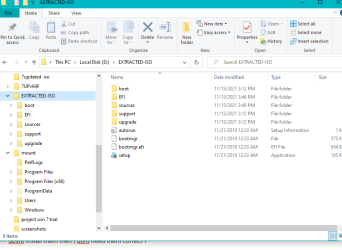
It is only possible to mount an image to an empty folder.

So boot.wim cannot have been in there.

You must have extracted the iso somewhere else.
 

My Computers My Computers

System One System Two

  • Computer type
    PC/Desktop
    OS
    7 X64
    CPU
    i5 8400
    Motherboard
    gigabyte b365m ds3h
    Memory
    2x8gb 3200mhz
    Hard Drives
    various
    PSU
    pure power 11 400w cm
    Case
    Coolermaster
    Cooling
    cryorig m9i
  • Computer type
    PC/Desktop
    OS
    7x64
    CPU
    g5400
    Motherboard
    ga b365m ds3h
    Memory
    8gb ddr4 2400
    PSU
    xfx pro 450w
SIW2
okay I started over again, since it was all deleted
will let ya know , thanks hopefully i finally get it right

- - - Updated - - -

okay so i don't need the folders in the mount to go into the extracted iso ,
if dism++ doesn't install them then i don't need them correct ?

folders differ.PNG
 

My Computers My Computers

System One System Two

  • Computer type
    PC/Desktop
    Computer Manufacturer/Model Number
    Lenovo - IdeaCentre 5i Desktop - Intel Core i5 - 8GB Memory - 1TB Hard Drive -
    OS
    windows 10 pro 64 bit
    CPU
    Intel(R) core(TM) i5-10400 CPU @ 2.90GHz
    Motherboard
    lenovo 370 A
    Memory
    Micron 8.00 GB
    Graphics Card(s)
    Intel(R) UHD Graphics 630 / Nvidia GeForce GT 1030
    Sound Card
    built in Intel corp
    Hard Drives
    Seagate sata - 1 terabyte /
  • Computer type
    PC/Desktop
    System Manufacturer/Model Number
    Dell OptiPlex 7020
    OS
    win 7 /win 10 dual boot
    CPU
    intel core i5 4570 (3.2Ghz)
    Memory
    32 Gb
    Graphics Card(s)
    Intel HD Graphics 4600
    Monitor(s) Displays
    Dell
    Hard Drives
    SSD 512Gb
I am not sure what you are asking.

Are you planning to run 7updaterv64f.cmd ? If you do that, you should not need to run dism++.

It is only because something seemed to go wrong with what you did before that it was suggested you try integrating the usb3 with dism++.

The extracted-iso folder is completely separate from the empty folder used for mounting.

The image in extracted-iso\sources\install.wim is mounted into a separate empty folder.

updates/drivers are added to the mounted image

the changes made to mounted image are saved into the install.wim

when the mounted image is unmounted, the mount folder is empty again and the install.wim in extracted-iso\sources is larger.
 

My Computers My Computers

System One System Two

  • Computer type
    PC/Desktop
    OS
    7 X64
    CPU
    i5 8400
    Motherboard
    gigabyte b365m ds3h
    Memory
    2x8gb 3200mhz
    Hard Drives
    various
    PSU
    pure power 11 400w cm
    Case
    Coolermaster
    Cooling
    cryorig m9i
  • Computer type
    PC/Desktop
    OS
    7x64
    CPU
    g5400
    Motherboard
    ga b365m ds3h
    Memory
    8gb ddr4 2400
    PSU
    xfx pro 450w
SIW2
I think i finally got it, except one thing,
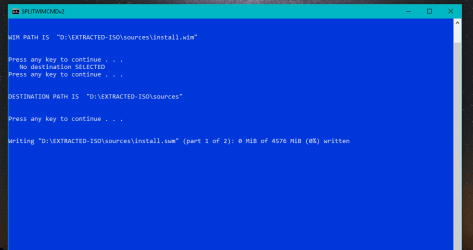
I am splitting the install.wim its 4.8 gb, with 7up.
do i save the swm's to the same folder as the install.wim which is in the extracted-iso folder that I'm going to delete after


split 7up.PNG


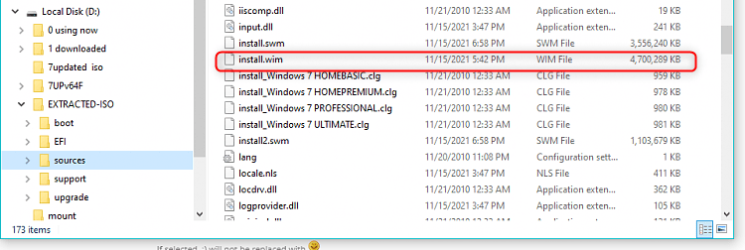
now i have this , do i just delete the install.wim and thats it or ?
split wims done.PNG
 
Last edited:

My Computers My Computers

System One System Two

  • Computer type
    PC/Desktop
    Computer Manufacturer/Model Number
    Lenovo - IdeaCentre 5i Desktop - Intel Core i5 - 8GB Memory - 1TB Hard Drive -
    OS
    windows 10 pro 64 bit
    CPU
    Intel(R) core(TM) i5-10400 CPU @ 2.90GHz
    Motherboard
    lenovo 370 A
    Memory
    Micron 8.00 GB
    Graphics Card(s)
    Intel(R) UHD Graphics 630 / Nvidia GeForce GT 1030
    Sound Card
    built in Intel corp
    Hard Drives
    Seagate sata - 1 terabyte /
  • Computer type
    PC/Desktop
    System Manufacturer/Model Number
    Dell OptiPlex 7020
    OS
    win 7 /win 10 dual boot
    CPU
    intel core i5 4570 (3.2Ghz)
    Memory
    32 Gb
    Graphics Card(s)
    Intel HD Graphics 4600
    Monitor(s) Displays
    Dell
    Hard Drives
    SSD 512Gb
do i save the swm's to the same folder as the install.wim

Yes, you can do that .

now i have this , do i just delete the install.wim and thats it

Yes, you can delete install.wim , or move it somewhere else if you want to keep it.

split wims done.PNG
 

My Computers My Computers

System One System Two

  • Computer type
    PC/Desktop
    OS
    7 X64
    CPU
    i5 8400
    Motherboard
    gigabyte b365m ds3h
    Memory
    2x8gb 3200mhz
    Hard Drives
    various
    PSU
    pure power 11 400w cm
    Case
    Coolermaster
    Cooling
    cryorig m9i
  • Computer type
    PC/Desktop
    OS
    7x64
    CPU
    g5400
    Motherboard
    ga b365m ds3h
    Memory
    8gb ddr4 2400
    PSU
    xfx pro 450w
do i have to rename either of the swm files ?
 

My Computers My Computers

System One System Two

  • Computer type
    PC/Desktop
    Computer Manufacturer/Model Number
    Lenovo - IdeaCentre 5i Desktop - Intel Core i5 - 8GB Memory - 1TB Hard Drive -
    OS
    windows 10 pro 64 bit
    CPU
    Intel(R) core(TM) i5-10400 CPU @ 2.90GHz
    Motherboard
    lenovo 370 A
    Memory
    Micron 8.00 GB
    Graphics Card(s)
    Intel(R) UHD Graphics 630 / Nvidia GeForce GT 1030
    Sound Card
    built in Intel corp
    Hard Drives
    Seagate sata - 1 terabyte /
  • Computer type
    PC/Desktop
    System Manufacturer/Model Number
    Dell OptiPlex 7020
    OS
    win 7 /win 10 dual boot
    CPU
    intel core i5 4570 (3.2Ghz)
    Memory
    32 Gb
    Graphics Card(s)
    Intel HD Graphics 4600
    Monitor(s) Displays
    Dell
    Hard Drives
    SSD 512Gb
They already have the correct names. setup is expecting install.swm, install2.swm
 

My Computers My Computers

System One System Two

  • Computer type
    PC/Desktop
    OS
    7 X64
    CPU
    i5 8400
    Motherboard
    gigabyte b365m ds3h
    Memory
    2x8gb 3200mhz
    Hard Drives
    various
    PSU
    pure power 11 400w cm
    Case
    Coolermaster
    Cooling
    cryorig m9i
  • Computer type
    PC/Desktop
    OS
    7x64
    CPU
    g5400
    Motherboard
    ga b365m ds3h
    Memory
    8gb ddr4 2400
    PSU
    xfx pro 450w
SIW2
Thanks for everything,
everything went as it was suppose to per your post.
I'll use Rufus in the morning and switch out hard drives.
fingers crossed.
I'll let you know ,
Thanks again for all you do
 

My Computers My Computers

System One System Two

  • Computer type
    PC/Desktop
    Computer Manufacturer/Model Number
    Lenovo - IdeaCentre 5i Desktop - Intel Core i5 - 8GB Memory - 1TB Hard Drive -
    OS
    windows 10 pro 64 bit
    CPU
    Intel(R) core(TM) i5-10400 CPU @ 2.90GHz
    Motherboard
    lenovo 370 A
    Memory
    Micron 8.00 GB
    Graphics Card(s)
    Intel(R) UHD Graphics 630 / Nvidia GeForce GT 1030
    Sound Card
    built in Intel corp
    Hard Drives
    Seagate sata - 1 terabyte /
  • Computer type
    PC/Desktop
    System Manufacturer/Model Number
    Dell OptiPlex 7020
    OS
    win 7 /win 10 dual boot
    CPU
    intel core i5 4570 (3.2Ghz)
    Memory
    32 Gb
    Graphics Card(s)
    Intel HD Graphics 4600
    Monitor(s) Displays
    Dell
    Hard Drives
    SSD 512Gb
:-)
 

My Computers My Computers

System One System Two

  • Computer type
    PC/Desktop
    OS
    7 X64
    CPU
    i5 8400
    Motherboard
    gigabyte b365m ds3h
    Memory
    2x8gb 3200mhz
    Hard Drives
    various
    PSU
    pure power 11 400w cm
    Case
    Coolermaster
    Cooling
    cryorig m9i
  • Computer type
    PC/Desktop
    OS
    7x64
    CPU
    g5400
    Motherboard
    ga b365m ds3h
    Memory
    8gb ddr4 2400
    PSU
    xfx pro 450w
SIW2
What did I do wrong please,


IMG_20211117_122611371~2.jpg
 
Last edited:

My Computers My Computers

System One System Two

  • Computer type
    PC/Desktop
    Computer Manufacturer/Model Number
    Lenovo - IdeaCentre 5i Desktop - Intel Core i5 - 8GB Memory - 1TB Hard Drive -
    OS
    windows 10 pro 64 bit
    CPU
    Intel(R) core(TM) i5-10400 CPU @ 2.90GHz
    Motherboard
    lenovo 370 A
    Memory
    Micron 8.00 GB
    Graphics Card(s)
    Intel(R) UHD Graphics 630 / Nvidia GeForce GT 1030
    Sound Card
    built in Intel corp
    Hard Drives
    Seagate sata - 1 terabyte /
  • Computer type
    PC/Desktop
    System Manufacturer/Model Number
    Dell OptiPlex 7020
    OS
    win 7 /win 10 dual boot
    CPU
    intel core i5 4570 (3.2Ghz)
    Memory
    32 Gb
    Graphics Card(s)
    Intel HD Graphics 4600
    Monitor(s) Displays
    Dell
    Hard Drives
    SSD 512Gb
For some reason, the UpdatePack is giving me an error:
"Failed to mount the image, the error code: 11."
I've searched the forums and didn't find anything. I'm trying to add USB 3.0 drivers to my Windows 7 Professional x64 ISO.

Any ideas?

Thanks.
 

My Computers My Computers

System One System Two

  • Computer type
    PC/Desktop
    Computer Manufacturer/Model Number
    Custom build
    OS
    Windows 11
  • Computer type
    PC/Desktop
If that is a message from the updatepack, then ask at simplix forum.
I dont know the error codes for that program.

You could try the obvious things, like running checkdisk and system file check in case there are errors with your current running system.
 

My Computers My Computers

System One System Two

  • Computer type
    PC/Desktop
    OS
    7 X64
    CPU
    i5 8400
    Motherboard
    gigabyte b365m ds3h
    Memory
    2x8gb 3200mhz
    Hard Drives
    various
    PSU
    pure power 11 400w cm
    Case
    Coolermaster
    Cooling
    cryorig m9i
  • Computer type
    PC/Desktop
    OS
    7x64
    CPU
    g5400
    Motherboard
    ga b365m ds3h
    Memory
    8gb ddr4 2400
    PSU
    xfx pro 450w
SIW2
i bought a nvidia geforce GT1030 graphics card , for windows 7 ,
do you by chance know if there is drivers in your big 7z drivers,
i can only find install files, not just the info file , so not sure how to get into iso

thanks for all you do,
hopefully someday ill get there

Also would it be better to put on dvd, its small enough ?
maybe wouldnt keep getting frozen lights lol
 

My Computers My Computers

System One System Two

  • Computer type
    PC/Desktop
    Computer Manufacturer/Model Number
    Lenovo - IdeaCentre 5i Desktop - Intel Core i5 - 8GB Memory - 1TB Hard Drive -
    OS
    windows 10 pro 64 bit
    CPU
    Intel(R) core(TM) i5-10400 CPU @ 2.90GHz
    Motherboard
    lenovo 370 A
    Memory
    Micron 8.00 GB
    Graphics Card(s)
    Intel(R) UHD Graphics 630 / Nvidia GeForce GT 1030
    Sound Card
    built in Intel corp
    Hard Drives
    Seagate sata - 1 terabyte /
  • Computer type
    PC/Desktop
    System Manufacturer/Model Number
    Dell OptiPlex 7020
    OS
    win 7 /win 10 dual boot
    CPU
    intel core i5 4570 (3.2Ghz)
    Memory
    32 Gb
    Graphics Card(s)
    Intel HD Graphics 4600
    Monitor(s) Displays
    Dell
    Hard Drives
    SSD 512Gb
dslgirl:
If you're using the NVIDIA GeForce GT 1030 graphics card with Windows 7 64-bit, you might want to stick with the NVIDIA GeForce 391.35 driver.
NVIDIA DRIVERS GeForce Game Ready Driver WHQL
It's hit or miss, but you may have a display problem if you use one of the more current Windows 7 64-bit drivers.
 

My Computer My Computer

Computer type
PC/Desktop
Computer Manufacturer/Model Number
Dell OptiPlex 9020
OS
Windows 7 Professional SP1 64-bit
CPU
Intel Core i7-4790 3.60 GHz
Memory
32 GB DDR3-1600 MHz
Graphics Card(s)
Integrated Intel HD Graphics 4600
Monitor(s) Displays
Viewsonic 32" LCD
Hard Drives
Kingston SATA 3 240 GB SSD
Internet Speed
Spectrum Internet 1000 Mbps
flavallee

So basically sounds like i got the wrong video card ?

figures , ill try but what video card should i get if that dont work please .
i will try from the list you gave me , but those are setup which i cant put on bootable usb correct ?
could that be why dism++ wouldnt let me install them? cuz I used the latest one ?
 

My Computers My Computers

System One System Two

  • Computer type
    PC/Desktop
    Computer Manufacturer/Model Number
    Lenovo - IdeaCentre 5i Desktop - Intel Core i5 - 8GB Memory - 1TB Hard Drive -
    OS
    windows 10 pro 64 bit
    CPU
    Intel(R) core(TM) i5-10400 CPU @ 2.90GHz
    Motherboard
    lenovo 370 A
    Memory
    Micron 8.00 GB
    Graphics Card(s)
    Intel(R) UHD Graphics 630 / Nvidia GeForce GT 1030
    Sound Card
    built in Intel corp
    Hard Drives
    Seagate sata - 1 terabyte /
  • Computer type
    PC/Desktop
    System Manufacturer/Model Number
    Dell OptiPlex 7020
    OS
    win 7 /win 10 dual boot
    CPU
    intel core i5 4570 (3.2Ghz)
    Memory
    32 Gb
    Graphics Card(s)
    Intel HD Graphics 4600
    Monitor(s) Displays
    Dell
    Hard Drives
    SSD 512Gb
It's a stand-alone executable(.exe) file which you need to download and save and then run.
After it checks your system for compatibility, it gives you choices how to install the graphics driver.
I always select a clean install and uncheck the options I don't need.

If you're wanting to integrate the graphics driver into SIW2's tool in post #1, he will need to help you.
 

My Computer My Computer

Computer type
PC/Desktop
Computer Manufacturer/Model Number
Dell OptiPlex 9020
OS
Windows 7 Professional SP1 64-bit
CPU
Intel Core i7-4790 3.60 GHz
Memory
32 GB DDR3-1600 MHz
Graphics Card(s)
Integrated Intel HD Graphics 4600
Monitor(s) Displays
Viewsonic 32" LCD
Hard Drives
Kingston SATA 3 240 GB SSD
Internet Speed
Spectrum Internet 1000 Mbps
flavallee
thank you very much

- - - Updated - - -


hi,
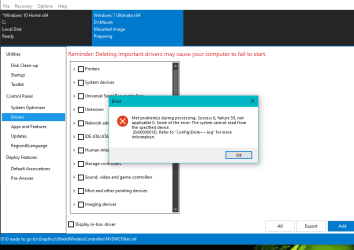
i extracted the files with 7 zip, then pointed dism++ to older graphics card NVIDIA GeForce 391.35 driver. inf files
got this error , did i do something wrong, or is it okay cuz 6 were done.

dism++ added graphics card.PNG

thanks in advance,
I'll be ecstatic if I ever get this done,
sorry for being a big pain, but im trying to learn.
 

My Computers My Computers

System One System Two

  • Computer type
    PC/Desktop
    Computer Manufacturer/Model Number
    Lenovo - IdeaCentre 5i Desktop - Intel Core i5 - 8GB Memory - 1TB Hard Drive -
    OS
    windows 10 pro 64 bit
    CPU
    Intel(R) core(TM) i5-10400 CPU @ 2.90GHz
    Motherboard
    lenovo 370 A
    Memory
    Micron 8.00 GB
    Graphics Card(s)
    Intel(R) UHD Graphics 630 / Nvidia GeForce GT 1030
    Sound Card
    built in Intel corp
    Hard Drives
    Seagate sata - 1 terabyte /
  • Computer type
    PC/Desktop
    System Manufacturer/Model Number
    Dell OptiPlex 7020
    OS
    win 7 /win 10 dual boot
    CPU
    intel core i5 4570 (3.2Ghz)
    Memory
    32 Gb
    Graphics Card(s)
    Intel HD Graphics 4600
    Monitor(s) Displays
    Dell
    Hard Drives
    SSD 512Gb
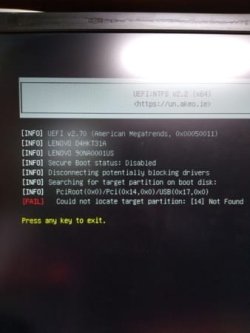
Hi,
Does anyone know of a website you can put the error codes in and see what you did wrong ?

Thanks
IMG_20211221_131305229 smaller.jpg
 

My Computers My Computers

System One System Two

  • Computer type
    PC/Desktop
    Computer Manufacturer/Model Number
    Lenovo - IdeaCentre 5i Desktop - Intel Core i5 - 8GB Memory - 1TB Hard Drive -
    OS
    windows 10 pro 64 bit
    CPU
    Intel(R) core(TM) i5-10400 CPU @ 2.90GHz
    Motherboard
    lenovo 370 A
    Memory
    Micron 8.00 GB
    Graphics Card(s)
    Intel(R) UHD Graphics 630 / Nvidia GeForce GT 1030
    Sound Card
    built in Intel corp
    Hard Drives
    Seagate sata - 1 terabyte /
  • Computer type
    PC/Desktop
    System Manufacturer/Model Number
    Dell OptiPlex 7020
    OS
    win 7 /win 10 dual boot
    CPU
    intel core i5 4570 (3.2Ghz)
    Memory
    32 Gb
    Graphics Card(s)
    Intel HD Graphics 4600
    Monitor(s) Displays
    Dell
    Hard Drives
    SSD 512Gb
The message in your screenshot says akeo.ie so perhaps ask there. It is the rufus site.
 

My Computers My Computers

System One System Two

  • Computer type
    PC/Desktop
    OS
    7 X64
    CPU
    i5 8400
    Motherboard
    gigabyte b365m ds3h
    Memory
    2x8gb 3200mhz
    Hard Drives
    various
    PSU
    pure power 11 400w cm
    Case
    Coolermaster
    Cooling
    cryorig m9i
  • Computer type
    PC/Desktop
    OS
    7x64
    CPU
    g5400
    Motherboard
    ga b365m ds3h
    Memory
    8gb ddr4 2400
    PSU
    xfx pro 450w
SIW2

thanks, but I didn't use Rufus, as above I copied to usb ?
Which it was you said I could do instead of Rufus

still working on this , im going crazy though
Could it be that 7updater did it?
 
Last edited:

My Computers My Computers

System One System Two

  • Computer type
    PC/Desktop
    Computer Manufacturer/Model Number
    Lenovo - IdeaCentre 5i Desktop - Intel Core i5 - 8GB Memory - 1TB Hard Drive -
    OS
    windows 10 pro 64 bit
    CPU
    Intel(R) core(TM) i5-10400 CPU @ 2.90GHz
    Motherboard
    lenovo 370 A
    Memory
    Micron 8.00 GB
    Graphics Card(s)
    Intel(R) UHD Graphics 630 / Nvidia GeForce GT 1030
    Sound Card
    built in Intel corp
    Hard Drives
    Seagate sata - 1 terabyte /
  • Computer type
    PC/Desktop
    System Manufacturer/Model Number
    Dell OptiPlex 7020
    OS
    win 7 /win 10 dual boot
    CPU
    intel core i5 4570 (3.2Ghz)
    Memory
    32 Gb
    Graphics Card(s)
    Intel HD Graphics 4600
    Monitor(s) Displays
    Dell
    Hard Drives
    SSD 512Gb
Back
Top