Update your Win 7 installation media

SIW2
thanks for all your patience
okay so what do i do, Do you think ill ever get this ?
not sure how to fix the issue ?
 

My Computers My Computers

System One System Two

  • Computer type
    PC/Desktop
    Computer Manufacturer/Model Number
    Lenovo - IdeaCentre 5i Desktop - Intel Core i5 - 8GB Memory - 1TB Hard Drive -
    OS
    windows 10 pro 64 bit
    CPU
    Intel(R) core(TM) i5-10400 CPU @ 2.90GHz
    Motherboard
    lenovo 370 A
    Memory
    Micron 8.00 GB
    Graphics Card(s)
    Intel(R) UHD Graphics 630 / Nvidia GeForce GT 1030
    Sound Card
    built in Intel corp
    Hard Drives
    Seagate sata - 1 terabyte /
  • Computer type
    PC/Desktop
    System Manufacturer/Model Number
    Dell OptiPlex 7020
    OS
    win 7 /win 10 dual boot
    CPU
    intel core i5 4570 (3.2Ghz)
    Memory
    32 Gb
    Graphics Card(s)
    Intel HD Graphics 4600
    Monitor(s) Displays
    Dell
    Hard Drives
    SSD 512Gb
There are people running win7 on 10&11 gen intel, you could have a look at win raid forum, or somebody here posted a link to a success story . Cant remember if it was ian50 or torchwood who posted the link.
 

My Computers My Computers

System One System Two

  • Computer type
    PC/Desktop
    OS
    7 X64
    CPU
    i5 8400
    Motherboard
    gigabyte b365m ds3h
    Memory
    2x8gb 3200mhz
    Hard Drives
    various
    PSU
    pure power 11 400w cm
    Case
    Coolermaster
    Cooling
    cryorig m9i
  • Computer type
    PC/Desktop
    OS
    7x64
    CPU
    g5400
    Motherboard
    ga b365m ds3h
    Memory
    8gb ddr4 2400
    PSU
    xfx pro 450w
SIW2

thanks for all your patience I'll try and find them.
may ask more of you if needed
I wont give up

thanks for all you do
 

My Computers My Computers

System One System Two

  • Computer type
    PC/Desktop
    Computer Manufacturer/Model Number
    Lenovo - IdeaCentre 5i Desktop - Intel Core i5 - 8GB Memory - 1TB Hard Drive -
    OS
    windows 10 pro 64 bit
    CPU
    Intel(R) core(TM) i5-10400 CPU @ 2.90GHz
    Motherboard
    lenovo 370 A
    Memory
    Micron 8.00 GB
    Graphics Card(s)
    Intel(R) UHD Graphics 630 / Nvidia GeForce GT 1030
    Sound Card
    built in Intel corp
    Hard Drives
    Seagate sata - 1 terabyte /
  • Computer type
    PC/Desktop
    System Manufacturer/Model Number
    Dell OptiPlex 7020
    OS
    win 7 /win 10 dual boot
    CPU
    intel core i5 4570 (3.2Ghz)
    Memory
    32 Gb
    Graphics Card(s)
    Intel HD Graphics 4600
    Monitor(s) Displays
    Dell
    Hard Drives
    SSD 512Gb
A very cluey man nicknamed canonkong on Win-Raid about 4-5 weeks ago reported successfully installing Win 7 on a Gen 12 machine.

There is also a very interesting thread about installing Win 7 on a UEFI Class 3 machine (ie. no CSM or Legacy mode) on MDL:

Installing Windows 7 on the pure UEFI systems without CSM | My Digital Life Forums

About a year long, and perhaps still active (last post January 6 this year), about a third way through there is a post from someone who very successfully installed Win 7 on a Gen 11 machine with almost no trouble. The entire thread there, and those relevant on this forum, are must-reads.

I'm starting the Win 7 installation process on a Gen 10 machine in about 2 weeks or so. I'll comment if anything interesting happens ...
 

My Computer My Computer

Computer type
Laptop
Computer Manufacturer/Model Number
HP 250 G7
OS
Windows 7 Pro x64
CPU
Intel i5-8265U
Motherboard
Intel Coffee Lake
Memory
8gb
Graphics Card(s)
Intel Iris Plus 655
Sound Card
Realtek HDA
Monitor(s) Displays
Generic
Screen Resolution
1366 x 768
Hard Drives
Crucial P5 NVMe 1Tb internal
WD's 4Tb, 3Tb, 2 x 2Tb external
Mouse
Logi wireless
Internet Speed
45 Mbps
Antivirus
AVG
Browser
Firefox 88, Pale Moon 29, Brave 129
Other Info
Combination of i5-8265U with Crucial P5 achieves Crystal Bench scores > 5000

Iris Plus GPU (Whiskey Lake) driver from BioStar

HP 250 G7 is a budget machine
ian50

thanks so much, will give it a try
 

My Computers My Computers

System One System Two

  • Computer type
    PC/Desktop
    Computer Manufacturer/Model Number
    Lenovo - IdeaCentre 5i Desktop - Intel Core i5 - 8GB Memory - 1TB Hard Drive -
    OS
    windows 10 pro 64 bit
    CPU
    Intel(R) core(TM) i5-10400 CPU @ 2.90GHz
    Motherboard
    lenovo 370 A
    Memory
    Micron 8.00 GB
    Graphics Card(s)
    Intel(R) UHD Graphics 630 / Nvidia GeForce GT 1030
    Sound Card
    built in Intel corp
    Hard Drives
    Seagate sata - 1 terabyte /
  • Computer type
    PC/Desktop
    System Manufacturer/Model Number
    Dell OptiPlex 7020
    OS
    win 7 /win 10 dual boot
    CPU
    intel core i5 4570 (3.2Ghz)
    Memory
    32 Gb
    Graphics Card(s)
    Intel HD Graphics 4600
    Monitor(s) Displays
    Dell
    Hard Drives
    SSD 512Gb
SIW2
hi i used uefiseven but when i went into esp after installing win 7 the files from the previous install where still there ,
What do i do now please and thanks again for your patience,
I may get this yet

- - - Updated - - -

i got it i did diskpart then clean and it removed it
 

My Computers My Computers

System One System Two

  • Computer type
    PC/Desktop
    Computer Manufacturer/Model Number
    Lenovo - IdeaCentre 5i Desktop - Intel Core i5 - 8GB Memory - 1TB Hard Drive -
    OS
    windows 10 pro 64 bit
    CPU
    Intel(R) core(TM) i5-10400 CPU @ 2.90GHz
    Motherboard
    lenovo 370 A
    Memory
    Micron 8.00 GB
    Graphics Card(s)
    Intel(R) UHD Graphics 630 / Nvidia GeForce GT 1030
    Sound Card
    built in Intel corp
    Hard Drives
    Seagate sata - 1 terabyte /
  • Computer type
    PC/Desktop
    System Manufacturer/Model Number
    Dell OptiPlex 7020
    OS
    win 7 /win 10 dual boot
    CPU
    intel core i5 4570 (3.2Ghz)
    Memory
    32 Gb
    Graphics Card(s)
    Intel HD Graphics 4600
    Monitor(s) Displays
    Dell
    Hard Drives
    SSD 512Gb
So I have followed the procedure, several times actually, no problem there only takes a few minutes.
I selected not to include updates and chose option 5 for Windows Ultimate which I bought as an ISO from a reputable source.
I have a Samsung M.2 980 Pro 1TB plugged into the board.
Put the ISO on a thumb drive and plugged it into USB3, keyboard and mouse into USB2 on the Z390 board, started it, USB is obviously working , loads the windows files but then hangs on the Windows logo loading files bit. Tried it several times. Any ideas anyone?
 

My Computers My Computers

System One System Two

  • Computer type
    PC/Desktop
    Computer Manufacturer/Model Number
    Build
    OS
    Windows 7 Ultimate x64, Window 10 Pro x64
    CPU
    i9
    Motherboard
    Gigabyte Z390 Aorus Ultra
    Memory
    64 GB
    Graphics Card(s)
    GTX 1080
    Hard Drives
    Samsung m.2 980 PRO 1TB
    Antivirus
    MS
    Browser
    Mozilla
  • Computer type
    PC/Desktop
Sorted with problem with the hung windows 7 install, but no rest for the wicket I am onto my next one.
Windows does not see the drive and is asking for a driver, however it is in BIOS. I tried the "pure" 64bit Samsung NVMe Driver v3.3.0.2003 WHQL for Win7 x64 by copying the folder to a non-iso usb installation drive but to no avail.
I have tried various configuration settings in BIOS.
Suggestions welcome.
 

My Computers My Computers

System One System Two

  • Computer type
    PC/Desktop
    Computer Manufacturer/Model Number
    Build
    OS
    Windows 7 Ultimate x64, Window 10 Pro x64
    CPU
    i9
    Motherboard
    Gigabyte Z390 Aorus Ultra
    Memory
    64 GB
    Graphics Card(s)
    GTX 1080
    Hard Drives
    Samsung m.2 980 PRO 1TB
    Antivirus
    MS
    Browser
    Mozilla
  • Computer type
    PC/Desktop
SIW2 , Megahertz07 , ian50

Thanks for all you do
I finally got it to boot into windows 7 Wahoooooo.
had to boot without driver signing, thats another issue huh ?

but now working out device manager issues ,
will post how I did it all if you want , this pc is a brand new lenovo desktop 10th gen.

hers my problems any ideas appreciated


421041d1646264840-update-your-win-7-installation-media-img_20220302_150413564-sss.jpg
 

My Computers My Computers

System One System Two

  • Computer type
    PC/Desktop
    Computer Manufacturer/Model Number
    Lenovo - IdeaCentre 5i Desktop - Intel Core i5 - 8GB Memory - 1TB Hard Drive -
    OS
    windows 10 pro 64 bit
    CPU
    Intel(R) core(TM) i5-10400 CPU @ 2.90GHz
    Motherboard
    lenovo 370 A
    Memory
    Micron 8.00 GB
    Graphics Card(s)
    Intel(R) UHD Graphics 630 / Nvidia GeForce GT 1030
    Sound Card
    built in Intel corp
    Hard Drives
    Seagate sata - 1 terabyte /
  • Computer type
    PC/Desktop
    System Manufacturer/Model Number
    Dell OptiPlex 7020
    OS
    win 7 /win 10 dual boot
    CPU
    intel core i5 4570 (3.2Ghz)
    Memory
    32 Gb
    Graphics Card(s)
    Intel HD Graphics 4600
    Monitor(s) Displays
    Dell
    Hard Drives
    SSD 512Gb
dslgirl:

Assuming your computer has an Intel supported motherboard, have you installed the Intel chipset driver and Intel management engine components driver for it?
 

My Computer My Computer

Computer type
PC/Desktop
Computer Manufacturer/Model Number
Dell OptiPlex 9020
OS
Windows 7 Professional SP1 64-bit
CPU
Intel Core i7-4790 3.60 GHz
Memory
32 GB DDR3-1600 MHz
Graphics Card(s)
Integrated Intel HD Graphics 4600
Monitor(s) Displays
Viewsonic 32" LCD
Hard Drives
Kingston SATA 3 240 GB SSD
Internet Speed
Spectrum Internet 1000 Mbps
flavalle
im not sure where to find them ?
since they only make this pc for windows 10
any ideas
Thanks for your help

I read here somewhere driver easy is not a good idea,
another other suggestions
 
Last edited:

My Computers My Computers

System One System Two

  • Computer type
    PC/Desktop
    Computer Manufacturer/Model Number
    Lenovo - IdeaCentre 5i Desktop - Intel Core i5 - 8GB Memory - 1TB Hard Drive -
    OS
    windows 10 pro 64 bit
    CPU
    Intel(R) core(TM) i5-10400 CPU @ 2.90GHz
    Motherboard
    lenovo 370 A
    Memory
    Micron 8.00 GB
    Graphics Card(s)
    Intel(R) UHD Graphics 630 / Nvidia GeForce GT 1030
    Sound Card
    built in Intel corp
    Hard Drives
    Seagate sata - 1 terabyte /
  • Computer type
    PC/Desktop
    System Manufacturer/Model Number
    Dell OptiPlex 7020
    OS
    win 7 /win 10 dual boot
    CPU
    intel core i5 4570 (3.2Ghz)
    Memory
    32 Gb
    Graphics Card(s)
    Intel HD Graphics 4600
    Monitor(s) Displays
    Dell
    Hard Drives
    SSD 512Gb
This thread is 122 pages long, and I don't know how far back you jumped into it, so I don't know the description of your computer and/or its motherboard.

If your computer was made for Windows 10 and not for Windows 7, SIW2 and the other hardware driver experts here are probably in a better position than me to help you.
 

My Computer My Computer

Computer type
PC/Desktop
Computer Manufacturer/Model Number
Dell OptiPlex 9020
OS
Windows 7 Professional SP1 64-bit
CPU
Intel Core i7-4790 3.60 GHz
Memory
32 GB DDR3-1600 MHz
Graphics Card(s)
Integrated Intel HD Graphics 4600
Monitor(s) Displays
Viewsonic 32" LCD
Hard Drives
Kingston SATA 3 240 GB SSD
Internet Speed
Spectrum Internet 1000 Mbps

My Computers My Computers

System One System Two

  • Computer type
    PC/Desktop
    Computer Manufacturer/Model Number
    Lenovo - IdeaCentre 5i Desktop - Intel Core i5 - 8GB Memory - 1TB Hard Drive -
    OS
    windows 10 pro 64 bit
    CPU
    Intel(R) core(TM) i5-10400 CPU @ 2.90GHz
    Motherboard
    lenovo 370 A
    Memory
    Micron 8.00 GB
    Graphics Card(s)
    Intel(R) UHD Graphics 630 / Nvidia GeForce GT 1030
    Sound Card
    built in Intel corp
    Hard Drives
    Seagate sata - 1 terabyte /
  • Computer type
    PC/Desktop
    System Manufacturer/Model Number
    Dell OptiPlex 7020
    OS
    win 7 /win 10 dual boot
    CPU
    intel core i5 4570 (3.2Ghz)
    Memory
    32 Gb
    Graphics Card(s)
    Intel HD Graphics 4600
    Monitor(s) Displays
    Dell
    Hard Drives
    SSD 512Gb
Hi,
Does anyone know if I use a system recovery disk and system image backup to restore pc
will the (esp) be in the system image, or do I have to install all again to get it

Thanks
 

My Computers My Computers

System One System Two

  • Computer type
    PC/Desktop
    Computer Manufacturer/Model Number
    Lenovo - IdeaCentre 5i Desktop - Intel Core i5 - 8GB Memory - 1TB Hard Drive -
    OS
    windows 10 pro 64 bit
    CPU
    Intel(R) core(TM) i5-10400 CPU @ 2.90GHz
    Motherboard
    lenovo 370 A
    Memory
    Micron 8.00 GB
    Graphics Card(s)
    Intel(R) UHD Graphics 630 / Nvidia GeForce GT 1030
    Sound Card
    built in Intel corp
    Hard Drives
    Seagate sata - 1 terabyte /
  • Computer type
    PC/Desktop
    System Manufacturer/Model Number
    Dell OptiPlex 7020
    OS
    win 7 /win 10 dual boot
    CPU
    intel core i5 4570 (3.2Ghz)
    Memory
    32 Gb
    Graphics Card(s)
    Intel HD Graphics 4600
    Monitor(s) Displays
    Dell
    Hard Drives
    SSD 512Gb
Greetings SIW2.

Good to see that the W7 community is thriving under your capable hands.

I recently came into possession of a KabyLake i5 7267U mic mini-PC, and thought it would be a walk in the park adding W7 OS to the existing w10 setup. Well, here are some unexpected issues :

1.7Updaterv64F reported an error message after integrating the massive 7UPDRIVERS.7z drivers pack. Any idea what these 2 erros could be?
Code:
...
Installing 197 of 198 - D:\7UPv64F\DRIVERS\Installx64\VIA USB\xhcdrv.inf: The driver package was successfully installed.
Installing 198 of 198 - D:\7UPv64F\DRIVERS\Installx64\XHCI\USBXHCI.inf: The driver package was successfully installed.
[COLOR=#ff0000]Error: 2[/COLOR]
The command completed with errors. For more information, refer to the log file.
The DISM log file can be found at C:\Windows\Logs\DISM\dism.log
....

2. As you are aware, installing a W7 OS after W10 changes the dual boot menu to old W7 legacy style. However running the following bcdedit command failed to revert the boot menu back to graphical w10 style. Any suggestions?
In win 10 elevated command prompt:
bcdedit /set {default} bootmenupolicy standard

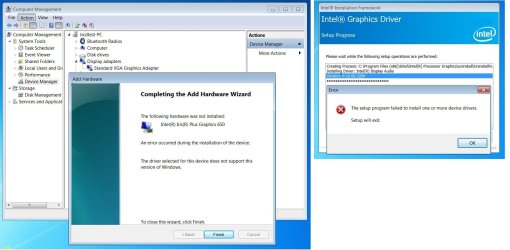
3. The biggest challenge is finding a w7 driver for the Iris® Plus Graphics 650 GPU (hardware id 5927). All the drivers you have listed failed to install. Any further suggestions?
5927.jpg

Many thanks for your kind assistance and best regards,
 
Last edited:

My Computer My Computer

Computer type
PC/Desktop
OS
Windows 7 Ultimate x86
hi, any help appreciated
my usb windows 7 installer DISM wont do updates, this usb was created by using SIW2 way, but I cant find where on usb install drive to put the "wsusscn3" , so where do i put "wsusscn3" if I need installer in the future . There is no config folder on usb install drive
thanks
My windows is up and working great on my new Lenovo desktop 10th gen ,
Thanks to SIW2 for the extreme help, I couldn't have done it with out him.
 
Last edited:

My Computers My Computers

System One System Two

  • Computer type
    PC/Desktop
    Computer Manufacturer/Model Number
    Lenovo - IdeaCentre 5i Desktop - Intel Core i5 - 8GB Memory - 1TB Hard Drive -
    OS
    windows 10 pro 64 bit
    CPU
    Intel(R) core(TM) i5-10400 CPU @ 2.90GHz
    Motherboard
    lenovo 370 A
    Memory
    Micron 8.00 GB
    Graphics Card(s)
    Intel(R) UHD Graphics 630 / Nvidia GeForce GT 1030
    Sound Card
    built in Intel corp
    Hard Drives
    Seagate sata - 1 terabyte /
  • Computer type
    PC/Desktop
    System Manufacturer/Model Number
    Dell OptiPlex 7020
    OS
    win 7 /win 10 dual boot
    CPU
    intel core i5 4570 (3.2Ghz)
    Memory
    32 Gb
    Graphics Card(s)
    Intel HD Graphics 4600
    Monitor(s) Displays
    Dell
    Hard Drives
    SSD 512Gb
That goes to the disk++ config folder.
If not present, disk++ will download the latest version when performing udates.
Whole process should be quite transparent.
 

My Computer My Computer

Computer type
PC/Desktop
OS
Windows 7 Ultimate x86
goopy ,
thanks ,
I tried to get updates it gives me that error code, so did research here and it needs that file,
I have the latest dism on the usb installer.
so not sure what you mean by " If not present, disk++ will download the latest version when performing updates."


thanks for all you guys do
 

My Computers My Computers

System One System Two

  • Computer type
    PC/Desktop
    Computer Manufacturer/Model Number
    Lenovo - IdeaCentre 5i Desktop - Intel Core i5 - 8GB Memory - 1TB Hard Drive -
    OS
    windows 10 pro 64 bit
    CPU
    Intel(R) core(TM) i5-10400 CPU @ 2.90GHz
    Motherboard
    lenovo 370 A
    Memory
    Micron 8.00 GB
    Graphics Card(s)
    Intel(R) UHD Graphics 630 / Nvidia GeForce GT 1030
    Sound Card
    built in Intel corp
    Hard Drives
    Seagate sata - 1 terabyte /
  • Computer type
    PC/Desktop
    System Manufacturer/Model Number
    Dell OptiPlex 7020
    OS
    win 7 /win 10 dual boot
    CPU
    intel core i5 4570 (3.2Ghz)
    Memory
    32 Gb
    Graphics Card(s)
    Intel HD Graphics 4600
    Monitor(s) Displays
    Dell
    Hard Drives
    SSD 512Gb
deleted
 

My Computers My Computers

System One System Two

  • Computer type
    Laptop
    Computer Manufacturer/Model Number
    Acer Aspire 5 A515-52G
    OS
    Windows 7 Professional x64
    CPU
    i5-8265u
    Motherboard
    ---
    Memory
    Corsair Vengeance 2x8GB DDR4 2400MHz CL16
    Graphics Card(s)
    Intel UHD 620, NVidia GeForce MX130
    Hard Drives
    SanDisk SSD Plus 1TB
    PSU
    N/A
    Case
    N/A
    Cooling
    1 fan that's louder than a ****ing jet
    Keyboard
    SPC Gear GK630K Tournament Kailh Brown (+ Laptop's built-in
    Mouse
    Genesis Xenon 750 (+ Laptop's touchpad)
    Internet Speed
    250 Mbps (Download) / 30 Mbps (Upload)
    Antivirus
    None
    Browser
    Chrome / Firefox
  • Computer type
    PC/Desktop
Back
Top