Update your Win 7 installation media

Hi, I Am Getting There Errors After Entering My Installer Path:
find: '/i': No such file or directoryfind: 'Architecture': No such file or directoryx86_64 was unexpected at this time.
Help Me!

- - - Updated - - -

Got It Working On Another Computer!!!

- - - Updated - - -

Any Drivers For Lenovo Legion 5 15IMH05?
GPU1 Intel UHD Graphics 630
GPU2 NVIDIA GeForce GTX 1650
Wi-Fi Intel(R) Wi-Fi 6 AX201 160MHz

If There Are Any Working Drivers Please Let Me Know!
 

My Computers My Computers

System One System Two

  • Computer type
    Laptop
    Computer Manufacturer/Model Number
    Lenovo
    OS
    Windows 10 Home x64
    CPU
    Intel Core i7-10750H
    Memory
    16GB
  • Computer type
    PC/Desktop
Intel UHD Graphics 630

I am using the biostar drivers https://www.biostar.com.tw/app/en/event/H310_windowstool/win7_8th_i3_i5_Driver_2.0.rar

GPU2 NVIDIA GeForce GTX 1650

https://dl.driverpack.io/driverpack...x64/473.04/nVidia-FORCED-6Xx64-473.04-drp.zip

Download nVidia GeForce GTX 1650 drivers for Windows 7 x64 | DriverPack


Wi-Fi Intel(R) Wi-Fi 6 AX201 160MHz

I don't know. It shouldnt be too difficult to replace the nic card on the mobo with one that has win7 drivers. Or use one of those usb wifi dongle things.
 

My Computers My Computers

System One System Two

  • Computer type
    PC/Desktop
    OS
    7 X64
    CPU
    i5 8400
    Motherboard
    gigabyte b365m ds3h
    Memory
    2x8gb 3200mhz
    Hard Drives
    various
    PSU
    pure power 11 400w cm
    Case
    Coolermaster
    Cooling
    cryorig m9i
  • Computer type
    PC/Desktop
    OS
    7x64
    CPU
    g5400
    Motherboard
    ga b365m ds3h
    Memory
    8gb ddr4 2400
    PSU
    xfx pro 450w
I have three old laptop Asus Zenbook and Lenovo Yoga and IdeaPad, had installed Win7 or 32-bit OS successfully.
this month I did flash bios of Lenovo Yoga. at the time no issue was noticed.
last weekend, I was testing Windows 7 new install media made according to post #1 by SIW2.
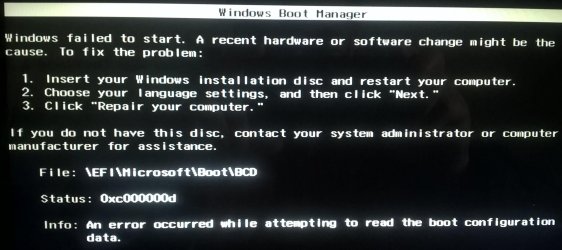
Other two PC are fine (new media fixed issues of USB3, SSD drivers when boot). but the Yoga got boot error

Status: 0xc000000d

Similar to this one.
uefi ssd USB windows 7 x64 ultimate install error 0xc000000d

This was an old issue and the solution was well-known. Then I tested Win10 media. no issue. boot fine and started to install (no plan to install, just a test). re-tested an un-mod Windows 7 media (SP1 DVD disk). same error. At this point, it's clear, no Win7 re-install on this Yoga any more after its BIOS flash. (I did so many times in past)

have to think, Lenovo last BIOS update, locked down BIOS to boot by Win10 or higher only. Ruled out Windows 7.
(only way to install Windows 7 would be, Win10 boot.wim + Win7 install.wim. Win10 boot and install no any problems at this time)

When you do BIOS flash. be careful on this issue.
 

My Computers My Computers

System One System Two

  • Computer type
    PC/Desktop
    Computer Manufacturer/Model Number
    HP Elite 800 G5
    OS
    Windows 7 Pro 64-bit
    CPU
    I7-9700
    Memory
    32 GB
  • Computer type
    Laptop
    System Manufacturer/Model Number
    ASUS UX305C
    OS
    Windows 7 Pro 64-bit

My Computers My Computers

System One System Two

  • Computer type
    PC/Desktop
    OS
    7 X64
    CPU
    i5 8400
    Motherboard
    gigabyte b365m ds3h
    Memory
    2x8gb 3200mhz
    Hard Drives
    various
    PSU
    pure power 11 400w cm
    Case
    Coolermaster
    Cooling
    cryorig m9i
  • Computer type
    PC/Desktop
    OS
    7x64
    CPU
    g5400
    Motherboard
    ga b365m ds3h
    Memory
    8gb ddr4 2400
    PSU
    xfx pro 450w
I did more google search and the reason has been even in wiki (Windows 7 is without "Windows Boot Manager". hence Ruled out after my last BIOS flash)

Unified Extensible Firmware Interface - Wikipedia

---
[h=3]Firmware problems[/h]The increased prominence of UEFI firmware in devices has also led to a number of technical problems blamed on their respective implementations.[SUP][155][/SUP]

Following the release of Windows 8 in late 2012, it was discovered that certain Lenovo computer models with Secure Boot had firmware that was hardcoded to allow only executables named "Windows Boot Manager" or "Red Hat Enterprise Linux" to load, regardless of any other setting.[SUP][156][/SUP]
 

My Computers My Computers

System One System Two

  • Computer type
    PC/Desktop
    Computer Manufacturer/Model Number
    HP Elite 800 G5
    OS
    Windows 7 Pro 64-bit
    CPU
    I7-9700
    Memory
    32 GB
  • Computer type
    Laptop
    System Manufacturer/Model Number
    ASUS UX305C
    OS
    Windows 7 Pro 64-bit
siliconbeaver

The message in your screenshot is something different.

It indicates there is a problem with the bcd file/entry in your win7 installation media.

After bootx64.efi has been started, it looks in the bcd file to get instructions.

The message indicates that Either the bcd file is damaged or missing or it does not have the correct entries.

For installation media the process is:

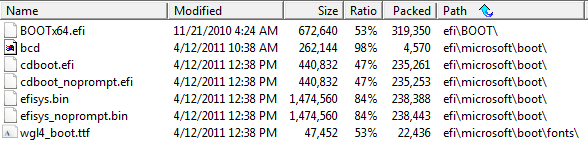
efi firmware > efi\boot\bootx64.efi > efi\microsoft\boot\bcd > sources\boot.wim windows loader

You can extract the attached efi.zip file onto your installation media usb stick ( for 64 bit win7 )

- - - Updated - - -

The standard bcd entry for installation media looks like this:
 

Attachments

  • efi.zip
    efi.zip
    1.2 MB · Views: 3
  • bootx64.efi.jpg
    bootx64.efi.jpg
    5 KB · Views: 47
  • bcd.jpg
    bcd.jpg
    7.4 KB · Views: 44
  • bootloader-entry.jpg
    bootloader-entry.jpg
    27 KB · Views: 0
Last edited:

My Computers My Computers

System One System Two

  • Computer type
    PC/Desktop
    OS
    7 X64
    CPU
    i5 8400
    Motherboard
    gigabyte b365m ds3h
    Memory
    2x8gb 3200mhz
    Hard Drives
    various
    PSU
    pure power 11 400w cm
    Case
    Coolermaster
    Cooling
    cryorig m9i
  • Computer type
    PC/Desktop
    OS
    7x64
    CPU
    g5400
    Motherboard
    ga b365m ds3h
    Memory
    8gb ddr4 2400
    PSU
    xfx pro 450w
Thanks,

tried your package of efi.zip

my original files (media from DVD disk. timestamp, for somehow, early than yours)
image.png

the over-written files by your efi.zip (only efi. those lang packs not updated.)
image.png

did boot test. failed and same error message. any further test I can try?
 

My Computers My Computers

System One System Two

  • Computer type
    PC/Desktop
    Computer Manufacturer/Model Number
    HP Elite 800 G5
    OS
    Windows 7 Pro 64-bit
    CPU
    I7-9700
    Memory
    32 GB
  • Computer type
    Laptop
    System Manufacturer/Model Number
    ASUS UX305C
    OS
    Windows 7 Pro 64-bit
See if this works
17514x64v30.iso

extract the 17514x64v30.iso iso to usb stick with usb7ice using default fat32
 

Attachments

Last edited:

My Computers My Computers

System One System Two

  • Computer type
    PC/Desktop
    OS
    7 X64
    CPU
    i5 8400
    Motherboard
    gigabyte b365m ds3h
    Memory
    2x8gb 3200mhz
    Hard Drives
    various
    PSU
    pure power 11 400w cm
    Case
    Coolermaster
    Cooling
    cryorig m9i
  • Computer type
    PC/Desktop
    OS
    7x64
    CPU
    g5400
    Motherboard
    ga b365m ds3h
    Memory
    8gb ddr4 2400
    PSU
    xfx pro 450w
I see why to use Usb7ice. Otherwise, no way to ISO to USB drive. Thanks,

Dont understand . Is that a question?

usb7ice will do the job properly
 

My Computers My Computers

System One System Two

  • Computer type
    PC/Desktop
    OS
    7 X64
    CPU
    i5 8400
    Motherboard
    gigabyte b365m ds3h
    Memory
    2x8gb 3200mhz
    Hard Drives
    various
    PSU
    pure power 11 400w cm
    Case
    Coolermaster
    Cooling
    cryorig m9i
  • Computer type
    PC/Desktop
    OS
    7x64
    CPU
    g5400
    Motherboard
    ga b365m ds3h
    Memory
    8gb ddr4 2400
    PSU
    xfx pro 450w
I thought, ISO couldn't make USB drive directly (I didn't use use7ice in past).
did google, found out usb7ice is a right tool to do the job. hence I saw why usb7ice is suggested in your post.

- - - Updated - - -

Is usb7ice slow?
almost 30-min, still in copying, about 1/2 done. or I did some wrong?

- - - Updated - - -

frustrated.
got same error message.

image.jpg
 

My Computers My Computers

System One System Two

  • Computer type
    PC/Desktop
    Computer Manufacturer/Model Number
    HP Elite 800 G5
    OS
    Windows 7 Pro 64-bit
    CPU
    I7-9700
    Memory
    32 GB
  • Computer type
    Laptop
    System Manufacturer/Model Number
    ASUS UX305C
    OS
    Windows 7 Pro 64-bit
It takes only a minute for me. Maybe I have quite a fast usb stick

Amazon.com
 

My Computers My Computers

System One System Two

  • Computer type
    PC/Desktop
    OS
    7 X64
    CPU
    i5 8400
    Motherboard
    gigabyte b365m ds3h
    Memory
    2x8gb 3200mhz
    Hard Drives
    various
    PSU
    pure power 11 400w cm
    Case
    Coolermaster
    Cooling
    cryorig m9i
  • Computer type
    PC/Desktop
    OS
    7x64
    CPU
    g5400
    Motherboard
    ga b365m ds3h
    Memory
    8gb ddr4 2400
    PSU
    xfx pro 450w
I had read those mentioned in the wiki. and several Lenovo tech forums.

Simply saying,

Lenovo BIOS has a "whitelist". If my options NOT in the list, the machine will prompt error messages. In Lenovo tech forums, especially in early years, many posts about "failures by unauthorized parts" on USB drives (not unauthorized by Lenovo white-list), replacement hdd to SSD (early white-list excluding SSD). wifi card, VGA card, as well as OS UEFI, CSM enable.
and there were many technology and discussions on how to remove the white-list (using SPI programmer, an IC hardware). some people posted code (you need to plug it into your own BIOS).
Unfortunately, the cracked BIOS only working for the user with his products ID. wouldn't work on others machine.

people reported, the latest BIOS are much harder to crack. and most demand is to remove WIFI card from white-list.

- - - Updated - - -

image.png

- - - Updated - - -

image.png
image.png
 

My Computers My Computers

System One System Two

  • Computer type
    PC/Desktop
    Computer Manufacturer/Model Number
    HP Elite 800 G5
    OS
    Windows 7 Pro 64-bit
    CPU
    I7-9700
    Memory
    32 GB
  • Computer type
    Laptop
    System Manufacturer/Model Number
    ASUS UX305C
    OS
    Windows 7 Pro 64-bit
did you try using win8 or win10 boot.wim and install win7 using winntsetup ?

win10 special repair media includes winntsetup:

1904v3.iso
 

My Computers My Computers

System One System Two

  • Computer type
    PC/Desktop
    OS
    7 X64
    CPU
    i5 8400
    Motherboard
    gigabyte b365m ds3h
    Memory
    2x8gb 3200mhz
    Hard Drives
    various
    PSU
    pure power 11 400w cm
    Case
    Coolermaster
    Cooling
    cryorig m9i
  • Computer type
    PC/Desktop
    OS
    7x64
    CPU
    g5400
    Motherboard
    ga b365m ds3h
    Memory
    8gb ddr4 2400
    PSU
    xfx pro 450w
I did.

boot no any problem. then requested Windows key prior to install. never run into this problem. how to detour?
google says, it's due to BIOS info mis-matched.

Simply install Win8.1/10, no any problem. (I am running Win8.1 now)

did you try using win8 or win10 boot.wim and install win7 using winntsetup ?

win10 special repair media includes winntsetup:

1904v3.iso
 

My Computers My Computers

System One System Two

  • Computer type
    PC/Desktop
    Computer Manufacturer/Model Number
    HP Elite 800 G5
    OS
    Windows 7 Pro 64-bit
    CPU
    I7-9700
    Memory
    32 GB
  • Computer type
    Laptop
    System Manufacturer/Model Number
    ASUS UX305C
    OS
    Windows 7 Pro 64-bit
@SIW2

Thank you for your helps and supports on my Yoga Windows 7 test.

After endless trying, I have decided to let it go Windows 10. much less issues of hardware and drivers.
New issues I can see are daily Windows 10 update and PC backup/maintenance.
 
Last edited:

My Computers My Computers

System One System Two

  • Computer type
    PC/Desktop
    Computer Manufacturer/Model Number
    HP Elite 800 G5
    OS
    Windows 7 Pro 64-bit
    CPU
    I7-9700
    Memory
    32 GB
  • Computer type
    Laptop
    System Manufacturer/Model Number
    ASUS UX305C
    OS
    Windows 7 Pro 64-bit
hi, any help appreciated 2 questions, 2 separate pcs.

1.) I want to install windows 7 on D; partition , with 10 already installed on C; partition, dell optiplex 7040 desktop.
I want to dual boot so need to install as a bootable drive.
do i need to do anything specific , I've never done this before , or just install to d: drive ?

2.) I installed windows 7 on my new pc on c: drive, Thanks to you guys.
its a Lenovo - IdeaCentre 5i Desktop - Intel Core i5 .
can I and how would I use my system image to put 10 on D: instead of back on C; I want to be able dual boot that also,
So is it possible to change win 10 system image to put on drive D;

Any help really appreciated
 

My Computers My Computers

System One System Two

  • Computer type
    PC/Desktop
    Computer Manufacturer/Model Number
    Lenovo - IdeaCentre 5i Desktop - Intel Core i5 - 8GB Memory - 1TB Hard Drive -
    OS
    windows 10 pro 64 bit
    CPU
    Intel(R) core(TM) i5-10400 CPU @ 2.90GHz
    Motherboard
    lenovo 370 A
    Memory
    Micron 8.00 GB
    Graphics Card(s)
    Intel(R) UHD Graphics 630 / Nvidia GeForce GT 1030
    Sound Card
    built in Intel corp
    Hard Drives
    Seagate sata - 1 terabyte /
  • Computer type
    PC/Desktop
    System Manufacturer/Model Number
    Dell OptiPlex 7020
    OS
    win 7 /win 10 dual boot
    CPU
    intel core i5 4570 (3.2Ghz)
    Memory
    32 Gb
    Graphics Card(s)
    Intel HD Graphics 4600
    Monitor(s) Displays
    Dell
    Hard Drives
    SSD 512Gb
1.) I want to install windows 7 on D; partition , with 10 already installed on C; partition, dell optiplex 7040 desktop.
I want to dual boot so need to install as a bootable drive.
do i need to do anything specific , I've never done this before , or just install to d: drive ?

I would do it from within your win10.

Run winntsetup. View attachment WinNTSetup_v524.zip
browse to the win7 install.wim
select the edition you want to install in the dropdown
browse to the partition you want to install win 7 onto.


2.) I installed windows 7 on my new pc on c: drive, Thanks to you guys.
its a Lenovo - IdeaCentre 5i Desktop - Intel Core i5 .
can I and how would I use my system image to put 10 on D: instead of back on C; I want to be able dual boot that also,
So is it possible to change win 10 system image to put on drive D;

yes. you can do it from booted win10 media using wbadmin command.

OR you can load the .vhdx file in diskgenius and clone it to the target partition.
Free Download DiskGenius Online


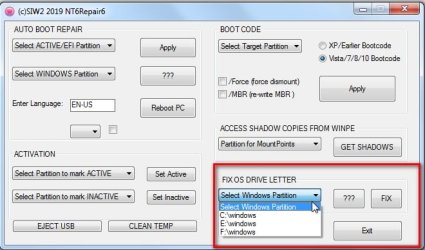
Then Fix the os letter and then add a boot menu entry using nt6repair View attachment nt6repair9x86.zip

Select the target Windows partition in the dropdown, then click FIX

nt6repair6-FIXOSLETTER.jpg
 
Last edited:

My Computers My Computers

System One System Two

  • Computer type
    PC/Desktop
    OS
    7 X64
    CPU
    i5 8400
    Motherboard
    gigabyte b365m ds3h
    Memory
    2x8gb 3200mhz
    Hard Drives
    various
    PSU
    pure power 11 400w cm
    Case
    Coolermaster
    Cooling
    cryorig m9i
  • Computer type
    PC/Desktop
    OS
    7x64
    CPU
    g5400
    Motherboard
    ga b365m ds3h
    Memory
    8gb ddr4 2400
    PSU
    xfx pro 450w
SIW2
thanks again, i will try on both pcs,
but due to work and etc
wont be able to try until next weekend
what is booted win10 media using wbadmin command ?
please
also I'm using the win 10 system image I created while that HDD was in pc
thanks as usual.

oh okay will try it
 

My Computers My Computers

System One System Two

  • Computer type
    PC/Desktop
    Computer Manufacturer/Model Number
    Lenovo - IdeaCentre 5i Desktop - Intel Core i5 - 8GB Memory - 1TB Hard Drive -
    OS
    windows 10 pro 64 bit
    CPU
    Intel(R) core(TM) i5-10400 CPU @ 2.90GHz
    Motherboard
    lenovo 370 A
    Memory
    Micron 8.00 GB
    Graphics Card(s)
    Intel(R) UHD Graphics 630 / Nvidia GeForce GT 1030
    Sound Card
    built in Intel corp
    Hard Drives
    Seagate sata - 1 terabyte /
  • Computer type
    PC/Desktop
    System Manufacturer/Model Number
    Dell OptiPlex 7020
    OS
    win 7 /win 10 dual boot
    CPU
    intel core i5 4570 (3.2Ghz)
    Memory
    32 Gb
    Graphics Card(s)
    Intel HD Graphics 4600
    Monitor(s) Displays
    Dell
    Hard Drives
    SSD 512Gb
boot win10 install media. Go to command prompt. Type wbadmin /? for help.

If you prefer not to use commands , you can try the other method in my previous post.
 

My Computers My Computers

System One System Two

  • Computer type
    PC/Desktop
    OS
    7 X64
    CPU
    i5 8400
    Motherboard
    gigabyte b365m ds3h
    Memory
    2x8gb 3200mhz
    Hard Drives
    various
    PSU
    pure power 11 400w cm
    Case
    Coolermaster
    Cooling
    cryorig m9i
  • Computer type
    PC/Desktop
    OS
    7x64
    CPU
    g5400
    Motherboard
    ga b365m ds3h
    Memory
    8gb ddr4 2400
    PSU
    xfx pro 450w
SIW2
thanks again
boot win10 install media = its a system image unable to boot to it ,
will try the other way and let you know tyvvvm
 

My Computers My Computers

System One System Two

  • Computer type
    PC/Desktop
    Computer Manufacturer/Model Number
    Lenovo - IdeaCentre 5i Desktop - Intel Core i5 - 8GB Memory - 1TB Hard Drive -
    OS
    windows 10 pro 64 bit
    CPU
    Intel(R) core(TM) i5-10400 CPU @ 2.90GHz
    Motherboard
    lenovo 370 A
    Memory
    Micron 8.00 GB
    Graphics Card(s)
    Intel(R) UHD Graphics 630 / Nvidia GeForce GT 1030
    Sound Card
    built in Intel corp
    Hard Drives
    Seagate sata - 1 terabyte /
  • Computer type
    PC/Desktop
    System Manufacturer/Model Number
    Dell OptiPlex 7020
    OS
    win 7 /win 10 dual boot
    CPU
    intel core i5 4570 (3.2Ghz)
    Memory
    32 Gb
    Graphics Card(s)
    Intel HD Graphics 4600
    Monitor(s) Displays
    Dell
    Hard Drives
    SSD 512Gb
Back
Top