
You are using an out of date browser. It may not display this or other websites correctly.
You should upgrade or use an alternative browser.
You should upgrade or use an alternative browser.
Update your Win 7 installation media
- Thread starter SIW2
- Start date

Thankyou for the suggestion. I will try to find those KB numbers, I assume from Microsoft website?
My Computer
- Computer type
- PC/Desktop
- Computer Manufacturer/Model Number
- Home built Asus
- OS
- Windows 7 Pro 64bit
- CPU
- Intel® Core™ i3 Processor 3.7ghz
- Motherboard
- Asus Intel Prime H270-Pro LGA 1151 ATX
- Memory
- Crucial (2x8GB) DDR4-2400
- Graphics Card(s)
- on board
- Monitor(s) Displays
- BENQ GL2450HE (24 inch)
- Screen Resolution
- 1980 x 1080
- Hard Drives
- C drive is SSD Crucial 500gb mostly for the OS
- PSU
- Corsair CX750
- Case
- A big black one
- Cooling
- Cooler Master Hyper TX3i on the processor
- Keyboard
- Logitech k2700 wireless
- Mouse
- Logitech M575 wireless trackball
- Internet Speed
- Just under about 7mb/s on a good day
- Antivirus
- Avira Free
- Browser
- Opera, Firefox, Chrome, and Supermium
My Computer
- Computer type
- PC/Desktop
- OS
- Windows 7 Home Premium
Thanks. Found them and they installed easily. Now I managed to get better functionality accessing from the internet, my installation of Avira stuck because I didn't have dotnet 4.8. I am trying to get that from Microsoft at the moment. That might be a key to getting a lot of other things installed.
.Net 4.8 is now in place and Avira is now squeezing through the eye of the needle (downloading). For some reason I can't find one in English
but once it is on board I can at least do more browsing safely to find an English version.
Next will be to figure out how to get the rest of the cleaned up Updates that are in the SiMPLiX package.
.Net 4.8 is now in place and Avira is now squeezing through the eye of the needle (downloading). For some reason I can't find one in English
but once it is on board I can at least do more browsing safely to find an English version.
Next will be to figure out how to get the rest of the cleaned up Updates that are in the SiMPLiX package.
Last edited:
My Computer
- Computer type
- PC/Desktop
- Computer Manufacturer/Model Number
- Home built Asus
- OS
- Windows 7 Pro 64bit
- CPU
- Intel® Core™ i3 Processor 3.7ghz
- Motherboard
- Asus Intel Prime H270-Pro LGA 1151 ATX
- Memory
- Crucial (2x8GB) DDR4-2400
- Graphics Card(s)
- on board
- Monitor(s) Displays
- BENQ GL2450HE (24 inch)
- Screen Resolution
- 1980 x 1080
- Hard Drives
- C drive is SSD Crucial 500gb mostly for the OS
- PSU
- Corsair CX750
- Case
- A big black one
- Cooling
- Cooler Master Hyper TX3i on the processor
- Keyboard
- Logitech k2700 wireless
- Mouse
- Logitech M575 wireless trackball
- Internet Speed
- Just under about 7mb/s on a good day
- Antivirus
- Avira Free
- Browser
- Opera, Firefox, Chrome, and Supermium
SIW2
Happy New Year!
Hey in another thread you posted a link to UpdatePack for 17-5-15 for me but when I ran the 7UPv64I and it integrated everything, the log shows the UpdatePack to be 19.5.15 instead of 17.5.15. Could you post another link for the 2017 file or is the log indicating something else?
Much appreciated for sure!
Happy New Year!
Hey in another thread you posted a link to UpdatePack for 17-5-15 for me but when I ran the 7UPv64I and it integrated everything, the log shows the UpdatePack to be 19.5.15 instead of 17.5.15. Could you post another link for the 2017 file or is the log indicating something else?
Much appreciated for sure!
Attachments
My Computer
- Computer type
- PC/Desktop
- Computer Manufacturer/Model Number
- Leo625`s Amazing Time Killers
- OS
- Win 7 Ultimate X64
- CPU
- AMD RYZEN 5 2600
- Motherboard
- GIGABYTE X470 AORUS Gaming 7 WIFI
- Memory
- MEM 2Gx8|G.SKILL AEGIS
- Graphics Card(s)
- NVIDIA 750 Ti
- Sound Card
- MB
- Monitor(s) Displays
- LG
- Screen Resolution
- 1920 X 1080
- Hard Drives
- WD 1TB Black
- PSU
- Corsair 750
- Case
- Old and Sturdy
- Cooling
- 3 - 120MM Fans and CoolerMaster Hyper 612 on CPU
- Keyboard
- Logitech wired and lighted
- Mouse
- Logitech wireless
- Browser
- Firefox

- Local time
- 12:25 PM
- Messages
- 16,784
Do you mean this 17.5.15.zip
My Computers
System One System Two
-
- Computer type
- PC/Desktop
- OS
- 7 X64
- CPU
- i5 8400
- Motherboard
- gigabyte b365m ds3h
- Memory
- 2x8gb 3200mhz
- Hard Drives
- various
- PSU
- pure power 11 400w cm
- Case
- Coolermaster
- Cooling
- cryorig m9i
-
- Computer type
- PC/Desktop
- OS
- 7x64
- CPU
- g5400
- Motherboard
- ga b365m ds3h
- Memory
- 8gb ddr4 2400
- PSU
- xfx pro 450w
Yes Sir! I used this zip file with 7UPv64I and the log confuses me because it shows 19.5.15.
My Computer
- Computer type
- PC/Desktop
- Computer Manufacturer/Model Number
- Leo625`s Amazing Time Killers
- OS
- Win 7 Ultimate X64
- CPU
- AMD RYZEN 5 2600
- Motherboard
- GIGABYTE X470 AORUS Gaming 7 WIFI
- Memory
- MEM 2Gx8|G.SKILL AEGIS
- Graphics Card(s)
- NVIDIA 750 Ti
- Sound Card
- MB
- Monitor(s) Displays
- LG
- Screen Resolution
- 1920 X 1080
- Hard Drives
- WD 1TB Black
- PSU
- Corsair 750
- Case
- Old and Sturdy
- Cooling
- 3 - 120MM Fans and CoolerMaster Hyper 612 on CPU
- Keyboard
- Logitech wired and lighted
- Mouse
- Logitech wireless
- Browser
- Firefox
- Local time
- 12:25 PM
- Messages
- 16,784
SHA1: 7D6BE34F4F3CBB64007184832460130F47CA009B

scroll toward the bottom of your logfile and you will see it is correct:
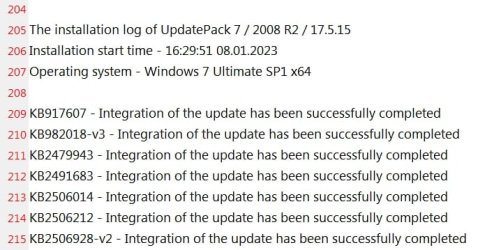
scroll toward the bottom of your logfile and you will see it is correct:
Last edited:
My Computers
System One System Two
-
- Computer type
- PC/Desktop
- OS
- 7 X64
- CPU
- i5 8400
- Motherboard
- gigabyte b365m ds3h
- Memory
- 2x8gb 3200mhz
- Hard Drives
- various
- PSU
- pure power 11 400w cm
- Case
- Coolermaster
- Cooling
- cryorig m9i
-
- Computer type
- PC/Desktop
- OS
- 7x64
- CPU
- g5400
- Motherboard
- ga b365m ds3h
- Memory
- 8gb ddr4 2400
- PSU
- xfx pro 450w
LOL! I should have known... loose nut between the floor and the keyboard. My apologies and Thanks!
My Computer
- Computer type
- PC/Desktop
- Computer Manufacturer/Model Number
- Leo625`s Amazing Time Killers
- OS
- Win 7 Ultimate X64
- CPU
- AMD RYZEN 5 2600
- Motherboard
- GIGABYTE X470 AORUS Gaming 7 WIFI
- Memory
- MEM 2Gx8|G.SKILL AEGIS
- Graphics Card(s)
- NVIDIA 750 Ti
- Sound Card
- MB
- Monitor(s) Displays
- LG
- Screen Resolution
- 1920 X 1080
- Hard Drives
- WD 1TB Black
- PSU
- Corsair 750
- Case
- Old and Sturdy
- Cooling
- 3 - 120MM Fans and CoolerMaster Hyper 612 on CPU
- Keyboard
- Logitech wired and lighted
- Mouse
- Logitech wireless
- Browser
- Firefox
- Local time
- 12:25 PM
- Messages
- 16,784
For anybody running win7 on intel 8th gen , the biostar igpu drivers in post #3 work fine.
Snappy driver will offer a more recent igpu driver version 5077 which also works fine
either snappy driver installer will do it
Snappy Driver Installer - Install and Update Drivers for Free
or
Snappy Driver Installer Origin – The original driver installation tool for Windows.
Snappy driver will offer a more recent igpu driver version 5077 which also works fine
either snappy driver installer will do it
Snappy Driver Installer - Install and Update Drivers for Free
or
Snappy Driver Installer Origin – The original driver installation tool for Windows.
My Computers
System One System Two
-
- Computer type
- PC/Desktop
- OS
- 7 X64
- CPU
- i5 8400
- Motherboard
- gigabyte b365m ds3h
- Memory
- 2x8gb 3200mhz
- Hard Drives
- various
- PSU
- pure power 11 400w cm
- Case
- Coolermaster
- Cooling
- cryorig m9i
-
- Computer type
- PC/Desktop
- OS
- 7x64
- CPU
- g5400
- Motherboard
- ga b365m ds3h
- Memory
- 8gb ddr4 2400
- PSU
- xfx pro 450w
- Local time
- 4:25 AM
- Messages
- 15
For anybody running win7 on intel 8th gen , the biostar igpu drivers in post #3 work fine..
Does this driver package have drivers for an Intel M-5Y70/5Y71 (5th generation) SDIO? I have a Dell 7140 that i would love to run Win 7 on. I have all the drivers needed for Win7 except SDIO without which I can not use the touch screen at all. TIA!
My Computer
- Computer type
- PC/Desktop
- OS
- Windows 7 Pro 64bit
- Local time
- 12:25 PM
- Messages
- 16,784
I have no idea. Try it and find out.
My Computers
System One System Two
-
- Computer type
- PC/Desktop
- OS
- 7 X64
- CPU
- i5 8400
- Motherboard
- gigabyte b365m ds3h
- Memory
- 2x8gb 3200mhz
- Hard Drives
- various
- PSU
- pure power 11 400w cm
- Case
- Coolermaster
- Cooling
- cryorig m9i
-
- Computer type
- PC/Desktop
- OS
- 7x64
- CPU
- g5400
- Motherboard
- ga b365m ds3h
- Memory
- 8gb ddr4 2400
- PSU
- xfx pro 450w
HI,
I had almost given up with trying to install W7 on my laptop with an NVMe SSD when I came across this thread. Thank you for the 7UPv47 programme. What joy as W7 installed but, on restarting I received an error message:
windows cannot verify the digital signature for this file
the file is: \windows\system32\drivers\msnvme.sys
I was able to disable driver signing enforcement but on restarting, after a few seconds, there was a blue screen event followed by a shut down.
I am not familiar with DISM but if you could give me some instructions on how to delete the offending file I would be most grateful.
Thank you
I had almost given up with trying to install W7 on my laptop with an NVMe SSD when I came across this thread. Thank you for the 7UPv47 programme. What joy as W7 installed but, on restarting I received an error message:
windows cannot verify the digital signature for this file
the file is: \windows\system32\drivers\msnvme.sys
If disabling driver signing enforcement doesnt work, you can try deleting the msnvme driver.
I was able to disable driver signing enforcement but on restarting, after a few seconds, there was a blue screen event followed by a shut down.
I am not familiar with DISM but if you could give me some instructions on how to delete the offending file I would be most grateful.
Thank you
My Computer
- Computer type
- PC/Desktop
- OS
- W 7 Ultimate x64
- Local time
- 12:25 PM
- Messages
- 16,784
Is anybody else getting that message ?
I am unable to reproduce it.
I am unable to reproduce it.
Last edited:
My Computers
System One System Two
-
- Computer type
- PC/Desktop
- OS
- 7 X64
- CPU
- i5 8400
- Motherboard
- gigabyte b365m ds3h
- Memory
- 2x8gb 3200mhz
- Hard Drives
- various
- PSU
- pure power 11 400w cm
- Case
- Coolermaster
- Cooling
- cryorig m9i
-
- Computer type
- PC/Desktop
- OS
- 7x64
- CPU
- g5400
- Motherboard
- ga b365m ds3h
- Memory
- 8gb ddr4 2400
- PSU
- xfx pro 450w
Very useful suggestion but pretty generic like billions already available on the net.I'm not reading all 135 pages thus far, but if it hasn't been mentioned already, NTLite can slipstream updates with a few clicks of the mouse...
The problem is where to find the latest update package for Windows 7.
I know there was one updated to 01/2020 but I can't find it.
And once (if) I find it, will NTLite integrate the package in a Windows 7 SP1 ISO image?
- - - Updated - - -
Could you please tell what is the difference between these universal USB3 drivers (are SATA drivers universal too?) and the ones that are specific or came with the motherboard?Here is a way to get your installation media up to date: Includes "universal" usb3 , sata drivers, nvme drivers and MS nvme updates
Please bare with me, does the Simplix Pack include the latest Win7 security updates PLUS the above drivers or it's only about security?NOTE: It is not required to use the simplix update pack. If you only want to integrate usb3 and nvme support, Run 7updater.cmd without simplix update pack present.
My Computer
- Computer type
- PC/Desktop
- Computer Manufacturer/Model Number
- Custom build
- OS
- Windows 7 Ultimate x64
- CPU
- Intel i5-6600K 3.50GHz
- Motherboard
- Asus Pro Z170 Gaming
- Memory
- Corsair DDR4 2x8GB
- Graphics Card(s)
- MSI GeForce GTX1070 Gaming X
- Sound Card
- On board Realtek
- Monitor(s) Displays
- Dell SP2309W
- Screen Resolution
- 1920x1080
- Hard Drives
- OS Samsung 850 EVO 500GB SATA III SSD
2x Hitachi Deskstar 1GB SATA data drives
1x Western Digital Caviar Black 1TB SATA data drive
- PSU
- Corsair HX650W
- Case
- CoolerMaster CM 690 III
- Cooling
- Coolermaster Hyper 212 EVO 1x200mm 1x140mm 2x120mm case fan
- Keyboard
- Logitech usb keyboard
- Mouse
- Logitech G500 $27 bargain :)
- Internet Speed
- ADSL2
- Antivirus
- Microsoft Security Essential, MalwareBytes
- Browser
- SRWare Iron, Internet Explorer
- Other Info
- Very happy with this buid.
I struggled a lot to find all compatible parts since I wanted an Intel 1151 based motherboard so to be able to install Windows 7.
I chose this case because it has amazing air flow, it's sturdy and looks good.
The case included 1x 200mm front and 1x 120mm back fans, I added 1x 200mm on the top and 1x120 bottom fans and modded the panels with black stockings for women s
- Local time
- 12:25 PM
- Messages
- 16,784
universal USB3 drivers
it is win8 usb3 stack.
they work with almost everything, but not the matisse usb3 on recent amd cpus - see post#3
My Computers
System One System Two
-
- Computer type
- PC/Desktop
- OS
- 7 X64
- CPU
- i5 8400
- Motherboard
- gigabyte b365m ds3h
- Memory
- 2x8gb 3200mhz
- Hard Drives
- various
- PSU
- pure power 11 400w cm
- Case
- Coolermaster
- Cooling
- cryorig m9i
-
- Computer type
- PC/Desktop
- OS
- 7x64
- CPU
- g5400
- Motherboard
- ga b365m ds3h
- Memory
- 8gb ddr4 2400
- PSU
- xfx pro 450w
Is anybody else getting that message ?
I am unable to reproduce it.
Post 1193 et seq on this thread refers.
My Computer
- Computer type
- PC/Desktop
- OS
- W 7 Ultimate x64
Very useful suggestion but pretty generic like billions already available on the net.
The problem is where to find the latest update package for Windows 7.
I know there was one updated to 01/2020 but I can't find it.
And once (if) I find it, will NTLite integrate the package in a Windows 7 SP1 ISO image?
Generic? You wanna clarify that statement so that I can make a better response?
Read here: Download Windows Updates – NTLite
- - - Updated - - -
HI,
I had almost given up with trying to install W7 on my laptop with an NVMe SSD when I came across this thread. Thank you for the 7UPv47 programme. What joy as W7 installed but, on restarting I received an error message:
windows cannot verify the digital signature for this file
the file is: \windows\system32\drivers\msnvme.sys
I had nothing but frustration trying to get Windows 7 on an NVMe drive. I knew I had to slipstream the driver and I did so from Micron's (Crucial) provided NVMe driver off their website using NTLite. BUT! Windows complained about the Sig and faltered. Being thoroughly pissed MS requires driver Sigs and how this was nothing but a PITA, I had to do more research on the issue. What I found out was that there were two Microsoft updates that allowed Windows 7 to use an NVMe drive. I also found out you can use bcdedit I think it is to nullify driver Sig enforcement. But that'll throw a watermark on the lower right of your screen. Totally BS if you ask me. Though, there is a hack to delete that watermark.
The ultimate solution that worked for me was to slipstream those two updates, but! I STILL kept getting a driver Sig fail relating to the Crucial driver I had slipstreamed previously. So I had to hunt it down in my Windows install with Everything.exe and delete it from the system32 folder I think it was. Now Windows didn't complain about the Sig for that Crucial driver. Oddly enough however, the Crucial driver WAS signed! So I don't know what Windows (Microsoft) wanted in terms of a proper signed driver.
So, having said all this, if you do in fact have those two necessary NVMe updates (I don't remember their KB numbers) but still have that driver installed, find that DLL and trash it. The two updates alone should provide the necessary functionality for an NVMe drive under Windows 7. Funny thing is though once you install those two updates and boot in and go to Device Manager you'll see the NVMe driver dated to 2006! The hell? The Crucial driver never worked but this one does?!
That driver you have is probably your BSOD/Sig issue.
Edit-
SIW2 has the updates for NVMe functionality in his signature below his posts.
- - - Updated - - -
Is anybody else getting that message ?
I am unable to reproduce it.
Here's the relevancy to that. Update your Win 7 installation media
My Computer
- Computer type
- PC/Desktop
- OS
- Windows 7 Ultimate x64
F22 Simpilot,
Thank you for your post.
I used everything to find the msnvme.sys file. It found 3 in 7UPv47 and I deleted them.
I then reran 7UPv47 (with the now deleted files) and followed all the screenshots until the end.
I inserted the flash drive and installed windows 7 but on reboot I still received the "cannot verify the digital signature..." message for the msnvme.sys driver.
Very few people seem to be having this issue but all suggestions welcomed!
Thank you for your post.
I used everything to find the msnvme.sys file. It found 3 in 7UPv47 and I deleted them.
I then reran 7UPv47 (with the now deleted files) and followed all the screenshots until the end.
I inserted the flash drive and installed windows 7 but on reboot I still received the "cannot verify the digital signature..." message for the msnvme.sys driver.
Very few people seem to be having this issue but all suggestions welcomed!
My Computer
- Computer type
- PC/Desktop
- OS
- W 7 Ultimate x64
Similar threads
- Replies
- 18
- Views
- 7K

- Replies
- 12
- Views
- 7K

- Replies
- 1
- Views
- 4K

- Replies
- 5
- Views
- 6K

