[Urgent] Computer not working normally please help

My Computer My Computer

Computer type
PC/Desktop
Computer Manufacturer/Model Number
home built
OS
Multi-Boot W7_Pro_x64 W8.1_Pro_x64 W10_Pro_x64 +Linux_VMs +Chromium_VM
CPU
AMD Athlon II x4 620
Motherboard
Gigabyte GA-MA785G-UD3H
Memory
6GB GSkill DDR2 800
Graphics Card(s)
AMD 4670 GPU + AMD 4200 IGP
Sound Card
on board Realtek ALC889A
Monitor(s) Displays
RCA 40" LCD TV, Insignia 32" LCD TV, HP 15" LCD monitor
Screen Resolution
1680 x 1050
Hard Drives
OCZ Vertex 3 120GB,
Samsung F3 1TB (3),
Several others - WD, Seagate, Hitachi, ...
PSU
Corsair 500 W
Case
Rosewill mid tower
Cooling
CM 90mm rifle
Keyboard
Gyration wireless, Logitech wireless, Dell USB wired
Mouse
Gyration wireless, Logitech wireless, V7 USB wired
Internet Speed
Spectrum - 100Mbps D / 10Mbps U
Antivirus
Avast, MBAM3, EMET, WinPatrol
Browser
Pale Moon, Firefox, IE
Other Info
2 multi-boot PC's
Mainly HTPC/Office/Gen purpose (no gaming).
Trendnet USB KVM.
LG DVD burner/Blue Ray Player.
Tray system for removable SATA backup drives.

Not currently OCd, under-volted.
I use Hybrid sleep, rarely re-boot or shutdown.

Hauppauge HD-PVR, Avermedia PCIe TV Tuner, Hauppauge PCI TV Tuner.
Did you disable everything at startup except AV to test it? Do that now.

When you get error messages, immediately google the text to see how others have resolved them. No need to wait a day for someone here to do it for you, if they will.

I concur with David on what I would do next if the other steps don't pan out.

You're investing in more than a Clean Reinstall Windows 7 if you stick with only the tools and methods given because you will have the best install of Win7 one can have for as long as you do.
 

My Computer My Computer

Computer type
PC/Desktop
Computer Manufacturer/Model Number
home built
OS
Multi-Boot W7_Pro_x64 W8.1_Pro_x64 W10_Pro_x64 +Linux_VMs +Chromium_VM
CPU
AMD Athlon II x4 620
Motherboard
Gigabyte GA-MA785G-UD3H
Memory
6GB GSkill DDR2 800
Graphics Card(s)
AMD 4670 GPU + AMD 4200 IGP
Sound Card
on board Realtek ALC889A
Monitor(s) Displays
RCA 40" LCD TV, Insignia 32" LCD TV, HP 15" LCD monitor
Screen Resolution
1680 x 1050
Hard Drives
OCZ Vertex 3 120GB,
Samsung F3 1TB (3),
Several others - WD, Seagate, Hitachi, ...
PSU
Corsair 500 W
Case
Rosewill mid tower
Cooling
CM 90mm rifle
Keyboard
Gyration wireless, Logitech wireless, Dell USB wired
Mouse
Gyration wireless, Logitech wireless, V7 USB wired
Internet Speed
Spectrum - 100Mbps D / 10Mbps U
Antivirus
Avast, MBAM3, EMET, WinPatrol
Browser
Pale Moon, Firefox, IE
Other Info
2 multi-boot PC's
Mainly HTPC/Office/Gen purpose (no gaming).
Trendnet USB KVM.
LG DVD burner/Blue Ray Player.
Tray system for removable SATA backup drives.

Not currently OCd, under-volted.
I use Hybrid sleep, rarely re-boot or shutdown.

Hauppauge HD-PVR, Avermedia PCIe TV Tuner, Hauppauge PCI TV Tuner.
I just spent last hour reinstalling OS. It just finished and I can't believe this the problem still persists. Now I believe its related to graphics card / hardware this is bad :(
 

My Computer My Computer

Computer type
PC/Desktop
Computer Manufacturer/Model Number
Custom Build
OS
Windows 7 Home Premium 64 Bit
CPU
Intel(R) Core(TM) i5-4670K CPU @ 3.40GHz
Motherboard
MSI Z87-G45 GAMING (MS-7821)
Memory
8.00 GB
Graphics Card(s)
NVIDIA GeForce GTX 760
Sound Card
(1) NVIDIA High Definition Audio (2) Realtek High Definiti
Screen Resolution
1680 x 1050
In your SF specs for Hard Drives it shows you use Raid, is that how your PC is setup ?

SF_Specs_02.PNG

Do you have a "custom built and/or custom configured" PC ?
 

My Computer My Computer

Computer type
PC/Desktop
Computer Manufacturer/Model Number
home built
OS
Multi-Boot W7_Pro_x64 W8.1_Pro_x64 W10_Pro_x64 +Linux_VMs +Chromium_VM
CPU
AMD Athlon II x4 620
Motherboard
Gigabyte GA-MA785G-UD3H
Memory
6GB GSkill DDR2 800
Graphics Card(s)
AMD 4670 GPU + AMD 4200 IGP
Sound Card
on board Realtek ALC889A
Monitor(s) Displays
RCA 40" LCD TV, Insignia 32" LCD TV, HP 15" LCD monitor
Screen Resolution
1680 x 1050
Hard Drives
OCZ Vertex 3 120GB,
Samsung F3 1TB (3),
Several others - WD, Seagate, Hitachi, ...
PSU
Corsair 500 W
Case
Rosewill mid tower
Cooling
CM 90mm rifle
Keyboard
Gyration wireless, Logitech wireless, Dell USB wired
Mouse
Gyration wireless, Logitech wireless, V7 USB wired
Internet Speed
Spectrum - 100Mbps D / 10Mbps U
Antivirus
Avast, MBAM3, EMET, WinPatrol
Browser
Pale Moon, Firefox, IE
Other Info
2 multi-boot PC's
Mainly HTPC/Office/Gen purpose (no gaming).
Trendnet USB KVM.
LG DVD burner/Blue Ray Player.
Tray system for removable SATA backup drives.

Not currently OCd, under-volted.
I use Hybrid sleep, rarely re-boot or shutdown.

Hauppauge HD-PVR, Avermedia PCIe TV Tuner, Hauppauge PCI TV Tuner.

I got a new computer spec is attached to this post ( Screenshot). Should I run some tests on hardware? because that really should be the case if this is happening after a full OS reinstall.
 

Attachments

  • asdasd.png
    asdasd.png
    30.3 KB · Views: 1

My Computer My Computer

Computer type
PC/Desktop
Computer Manufacturer/Model Number
Custom Build
OS
Windows 7 Home Premium 64 Bit
CPU
Intel(R) Core(TM) i5-4670K CPU @ 3.40GHz
Motherboard
MSI Z87-G45 GAMING (MS-7821)
Memory
8.00 GB
Graphics Card(s)
NVIDIA GeForce GTX 760
Sound Card
(1) NVIDIA High Definition Audio (2) Realtek High Definiti
Screen Resolution
1680 x 1050
I just noticed something weird with my video card please take a look at this.
 

My Computer My Computer

Computer type
PC/Desktop
Computer Manufacturer/Model Number
Custom Build
OS
Windows 7 Home Premium 64 Bit
CPU
Intel(R) Core(TM) i5-4670K CPU @ 3.40GHz
Motherboard
MSI Z87-G45 GAMING (MS-7821)
Memory
8.00 GB
Graphics Card(s)
NVIDIA GeForce GTX 760
Sound Card
(1) NVIDIA High Definition Audio (2) Realtek High Definiti
Screen Resolution
1680 x 1050
I had to upload it to imgur because the attachment is bugging out on me too
i67MJ5t.png
 

My Computer My Computer

Computer type
PC/Desktop
Computer Manufacturer/Model Number
Custom Build
OS
Windows 7 Home Premium 64 Bit
CPU
Intel(R) Core(TM) i5-4670K CPU @ 3.40GHz
Motherboard
MSI Z87-G45 GAMING (MS-7821)
Memory
8.00 GB
Graphics Card(s)
NVIDIA GeForce GTX 760
Sound Card
(1) NVIDIA High Definition Audio (2) Realtek High Definiti
Screen Resolution
1680 x 1050
:doh:
You don't even have a video driver, that's the placeholder the installer gives before a Display driver is delivered.

So you didn't follow Clean Reinstall Windows 7 especially the critical steps printed in red for how drivers are delivered!?

I specifically suggested to use this opportunity to get it perfect and you ended up without even installing a display driver on an issue about display problems.

May I suggest you go back over Clean Reinstall Windows 7 and this time follow the steps, especially for drivers which are printed in red so you can't really miss them unless you never even looked at them to begin with.

I will repeat: You will get and keep a perfect install to the exact extent you follow the steps. Over a million consumers have used it without a single complaint or returning with a single problem. So it's really up to you.
 
I was just going to reply i'm totally lost...
Thanks Greg for your post and info !
 

My Computer My Computer

Computer type
PC/Desktop
Computer Manufacturer/Model Number
home built
OS
Multi-Boot W7_Pro_x64 W8.1_Pro_x64 W10_Pro_x64 +Linux_VMs +Chromium_VM
CPU
AMD Athlon II x4 620
Motherboard
Gigabyte GA-MA785G-UD3H
Memory
6GB GSkill DDR2 800
Graphics Card(s)
AMD 4670 GPU + AMD 4200 IGP
Sound Card
on board Realtek ALC889A
Monitor(s) Displays
RCA 40" LCD TV, Insignia 32" LCD TV, HP 15" LCD monitor
Screen Resolution
1680 x 1050
Hard Drives
OCZ Vertex 3 120GB,
Samsung F3 1TB (3),
Several others - WD, Seagate, Hitachi, ...
PSU
Corsair 500 W
Case
Rosewill mid tower
Cooling
CM 90mm rifle
Keyboard
Gyration wireless, Logitech wireless, Dell USB wired
Mouse
Gyration wireless, Logitech wireless, V7 USB wired
Internet Speed
Spectrum - 100Mbps D / 10Mbps U
Antivirus
Avast, MBAM3, EMET, WinPatrol
Browser
Pale Moon, Firefox, IE
Other Info
2 multi-boot PC's
Mainly HTPC/Office/Gen purpose (no gaming).
Trendnet USB KVM.
LG DVD burner/Blue Ray Player.
Tray system for removable SATA backup drives.

Not currently OCd, under-volted.
I use Hybrid sleep, rarely re-boot or shutdown.

Hauppauge HD-PVR, Avermedia PCIe TV Tuner, Hauppauge PCI TV Tuner.
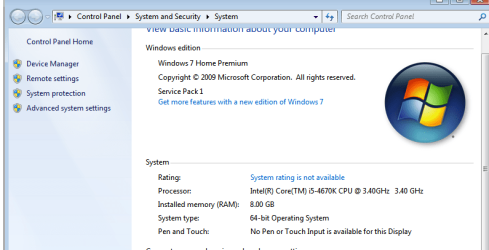
I apologize for being ignorant but I've reinstalled OS like this 5 times nad it always worked out fine. I really think my video card is burnt out or something. I put int my CD, restart my PC and boot from CD and it would allow me to install clean like that. I read the tutorial but im not sure what else I should be doing :/

Edit: Sorry I understand now.
 

My Computer My Computer

Computer type
PC/Desktop
Computer Manufacturer/Model Number
Custom Build
OS
Windows 7 Home Premium 64 Bit
CPU
Intel(R) Core(TM) i5-4670K CPU @ 3.40GHz
Motherboard
MSI Z87-G45 GAMING (MS-7821)
Memory
8.00 GB
Graphics Card(s)
NVIDIA GeForce GTX 760
Sound Card
(1) NVIDIA High Definition Audio (2) Realtek High Definiti
Screen Resolution
1680 x 1050
Do I need to reinstall OS again? because step 7 comes after the OS is installed and I just fresh installed.
 

My Computer My Computer

Computer type
PC/Desktop
Computer Manufacturer/Model Number
Custom Build
OS
Windows 7 Home Premium 64 Bit
CPU
Intel(R) Core(TM) i5-4670K CPU @ 3.40GHz
Motherboard
MSI Z87-G45 GAMING (MS-7821)
Memory
8.00 GB
Graphics Card(s)
NVIDIA GeForce GTX 760
Sound Card
(1) NVIDIA High Definition Audio (2) Realtek High Definiti
Screen Resolution
1680 x 1050
The whole point of doing a diagnostic reinstall is to follow the tutorial so you know it's perfect. If you reinstalled in an hour and complain about the same problem when you don't even have your video driver installed yet, then you're obviously not doing it anywhere near correctly.

All installs are not equal. Most do a haphazard install and then wonder why they have less than perfect Win7 performance or chronic problems. This is the chance to get an absolutely perfect install. Do you still not get that?
 
Yes I understand I will reinstall OS again and immediately open the tutorial to follow rest of the steps. Sorry for the trouble.
 

My Computer My Computer

Computer type
PC/Desktop
Computer Manufacturer/Model Number
Custom Build
OS
Windows 7 Home Premium 64 Bit
CPU
Intel(R) Core(TM) i5-4670K CPU @ 3.40GHz
Motherboard
MSI Z87-G45 GAMING (MS-7821)
Memory
8.00 GB
Graphics Card(s)
NVIDIA GeForce GTX 760
Sound Card
(1) NVIDIA High Definition Audio (2) Realtek High Definiti
Screen Resolution
1680 x 1050
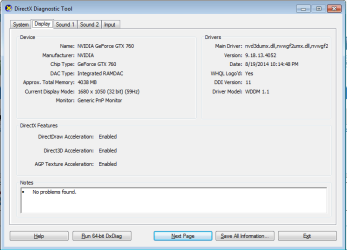
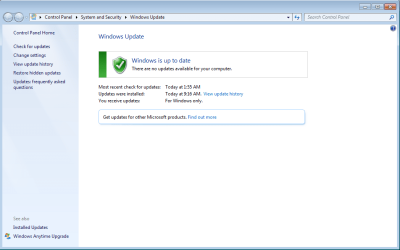
Sorry Gret and David, I apologize for last night. I followed the tutorial exactly and did a clean OS install. As soon as windows was done installing I Immediately set up my internet and ran all the windows updates. The new DXDiag is attached to this post. I kept on running windows updates till there's no more. However, even after running all the updates i'm still having the same problem.

* Image distortion is still happening,
* Web pages are still having problems being loaded unless I refresh it once or twice.
* Nvidia told me there's a new update for the driver I tried downloading it and when its completed it tells me it's corrupted. // same issue from before
* I had problems running installer for anti-virus // when I run it nothing happens.
* I tried downloading Avira, AVG, MSE and after its done downloading sometimes it tells me download fail network error. Or when its done downloading, I run installer it tells me file is corrupt.

Sorry for the trouble I hope you guys will continue helping me :(
 

Attachments

  • dx.png
    dx.png
    12.8 KB · Views: 0
  • update.png
    update.png
    28 KB · Views: 0

My Computer My Computer

Computer type
PC/Desktop
Computer Manufacturer/Model Number
Custom Build
OS
Windows 7 Home Premium 64 Bit
CPU
Intel(R) Core(TM) i5-4670K CPU @ 3.40GHz
Motherboard
MSI Z87-G45 GAMING (MS-7821)
Memory
8.00 GB
Graphics Card(s)
NVIDIA GeForce GTX 760
Sound Card
(1) NVIDIA High Definition Audio (2) Realtek High Definiti
Screen Resolution
1680 x 1050
Did you happen to notice at what point the problem began again, or was it happening all along as you set up your install? This is important to try to isolate if there is a program or setting that is causing this and not hardware as is looking increasingly likely.

Do you a display chip on your mobo or access to another video card to try running without that card to see if the problem persists? Is the card still under one-year included warranty so you can contact their Tech Support to test it and possible RMA?

Can you reinstall the video card to make sure it is seating correctly?

Have you tested your RAM and hard drive from Troubleshooting Steps for Windows 7 ? You can also stress test your CPU with Prime95 - MajorGeeks and the video card with FurMark: VGA Stress Test.

Another test is to run a boot disk, even with the hard drive unplugged, to see if the issue replicates because this will eliminate the OS and hard drive as the cause with certainty.

As you get into these tests we will call on any hardware experts needed to help you more in depth. David is excellent with hardware, while my specialty is the install (as you found out ;)). With close interactive cooperation the issue will be solved.

I have some free time today so if you want to install TeamViewer Download and install at all defaults, private message back to me the Teamviewer Your ID and password, leave it open on the desktop, I will connect and look it over for you.
 
I checked it immediately after I get to desktop after the reinstall and it happened immediately. I sent you team viewer information. I really thank you for taking your time to help me ty so much.
 

My Computer My Computer

Computer type
PC/Desktop
Computer Manufacturer/Model Number
Custom Build
OS
Windows 7 Home Premium 64 Bit
CPU
Intel(R) Core(TM) i5-4670K CPU @ 3.40GHz
Motherboard
MSI Z87-G45 GAMING (MS-7821)
Memory
8.00 GB
Graphics Card(s)
NVIDIA GeForce GTX 760
Sound Card
(1) NVIDIA High Definition Audio (2) Realtek High Definiti
Screen Resolution
1680 x 1050
Can you try a different video card or the internal graphics (if you have it) as Greg suggested?

Greg pretty much has everything covered you can use to test hardware - HD, RAM, etc.
The only other things i see that might be a problem that could be tested is the PSU and motherboard.

If you can remove the video card and use internal graphics i think that would reduce the power draw on the PSU, it might make a difference.

For testing a PSU it's probably best to take it to a reputable PC Repair shop an have them test it.
Maybe a PC shop can run diagnostics on the motherboard to see if there are any issues, i don't know, i've never done that.

What i usually do is buy a new PSU, or try one of my old spares i have laying around.
It's not what i recommend as it involves a lot of wiring, and possibly even removing components and parts to get access needed to be able to replace the PSU.

In some ways it seems like a hardware issue, but i don't understand how a faulty GPU would cause a corrupt download ???

I believe faulty RAM, HD, PSU, or MB could cause all kinds of issues.

How old is the PC and is it still under warranty ?
Do you know the make and model of the PSU ?
 

My Computer My Computer

Computer type
PC/Desktop
Computer Manufacturer/Model Number
home built
OS
Multi-Boot W7_Pro_x64 W8.1_Pro_x64 W10_Pro_x64 +Linux_VMs +Chromium_VM
CPU
AMD Athlon II x4 620
Motherboard
Gigabyte GA-MA785G-UD3H
Memory
6GB GSkill DDR2 800
Graphics Card(s)
AMD 4670 GPU + AMD 4200 IGP
Sound Card
on board Realtek ALC889A
Monitor(s) Displays
RCA 40" LCD TV, Insignia 32" LCD TV, HP 15" LCD monitor
Screen Resolution
1680 x 1050
Hard Drives
OCZ Vertex 3 120GB,
Samsung F3 1TB (3),
Several others - WD, Seagate, Hitachi, ...
PSU
Corsair 500 W
Case
Rosewill mid tower
Cooling
CM 90mm rifle
Keyboard
Gyration wireless, Logitech wireless, Dell USB wired
Mouse
Gyration wireless, Logitech wireless, V7 USB wired
Internet Speed
Spectrum - 100Mbps D / 10Mbps U
Antivirus
Avast, MBAM3, EMET, WinPatrol
Browser
Pale Moon, Firefox, IE
Other Info
2 multi-boot PC's
Mainly HTPC/Office/Gen purpose (no gaming).
Trendnet USB KVM.
LG DVD burner/Blue Ray Player.
Tray system for removable SATA backup drives.

Not currently OCd, under-volted.
I use Hybrid sleep, rarely re-boot or shutdown.

Hauppauge HD-PVR, Avermedia PCIe TV Tuner, Hauppauge PCI TV Tuner.
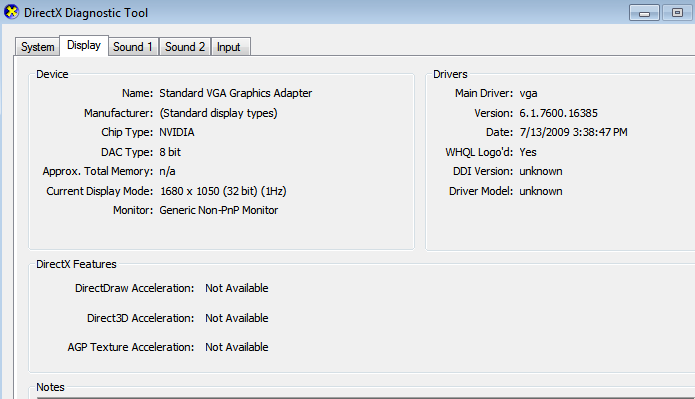
It's a custom build with no drivers on builder's website, but the driver disk was 2013 so we used it to get in the missing Drivers. It's rebooting now then I'll check Updates for any driver's it prefers to compare.

Waiting awhile for TV to notify so I hope Updates and driver reboot didn't fail. If so you may need to boot into System Recovery Options
to System Restore to before the last Updates batch. Let us know condition first.
 
Back
Top