urgent help with hard disk doing wrong . please

Edi77

New member
Local time
4:47 PM
Messages
25
Hi
Please, please,
NEED HELP WITH my hard disk that dont work and dont shows on my computer . tried to use the mini tools partition . but its shown like a - bad disk and not recover nothing.
Who know what can I do?
 

My Computer

Computer type
PC/Desktop
Computer Manufacturer/Model Number
sony
OS
windows 7 premium 64bit
Memory
4.00 gb
Antivirus
norton
Browser
google chrumo

My Computer

Computer type
PC/Desktop
Computer Manufacturer/Model Number
Own build (new) Desk1 / Asus ROG Win 7 / Desk2 1st build
OS
Desk1 7 Home Prem / Desk2 10 Pro / Main lap Asus ROG 10 Pro 2 laptop Toshiba 7 Pro Asus P2520 7 & 10
CPU
Desk1 i5 3750K / Laptop i7 GTX 860M / Desk2 i5 2500
Motherboard
Desk1 Asus P877-V / Desk2 Gigabyte H67 UD3H / Laptop ?
Memory
Desk1 8GB (1866) / Desk2 16GB (1333) / Laptop 8Gb DDR3
Graphics Card(s)
Desk 1& 2NVidia GTX 650 & Laptops on board Intel
Sound Card
Desk 1 & 2 -XONAR DG Realtek High Def audio Laptop
Monitor(s) Displays
Desk 1 Benq HD 2450 / Desk2 Philips 24" / Laptop 17.5"
Screen Resolution
1920x1080 D1 & D2 & Laptop 1
Hard Drives
Desk1 Samsung 120GB 830 SSD
Asus ROG 256GB 850 Pro SSD
Desk2 Samsung 840 256 SSD
Toshiba 120GB EVO
PSU
Desk 1 Corsair HX 1050/ Laptop ? / Desk 2 Corsair HX 650
Case
Desk 1 Cooler HAF XM ? Toshiba laptop / Desk2 Coolermaster
Cooling
Fans on all Desk1 -2 Desk2 - all Coolermasters 5 Laptop ?
Keyboard
Desk 1 MS Sidewinder X6 Desk 2 MS Sidewinder X 4
Mouse
Desk 1&2 - Gigabyte MS 900 gamer - laptop - Logitec wireless
Internet Speed
ADSL2+
Other Info
One other Desktop (tester) and spare Toshba laptop both with SSD's
Running Kaspersky 2016 ISS on all machines config'd identically
Logitec audio stereo systems on each machine (x3)
Canon MG5250MFC
Router/modem TP-Link running WPA2SK
Hi
Thanks for you answering.
I got a lot of data on!!! too many and too important!!!
must save it and don't know how!!

I can see it on the task bar near the sound (safety...) and I tried the mini tools software but it says 'bad disk'
What should I do next?
 

My Computer

Computer type
PC/Desktop
Computer Manufacturer/Model Number
sony
OS
windows 7 premium 64bit
Memory
4.00 gb
Antivirus
norton
Browser
google chrumo
Hello Edi77!

Is your drive shown anywhere in your OS at all? In Disk Management? Can you post a screenshot?
Is it detected in BIOS? Also, what kind of hard drive is it, internal, external etc.?
Answering these question could help troubleshoot faster and better!

Regards

CK_WD
 

My Computer

Computer type
PC/Desktop
OS
Windows 7 Home Premium x64
Hi,
My device is WD MY PASSPORT.
Before I used the mini tools program it was on Disk management, but now - not.
I will try find it on BIOS hope to know how.
 

My Computer

Computer type
PC/Desktop
Computer Manufacturer/Model Number
sony
OS
windows 7 premium 64bit
Memory
4.00 gb
Antivirus
norton
Browser
google chrumo
Its shown on the 'safety remove...'
 

My Computer

Computer type
PC/Desktop
Computer Manufacturer/Model Number
sony
OS
windows 7 premium 64bit
Memory
4.00 gb
Antivirus
norton
Browser
google chrumo
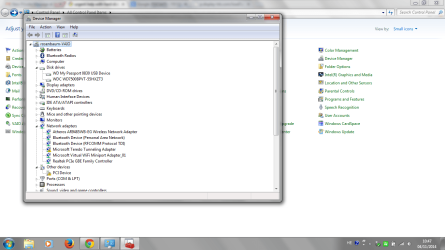
I do have it on the device manager
 

Attachments

  • 123.png
    123.png
    66.9 KB · Views: 3

My Computer

Computer type
PC/Desktop
Computer Manufacturer/Model Number
sony
OS
windows 7 premium 64bit
Memory
4.00 gb
Antivirus
norton
Browser
google chrumo

My Computer

Computer type
PC/Desktop
Computer Manufacturer/Model Number
Own build (new) Desk1 / Asus ROG Win 7 / Desk2 1st build
OS
Desk1 7 Home Prem / Desk2 10 Pro / Main lap Asus ROG 10 Pro 2 laptop Toshiba 7 Pro Asus P2520 7 & 10
CPU
Desk1 i5 3750K / Laptop i7 GTX 860M / Desk2 i5 2500
Motherboard
Desk1 Asus P877-V / Desk2 Gigabyte H67 UD3H / Laptop ?
Memory
Desk1 8GB (1866) / Desk2 16GB (1333) / Laptop 8Gb DDR3
Graphics Card(s)
Desk 1& 2NVidia GTX 650 & Laptops on board Intel
Sound Card
Desk 1 & 2 -XONAR DG Realtek High Def audio Laptop
Monitor(s) Displays
Desk 1 Benq HD 2450 / Desk2 Philips 24" / Laptop 17.5"
Screen Resolution
1920x1080 D1 & D2 & Laptop 1
Hard Drives
Desk1 Samsung 120GB 830 SSD
Asus ROG 256GB 850 Pro SSD
Desk2 Samsung 840 256 SSD
Toshiba 120GB EVO
PSU
Desk 1 Corsair HX 1050/ Laptop ? / Desk 2 Corsair HX 650
Case
Desk 1 Cooler HAF XM ? Toshiba laptop / Desk2 Coolermaster
Cooling
Fans on all Desk1 -2 Desk2 - all Coolermasters 5 Laptop ?
Keyboard
Desk 1 MS Sidewinder X6 Desk 2 MS Sidewinder X 4
Mouse
Desk 1&2 - Gigabyte MS 900 gamer - laptop - Logitec wireless
Internet Speed
ADSL2+
Other Info
One other Desktop (tester) and spare Toshba laptop both with SSD's
Running Kaspersky 2016 ISS on all machines config'd identically
Logitec audio stereo systems on each machine (x3)
Canon MG5250MFC
Router/modem TP-Link running WPA2SK
Okay, we could go somewhere from what you've shown, Edi. You don't see the drive in Disk Management, is that right? Since your WD My Passport is displayed in Device Manager it means that Windows 7 recognizes that the hardware exists in your computer, which is good. However, it's not enabled and so Windows can't assign system resources to it and that would be why you can't use it. Try this:
1. Open Device Manager
2. Right click on the drive
3. Choose Properties
4. Click on the Driver Tab
5. Click on Enable and then OK
If this doesn't work, I would suggest you first try the most obvious troubleshooting – use a different cable, try another port (best USB 3.0). Still, we would really appreciate a screenshot of your Disk Management where all your hard drives are shown with their partitions, file systems and status. Connect the drive and make the shot to see what's happening there.
Also you could scan it with the WD Data Lifeguard Tool:
WD Support / Downloads / Other Products / Data Lifeguard Diagnostic for Windows

This way we could determine if it's a hardware damage you have, though it could be a lost partition.

Regards

CK_WD
 
Last edited:

My Computer

Computer type
PC/Desktop
OS
Windows 7 Home Premium x64
I'll go with CK on this mate and I cannot see why it is recognised in Vista and not 7.

I suppose another option is to try it on a another machine and if - format it if you have nothing of any consequence on it then try it back in the 7 machine.

Just out of pure interest and to eliminate any possibility of the OS being a bit out of whack run these.

http://www.sevenforums.com/tutorials/1538-sfc-scannow-command-system-file-checker.html

http://www.sevenforums.com/tutorials/433-disk-check.html < use the /f and /r options in Option 2 ifnecessary
 

My Computer

Computer type
PC/Desktop
Computer Manufacturer/Model Number
Own build (new) Desk1 / Asus ROG Win 7 / Desk2 1st build
OS
Desk1 7 Home Prem / Desk2 10 Pro / Main lap Asus ROG 10 Pro 2 laptop Toshiba 7 Pro Asus P2520 7 & 10
CPU
Desk1 i5 3750K / Laptop i7 GTX 860M / Desk2 i5 2500
Motherboard
Desk1 Asus P877-V / Desk2 Gigabyte H67 UD3H / Laptop ?
Memory
Desk1 8GB (1866) / Desk2 16GB (1333) / Laptop 8Gb DDR3
Graphics Card(s)
Desk 1& 2NVidia GTX 650 & Laptops on board Intel
Sound Card
Desk 1 & 2 -XONAR DG Realtek High Def audio Laptop
Monitor(s) Displays
Desk 1 Benq HD 2450 / Desk2 Philips 24" / Laptop 17.5"
Screen Resolution
1920x1080 D1 & D2 & Laptop 1
Hard Drives
Desk1 Samsung 120GB 830 SSD
Asus ROG 256GB 850 Pro SSD
Desk2 Samsung 840 256 SSD
Toshiba 120GB EVO
PSU
Desk 1 Corsair HX 1050/ Laptop ? / Desk 2 Corsair HX 650
Case
Desk 1 Cooler HAF XM ? Toshiba laptop / Desk2 Coolermaster
Cooling
Fans on all Desk1 -2 Desk2 - all Coolermasters 5 Laptop ?
Keyboard
Desk 1 MS Sidewinder X6 Desk 2 MS Sidewinder X 4
Mouse
Desk 1&2 - Gigabyte MS 900 gamer - laptop - Logitec wireless
Internet Speed
ADSL2+
Other Info
One other Desktop (tester) and spare Toshba laptop both with SSD's
Running Kaspersky 2016 ISS on all machines config'd identically
Logitec audio stereo systems on each machine (x3)
Canon MG5250MFC
Router/modem TP-Link running WPA2SK
Actually ICit2lol, OP has mentioned a few times that he has a lot of very important information on that external WD My Passport hard drive. So reformatting is out of the question in this case. Also, I think he's using one OS – Windows 7 (for which in my previous post I wrote Vista by mistake, but now have corrected it, so I apologize).
I hope he'll run the WD DLG Quick and Extended tests to see what kind of errors (and if) it will show for the drive.
But so far it seems like a lost partition to me, though, I would like to see a screen shot of Drive Management and continue from there.

Cheers!

CK_WD
 

My Computer

Computer type
PC/Desktop
OS
Windows 7 Home Premium x64
I tried to go through the Device Manager -- but it doesn't give the option - Enable - only Disable.
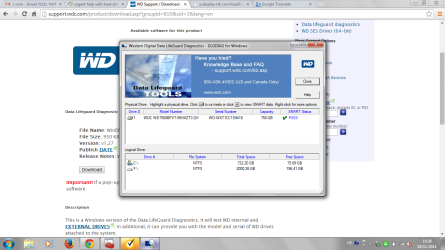
The WD program show this picture :
 

Attachments

  • 111.png
    111.png
    82.8 KB · Views: 1

My Computer

Computer type
PC/Desktop
Computer Manufacturer/Model Number
sony
OS
windows 7 premium 64bit
Memory
4.00 gb
Antivirus
norton
Browser
google chrumo
I think the faulty drive is F - shown down and it doesn't give the option to go there
 

My Computer

Computer type
PC/Desktop
Computer Manufacturer/Model Number
sony
OS
windows 7 premium 64bit
Memory
4.00 gb
Antivirus
norton
Browser
google chrumo
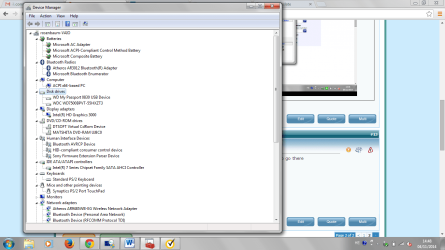
The picture of Device Manager
 

Attachments

  • 112.png
    112.png
    65.1 KB · Views: 2

My Computer

Computer type
PC/Desktop
Computer Manufacturer/Model Number
sony
OS
windows 7 premium 64bit
Memory
4.00 gb
Antivirus
norton
Browser
google chrumo
And also I tried with another computer and doesn't work too
 

My Computer

Computer type
PC/Desktop
Computer Manufacturer/Model Number
sony
OS
windows 7 premium 64bit
Memory
4.00 gb
Antivirus
norton
Browser
google chrumo
Got news
I can sea the passport on My Computer with all the folders. But -- I can't get in !!!!
It says
 

Attachments

  • 222.png
    222.png
    86 KB · Views: 1

My Computer

Computer type
PC/Desktop
Computer Manufacturer/Model Number
sony
OS
windows 7 premium 64bit
Memory
4.00 gb
Antivirus
norton
Browser
google chrumo
Hi Edi!

Well, if it gives you the option to Disable then that means it's already enabled. There's nothing to do from Device Manager, basically.
Also, it seems that the drive is physically fine. At least the WD software shows so.
What's your external drive's total capacity? How have you connected it?
The top window shows the drives in your system that are available for testing, all with details. In the bottom window, the partition information for the selected drive is displayed. Yes, F: should be the faulty one but the capacities aren't matching.
The picture from Device Manager is good but we need a Disk Management screenshot. There, all your drives are shown with their partitions, health status and file systems.
If you take the picture (I'm sorry for any misunderstanding) I think I will be able to give you more detail.

Regards,

CK_WD
 
Last edited:

My Computer

Computer type
PC/Desktop
OS
Windows 7 Home Premium x64
Hi Edi77,

You have shown that F:\My Video is not accessible. Are you able to access the other folders?

There is no point in giving information in bits and pieces overlooking the information sought.

Please post a screenshot of Windows Disk Management as already sought by others. Your screenshot should be a full Window of Disk Management hiding the Console Tree and Action Pane.

http://www.sevenforums.com/tutorials/274797-disk-management-post-screen-capture-image.html

Also post a screenshot of how the drive looks in Partition Wizard.
 

My Computer

OS
Windows 7 Home Premium 32 bit
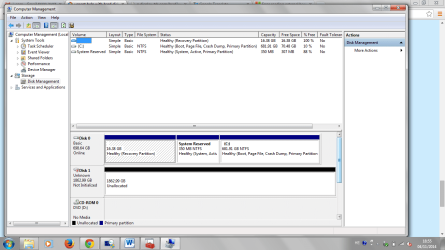
The picture of the Computer management is :
 

My Computer

Computer type
PC/Desktop
Computer Manufacturer/Model Number
sony
OS
windows 7 premium 64bit
Memory
4.00 gb
Antivirus
norton
Browser
google chrumo
This is the picture of the Computer management:
 

Attachments

  • 12.png
    12.png
    59.3 KB · Views: 4

My Computer

Computer type
PC/Desktop
Computer Manufacturer/Model Number
sony
OS
windows 7 premium 64bit
Memory
4.00 gb
Antivirus
norton
Browser
google chrumo
Back
Top