urgent help with hard disk doing wrong . please

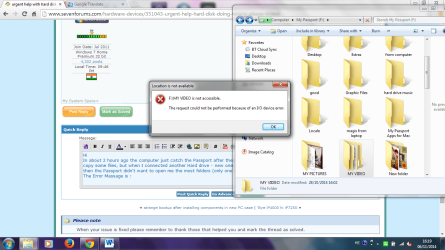
And now the error changed (in all folders)
 

Attachments

  • 444.png
    444.png
    90.1 KB · Views: 4
Last edited:

My Computer

Computer type
PC/Desktop
Computer Manufacturer/Model Number
sony
OS
windows 7 premium 64bit
Memory
4.00 gb
Antivirus
norton
Browser
google chrumo
My observations:

Earlier your external WD Passport drive appeared in your computer as F: drive. But your F: My video was elsewhere and that device was not ready. (switched off ?? Removed from that location??)

In your latest screenshot what you are seeing is an F: drive which is elsewhere and that in turn looks for a drive elsewhere. :). Your external drive's drive letter in the present location has been stolen - I guess - and so it is not getting its drive letter.

With these observations, I leave it to CKWD and ICit2lol to break their heads on it :D.
 

My Computer

OS
Windows 7 Home Premium 32 bit
Actually ICit2lol, OP has mentioned a few times that he has a lot of very important information on that external WD My Passport hard drive. So reformatting is out of the question in this case. Also, I think he's using one OS – Windows 7 (for which in my previous post I wrote Vista by mistake, but now have corrected it, so I apologize).
I hope he'll run the WD DLG Quick and Extended tests to see what kind of errors (and if) it will show for the drive.
But so far it seems like a lost partition to me, though, I would like to see a screen shot of Drive Management and continue from there.

Cheers!

CK_WD
Ok missed that in my rush so if that is the situation then Edi might be better off using this before anything else

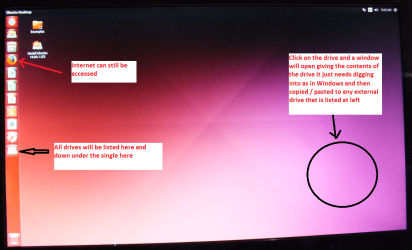
BOOTABLE UBUNTU

Make a bootable Ubuntu disk http://www.ubuntu.com/download

Set the BIOS to boot from theoptical when the machine boots it will show you a screen with TRY or INSTALL> select TRYnot INSTALL

When it is finished - it takes verylittle time you will get a screen like in the pic .

Open the drive you want > Userand dig down until you get to the data / settings you may be able to copy /paste the material you want to an external source or other installed drive doingthis.

I am not sure if it will but I haverecovered tons of data etc using this method both on "dead" or justplain drives that you cannot get data from using Windows. It does not get absolutely everything but usually what one wants.
 

Attachments

  • UBUNTU SCREEN X2.PNG
    UBUNTU SCREEN X2.PNG
    272.7 KB · Views: 0

My Computer

Computer type
PC/Desktop
Computer Manufacturer/Model Number
Own build (new) Desk1 / Asus ROG Win 7 / Desk2 1st build
OS
Desk1 7 Home Prem / Desk2 10 Pro / Main lap Asus ROG 10 Pro 2 laptop Toshiba 7 Pro Asus P2520 7 & 10
CPU
Desk1 i5 3750K / Laptop i7 GTX 860M / Desk2 i5 2500
Motherboard
Desk1 Asus P877-V / Desk2 Gigabyte H67 UD3H / Laptop ?
Memory
Desk1 8GB (1866) / Desk2 16GB (1333) / Laptop 8Gb DDR3
Graphics Card(s)
Desk 1& 2NVidia GTX 650 & Laptops on board Intel
Sound Card
Desk 1 & 2 -XONAR DG Realtek High Def audio Laptop
Monitor(s) Displays
Desk 1 Benq HD 2450 / Desk2 Philips 24" / Laptop 17.5"
Screen Resolution
1920x1080 D1 & D2 & Laptop 1
Hard Drives
Desk1 Samsung 120GB 830 SSD
Asus ROG 256GB 850 Pro SSD
Desk2 Samsung 840 256 SSD
Toshiba 120GB EVO
PSU
Desk 1 Corsair HX 1050/ Laptop ? / Desk 2 Corsair HX 650
Case
Desk 1 Cooler HAF XM ? Toshiba laptop / Desk2 Coolermaster
Cooling
Fans on all Desk1 -2 Desk2 - all Coolermasters 5 Laptop ?
Keyboard
Desk 1 MS Sidewinder X6 Desk 2 MS Sidewinder X 4
Mouse
Desk 1&2 - Gigabyte MS 900 gamer - laptop - Logitec wireless
Internet Speed
ADSL2+
Other Info
One other Desktop (tester) and spare Toshba laptop both with SSD's
Running Kaspersky 2016 ISS on all machines config'd identically
Logitec audio stereo systems on each machine (x3)
Canon MG5250MFC
Router/modem TP-Link running WPA2SK
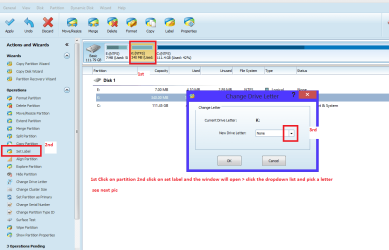
By the by the drive letter can be added with Partition Wizard if it has been lost as Jumnaji says.
If you want CK I will duck out as I don't feel I am contributing that much here in this thread.
 

My Computer

Computer type
PC/Desktop
Computer Manufacturer/Model Number
Own build (new) Desk1 / Asus ROG Win 7 / Desk2 1st build
OS
Desk1 7 Home Prem / Desk2 10 Pro / Main lap Asus ROG 10 Pro 2 laptop Toshiba 7 Pro Asus P2520 7 & 10
CPU
Desk1 i5 3750K / Laptop i7 GTX 860M / Desk2 i5 2500
Motherboard
Desk1 Asus P877-V / Desk2 Gigabyte H67 UD3H / Laptop ?
Memory
Desk1 8GB (1866) / Desk2 16GB (1333) / Laptop 8Gb DDR3
Graphics Card(s)
Desk 1& 2NVidia GTX 650 & Laptops on board Intel
Sound Card
Desk 1 & 2 -XONAR DG Realtek High Def audio Laptop
Monitor(s) Displays
Desk 1 Benq HD 2450 / Desk2 Philips 24" / Laptop 17.5"
Screen Resolution
1920x1080 D1 & D2 & Laptop 1
Hard Drives
Desk1 Samsung 120GB 830 SSD
Asus ROG 256GB 850 Pro SSD
Desk2 Samsung 840 256 SSD
Toshiba 120GB EVO
PSU
Desk 1 Corsair HX 1050/ Laptop ? / Desk 2 Corsair HX 650
Case
Desk 1 Cooler HAF XM ? Toshiba laptop / Desk2 Coolermaster
Cooling
Fans on all Desk1 -2 Desk2 - all Coolermasters 5 Laptop ?
Keyboard
Desk 1 MS Sidewinder X6 Desk 2 MS Sidewinder X 4
Mouse
Desk 1&2 - Gigabyte MS 900 gamer - laptop - Logitec wireless
Internet Speed
ADSL2+
Other Info
One other Desktop (tester) and spare Toshba laptop both with SSD's
Running Kaspersky 2016 ISS on all machines config'd identically
Logitec audio stereo systems on each machine (x3)
Canon MG5250MFC
Router/modem TP-Link running WPA2SK
Hi again all!

Well @jumanji, thank you I suppose for the challenge!

@Icit2lol, please, I can't be asking or telling such a thing! It is so much better when more people think together and exchange ideas and troubleshoot. If you feel you'd like to step down, that would be all your decision. :)

Looking better at the screenshots from WD DLG tests I was sure something doesn't fit and the “Location is not available”-error from Edi's last screenshot confirmed it.

@Edi77, this issue is most likely caused by bad registry entries, corrupted or broken ACLs (access control list). The idea would be to change the drive letter as this is probably what's confusing your system. This usually needs to be done by right clicking on the hard drive's partition in Computer management and selecting Change Drive Letter and Paths. A further action to take would be to take ownership of the drive through Assign the Current User Account as Owner of the Drive. This would eliminate restrictions on accessing the drive.
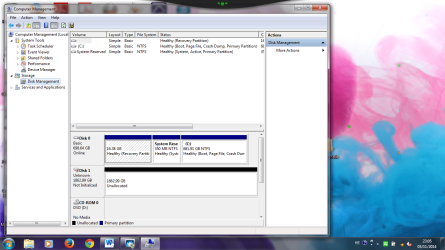
But the problem here is that your drive is at the same time showing in Computer Management as Unallocated, which means that it doesn't have partitions or a file system and basically, you shouldn't be able to change the letter from there.
So in my opinion you'd have two options: you could use recovery software for your partitions or take on @Jumanji and @ICit2lol's advices and use a software to get back the lost drive letter.

But the problematic drive letter doesn't explain the at the same time Unallocated disk. So if anyone would have further ideas, Jumanji, Icit2lol?

CK_WD
 

My Computer

Computer type
PC/Desktop
OS
Windows 7 Home Premium x64
CK both of those things can be fixed with Partition Wizard unless there is something very wrong with the machine or the OS. See pics and if not sure post back
 

Attachments

  • MINI TOOL 1.PNG
    MINI TOOL 1.PNG
    36.9 KB · Views: 1
  • MINI TOOL 2.PNG
    MINI TOOL 2.PNG
    52.5 KB · Views: 1

My Computer

Computer type
PC/Desktop
Computer Manufacturer/Model Number
Own build (new) Desk1 / Asus ROG Win 7 / Desk2 1st build
OS
Desk1 7 Home Prem / Desk2 10 Pro / Main lap Asus ROG 10 Pro 2 laptop Toshiba 7 Pro Asus P2520 7 & 10
CPU
Desk1 i5 3750K / Laptop i7 GTX 860M / Desk2 i5 2500
Motherboard
Desk1 Asus P877-V / Desk2 Gigabyte H67 UD3H / Laptop ?
Memory
Desk1 8GB (1866) / Desk2 16GB (1333) / Laptop 8Gb DDR3
Graphics Card(s)
Desk 1& 2NVidia GTX 650 & Laptops on board Intel
Sound Card
Desk 1 & 2 -XONAR DG Realtek High Def audio Laptop
Monitor(s) Displays
Desk 1 Benq HD 2450 / Desk2 Philips 24" / Laptop 17.5"
Screen Resolution
1920x1080 D1 & D2 & Laptop 1
Hard Drives
Desk1 Samsung 120GB 830 SSD
Asus ROG 256GB 850 Pro SSD
Desk2 Samsung 840 256 SSD
Toshiba 120GB EVO
PSU
Desk 1 Corsair HX 1050/ Laptop ? / Desk 2 Corsair HX 650
Case
Desk 1 Cooler HAF XM ? Toshiba laptop / Desk2 Coolermaster
Cooling
Fans on all Desk1 -2 Desk2 - all Coolermasters 5 Laptop ?
Keyboard
Desk 1 MS Sidewinder X6 Desk 2 MS Sidewinder X 4
Mouse
Desk 1&2 - Gigabyte MS 900 gamer - laptop - Logitec wireless
Internet Speed
ADSL2+
Other Info
One other Desktop (tester) and spare Toshba laptop both with SSD's
Running Kaspersky 2016 ISS on all machines config'd identically
Logitec audio stereo systems on each machine (x3)
Canon MG5250MFC
Router/modem TP-Link running WPA2SK
Nope, I am not posing any challenge to anyone.:)

The screenshots posted by the OP are confusing and may be under different conditions. I thought the OP will respond to my last post - post #22 and from thereon you can takeover. ( Unfortunately I do not have much time to devote to this forum and can't follow up if I enter. So I always think twice before entering any thread.)

Since the OP hasn't responded to my last post, I shall pose the following questions and ask for more information that will clear - I presume :) - the confusion and you/we may be in a better position to help him.

1. What is the capacity of your Western Digital external Passport drive? Can you read the label and give us the exact nomenclature/Part number?

(It does appear in Device Manager and as drive F in your computer. Computer>My Passport F: (post #16). But there is no corresponding Windows Disk Management shot from which we could have known its capacity. In your post #20 it shows as an Unallocated 2TB drive in Windows Disk Management.:confused:. In post#21 further down it shows as Computer > F: And as far as I can see it is not physically present in your computer or so I think.:confused::confused:. No Device Manager/WDM screenshot. We remain as confused ever :))

2. Now please do this: Disconnect your computer from Internet - by whatever means.Make sure that there is no auto reconnect. Shut down your computer. Plug out your Passport external drive as also any other external drive/s, pen drives, USB hubs.docks. Boot your computer and then plug in only your WD external drive. Post a screenshot of Device Manager and Windows Disk Management. ( After taking out the screenshots you can reconnect to the internet and post them or post from another computer. During any further troubleshooting as advised by anyone here , you will disconnect from the internet and then only plug in your external drive to carryout any recommended action..)

@ICit2, As I was composing this post your post appeared.. Anyway it does not matter and I am going ahead and posting it. No modifications needed in my post. But as I said I shall only peep in once in a while without any further interference. :)
 
Last edited:

My Computer

OS
Windows 7 Home Premium 32 bit
Hey,

@Icit2lol, this could hopefully be of real help! Since the traditional ways wouldn't very much work, if OP's screenshots are as they seem, this is just golden!
@jumanji, saying that it was a challenge was actually with all good intention, @Edi77's screenshots were a bit confusing and you are probably right about the different conditions. Still, I can't quite wrap my head around what would cause the WD external hard drive to be shown as Unallocated and at the same time show folders with “Location is not available”-error?
Your explanation and @Icit2lol's photos are quite thorough and I hope they'll for sure help Edi!
@Edi77, these are some good tips and troubleshooting we/they've come up with, I strongly advise you to try them and post results here in the thread. :)
Just to clarify, I hope I haven't left the impression that no other help but mine is needed here, quite the contrary! So thank you @Icit2lol and @jumanji!
@Edi77, I should apologize for the chaotic discussion but as I think you've understood, it can be quite confusing and difficult sometimes troubleshooting like this, but most times in the end the air is cleared and the problem solved. I hope we'll be able to solve your problem too! :)
So after you follow the steps provided, please post the results!

Best of luck!
CK_WD
 

My Computer

Computer type
PC/Desktop
OS
Windows 7 Home Premium x64
jumanji -
1. WD My Passport
Ultra
Part Number
4064-7015107-000
JEMSHE044140JE
Lot Number
 

My Computer

Computer type
PC/Desktop
Computer Manufacturer/Model Number
sony
OS
windows 7 premium 64bit
Memory
4.00 gb
Antivirus
norton
Browser
google chrumo
capacity???? What is the capacity of your Western Digital external Passport drive?
 

My Computer

OS
Windows 7 Home Premium 32 bit
Ok. I am going off to sleep now.

Please do as in 2. in my previous post and post the screenshots.

No internet. Only your WD external drive. Screenshots of Device Manager and Windows Disk Management.
 

My Computer

OS
Windows 7 Home Premium 32 bit
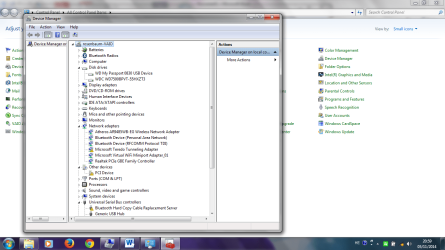
Took me a very long time until the laptop started. This the pics
 

Attachments

  • 12.png
    12.png
    83.8 KB · Views: 2
  • 13.png
    13.png
    137.2 KB · Views: 3

My Computer

Computer type
PC/Desktop
Computer Manufacturer/Model Number
sony
OS
windows 7 premium 64bit
Memory
4.00 gb
Antivirus
norton
Browser
google chrumo
OK, Run MiniTools Partition Wizard and post the screenshot of the screen.

If your external drive is shown as Unallocated in Partition Wizard, then run Partition Recovery Wizard and Quick scan.

If your external drive is shown as "Bad Disk" then quit Partition Wizard and run Datalifeguard Diagnostics for Windows. Do the Short Test and then Extended Test. The extended Test will take a long time. It will repair your Disk, if possible. Please note down the time taken for the long test.

During all these tests, keep your internet off to keep away any networked computers.

Keep us posted.
 

My Computer

OS
Windows 7 Home Premium 32 bit
What is the capacity of your external WD My Passport, @Edi77? Are you positive it's a My Passport Ultra and not Essential or something else?
In post #12 OP presents screenshots of the WD DLG results. There you can see how capacities somehow mismatch. In the lower drive F is shown as ~2TB but in the physical drives' section it's shown as 750 GB.
So, Edi, if you haven't done the Extended test with DLG do so, and please post the results and do the steps that @jumanji provided in post #33. :)

CK_WD
 

My Computer

Computer type
PC/Desktop
OS
Windows 7 Home Premium x64
That 750GB drive which is also a Western Digital is OP's system drive.

In that post OP has also said that Datalifeguard could not access the external drive to perform the tests.

Let us see what happens now.

His external WD drive is identified as WD My Passport 0830 USB device in Device Manager. I don't know whether that is the way a WD My Passport Ultra is identified.

( I had a doubt that most of the other data he said he was able to see but not access was from another location and that is why I had asked him to disconnect from Internet and start from scratch.No more I see it now and the next moment I don't see anything. Outsiders have been banned. :))
 

My Computer

OS
Windows 7 Home Premium 32 bit
You are right about the drives and capacities, @jumanji.
Still, I am starting to think that the problem is a lost partition and at the same time the OS is confusing the location of files.
Hopefully the recovery software would help!

Regards,
CK_WD
 

My Computer

Computer type
PC/Desktop
OS
Windows 7 Home Premium x64
I wish I had never entered this thread. Let us see how things turn up..
 

My Computer

OS
Windows 7 Home Premium 32 bit
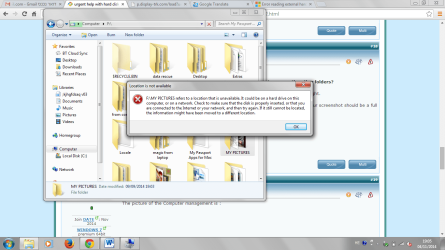
Hi
Just 2 hours ago , I could see the Passport in My Computer , and I could, eve, to copy some files. But , when I tried to connect a new hard drive - My Cloud - just to put on the data, then , the Passport don't open the most folder except one and don't let me copy nothing.
The Error Massage is -
 

Attachments

  • 14.png
    14.png
    95.9 KB · Views: 1

My Computer

Computer type
PC/Desktop
Computer Manufacturer/Model Number
sony
OS
windows 7 premium 64bit
Memory
4.00 gb
Antivirus
norton
Browser
google chrumo
What the best thing to do now? The mini tools program ?
 

My Computer

Computer type
PC/Desktop
Computer Manufacturer/Model Number
sony
OS
windows 7 premium 64bit
Memory
4.00 gb
Antivirus
norton
Browser
google chrumo
The capacity of your external WD My Passport is 2tb. The 750 one is the old one that not connected very long ago. Thanks
 

My Computer

Computer type
PC/Desktop
Computer Manufacturer/Model Number
sony
OS
windows 7 premium 64bit
Memory
4.00 gb
Antivirus
norton
Browser
google chrumo
Back
Top