USB device not recognized - Help!

USB problem

Hi guys!
I am trying to connect my bluetooth Parrot minikit from the car to 3 different computers with different operation system (Win 7 Ultimate x64 and x86, Windows XP 32-bit) but all of them having the same warning "USB Device not Recognized"). So reinstalling or reparing the OS is not an issue. Who could help?
 

My Computer My Computer

OS
Windows 7 Ultimate X64
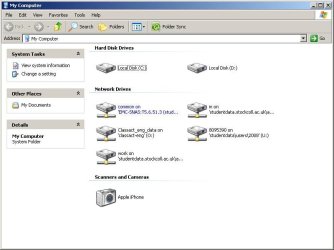
CANT SEE portable HD in my computer

can anyone tell me what to do because everytime i plug my portable hd i cant see it on my computer but it appears that it is connected, i think this what happened after doing this
http://www.sevenforums.com/tutorials/2432-usb-windows-7-installation-key-drive-create.html
im only up to step 11 of it and i stop because i get error.
:(

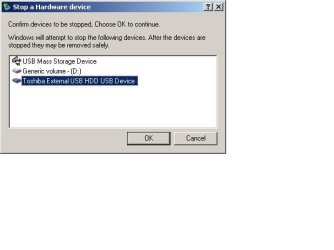
everytime i connect it it appears like the image below when i click the usb safety remove :(
 

Attachments

  • untitle.jpeg
    untitle.jpeg
    42.6 KB · Views: 75
  • untitled.jpg
    untitled.jpg
    16.2 KB · Views: 94
Hi guys!
I am trying to connect my bluetooth Parrot minikit from the car to 3 different computers with different operation system (Win 7 Ultimate x64 and x86, Windows XP 32-bit) but all of them having the same warning "USB Device not Recognized"). So reinstalling or reparing the OS is not an issue. Who could help?

This doesn't sound like the simple USB handler giving up problem. It sounds like a driver issue. Have you installed the appropriate driver for the Parrot device?
 

My Computer My Computer

Computer Manufacturer/Model Number
Home Built
OS
Windows 7 Pro 64-bit
CPU
2 x Opteron quad-core
Motherboard
TYAN Thunder N3600B Dual processor mobo
Memory
16 gig buffered
Graphics Card(s)
Radeon 4890 feeding my compnent stereo system. Sounds great
Sound Card
M-Audio Delta Audiophile
Monitor(s) Displays
Acer 24", Acer 21"
Screen Resolution
1980x1050 & 1680x1050
Hard Drives
Internal:

OCZ 60 gig SSD
2 x WD 1tb
1 WD 1.5tb
1 WD 320 GB

External:

3 x WD Mybook 1TB
PSU
Corsair 900w
Case
Coolermaster HAF 932
Cooling
Many fans, liquid cooling on the way but likely in November
Keyboard
Saitek red backlit
Mouse
Logitek USB
Internet Speed
Way too slow for a DSL line
Other Info
This is a build that was in progress but got pressed into service because of the need for large photo editing capability.

More will be revealed after "car season" (race cars, Salt Flats, etc.) is over in October. That's when the serious tweaking will start.

See Build Diary here:
http://www.raytherat.com/dreadnought/Welcome.html
Hi RayTheRat. I did not install any driver but I did not find in Internet any driver for my Parrot minikit. Can you tell me where I can find this driver?
 

My Computer My Computer

OS
Windows 7 Ultimate X64
Hi everyone.

I have a generic usb joystick (don´t know who is the manufacturer), but when I plug it in my computer it says that it not recognize the usb device. I have windows 7 home premium 64 bits OS and tried to plug my joystick in another computer with the same OS and same updates (the latests updates) and it worked fine. I tried to plug it in in every USB slot that I have but the same happens. The usb slots work fine because I plug in another devices like an external usb hard disk and it works correctly.

Any suggestion before I try to unplug the computer for some minutes??

Thanks in advance.
 

My Computer My Computer

OS
Windows 7 Home Premium 64 bits
hi,

Just to share my experience.

I am on windows 7 prof 32 bits, since i upgrade my itune 10.6, i found my iphone 4 IOS5.0.1 keep intermitten disconnected from USB and detected as unknown device. have been trying this for about 2 weeks, now I try to fall back to itune 10.5, problem is resolved.
 

My Computer My Computer

OS
windows 7 prof 32bit
USB Devices not recognised....

Okay, I know this thread is somewhat 'old', but my situation is in line with this thread - 'USB device not recognized'.

I have tried all suggestions except the one to go to USB 1.1 speed.

I have a new MSI mother - I have updated to the latest firmware level.
I have Win 7 Home Premium - I have applied all latest updates

I have a Maxtor, HP and Verbatum external drive, all which worked under XP - NO USB DEVICE issues. They worked fine for maybe two months since upgrading to the new PC and Win 7.

Now no matter what I do, I cannot get them to be 'seen', I have a wireless Mouse/Keyboard from logitec which works fine. I have plugged a PS2 mouse/ keyboard in so as I can operate without the USB sender and thus removed the remaining USB device.

I have uninstalled all USB 'devices' hubs and the like, unplugged all USB devices, powered off and removed the power cable for over 5mins.

As soon as I plug any of the HDDs in, I get the UDNR (USB Device Not Recognized).

Damn frustrating!

Any new ideas guys?

Many thanks,

Bob
 

My Computer My Computer

OS
7 64 bit
Hi RayTheRat. I did not install any driver but I did not find in Internet any driver for my Parrot minikit. Can you tell me where I can find this driver?

I don't know of any specific driver for that device, but there IS a software update available for it. Go here:
Parrot - Parrot Minikit Plus

No driver updates, but a device s/w update that may help.

I've come to the conclusion that Micro$oft has dropped the ball big time on this problem. However, I've done some things that have helped me. First, I use a Firewire CF card reader instead of a USB unit. Nor only is it more reliable, but it's 4 to 16 times faster than a USB reader. I wish I could get it to work on my laptop. But what I do there is connect the cameras directly to the USB port and copy/move files that way, rather than thru a card reader. I've also started unloading photos from my cameras via the direct USB connection, rather than removing the card and placing it in a reader, especially with my laptop when on the road. I wish I could find a FW reader that didn't require an external power supply for the laptop.

One more issue. If you're using a USB keyboard and the computer crashes or loses power, the boot loader asks what you want to do: example: Boot Normally. In this case, the USB KB is ignored completely. Not a good thing. I keep a spare PS2 KB just for that possibility,

I've worked with computers for a long time and back in the mainframe daze, it was mandatory to "logically power off" (umount) a drive before physically removing it. The "Eject" option in Windoze Explorer is the closest equivalent to "powering off" a device, particularly a thumb drive or data card (CF, SD, etc.) I've made myself make that a habit, cuz it's a lot quicker than rebooting, which is the alternative.

The last thing I've found (I think I wrote about it before) is that some sort of "intelligent" USB handler/hub/reader is much better than just plugging a USB device into a port. For some reason, the "handler" (in my case a multi-slot card reader) seems to be able to communicate more fluently with the OS and hardware than just a dumb stick or card.

Hth,

 

My Computer My Computer

Computer Manufacturer/Model Number
Home Built
OS
Windows 7 Pro 64-bit
CPU
2 x Opteron quad-core
Motherboard
TYAN Thunder N3600B Dual processor mobo
Memory
16 gig buffered
Graphics Card(s)
Radeon 4890 feeding my compnent stereo system. Sounds great
Sound Card
M-Audio Delta Audiophile
Monitor(s) Displays
Acer 24", Acer 21"
Screen Resolution
1980x1050 & 1680x1050
Hard Drives
Internal:

OCZ 60 gig SSD
2 x WD 1tb
1 WD 1.5tb
1 WD 320 GB

External:

3 x WD Mybook 1TB
PSU
Corsair 900w
Case
Coolermaster HAF 932
Cooling
Many fans, liquid cooling on the way but likely in November
Keyboard
Saitek red backlit
Mouse
Logitek USB
Internet Speed
Way too slow for a DSL line
Other Info
This is a build that was in progress but got pressed into service because of the need for large photo editing capability.

More will be revealed after "car season" (race cars, Salt Flats, etc.) is over in October. That's when the serious tweaking will start.

See Build Diary here:
http://www.raytherat.com/dreadnought/Welcome.html
Hi All/Anyone,

I posted to this 'old' thread for a current problem. There has been no response so far.

Please guide me - should I create a new thread?

Many thanks,

Bob
 

My Computer My Computer

OS
7 64 bit
Hmmm...

I just applied another update from MSI and it's all working fine! Don't know why they suddenly went 'bad' as I do not apply updates unless I have a problem, so as far as I am aware there were no changes at the time my PC left the tracks!

Anyhow, I'm smiling now!

Thnx

Bob
 

My Computer My Computer

OS
7 64 bit
It is still a problem today (January 2020) My Parrot Minikit Neo2 HD is not detected by Windows 7, neither in Windows10.

To update the unit's software and to change language, user must connect the device to an usb port, and the unit should appear in Explorer.

However in Explorer (MyComputer) I don't see a new "DriveLetter" (Station Letter is a better name), neither the usual sound that confirms a new USB connection.

I have a MSI motherboard. So I might try to update its firmware, but I'm reluctant to do this.
I have a ticket at Parrot Support and I waiting for their advice.

(Do I need to post a new thread on this issue ?)
 

My Computer My Computer

Computer type
PC/Desktop
Computer Manufacturer/Model Number
Custom build
OS
Dual boot Windows 7 Windows 10
Motherboard
MSI
Back
Top