USB Mass Storage Issue Windows 7 x64

texusn

New member
Local time
9:04 AM
Messages
5
I have finally given up so I am posting this. I have an issue in which no USB mass storage devices work on my system. I have tried my BlackBerry, IPod, multiple USB jump drives and a SATA dock. They system recognizes them but won’t install them and they show a yellow exclamation mark in the device manager. The USB ports work as I can use a webcam, scanner or mouse in the same port with no issues. I used a program called DriverMax to make sure all my drivers were up to date but that did not help. Any help would be greatly appreciated! Thanks in advance!

Attached is a report from DriveMax of what drivers are installed.
 

Attachments

My Computer My Computer

Computer Manufacturer/Model Number
Self Built
OS
Windows 7 x64
CPU
Intel i7 930
Motherboard
ASUS P6X58D Premium
Memory
DDR3 6GB TRI CAS 8
Graphics Card(s)
NVIDIA GeForce GTX 470
Sound Card
Built in to board
Monitor(s) Displays
Dual LG 22" Wide Screen
Hard Drives
OS: Corsair CSSD-R60GB2 SATA (6 GB)
DATA: WDC WD20 01FASS-00W2B0 SATA (2.0 TB)
PSU
TX850W Corsair
Case
Thermaltake Armor A90
Cooling
Ultra ChillTec
Welcome to the Seven Forums! texusn

Most likely since the ports are known to be working something is preventing the detection process on those particular items. For the external dock and flash drives once plugged in you should be seeing a popup for running things or viewing the file content.

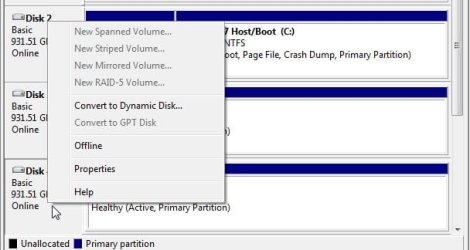
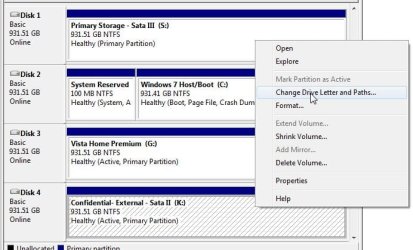
The two images here what to look for when in the Disk Management for either a drive when present in the docking station or when plugging in a flash drive and displayed in the DM there. The two screens attached here will show that the drive in the external enclosure is being seen as "online" otherwise a right click to find that option rather then setting it to offline would be needed as well as right clicking a second time to assign a drive letter.

This usually is all it takes at first to see any new drive or device initialized. When opening up an explorer afterwards you should be seeing the new drive icon with the drive letter selected in view. As far as DriverMax or any other 3rd party driver locator those are generally a waste of time to begin with since this is a Windows related item not a driver concern as far as detection and automatic installation to make things active. Once detected properly you would see a prompting if any drivers are needed.
 

Attachments

  • Drive status.jpg
    Drive status.jpg
    32.3 KB · Views: 125
  • Drive Initialize Assign Letter.jpg
    Drive Initialize Assign Letter.jpg
    53.9 KB · Views: 100

My Computers My Computers

System One System Two

  • Computer type
    PC/Desktop
    Computer Manufacturer/Model Number
    Custom builds = 2
    OS
    W7 Ultimate x64/W10 Pro x64/W11 Pro Triple Boot - Main PC W7 Remote PC Micro ATX W7 Pro x64/W11 Pro
    CPU
    AMD Phenom II X4 975 Deneb 3.6ghz - 965 2nd remote pc
    Motherboard
    Gigabyte GA-790XTA-UD4-Gigabyte GA-880GM-D2H remote pc
    Memory
    Kingston Hyper X DDR3 1600 1.5v 16gb - Hyper X Fury 8gb 2nd
    Graphics Card(s)
    MSI HD Radeon 5750 1gb - MSI HD Radeon 6450 on mini tower
    Sound Card
    Creative Labs X-Fi Xtreme Audio P - Realtek onooard 2nd case
    Monitor(s) Displays
    ASUS VW199T-P 19" HP 2082a Main-HP 2082a 20" remote pc
    Screen Resolution
    Asus 1440x900 - HP 1600x900
    Hard Drives
    WD Black 1TB HD per OS W7, W10, and pending W11 presently on 500gb OS Drive - Pending Triple 1TB HDs for Spanned Storage/backup volume
    Single 2TB external USB enclosure, single 1TB System 7 Host/Boot drive, Pending 8TB external HD for system image b
    PSU
    Corsair 750TX - primary / Corsair CX600 - second
    Case
    Antec 900-2 - SSD compatible / NZXT Vulcan mini tower
    Cooling
    Zalman CNPS9900A
    Keyboard
    AZIO L70 Backlit Letters Gaming - ONN Cordless/USB
    Mouse
    MSI DS200 Programmable, Logitech Cordless
    Internet Speed
    30mbps upgrade - primary hard wired - mini tower usb WiFi
    Antivirus
    GFI VIPRE Internet Security 2014 on W7 2016 beta on W10,
    Browser
    Cyberfox, WaterFox 64bit FF variants, FireFox x64, Pale Moon
    Other Info
    Accomdata fan cooled usb 2.0 PIDE/Sata II, III external enclosure.
    Sambient usb/eSata PATA/Sata II, III external enclosure.
  • Computer type
    PC/Desktop
    System Manufacturer/Model Number
    CUSTOM ASSEMBLY
    OS
    W7 Pro x64/W11 Pro
    CPU
    AMD Deneb 3.6ghz - 965
    Motherboard
    Gigabyte GA-880GM-D2H remote pc
    Memory
    Kingston Hyper X Fury 8gb
    Graphics Card(s)
    MSI HD Radeon 6450 DVI Output
    Sound Card
    Realtek onooard Creative or Other separate PENDING
    Monitor(s) Displays
    VIZIO 32" LCD TV Separate LCD Pending
    Screen Resolution
    1600x1080
    Hard Drives
    WD 500GB OS Host/Boot WD Green 1TB Storage/Backup
    PSU
    Corsair 600W - THERMALTAKE 600W spare case
    Case
    NZXT Vulcan mini tower
    Cooling
    Twin 120mm Top Fans - 240mm Side Cover
    Keyboard
    ONN Cordless/USB Logitech Cordless
    Mouse
    ONN USB/Cordless - Logitech Cordless
    Internet Speed
    DSL 5G
    Browser
    MS Edge, FireFox, WaterFox x64, FireFox Nightly
    Other Info
    OS Testing-Remote Access to Main TeamViewer
Try uninstalling the drivers for all the USB root hubs, then all the USB host controllers, then reboot. This should force the Windows 7 host drivers to load again.
 

My Computer My Computer

Computer Manufacturer/Model Number
Too many to describe...
OS
Windows 7 x64 pro/ Windows 7 x86 Pro/ XP SP3 x86
Thank you for your replies!

Night Hawk,
I looked in the disk management tool but none of the items show up in their when they are connected. I tried rescan and still they did not show.

Bill2,
I tried to remove all the root hubs and then host controllers. Two of each would not remove visually from the list but said they would remove on a restart. I waited till I attempted all and then rebooted. 3A35 and 3A39 were the two that would not remove of the host controllers. After reboot same issue.

All,
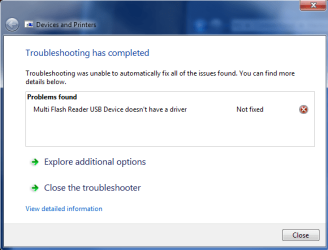
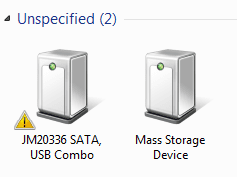
They do show up in the “Devices and Printers” as unspecified. If I try and repair it then it says it was unable to because they did not have a driver. It is almost like I am missing the mass storage driver all together.


I loaded two files showing the screen shots I am seeing.
 

Attachments

  • Problem message.png
    Problem message.png
    17.1 KB · Views: 24
  • Unspecified.png
    Unspecified.png
    3.8 KB · Views: 4,240

My Computer My Computer

Computer Manufacturer/Model Number
Self Built
OS
Windows 7 x64
CPU
Intel i7 930
Motherboard
ASUS P6X58D Premium
Memory
DDR3 6GB TRI CAS 8
Graphics Card(s)
NVIDIA GeForce GTX 470
Sound Card
Built in to board
Monitor(s) Displays
Dual LG 22" Wide Screen
Hard Drives
OS: Corsair CSSD-R60GB2 SATA (6 GB)
DATA: WDC WD20 01FASS-00W2B0 SATA (2.0 TB)
PSU
TX850W Corsair
Case
Thermaltake Armor A90
Cooling
Ultra ChillTec
If the docking station lacks a drive inside that's all you would see since you wouldn't be installing any drivers for it. That one is ok and should be seen that way until a drive is docked where you then will see the drive itself appear in the DM.

Have you tried the flash drives(jump drives) on any other machine to see if those are working there?
 

My Computers My Computers

System One System Two

  • Computer type
    PC/Desktop
    Computer Manufacturer/Model Number
    Custom builds = 2
    OS
    W7 Ultimate x64/W10 Pro x64/W11 Pro Triple Boot - Main PC W7 Remote PC Micro ATX W7 Pro x64/W11 Pro
    CPU
    AMD Phenom II X4 975 Deneb 3.6ghz - 965 2nd remote pc
    Motherboard
    Gigabyte GA-790XTA-UD4-Gigabyte GA-880GM-D2H remote pc
    Memory
    Kingston Hyper X DDR3 1600 1.5v 16gb - Hyper X Fury 8gb 2nd
    Graphics Card(s)
    MSI HD Radeon 5750 1gb - MSI HD Radeon 6450 on mini tower
    Sound Card
    Creative Labs X-Fi Xtreme Audio P - Realtek onooard 2nd case
    Monitor(s) Displays
    ASUS VW199T-P 19" HP 2082a Main-HP 2082a 20" remote pc
    Screen Resolution
    Asus 1440x900 - HP 1600x900
    Hard Drives
    WD Black 1TB HD per OS W7, W10, and pending W11 presently on 500gb OS Drive - Pending Triple 1TB HDs for Spanned Storage/backup volume
    Single 2TB external USB enclosure, single 1TB System 7 Host/Boot drive, Pending 8TB external HD for system image b
    PSU
    Corsair 750TX - primary / Corsair CX600 - second
    Case
    Antec 900-2 - SSD compatible / NZXT Vulcan mini tower
    Cooling
    Zalman CNPS9900A
    Keyboard
    AZIO L70 Backlit Letters Gaming - ONN Cordless/USB
    Mouse
    MSI DS200 Programmable, Logitech Cordless
    Internet Speed
    30mbps upgrade - primary hard wired - mini tower usb WiFi
    Antivirus
    GFI VIPRE Internet Security 2014 on W7 2016 beta on W10,
    Browser
    Cyberfox, WaterFox 64bit FF variants, FireFox x64, Pale Moon
    Other Info
    Accomdata fan cooled usb 2.0 PIDE/Sata II, III external enclosure.
    Sambient usb/eSata PATA/Sata II, III external enclosure.
  • Computer type
    PC/Desktop
    System Manufacturer/Model Number
    CUSTOM ASSEMBLY
    OS
    W7 Pro x64/W11 Pro
    CPU
    AMD Deneb 3.6ghz - 965
    Motherboard
    Gigabyte GA-880GM-D2H remote pc
    Memory
    Kingston Hyper X Fury 8gb
    Graphics Card(s)
    MSI HD Radeon 6450 DVI Output
    Sound Card
    Realtek onooard Creative or Other separate PENDING
    Monitor(s) Displays
    VIZIO 32" LCD TV Separate LCD Pending
    Screen Resolution
    1600x1080
    Hard Drives
    WD 500GB OS Host/Boot WD Green 1TB Storage/Backup
    PSU
    Corsair 600W - THERMALTAKE 600W spare case
    Case
    NZXT Vulcan mini tower
    Cooling
    Twin 120mm Top Fans - 240mm Side Cover
    Keyboard
    ONN Cordless/USB Logitech Cordless
    Mouse
    ONN USB/Cordless - Logitech Cordless
    Internet Speed
    DSL 5G
    Browser
    MS Edge, FireFox, WaterFox x64, FireFox Nightly
    Other Info
    OS Testing-Remote Access to Main TeamViewer
The dock did have the drive in it during that screen shot I sent you. It did not show up in DM.

I have tried all these devices:

Multiple Jump Drives
Camera
SATA Dock
BlackBerry Phone
iPod

All of which work on other machines fine. They all just appear to be missing a common mass storage driver on this new OS.
 

My Computer My Computer

Computer Manufacturer/Model Number
Self Built
OS
Windows 7 x64
CPU
Intel i7 930
Motherboard
ASUS P6X58D Premium
Memory
DDR3 6GB TRI CAS 8
Graphics Card(s)
NVIDIA GeForce GTX 470
Sound Card
Built in to board
Monitor(s) Displays
Dual LG 22" Wide Screen
Hard Drives
OS: Corsair CSSD-R60GB2 SATA (6 GB)
DATA: WDC WD20 01FASS-00W2B0 SATA (2.0 TB)
PSU
TX850W Corsair
Case
Thermaltake Armor A90
Cooling
Ultra ChillTec
I see others are having this issue. I saw that some recommended running sfc. I ran it and am attaching the results. Apparently it sees an issue but I am not entirely sure how to fix.
 

Attachments

  • sfc.png
    sfc.png
    5 KB · Views: 320

My Computer My Computer

Computer Manufacturer/Model Number
Self Built
OS
Windows 7 x64
CPU
Intel i7 930
Motherboard
ASUS P6X58D Premium
Memory
DDR3 6GB TRI CAS 8
Graphics Card(s)
NVIDIA GeForce GTX 470
Sound Card
Built in to board
Monitor(s) Displays
Dual LG 22" Wide Screen
Hard Drives
OS: Corsair CSSD-R60GB2 SATA (6 GB)
DATA: WDC WD20 01FASS-00W2B0 SATA (2.0 TB)
PSU
TX850W Corsair
Case
Thermaltake Armor A90
Cooling
Ultra ChillTec
One thing I did here was custom assign a particular rather loud wav file to the the "new device connected" and "device disconnected" items in the Control Panel>Sound>sounds tab there so I no longer have to looking at the screen when plugging or unplugging any usb drive or device.

Apparently the present installation is not detecting anything new like it should and may have been a bad install seen there. You can try running the "sfc /scannow" command at the Run command with the 7 dvd in the drive and see if that will help by replacing any system files if found damaged or missing as one idea.

Since you are seeing the other mass storage device present something is still working where this might be all that is needed if only one or two system files are involved. Or the one thing often overlooked is the regulation of the usb bus seen on different boards.

When going to take a usb flash for example from one system to another older case the drive will be sluggish and the owner complains of not being able to use some of the ports while having multiple devices plugged in or his own flash has to be plugged into a separate usb hub. Those are powered externally with an ac adapter.

You may have to consider that as a likely cause since you know all the drives work and the individual ports still work but not when having multiple drives plugged in suggesting the bus is being pulled down a bit. Some time back while in a Walmart I picked a small 4 port Cyberpower blue led hub that actually works llike a champ for any printer, external drive, enclosure, or flash drive plugged from simply providing an adequate level for each device.

Funny how we missed each other's own idea on using the system file checker on this! :D But conisder the other on adding a good hub on to see if that will provided the power level correctly to see the drives and devices work for you.
 

My Computers My Computers

System One System Two

  • Computer type
    PC/Desktop
    Computer Manufacturer/Model Number
    Custom builds = 2
    OS
    W7 Ultimate x64/W10 Pro x64/W11 Pro Triple Boot - Main PC W7 Remote PC Micro ATX W7 Pro x64/W11 Pro
    CPU
    AMD Phenom II X4 975 Deneb 3.6ghz - 965 2nd remote pc
    Motherboard
    Gigabyte GA-790XTA-UD4-Gigabyte GA-880GM-D2H remote pc
    Memory
    Kingston Hyper X DDR3 1600 1.5v 16gb - Hyper X Fury 8gb 2nd
    Graphics Card(s)
    MSI HD Radeon 5750 1gb - MSI HD Radeon 6450 on mini tower
    Sound Card
    Creative Labs X-Fi Xtreme Audio P - Realtek onooard 2nd case
    Monitor(s) Displays
    ASUS VW199T-P 19" HP 2082a Main-HP 2082a 20" remote pc
    Screen Resolution
    Asus 1440x900 - HP 1600x900
    Hard Drives
    WD Black 1TB HD per OS W7, W10, and pending W11 presently on 500gb OS Drive - Pending Triple 1TB HDs for Spanned Storage/backup volume
    Single 2TB external USB enclosure, single 1TB System 7 Host/Boot drive, Pending 8TB external HD for system image b
    PSU
    Corsair 750TX - primary / Corsair CX600 - second
    Case
    Antec 900-2 - SSD compatible / NZXT Vulcan mini tower
    Cooling
    Zalman CNPS9900A
    Keyboard
    AZIO L70 Backlit Letters Gaming - ONN Cordless/USB
    Mouse
    MSI DS200 Programmable, Logitech Cordless
    Internet Speed
    30mbps upgrade - primary hard wired - mini tower usb WiFi
    Antivirus
    GFI VIPRE Internet Security 2014 on W7 2016 beta on W10,
    Browser
    Cyberfox, WaterFox 64bit FF variants, FireFox x64, Pale Moon
    Other Info
    Accomdata fan cooled usb 2.0 PIDE/Sata II, III external enclosure.
    Sambient usb/eSata PATA/Sata II, III external enclosure.
  • Computer type
    PC/Desktop
    System Manufacturer/Model Number
    CUSTOM ASSEMBLY
    OS
    W7 Pro x64/W11 Pro
    CPU
    AMD Deneb 3.6ghz - 965
    Motherboard
    Gigabyte GA-880GM-D2H remote pc
    Memory
    Kingston Hyper X Fury 8gb
    Graphics Card(s)
    MSI HD Radeon 6450 DVI Output
    Sound Card
    Realtek onooard Creative or Other separate PENDING
    Monitor(s) Displays
    VIZIO 32" LCD TV Separate LCD Pending
    Screen Resolution
    1600x1080
    Hard Drives
    WD 500GB OS Host/Boot WD Green 1TB Storage/Backup
    PSU
    Corsair 600W - THERMALTAKE 600W spare case
    Case
    NZXT Vulcan mini tower
    Cooling
    Twin 120mm Top Fans - 240mm Side Cover
    Keyboard
    ONN Cordless/USB Logitech Cordless
    Mouse
    ONN USB/Cordless - Logitech Cordless
    Internet Speed
    DSL 5G
    Browser
    MS Edge, FireFox, WaterFox x64, FireFox Nightly
    Other Info
    OS Testing-Remote Access to Main TeamViewer
Hi, I'm having exactly the same problems as texusn.
My USB-memory stick and USB-HDD are both plugged in to my computer directly with no USB-hub. I can find both devices in the device manager but not in Disk Management. There's no difference if I have one or both plugged in. My USB-mouse and keyboard are working fine and the USB-storage devices run perfectly on other computers.
I've tried running sfc /scannow with my win7 disc in but apparantly I don't have administrative rights... However, if someone finds a solution to texusn's problem I'm sure it will help me too. :)
 
Last edited:

My Computer My Computer

OS
Windows 7
Hello and welcome to SF! Diadiadia

The first thought people often have is something must wrong in Windows as far as usb devices especially with external HDs and flash drives. WRONG!

Try measuring how well the usb bus itself is on the board! If you have several devices attached for example or with certain brands it seems the usb bus simply won't provide what the drive or device wants to pull from it.

I see this with different brands of flash drives on different systems where sometimes that good working hub is the only place you are able to use some of them! For flash drives 4 brands as one example with PNY left out in the cold! HP not doing much better. San Disk slow but will work. Kingston Data Travellers won out in every test between 3 or 4 desktops and even a Vista laptop.

When moving the PNY being the notorious fail around it simply would not work on one old XP build at all! When plugging the additional front or top usb ports in the drive is seen but does nothing again. A small 4 port hub being independently powered is the only place it will work!

Likewise the illuminated usb keyboard will not work as far as the illumination off of any hub. It requires being plugged into a port on the board directly. This problem catches everyone at some point with external HDs, flash drives, printers, and other devices where some are simply too fussy about where they get plugged into.
 

My Computers My Computers

System One System Two

  • Computer type
    PC/Desktop
    Computer Manufacturer/Model Number
    Custom builds = 2
    OS
    W7 Ultimate x64/W10 Pro x64/W11 Pro Triple Boot - Main PC W7 Remote PC Micro ATX W7 Pro x64/W11 Pro
    CPU
    AMD Phenom II X4 975 Deneb 3.6ghz - 965 2nd remote pc
    Motherboard
    Gigabyte GA-790XTA-UD4-Gigabyte GA-880GM-D2H remote pc
    Memory
    Kingston Hyper X DDR3 1600 1.5v 16gb - Hyper X Fury 8gb 2nd
    Graphics Card(s)
    MSI HD Radeon 5750 1gb - MSI HD Radeon 6450 on mini tower
    Sound Card
    Creative Labs X-Fi Xtreme Audio P - Realtek onooard 2nd case
    Monitor(s) Displays
    ASUS VW199T-P 19" HP 2082a Main-HP 2082a 20" remote pc
    Screen Resolution
    Asus 1440x900 - HP 1600x900
    Hard Drives
    WD Black 1TB HD per OS W7, W10, and pending W11 presently on 500gb OS Drive - Pending Triple 1TB HDs for Spanned Storage/backup volume
    Single 2TB external USB enclosure, single 1TB System 7 Host/Boot drive, Pending 8TB external HD for system image b
    PSU
    Corsair 750TX - primary / Corsair CX600 - second
    Case
    Antec 900-2 - SSD compatible / NZXT Vulcan mini tower
    Cooling
    Zalman CNPS9900A
    Keyboard
    AZIO L70 Backlit Letters Gaming - ONN Cordless/USB
    Mouse
    MSI DS200 Programmable, Logitech Cordless
    Internet Speed
    30mbps upgrade - primary hard wired - mini tower usb WiFi
    Antivirus
    GFI VIPRE Internet Security 2014 on W7 2016 beta on W10,
    Browser
    Cyberfox, WaterFox 64bit FF variants, FireFox x64, Pale Moon
    Other Info
    Accomdata fan cooled usb 2.0 PIDE/Sata II, III external enclosure.
    Sambient usb/eSata PATA/Sata II, III external enclosure.
  • Computer type
    PC/Desktop
    System Manufacturer/Model Number
    CUSTOM ASSEMBLY
    OS
    W7 Pro x64/W11 Pro
    CPU
    AMD Deneb 3.6ghz - 965
    Motherboard
    Gigabyte GA-880GM-D2H remote pc
    Memory
    Kingston Hyper X Fury 8gb
    Graphics Card(s)
    MSI HD Radeon 6450 DVI Output
    Sound Card
    Realtek onooard Creative or Other separate PENDING
    Monitor(s) Displays
    VIZIO 32" LCD TV Separate LCD Pending
    Screen Resolution
    1600x1080
    Hard Drives
    WD 500GB OS Host/Boot WD Green 1TB Storage/Backup
    PSU
    Corsair 600W - THERMALTAKE 600W spare case
    Case
    NZXT Vulcan mini tower
    Cooling
    Twin 120mm Top Fans - 240mm Side Cover
    Keyboard
    ONN Cordless/USB Logitech Cordless
    Mouse
    ONN USB/Cordless - Logitech Cordless
    Internet Speed
    DSL 5G
    Browser
    MS Edge, FireFox, WaterFox x64, FireFox Nightly
    Other Info
    OS Testing-Remote Access to Main TeamViewer
Thanks for the welcoming and advice. However, my USB-devices have been working fine on my computer while I was running windows XP so the USB bus should be good enough.
 

My Computer My Computer

OS
Windows 7
Having run the system file checker and found errors plus not having problems while XP was on only leads back to one thing namely the 7 install itself was incomplete or simply put a bad install to begin with. You may end up needing to perform an upgrade to repair or even full clean install to solve this since we've already covered the other mostly likely other causes.
 

My Computers My Computers

System One System Two

  • Computer type
    PC/Desktop
    Computer Manufacturer/Model Number
    Custom builds = 2
    OS
    W7 Ultimate x64/W10 Pro x64/W11 Pro Triple Boot - Main PC W7 Remote PC Micro ATX W7 Pro x64/W11 Pro
    CPU
    AMD Phenom II X4 975 Deneb 3.6ghz - 965 2nd remote pc
    Motherboard
    Gigabyte GA-790XTA-UD4-Gigabyte GA-880GM-D2H remote pc
    Memory
    Kingston Hyper X DDR3 1600 1.5v 16gb - Hyper X Fury 8gb 2nd
    Graphics Card(s)
    MSI HD Radeon 5750 1gb - MSI HD Radeon 6450 on mini tower
    Sound Card
    Creative Labs X-Fi Xtreme Audio P - Realtek onooard 2nd case
    Monitor(s) Displays
    ASUS VW199T-P 19" HP 2082a Main-HP 2082a 20" remote pc
    Screen Resolution
    Asus 1440x900 - HP 1600x900
    Hard Drives
    WD Black 1TB HD per OS W7, W10, and pending W11 presently on 500gb OS Drive - Pending Triple 1TB HDs for Spanned Storage/backup volume
    Single 2TB external USB enclosure, single 1TB System 7 Host/Boot drive, Pending 8TB external HD for system image b
    PSU
    Corsair 750TX - primary / Corsair CX600 - second
    Case
    Antec 900-2 - SSD compatible / NZXT Vulcan mini tower
    Cooling
    Zalman CNPS9900A
    Keyboard
    AZIO L70 Backlit Letters Gaming - ONN Cordless/USB
    Mouse
    MSI DS200 Programmable, Logitech Cordless
    Internet Speed
    30mbps upgrade - primary hard wired - mini tower usb WiFi
    Antivirus
    GFI VIPRE Internet Security 2014 on W7 2016 beta on W10,
    Browser
    Cyberfox, WaterFox 64bit FF variants, FireFox x64, Pale Moon
    Other Info
    Accomdata fan cooled usb 2.0 PIDE/Sata II, III external enclosure.
    Sambient usb/eSata PATA/Sata II, III external enclosure.
  • Computer type
    PC/Desktop
    System Manufacturer/Model Number
    CUSTOM ASSEMBLY
    OS
    W7 Pro x64/W11 Pro
    CPU
    AMD Deneb 3.6ghz - 965
    Motherboard
    Gigabyte GA-880GM-D2H remote pc
    Memory
    Kingston Hyper X Fury 8gb
    Graphics Card(s)
    MSI HD Radeon 6450 DVI Output
    Sound Card
    Realtek onooard Creative or Other separate PENDING
    Monitor(s) Displays
    VIZIO 32" LCD TV Separate LCD Pending
    Screen Resolution
    1600x1080
    Hard Drives
    WD 500GB OS Host/Boot WD Green 1TB Storage/Backup
    PSU
    Corsair 600W - THERMALTAKE 600W spare case
    Case
    NZXT Vulcan mini tower
    Cooling
    Twin 120mm Top Fans - 240mm Side Cover
    Keyboard
    ONN Cordless/USB Logitech Cordless
    Mouse
    ONN USB/Cordless - Logitech Cordless
    Internet Speed
    DSL 5G
    Browser
    MS Edge, FireFox, WaterFox x64, FireFox Nightly
    Other Info
    OS Testing-Remote Access to Main TeamViewer
I had this precise problem and I fixed it by restoring \WINDOWS\INF from a backup.

SS
 

My Computer My Computer

Computer Manufacturer/Model Number
Dell Studio XPS 8100
OS
Windows 7 x64
CPU
Core i7-860
Motherboard
Dell/Foxconn
Memory
8GB
Graphics Card(s)
EVGA GeForce GT240 SSC
Monitor(s) Displays
Dell 2408WFP
Hard Drives
ST31000528AS
X-25MG2 80GB
I had this precise problem and I fixed it by restoring \WINDOWS\INF from a backup.

SS

Was that with the original Fat 32 factory partition or did you reformat it to NTFS before placing any files on it?

For XP and Vista the software installer was always seen when plugging in the first external HD bought here until simply nuking all that off and running it with the native NTFS volume. With the exception of writing GParted or installing a live distro onto flash drives I do the same for those as well.
 

My Computers My Computers

System One System Two

  • Computer type
    PC/Desktop
    Computer Manufacturer/Model Number
    Custom builds = 2
    OS
    W7 Ultimate x64/W10 Pro x64/W11 Pro Triple Boot - Main PC W7 Remote PC Micro ATX W7 Pro x64/W11 Pro
    CPU
    AMD Phenom II X4 975 Deneb 3.6ghz - 965 2nd remote pc
    Motherboard
    Gigabyte GA-790XTA-UD4-Gigabyte GA-880GM-D2H remote pc
    Memory
    Kingston Hyper X DDR3 1600 1.5v 16gb - Hyper X Fury 8gb 2nd
    Graphics Card(s)
    MSI HD Radeon 5750 1gb - MSI HD Radeon 6450 on mini tower
    Sound Card
    Creative Labs X-Fi Xtreme Audio P - Realtek onooard 2nd case
    Monitor(s) Displays
    ASUS VW199T-P 19" HP 2082a Main-HP 2082a 20" remote pc
    Screen Resolution
    Asus 1440x900 - HP 1600x900
    Hard Drives
    WD Black 1TB HD per OS W7, W10, and pending W11 presently on 500gb OS Drive - Pending Triple 1TB HDs for Spanned Storage/backup volume
    Single 2TB external USB enclosure, single 1TB System 7 Host/Boot drive, Pending 8TB external HD for system image b
    PSU
    Corsair 750TX - primary / Corsair CX600 - second
    Case
    Antec 900-2 - SSD compatible / NZXT Vulcan mini tower
    Cooling
    Zalman CNPS9900A
    Keyboard
    AZIO L70 Backlit Letters Gaming - ONN Cordless/USB
    Mouse
    MSI DS200 Programmable, Logitech Cordless
    Internet Speed
    30mbps upgrade - primary hard wired - mini tower usb WiFi
    Antivirus
    GFI VIPRE Internet Security 2014 on W7 2016 beta on W10,
    Browser
    Cyberfox, WaterFox 64bit FF variants, FireFox x64, Pale Moon
    Other Info
    Accomdata fan cooled usb 2.0 PIDE/Sata II, III external enclosure.
    Sambient usb/eSata PATA/Sata II, III external enclosure.
  • Computer type
    PC/Desktop
    System Manufacturer/Model Number
    CUSTOM ASSEMBLY
    OS
    W7 Pro x64/W11 Pro
    CPU
    AMD Deneb 3.6ghz - 965
    Motherboard
    Gigabyte GA-880GM-D2H remote pc
    Memory
    Kingston Hyper X Fury 8gb
    Graphics Card(s)
    MSI HD Radeon 6450 DVI Output
    Sound Card
    Realtek onooard Creative or Other separate PENDING
    Monitor(s) Displays
    VIZIO 32" LCD TV Separate LCD Pending
    Screen Resolution
    1600x1080
    Hard Drives
    WD 500GB OS Host/Boot WD Green 1TB Storage/Backup
    PSU
    Corsair 600W - THERMALTAKE 600W spare case
    Case
    NZXT Vulcan mini tower
    Cooling
    Twin 120mm Top Fans - 240mm Side Cover
    Keyboard
    ONN Cordless/USB Logitech Cordless
    Mouse
    ONN USB/Cordless - Logitech Cordless
    Internet Speed
    DSL 5G
    Browser
    MS Edge, FireFox, WaterFox x64, FireFox Nightly
    Other Info
    OS Testing-Remote Access to Main TeamViewer
Sorry it took so long to post this final part.

Well my issue was finally resolved with a complete reload. The SFC scan I ran which I posted earlier did show some bad files. The problem I had was the media I had downloaded also had the same bad files. I was unable to restore the files from the DVD as it told me the store was also corrupt. I borrowed a friends DVD and attempted to perform a repair but was not permitted to do so as it could not validate if I was using bit locker. I suspect this was related to the corrupt files. After reloading my system works great! My USB devices work as expected and mass storage is functioning. I ran an SFC again and it gave me a clean bill of health. I would recommend that anyone with this issue run SFC and rule that out first.

Thanks for all who helped me out!
 

My Computer My Computer

Computer Manufacturer/Model Number
Self Built
OS
Windows 7 x64
CPU
Intel i7 930
Motherboard
ASUS P6X58D Premium
Memory
DDR3 6GB TRI CAS 8
Graphics Card(s)
NVIDIA GeForce GTX 470
Sound Card
Built in to board
Monitor(s) Displays
Dual LG 22" Wide Screen
Hard Drives
OS: Corsair CSSD-R60GB2 SATA (6 GB)
DATA: WDC WD20 01FASS-00W2B0 SATA (2.0 TB)
PSU
TX850W Corsair
Case
Thermaltake Armor A90
Cooling
Ultra ChillTec
I think you posted your update on the wrong thread. texusn just to let you know this is a totally different problem here.
 

My Computers My Computers

System One System Two

  • Computer type
    PC/Desktop
    Computer Manufacturer/Model Number
    Custom builds = 2
    OS
    W7 Ultimate x64/W10 Pro x64/W11 Pro Triple Boot - Main PC W7 Remote PC Micro ATX W7 Pro x64/W11 Pro
    CPU
    AMD Phenom II X4 975 Deneb 3.6ghz - 965 2nd remote pc
    Motherboard
    Gigabyte GA-790XTA-UD4-Gigabyte GA-880GM-D2H remote pc
    Memory
    Kingston Hyper X DDR3 1600 1.5v 16gb - Hyper X Fury 8gb 2nd
    Graphics Card(s)
    MSI HD Radeon 5750 1gb - MSI HD Radeon 6450 on mini tower
    Sound Card
    Creative Labs X-Fi Xtreme Audio P - Realtek onooard 2nd case
    Monitor(s) Displays
    ASUS VW199T-P 19" HP 2082a Main-HP 2082a 20" remote pc
    Screen Resolution
    Asus 1440x900 - HP 1600x900
    Hard Drives
    WD Black 1TB HD per OS W7, W10, and pending W11 presently on 500gb OS Drive - Pending Triple 1TB HDs for Spanned Storage/backup volume
    Single 2TB external USB enclosure, single 1TB System 7 Host/Boot drive, Pending 8TB external HD for system image b
    PSU
    Corsair 750TX - primary / Corsair CX600 - second
    Case
    Antec 900-2 - SSD compatible / NZXT Vulcan mini tower
    Cooling
    Zalman CNPS9900A
    Keyboard
    AZIO L70 Backlit Letters Gaming - ONN Cordless/USB
    Mouse
    MSI DS200 Programmable, Logitech Cordless
    Internet Speed
    30mbps upgrade - primary hard wired - mini tower usb WiFi
    Antivirus
    GFI VIPRE Internet Security 2014 on W7 2016 beta on W10,
    Browser
    Cyberfox, WaterFox 64bit FF variants, FireFox x64, Pale Moon
    Other Info
    Accomdata fan cooled usb 2.0 PIDE/Sata II, III external enclosure.
    Sambient usb/eSata PATA/Sata II, III external enclosure.
  • Computer type
    PC/Desktop
    System Manufacturer/Model Number
    CUSTOM ASSEMBLY
    OS
    W7 Pro x64/W11 Pro
    CPU
    AMD Deneb 3.6ghz - 965
    Motherboard
    Gigabyte GA-880GM-D2H remote pc
    Memory
    Kingston Hyper X Fury 8gb
    Graphics Card(s)
    MSI HD Radeon 6450 DVI Output
    Sound Card
    Realtek onooard Creative or Other separate PENDING
    Monitor(s) Displays
    VIZIO 32" LCD TV Separate LCD Pending
    Screen Resolution
    1600x1080
    Hard Drives
    WD 500GB OS Host/Boot WD Green 1TB Storage/Backup
    PSU
    Corsair 600W - THERMALTAKE 600W spare case
    Case
    NZXT Vulcan mini tower
    Cooling
    Twin 120mm Top Fans - 240mm Side Cover
    Keyboard
    ONN Cordless/USB Logitech Cordless
    Mouse
    ONN USB/Cordless - Logitech Cordless
    Internet Speed
    DSL 5G
    Browser
    MS Edge, FireFox, WaterFox x64, FireFox Nightly
    Other Info
    OS Testing-Remote Access to Main TeamViewer
I had this precise problem and I fixed it by restoring \WINDOWS\INF from a backup.

SS

Was that with the original Fat 32 factory partition or did you reformat it to NTFS before placing any files on it?

For XP and Vista the software installer was always seen when plugging in the first external HD bought here until simply nuking all that off and running it with the native NTFS volume. With the exception of writing GParted or installing a live distro onto flash drives I do the same for those as well.

Sorry about the delay in getting back to you.

My system was NTFS from the factory.

I just pulled the \INF directory from a DriveImage XML backup and merged it with the existing one, and that solved the USB mass storage class issue. For me anyway.

So there was no reformatting to do or anything like that.
SS
 

My Computer My Computer

Computer Manufacturer/Model Number
Dell Studio XPS 8100
OS
Windows 7 x64
CPU
Core i7-860
Motherboard
Dell/Foxconn
Memory
8GB
Graphics Card(s)
EVGA GeForce GT240 SSC
Monitor(s) Displays
Dell 2408WFP
Hard Drives
ST31000528AS
X-25MG2 80GB
The reason I mentioned that is many models are compatible for both Windows and Mac where they come with a Fat 32 volume on them instead. That will then see a software installed in order to run the drive on the other OS as well as on XP, Vista. 7 saw the return of support for Fat and exFat volumes.

Most usb flash drives will typically Fat 32 on them as well.

At least you found the solution there however. Now get busy backing things up! :D
 

My Computers My Computers

System One System Two

  • Computer type
    PC/Desktop
    Computer Manufacturer/Model Number
    Custom builds = 2
    OS
    W7 Ultimate x64/W10 Pro x64/W11 Pro Triple Boot - Main PC W7 Remote PC Micro ATX W7 Pro x64/W11 Pro
    CPU
    AMD Phenom II X4 975 Deneb 3.6ghz - 965 2nd remote pc
    Motherboard
    Gigabyte GA-790XTA-UD4-Gigabyte GA-880GM-D2H remote pc
    Memory
    Kingston Hyper X DDR3 1600 1.5v 16gb - Hyper X Fury 8gb 2nd
    Graphics Card(s)
    MSI HD Radeon 5750 1gb - MSI HD Radeon 6450 on mini tower
    Sound Card
    Creative Labs X-Fi Xtreme Audio P - Realtek onooard 2nd case
    Monitor(s) Displays
    ASUS VW199T-P 19" HP 2082a Main-HP 2082a 20" remote pc
    Screen Resolution
    Asus 1440x900 - HP 1600x900
    Hard Drives
    WD Black 1TB HD per OS W7, W10, and pending W11 presently on 500gb OS Drive - Pending Triple 1TB HDs for Spanned Storage/backup volume
    Single 2TB external USB enclosure, single 1TB System 7 Host/Boot drive, Pending 8TB external HD for system image b
    PSU
    Corsair 750TX - primary / Corsair CX600 - second
    Case
    Antec 900-2 - SSD compatible / NZXT Vulcan mini tower
    Cooling
    Zalman CNPS9900A
    Keyboard
    AZIO L70 Backlit Letters Gaming - ONN Cordless/USB
    Mouse
    MSI DS200 Programmable, Logitech Cordless
    Internet Speed
    30mbps upgrade - primary hard wired - mini tower usb WiFi
    Antivirus
    GFI VIPRE Internet Security 2014 on W7 2016 beta on W10,
    Browser
    Cyberfox, WaterFox 64bit FF variants, FireFox x64, Pale Moon
    Other Info
    Accomdata fan cooled usb 2.0 PIDE/Sata II, III external enclosure.
    Sambient usb/eSata PATA/Sata II, III external enclosure.
  • Computer type
    PC/Desktop
    System Manufacturer/Model Number
    CUSTOM ASSEMBLY
    OS
    W7 Pro x64/W11 Pro
    CPU
    AMD Deneb 3.6ghz - 965
    Motherboard
    Gigabyte GA-880GM-D2H remote pc
    Memory
    Kingston Hyper X Fury 8gb
    Graphics Card(s)
    MSI HD Radeon 6450 DVI Output
    Sound Card
    Realtek onooard Creative or Other separate PENDING
    Monitor(s) Displays
    VIZIO 32" LCD TV Separate LCD Pending
    Screen Resolution
    1600x1080
    Hard Drives
    WD 500GB OS Host/Boot WD Green 1TB Storage/Backup
    PSU
    Corsair 600W - THERMALTAKE 600W spare case
    Case
    NZXT Vulcan mini tower
    Cooling
    Twin 120mm Top Fans - 240mm Side Cover
    Keyboard
    ONN Cordless/USB Logitech Cordless
    Mouse
    ONN USB/Cordless - Logitech Cordless
    Internet Speed
    DSL 5G
    Browser
    MS Edge, FireFox, WaterFox x64, FireFox Nightly
    Other Info
    OS Testing-Remote Access to Main TeamViewer
Back
Top