

- Local time
- 7:47 AM
- Messages
- 50,634
USB ports not working on Toshiba L55-B5276 install
I'm supposed to be enjoying the weekend in Palm Springs but one of the PC's I reinstalled out here is giving me trouble. I've spent a day on this and am hoping some fresh eyes for our driver detectives can save my holiday weekend.
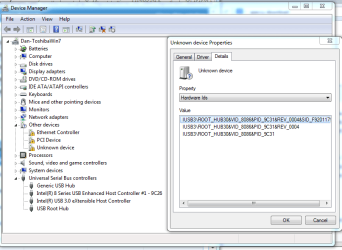
It's a new Toshiba L55-B5276 he wants Win7 to replace 8.1. Not possible to install to UEFI in CSM mode which is all that will allow it, so I installed Legacy. Toshiba Chipset doesn't seem to really install, just races through and says its finished but nothing changes in Device Manager. The Problem seems to be USB3 hub which wouldn't start with the driver I found for it via Hardware ID IUSB3\ROOT_HUB30&VID_8086&PID_9C31&REV_0004&SID_F9201179
so after uninstall it is now Unknown Device.
I tried Intel Driver Update Utility which only seems to find the display driver package and for some reason can't even detect the i5 CPU.
Speccy attached.
I really appreciate any help I can get on this as it's ruining my holiday weekend.
I'm supposed to be enjoying the weekend in Palm Springs but one of the PC's I reinstalled out here is giving me trouble. I've spent a day on this and am hoping some fresh eyes for our driver detectives can save my holiday weekend.
It's a new Toshiba L55-B5276 he wants Win7 to replace 8.1. Not possible to install to UEFI in CSM mode which is all that will allow it, so I installed Legacy. Toshiba Chipset doesn't seem to really install, just races through and says its finished but nothing changes in Device Manager. The Problem seems to be USB3 hub which wouldn't start with the driver I found for it via Hardware ID IUSB3\ROOT_HUB30&VID_8086&PID_9C31&REV_0004&SID_F9201179
so after uninstall it is now Unknown Device.
I tried Intel Driver Update Utility which only seems to find the display driver package and for some reason can't even detect the i5 CPU.
Speccy attached.
I really appreciate any help I can get on this as it's ruining my holiday weekend.
Attachments
Last edited:


