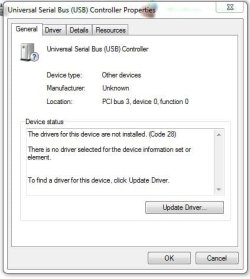
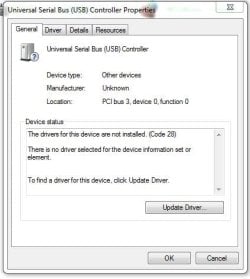
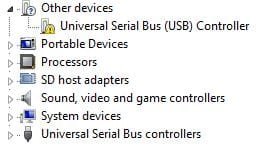
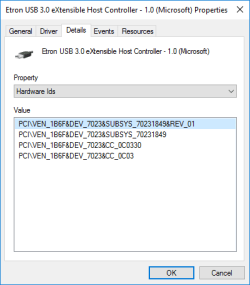
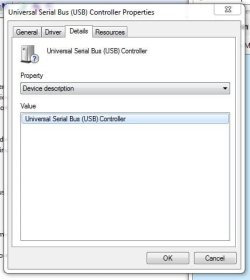
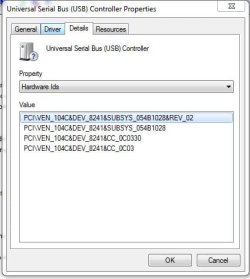
device list was incorrect I hope my description is clear enough to understand. My XPS One 2710 (all-in-one) has 4 USB portson the back and 2 on the side. 2 ports on the back don’t work.The others do.I see in Device Manager that there is a !at the first USB Controller. Opening the last USB listing on the attached device listshows many entries all of which say the device is working properly. Clicking the highlighted one shows the attached driver properties
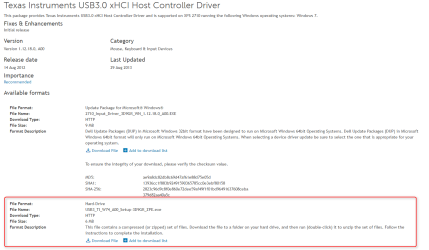
The Update Driver button doesn’t find anything but Dell has thisupdate, among others, listed for my computer. Dell site URL is Texas Instruments USB3.0 xHCI Host Controller Driver Driver Details | Dell US Mouse,Keyboard & Input Devices |Texas Instruments USB3.0 xHCI Host ControllerDriver (9 MB) But I'm not eager to install because I havechanged keyboard & mouse from original equipment and fear that current Kbrdand mouse may not work after install. And I amwondering why only 2 USBs don’t work.Couldthere be separate drivers for these 2? All 6 are 3.0 Orare they just somehow damaged?
Attachments
device list.JPG
32 KB
· Views: 19
driver properties.JPG
32 KB
· Views: 16
Last edited:
My Computer
At a glance
windows 7 home premium 64 bit SP1Intel Core i7 3770S @ 3.10GHzDDR3 16384 MBytesIntel(R) HD Graphics 4000, NVIDIA GeForce GT ...
Computer type
PC/Desktop
Computer Manufacturer/Model Number
Dell XPS One 2710
OS
windows 7 home premium 64 bit SP1
CPU
Intel Core i7 3770S @ 3.10GHz
Motherboard
Dell 02XMCT (CPU 1)
Memory
DDR3 16384 MBytes
Graphics Card(s)
Intel(R) HD Graphics 4000, NVIDIA GeForce GT 640M
Sound Card
Realtek High Definition Audio
Monitor(s) Displays
XPS One 2710 on Intel HD Graphics 4000 27"
Screen Resolution
2560x1440@59Hz
Hard Drives
1863GB
Case
All-in-One
Keyboard
Changed to old multimedia wireless set I had on XP machine
Internet Speed
1 Gb
Antivirus
Norton 360
Browser
IE, Chrome & Firefox
Other Info
A little worried about CPU temp that gets up to 180 F when watching TV via Media Center. 140-150 F normally.
Thanks for the help. But what about my questions
"But I'm not eager to install because I have changed keyboard & mouse from original equipment and fear that current Kbrd and mouse may not work after install. And I am wondering why only 2 USBs don’t work while the other 4 do. Could there be separate drivers for these 2? All 6 are 3.0 Or are they just somehow damaged?"
My Computer
At a glance
windows 7 home premium 64 bit SP1Intel Core i7 3770S @ 3.10GHzDDR3 16384 MBytesIntel(R) HD Graphics 4000, NVIDIA GeForce GT ...
Computer type
PC/Desktop
Computer Manufacturer/Model Number
Dell XPS One 2710
OS
windows 7 home premium 64 bit SP1
CPU
Intel Core i7 3770S @ 3.10GHz
Motherboard
Dell 02XMCT (CPU 1)
Memory
DDR3 16384 MBytes
Graphics Card(s)
Intel(R) HD Graphics 4000, NVIDIA GeForce GT 640M
Sound Card
Realtek High Definition Audio
Monitor(s) Displays
XPS One 2710 on Intel HD Graphics 4000 27"
Screen Resolution
2560x1440@59Hz
Hard Drives
1863GB
Case
All-in-One
Keyboard
Changed to old multimedia wireless set I had on XP machine
Internet Speed
1 Gb
Antivirus
Norton 360
Browser
IE, Chrome & Firefox
Other Info
A little worried about CPU temp that gets up to 180 F when watching TV via Media Center. 140-150 F normally.
But I'm not eager to install because I havechanged keyboard & mouse from original equipment and fear that current Kbrdand mouse may not work after install.
And I amwondering why only 2 USBs don’t work.Could there be separate drivers for these 2? All 6 are 3.0 Or are they just somehow damaged?
About the worry over your new keyboard and mouse, that is just the category those are under, the driver you posted has nothing to do with the keyboard or mouse. It is an input device so it falls under that.
The reason only two don't work is they are the ones on that controller, there is usually more than one controller.
My Computer
At a glance
Win 10 Pro x64Intel I5-2500K @3.3GHz16GB G.Skill Ripjaws X (4x4GB)EVGA GeForce 750 Ti SC 2GB
Computer type
PC/Desktop
Computer Manufacturer/Model Number
Self Built
OS
Win 10 Pro x64
CPU
Intel I5-2500K @3.3GHz
Motherboard
Asrock P67 Extreme4
Memory
16GB G.Skill Ripjaws X (4x4GB)
Graphics Card(s)
EVGA GeForce 750 Ti SC 2GB
Sound Card
ASUS Xonar DG 5.1 Channels 24-bit 96KHz PCI Interface Sound
Monitor(s) Displays
auria eq2367
Screen Resolution
1920 x 1080
Hard Drives
250GB Samsung 850 EVO SSD
1TB WD Blue
1TB Hitachi
PSU
SeaSonic X 650W 80 Plus Gold
Case
Corsair Obsidian 750D
Cooling
Corsair H60, Three 140mm case fans
Keyboard
Logitech Wireless Keyboard K520
Mouse
Logitech Wireless Mouse M310
Internet Speed
Wave Broadband ~ 100 dn 5 up
Antivirus
Windows Defender, Malwarebytes Premium
Browser
Edge, IE11, Chrome
Other Info
Laptop specs: HP g7-1365dx /
CPU: AMD A6-3420M APU with Radeon(tm) HD Graphics /
RAM: Crucial 8Gb (2x4Gb) /
SSD: Crucial M4-CT128M4SSD2 ATA Device/ FW 000F /
GFX: AMD Radeon HD 6520G /
OS: Windows 10 Pro x64
Thanks for the help. But what about my questions
"But I'm not eager to install because I have changed keyboard & mouse from original equipment and fear that current Kbrd and mouse may not work after install. And I am wondering why only 2 USBs don’t work while the other 4 do. Could there be separate drivers for these 2? All 6 are 3.0 Or are they just somehow damaged?"
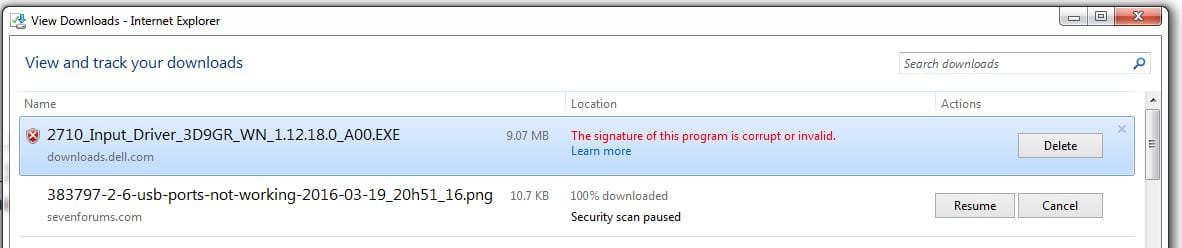
I tried to download the file from Dell but got a message on bottom of screen saying "The signature of 2710_input_Driver_3D9GR_WN_1.12.18.0_A00.exr is corrupt or invalid". I clicked a more info button and got the attached. I hate talking to the Dell techs but must I? Or is there another solution?
Attachments
download fail.JPG
37.4 KB
· Views: 0
My Computer
At a glance
windows 7 home premium 64 bit SP1Intel Core i7 3770S @ 3.10GHzDDR3 16384 MBytesIntel(R) HD Graphics 4000, NVIDIA GeForce GT ...
Computer type
PC/Desktop
Computer Manufacturer/Model Number
Dell XPS One 2710
OS
windows 7 home premium 64 bit SP1
CPU
Intel Core i7 3770S @ 3.10GHz
Motherboard
Dell 02XMCT (CPU 1)
Memory
DDR3 16384 MBytes
Graphics Card(s)
Intel(R) HD Graphics 4000, NVIDIA GeForce GT 640M
Sound Card
Realtek High Definition Audio
Monitor(s) Displays
XPS One 2710 on Intel HD Graphics 4000 27"
Screen Resolution
2560x1440@59Hz
Hard Drives
1863GB
Case
All-in-One
Keyboard
Changed to old multimedia wireless set I had on XP machine
Internet Speed
1 Gb
Antivirus
Norton 360
Browser
IE, Chrome & Firefox
Other Info
A little worried about CPU temp that gets up to 180 F when watching TV via Media Center. 140-150 F normally.
Fantastic! Would not have thought to try Chrome. It worked. Didn't need to restart as it said. Just stuck in a stick and it saw it. You have spent a bit of time with my problem and I really appreciate it. Much better than going to Dell and I learned a few things. Much Mahalo!
My Computer
At a glance
windows 7 home premium 64 bit SP1Intel Core i7 3770S @ 3.10GHzDDR3 16384 MBytesIntel(R) HD Graphics 4000, NVIDIA GeForce GT ...
Computer type
PC/Desktop
Computer Manufacturer/Model Number
Dell XPS One 2710
OS
windows 7 home premium 64 bit SP1
CPU
Intel Core i7 3770S @ 3.10GHz
Motherboard
Dell 02XMCT (CPU 1)
Memory
DDR3 16384 MBytes
Graphics Card(s)
Intel(R) HD Graphics 4000, NVIDIA GeForce GT 640M
Sound Card
Realtek High Definition Audio
Monitor(s) Displays
XPS One 2710 on Intel HD Graphics 4000 27"
Screen Resolution
2560x1440@59Hz
Hard Drives
1863GB
Case
All-in-One
Keyboard
Changed to old multimedia wireless set I had on XP machine
Internet Speed
1 Gb
Antivirus
Norton 360
Browser
IE, Chrome & Firefox
Other Info
A little worried about CPU temp that gets up to 180 F when watching TV via Media Center. 140-150 F normally.
Fantastic! Would not have thought to try Chrome. It worked. Didn't need to restart as it said. Just stuck in a stick and it saw it. You have spent a bit of time with my problem and I really appreciate it. Much better than going to Dell and I learned a few things. Much Mahalo!