Solved USB Power Output Meter ???

BuckSkin

New member
Power User
VIP
Local time
1:16 AM
Messages
521
Is there such a thing as a device that can be plugged into a USB port that will display the voltage and available power, in the same manner that one would test a vehicle battery or wall outlet ?


Thanks for reading and all help is appreciated.
 

My Computer

Computer type
PC/Desktop
Computer Manufacturer/Model Number
Dell Optiplex 780m "mini-tower"
OS
Windows 7 Pro x64
CPU
Intel Core Two Duo E8600 3.33 ghz
Motherboard
Whatever DELL put in it
Memory
8GB
Graphics Card(s)
Gigabyte Radeon R7 240
Monitor(s) Displays
HP 2159m
PSU
750 Watt Corsair CX750
Keyboard
Logitech Wireless
Mouse
Logitech Wireless
Browser
Chrome, Firefox, IE
There are such devices. I did a search at Amazon (uk) : usb multi power meter and found a variety of responses.
 

My Computer

Computer type
PC/Desktop
OS
Windows 7 x64, Vista x64, 8.1 smartphone
CPU
Intel E8400 65W 64-bit
Motherboard
Gigabyte EP45-UD3LR
Memory
DDR2 2 x 2GB, 1GB x 2
Graphics Card(s)
XFX Radeon HD5750
Sound Card
AMD High Definition Audio; Realtek High Definition Audio
Monitor(s) Displays
iiyama prolite X2377HDS
Screen Resolution
1920 x 1080
Hard Drives
500GB 7200 rpm Seagate ST3500413AS 16MB, 500GB 5400 rpm Toshiba MQ02ABF050H 32MB, 200GB 7200 rpm Seagate ST3200820AS 8MB, 2TB 7200 rpm Western Digital WD20EZRX 64MB
PSU
Enermax Liberty Modular
Case
Antec P193 Midi Tower
Keyboard
Mionix ZIBAL 60
Mouse
Razer USB 2.0 Diamondback Mouse or Huion Graphics Tablet
Browser
Internet Explorer, Lunascape, Firefox, Opera, Avast Safezone
On a USB port you have 5 volts from the power supply.
USB - Wikipedia
To measure the voltage, you put a voltmeter on Grd and +5 (paralel). That's easy.
To measure the current you must put an ampere meter in series with the load. This is difficult.
To find out the power consumption you must multiply the voltage by the current.

Finally, the available power you don't measure as it's a limited by the devices (power supply and MoBo)
 

My Computers

System One System Two

  • Computer type
    PC/Desktop
    Computer Manufacturer/Model Number
    custom build
    OS
    Windows 7 HP 64
    CPU
    i5 6600K - 800MHz to 4200MHz
    Motherboard
    GA-Z170-HD3P
    Memory
    4+4G GSkill DDR4 3000
    Graphics Card(s)
    IG - Intel 530
    Monitor(s) Displays
    Samsung 226BW
    Screen Resolution
    1680x1050
    Hard Drives
    (1) -1 SM951 – 128GB M.2 AHCI PCIe SSD drive for Windows 7 and Lubuntu
    (2) -1 WD SATA 3 - 1T for Data
    (3) -1 WD SATA 3 - 1T for backup
    PSU
    Thermaltake 450W TR2 gold
    Keyboard
    Old and good Chicony mechanical keyboard
    Mouse
    Logitech mX performance - 9 buttons (had to disable some)
    Internet Speed
    500Mb/s
    Browser
    Firefox 64
    Other Info
    TinyWall firewall
  • Computer type
    Laptop
    System Manufacturer/Model Number
    Asus Q550LF
    OS
    Windows 7 Pro
    CPU
    i7-4500U 800MHz to 3.0GHz
    Motherboard
    Asus Q550LF
    Memory
    (4+4)G DDR3 1600
    Graphics Card(s)
    IG intel 4400 + NVIDIA GeForce GT 745M
    Sound Card
    Realtek
    Monitor(s) Displays
    LG Display LP156WF4-SPH1
    Screen Resolution
    1920 x 1080
    Hard Drives
    BX500 120G SSD for Windows and programs +
    1T HDD for data
    Internet Speed
    500 Mb/s
    Browser
    Firefox
    Other Info
    TinyWall firewall
There are such devices. I did a search at Amazon (uk) : usb multi power meter and found a variety of responses.

Thanks for the link; one of those might prove handy in my trouble-shooting endeavors.

To measure the current you must put an ampere meter in series with the load. This is difficult.

After reading that line, my old noggin has puzzled out a workable plan of action, involving one of those USB desk lamps (or two or three) and an ammeter; I agree --- it is difficult.


Thanks everyone.
 

My Computer

Computer type
PC/Desktop
Computer Manufacturer/Model Number
Dell Optiplex 780m "mini-tower"
OS
Windows 7 Pro x64
CPU
Intel Core Two Duo E8600 3.33 ghz
Motherboard
Whatever DELL put in it
Memory
8GB
Graphics Card(s)
Gigabyte Radeon R7 240
Monitor(s) Displays
HP 2159m
PSU
750 Watt Corsair CX750
Keyboard
Logitech Wireless
Mouse
Logitech Wireless
Browser
Chrome, Firefox, IE

My Computer

Computer type
PC/Desktop
OS
Windows 7 Ultimate x64
I use this one right here:

Thanks for the recommendation and link.


The scenario that put me on this quest was an as yet unexplained drop in the current output of my USB 3.0 ports.

My wife and I have exactly identical tower machines, with identical components and extras, with the exception that mine has a CX750 Corsair power unit and hers still has the as-delivered 305-watt unit.

Both machines came originally with only USB 2.0.

I have added 5-port USB 3.0 cards and 4-port front-mounted USB 3.0 hubs with a fast-charge port to both machines.

Up until a couple days ago, I could plug a non-self-powered (soccer-mom type) external HDD (we have at least half-a-dozen of these) into any port, front or rear, 2.0 or 3.0, on either machine, and it would be immediately recognized and could read/write to a fare-the-well.

To add to that, all of the rear ports have six-foot USB 3.0 extension cables, so that I don't have to crawl down in amongst the spider webs to use the ports; I can tell no difference whatsoever in a drive being plugged into the extension cable, as opposed to being direct-connected.

Now, for reasons as yet undetermined, on my machine, there is not enough power on the front 3.0 ports, nor on the extension cables, to allow an ext. HDD to be recognized.

I can plug straight into a rear 3.0 port and it will connect, but not as immediate as it was.

I can still plug into any of the 2.0 ports, front or rear, and all works well.

The weakened connection points still have plenty of power for flash-drives and card-readers.

I plugged in a self-powered 7-port 3.0 hub to one of the USB extension cables and the ext. drives will connect and recognize fine.

So............, my surmisement is that my 5-port USB 3.0 card has weakened power output; it still has barely enough power to operate the drives when direct-connected, but not enough when using the front ports or the extension cables.

Before this malady occurred, I could have several of these drives connected at the same time and copy from one to another without a hitch.


Sorry for such a long-winded explanation.

 

My Computer

Computer type
PC/Desktop
Computer Manufacturer/Model Number
Dell Optiplex 780m "mini-tower"
OS
Windows 7 Pro x64
CPU
Intel Core Two Duo E8600 3.33 ghz
Motherboard
Whatever DELL put in it
Memory
8GB
Graphics Card(s)
Gigabyte Radeon R7 240
Monitor(s) Displays
HP 2159m
PSU
750 Watt Corsair CX750
Keyboard
Logitech Wireless
Mouse
Logitech Wireless
Browser
Chrome, Firefox, IE
Maybe the USB 3.0 card is going bad.

You should be able to view amp draw from a USB device under device manager.
 

My Computer

Computer type
PC/Desktop
OS
Windows 7 Ultimate x64
Maybe the USB 3.0 card is going bad.

That has been my surmisement; I really liked it while it lasted.
So long as I use the self-powered hub for the current demanding ext HDDs, it seems to be fine elsewise.

You should be able to view amp draw from a USB device under device manager.

Thanks; I was not aware of that.
 

My Computer

Computer type
PC/Desktop
Computer Manufacturer/Model Number
Dell Optiplex 780m "mini-tower"
OS
Windows 7 Pro x64
CPU
Intel Core Two Duo E8600 3.33 ghz
Motherboard
Whatever DELL put in it
Memory
8GB
Graphics Card(s)
Gigabyte Radeon R7 240
Monitor(s) Displays
HP 2159m
PSU
750 Watt Corsair CX750
Keyboard
Logitech Wireless
Mouse
Logitech Wireless
Browser
Chrome, Firefox, IE

I finally got around to ordering one of those.

I had no idea that the wife was an ice-cube USB-charger hoarder; I started testing chargers and she just kept digging them out.

One of these would have been handy ages ago and I highly recommend them.

As to my front USB panel losing power output, I found the culprit when I was installing a PCI SATA card; the power cable to the USB panel is just long enough and there are a ton of wires in my machine; the last time I had the side-panel off, I must have pushed the mess of wires a bit too much and had almost completely disconnected the power connection to the USB panel.
I added a 8-inch extender to provide a bit of slack; and, everything is back up and running; the USB ports have plenty of power now.

One thing I did find curious while poking my shiny new little tester into various USB orifices: I was using a USB dual camera battery charger to provide an amp load during my tests, I have a Pluggable self-powered 7-port USB hub that has both outer ports designated as hi-load charging ports; I was expecting the two designated charging ports to read somewhat higher amperage than the regular ports --- not so, all seven ports read the same = 5.24-volts 1.57-amps
 

My Computer

Computer type
PC/Desktop
Computer Manufacturer/Model Number
Dell Optiplex 780m "mini-tower"
OS
Windows 7 Pro x64
CPU
Intel Core Two Duo E8600 3.33 ghz
Motherboard
Whatever DELL put in it
Memory
8GB
Graphics Card(s)
Gigabyte Radeon R7 240
Monitor(s) Displays
HP 2159m
PSU
750 Watt Corsair CX750
Keyboard
Logitech Wireless
Mouse
Logitech Wireless
Browser
Chrome, Firefox, IE
Keep in mind that's amp draw for the device connected to the USB power meter. Not amp availability from the hub.

What is the make and model of the hub?

1.57 amps is pretty decent on draw and that tells me the hub is at least pumping that out. On the hub should read how many amps it can provide.
 

My Computer

Computer type
PC/Desktop
OS
Windows 7 Ultimate x64
What is the make and model of the hub?


Plugable brand; Amazon has the main picture wrong; scroll down a bit for the actual pictures:

Amazon.com: Plugable 7 port USB 3.0 hub - 25W Powered USB HUB: Computers & Accessories

They have replaced this model with an even more powerful one:

Amazon.com: Plugable 7-Port USB 3.0 SuperSpeed Charging Hub with 60W Power Adapter: Computers & Accessories

I just wish it had individual On/Off switches so I could turn on/off the non-self-powered 2.5" ext. HDDs, instead of having to plug/unplug them.

The one much-needed feature that is surprisingly rare to find on USB hubs is integral wall and under-shelf mounting.
 

My Computer

Computer type
PC/Desktop
Computer Manufacturer/Model Number
Dell Optiplex 780m "mini-tower"
OS
Windows 7 Pro x64
CPU
Intel Core Two Duo E8600 3.33 ghz
Motherboard
Whatever DELL put in it
Memory
8GB
Graphics Card(s)
Gigabyte Radeon R7 240
Monitor(s) Displays
HP 2159m
PSU
750 Watt Corsair CX750
Keyboard
Logitech Wireless
Mouse
Logitech Wireless
Browser
Chrome, Firefox, IE
Well, that hub is using a VIA chipset, and I do believe those are pretty solid. The hub is capable of supplying 5 amps. To read the total amp consumption from the hub and your computer, plug the USB meter between the computer and the hub. If it does read over 3 amps you might want to find a USB cable that can support 5 amps or greater. I'm pretty sure eBay or Amazon would have them.

Which USB power meter did you buy exactly? It may not be capable of reading 5 amps.

Actually, the one I linked to from eBay does say: Test Current: 0 ~ 3A (10A Maximum). And I just looked at mine and it will only test up to 3 amps.

Also note, that hub does have a good review and company grade as seen here: Fakespot | Plugable 7 Port Usb 30 Superspeed Hub With 25w Power Adapter Fake Review Analysis
 

My Computer

Computer type
PC/Desktop
OS
Windows 7 Ultimate x64
Which USB power meter did you buy exactly? It may not be capable of reading 5 amps.

Actually, the one I linked to from eBay does say: Test Current: 0 ~ 3A (10A Maximum). And I just looked at mine and it will only test up to 3 amps.

I am fairly certain that I got the exact one you have.
I never thought about putting it between the computer and hub; would I do that with or without the wall plug powered up?

Thanks for all the information on my hub.
 

My Computer

Computer type
PC/Desktop
Computer Manufacturer/Model Number
Dell Optiplex 780m "mini-tower"
OS
Windows 7 Pro x64
CPU
Intel Core Two Duo E8600 3.33 ghz
Motherboard
Whatever DELL put in it
Memory
8GB
Graphics Card(s)
Gigabyte Radeon R7 240
Monitor(s) Displays
HP 2159m
PSU
750 Watt Corsair CX750
Keyboard
Logitech Wireless
Mouse
Logitech Wireless
Browser
Chrome, Firefox, IE
I had / have, on occasion, a need to check the output power of various USB Charging systems / Ports.

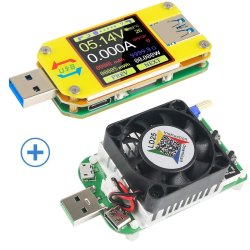
I ended up getting a test set from Amazon (UK) UM34C USB 3.0 Multimeter Bluetooth USB Voltmeter Ammeter and USB Electronic Load Tester Resistor USB Voltage Current Battery Power Capacity Charger Temperature Load Meter Tester: Amazon.co.uk: DIY & Tools as most of the basic units are not really up to the job - These "pro" items are much more reliable, and the settable load enables realistic load testing, of both charges and the drain of the actual cables

71bplLY08AL._SL1200_.jpg
 

My Computers

System One System Two

  • Computer type
    PC/Desktop
    Computer Manufacturer/Model Number
    ChillBlast - Custom to my design
    OS
    Windows 11 Pro x64 [Latest Release and Release Preview]
    CPU
    Ryzen 9 5950X, 3.8 - 5.2 MHz
    Motherboard
    Asus Prime X570-Pro
    Memory
    64GB [2 x 32GB] DDR4 3200MHz
    Graphics Card(s)
    4GB NVIDIA GEFORCE GTX 1650 Ti
    Sound Card
    On-board SPDIF to 5.1 System + HDMI [5.1 system]
    Monitor(s) Displays
    32" UHD 32 Bit HDR Monitor + 43" UHD 4K 32Bit HDR TV
    Screen Resolution
    2 x 3840 x 2160 @60Hz
    Hard Drives
    1TB M2 SSD OS, 500GB Fast Access SSD, 2 x 8TB Data + Various Externals from 1TB to 4TB, 10TB NAS
    PSU
    NZXT C750 80 PLUS Gold 750W Modular PSU
    Case
    Workstation Case [Matt Black]
    Cooling
    NZXT Kraken X63 280mm CPU Cooler +2x Quiet Case fans
    Keyboard
    Logitech Wireless MX Keys & K400 + others
    Mouse
    Logitech Wireless MX Master 3S
    Internet Speed
    920 MB Down 50 MB Up
    Antivirus
    BitDefender Total Security Pro
    Browser
    Chrome (always run latest Non-Beta)
    Other Info
    Also run ...
    Laptop - Quad 8GB - Windows 10 Pro x64
    Nexus 7 Android tablet x2
    Samsung 10.2" tablet
    Blackview TAB 8 4G Android Tablet c/w Keyboard
    Wacom Intuos Pro Medium Pen Pad
    Wacom Intuos Pro Small Pen Pad
    Wacom Expresskeys Remote
    Loopdeck+ Graphics Controller
    Shuttle Pro v2 Control
  • Computer type
    Laptop
    System Manufacturer/Model Number
    Dell XPS 17 10750H
    OS
    Windows 11 Pro x64 Latest RP
    CPU
    Intel I7 10750H 5.0GHz
    Motherboard
    Dell XPS
    Memory
    32GB [2x16GB] DDR4 2933 MHz
    Graphics Card(s)
    nVidia GTX1650Ti 4 GB GDDR6
    Sound Card
    Stock [Realtek] 4 Speaker
    Monitor(s) Displays
    17" IPS UHD+ Infinity Edge Touchscreen
    Screen Resolution
    3840 x 2400
    Hard Drives
    2TB M2 NVMe, 4TB External + various 500GB & 1TB External NVMe (also have access to spinner HDD from
    PSU
    Stock
    Case
    Stock XPS Aluminium & Carbon Fibre
    Cooling
    Stock - Active Fan Control
    Keyboard
    Backlit + Various Logitech
    Mouse
    Stock Track Pad + Logitech MX Trackball
    Internet Speed
    72 MB Down 18MB Up
    Browser
    Chrome
    Other Info
    Also run ...
    Laptop - Quad 8GB - Windows 10 Pro x64
    Nexus 7 Android tablet x2
    10.2" tablet
    Sony Z3 Android Smartphone
    Wacom Intuos Pro Medium Pen Pad
    Wacom Intuos Pro Small Pen Pad
    Wacom Expresskeys Remote
    Loopdeck+ Graphics Controller
    Shuttle Pro v2 Control Pad
    10TB NAS
I am fairly certain that I got the exact one you have.
I never thought about putting it between the computer and hub; would I do that with or without the wall plug powered up?

Thanks for all the information on my hub.


You would measure the amps with the wall plug. But if your devices are pulling more than 3 amps that may not be a good idea. Though the USB power meter does say it can handle 10 amps. But it will only read up to 3 amps.
 

My Computer

Computer type
PC/Desktop
OS
Windows 7 Ultimate x64
Back
Top