USB power - a question

teckneeculler

Member
Power User
VIP
Local time
5:22 AM
Messages
512
What's the power output of a computer's USB port? I've just realized that I have no idea, despite using these things for umpteen years.
Whatever it is, I assume that it must be the same as the output from the little USB adapters that plug into household power sockets?
 

My Computer My Computer

At a glance

Win7 Ultimate SP1Intel Core i5 9400 Coffee Lake 14nm16G DDR4NVidia GeForce GTX 960
Computer type
PC/Desktop
Computer Manufacturer/Model Number
My build
OS
Win7 Ultimate SP1
CPU
Intel Core i5 9400 Coffee Lake 14nm
Motherboard
Asus Prime H310M-E R2.0 (LGA1151)
Memory
16G DDR4
Graphics Card(s)
NVidia GeForce GTX 960
Sound Card
Realtek High Definition Audio (mobo)
Monitor(s) Displays
Asus PA248 24" 16:10 format
Screen Resolution
1920x1200@59Hz
Hard Drives
1863GB Seagate ST2000DM
3726GB Seagate ST4000DM
1863GB Seagate ST2000DM
6TB Seagate
465GB NVMe Samsung SSD 970
PSU
750G2
Case
Tower
Cooling
Standard
Keyboard
USB
Mouse
USB
Internet Speed
920Mbs/480Mbs
Antivirus
Malwarebytes
Browser
Firefox
It's 5 volts and 500 mA (Milliamps) for a computer. That amp part (current) is typical for computers in that it's 500 mA. So that's why you may need a good, reputable USB powered hub to provide more USB ports allotting more Amps.

That's on the output side of things. On the input for a powered USB hub, that wall wart adapter could be consuming 2 Amps! In the U.S. we use 120 volts. So the wattage formula is volts * Amps = watts. 120 * 2 is 240 watts. So that powered USB hub could be consuming the equivalent of two 100 watt light bulbs and a 40 watt light bulb. Just keep that in mind because if you have lots of electronics on the same circuit and a space heater you'll come close to popping the breaker since they are mostly rated at 15 Amps per room in the U.S. Some as little as 10 Amps before the breaker trips.

Moving along. The USB wall wart adapters for phones, tablets and lots of of consumer electronics output 5 volts, but depending on the needs of the device being charged have a certain Amp output. Usually around 2 Amps on the output. Enough to charge a tablet. You can see the input and output current and voltage on the adapter its self.

Keep in mind that you don't want to charge a phone or what ever with a cheap USB cable or an under powered USB wall adapter. It'll first cause the adapter to get very warm since the device is pulling all the current possible, and it could damage your device. You just want to make sure you have more than enough Amps on the output side.

They sell small battery charges for USB devices. I have a couple. My Tripp-Lite is rated at over 10,000 mAH (10AH Amp Hours). Looks kinda like this. Not the same model. Which means I can pull an Amp per hour for 10 hours. So I should be able to charge my phone at least 10 times. But that's just approximate.

In Windows XP you could see how much current the USB bus was currently consuming in Amps by going to the device manager and into the USB devices. Doesn't appear Windows 7 has that.

You might be interested in my video here:
How to tell if a USB phone cable is genuine - YouTube

- - - Updated - - -

An analogy for Amps and Voltage is this:

Think of electricity like a river. The amount of water flow is like Amps. The pressure of that water is like Voltage.

So for Amps it's a Coulomb per second or 1 Amp per second which is equal to the charge of 6.241 x 10[SUP]18[/SUP] protons. LOL For water your flow rate (amount per time) would be like gallons per hour. Or gallons per minute. Or Kilograms per hour. Or even cubic feet per hour. You get the point that Amps are a flow measured with time, a "rate."

You have a rate of possible delivery and a rate of consumption.

Even applies to economics and the freaking post office! LOL

 
Last edited:

My Computer My Computer

At a glance

Windows 7 Ultimate x64
Computer type
PC/Desktop
OS
Windows 7 Ultimate x64
That's interesting, thanks.
One of the reasons I asked is I have an oldish Samsung Galaxy Tab S 10.5 that I use so infrequently (to watch movies in bed) that I always have to search around for a charging cable. Then I eventually remember that I just need to plug it into one of the output ports on my Asus monitor with a regular USB A to C cable.
Confusingly for me, this charging operation works whether the Galaxy is on or off (tho when it's off is a way faster charge) but if it's switched on I can also transfer movies to the tablet, or, flowing in the other direction, watch its movie content on the Asus monitor.
 

My Computer My Computer

At a glance

Win7 Ultimate SP1Intel Core i5 9400 Coffee Lake 14nm16G DDR4NVidia GeForce GTX 960
Computer type
PC/Desktop
Computer Manufacturer/Model Number
My build
OS
Win7 Ultimate SP1
CPU
Intel Core i5 9400 Coffee Lake 14nm
Motherboard
Asus Prime H310M-E R2.0 (LGA1151)
Memory
16G DDR4
Graphics Card(s)
NVidia GeForce GTX 960
Sound Card
Realtek High Definition Audio (mobo)
Monitor(s) Displays
Asus PA248 24" 16:10 format
Screen Resolution
1920x1200@59Hz
Hard Drives
1863GB Seagate ST2000DM
3726GB Seagate ST4000DM
1863GB Seagate ST2000DM
6TB Seagate
465GB NVMe Samsung SSD 970
PSU
750G2
Case
Tower
Cooling
Standard
Keyboard
USB
Mouse
USB
Internet Speed
920Mbs/480Mbs
Antivirus
Malwarebytes
Browser
Firefox
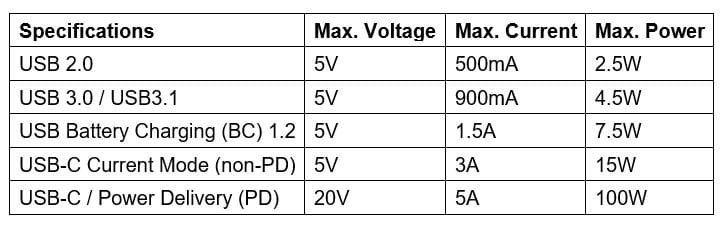
You are talking about two different things. The USB ports on a computer are all 5 volts. Their output current depends upon what standard they are. They can USB 2.0, USB 3.0, or USB-C.

USB chargers can vary both the voltage and current depending upon their capability and that of the battery they are charging. For example the charger for my Samsung S21 phone can rapid charge it at 2.6 amps at 9.3 volts for a total of 25 watts. I have seen other chargers with capabilities of 700ma, 1000ma, 1500ma, 2000ma, or 3000mA. Note that both the charger and battery being charged have to support rapid charging to take advantage of the extra charging current available. For example, one time after a power failure I used my laptop to charge my phone. The phone was probably charged at only 500mA because the laptop wasn't capable of rapid charging.

USB Charging.jpg

USB Charging and Power Delivery
USB Charging and Power Delivery | Tripp Lite
 

My Computers My Computers

  • At a glance

    Windows 7 Professional 64bit / Windows 10 Hom...AMD FX-8350GSKILL Ripjaw-X PC3 12800 12GB (2x4GB, 2x2GB)ASUS ENGTX560 DCII OC/2DI/1GD5 1GB
    Computer type
    PC/Desktop
    Computer Manufacturer/Model Number
    Custom build
    OS
    Windows 7 Professional 64bit / Windows 10 Home 64bit
    CPU
    AMD FX-8350
    Motherboard
    Gigabyte GA-990FXA-UD3 (AM3+) Rev. 4.0
    Memory
    GSKILL Ripjaw-X PC3 12800 12GB (2x4GB, 2x2GB)
    Graphics Card(s)
    ASUS ENGTX560 DCII OC/2DI/1GD5 1GB
    Sound Card
    Integrated
    Monitor(s) Displays
    Asus VE228H (21.5-in)
    Screen Resolution
    1920x1080 60Hz
    Hard Drives
    SAMSUNG 870 EVO 1TB (2.5" SATA SSD)
    SAMSUNG 870 EVO 500GB (2.5" SATA SSD)
    PSU
    Antec TruePower (new) TP-650 (650 watts)
    Case
    Antec Three Hundred
    Cooling
    AMD stock (plan to upgrade to Cooler Master Hyper 212 EVO)
    Keyboard
    Logitech K540 (wireless)
    Mouse
    Logitech M310 (wireless)
    Internet Speed
    Comcast Gigabit X2 Internet (2100Mbps down / 300Mbps up)
    Browser
    Firefox, Edge, Chrome
    Other Info
    Optical drive: ASUS DRW-24B3ST/BLK/G (Black) (24X)
    External hard drives: 2TB & 6TB
    Internet Gateway: Comcast XB8
  • Computer type
    PC/Desktop
Okay, I think I'm beginning to get it. I can charge my Samsung tablet from my computer using a USB A-C cable.
If I use a USB 2.0 port it'll charge at 2.5W, a USB 3.0\3.1 port will do it at 4.5W.
I also have a couple of 'wall warts' (hate that name) that I guess might do the charging, too.
One is a Sony - 5V x 850mA, the other an Apple with a gutsier 5.2V x 2.4A (12.48W).
Is there an upper limit to the wattage that the Samsung tablet would accept? The manual says nothing about that.
 

My Computer My Computer

At a glance

Win7 Ultimate SP1Intel Core i5 9400 Coffee Lake 14nm16G DDR4NVidia GeForce GTX 960
Computer type
PC/Desktop
Computer Manufacturer/Model Number
My build
OS
Win7 Ultimate SP1
CPU
Intel Core i5 9400 Coffee Lake 14nm
Motherboard
Asus Prime H310M-E R2.0 (LGA1151)
Memory
16G DDR4
Graphics Card(s)
NVidia GeForce GTX 960
Sound Card
Realtek High Definition Audio (mobo)
Monitor(s) Displays
Asus PA248 24" 16:10 format
Screen Resolution
1920x1200@59Hz
Hard Drives
1863GB Seagate ST2000DM
3726GB Seagate ST4000DM
1863GB Seagate ST2000DM
6TB Seagate
465GB NVMe Samsung SSD 970
PSU
750G2
Case
Tower
Cooling
Standard
Keyboard
USB
Mouse
USB
Internet Speed
920Mbs/480Mbs
Antivirus
Malwarebytes
Browser
Firefox
Electronics will typically draw the current needed for charging or consumption while in use. So look on your tablet. What is the input charging current rating? if it's 2 Amps (2000 mA) then you should use a charger capable of that amperage on the output or more. Again, it'll say on the charger.

In the U.S. you'll want chargers and what have you to be UL listed. This is the Underwriter Laboratories. If companies (if they care and are willing to spend the money) get their products UL tested to meet certain criteria for safety, then they can (lawfully) place the coveted UL sticker or marking on the device. Sometimes the UL label is holographic to help prevent a forgery. But I wouldn't trust that label unless you know for sure. China likes to fake those. That's where Customs and the FTC step in.

So having said that, be leary of buying consumer electronics not UL listed. Not necessary a sign of a bad or unsafe product, but when the company does go the extra mile to apply for being UL listed tells you a little about the company and whether the device meets certain safety standards. You should be able to look up a product at UL's website, but I think they charge for the Info. The other Cert is NEMA. But that's more for battery backups, surge protectors and what have you. I'd gone so far as to look up a company's ISO certifications if they have any. Even for companies in China which is where 99% of all consumer electronics come from.

If you shop for electronics on Amazon, finding UL listed products are like finding a needle in a haystack. I often times have to use the Q/A and see. Then I have to trust the validity of the response. And Amazon reviews as well as other revenue, I mean, review sites can't be trusted. I learned this from the investigations and reputation management firm KwikChex. Well, I always suspected the marketing and capital growth capability of reviews to be of shenanigans anyway. (And that Wikipedia page needs some editing. LOL)
 

My Computer My Computer

At a glance

Windows 7 Ultimate x64
Computer type
PC/Desktop
OS
Windows 7 Ultimate x64
Back
Top