USB write protected?

Selena

New member
Local time
11:38 PM
Messages
20
Hi, I have a problem with a brand new USB stick, PNY 64GB I bought on e-bay about two months ago. It started working properly, I transferred on it about 20GB of my photos. I did not notice anything weird. The pictures were there and I think I could even move them on and off, like copying and deleting. After few days, when I wanted to erase them, there was a message that the device is write protected. USB? There is nothing to switch it for write protection like on SD cards, for example.
From that moment, the device once was recognized as inserted in the PC, other times it was not. I could not delete the images, I could not format the device and even the KillDisc software, after running nearly 5 days without a break could not sort this out. There was an error message at 99% of process and I could do nothing else than to skip it, which resulted in the problem persisting on the USB.
Now I cannot even view the files, despite after this treatment I could have seen them few days ago. The files, after I clicked on them, showed mostly unaffected photos in the views, but when I wanted to see any particular photo, all of them appeared to be damaged - there was a grey area on the majority of the photo, just a thin area of the original picture could be seen on the top of the picture.

I have contacted the seller with this problem and they offered me the refund or replace, even assured me that the item will go to the manufacturer.
However, I guess that there are phishers outside just waiting for items like this, who are able to get to the data and do with them whatever they want. I would love to receive a refund but I do not want the USB stick to go out in this condition.

Just to say, that my PC appears to be clean of any malware, I have updated Windows antivir and firewall and I have permanently switched on the paid version of Superantispyware, which scans the PC almost every day and I remove any cookies that appear as a thread. I have no problems with other USB connected devices, even in the same slot...

What would you recommend in this case?
And how to reply to the seller that I am not that adventurous sending out the device in this condition. I offered to them that I would actually physically damage the hardware and post it to them so that they can be sure that I am not trying to fool them by claiming a faulty item while it would be perfectly fit just to get the refund.
They did not make any statement about this idea at all.

PS: after checking some of your answers to a similar problem (such as computer, device, right click, properties, etc) I cannot see the "Security" tab in it. And the disc appears to be full - perhaps after the KillDisc treatment...

PPS: right, while waiting for a reply, I played with it and found out that if I click right on the computer, there is the Security, but previously I did this with the device I want to treat...
 
Last edited:

My Computer

OS
Win7 64 bit
Hi,

If I understand you, you wish to remove all the photo's/data on this stick prior to returning it to the seller. Is that correct?

Regards,
Golden
 

My Computer

Computer type
PC/Desktop
Computer Manufacturer/Model Number
Golden Mk. I.4
OS
Windows 10 Pro x64 ; Xubuntu x64
CPU
Intel i7 860 @ 2.80 GHz O/C'ed to 4.0GHz
Motherboard
Gigabyte P55A-UD3R Rev.1. Award BIOS F13
Memory
16GB Corsair Vengance DDR3 @ 661 MHz Dual Channel (9-9-9-24)
Graphics Card(s)
EVGA NVidia GTX 560 1024MB
Sound Card
Realtek Integrated
Monitor(s) Displays
Dual Samsung SyncMaster 2494HS
Screen Resolution
1920*1080 and 1920*1080
Hard Drives
1*Samsung 840 EVO 120GB SSD;
1*OCZ Vertex 2 60GB SSD;
2*Samsung F3 SpinPoint 1TB in RAID0;
1*Samsung F1 SpinPoint 1TB;
2*Western Digital 1TB External USB 3.0
1*Western Digital 500GB External USB 3.0
1*Seagate 500GB External USB 2.0
PSU
Thermaltake ToughPower QFan 750W
Case
Thermaltake Element S VK60001W2Z
Cooling
Corsair H60 Water Cooling, 2*230mm and 2*80mm case fans
Keyboard
Logitech G110
Mouse
Logitech MX518
exactly, correct. but i mean truly wipe them out, not just cut the way to them as to an average user it appears empty but the data are still there. that was why i used the killdisc, though even after that i could see the folders and view the pictures...
 

My Computer

OS
Win7 64 bit
Hi,

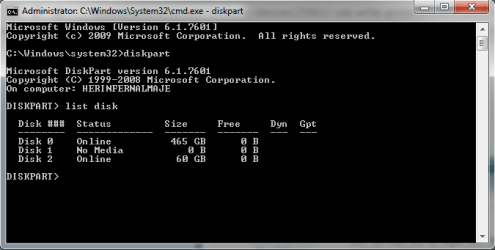
OK, we can try to wipe the USB using the Windows DISKPART CLEAN ALL utility. Plug the USB into the computer, and then follow these steps, then post back as we progress.

1. Click the Start :orb:
2. In the search box, type cmd
3. In the list that opens, right-click on cmd.exe and choose the 'Run as administrator' option
4. In the cmd window that opens, type the following, hitting enter after each command:

diskpart
list disk

Post back what is written in the window, or better still take screen capture image and attach them to your reply.

http://www.sevenforums.com/tutorials/9733-screenshots-files-upload-post-seven-forums.html

Regards,
Golden
 

My Computer

Computer type
PC/Desktop
Computer Manufacturer/Model Number
Golden Mk. I.4
OS
Windows 10 Pro x64 ; Xubuntu x64
CPU
Intel i7 860 @ 2.80 GHz O/C'ed to 4.0GHz
Motherboard
Gigabyte P55A-UD3R Rev.1. Award BIOS F13
Memory
16GB Corsair Vengance DDR3 @ 661 MHz Dual Channel (9-9-9-24)
Graphics Card(s)
EVGA NVidia GTX 560 1024MB
Sound Card
Realtek Integrated
Monitor(s) Displays
Dual Samsung SyncMaster 2494HS
Screen Resolution
1920*1080 and 1920*1080
Hard Drives
1*Samsung 840 EVO 120GB SSD;
1*OCZ Vertex 2 60GB SSD;
2*Samsung F3 SpinPoint 1TB in RAID0;
1*Samsung F1 SpinPoint 1TB;
2*Western Digital 1TB External USB 3.0
1*Western Digital 500GB External USB 3.0
1*Seagate 500GB External USB 2.0
PSU
Thermaltake ToughPower QFan 750W
Case
Thermaltake Element S VK60001W2Z
Cooling
Corsair H60 Water Cooling, 2*230mm and 2*80mm case fans
Keyboard
Logitech G110
Mouse
Logitech MX518
ok, except there was no .exe option, just one black and white icon on the top, but I guess that is ok.
 

Attachments

  • diskpart1.png
    diskpart1.png
    11.6 KB · Views: 166

My Computer

OS
Win7 64 bit
Hi,

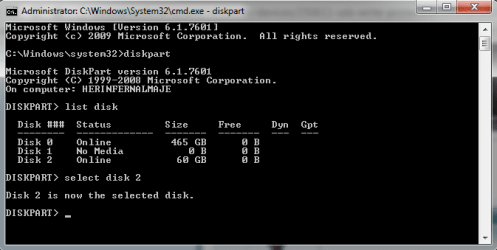
Yes, that's OK. Now type the following in that same window and hit enter:

select disk 2

Then post back another screen capture image so we are 100% sure we are going to wipe the correct disk - we don't want to wipe the wrong disk!

Regards,
Golden
 

My Computer

Computer type
PC/Desktop
Computer Manufacturer/Model Number
Golden Mk. I.4
OS
Windows 10 Pro x64 ; Xubuntu x64
CPU
Intel i7 860 @ 2.80 GHz O/C'ed to 4.0GHz
Motherboard
Gigabyte P55A-UD3R Rev.1. Award BIOS F13
Memory
16GB Corsair Vengance DDR3 @ 661 MHz Dual Channel (9-9-9-24)
Graphics Card(s)
EVGA NVidia GTX 560 1024MB
Sound Card
Realtek Integrated
Monitor(s) Displays
Dual Samsung SyncMaster 2494HS
Screen Resolution
1920*1080 and 1920*1080
Hard Drives
1*Samsung 840 EVO 120GB SSD;
1*OCZ Vertex 2 60GB SSD;
2*Samsung F3 SpinPoint 1TB in RAID0;
1*Samsung F1 SpinPoint 1TB;
2*Western Digital 1TB External USB 3.0
1*Western Digital 500GB External USB 3.0
1*Seagate 500GB External USB 2.0
PSU
Thermaltake ToughPower QFan 750W
Case
Thermaltake Element S VK60001W2Z
Cooling
Corsair H60 Water Cooling, 2*230mm and 2*80mm case fans
Keyboard
Logitech G110
Mouse
Logitech MX518
done :)
 

Attachments

  • diskpart2.png
    diskpart2.png
    11.1 KB · Views: 125

My Computer

OS
Win7 64 bit
ps: if we will be able to clean it all throughout, will the write protected problem be solved then? in that case i would keep the USB.
 

My Computer

OS
Win7 64 bit
OK.

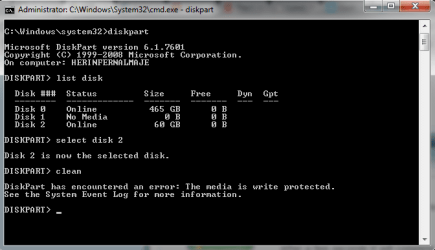
In that same window, type and following and hit enter:

clean

After a few seconds it will complete. Now go into Windows Explorer, and check to see that the USB drive is empty.

I'm not sure that will fix the problem - you could use it for a bit and see if it works OK.

Regards,
Golden
 

My Computer

Computer type
PC/Desktop
Computer Manufacturer/Model Number
Golden Mk. I.4
OS
Windows 10 Pro x64 ; Xubuntu x64
CPU
Intel i7 860 @ 2.80 GHz O/C'ed to 4.0GHz
Motherboard
Gigabyte P55A-UD3R Rev.1. Award BIOS F13
Memory
16GB Corsair Vengance DDR3 @ 661 MHz Dual Channel (9-9-9-24)
Graphics Card(s)
EVGA NVidia GTX 560 1024MB
Sound Card
Realtek Integrated
Monitor(s) Displays
Dual Samsung SyncMaster 2494HS
Screen Resolution
1920*1080 and 1920*1080
Hard Drives
1*Samsung 840 EVO 120GB SSD;
1*OCZ Vertex 2 60GB SSD;
2*Samsung F3 SpinPoint 1TB in RAID0;
1*Samsung F1 SpinPoint 1TB;
2*Western Digital 1TB External USB 3.0
1*Western Digital 500GB External USB 3.0
1*Seagate 500GB External USB 2.0
PSU
Thermaltake ToughPower QFan 750W
Case
Thermaltake Element S VK60001W2Z
Cooling
Corsair H60 Water Cooling, 2*230mm and 2*80mm case fans
Keyboard
Logitech G110
Mouse
Logitech MX518
hm... as you can see, that stupid piece of you know what is quite strong minded.
I think my friend has already tried this option as I saw him to fiddle on a screen similar to this - he was not any wiser.
 

Attachments

  • diskpart3.png
    diskpart3.png
    13.1 KB · Views: 157

My Computer

OS
Win7 64 bit
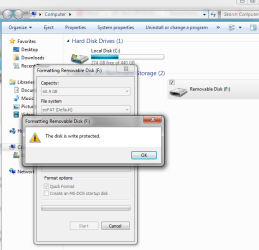
Mmmmm. Do you get the same message if you try and format this drive in Windows Explorer?

What make of USB drive is this? Does it have a small switch on the side of it to turn off protection?

Regards,
Golden
 

My Computer

Computer type
PC/Desktop
Computer Manufacturer/Model Number
Golden Mk. I.4
OS
Windows 10 Pro x64 ; Xubuntu x64
CPU
Intel i7 860 @ 2.80 GHz O/C'ed to 4.0GHz
Motherboard
Gigabyte P55A-UD3R Rev.1. Award BIOS F13
Memory
16GB Corsair Vengance DDR3 @ 661 MHz Dual Channel (9-9-9-24)
Graphics Card(s)
EVGA NVidia GTX 560 1024MB
Sound Card
Realtek Integrated
Monitor(s) Displays
Dual Samsung SyncMaster 2494HS
Screen Resolution
1920*1080 and 1920*1080
Hard Drives
1*Samsung 840 EVO 120GB SSD;
1*OCZ Vertex 2 60GB SSD;
2*Samsung F3 SpinPoint 1TB in RAID0;
1*Samsung F1 SpinPoint 1TB;
2*Western Digital 1TB External USB 3.0
1*Western Digital 500GB External USB 3.0
1*Seagate 500GB External USB 2.0
PSU
Thermaltake ToughPower QFan 750W
Case
Thermaltake Element S VK60001W2Z
Cooling
Corsair H60 Water Cooling, 2*230mm and 2*80mm case fans
Keyboard
Logitech G110
Mouse
Logitech MX518
did you mean this?

yes, we tried all possible options we knew, and my friend is not computer illiterate (though not a professional either).
he said that the last option is only the hammer...
 

Attachments

  • disc message.png
    disc message.png
    34.2 KB · Views: 20

My Computer

OS
Win7 64 bit
and, as I said previously: no switch visible, the make is PNY, and if it was that easy, the seller would have already adviced us about this...
 

My Computer

OS
Win7 64 bit
OK.

Lets try something else. Close the cmd window if it is still open by typing:

exit
exit


Now open a new cmd window as before, and type the following and hit enter:

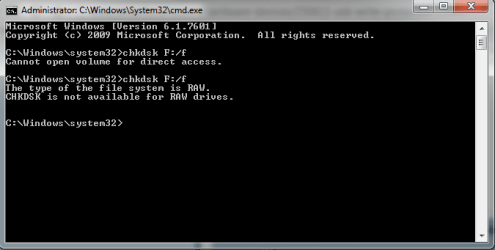
chkdsk F: /f

What does it report?

Regards,
Golden
 

My Computer

Computer type
PC/Desktop
Computer Manufacturer/Model Number
Golden Mk. I.4
OS
Windows 10 Pro x64 ; Xubuntu x64
CPU
Intel i7 860 @ 2.80 GHz O/C'ed to 4.0GHz
Motherboard
Gigabyte P55A-UD3R Rev.1. Award BIOS F13
Memory
16GB Corsair Vengance DDR3 @ 661 MHz Dual Channel (9-9-9-24)
Graphics Card(s)
EVGA NVidia GTX 560 1024MB
Sound Card
Realtek Integrated
Monitor(s) Displays
Dual Samsung SyncMaster 2494HS
Screen Resolution
1920*1080 and 1920*1080
Hard Drives
1*Samsung 840 EVO 120GB SSD;
1*OCZ Vertex 2 60GB SSD;
2*Samsung F3 SpinPoint 1TB in RAID0;
1*Samsung F1 SpinPoint 1TB;
2*Western Digital 1TB External USB 3.0
1*Western Digital 500GB External USB 3.0
1*Seagate 500GB External USB 2.0
PSU
Thermaltake ToughPower QFan 750W
Case
Thermaltake Element S VK60001W2Z
Cooling
Corsair H60 Water Cooling, 2*230mm and 2*80mm case fans
Keyboard
Logitech G110
Mouse
Logitech MX518
well, i exited it before just by hitting the x in the corner. will it be ok?
 

My Computer

OS
Win7 64 bit
Yes thats fine to close it that way.
 

My Computer

Computer type
PC/Desktop
Computer Manufacturer/Model Number
Golden Mk. I.4
OS
Windows 10 Pro x64 ; Xubuntu x64
CPU
Intel i7 860 @ 2.80 GHz O/C'ed to 4.0GHz
Motherboard
Gigabyte P55A-UD3R Rev.1. Award BIOS F13
Memory
16GB Corsair Vengance DDR3 @ 661 MHz Dual Channel (9-9-9-24)
Graphics Card(s)
EVGA NVidia GTX 560 1024MB
Sound Card
Realtek Integrated
Monitor(s) Displays
Dual Samsung SyncMaster 2494HS
Screen Resolution
1920*1080 and 1920*1080
Hard Drives
1*Samsung 840 EVO 120GB SSD;
1*OCZ Vertex 2 60GB SSD;
2*Samsung F3 SpinPoint 1TB in RAID0;
1*Samsung F1 SpinPoint 1TB;
2*Western Digital 1TB External USB 3.0
1*Western Digital 500GB External USB 3.0
1*Seagate 500GB External USB 2.0
PSU
Thermaltake ToughPower QFan 750W
Case
Thermaltake Element S VK60001W2Z
Cooling
Corsair H60 Water Cooling, 2*230mm and 2*80mm case fans
Keyboard
Logitech G110
Mouse
Logitech MX518
here we go
 

Attachments

  • diskpart4.png
    diskpart4.png
    9.2 KB · Views: 87

My Computer

OS
Win7 64 bit
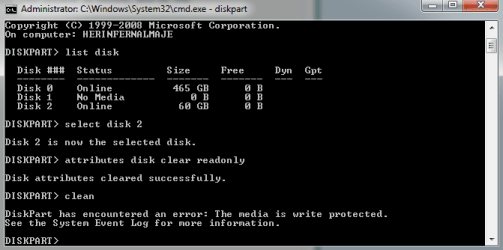
OK. That RAW format indicates the format of the disk cannot be read - perhaps a physical problem with it. Actually, I have one more suggestion. Please open a new cmd window as before, and do the following in bold text as shown below:

diskpart
list disk


(make sure the 60GB is still disk 2)

select disk 2

(make sure disk 2 has been selected)

attributes disk clear readonly
clean


Now check to see if the USB is empty.

Regards,
Golden
 

My Computer

Computer type
PC/Desktop
Computer Manufacturer/Model Number
Golden Mk. I.4
OS
Windows 10 Pro x64 ; Xubuntu x64
CPU
Intel i7 860 @ 2.80 GHz O/C'ed to 4.0GHz
Motherboard
Gigabyte P55A-UD3R Rev.1. Award BIOS F13
Memory
16GB Corsair Vengance DDR3 @ 661 MHz Dual Channel (9-9-9-24)
Graphics Card(s)
EVGA NVidia GTX 560 1024MB
Sound Card
Realtek Integrated
Monitor(s) Displays
Dual Samsung SyncMaster 2494HS
Screen Resolution
1920*1080 and 1920*1080
Hard Drives
1*Samsung 840 EVO 120GB SSD;
1*OCZ Vertex 2 60GB SSD;
2*Samsung F3 SpinPoint 1TB in RAID0;
1*Samsung F1 SpinPoint 1TB;
2*Western Digital 1TB External USB 3.0
1*Western Digital 500GB External USB 3.0
1*Seagate 500GB External USB 2.0
PSU
Thermaltake ToughPower QFan 750W
Case
Thermaltake Element S VK60001W2Z
Cooling
Corsair H60 Water Cooling, 2*230mm and 2*80mm case fans
Keyboard
Logitech G110
Mouse
Logitech MX518
haha

sorry, i know it isnt funny, but i cannot help myself... pathetic
 

Attachments

  • diskpart5.png
    diskpart5.png
    9.4 KB · Views: 75

My Computer

OS
Win7 64 bit
OK.

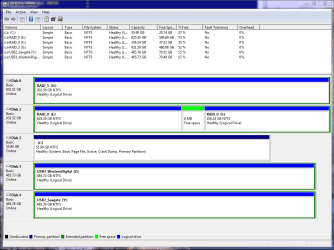
If you open up Disk Manager , can you post a screen capture image similar to that shown below?

Regards,
Golden
 

Attachments

  • capture.png
    capture.png
    34.2 KB · Views: 43

My Computer

Computer type
PC/Desktop
Computer Manufacturer/Model Number
Golden Mk. I.4
OS
Windows 10 Pro x64 ; Xubuntu x64
CPU
Intel i7 860 @ 2.80 GHz O/C'ed to 4.0GHz
Motherboard
Gigabyte P55A-UD3R Rev.1. Award BIOS F13
Memory
16GB Corsair Vengance DDR3 @ 661 MHz Dual Channel (9-9-9-24)
Graphics Card(s)
EVGA NVidia GTX 560 1024MB
Sound Card
Realtek Integrated
Monitor(s) Displays
Dual Samsung SyncMaster 2494HS
Screen Resolution
1920*1080 and 1920*1080
Hard Drives
1*Samsung 840 EVO 120GB SSD;
1*OCZ Vertex 2 60GB SSD;
2*Samsung F3 SpinPoint 1TB in RAID0;
1*Samsung F1 SpinPoint 1TB;
2*Western Digital 1TB External USB 3.0
1*Western Digital 500GB External USB 3.0
1*Seagate 500GB External USB 2.0
PSU
Thermaltake ToughPower QFan 750W
Case
Thermaltake Element S VK60001W2Z
Cooling
Corsair H60 Water Cooling, 2*230mm and 2*80mm case fans
Keyboard
Logitech G110
Mouse
Logitech MX518
Back
Top