Used diskpart-clean command on sd card? Help

Still nothing doing it that way. ):
Do you think a professional company would be able to recover it if i sent it out? Or did i completely ruin it?

I can't say anything for sure unless I see your SD card with a Sector Editor and examine the sectors in it.

But before we venture into it - its going to be an exercise for you but not difficult anyway - please try this.

Download, install and run the free Trial version of Getdataback Simple, scan your SDcard and check whether it shows all your files. Report.( I had tried and it recovered mp3 files and played those well. To copy you have to buy a licence. I didn't buy since I only wanted to experiment with it and it did a good job.:))

https://www.runtime.org/data-recovery-software.htm

My experiment here http://www.sevenforums.com/hardware...nclosure-suddenly-became-raw.html#post3034678
 

My Computer My Computer

OS
Windows 7 Home Premium 32 bit
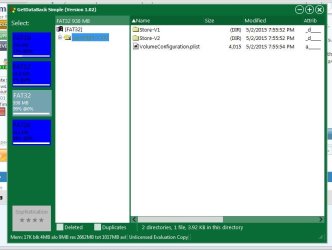
So this happened, showing FAT16, FAT12, FAT32, FAT16 again. When i open each of them i dont see any photo files, just random folders?
I did the complete scan
 

Attachments

  • Capture.JPG
    Capture.JPG
    48.9 KB · Views: 2

My Computer My Computer

Computer type
Laptop
OS
windows 7 home premium 32 bit
Double click on Store-V1 folder to open it and see what is inside.
Do that on Store- V2 also.
Do you see any jpg files?
 

My Computer My Computer

OS
Windows 7 Home Premium 32 bit
no jpg files
 

My Computer My Computer

Computer type
Laptop
OS
windows 7 home premium 32 bit
hmmm...............then I am afraid there is no jpg file on your microSD card to be recovered.( You may open the other FAT16,FAT12 volumes also and check if there is something inside.)

That card itself I guess came from a digicam or cellphone.

Were you able to see the photographs when you put it on your PC?

Whatever, there is nothing in it now, as far as I can see. No need to do a sector examination too.

Try what SIW2 had suggested in his post #12. He has always been suggesting it, but I had never tried it. So you are on your own.
 

My Computer My Computer

OS
Windows 7 Home Premium 32 bit
  • Like
Reactions: whs
okay thank you for all your help!
 

My Computer My Computer

Computer type
Laptop
OS
windows 7 home premium 32 bit
I was just curious to find out what is that Spotlight-V100 shown by Getdataback Simple and googling found that is created by Mac Systems on USBs plugged into it.

"The .spotlight-v100 and .trashes folders were created automatically by an Apple Macintosh computer system that the USB flash drive was plugged in before. These two folders are automatically created whenever a USB flash drive is connected to a computer system running an Apple Mac operating system. Spotlight is an indexing process on the Mac that will save the information that are gathered in the .spotlight-v100 directory."

Does that give you any clue on that SD Card?

Are you even looking at the correct SD Card for the photos????????????

This of course is proving to be the anticlimax for the whole thread,:) thanks to Getdataback simple.
 
Last edited:

My Computer My Computer

OS
Windows 7 Home Premium 32 bit

My Computers My Computers

System One System Two

  • Computer type
    PC/Desktop
    OS
    7 X64
    CPU
    i5 8400
    Motherboard
    gigabyte b365m ds3h
    Memory
    2x8gb 3200mhz
    Hard Drives
    various
    PSU
    pure power 11 400w cm
    Case
    Coolermaster
    Cooling
    cryorig m9i
  • Computer type
    PC/Desktop
    OS
    7x64
    CPU
    g5400
    Motherboard
    ga b365m ds3h
    Memory
    8gb ddr4 2400
    PSU
    xfx pro 450w
I had a friend try to help me with photorec on his Mac before you suggested it. And yes it it the correct card. It was only reformatted on may 1st. So it wasn't that long ago, I've been trying for days straight to fix it.
 

My Computer My Computer

Computer type
Laptop
OS
windows 7 home premium 32 bit
Someone told me it had something to do with the sectors? I'm not too sure what that means.
 

My Computer My Computer

Computer type
Laptop
OS
windows 7 home premium 32 bit
OK ma'm, the author of PhotoRec/TestDisk recommends two programs to try when PhotoRec is not successful.

1. GetDataback NTFS (now Getdataback Simple) - we have already tried it and
2. Zero Assumption Recovery - Yep, that is what was suggested by SIW2 in his post#28. And as he said digital picture recovery is free.

So try your luck. Data Recovery Software, Solutions, Tutorials, Forum - ZAR Data Recovery
 

My Computer My Computer

OS
Windows 7 Home Premium 32 bit
I've used ZAR to recover photos from a camera's Micro SD card but that was a few years ago. The user interface is a little confusing, at first, but I was able to recover all but just a few pictures. I used a card reader on the PC since the camera wouldn't even recognize the SD. It worked so well, I bought the package. As it turns out, I haven't needed it since. :rolleyes:
 

My Computer My Computer

Computer type
PC/Desktop
Computer Manufacturer/Model Number
Built 2/11/2011
OS
Windows 7 Pro-x64
CPU
i7-2600 3.4GHz - 3.8GHz Turbo
Motherboard
Intel DH67BL-B3
Memory
8Gb - 2x4GB, Muskin 991770 PC3-1333
Graphics Card(s)
Integrated Intel HD 2000
Sound Card
Integrated Intel 10.1 HD, RealTek ALC892
Monitor(s) Displays
Asus LCD VH222H, Haier HL24XSL2a
Screen Resolution
1920x1080, 1920x1080
Hard Drives
Crucial SSD C300-128Gb,
Western Digital WD5002AALX - 500Gb,
Western Digital WD7501AALS - 750Gb
PSU
Seasonic 650W 80+ Gold Modular
Case
Rosewill Defender
Cooling
Stock CPU, Four 120mm case fans, PCH fan added
Keyboard
Logitech EX100 Y-RBH94 Wireless
Mouse
Logitech EX100 M-RCE95 Wireless
Internet Speed
3.0/1.5 Mbs
Antivirus
Microsoft Security Essentials
Browser
Microsoft Internet Explorer 11
Other Info
Antec Veris Premier-Multimedia IR Station,
Cyber Accoustics-3602 Speakers,
AFT XM-5U Card Reader,
Hauppauge TV-HVR-2250,
Sony LX300 USB Turntable
I will give this a try, and get back to you all! thank you (:
 

My Computer My Computer

Computer type
Laptop
OS
windows 7 home premium 32 bit
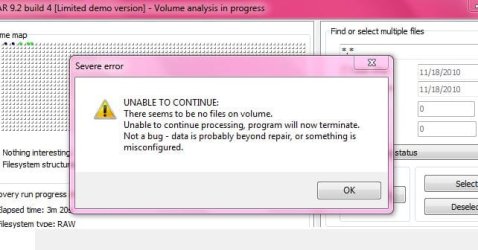
ZAR did not work, it must just be my SD card or something. But i really messed it up i guess. Any way a professional could do it if no recovery softwares can?
 

My Computer My Computer

Computer type
Laptop
OS
windows 7 home premium 32 bit
This is the error message i got. Does anyone know what it means by misconfigured?
 

Attachments

  • Capture.JPG
    Capture.JPG
    41.4 KB · Views: 10

My Computer My Computer

Computer type
Laptop
OS
windows 7 home premium 32 bit
Yeah, I suspect the data is toast then. I just ran ZAR on my "blank" camera card and got pictures from 2005!

One last thing to try: Insert the card in the camera. Does the cameral recognize the card? If so, use the camera's option to quick format the card. Then re-run ZAR.
 

My Computer My Computer

Computer type
PC/Desktop
Computer Manufacturer/Model Number
Built 2/11/2011
OS
Windows 7 Pro-x64
CPU
i7-2600 3.4GHz - 3.8GHz Turbo
Motherboard
Intel DH67BL-B3
Memory
8Gb - 2x4GB, Muskin 991770 PC3-1333
Graphics Card(s)
Integrated Intel HD 2000
Sound Card
Integrated Intel 10.1 HD, RealTek ALC892
Monitor(s) Displays
Asus LCD VH222H, Haier HL24XSL2a
Screen Resolution
1920x1080, 1920x1080
Hard Drives
Crucial SSD C300-128Gb,
Western Digital WD5002AALX - 500Gb,
Western Digital WD7501AALS - 750Gb
PSU
Seasonic 650W 80+ Gold Modular
Case
Rosewill Defender
Cooling
Stock CPU, Four 120mm case fans, PCH fan added
Keyboard
Logitech EX100 Y-RBH94 Wireless
Mouse
Logitech EX100 M-RCE95 Wireless
Internet Speed
3.0/1.5 Mbs
Antivirus
Microsoft Security Essentials
Browser
Microsoft Internet Explorer 11
Other Info
Antec Veris Premier-Multimedia IR Station,
Cyber Accoustics-3602 Speakers,
AFT XM-5U Card Reader,
Hauppauge TV-HVR-2250,
Sony LX300 USB Turntable
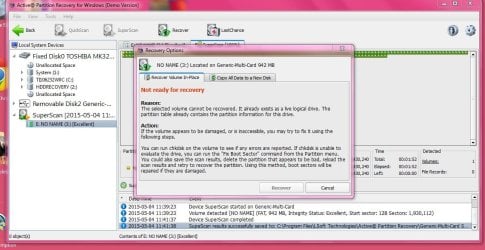
Just tried this recovery program, and got this message, does anyone know the reason? The little blocks it ran through on this recovery had red on all of them, which means bad sectors? Maybe something else needs to be fixed before running a photo recovery?
 

Attachments

  • Capture.JPG
    Capture.JPG
    116.4 KB · Views: 3

My Computer My Computer

Computer type
Laptop
OS
windows 7 home premium 32 bit
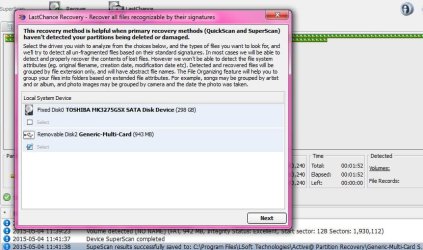
Would this hurt to try?
 

Attachments

  • Capture.JPG
    Capture.JPG
    78.4 KB · Views: 2

My Computer My Computer

Computer type
Laptop
OS
windows 7 home premium 32 bit
Try it. I doubt anything can hurt at this point.

ZAR creates a log file in: C:\Program Files (x86)\ZAR as logfile.txt. Upload this log.
 

My Computer My Computer

Computer type
PC/Desktop
Computer Manufacturer/Model Number
Built 2/11/2011
OS
Windows 7 Pro-x64
CPU
i7-2600 3.4GHz - 3.8GHz Turbo
Motherboard
Intel DH67BL-B3
Memory
8Gb - 2x4GB, Muskin 991770 PC3-1333
Graphics Card(s)
Integrated Intel HD 2000
Sound Card
Integrated Intel 10.1 HD, RealTek ALC892
Monitor(s) Displays
Asus LCD VH222H, Haier HL24XSL2a
Screen Resolution
1920x1080, 1920x1080
Hard Drives
Crucial SSD C300-128Gb,
Western Digital WD5002AALX - 500Gb,
Western Digital WD7501AALS - 750Gb
PSU
Seasonic 650W 80+ Gold Modular
Case
Rosewill Defender
Cooling
Stock CPU, Four 120mm case fans, PCH fan added
Keyboard
Logitech EX100 Y-RBH94 Wireless
Mouse
Logitech EX100 M-RCE95 Wireless
Internet Speed
3.0/1.5 Mbs
Antivirus
Microsoft Security Essentials
Browser
Microsoft Internet Explorer 11
Other Info
Antec Veris Premier-Multimedia IR Station,
Cyber Accoustics-3602 Speakers,
AFT XM-5U Card Reader,
Hauppauge TV-HVR-2250,
Sony LX300 USB Turntable
Your SD card got misconfigured the moment it was plugged into the Mac system. The tell-tale sign is the presence of .Spotlight -V100.

As far as data recovery is concerned we always go not one extra mile but many, to make sure that nothing gets written into media under recovery. In this case something undesirable has happened.

Whether you should get on to a professional recovery service, please wait to hear other knowledgeable residents here.( I am only a visitor and don't know how it goes here)

(OK, that was carwiz beatng me in time, :))
 

My Computer My Computer

OS
Windows 7 Home Premium 32 bit
Back
Top