User Account Type - Change

How to Change a User Account Type in Windows 7

   Information
This will show you how to change a already created user account to be either a guest, standard user, or administrator type in Windows 7.
   Note

Guests - A guest account allows people to have temporary access to your computer. People using the guest account can't install software, hardware, or change settings. While the default "Guest" account cannot be password protected, an existing user account made into only a guest account using an option below can have a password.

Standard user (Users) - A limited unelevated standard "users" account that can use most software and change system settings that do not affect other users. If a standard user wants to do an action that requires elevated rights or affects other users, then they will be prompted by UAC (if set to notify) to provide an administrator's password before being allowed to do so. If UAC is not set to notify, then the standard user will just be denied and not allowed to do the action.

Administrator - An unelevated administrator account that has complete access to the computer and can make any desired changes. Based on your UAC notification settings, administrators may be prompted to provide their password or confirmation before being allowed to open or run anything that requires elevated rights to do so, and make changes that affect the system or other users.


OPTION ONE

Use "User Accounts" in Control Panel to Change "Your" User Account Type

1. Open the Control Panel (Large icons view), and click on User Accounts.

2. Click on the Change your account type link. (see screenshot below) Current-1_UAC.jpg
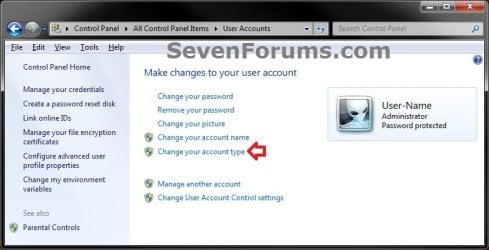
3. If prompted by UAC, then click on Yes (administrator) or enter the administrator's password (standard user).

4. Select (dot) what type of user account (Standard user or Administrator) you want this user account to be now, and click on the Change Account Type button. (see screenshot below)
NOTE: If the user account is originally an administrator account, then Windows 7 will not let you change it to a standard user account unless you already have another administrator account on the computer. Current-2.jpg
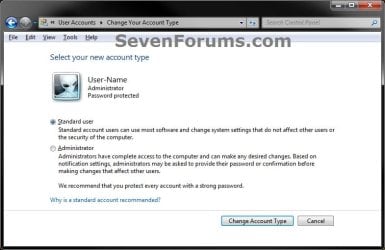
5. Close the User Accounts window when finished. (see screenshot below step 2)


OPTION TWO

Change "Another" User Account's Type in "User Accounts" in Control Panel

1. Open the Control Panel (Large icons view), and click on User Accounts.

2. Click on the Manage another account link. (see screenshot below) Another-1_UAC.jpg
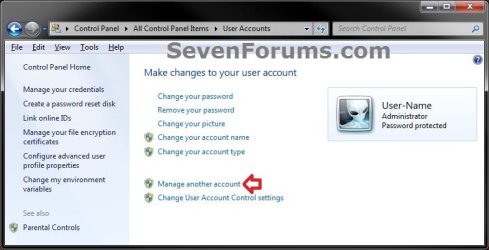
3. If prompted by UAC, then click on Yes (administrator) or enter the administrator's password (standard user).

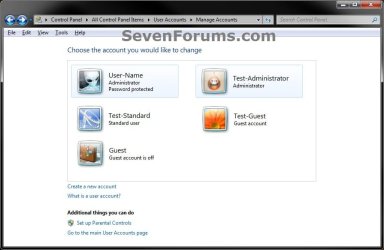
4. Click on the Administrator or Standard user account that you want to change the type of. (see screenshot below)
NOTE: If this is a guest account type, and not the actual default "Guest" account, then the only way to change it's type would be to change it to an Administrator account type first. Afterwards, you will be able to leave it as Administrator, or be able to change it to a Standard User account type. Another-2.jpg
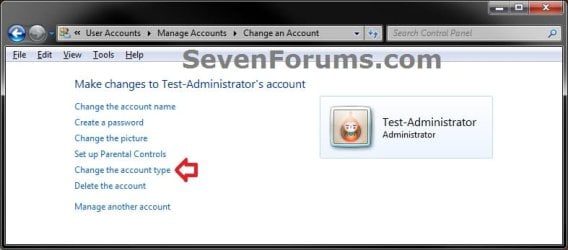
5. Click on the Change your account type link. (see screenshot below) Another-3.jpg
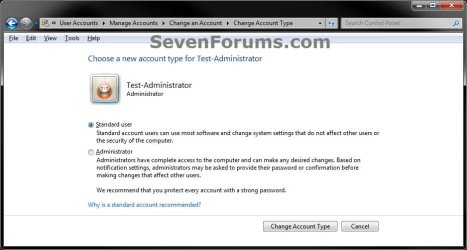
6. Select (dot) what type of user account (Standard user or Administrator) you want this user account to be now, and click on the Change Account Type button. (see screenshot below)
NOTE: If the user account is originally an administrator account, then Windows 7 will not let you change it to a standard user account unless you already have another administrator account on the computer. Another-4.jpg
7. Close the Change an Account window when finished. (see screenshot below step 5)


OPTION THREE

Change "Any" User Account's Type in Advanced User Accounts

1. Open the Start Menu, then type netplwiz in the search box and press enter.

2. If prompted by UAC, then click on Yes (administrator) or enter the administrator's password (standard user).

3. Check the Users must enter a user name and password to use this computer box, select (highlight) the Administrators or Users (Standard user) account under Group that you want to change the type of, then click on the Properties button. (see screenshot below) Advanced-1.jpg
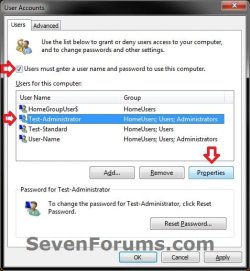
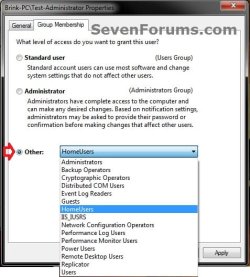
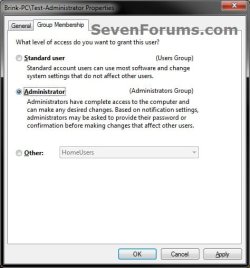
4. Click on the Group Membership tab, select (dot) what type of user account (Standard user or Administrator) you want this user account to be now, and click on OK. (see screenshot below)
:warn: WARNING: If the user account is originally an administrator account, then do not change it to a standard user account unless you already have another administrator account on the computer. You will lose access to everything that a standard user cannot open if you do. Advanced-2A.jpg
Advanced-2B.jpg

5. If you had a user account set to be logged on to at startup automatically, then you will need to set this back for that user account.

6. Close the advanced User Accounts window when finished. (see screenshot below step 3)


OPTION FOUR

Change User Account Type in Elevated Command Prompt


NOTE: This option will use the net localgroup command to basically add an "existing user account" to the group that you want the account type to be, then remove the user account from any other group (account type) that it belongs to, leaving the user account as only a member of the group that you want the account type to be. 1. Open an elevated command prompt.

2. To See What Groups the Existing User Account Currently Belongs To
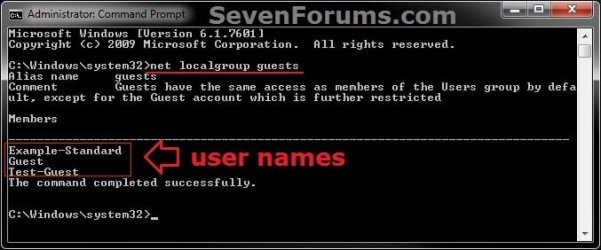
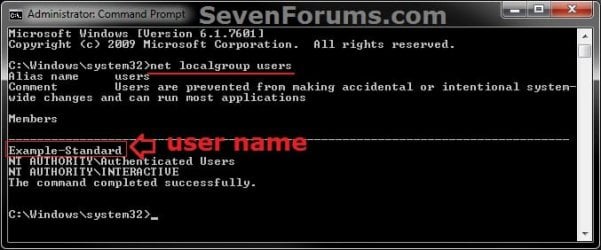
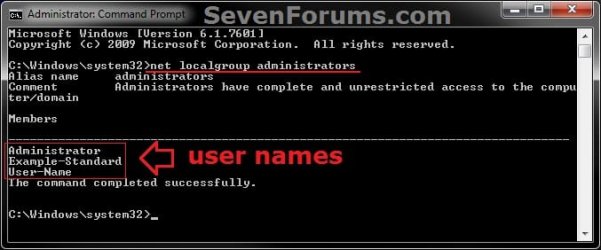
NOTE: This will give you a list of user account names that are a member of each user account type. For example, to see what account types my Example-Standard (name) user account is a member of.
A) In the elevated command prompt, copy and paste the commands below one at a time for each account type, and press Enter after each one. (see screenshots below)
  • net localgroup guests
  • net localgroup users
  • net localgroup administrators
Guests.jpg

Users.jpg

Administrators.jpg

3. Do either step 4, 5, or 6 below for what account type you want the user account (ex: Example-Standard) to be.

4. To Add User Account to Administrators Group
NOTE: This is to make the user account (ex: Example-Standard) a administrator account type by adding it to the administrators group, and removing the user account from the users and guests groups if the user account is a part of them. A) In the elevated command prompt, type the command below and press Enter. (see screenshot below)
NOTE: Substitute UserName in the command below with the actual user name of the user account (ex: Example-Standard) within quotes that you want to add to the administrators group. net localgroup administrators "UserName" /add
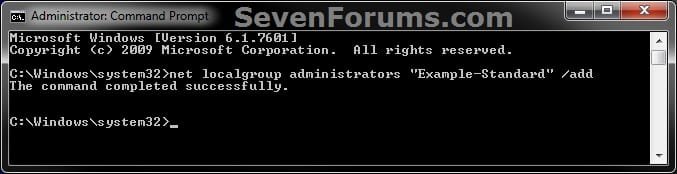
Add_Administrators.jpg
B) Go to step 7, and remove the user account from the users and guests groups if listed as being a member of them from step 2.
5. To Add User Account to Users Group
NOTE: This is to make the user account (ex: Example-Standard) a standard user account type by adding it to the users group, and removing the user account from the administrators and guests groups if the user account is a part of them. A) In the elevated command prompt, type the command below and press Enter. (see screenshot below)
NOTE: Substitute UserName in the command below with the actual user name of the user account (ex: Example-Standard) within quotes that you want to add to the users group. net localgroup users "UserName" /add
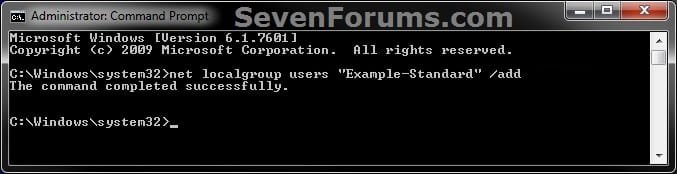
add-users.jpg
B) Go to step 7, and remove the user account from the administrators and guests groups if listed as being a member of them from step 2.
6. To Add User Account to Guests Group
NOTE: This is to make the user account (ex: Example-Standard) a guest account type by adding it to the guests group, and removing the user account from the users and administrators groups if the user account is a part of them. A) In the elevated command prompt, type the command below and press Enter. (see screenshot below)
NOTE: Substitute UserName in the command below with the actual user name of the user account (ex: Example-Standard) within quotes that you want to add to the guests group. net localgroup guests "UserName" /add
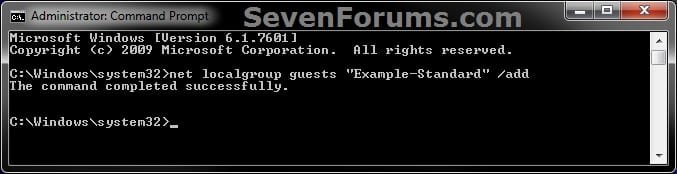
Add_Guests.jpg
B) Go to step 7, and remove the user account from the users and administrators groups if listed as being a member of them from step 2.
7. To Remove User Account from Groups
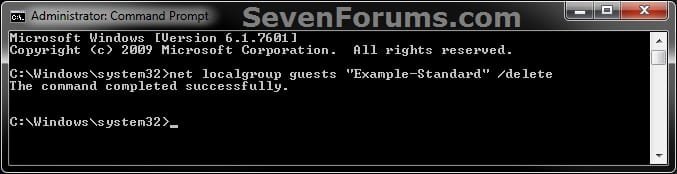
NOTE: This is to remove the user account (ex: Example-Standard) from all of the groups that is was listed as being a member of from step 2 except for the group (account type) that you want the user account to be. A) In the elevated command prompt, type the commands below one at a time for only each group (account type) that you want to remove the user account from being a member of, and press Enter after each one. (see screenshots below)

NOTE: Substitute UserName in the command below with the actual user name of the user account (ex: Example-Standard) within quotes that you want to remove from being a member of the group.
  • net localgroup administrators "UserName" /delete
  • net localgroup users "UserName" /delete
  • net localgroup guests "UserName" /delete
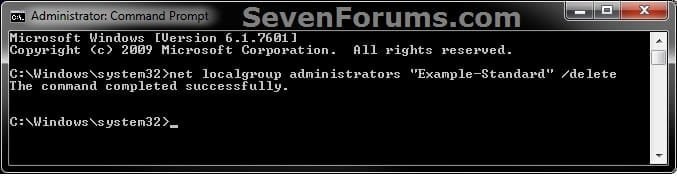
Remove_Administrators.jpg

Remove_Users.jpg

Remove_Guests.jpg

8. When finished, close the elevated command prompt.


OPTION FIVE

Change User Account Type in Local Users and Groups

1. Open Local Users and Groups, and click on the Users folder in the left pane. (see screenshot below) lusrmgr-1.jpg
2. In the middle pane, double click on the user account (ex: Example-Standard) under the Name column that you want to change the account type of. (see screenshot below) lusrmgr-3.jpg
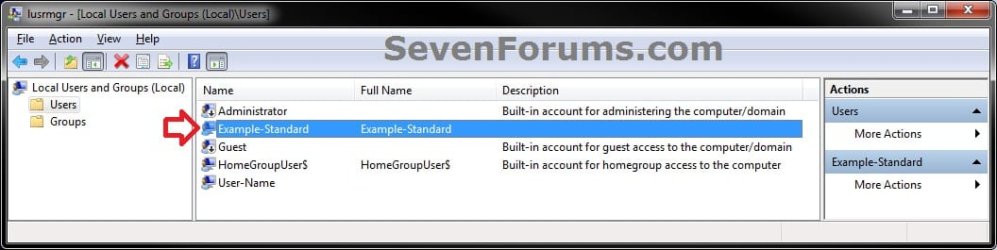
3. Click on the Member of tab, and do either step 4, 5, or 6 below for what account type you want the user account (ex: Example-Standard) to be. (see screenshot below) lusrmgr-4.jpg
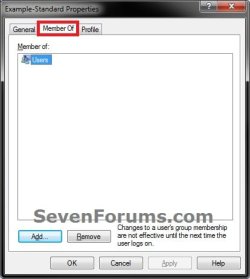
4. To Add User Account to Administrators Group
NOTE: This is to make the user account (ex: Example-Standard) a administrator account type by adding it to the administrators group, and removing the user account from the users and guests groups if the user account is a part of them. A) Click on the Add button, and add "Administrators". (see Option One at link for how)

B) If listed, select Users and Guests, and click on the Remove button. (see Option One at link for how)
NOTE: You can press and hold the CTRL key to select more than one listed group.

C) Go to step 7.
5. To Add User Account to Users Group
NOTE: This is to make the user account (ex: Example-Standard) a standard user account type by adding it to the users group, and removing the user account from the administrators and guests groups if the user account is a part of them. A) Click on the Add button, and add "Users". (see Option One at link for how)

B) If listed, select Administrators and Guests, and click on the Remove button. (see Option One at link for how)
NOTE: You can press and hold the CTRL key to select more than one listed group.

C) Go to step 7.
6. To Add User Account to Guests Group
NOTE: This is to make the user account (ex: Example-Standard) a guest account type by adding it to the guests group, and removing the user account from the users and administrators groups if the user account is a part of them. A) Click on the Add button, and add "Guests". (see Option One at link for how)

B) If listed, select Users and Administrators, and click on the Remove button. (see Option One at link for how)
NOTE: You can press and hold the CTRL key to select more than one listed group.

C) Go to step 7.
7. When finished, click on OK. (see screenshot below step 3)

8. Close Local Users and Groups.
That's it
Shawn


Last edited:
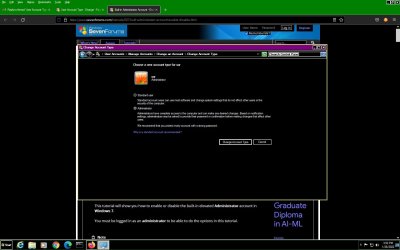
hi, I already tried using the built in administrator account. It sometimes allows to change, but it auto changes immediately to standard user account as in the picture. Sometimes change account type button is not clickable when you select administrator radio button. please see the example fig. How to fix it
 

Attachments

  • cannot change as administrator.jpg
    cannot change as administrator.jpg
    104.4 KB · Views: 1

My Computer

Computer type
PC/Desktop
Computer Manufacturer/Model Number
custom build
OS
Microsoft Windows 7 Ultimate 64-bit 7601 Multiprocessor Free Service Pack 1
CPU
Intel(R) Core(TM)2 Duo CPU E7200 @ 2.53GHz
Motherboard
To be filled by O.E.M. To be filled by O.E.M.
Memory
4.00 GB
Graphics Card(s)
NVIDIA GeForce 210
Sound Card
(1) NVIDIA High Definition Audio (2) Realtek High Definiti
Screen Resolution
1920 x 1080 x 32 bits (4294967296 colors) @ 60 Hz
Hard Drives
ST3500312CS ATA Device
hi, I already tried using the built in administrator account. It sometimes allows to change, but it auto changes immediately to standard user account as in the picture. Sometimes change account type button is not clickable when you select administrator radio button. please see the example fig. How to fix it

If able, you could create and use a new administrator account instead to see if it may stay an admnistrator.
 

My Computer

Computer type
PC/Desktop
Computer Manufacturer/Model Number
Self built custom
OS
64-bit Windows 11 Pro for Workstations
CPU
Intel i7-8700K OC'd to 5 GHz
Motherboard
ASUS ROG Maximus XI Formula Z390
Memory
64 GB (4x16GB) G.SKILL TridentZ RGB DDR4 3600 MHz
Graphics Card(s)
ASUS ROG-STRIX-GTX1080TI-O11G-GAMING
Sound Card
Integrated
Monitor(s) Displays
2 x Samsung Odyssey G7 27"
Screen Resolution
2560x1440
Hard Drives
1TB Samsung 990 PRO M.2,
4TB Samsung 990 PRO PRO M.2,
TerraMaster F8 SSD Plus NAS
PSU
Seasonic Prime Titanium 850W
Case
Thermaltake Core P3
Cooling
Corsair Hydro H115i
Keyboard
Logitech wireless K800
Mouse
Logitech MX Master 4
Internet Speed
2 Gb/s Download and 100 Mb/s Upload
Antivirus
Malwarebyte Anti-Malware Premium
Browser
Google Chrome
Other Info
Logitech Z625 speaker system,
Logitech BRIO 4K Pro webcam,
HP Color LaserJet Pro MFP M477fdn,
APC SMART-UPS RT 1000 XL - SURT1000XLI,
Galaxy S23 Plus phone
Hi, Brink, created a admin account with full privileges. But find that the radio button shows as standard . Now I understand that , it is of course, administrator account , but the radio button confuse with showing standard when you just open the account. I also tried to change the radio button to administrator, when the change account type button becomes not clickable.
Now I understand that windows show if you want to change the account, you could just click the change button, as radio button already selects one of the available change of user.
This query was asked , because, when I tried some commands on w32time on elevated command prompt, I get access denied errors and other errors.
I think that it being an administrator, there should not have been problem in executing the command, and access denied prompted me to know if the user account is administrator or standard.
Thanks. But I think there are bugs in w32 time commands, which gives itsself a kind of access denied to users
Thanks.
How could I check that a user has all the privileges like the built in admin account. is there a check possible
 

My Computer

Computer type
PC/Desktop
Computer Manufacturer/Model Number
custom build
OS
Microsoft Windows 7 Ultimate 64-bit 7601 Multiprocessor Free Service Pack 1
CPU
Intel(R) Core(TM)2 Duo CPU E7200 @ 2.53GHz
Motherboard
To be filled by O.E.M. To be filled by O.E.M.
Memory
4.00 GB
Graphics Card(s)
NVIDIA GeForce 210
Sound Card
(1) NVIDIA High Definition Audio (2) Realtek High Definiti
Screen Resolution
1920 x 1080 x 32 bits (4294967296 colors) @ 60 Hz
Hard Drives
ST3500312CS ATA Device
Hi, Brink, created a admin account with full privileges. But find that the radio button shows as standard . Now I understand that , it is of course, administrator account , but the radio button confuse with showing standard when you just open the account. I also tried to change the radio button to administrator, when the change account type button becomes not clickable.
Now I understand that windows show if you want to change the account, you could just click the change button, as radio button already selects one of the available change of user.
This query was asked , because, when I tried some commands on w32time on elevated command prompt, I get access denied errors and other errors.
I think that it being an administrator, there should not have been problem in executing the command, and access denied prompted me to know if the user account is administrator or standard.
Thanks. But I think there are bugs in w32 time commands, which gives itsself a kind of access denied to users
Thanks.
How could I check that a user has all the privileges like the built in admin account. is there a check possible

Just to verify, be sure you have an elevated command prompt opened when running the command. You'll get an access denied message if you only have an unelevated command prompt opened even if signed in as administrator.

You can run the net localgroup administrators command from step 2 in option 4 to verify which accounts are administrators.
 

My Computer

Computer type
PC/Desktop
Computer Manufacturer/Model Number
Self built custom
OS
64-bit Windows 11 Pro for Workstations
CPU
Intel i7-8700K OC'd to 5 GHz
Motherboard
ASUS ROG Maximus XI Formula Z390
Memory
64 GB (4x16GB) G.SKILL TridentZ RGB DDR4 3600 MHz
Graphics Card(s)
ASUS ROG-STRIX-GTX1080TI-O11G-GAMING
Sound Card
Integrated
Monitor(s) Displays
2 x Samsung Odyssey G7 27"
Screen Resolution
2560x1440
Hard Drives
1TB Samsung 990 PRO M.2,
4TB Samsung 990 PRO PRO M.2,
TerraMaster F8 SSD Plus NAS
PSU
Seasonic Prime Titanium 850W
Case
Thermaltake Core P3
Cooling
Corsair Hydro H115i
Keyboard
Logitech wireless K800
Mouse
Logitech MX Master 4
Internet Speed
2 Gb/s Download and 100 Mb/s Upload
Antivirus
Malwarebyte Anti-Malware Premium
Browser
Google Chrome
Other Info
Logitech Z625 speaker system,
Logitech BRIO 4K Pro webcam,
HP Color LaserJet Pro MFP M477fdn,
APC SMART-UPS RT 1000 XL - SURT1000XLI,
Galaxy S23 Plus phone
hi, Thanks I verified and found that users have administrator privileges other than NT/authority.
what those signifies and One item shows trusted installer
C:\Windows\system32>net localgroup administrators
Alias name administrators
Comment Administrators have complete and unrestricted access to the compu
ter/domain

Members

-------------------------------------------------------------------------------
Administrator
chandru
NT AUTHORITY\LOCAL SERVICE
NT AUTHORITY\NETWORK SERVICE
NT AUTHORITY\SERVICE
NT AUTHORITY\SYSTEM
NT SERVICE\TrustedInstaller
sar
The command completed successfully.
 

My Computer

Computer type
PC/Desktop
Computer Manufacturer/Model Number
custom build
OS
Microsoft Windows 7 Ultimate 64-bit 7601 Multiprocessor Free Service Pack 1
CPU
Intel(R) Core(TM)2 Duo CPU E7200 @ 2.53GHz
Motherboard
To be filled by O.E.M. To be filled by O.E.M.
Memory
4.00 GB
Graphics Card(s)
NVIDIA GeForce 210
Sound Card
(1) NVIDIA High Definition Audio (2) Realtek High Definiti
Screen Resolution
1920 x 1080 x 32 bits (4294967296 colors) @ 60 Hz
Hard Drives
ST3500312CS ATA Device
hi, Thanks I verified and found that users have administrator privileges other than NT/authority.
what those signifies and One item shows trusted installer
C:\Windows\system32>net localgroup administrators
Alias name administrators
Comment Administrators have complete and unrestricted access to the compu
ter/domain

Members

-------------------------------------------------------------------------------
Administrator
chandru
NT AUTHORITY\LOCAL SERVICE
NT AUTHORITY\NETWORK SERVICE
NT AUTHORITY\SERVICE
NT AUTHORITY\SYSTEM
NT SERVICE\TrustedInstaller
sar
The command completed successfully.

:thumbsup:

If they show as administrators here, then that should be good.
 

My Computer

Computer type
PC/Desktop
Computer Manufacturer/Model Number
Self built custom
OS
64-bit Windows 11 Pro for Workstations
CPU
Intel i7-8700K OC'd to 5 GHz
Motherboard
ASUS ROG Maximus XI Formula Z390
Memory
64 GB (4x16GB) G.SKILL TridentZ RGB DDR4 3600 MHz
Graphics Card(s)
ASUS ROG-STRIX-GTX1080TI-O11G-GAMING
Sound Card
Integrated
Monitor(s) Displays
2 x Samsung Odyssey G7 27"
Screen Resolution
2560x1440
Hard Drives
1TB Samsung 990 PRO M.2,
4TB Samsung 990 PRO PRO M.2,
TerraMaster F8 SSD Plus NAS
PSU
Seasonic Prime Titanium 850W
Case
Thermaltake Core P3
Cooling
Corsair Hydro H115i
Keyboard
Logitech wireless K800
Mouse
Logitech MX Master 4
Internet Speed
2 Gb/s Download and 100 Mb/s Upload
Antivirus
Malwarebyte Anti-Malware Premium
Browser
Google Chrome
Other Info
Logitech Z625 speaker system,
Logitech BRIO 4K Pro webcam,
HP Color LaserJet Pro MFP M477fdn,
APC SMART-UPS RT 1000 XL - SURT1000XLI,
Galaxy S23 Plus phone
Hi, brinks, I had done a wrong thing and then I could not logon at all as it prompts for password.
I somehow resorted to SR to get back to the logon screen as before and could log on.
Now, I do not want any logon screen at the start, nor showing any password prompt.
How do i log on my user sar, without the admin and chandru log on screen.
these were created for test purposes
please give me the idea , as I do not want user logon screen or password.
Is that possible
please give quick quick fix
 

My Computer

Computer type
PC/Desktop
Computer Manufacturer/Model Number
custom build
OS
Microsoft Windows 7 Ultimate 64-bit 7601 Multiprocessor Free Service Pack 1
CPU
Intel(R) Core(TM)2 Duo CPU E7200 @ 2.53GHz
Motherboard
To be filled by O.E.M. To be filled by O.E.M.
Memory
4.00 GB
Graphics Card(s)
NVIDIA GeForce 210
Sound Card
(1) NVIDIA High Definition Audio (2) Realtek High Definiti
Screen Resolution
1920 x 1080 x 32 bits (4294967296 colors) @ 60 Hz
Hard Drives
ST3500312CS ATA Device
Hi, brinks, I had done a wrong thing and then I could not logon at all as it prompts for password.
I somehow resorted to SR to get back to the logon screen as before and could log on.
Now, I do not want any logon screen at the start, nor showing any password prompt.
How do i log on my user sar, without the admin and chandru log on screen.
these were created for test purposes
please give me the idea , as I do not want user logon screen or password.
Is that possible
please give quick quick fix

You can use netplwiz in option 1 below to automatically log in to an account at startup.

Log On Automatically at Startup
 

My Computer

Computer type
PC/Desktop
Computer Manufacturer/Model Number
Self built custom
OS
64-bit Windows 11 Pro for Workstations
CPU
Intel i7-8700K OC'd to 5 GHz
Motherboard
ASUS ROG Maximus XI Formula Z390
Memory
64 GB (4x16GB) G.SKILL TridentZ RGB DDR4 3600 MHz
Graphics Card(s)
ASUS ROG-STRIX-GTX1080TI-O11G-GAMING
Sound Card
Integrated
Monitor(s) Displays
2 x Samsung Odyssey G7 27"
Screen Resolution
2560x1440
Hard Drives
1TB Samsung 990 PRO M.2,
4TB Samsung 990 PRO PRO M.2,
TerraMaster F8 SSD Plus NAS
PSU
Seasonic Prime Titanium 850W
Case
Thermaltake Core P3
Cooling
Corsair Hydro H115i
Keyboard
Logitech wireless K800
Mouse
Logitech MX Master 4
Internet Speed
2 Gb/s Download and 100 Mb/s Upload
Antivirus
Malwarebyte Anti-Malware Premium
Browser
Google Chrome
Other Info
Logitech Z625 speaker system,
Logitech BRIO 4K Pro webcam,
HP Color LaserJet Pro MFP M477fdn,
APC SMART-UPS RT 1000 XL - SURT1000XLI,
Galaxy S23 Plus phone
You should add that option 5 is not available for home editions. Only on pro, ultimate, and enterprise.
 

My Computers

System One System Two

hi, Brink, nice of you to share the tips.
But I want to know, what went wrong in my case.
Logged in built in admin account. Deleted chandru admin account. After that , went to user sar account. unchecked the user must enter password and a popup shows to enter password. I just left all the three fields blank, to doubly sure that it is not asking or password. Then, after that I disabled the built in admin account to not to show on the log on admin icon.
Then I just shutdown the pc.
Then I reboot to find what happened.
Here, on my user account, it shows to enter password,which I never supplied and if it at all, blank
When I placed on passord field and just enter, it would not go and again prompt for password.
I could not log on from then onwards.
I tried safe mode but the same screen.
There I resorted to System Restore, which somehow gave me relief.
what is the wrong that I have committed ? Brink.
should not I delete the other admin account and disabled the built in admin account
Should I have supplied the password to sar account
 

My Computer

Computer type
PC/Desktop
Computer Manufacturer/Model Number
custom build
OS
Microsoft Windows 7 Ultimate 64-bit 7601 Multiprocessor Free Service Pack 1
CPU
Intel(R) Core(TM)2 Duo CPU E7200 @ 2.53GHz
Motherboard
To be filled by O.E.M. To be filled by O.E.M.
Memory
4.00 GB
Graphics Card(s)
NVIDIA GeForce 210
Sound Card
(1) NVIDIA High Definition Audio (2) Realtek High Definiti
Screen Resolution
1920 x 1080 x 32 bits (4294967296 colors) @ 60 Hz
Hard Drives
ST3500312CS ATA Device
hi, Brink, nice of you to share the tips.
But I want to know, what went wrong in my case.
Logged in built in admin account. Deleted chandru admin account. After that , went to user sar account. unchecked the user must enter password and a popup shows to enter password. I just left all the three fields blank, to doubly sure that it is not asking or password. Then, after that I disabled the built in admin account to not to show on the log on admin icon.
Then I just shutdown the pc.
Then I reboot to find what happened.
Here, on my user account, it shows to enter password,which I never supplied and if it at all, blank
When I placed on passord field and just enter, it would not go and again prompt for password.
I could not log on from then onwards.
I tried safe mode but the same screen.
There I resorted to System Restore, which somehow gave me relief.
what is the wrong that I have committed ? Brink.
should not I delete the other admin account and disabled the built in admin account
Should I have supplied the password to sar account

If your account has a password, you'll have to enter it in netplwiz for it to be able to log in automatically at startup.
 

My Computer

Computer type
PC/Desktop
Computer Manufacturer/Model Number
Self built custom
OS
64-bit Windows 11 Pro for Workstations
CPU
Intel i7-8700K OC'd to 5 GHz
Motherboard
ASUS ROG Maximus XI Formula Z390
Memory
64 GB (4x16GB) G.SKILL TridentZ RGB DDR4 3600 MHz
Graphics Card(s)
ASUS ROG-STRIX-GTX1080TI-O11G-GAMING
Sound Card
Integrated
Monitor(s) Displays
2 x Samsung Odyssey G7 27"
Screen Resolution
2560x1440
Hard Drives
1TB Samsung 990 PRO M.2,
4TB Samsung 990 PRO PRO M.2,
TerraMaster F8 SSD Plus NAS
PSU
Seasonic Prime Titanium 850W
Case
Thermaltake Core P3
Cooling
Corsair Hydro H115i
Keyboard
Logitech wireless K800
Mouse
Logitech MX Master 4
Internet Speed
2 Gb/s Download and 100 Mb/s Upload
Antivirus
Malwarebyte Anti-Malware Premium
Browser
Google Chrome
Other Info
Logitech Z625 speaker system,
Logitech BRIO 4K Pro webcam,
HP Color LaserJet Pro MFP M477fdn,
APC SMART-UPS RT 1000 XL - SURT1000XLI,
Galaxy S23 Plus phone
Ok. I understand. I have not assigned any password to my sar user account. why did it prompt, I do not know.
Moreover, Should I disable admin account and chandru acccount to not to show on logon.
Or, I could just select my sar account and do the netplwiz option
 

My Computer

Computer type
PC/Desktop
Computer Manufacturer/Model Number
custom build
OS
Microsoft Windows 7 Ultimate 64-bit 7601 Multiprocessor Free Service Pack 1
CPU
Intel(R) Core(TM)2 Duo CPU E7200 @ 2.53GHz
Motherboard
To be filled by O.E.M. To be filled by O.E.M.
Memory
4.00 GB
Graphics Card(s)
NVIDIA GeForce 210
Sound Card
(1) NVIDIA High Definition Audio (2) Realtek High Definiti
Screen Resolution
1920 x 1080 x 32 bits (4294967296 colors) @ 60 Hz
Hard Drives
ST3500312CS ATA Device
Ok. I understand. I have not assigned any password to my sar user account. why did it prompt, I do not know.
Moreover, Should I disable admin account and chandru acccount to not to show on logon.
Or, I could just select my sar account and do the netplwiz option

You could just select the sar account in netplwiz. Since it doesn't have a password, you would just leave the password fields empty in netplwiz.
 

My Computer

Computer type
PC/Desktop
Computer Manufacturer/Model Number
Self built custom
OS
64-bit Windows 11 Pro for Workstations
CPU
Intel i7-8700K OC'd to 5 GHz
Motherboard
ASUS ROG Maximus XI Formula Z390
Memory
64 GB (4x16GB) G.SKILL TridentZ RGB DDR4 3600 MHz
Graphics Card(s)
ASUS ROG-STRIX-GTX1080TI-O11G-GAMING
Sound Card
Integrated
Monitor(s) Displays
2 x Samsung Odyssey G7 27"
Screen Resolution
2560x1440
Hard Drives
1TB Samsung 990 PRO M.2,
4TB Samsung 990 PRO PRO M.2,
TerraMaster F8 SSD Plus NAS
PSU
Seasonic Prime Titanium 850W
Case
Thermaltake Core P3
Cooling
Corsair Hydro H115i
Keyboard
Logitech wireless K800
Mouse
Logitech MX Master 4
Internet Speed
2 Gb/s Download and 100 Mb/s Upload
Antivirus
Malwarebyte Anti-Malware Premium
Browser
Google Chrome
Other Info
Logitech Z625 speaker system,
Logitech BRIO 4K Pro webcam,
HP Color LaserJet Pro MFP M477fdn,
APC SMART-UPS RT 1000 XL - SURT1000XLI,
Galaxy S23 Plus phone
Back
Top