User Files Folder - Pin to Taskbar

How to Pin Your User Files Folder to the Windows 7 Taskbar

   Information
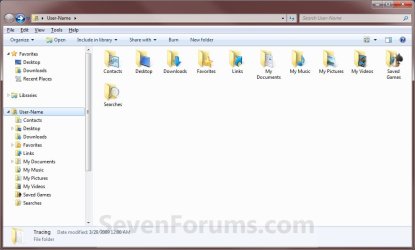
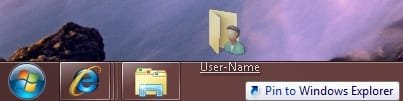
This will show you how create a shortcut of your user profile (user files) folder to pin to the Windows 7 taskbar as a separate icon instead of it being pinned as a Jump List item in the pinned Window Explorer taskbar icon.
Default.jpg


EXAMPLE: Your User's Files Folder Unpinned and Pinned from the Taskbar
attachment.php


attachment.php

EXAMPLE: Your User Files Folder
User_Folder.jpg


OPTION ONE

To Use a Download


1. Click on the Download button below to download the file below.
Users_Files_Folder.zip

Download


2. Click on Save, and save the .zip file to the desktop.

3. Open the .zip file and extract the User's Files Folder shortcut to the desktop.
NOTE: You can rename the User's Files Folder shortcut to any name that you would like to use instead though. For example, your user account name.

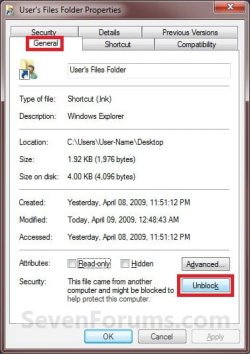
4. Right click on the User's Files Folder shortcut and click on Properties, General tab, and the Unblock button. (see screenshot below)
NOTE: If the unblock button is not there, then the shortcut is already set to be unblocked. Continue on to step 5.
Blocked.jpg
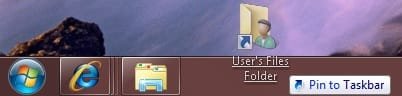
5. Drag the User's Files Folder shortcut onto the taskbar until you see the Pin to Taskbar pop-up and drop it. (see screenshot below)
Pin.jpg
6. The User's Files Folder is now pinned to the taskbar. (see screenshot below)
NOTE: If you ever wish to remove the pinned User's Files Folder icon from the taskbar, right click on it and click on Unpin this program from the Taskbar.

Taskbar-2.jpg
7. When done, you can delete the downloaded User's Files Folder shortcut and .zip files on the desktop if you like.


OPTION TWO

To Do it Manually


1. Right click on a empty space on the desktop and click on New and Shortcut.

2. Copy and paste the location in bold below into the Location field and click on the Next button. (see screenshot below)
%SystemRoot%\explorer.exe shell:UsersFilesFolder
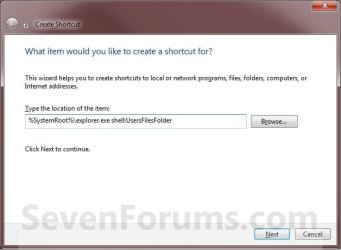
Step1.jpg
3. For the name, type User's Files Folder and click on the Finish button. (see screenshot below)
NOTE: You can type any name that you would like to use instead though. For example, your user account name.
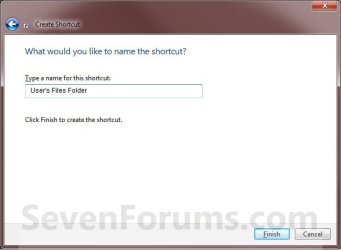
Step2.jpg
4. Right click on the new User's Files Folder shortcut on the desktop and click on Properties.

5. Under the Shortcut tab, click on the Change Icon button. (see screenshot below)
Step3.jpg
6. In the "Look for icons..." line, copy and paste the location below and press enter. (see screenshot below)
%SystemRoot%\system32\imageres.dll
Step4.jpg
7. Select the User's Files Folder icon and click on OK. (See screenshot above)

8. Click on OK. (See screenshot below)
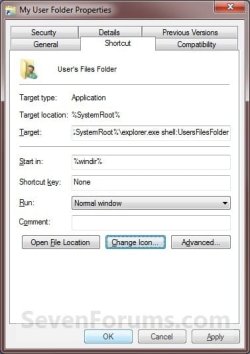
Step5.jpg
9. Right click on the shortcut, and click on Pin to Taskbar.
NOTE: You could also drag the new User's Files Folder shortcut onto the taskbar until you see the Pin to Taskbar pop-up and drop it. (see screenshot below)
Pin.jpg
10. Your user's files folder is now pinned to the taskbar. (see screenshot below)
NOTE: If you ever wish to remove the pinned User's Files Folder icon from the taskbar, right click on it and click on Unpin this program from the Taskbar.
Taskbar-2.jpg
11. You can now delete the User's Files Folder shortcut on the desktop.
That's it,
Shawn


Attachments

Last edited:
That will be a plus for a good number of people right from the start there! It's always a pain in the butt having to browse through all of the sub folders to get to something! Good find! :D
 

My Computers

System One System Two

  • Computer type
    PC/Desktop
    Computer Manufacturer/Model Number
    Custom builds = 2
    OS
    W7 Ultimate x64/W10 Pro x64/W11 Pro Triple Boot - Main PC W7 Remote PC Micro ATX W7 Pro x64/W11 Pro
    CPU
    AMD Phenom II X4 975 Deneb 3.6ghz - 965 2nd remote pc
    Motherboard
    Gigabyte GA-790XTA-UD4-Gigabyte GA-880GM-D2H remote pc
    Memory
    Kingston Hyper X DDR3 1600 1.5v 16gb - Hyper X Fury 8gb 2nd
    Graphics Card(s)
    MSI HD Radeon 5750 1gb - MSI HD Radeon 6450 on mini tower
    Sound Card
    Creative Labs X-Fi Xtreme Audio P - Realtek onooard 2nd case
    Monitor(s) Displays
    ASUS VW199T-P 19" HP 2082a Main-HP 2082a 20" remote pc
    Screen Resolution
    Asus 1440x900 - HP 1600x900
    Hard Drives
    WD Black 1TB HD per OS W7, W10, and pending W11 presently on 500gb OS Drive - Pending Triple 1TB HDs for Spanned Storage/backup volume
    Single 2TB external USB enclosure, single 1TB System 7 Host/Boot drive, Pending 8TB external HD for system image b
    PSU
    Corsair 750TX - primary / Corsair CX600 - second
    Case
    Antec 900-2 - SSD compatible / NZXT Vulcan mini tower
    Cooling
    Zalman CNPS9900A
    Keyboard
    AZIO L70 Backlit Letters Gaming - ONN Cordless/USB
    Mouse
    MSI DS200 Programmable, Logitech Cordless
    Internet Speed
    30mbps upgrade - primary hard wired - mini tower usb WiFi
    Antivirus
    GFI VIPRE Internet Security 2014 on W7 2016 beta on W10,
    Browser
    Cyberfox, WaterFox 64bit FF variants, FireFox x64, Pale Moon
    Other Info
    Accomdata fan cooled usb 2.0 PIDE/Sata II, III external enclosure.
    Sambient usb/eSata PATA/Sata II, III external enclosure.
  • Computer type
    PC/Desktop
    System Manufacturer/Model Number
    CUSTOM ASSEMBLY
    OS
    W7 Pro x64/W11 Pro
    CPU
    AMD Deneb 3.6ghz - 965
    Motherboard
    Gigabyte GA-880GM-D2H remote pc
    Memory
    Kingston Hyper X Fury 8gb
    Graphics Card(s)
    MSI HD Radeon 6450 DVI Output
    Sound Card
    Realtek onooard Creative or Other separate PENDING
    Monitor(s) Displays
    VIZIO 32" LCD TV Separate LCD Pending
    Screen Resolution
    1600x1080
    Hard Drives
    WD 500GB OS Host/Boot WD Green 1TB Storage/Backup
    PSU
    Corsair 600W - THERMALTAKE 600W spare case
    Case
    NZXT Vulcan mini tower
    Cooling
    Twin 120mm Top Fans - 240mm Side Cover
    Keyboard
    ONN Cordless/USB Logitech Cordless
    Mouse
    ONN USB/Cordless - Logitech Cordless
    Internet Speed
    DSL 5G
    Browser
    MS Edge, FireFox, WaterFox x64, FireFox Nightly
    Other Info
    OS Testing-Remote Access to Main TeamViewer
LOL, you're welcome. :)
 

My Computer

Computer type
PC/Desktop
Computer Manufacturer/Model Number
Self built custom
OS
64-bit Windows 11 Pro for Workstations
CPU
Intel i7-8700K OC'd to 5 GHz
Motherboard
ASUS ROG Maximus XI Formula Z390
Memory
64 GB (4x16GB) G.SKILL TridentZ RGB DDR4 3600 MHz
Graphics Card(s)
ASUS ROG-STRIX-GTX1080TI-O11G-GAMING
Sound Card
Integrated
Monitor(s) Displays
2 x Samsung Odyssey G7 27"
Screen Resolution
2560x1440
Hard Drives
1TB Samsung 990 PRO M.2,
4TB Samsung 990 PRO PRO M.2,
TerraMaster F8 SSD Plus NAS
PSU
Seasonic Prime Titanium 850W
Case
Thermaltake Core P3
Cooling
Corsair Hydro H115i
Keyboard
Logitech wireless K800
Mouse
Logitech MX Master 4
Internet Speed
2 Gb/s Download and 100 Mb/s Upload
Antivirus
Malwarebyte Anti-Malware Premium
Browser
Google Chrome
Other Info
Logitech Z625 speaker system,
Logitech BRIO 4K Pro webcam,
HP Color LaserJet Pro MFP M477fdn,
APC SMART-UPS RT 1000 XL - SURT1000XLI,
Galaxy S23 Plus phone
That went right on here while saving the zip file to a utility folder for a variety of things on the storage drive. Once opened with a double click, dragged onto the desktop, and the right click to unblock was done you can see the end result with the simple drag to taskbar. You can see it next to the AVG icon there.
 
Last edited by a moderator:

My Computers

System One System Two

  • Computer type
    PC/Desktop
    Computer Manufacturer/Model Number
    Custom builds = 2
    OS
    W7 Ultimate x64/W10 Pro x64/W11 Pro Triple Boot - Main PC W7 Remote PC Micro ATX W7 Pro x64/W11 Pro
    CPU
    AMD Phenom II X4 975 Deneb 3.6ghz - 965 2nd remote pc
    Motherboard
    Gigabyte GA-790XTA-UD4-Gigabyte GA-880GM-D2H remote pc
    Memory
    Kingston Hyper X DDR3 1600 1.5v 16gb - Hyper X Fury 8gb 2nd
    Graphics Card(s)
    MSI HD Radeon 5750 1gb - MSI HD Radeon 6450 on mini tower
    Sound Card
    Creative Labs X-Fi Xtreme Audio P - Realtek onooard 2nd case
    Monitor(s) Displays
    ASUS VW199T-P 19" HP 2082a Main-HP 2082a 20" remote pc
    Screen Resolution
    Asus 1440x900 - HP 1600x900
    Hard Drives
    WD Black 1TB HD per OS W7, W10, and pending W11 presently on 500gb OS Drive - Pending Triple 1TB HDs for Spanned Storage/backup volume
    Single 2TB external USB enclosure, single 1TB System 7 Host/Boot drive, Pending 8TB external HD for system image b
    PSU
    Corsair 750TX - primary / Corsair CX600 - second
    Case
    Antec 900-2 - SSD compatible / NZXT Vulcan mini tower
    Cooling
    Zalman CNPS9900A
    Keyboard
    AZIO L70 Backlit Letters Gaming - ONN Cordless/USB
    Mouse
    MSI DS200 Programmable, Logitech Cordless
    Internet Speed
    30mbps upgrade - primary hard wired - mini tower usb WiFi
    Antivirus
    GFI VIPRE Internet Security 2014 on W7 2016 beta on W10,
    Browser
    Cyberfox, WaterFox 64bit FF variants, FireFox x64, Pale Moon
    Other Info
    Accomdata fan cooled usb 2.0 PIDE/Sata II, III external enclosure.
    Sambient usb/eSata PATA/Sata II, III external enclosure.
  • Computer type
    PC/Desktop
    System Manufacturer/Model Number
    CUSTOM ASSEMBLY
    OS
    W7 Pro x64/W11 Pro
    CPU
    AMD Deneb 3.6ghz - 965
    Motherboard
    Gigabyte GA-880GM-D2H remote pc
    Memory
    Kingston Hyper X Fury 8gb
    Graphics Card(s)
    MSI HD Radeon 6450 DVI Output
    Sound Card
    Realtek onooard Creative or Other separate PENDING
    Monitor(s) Displays
    VIZIO 32" LCD TV Separate LCD Pending
    Screen Resolution
    1600x1080
    Hard Drives
    WD 500GB OS Host/Boot WD Green 1TB Storage/Backup
    PSU
    Corsair 600W - THERMALTAKE 600W spare case
    Case
    NZXT Vulcan mini tower
    Cooling
    Twin 120mm Top Fans - 240mm Side Cover
    Keyboard
    ONN Cordless/USB Logitech Cordless
    Mouse
    ONN USB/Cordless - Logitech Cordless
    Internet Speed
    DSL 5G
    Browser
    MS Edge, FireFox, WaterFox x64, FireFox Nightly
    Other Info
    OS Testing-Remote Access to Main TeamViewer
Added this and Computer shortcut... every time I click on this User shortcut it opens on the computer shortcut button on the taskbar...
 

My Computer

Computer Manufacturer/Model Number
Dell XPS M1710
OS
Windows 7 Pro
CPU
Intel T7400 (2.16Ghz)
Motherboard
XPS M1710 Motherboard
Memory
Kingston HyperX 4GB 800MHz DDR2
Graphics Card(s)
Nvidia Geforce Go 7900 GTX
Sound Card
Sigmatel Audio HD
Monitor(s) Displays
17" WUXGA UltraSharp TrueLife
Screen Resolution
1920x1200
Hard Drives
320GB Sata 7200RPM 16MB Cache
PSU
130 Watt AC Adapter
Case
Silver/Black XPS 17" Case with 7 sets of multicolor LEDs
Cooling
2 High Speed Fans and Heat Pipes
Internet Speed
Time Warner Roadrunner 20Mb
Other Info
4x BluRay
Hello Scott, and welcome to Seven Forums.

Double check to make sure that you have the correct location entered for the shortcut and no typos. Have you tried the download?
 

My Computer

Computer type
PC/Desktop
Computer Manufacturer/Model Number
Self built custom
OS
64-bit Windows 11 Pro for Workstations
CPU
Intel i7-8700K OC'd to 5 GHz
Motherboard
ASUS ROG Maximus XI Formula Z390
Memory
64 GB (4x16GB) G.SKILL TridentZ RGB DDR4 3600 MHz
Graphics Card(s)
ASUS ROG-STRIX-GTX1080TI-O11G-GAMING
Sound Card
Integrated
Monitor(s) Displays
2 x Samsung Odyssey G7 27"
Screen Resolution
2560x1440
Hard Drives
1TB Samsung 990 PRO M.2,
4TB Samsung 990 PRO PRO M.2,
TerraMaster F8 SSD Plus NAS
PSU
Seasonic Prime Titanium 850W
Case
Thermaltake Core P3
Cooling
Corsair Hydro H115i
Keyboard
Logitech wireless K800
Mouse
Logitech MX Master 4
Internet Speed
2 Gb/s Download and 100 Mb/s Upload
Antivirus
Malwarebyte Anti-Malware Premium
Browser
Google Chrome
Other Info
Logitech Z625 speaker system,
Logitech BRIO 4K Pro webcam,
HP Color LaserJet Pro MFP M477fdn,
APC SMART-UPS RT 1000 XL - SURT1000XLI,
Galaxy S23 Plus phone
I used %SystemRoot%\explorer.exe shell:UsersFilesFolder for the User's Files Folder pinned link.

I used %windir%\explorer.exe /n,::{20D04FE0-3AEA-1069-A2D8-08002B30309D} for the Computer pinned link.

When I click on the Computer link it worked fine. When I click on the User's Files Folder link it opens in the Computer button link.
 

My Computer

Computer Manufacturer/Model Number
Dell XPS M1710
OS
Windows 7 Pro
CPU
Intel T7400 (2.16Ghz)
Motherboard
XPS M1710 Motherboard
Memory
Kingston HyperX 4GB 800MHz DDR2
Graphics Card(s)
Nvidia Geforce Go 7900 GTX
Sound Card
Sigmatel Audio HD
Monitor(s) Displays
17" WUXGA UltraSharp TrueLife
Screen Resolution
1920x1200
Hard Drives
320GB Sata 7200RPM 16MB Cache
PSU
130 Watt AC Adapter
Case
Silver/Black XPS 17" Case with 7 sets of multicolor LEDs
Cooling
2 High Speed Fans and Heat Pipes
Internet Speed
Time Warner Roadrunner 20Mb
Other Info
4x BluRay

My Computer

Computer type
PC/Desktop
Computer Manufacturer/Model Number
Self built custom
OS
64-bit Windows 11 Pro for Workstations
CPU
Intel i7-8700K OC'd to 5 GHz
Motherboard
ASUS ROG Maximus XI Formula Z390
Memory
64 GB (4x16GB) G.SKILL TridentZ RGB DDR4 3600 MHz
Graphics Card(s)
ASUS ROG-STRIX-GTX1080TI-O11G-GAMING
Sound Card
Integrated
Monitor(s) Displays
2 x Samsung Odyssey G7 27"
Screen Resolution
2560x1440
Hard Drives
1TB Samsung 990 PRO M.2,
4TB Samsung 990 PRO PRO M.2,
TerraMaster F8 SSD Plus NAS
PSU
Seasonic Prime Titanium 850W
Case
Thermaltake Core P3
Cooling
Corsair Hydro H115i
Keyboard
Logitech wireless K800
Mouse
Logitech MX Master 4
Internet Speed
2 Gb/s Download and 100 Mb/s Upload
Antivirus
Malwarebyte Anti-Malware Premium
Browser
Google Chrome
Other Info
Logitech Z625 speaker system,
Logitech BRIO 4K Pro webcam,
HP Color LaserJet Pro MFP M477fdn,
APC SMART-UPS RT 1000 XL - SURT1000XLI,
Galaxy S23 Plus phone
You're most welcome Camilla, and welcome to Seven Forums. :)
 

My Computer

Computer type
PC/Desktop
Computer Manufacturer/Model Number
Self built custom
OS
64-bit Windows 11 Pro for Workstations
CPU
Intel i7-8700K OC'd to 5 GHz
Motherboard
ASUS ROG Maximus XI Formula Z390
Memory
64 GB (4x16GB) G.SKILL TridentZ RGB DDR4 3600 MHz
Graphics Card(s)
ASUS ROG-STRIX-GTX1080TI-O11G-GAMING
Sound Card
Integrated
Monitor(s) Displays
2 x Samsung Odyssey G7 27"
Screen Resolution
2560x1440
Hard Drives
1TB Samsung 990 PRO M.2,
4TB Samsung 990 PRO PRO M.2,
TerraMaster F8 SSD Plus NAS
PSU
Seasonic Prime Titanium 850W
Case
Thermaltake Core P3
Cooling
Corsair Hydro H115i
Keyboard
Logitech wireless K800
Mouse
Logitech MX Master 4
Internet Speed
2 Gb/s Download and 100 Mb/s Upload
Antivirus
Malwarebyte Anti-Malware Premium
Browser
Google Chrome
Other Info
Logitech Z625 speaker system,
Logitech BRIO 4K Pro webcam,
HP Color LaserJet Pro MFP M477fdn,
APC SMART-UPS RT 1000 XL - SURT1000XLI,
Galaxy S23 Plus phone
Manual method not working

I tried your 2nd option for this process and I have the icon and all on my desktop, but when I go to pin it to the taskbar I get a NO sign (like the no smoking symbol). Why's that?
 

My Computer

Computer Manufacturer/Model Number
HP Pavilion Elite HPE
OS
64 Windows 7 Unlimited
CPU
Intel(R) Core(TM) i7 CPU 975 @ 3.33GHz
Motherboard
Unknown
Memory
14 Gigs
Graphics Card(s)
unknown
Sound Card
unknown
Monitor(s) Displays
HP w2207h
Hard Drives
Plenty of space
PSU
?
Case
Black
Cooling
Fan
Hello Sperry,

Are you able to right click on the shortcut, and click on Pin to Taskbar instead?

Hope this helps,
Shawn
 

My Computer

Computer type
PC/Desktop
Computer Manufacturer/Model Number
Self built custom
OS
64-bit Windows 11 Pro for Workstations
CPU
Intel i7-8700K OC'd to 5 GHz
Motherboard
ASUS ROG Maximus XI Formula Z390
Memory
64 GB (4x16GB) G.SKILL TridentZ RGB DDR4 3600 MHz
Graphics Card(s)
ASUS ROG-STRIX-GTX1080TI-O11G-GAMING
Sound Card
Integrated
Monitor(s) Displays
2 x Samsung Odyssey G7 27"
Screen Resolution
2560x1440
Hard Drives
1TB Samsung 990 PRO M.2,
4TB Samsung 990 PRO PRO M.2,
TerraMaster F8 SSD Plus NAS
PSU
Seasonic Prime Titanium 850W
Case
Thermaltake Core P3
Cooling
Corsair Hydro H115i
Keyboard
Logitech wireless K800
Mouse
Logitech MX Master 4
Internet Speed
2 Gb/s Download and 100 Mb/s Upload
Antivirus
Malwarebyte Anti-Malware Premium
Browser
Google Chrome
Other Info
Logitech Z625 speaker system,
Logitech BRIO 4K Pro webcam,
HP Color LaserJet Pro MFP M477fdn,
APC SMART-UPS RT 1000 XL - SURT1000XLI,
Galaxy S23 Plus phone

My Computer

Computer Manufacturer/Model Number
HP Pavilion Elite HPE
OS
64 Windows 7 Unlimited
CPU
Intel(R) Core(TM) i7 CPU 975 @ 3.33GHz
Motherboard
Unknown
Memory
14 Gigs
Graphics Card(s)
unknown
Sound Card
unknown
Monitor(s) Displays
HP w2207h
Hard Drives
Plenty of space
PSU
?
Case
Black
Cooling
Fan

My Computer

Computer type
PC/Desktop
Computer Manufacturer/Model Number
Self built custom
OS
64-bit Windows 11 Pro for Workstations
CPU
Intel i7-8700K OC'd to 5 GHz
Motherboard
ASUS ROG Maximus XI Formula Z390
Memory
64 GB (4x16GB) G.SKILL TridentZ RGB DDR4 3600 MHz
Graphics Card(s)
ASUS ROG-STRIX-GTX1080TI-O11G-GAMING
Sound Card
Integrated
Monitor(s) Displays
2 x Samsung Odyssey G7 27"
Screen Resolution
2560x1440
Hard Drives
1TB Samsung 990 PRO M.2,
4TB Samsung 990 PRO PRO M.2,
TerraMaster F8 SSD Plus NAS
PSU
Seasonic Prime Titanium 850W
Case
Thermaltake Core P3
Cooling
Corsair Hydro H115i
Keyboard
Logitech wireless K800
Mouse
Logitech MX Master 4
Internet Speed
2 Gb/s Download and 100 Mb/s Upload
Antivirus
Malwarebyte Anti-Malware Premium
Browser
Google Chrome
Other Info
Logitech Z625 speaker system,
Logitech BRIO 4K Pro webcam,
HP Color LaserJet Pro MFP M477fdn,
APC SMART-UPS RT 1000 XL - SURT1000XLI,
Galaxy S23 Plus phone

My Computer

Computer Manufacturer/Model Number
HP Pavilion Elite HPE
OS
64 Windows 7 Unlimited
CPU
Intel(R) Core(TM) i7 CPU 975 @ 3.33GHz
Motherboard
Unknown
Memory
14 Gigs
Graphics Card(s)
unknown
Sound Card
unknown
Monitor(s) Displays
HP w2207h
Hard Drives
Plenty of space
PSU
?
Case
Black
Cooling
Fan
Sperry,


That would explain why you could not pin it then. ;)

You cannot pin folders to the taskbar. You can only pin programs or shortcuts of programs to the taskbar.


If you did OPTION TWO exactly as written, then it would have created a workaround shortcut of the user profile folder through explorer that you would be able to pin to the taskbar.
 

My Computer

Computer type
PC/Desktop
Computer Manufacturer/Model Number
Self built custom
OS
64-bit Windows 11 Pro for Workstations
CPU
Intel i7-8700K OC'd to 5 GHz
Motherboard
ASUS ROG Maximus XI Formula Z390
Memory
64 GB (4x16GB) G.SKILL TridentZ RGB DDR4 3600 MHz
Graphics Card(s)
ASUS ROG-STRIX-GTX1080TI-O11G-GAMING
Sound Card
Integrated
Monitor(s) Displays
2 x Samsung Odyssey G7 27"
Screen Resolution
2560x1440
Hard Drives
1TB Samsung 990 PRO M.2,
4TB Samsung 990 PRO PRO M.2,
TerraMaster F8 SSD Plus NAS
PSU
Seasonic Prime Titanium 850W
Case
Thermaltake Core P3
Cooling
Corsair Hydro H115i
Keyboard
Logitech wireless K800
Mouse
Logitech MX Master 4
Internet Speed
2 Gb/s Download and 100 Mb/s Upload
Antivirus
Malwarebyte Anti-Malware Premium
Browser
Google Chrome
Other Info
Logitech Z625 speaker system,
Logitech BRIO 4K Pro webcam,
HP Color LaserJet Pro MFP M477fdn,
APC SMART-UPS RT 1000 XL - SURT1000XLI,
Galaxy S23 Plus phone
Sperry,

You cannot pin folders to the taskbar. You can only pin programs or shortcuts of programs to the taskbar.

If you did OPTION TWO exactly as written, then it would have created a workaround shortcut of the user profile folder through explorer that you would be able to pin to the taskbar.

I did it nearly exactly with the exception of choosing the icon.
The line of code: %SystemRoot%\system32\imageres.dll
for the icon selection didn't work, so I located another icon that looked similar and used it instead.
If it's not possible to pin a folder to the taskbar using what's presently available in windows then is there a software utility that will allow it?
 

My Computer

Computer Manufacturer/Model Number
HP Pavilion Elite HPE
OS
64 Windows 7 Unlimited
CPU
Intel(R) Core(TM) i7 CPU 975 @ 3.33GHz
Motherboard
Unknown
Memory
14 Gigs
Graphics Card(s)
unknown
Sound Card
unknown
Monitor(s) Displays
HP w2207h
Hard Drives
Plenty of space
PSU
?
Case
Black
Cooling
Fan
As a test, how does using OPTION ONE exactly as is work for you?

I'm not sure why that wouldn't work for you for the icon unless a mistake may have been made using it. Could you post screenshots showing what it's doing for you instead?

The only way to pin a folder to the taskbar in Windows 7 is to use either option in the tutorial below. OPTION ONE in the tutorial below is the same method used in the tutorial on the first page to pin the "Users Files Folder" (user profile folder) to the taskbar.

http://www.sevenforums.com/tutorials/9305-taskbar-pin-unpin-folder.html
 

My Computer

Computer type
PC/Desktop
Computer Manufacturer/Model Number
Self built custom
OS
64-bit Windows 11 Pro for Workstations
CPU
Intel i7-8700K OC'd to 5 GHz
Motherboard
ASUS ROG Maximus XI Formula Z390
Memory
64 GB (4x16GB) G.SKILL TridentZ RGB DDR4 3600 MHz
Graphics Card(s)
ASUS ROG-STRIX-GTX1080TI-O11G-GAMING
Sound Card
Integrated
Monitor(s) Displays
2 x Samsung Odyssey G7 27"
Screen Resolution
2560x1440
Hard Drives
1TB Samsung 990 PRO M.2,
4TB Samsung 990 PRO PRO M.2,
TerraMaster F8 SSD Plus NAS
PSU
Seasonic Prime Titanium 850W
Case
Thermaltake Core P3
Cooling
Corsair Hydro H115i
Keyboard
Logitech wireless K800
Mouse
Logitech MX Master 4
Internet Speed
2 Gb/s Download and 100 Mb/s Upload
Antivirus
Malwarebyte Anti-Malware Premium
Browser
Google Chrome
Other Info
Logitech Z625 speaker system,
Logitech BRIO 4K Pro webcam,
HP Color LaserJet Pro MFP M477fdn,
APC SMART-UPS RT 1000 XL - SURT1000XLI,
Galaxy S23 Plus phone
IT WORKED!!!!!!

As a test, how does using OPTION ONE exactly as is work for you?

I'm not sure why that wouldn't work for you for the icon unless a mistake may have been made using it. Could you post screenshots showing what it's doing for you instead?

The only way to pin a folder to the taskbar in Windows 7 is to use either option in the tutorial below. OPTION ONE in the tutorial below is the same method used in the tutorial on the first page to pin the "Users Files Folder" (user profile folder) to the taskbar.

http://www.sevenforums.com/tutorials/9305-taskbar-pin-unpin-folder.html

:D Once I put explorer in front of the path and applied the changes I was then able to pin the folder to the taskbar. Now I just need to make a different icon for it so it won't look like the explorer icon already on the desktop. Thanks so much!
 

My Computer

Computer Manufacturer/Model Number
HP Pavilion Elite HPE
OS
64 Windows 7 Unlimited
CPU
Intel(R) Core(TM) i7 CPU 975 @ 3.33GHz
Motherboard
Unknown
Memory
14 Gigs
Graphics Card(s)
unknown
Sound Card
unknown
Monitor(s) Displays
HP w2207h
Hard Drives
Plenty of space
PSU
?
Case
Black
Cooling
Fan
You're most welcome.

Yep, that's how it is in OPTION TWO. ;)

If you do steps 4-8 exactly in OPTION TWO, that will change the icon for you.

OR

You could do OPTION ONE, to download the shortcut already made and ready for you. All you would have to do is unblock it and rename it if you like to what you want instead.
 

My Computer

Computer type
PC/Desktop
Computer Manufacturer/Model Number
Self built custom
OS
64-bit Windows 11 Pro for Workstations
CPU
Intel i7-8700K OC'd to 5 GHz
Motherboard
ASUS ROG Maximus XI Formula Z390
Memory
64 GB (4x16GB) G.SKILL TridentZ RGB DDR4 3600 MHz
Graphics Card(s)
ASUS ROG-STRIX-GTX1080TI-O11G-GAMING
Sound Card
Integrated
Monitor(s) Displays
2 x Samsung Odyssey G7 27"
Screen Resolution
2560x1440
Hard Drives
1TB Samsung 990 PRO M.2,
4TB Samsung 990 PRO PRO M.2,
TerraMaster F8 SSD Plus NAS
PSU
Seasonic Prime Titanium 850W
Case
Thermaltake Core P3
Cooling
Corsair Hydro H115i
Keyboard
Logitech wireless K800
Mouse
Logitech MX Master 4
Internet Speed
2 Gb/s Download and 100 Mb/s Upload
Antivirus
Malwarebyte Anti-Malware Premium
Browser
Google Chrome
Other Info
Logitech Z625 speaker system,
Logitech BRIO 4K Pro webcam,
HP Color LaserJet Pro MFP M477fdn,
APC SMART-UPS RT 1000 XL - SURT1000XLI,
Galaxy S23 Plus phone
Back
Top