User Folder - Add or Remove from Navigation Pane

How to Add or Remove your User Folder from Navigation Pane in Windows 7

   Information
This will show you how to add or remove your user name User Profile Folder (C:\Users\(user-name)) in the Windows Explorer Navigation Pane in Windows 7.


   Warning

  • You can only do this tutorial while logged into an administrator account.
  • This will affect all user accounts on the computer.
  • This will also add or remove the default User's Files desktop icon as well.
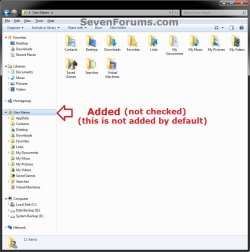
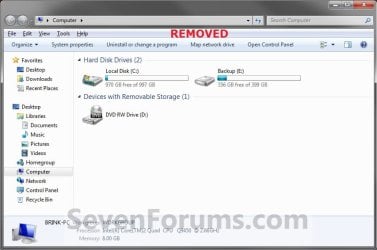
EXAMPLE: User Folder in Navigation Pane
NOTE: This is your default navigation pane with User Folder added by default when you have the Show all folders option checked and unchecked.
Default.jpg

Added-2.jpg

Removed.jpg

Here's How:
1. Open the Start Menu and type regedit.exe in the search line, then press enter.

2. If prompted by UAC, then click on Yes.

3. In Regedit, go to the location below: (See screenshot below step 4)
Code:
HKEY_CLASSES_ROOT\CLSID\{59031a47-3f72-44a7-89c5-5595fe6b30ee}\ShellFolder
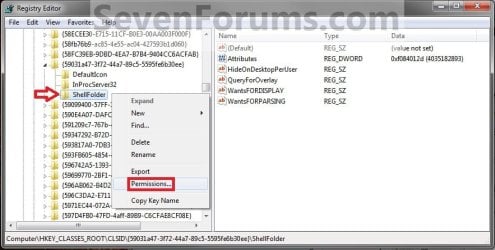
4. In the left pane of regedit, right click on the ShellFolder key and click on Permissions. (See screenshot below)
Step1.jpg
5. At the top, select the Administrators group. At the bottom, check the Allow box to the right of Full Control and click on OK. (See screenshot below)
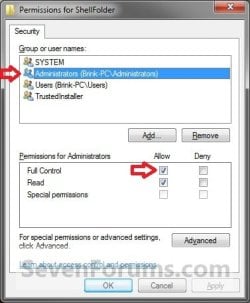
Step2.jpg
6. Do either step 7 or 8 to add or remove your user profile folder from the navigation pane.

7. To Add your User Folder to the Navigation Pane
NOTE: This is the default setting.
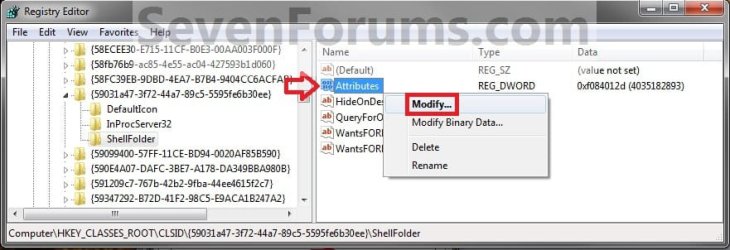
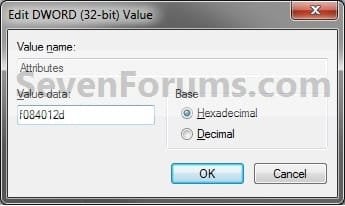
A) In the right pane of regedit, right click on Attributes, click on Modify, type f084012d, and click on OK. (see screenshots below)
NOTE: This is to have your user profile folder display under Desktop when you have Show all folders checked.
Step3.jpg

Step4.jpg

B) In the right pane of ShellFolder, right click on a empty space, click on New and String Value, copy and paste the name below, and press Enter. (see screenshot below)
NOTE: If you like, this is to have your user profile folder display as a separate group in the navigation pane when you do not have Show all folders checked.
PinToNameSpaceTree

group.jpg
C) Go to step 9.
8. To Remove your User Folder from the Navigation Pane
A) In the right pane of regedit, right click on Attributes, click on Modify, type f094012d, and click on OK. (see screenshots below)
NOTE: This is to not have your user profile folder display under Desktop when you have Show all folders checked.
Step3.jpg

Step5.jpg

B) In the right pane of ShellFolder, right click on PinToNameSpaceTree (if there), and click on Delete. (see screenshot below)
NOTE: If you like, this is to not have your user profile folder display as a separate group in the navigation pane when you do not have Show all folders checked.
group.jpg
C) Click on Yes to confirm deletion. (see screenshot below)
Delete.jpg
D) Continue on to step 9.
9. If you have 64-bit Windows 7 Installed
   Note

To also add or remove your User Folder from the File -> "Open" and File -> "Save as" type dialog windows as well in 64-bit Windows 7, you will also need to do this step. This does not include the "Browse", "Copy to folder", or "Move to folder" type dialog windows though.

If you have a 32-bit Windows 7 installed, then skip this step since doing steps 1 to 7/8 will add or remove your User Folder from the "Open" and "Save as" type windows as well.

A) In Regedit, go to the location below:
Code:
HKEY_LOCAL_MACHINE\SOFTWARE\Wow6432Node\Classes\CLSID\{59031a47-3f72-44a7-89c5-5595fe6b30ee}\ShellFolder
HKLM.jpg
B) Repeat steps 4 to 7/8 above for this registry location.
10. Close regedit.

11. Restart the computer to fully apply.
That's it,
Shawn


Last edited:
I have a new computer (HP Compaq Presario )with Win 7 Home Premium. I tried using your directions to eliminate users group and your directions are different than mine and didn't work. Could it be you don't have the latest version of Win 7 ?? I saw in another post that you can just use a (-) in front of the instruction and that way if you want to reverse the change you just remove the (-) sign. This seems to be a lot easier and safer.
 

My Computer

Computer Manufacturer/Model Number
HP
OS
Win 7
CPU
AMD
Hello Bob,

Double check to make sure that you have followed each step exactly, and restarted the computer afterwards in case you may have made a mistake at some point. This only removes the User Folder group from the Navigation Pane and Desktop though. The - sign would not work for this.
 

My Computer

Computer type
PC/Desktop
Computer Manufacturer/Model Number
Self built custom
OS
64-bit Windows 11 Pro for Workstations
CPU
Intel i7-8700K OC'd to 5 GHz
Motherboard
ASUS ROG Maximus XI Formula Z390
Memory
64 GB (4x16GB) G.SKILL TridentZ RGB DDR4 3600 MHz
Graphics Card(s)
ASUS ROG-STRIX-GTX1080TI-O11G-GAMING
Sound Card
Integrated
Monitor(s) Displays
2 x Samsung Odyssey G7 27"
Screen Resolution
2560x1440
Hard Drives
1TB Samsung 990 PRO M.2,
4TB Samsung 990 PRO PRO M.2,
TerraMaster F8 SSD Plus NAS
PSU
Seasonic Prime Titanium 850W
Case
Thermaltake Core P3
Cooling
Corsair Hydro H115i
Keyboard
Logitech wireless K800
Mouse
Logitech MX Master 4
Internet Speed
2 Gb/s Download and 100 Mb/s Upload
Antivirus
Malwarebyte Anti-Malware Premium
Browser
Google Chrome
Other Info
Logitech Z625 speaker system,
Logitech BRIO 4K Pro webcam,
HP Color LaserJet Pro MFP M477fdn,
APC SMART-UPS RT 1000 XL - SURT1000XLI,
Galaxy S23 Plus phone
Hi Brink,

A question regarding Add/Remove navigation pane items..

Is it possible to have them all in a reg file including the "permissions" part? so it can be done on many computers easily.

Thanks
 

My Computer

OS
Windows 7
Hello Fakts,

Sorry, but not with a REG file. The permissions have to be handled by the user themselves instead. :(
 

My Computer

Computer type
PC/Desktop
Computer Manufacturer/Model Number
Self built custom
OS
64-bit Windows 11 Pro for Workstations
CPU
Intel i7-8700K OC'd to 5 GHz
Motherboard
ASUS ROG Maximus XI Formula Z390
Memory
64 GB (4x16GB) G.SKILL TridentZ RGB DDR4 3600 MHz
Graphics Card(s)
ASUS ROG-STRIX-GTX1080TI-O11G-GAMING
Sound Card
Integrated
Monitor(s) Displays
2 x Samsung Odyssey G7 27"
Screen Resolution
2560x1440
Hard Drives
1TB Samsung 990 PRO M.2,
4TB Samsung 990 PRO PRO M.2,
TerraMaster F8 SSD Plus NAS
PSU
Seasonic Prime Titanium 850W
Case
Thermaltake Core P3
Cooling
Corsair Hydro H115i
Keyboard
Logitech wireless K800
Mouse
Logitech MX Master 4
Internet Speed
2 Gb/s Download and 100 Mb/s Upload
Antivirus
Malwarebyte Anti-Malware Premium
Browser
Google Chrome
Other Info
Logitech Z625 speaker system,
Logitech BRIO 4K Pro webcam,
HP Color LaserJet Pro MFP M477fdn,
APC SMART-UPS RT 1000 XL - SURT1000XLI,
Galaxy S23 Plus phone
THANK YOU very much my friends!!

Hide the Homegroup
Hide the Libraries
Hide the Network item
Hide the User

Should be in a simple settings window with easy access...

this is one the little reasons i hate windows .

COME ON MS give more options to the users. registry is a pain

every time i build my system i need 2 days to config the registry for some very simple little things. OMG OMG!
 

My Computer

OS
windows7
Hi there,

sorry for digging out an old thread but I tried the method described in the first post and changed everything accordingly but the user folder still shows in my explorer. I checked the registry and the value is set correctly to "f094012d". :confused:

Btw, at step 9, I think the correct key is
Code:
HKEY_LOCAL_MACHINE\SOFTWARE\Classes\Wow6432Node\CLSID\{59031a47-3f72-44a7-89c5-5595fe6b30ee}\ShellFolder
I cannot find one at
Code:
HKEY_Local_Machine\Software\Wow6432Node\Classes\CLSID\{59031a47-3f72-44a7-89c5-5595fe6b30ee}\ShellFolder

TIA
SoWhy
 

My Computer

OS
Win7 Pro x64 / WinXP x32
CPU
AMD Phenom II X6 1055T
Motherboard
MSI 870A-G54
Memory
2 GB PC1333 DDR3
Graphics Card(s)
XFX HD5700
Monitor(s) Displays
Samsung SyncMaster 226BW + FujitsuSiemens C17-3
Screen Resolution
1680x1050 + 1280x1024
Hard Drives
Samsung HD103UJ
Samsung HD753LJ
Samsung HD154UI
Keyboard
Cherry
Mouse
Logitech MX510
Internet Speed
ADSL 16 MBit
Hello SoWhy,

The tutorial has the correct keys in it below. Did you restart the computer afterwards to apply the changes?

HKEY_CLASSES_ROOT\CLSID\{59031a47-3f72-44a7-89c5-5595fe6b30ee}\ShellFolder

and

HKEY_LOCAL_MACHINE\SOFTWARE\Wow6432Node\Classes\CLSID\{59031a47-3f72-44a7-89c5-5595fe6b30ee}\ShellFolder

Hope this helps,
Shawn
 

My Computer

Computer type
PC/Desktop
Computer Manufacturer/Model Number
Self built custom
OS
64-bit Windows 11 Pro for Workstations
CPU
Intel i7-8700K OC'd to 5 GHz
Motherboard
ASUS ROG Maximus XI Formula Z390
Memory
64 GB (4x16GB) G.SKILL TridentZ RGB DDR4 3600 MHz
Graphics Card(s)
ASUS ROG-STRIX-GTX1080TI-O11G-GAMING
Sound Card
Integrated
Monitor(s) Displays
2 x Samsung Odyssey G7 27"
Screen Resolution
2560x1440
Hard Drives
1TB Samsung 990 PRO M.2,
4TB Samsung 990 PRO PRO M.2,
TerraMaster F8 SSD Plus NAS
PSU
Seasonic Prime Titanium 850W
Case
Thermaltake Core P3
Cooling
Corsair Hydro H115i
Keyboard
Logitech wireless K800
Mouse
Logitech MX Master 4
Internet Speed
2 Gb/s Download and 100 Mb/s Upload
Antivirus
Malwarebyte Anti-Malware Premium
Browser
Google Chrome
Other Info
Logitech Z625 speaker system,
Logitech BRIO 4K Pro webcam,
HP Color LaserJet Pro MFP M477fdn,
APC SMART-UPS RT 1000 XL - SURT1000XLI,
Galaxy S23 Plus phone
Hi Shawn,

thanks for the reply. It didn't work after changing those values, even after restarting. I did a little searching and found another similar value at
Code:
HKEY_LOCAL_MACHINE\SOFTWARE\Classes\CLSID\{59031a47-3f72-44a7-89c5-5595fe6b30ee}\ShellFolder
After changing that one as well, it worked. :)

But in my registry there is no key
Code:
HKEY_LOCAL_MACHINE\SOFTWARE\Wow6432Node\Classes
but a
Code:
HKEY_LOCAL_MACHINE\SOFTWARE\Classes\Wow6432Node
so I still think that's incorrect or at least not correct for all versions of Win7.

Regards
SoWhy
 

My Computer

OS
Win7 Pro x64 / WinXP x32
CPU
AMD Phenom II X6 1055T
Motherboard
MSI 870A-G54
Memory
2 GB PC1333 DDR3
Graphics Card(s)
XFX HD5700
Monitor(s) Displays
Samsung SyncMaster 226BW + FujitsuSiemens C17-3
Screen Resolution
1680x1050 + 1280x1024
Hard Drives
Samsung HD103UJ
Samsung HD753LJ
Samsung HD154UI
Keyboard
Cherry
Mouse
Logitech MX510
Internet Speed
ADSL 16 MBit
I have both locations, but I added a screenshot in the tutorial to show I'm not crazy though. LOL ;)
 

My Computer

Computer type
PC/Desktop
Computer Manufacturer/Model Number
Self built custom
OS
64-bit Windows 11 Pro for Workstations
CPU
Intel i7-8700K OC'd to 5 GHz
Motherboard
ASUS ROG Maximus XI Formula Z390
Memory
64 GB (4x16GB) G.SKILL TridentZ RGB DDR4 3600 MHz
Graphics Card(s)
ASUS ROG-STRIX-GTX1080TI-O11G-GAMING
Sound Card
Integrated
Monitor(s) Displays
2 x Samsung Odyssey G7 27"
Screen Resolution
2560x1440
Hard Drives
1TB Samsung 990 PRO M.2,
4TB Samsung 990 PRO PRO M.2,
TerraMaster F8 SSD Plus NAS
PSU
Seasonic Prime Titanium 850W
Case
Thermaltake Core P3
Cooling
Corsair Hydro H115i
Keyboard
Logitech wireless K800
Mouse
Logitech MX Master 4
Internet Speed
2 Gb/s Download and 100 Mb/s Upload
Antivirus
Malwarebyte Anti-Malware Premium
Browser
Google Chrome
Other Info
Logitech Z625 speaker system,
Logitech BRIO 4K Pro webcam,
HP Color LaserJet Pro MFP M477fdn,
APC SMART-UPS RT 1000 XL - SURT1000XLI,
Galaxy S23 Plus phone
Another typically good tutorial, Brink. Works great for me. Thanks!
 

My Computer

Computer type
PC/Desktop
Computer Manufacturer/Model Number
Self build
OS
Windows 10 Home
CPU
Intel Core i5 3550
Motherboard
ASUS P8Z77-V LX (LGA1155)
Memory
Corsair Vengeance DDR3 16GB
Graphics Card(s)
Nvidia GEForce GTX 970 SSC
Monitor(s) Displays
Hanns-G 23.6", Acer 17"
Screen Resolution
1920x1080, 1440x900
Hard Drives
Sandisk SSD 256 GB
WD500GB
WD640GB
Seagage Ultra + 1TB ext.
BWD 800GB
WD 1TB ext
PSU
Antec 650w
Case
Cooler Master Centurion 534
Cooling
COOLER MASTER GeminII S524, 3 120 mm case fans.
Keyboard
Logitech MK300
Mouse
Logitech MK300
Internet Speed
Cable
Antivirus
MSSE, Malwarebytes
Browser
IE 10, Chrome
You're most welcome Cato. That's great news. Thank you. :)
 

My Computer

Computer type
PC/Desktop
Computer Manufacturer/Model Number
Self built custom
OS
64-bit Windows 11 Pro for Workstations
CPU
Intel i7-8700K OC'd to 5 GHz
Motherboard
ASUS ROG Maximus XI Formula Z390
Memory
64 GB (4x16GB) G.SKILL TridentZ RGB DDR4 3600 MHz
Graphics Card(s)
ASUS ROG-STRIX-GTX1080TI-O11G-GAMING
Sound Card
Integrated
Monitor(s) Displays
2 x Samsung Odyssey G7 27"
Screen Resolution
2560x1440
Hard Drives
1TB Samsung 990 PRO M.2,
4TB Samsung 990 PRO PRO M.2,
TerraMaster F8 SSD Plus NAS
PSU
Seasonic Prime Titanium 850W
Case
Thermaltake Core P3
Cooling
Corsair Hydro H115i
Keyboard
Logitech wireless K800
Mouse
Logitech MX Master 4
Internet Speed
2 Gb/s Download and 100 Mb/s Upload
Antivirus
Malwarebyte Anti-Malware Premium
Browser
Google Chrome
Other Info
Logitech Z625 speaker system,
Logitech BRIO 4K Pro webcam,
HP Color LaserJet Pro MFP M477fdn,
APC SMART-UPS RT 1000 XL - SURT1000XLI,
Galaxy S23 Plus phone
Does anyone know if this can be used to make your user folder appear in the navigation pane with "show all folders" disabled?

(Shout out to Brink for all the tutorials that have helped me over this past year!)
 

My Computer

Computer type
PC/Desktop
OS
Windows 7 32-bit
Does anyone know if this can be used to make your user folder appear in the navigation pane with "show all folders" disabled?

(Shout out to Brink for all the tutorials that have helped me over this past year!)

Hello GreyGoose, and welcome to Seven Forums.

The tutorial has been updated (step 8b) to allow your user folder to be able to be added to the navigation pane without having to have "show all folders" checked. :)
 

My Computer

Computer type
PC/Desktop
Computer Manufacturer/Model Number
Self built custom
OS
64-bit Windows 11 Pro for Workstations
CPU
Intel i7-8700K OC'd to 5 GHz
Motherboard
ASUS ROG Maximus XI Formula Z390
Memory
64 GB (4x16GB) G.SKILL TridentZ RGB DDR4 3600 MHz
Graphics Card(s)
ASUS ROG-STRIX-GTX1080TI-O11G-GAMING
Sound Card
Integrated
Monitor(s) Displays
2 x Samsung Odyssey G7 27"
Screen Resolution
2560x1440
Hard Drives
1TB Samsung 990 PRO M.2,
4TB Samsung 990 PRO PRO M.2,
TerraMaster F8 SSD Plus NAS
PSU
Seasonic Prime Titanium 850W
Case
Thermaltake Core P3
Cooling
Corsair Hydro H115i
Keyboard
Logitech wireless K800
Mouse
Logitech MX Master 4
Internet Speed
2 Gb/s Download and 100 Mb/s Upload
Antivirus
Malwarebyte Anti-Malware Premium
Browser
Google Chrome
Other Info
Logitech Z625 speaker system,
Logitech BRIO 4K Pro webcam,
HP Color LaserJet Pro MFP M477fdn,
APC SMART-UPS RT 1000 XL - SURT1000XLI,
Galaxy S23 Plus phone
Maybe I missed this ...

Are they still display if you view them from your user folder under "Computer" in the navigation pane?

If not, then you could remove the separate "User Folder" group from the navigation pane to use the "Computer" location instead to not set them.

http://www.sevenforums.com/tutorials/48123-user-folder-add-remove-navigation-pane.html

Hi Brink

Does this stop Explorer from adding the User Folder to the Navigation pane when you try to access a folder in your User Account? OR
Does it only prevent the "Show all folders" option from displaying it?​
 

My Computer

Computer type
PC/Desktop
Computer Manufacturer/Model Number
n/a
OS
W7 Ultimate SP1, LM19.2 MATE, W10 Home 1703, W10 Pro 1703 VM, #All 64 bit
CPU
AMD Phenom II x6 1100T, 3.3 GHz
Motherboard
ASUS M4A88T-M/USB3 (AM3)
Memory
12GB DDR3 1333 G-Skill (4GB x 2), G-Skill (2GB x 2)
Graphics Card(s)
NVIDIA GeForce GTX 660
Sound Card
Realtek?
Monitor(s) Displays
Samsung S23B350
Screen Resolution
1920x1080
Hard Drives
WD Green 2TB (SATA), WD Green 3TB (SATA), WD Blue 4TB (SATA), WD Blue 6TB (SATA)
PSU
Cooler Master
Case
Antec GX300 Tower
Cooling
3x Antec TRICOOL 120mm Fans
Mouse
Wired Optical
Internet Speed
DSL
Antivirus
Avast
Browser
Pale Moon (64 bit)
Other Info
2018-12-27 Upgraded HDDs
2015-12-10 Upgraded case, graphics card, storage
2015-08-15 Upgraded motherboard & RAM
2015-07-15 Upgraded LM17.1 to LM17.2
Hello Peter,

This will only add or remove the separate user name group in the navigation pane. The "C:\Users" folder will still be there when navigated to under "Computer" no matter what is set in the tutorial. :)
 

My Computer

Computer type
PC/Desktop
Computer Manufacturer/Model Number
Self built custom
OS
64-bit Windows 11 Pro for Workstations
CPU
Intel i7-8700K OC'd to 5 GHz
Motherboard
ASUS ROG Maximus XI Formula Z390
Memory
64 GB (4x16GB) G.SKILL TridentZ RGB DDR4 3600 MHz
Graphics Card(s)
ASUS ROG-STRIX-GTX1080TI-O11G-GAMING
Sound Card
Integrated
Monitor(s) Displays
2 x Samsung Odyssey G7 27"
Screen Resolution
2560x1440
Hard Drives
1TB Samsung 990 PRO M.2,
4TB Samsung 990 PRO PRO M.2,
TerraMaster F8 SSD Plus NAS
PSU
Seasonic Prime Titanium 850W
Case
Thermaltake Core P3
Cooling
Corsair Hydro H115i
Keyboard
Logitech wireless K800
Mouse
Logitech MX Master 4
Internet Speed
2 Gb/s Download and 100 Mb/s Upload
Antivirus
Malwarebyte Anti-Malware Premium
Browser
Google Chrome
Other Info
Logitech Z625 speaker system,
Logitech BRIO 4K Pro webcam,
HP Color LaserJet Pro MFP M477fdn,
APC SMART-UPS RT 1000 XL - SURT1000XLI,
Galaxy S23 Plus phone
I guess I explained that poorly

I have my Documents, Pictures, Downloads, Music and Video folders, set to the appropriate partitions on my HDD (E:\, F:\, G:\, O:\ & P:\).

I have noticed that (for some reason I haven't identified) my User Folder sometimes appears in the Navigation pane and I am actually browsing in that location instead of the location under "Computer".

It's an annoyance as it means I have to scroll further to access my other partitions (and run the risk of activating the Windows Explorer auto-scroll bug). :(

I have my User Folder (and Downloads) in the "Favorites" section anyway and the various folders appear in the Libraries in any case.
I'd like to prevent my User Folder from appearing as a separate entry in the Navigation pane.

I'll try to post a screenshot the next time it happens. :)
 
Last edited:

My Computer

Computer type
PC/Desktop
Computer Manufacturer/Model Number
n/a
OS
W7 Ultimate SP1, LM19.2 MATE, W10 Home 1703, W10 Pro 1703 VM, #All 64 bit
CPU
AMD Phenom II x6 1100T, 3.3 GHz
Motherboard
ASUS M4A88T-M/USB3 (AM3)
Memory
12GB DDR3 1333 G-Skill (4GB x 2), G-Skill (2GB x 2)
Graphics Card(s)
NVIDIA GeForce GTX 660
Sound Card
Realtek?
Monitor(s) Displays
Samsung S23B350
Screen Resolution
1920x1080
Hard Drives
WD Green 2TB (SATA), WD Green 3TB (SATA), WD Blue 4TB (SATA), WD Blue 6TB (SATA)
PSU
Cooler Master
Case
Antec GX300 Tower
Cooling
3x Antec TRICOOL 120mm Fans
Mouse
Wired Optical
Internet Speed
DSL
Antivirus
Avast
Browser
Pale Moon (64 bit)
Other Info
2018-12-27 Upgraded HDDs
2015-12-10 Upgraded case, graphics card, storage
2015-08-15 Upgraded motherboard & RAM
2015-07-15 Upgraded LM17.1 to LM17.2
Ah, in that case, doing step 8 and 9 should remove it for you. :)
 

My Computer

Computer type
PC/Desktop
Computer Manufacturer/Model Number
Self built custom
OS
64-bit Windows 11 Pro for Workstations
CPU
Intel i7-8700K OC'd to 5 GHz
Motherboard
ASUS ROG Maximus XI Formula Z390
Memory
64 GB (4x16GB) G.SKILL TridentZ RGB DDR4 3600 MHz
Graphics Card(s)
ASUS ROG-STRIX-GTX1080TI-O11G-GAMING
Sound Card
Integrated
Monitor(s) Displays
2 x Samsung Odyssey G7 27"
Screen Resolution
2560x1440
Hard Drives
1TB Samsung 990 PRO M.2,
4TB Samsung 990 PRO PRO M.2,
TerraMaster F8 SSD Plus NAS
PSU
Seasonic Prime Titanium 850W
Case
Thermaltake Core P3
Cooling
Corsair Hydro H115i
Keyboard
Logitech wireless K800
Mouse
Logitech MX Master 4
Internet Speed
2 Gb/s Download and 100 Mb/s Upload
Antivirus
Malwarebyte Anti-Malware Premium
Browser
Google Chrome
Other Info
Logitech Z625 speaker system,
Logitech BRIO 4K Pro webcam,
HP Color LaserJet Pro MFP M477fdn,
APC SMART-UPS RT 1000 XL - SURT1000XLI,
Galaxy S23 Plus phone
Thanks Brink

Ah, in that case, doing step 8 and 9 should remove it for you. :)

Thanks Brink.
I'll try it out now. :)

Just to confirm, I don't have "Show all folders" selected, but those steps will prevent the User Folder from EVER appearing in the Navigation pane?
 

My Computer

Computer type
PC/Desktop
Computer Manufacturer/Model Number
n/a
OS
W7 Ultimate SP1, LM19.2 MATE, W10 Home 1703, W10 Pro 1703 VM, #All 64 bit
CPU
AMD Phenom II x6 1100T, 3.3 GHz
Motherboard
ASUS M4A88T-M/USB3 (AM3)
Memory
12GB DDR3 1333 G-Skill (4GB x 2), G-Skill (2GB x 2)
Graphics Card(s)
NVIDIA GeForce GTX 660
Sound Card
Realtek?
Monitor(s) Displays
Samsung S23B350
Screen Resolution
1920x1080
Hard Drives
WD Green 2TB (SATA), WD Green 3TB (SATA), WD Blue 4TB (SATA), WD Blue 6TB (SATA)
PSU
Cooler Master
Case
Antec GX300 Tower
Cooling
3x Antec TRICOOL 120mm Fans
Mouse
Wired Optical
Internet Speed
DSL
Antivirus
Avast
Browser
Pale Moon (64 bit)
Other Info
2018-12-27 Upgraded HDDs
2015-12-10 Upgraded case, graphics card, storage
2015-08-15 Upgraded motherboard & RAM
2015-07-15 Upgraded LM17.1 to LM17.2
Nar, you don't have to have "Show all folders" selected. :)

Your user folder will still show when you navigate down to and open the C:\Users folder under Computer in the navigation pane, but not as a separate group or folder.
 

My Computer

Computer type
PC/Desktop
Computer Manufacturer/Model Number
Self built custom
OS
64-bit Windows 11 Pro for Workstations
CPU
Intel i7-8700K OC'd to 5 GHz
Motherboard
ASUS ROG Maximus XI Formula Z390
Memory
64 GB (4x16GB) G.SKILL TridentZ RGB DDR4 3600 MHz
Graphics Card(s)
ASUS ROG-STRIX-GTX1080TI-O11G-GAMING
Sound Card
Integrated
Monitor(s) Displays
2 x Samsung Odyssey G7 27"
Screen Resolution
2560x1440
Hard Drives
1TB Samsung 990 PRO M.2,
4TB Samsung 990 PRO PRO M.2,
TerraMaster F8 SSD Plus NAS
PSU
Seasonic Prime Titanium 850W
Case
Thermaltake Core P3
Cooling
Corsair Hydro H115i
Keyboard
Logitech wireless K800
Mouse
Logitech MX Master 4
Internet Speed
2 Gb/s Download and 100 Mb/s Upload
Antivirus
Malwarebyte Anti-Malware Premium
Browser
Google Chrome
Other Info
Logitech Z625 speaker system,
Logitech BRIO 4K Pro webcam,
HP Color LaserJet Pro MFP M477fdn,
APC SMART-UPS RT 1000 XL - SURT1000XLI,
Galaxy S23 Plus phone
Back
Top