User Folder - Create Your Own Special Folders

How to Create Your Own Special User Folder


I am dutch but for this tutorial I set my mui to English to make it easier on you. :D

Here I have a folder called "Installatie" (that's dutch for Installation)
Real folder.png
I want to make a special folder in my username (in this case Michel on the left pane), that I will call "Installatie" also, for easy reference.


Here's How:
1. Open an elevated command prompt.
By default it will open in C:\Windows\System32 even if you are on x64 windows.
2. Type cd\users\username (in my case username is Michel)
The prompt will now show "c:\users\username>

We will now use the "MKLINK" command.
3. Type mklink /d Installatie d:\Installatie and press enter.
Explanation:
mklink /d is the command means, link to folder

where I typed Installatie, you have to type the name you want to give to your special folder.

where I typed d:\Installatie, you have to type the location of the folder you want to point to.

If you did it right, you should get an output saying:
symbolic link created for Installatie <<===>> d:\installatie

See the screenshot.
output.png

Now in the explorer you will see the following.
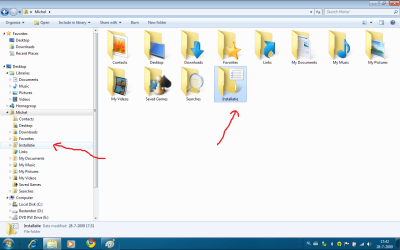
finished.png

I gave the folder another icon, through the properties-> customize->change icon.
Warning!! for chosing a icon don't use shell32.dll because the icons will show up to small in the right pane, browse to \windows\system32\imageres.dll instead and chose an icon from there.

You might also notice that your folder has an shortcut arrow and mine doesn't.

For getting rid of the shortcut arrows, you can go to this great tutorial of our esteemed colleague "Brink":
http://www.sevenforums.com/tutorials/3606-shortcut-arrow-change-remove-restore.html
Good luck.


Last edited by a moderator:
folder created, can't access it

I tried this on my vista 32bit laptop.
sorry, it does not work.
It created the folder, I choose the icon from the .dll, then I tried to open it and got the attached error
 
Last edited:

My Computer

Computer Manufacturer/Model Number
Gateway/NV7923u & NV79C52u Laptops
OS
windows 7 professional & ultimate 64bit laptops
CPU
2.27 boost to 2.53 & 2.53 boost to 2.80
Motherboard
Mobile Intel® HM55 Express Chipset ???
Memory
4GB
Graphics Card(s)
Intel® Graphics Media Accelerator HD
Sound Card
realtek High-definition audio support
Monitor(s) Displays
17.3 " HD 1600 x 900
Hard Drives
hatachi Travelstar 5400 500GB & west digital 500GB
Internet Speed
35MB fios
it's a tutorial for window 7 :doh:
 

My Computer

Computer Manufacturer/Model Number
mickey megabyte 1234
OS
ultimate 64 sp1
CPU
i5 2500K [email protected]
Motherboard
MSI P67A-GD53
Memory
8 gigs GSkill Ripjaws 1600
Graphics Card(s)
amd hd6950
Sound Card
creative x-fi gamer
Monitor(s) Displays
samsung 24"
Screen Resolution
1920x1080
Hard Drives
ocz vertex 2e 60 gig, samsung f3 1tb, buffalo 2tb ext
PSU
antec 550
Case
antec three hundred
Cooling
i'm a cooling fan
Keyboard
saitek eclipse ii
Mouse
logitech g3
Internet Speed
about 4 Mbps
Other Info
i love win7
I tried this on my vista 32bit laptop.
sorry, it does not work.
It created the folder, I choose the icon from the .dll, then I tried to open it and got the attached error

Should work for Vista also.


The screenshot's error message tells you what's wrong.

Your link is pointing to a location that does not exist, or the location is not accessible. (user rights)

But for now, I assume you mistyped the location, or made a mistake in the mklink syntax.

Just read the tutorial thoroughly and try it again, and pay attention to spaces and other details.

Good luck

edit: Make sure you use your own location names, not the ones I typed.
they serve merely as example.
 

My Computer

OS
Win7 Build 7600 x86
CPU
Pentium II 300MHz
Motherboard
Asus
Memory
32mb EDO RAM
Graphics Card(s)
Diamond Viper
Sound Card
Soundblaster 16
Monitor(s) Displays
14" AOC CRT 16K color
Screen Resolution
800x600
Hard Drives
300mb Quantum fireball
PSU
110 Watts
Cooling
Passive
Keyboard
Trust Ergonomic
Mouse
Generic
Internet Speed
256K u 128K d
forget it...

thanks anyway, it just won't work. I took ownership of my profile folder too.
It's cool, I can create a folder in the links folder as I've done B4

the folder is there, I'm able to change icon but can't open it. everytime I click the folder, I get this:


C:\Users\carmine\2review\2review\2review\2review\2review\2review\2review\2review\2review\2review\2review\2review\2review\2review\2review\2review\2review\2review\2review\2review\2review\2review\2review\2review\2review\2review\2review\2review\2review\2review
 
Last edited:

My Computer

Computer Manufacturer/Model Number
Gateway/NV7923u & NV79C52u Laptops
OS
windows 7 professional & ultimate 64bit laptops
CPU
2.27 boost to 2.53 & 2.53 boost to 2.80
Motherboard
Mobile Intel® HM55 Express Chipset ???
Memory
4GB
Graphics Card(s)
Intel® Graphics Media Accelerator HD
Sound Card
realtek High-definition audio support
Monitor(s) Displays
17.3 " HD 1600 x 900
Hard Drives
hatachi Travelstar 5400 500GB & west digital 500GB
Internet Speed
35MB fios
forget it...

thanks anyway, it just won't work. I took ownership of my profile folder too.
It's cool, I can create a folder in the links folder as I've done B4

Good,

That "links folder" makes the mklink kind of obsolete anyway.


note:
the mklink dates back to win2000 and works on xp, vista and win7.

Don't know why it won't work for you, but Iam sure it has something to do with your security settings.

But I'm glad you found a (better) alternative.

greetz
 

My Computer

OS
Win7 Build 7600 x86
CPU
Pentium II 300MHz
Motherboard
Asus
Memory
32mb EDO RAM
Graphics Card(s)
Diamond Viper
Sound Card
Soundblaster 16
Monitor(s) Displays
14" AOC CRT 16K color
Screen Resolution
800x600
Hard Drives
300mb Quantum fireball
PSU
110 Watts
Cooling
Passive
Keyboard
Trust Ergonomic
Mouse
Generic
Internet Speed
256K u 128K d
thank you, stay well;)
 

My Computer

Computer Manufacturer/Model Number
Gateway/NV7923u & NV79C52u Laptops
OS
windows 7 professional & ultimate 64bit laptops
CPU
2.27 boost to 2.53 & 2.53 boost to 2.80
Motherboard
Mobile Intel® HM55 Express Chipset ???
Memory
4GB
Graphics Card(s)
Intel® Graphics Media Accelerator HD
Sound Card
realtek High-definition audio support
Monitor(s) Displays
17.3 " HD 1600 x 900
Hard Drives
hatachi Travelstar 5400 500GB & west digital 500GB
Internet Speed
35MB fios
Where is the "Location" tab?

Hi,

I create my special folder as you explain on Windows 7. It works great! But when I right-click on this new folder, I can't see the "Location" tab... Is there something I miss?
Thank you.
 

My Computer

Computer Manufacturer/Model Number
Acer TravelMate 6592G
OS
Windows 7
CPU
Intel Core 2 Duo processor T9300
Memory
4GB DDR2
Graphics Card(s)
ATI Mobility Radeon HD 2400 XT HyperMemory

My Computer

Computer type
PC/Desktop
Computer Manufacturer/Model Number
Custom Build
OS
Microsoft Windows 7 Ultimate 64 bits 7601 Multiprocessor Free Service Pack 1
CPU
Intel(R) Core(TM) i7-3770K CPU @ 3.50GHz
Motherboard
ASUSTeK Computer INC. P8Z68-V PRO GEN3
Memory
8.00 GB
Graphics Card(s)
NVIDIA GeForce GTX 670
Sound Card
Omega Striker
Monitor(s) Displays
Viewsonic vx2250wm
Screen Resolution
1920 x 1080 x 32 bits (4294967296 colors) @ 60 Hz
Hard Drives
V9CPETXT
Seagate 1TB.
PSU
Corsair Gold Series AX850
Case
nvidia 690 advanced II
Cooling
Air
Bogus Tutorial

This is not creating a "special folder" :sa:

This is simply the old DOS way of making a shortcut.

cd\users\username = change directory to \users\username the same as just hitting the "username" link in your start menu.
mklink /d Installatie d:\Installatie = make a link (synonym to shortcut) to the directory d:\Installatie and call it Installatie and this is just the same command the windows GUI sends when you right click in the folder than go to new -> shortcut.

That is also why you get the shortcut arrow. Sorry no special folder at all!!

Please do not write tutorials if you're not really sure of what you're doing! :sarc:

Is there no moderator in this forum that checks these tutorials?

BTW: if you want a "special folder" (which is actually just a regular folder in your user directory) and have it appear in the favorites list in the left panel, just create a folder, name it and drag and drop it to the favorites list.
 

My Computer

OS
Windows 7 Ultimate
So just what is the purpose of having a "special folder" anyway? :confused:
 

My Computer

OS
Windows 7 Home Premium x64, Windows XP Professional, Ubuntu 10.04 Lucid Linx
This is not creating a "special folder" :sa:

This is simply the old DOS way of making a shortcut.

cd\users\username = change directory to \users\username the same as just hitting the "username" link in your start menu.
mklink /d Installatie d:\Installatie = make a link (synonym to shortcut) to the directory d:\Installatie and call it Installatie and this is just the same command the windows GUI sends when you right click in the folder than go to new -> shortcut.

That is also why you get the shortcut arrow. Sorry no special folder at all!!

Please do not write tutorials if you're not really sure of what you're doing! :sarc:

Is there no moderator in this forum that checks these tutorials?

BTW: if you want a "special folder" (which is actually just a regular folder in your user directory) and have it appear in the favorites list in the left panel, just create a folder, name it and drag and drop it to the favorites list.

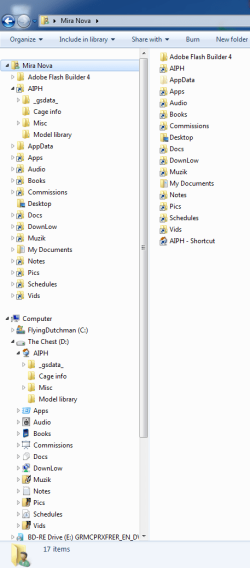
This is the difference.
mklinks.png
A symlink will appear in the Navigation Pane and can open it's hierarchy tree from there. A shortcut will not.

(And the favorites list has many enemies. :mad:)
 

My Computer

Computer type
PC/Desktop
OS
Windows 7 Pro x64 SP1
CPU
AMD Phenom II x6 1090T Black Edition 3.2GHz
Motherboard
ASUS M4A88TD-V EVO/USB3
Memory
Patriot G ‘Sector 5’ Edition 8GB (2 x 4GB) 1600MHz
Sound Card
(onboard) Realtek® ALC 892 8-Channel High Definition Audio
Monitor(s) Displays
ViewSonic VX2253 22"
Screen Resolution
1920x1080
Hard Drives
Transcend SSD720 2.5" SATAIII 64GB SSD; Western Digital Caviar Green WD20EARS 2TB 64MB 3.5" HDD
LG WH10LS30 10X Blu-ray Burner with LightScribe
PSU
CORSAIR TX Series 950W ATX12V 80 Plus Bronze
Case
Cooler Master HAF X NVidia Edition; 5 Green LED Fans!
Cooling
CORSAIR A70 120mm Dual-Fan
Keyboard
Verbatim 97472 Mini Wireless Slim
Mouse
bundled Verbatim 97472 Wireless
Antivirus
Avast
Browser
Chrome
Other Info
Ultraportable/Desktop Replacement Laptop:
circa Oct 2006,
Dell XPS M1210,
Windows 7 Professional 32-bit,
Intel Core 2 Duo T7200 2.0GHz,
3.25 (4) GB of RAM,
NVidia GeForce Go 7400,
500GB Seagate Momentus 7200RPM HDD
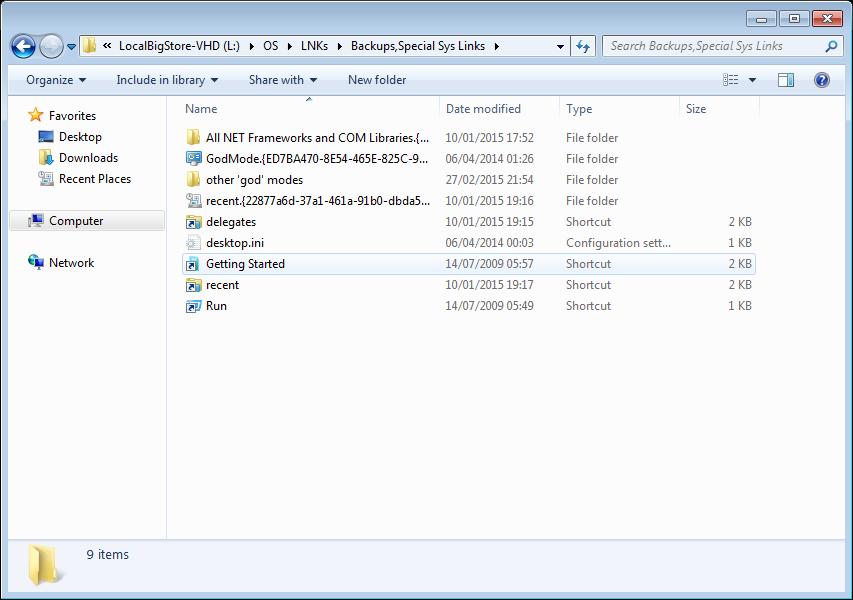
BUG with naming folders like 'GODMODE.{clsid}'?

I've been trying to add use frequent-specialFolders (like recent), using the 'new folder' - name.{CLSID} trick

a documented feature of the shell whereby filesystem folders can be easily made into namespace junctions, as described here on MSDN. Basically, any folder named <DisplayName>.<CLSID> will show up with just the <DisplayName> portion visible in Explorer, and navigating into the folder will take you to the namespace root defined by the <CLSID> portion of the name. This isn’t a user feature, it’s a developer feature.

Mine isn't working! I get the long name, with the .{CLSID} suffix...

Is anyone else having this problem?
Any ideas?

UPDATE - appears to have resolved. All I did was boot into Windows (Clean), noticed no issue, changed some folder type settings (show protected, don't hide known filetypes...), nothing caused the .{CLSID} folder suffix to be visible.

Created a new user admin account TEST, logged in, no issues... rebooted, logged into my own userprofile... problem resolved : )

Got one more build to try this on, might shootTheReg, see if any noticeable changes are made in ~HKCU
 
Last edited:

My Computer

Computer type
Laptop
Computer Manufacturer/Model Number
Dell
OS
Windows 7 Ultimate 64bit
CPU
2.2
Memory
8Gb
Graphics Card(s)
NVIDIA
Screen Resolution
1280/762
Mouse
built in pad || iphone || MS wireless
Internet Speed
100MB
Antivirus
Avast
Browser
Chrome, Chrome portable

My Computer

Computer type
PC/Desktop
Computer Manufacturer/Model Number
Self built custom
OS
64-bit Windows 11 Pro for Workstations
CPU
Intel i7-8700K OC'd to 5 GHz
Motherboard
ASUS ROG Maximus XI Formula Z390
Memory
64 GB (4x16GB) G.SKILL TridentZ RGB DDR4 3600 MHz
Graphics Card(s)
ASUS ROG-STRIX-GTX1080TI-O11G-GAMING
Sound Card
Integrated
Monitor(s) Displays
2 x Samsung Odyssey G7 27"
Screen Resolution
2560x1440
Hard Drives
1TB Samsung 990 PRO M.2,
4TB Samsung 990 PRO PRO M.2,
TerraMaster F8 SSD Plus NAS
PSU
Seasonic Prime Titanium 850W
Case
Thermaltake Core P3
Cooling
Corsair Hydro H115i
Keyboard
Logitech wireless K800
Mouse
Logitech MX Master 4
Internet Speed
2 Gb/s Download and 100 Mb/s Upload
Antivirus
Malwarebyte Anti-Malware Premium
Browser
Google Chrome
Other Info
Logitech Z625 speaker system,
Logitech BRIO 4K Pro webcam,
HP Color LaserJet Pro MFP M477fdn,
APC SMART-UPS RT 1000 XL - SURT1000XLI,
Galaxy S23 Plus phone
nope. just purged a diffdisk, and my fix^^ ain't working.

looks like I'm stuck with it

LVpI9Kp.png


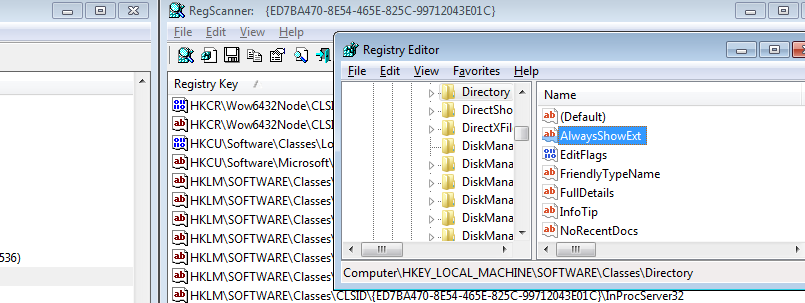
That's on a new user account, which makes me think it's a LocalMachine-scope thing...


PhIMTGw.png

Red herring
 
Last edited:

My Computer

Computer type
Laptop
Computer Manufacturer/Model Number
Dell
OS
Windows 7 Ultimate 64bit
CPU
2.2
Memory
8Gb
Graphics Card(s)
NVIDIA
Screen Resolution
1280/762
Mouse
built in pad || iphone || MS wireless
Internet Speed
100MB
Antivirus
Avast
Browser
Chrome, Chrome portable
Folder in User Folder?

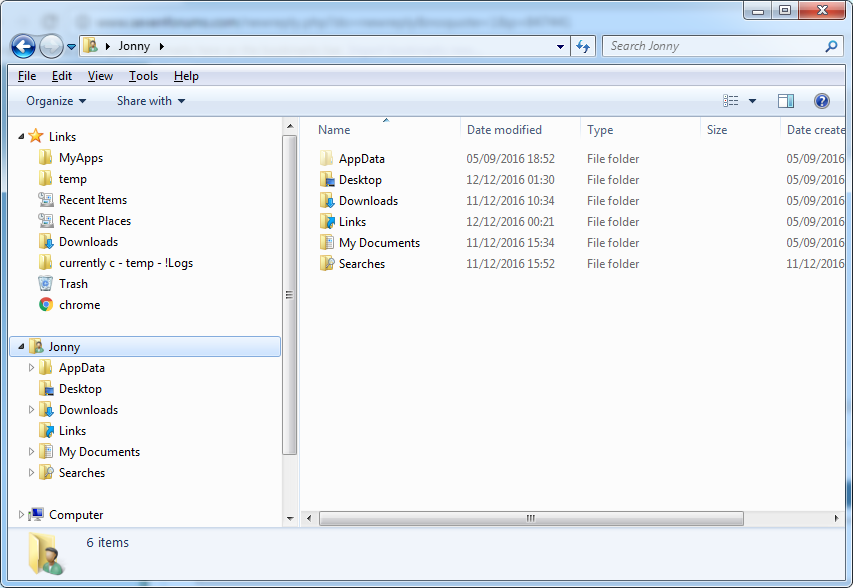
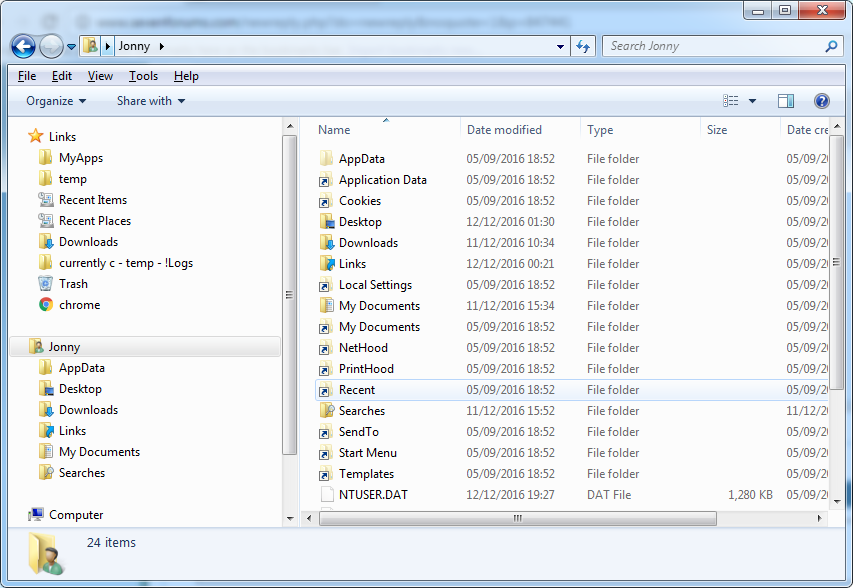
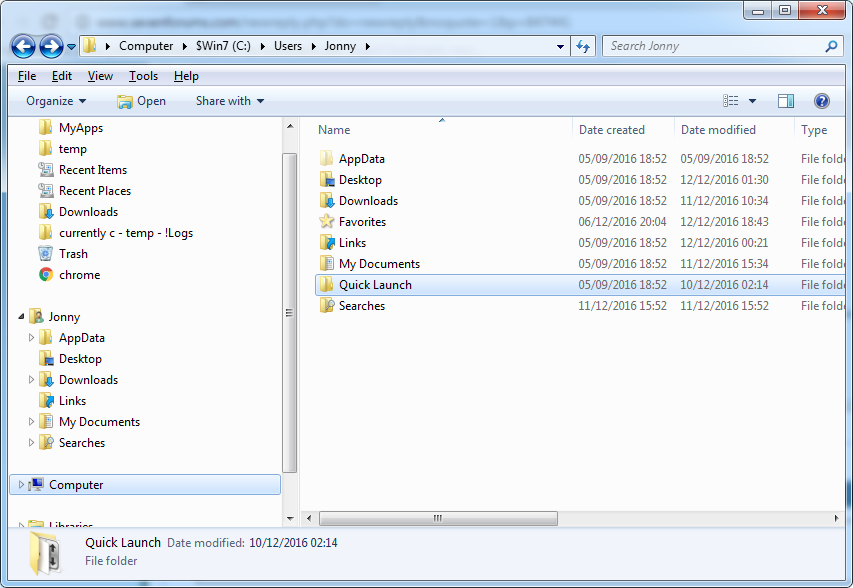
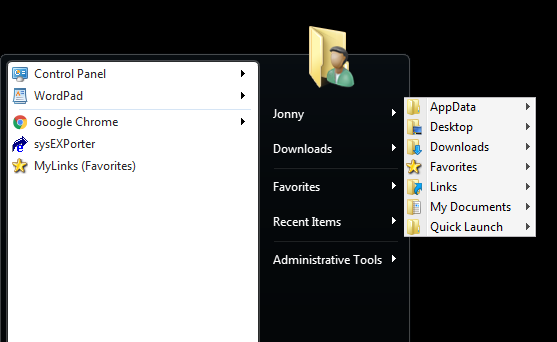
Hi, do you know what controls which folders are seen in the UserFolder?!

The userfolder is on the explorer nav. pane, and can be added to the start menu panel.

I've moved Quick Launch and Favorites to my userfolder, neither is visible via my userfolder (Shell Object).

If I go via environment variables (ie a path, %userprofile%\ ) the dir's are seen.

Thinking it might be only junctions are shown, I checked (dir /a)

All I see are

Downloads
My Documents
Links (ie win7 'Quick Access')
Searches

Is this just me?

3rkP2Oi.png


Even with show system files I can't see relocated Quick Launch - even though the path resolves, the hard coded env string path takes precedent

oJU5hY5.png


5doqQDl.png
 

My Computer

Computer type
Laptop
Computer Manufacturer/Model Number
Dell
OS
Windows 7 Ultimate 64bit
CPU
2.2
Memory
8Gb
Graphics Card(s)
NVIDIA
Screen Resolution
1280/762
Mouse
built in pad || iphone || MS wireless
Internet Speed
100MB
Antivirus
Avast
Browser
Chrome, Chrome portable
I've changed AppData (folder only, of course) to not be hidden.

Re Quick Launch, guessing Parsing Name 'dunnit. testing with favorites
 

My Computer

Computer type
Laptop
Computer Manufacturer/Model Number
Dell
OS
Windows 7 Ultimate 64bit
CPU
2.2
Memory
8Gb
Graphics Card(s)
NVIDIA
Screen Resolution
1280/762
Mouse
built in pad || iphone || MS wireless
Internet Speed
100MB
Antivirus
Avast
Browser
Chrome, Chrome portable
solved :)

Added Parent, Relative,& ParsingName, also to wow64 @
HKEY_LOCAL_MACHINE\SOFTWARE\Wow6432Node\Microsoft\Windows\CurrentVersion\explorer\FolderDescriptions\{1777F761-68AD-4D8A-87BD-30B759FA33DD}
REG_SZ (Default) (value not set)
REG_DWORD Attributes 0x00000001 (1)
REG_DWORD Category 0x00000004 (4)
REG_EXPAND_SZ Icon %SystemRoot%\system32\imageres.dll,-115
REG_EXPAND_SZ LocalizedName @%SystemRoot%\system32\shell32.dll,-21796
REG_SZ Name Favorites
REG_SZ ParsingName ::{59031a47-3f72-44a7-89c5-5595fe6b30ee}\{1777F761-68AD-4D8A-87BD-30B759FA33DD}
REG_DWORD PreCreate 0x00000001 (1)
REG_DWORD PublishExpandedPath 0x00000001 (1)
REG_SZ RelativePath Favorites
REG_DWORD Roamable 0x00000001 (1)

It's the little things :)

KzEb0WR.png
 

My Computer

Computer type
Laptop
Computer Manufacturer/Model Number
Dell
OS
Windows 7 Ultimate 64bit
CPU
2.2
Memory
8Gb
Graphics Card(s)
NVIDIA
Screen Resolution
1280/762
Mouse
built in pad || iphone || MS wireless
Internet Speed
100MB
Antivirus
Avast
Browser
Chrome, Chrome portable
Back
Top