User Folders - Change Default Location

How to Change the Default Location of User Folders in Windows 7 and Windows 8

   Information
This will show you how to change (move) the default location of your account's C:\Users\(user-name) folders to another location of your choice instead in Windows 7 and Windows 8, and still have access to the user folder from the Start Menu (Windows 7 only) location.

   Tip
If you are just wanting to save HDD space, then you might consider this below to be able to access the files from your libraries with the files actually located where you like instead. This way you will not have to worry about any potential issues that come with moving user folder locations. For example, whatever partition you move your user folders to will now be included in a system image in Windows 7 and Windows 8.

  • Create a new folder at any location you want.
  • Move any files you want into the new folder.
  • Include the new folder into a library (Windows 7 or Windows 8) of your choice.
  • If you like, you can also set the new folder to be the default save to location (Windows 7 or Windows 8) for the library as well.
   Warning
If you change the default location of your Favorites folder in Windows 8 or 8.1, your Favorites in Internet Explorer will no longer be available until you move your Favorites back to the default "C:\Users\(user-name)" location.


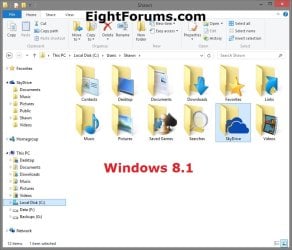
EXAMPLE: User Folders
NOTE: This is at the default C:\Users\(user-name) location.
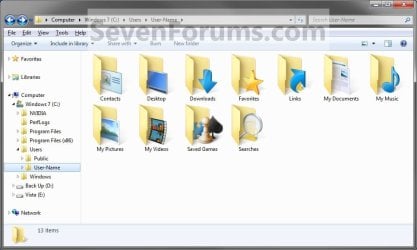
Example1.jpg

Windows_8.1.jpg


OPTION ONE

To Change Main User Profile Folder Location


1. For how, see:
http://www.sevenforums.com/tutorials/87555-user-profile-change-default-location.html

OR

How to Relocate User Profiles to another Partition or Disk in Windows 8


OPTION TWO

To Change User Folders Location from within User Profile Folder


1. If you a part of a homegroup, then you will need to change the homegroup settings to no longer share the user folder (ex: My Music) that you want to move first by unchecking the folder and clicking on Save Changes. (see screenshot below)
NOTE: This is so the user folder (ex: My Music) will not be shared on the homegroup anymore.
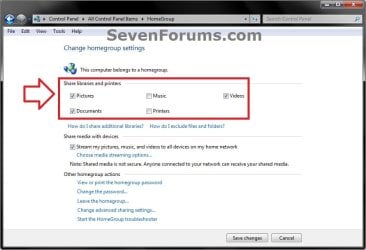
Homegroup.jpg
2. In Windows Explorer, navigate to where (ex: D: drive) you want to move the default user folder (ex: My Music) location to.

3. Create a New Folder by right clicking or press and hold on a empty space in the main window there, and click/tap on New and Folder. Name the new folder without spaces (ex: "Music" for My Music) for the user folder that you want to move there. (See screenshots below)
NOTE: The name that you type in for the new folder will be what you see as the user folder name in the Start Menu (shell:UsersFilesFolder) location when finished with all of these steps. It would be best to use the same name as the user folder to avoid confusion.
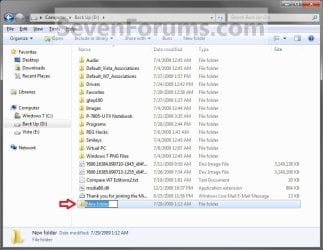
Rename1.jpg

Rename2.jpg

4. Close this window. (See screenshots above)

5. Press the Windows+R keys to open the Run dialog, type shell:UsersFilesFolder, and press enter.
NOTE: This will open your C:\Users\(user-name) folder.

6. Right click or press and hold on a user folder (ex: My Music, My Documents, My Pictures, etc.....) that you want to move the default location for, and click/tap on Properties. (See screenshot below)
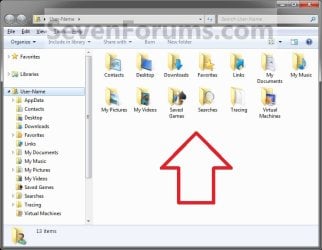
Right_Click_On_A_User_Folder.jpg
7. Click/tap on the Location tab, and Move button. (See screenshot below)
Properties1.jpg
8. Navigate to the same location as in step 2 and 3 above, then select the renamed new folder (ex: Music), and click/tap on the Select Folder button. (See screenshot below)
Properties2.jpg
9. Click/tap on OK. (See screenshot below)
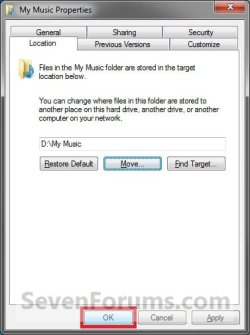
Properties3.jpg
10. Click/tap on Yes. (See screenshot below)
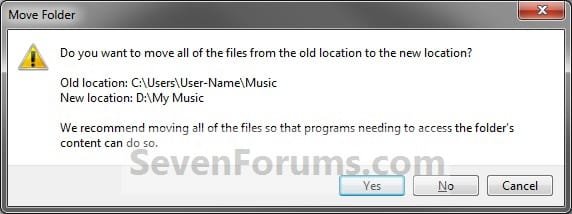
Properties4.jpg
11. After a few seconds when the location has been changed, the Properties window (screenshot under step 9) will then close.

12. Check back at the C:\Users\(user-name) location to make sure that the old user folder (ex: My Music) that you moved is no longer there. If it is, then make sure that the contents of the folder were moved to the new location, and delete it. (See screenshot below)
NOTE: If you are unable to delete the folder, then restart the computer and try again.
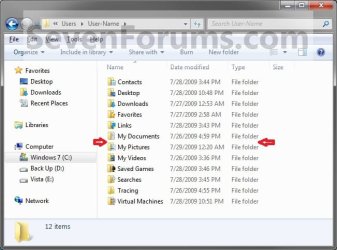
Finished2.jpg
13. You will notice that the folder at the shell:UsersFilesFolder location and the new location (ex: D drive) you moved the user folder to, now has the default user folder (ex: My Music) icon. (See screenshot below)
NOTE: The Start Menu in Windows 7 now opens the user folder from the new location (ex: D: drive) that you moved the user folder to.
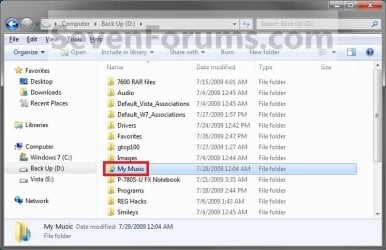
Finished.jpg
14. If you a part of a homegroup, then you can now change the homegroup settings back to share the user folder (ex: My Music) again if you like by checking the folder, and click/tap on Save Changes. (see screenshot below)
Homegroup.jpg
   Tip
If you wanted to restore the default location of the user folder, then see:

How to Restore the Default Location of User Folders in Windows 7 and Windows 8


That's it,
Shawn


Last edited:
  • Like
Reactions: Lee
Hi,

Thank you for this tutorial and the excellent answers. I read through all 22 pages of conversations in this thread (as well as many of those in the other tutorials about moving whole Profiles and having new Profiles stored in different locations) and somehow, I still have questions...not sure why my brain works like that. :-)


I just bought a new HP - my first Windows 7 machine so I have a lot to learn. In the past, every time I've gotten a new machine, I've sworn to myself that I was "going to do things differently" and segregate my system files from my data files (docs, pics, etc) and never did it. But the first thing I did after getting this new machine (after loading AV and running windows updates) was to partition the 1TB HDD to (roughly) 250GB for the system and applications and 750TB for my data.


Anyway... it seems that many of this thread's questions and many of your replies revolve around HDD space issues and how if space is the concern then the best solution is not to move the user's folders but to create new ones on a separate drive and include them in libraries. But with this huge drive, it's not a space issue for me. It's a question of 4 things:

1. being able to quickly back up my system;
2. being able to quickly restore my sytem in event of a problem;
3. being able to easily back up my DATA without backing up a lot of extraneous application files which can be easily re-installed;
4. being able to easily reinstall Windows if it gets slow and clunky over time, without having to deal with my personal DATA at that time.
Can you address the issue of the system image having to include the DATA drive if I relocate ANY of the user's folders (My Documents, My Pictures) to the DATA drive?

Right now, my 250GB SYSTEM partition's image file is 54GB. If I move about 1GB of personal data from the Documents folder (currently in the User Profile folder on the SYSTEM partition) to a folder on my 750GB DATA partition, are you saying that future backup images will include the DATA partition? Will the image include just that 1GB piece of the DATA drive or much more of it? While space for files, etc isn't an issue, keeping multiple copies of larger and larger system images will be.

I'm new to the practice of system images - they seem like a much better idea than just backing up files if the goal is to get up and running again quickly. BUT, over time, as one's Windows installation gets more and more cluttered, slow, and clunky, the system images will reflect that. So then doing a wipe and reinstalling Windows means losing all my User Profile info, right? Whereas if I had my User Profiles sitting on that DATA partition, I could wipe the SYSTEM partition and my User Profiles would still be intact. Do I have that right? Or is there a problem with my logic?


As a follow up question to that last one, IF you wipe and reinstall Windows from scratch, CAN you even use User Profiles that you saved from your prior system? If not, then is there even any reason to save them separately from the system (as they would be if they resided on a DATA drive)?


Thank you for your help.
 

My Computer

Computer Manufacturer/Model Number
HP Pavilion
OS
Win7 Home Premium SP1 32bit
CPU
core 2 quad
Hard Drives
WD Black 1Tb
Hello Buckscaper,

That's correct. If you were to move any of your user folders to the 750 GB partition, then it would be included in the system image that would have to be saved somewhere other than the 250 GB W7 and 750 GB partitions since you cannot save a system image to a same location included in the system image. Personally I do not recommend to move user profiles or user folders to another location just to avoid potential issues from it. Including folders to a library is much safer,

For the best backup protection, it would be better to have your system image backups and included folders for libraries located on a separate physical HDD instead of the same HDD that Windows is installed on. This way if your Windows 7 HDD should fail, all of your system images and data in the included folders would still be on your other separate HDD.

In your case, it would still be better to have the included folders and system images on your 750 GB partition. This way if your W7 installation goes south one day, the included folders on the 750 GB would remain intact and you will still be able to restore your system image back to the 250 GB partition to have it back like it was before.

Hope this helps,
Shawn
 

My Computer

Computer type
PC/Desktop
Computer Manufacturer/Model Number
Self built custom
OS
64-bit Windows 11 Pro for Workstations
CPU
Intel i7-8700K OC'd to 5 GHz
Motherboard
ASUS ROG Maximus XI Formula Z390
Memory
64 GB (4x16GB) G.SKILL TridentZ RGB DDR4 3600 MHz
Graphics Card(s)
ASUS ROG-STRIX-GTX1080TI-O11G-GAMING
Sound Card
Integrated
Monitor(s) Displays
2 x Samsung Odyssey G7 27"
Screen Resolution
2560x1440
Hard Drives
1TB Samsung 990 PRO M.2,
4TB Samsung 990 PRO PRO M.2,
TerraMaster F8 SSD Plus NAS
PSU
Seasonic Prime Titanium 850W
Case
Thermaltake Core P3
Cooling
Corsair Hydro H115i
Keyboard
Logitech wireless K800
Mouse
Logitech MX Master 4
Internet Speed
2 Gb/s Download and 100 Mb/s Upload
Antivirus
Malwarebyte Anti-Malware Premium
Browser
Google Chrome
Other Info
Logitech Z625 speaker system,
Logitech BRIO 4K Pro webcam,
HP Color LaserJet Pro MFP M477fdn,
APC SMART-UPS RT 1000 XL - SURT1000XLI,
Galaxy S23 Plus phone
Thanks for your response. Based on that, here is how I think things will be set up. Could you please comment and let me know if it seems that I understood your instructions?

1TB drive
- 250GB partition with Win7 system, applications, User Profiles & User Folders, Libraries.
---- this partition will be periodically imaged using Win7 backup/image function, with the images stored on an attached external 500GB HDD.
---- this partition will also be backed up via Carbonite.

- 750GB partition - DATA drive. Will contain folders like "documents", "pictures", "videos", etc which will be INCLUDED folders in the appropriate Libraries mentioned above.
---- this partition will be backed up only via Carbonite (until I get another external HDD big enough to handle it).

Do I have that right?

One other confusion I have is where to put my Dropbox folder - the default location is on the 250 system partition //User/user-name/Dropbox or should I relocate it to the 750 Data partition?

Thank you again
 

My Computer

Computer Manufacturer/Model Number
HP Pavilion
OS
Win7 Home Premium SP1 32bit
CPU
core 2 quad
Hard Drives
WD Black 1Tb
Anytime mate. :)

Yep, that sounds like a good setup to have.

Since Dropbox is a 3rd party app, it would be best to leave it at it's default location unless the app has a setting to specify where to have the folder at instead.
 

My Computer

Computer type
PC/Desktop
Computer Manufacturer/Model Number
Self built custom
OS
64-bit Windows 11 Pro for Workstations
CPU
Intel i7-8700K OC'd to 5 GHz
Motherboard
ASUS ROG Maximus XI Formula Z390
Memory
64 GB (4x16GB) G.SKILL TridentZ RGB DDR4 3600 MHz
Graphics Card(s)
ASUS ROG-STRIX-GTX1080TI-O11G-GAMING
Sound Card
Integrated
Monitor(s) Displays
2 x Samsung Odyssey G7 27"
Screen Resolution
2560x1440
Hard Drives
1TB Samsung 990 PRO M.2,
4TB Samsung 990 PRO PRO M.2,
TerraMaster F8 SSD Plus NAS
PSU
Seasonic Prime Titanium 850W
Case
Thermaltake Core P3
Cooling
Corsair Hydro H115i
Keyboard
Logitech wireless K800
Mouse
Logitech MX Master 4
Internet Speed
2 Gb/s Download and 100 Mb/s Upload
Antivirus
Malwarebyte Anti-Malware Premium
Browser
Google Chrome
Other Info
Logitech Z625 speaker system,
Logitech BRIO 4K Pro webcam,
HP Color LaserJet Pro MFP M477fdn,
APC SMART-UPS RT 1000 XL - SURT1000XLI,
Galaxy S23 Plus phone
Cool. Thanks very much. Dropbox does give the option of putting it anywhere the user wants, during installation. But I think that once it's installed, I'd have to uninstall and reinstall to get it moved. And...since I already installed it, I'll leave it where it is!

Thank you again. I think I'll be happy with this setup.

Cheers,
Buck
 

My Computer

Computer Manufacturer/Model Number
HP Pavilion
OS
Win7 Home Premium SP1 32bit
CPU
core 2 quad
Hard Drives
WD Black 1Tb
You're most welcome Buck. :)
 

My Computer

Computer type
PC/Desktop
Computer Manufacturer/Model Number
Self built custom
OS
64-bit Windows 11 Pro for Workstations
CPU
Intel i7-8700K OC'd to 5 GHz
Motherboard
ASUS ROG Maximus XI Formula Z390
Memory
64 GB (4x16GB) G.SKILL TridentZ RGB DDR4 3600 MHz
Graphics Card(s)
ASUS ROG-STRIX-GTX1080TI-O11G-GAMING
Sound Card
Integrated
Monitor(s) Displays
2 x Samsung Odyssey G7 27"
Screen Resolution
2560x1440
Hard Drives
1TB Samsung 990 PRO M.2,
4TB Samsung 990 PRO PRO M.2,
TerraMaster F8 SSD Plus NAS
PSU
Seasonic Prime Titanium 850W
Case
Thermaltake Core P3
Cooling
Corsair Hydro H115i
Keyboard
Logitech wireless K800
Mouse
Logitech MX Master 4
Internet Speed
2 Gb/s Download and 100 Mb/s Upload
Antivirus
Malwarebyte Anti-Malware Premium
Browser
Google Chrome
Other Info
Logitech Z625 speaker system,
Logitech BRIO 4K Pro webcam,
HP Color LaserJet Pro MFP M477fdn,
APC SMART-UPS RT 1000 XL - SURT1000XLI,
Galaxy S23 Plus phone
Hi Brink,

Thank you for your excellent tutorial. Could you please explain to me.

I have the SSD (C: drive) for Windows 7 Pro x64 and applications, the HDD (D: drive) is my data storage.

I can reach the My Document folder by three ways:


1. Desktop -> Libraries ->Documents ->My Documents
2. Desktop -> (User-Name)->My Documents
3. Desktop -> Computer -> Local Disk (C: ) -> Users -> (User-Name) -> My Documents


The # 3 is the real location of the folder by default. When I move the My Document folder from C: drive on D: drive, the folder disappears from location # 3 but exists (reference ?, shortcut ?) in location # 2. If I delete My Document folder from location # 2, then my real My Document folder is deleted from its new location on drive D:

Is this as it should be?


Should I delete all User folders (My Documents, My Music, etc…) from location #2 or not ?


Thank you.
 

My Computer

OS
Windows 7
Hello Shurzota,

Yes, when you move "My Documents" from C to D, "My Documents" will no longer be at #3. However, the (User Name) "User's Files" desktop icon #2 and Documents library #1 will still be linked to wherever on D you moved "My Documents" and open it.

If #2 is just the turned on "User's Files" desktop icon, then deleting it will not hurt anything and just turn it off and not affect "My Documents" at any other location since the desktop icon is just basically a shortcut.

Hope this helps, :)
Shawn
 

My Computer

Computer type
PC/Desktop
Computer Manufacturer/Model Number
Self built custom
OS
64-bit Windows 11 Pro for Workstations
CPU
Intel i7-8700K OC'd to 5 GHz
Motherboard
ASUS ROG Maximus XI Formula Z390
Memory
64 GB (4x16GB) G.SKILL TridentZ RGB DDR4 3600 MHz
Graphics Card(s)
ASUS ROG-STRIX-GTX1080TI-O11G-GAMING
Sound Card
Integrated
Monitor(s) Displays
2 x Samsung Odyssey G7 27"
Screen Resolution
2560x1440
Hard Drives
1TB Samsung 990 PRO M.2,
4TB Samsung 990 PRO PRO M.2,
TerraMaster F8 SSD Plus NAS
PSU
Seasonic Prime Titanium 850W
Case
Thermaltake Core P3
Cooling
Corsair Hydro H115i
Keyboard
Logitech wireless K800
Mouse
Logitech MX Master 4
Internet Speed
2 Gb/s Download and 100 Mb/s Upload
Antivirus
Malwarebyte Anti-Malware Premium
Browser
Google Chrome
Other Info
Logitech Z625 speaker system,
Logitech BRIO 4K Pro webcam,
HP Color LaserJet Pro MFP M477fdn,
APC SMART-UPS RT 1000 XL - SURT1000XLI,
Galaxy S23 Plus phone
dear brink, hello how do you do...?

um, i've been reading about the user folders - change default location, and when i installed my windows earlier this year i followed the post#1 instruction and move my Videos to D and my Documents to I

I moved it from C:/users/user-name/my videos => D:/my videos

now I'd like to ask...,

if I would like to rename the D my videos folder to smthn else like "Random 123", Can I just simply do it, or do i have to be concern with changing some paths or some other things as well?

secondly, I partitionize my drive to C D F and G, E is the DVD drive.
CD are primary and FG are logical.
I'd like to change the drive letter from G => I, is it as simple as changing it from the disk management menu or is there anything i should be concern about since the drive letter skips some letter? (i mean, instead of CDEFG, it's CDEF-I)

thirdly, i'd like to ask, my DVD drive default path is E, is it possible to change it to other letters without causing any problems? I'd like to change it to say Z or something. Or is it best left alone in terms of optical disk drive?


thank you very much,

kungfupanda
 

My Computer

Computer type
Laptop
Computer Manufacturer/Model Number
Asus K43S
OS
windows 7 home premium 64bit
CPU
Intel Core i3-2330m
Memory
6 Gib 10600 DDR3 RAM
Graphics Card(s)
Radeon 6730
Monitor(s) Displays
Generic PnP Monitor
Hard Drives
Intel SSD 330 Series 120 Gb
Seagate Momentus 750 Gb
Internet Speed
Slow, lol
Antivirus
KIS 2013
Hello kungfupanda,

No. You would not want to try and rename one of your user folders like "My Videos". Doing so will break it's symbolic link. If you like, I would recommend to move these folders back to your C drive, then do what's in the yellow Tip box at the top of the tutorial to use libraries instead. This way you can create a folder named what and where you like for this instead without the risk of messing up your user folders.

Yes, you can change your G drive letter to I, but only do so if you do not have anything (ex: shortcuts) that run or save automatically to the G drive. If you do and change the drive letter, then they will no longer work since they are still looking for the G drive. Use caution.

You should have no issue with changing your DVD's E letter to Z.

http://www.sevenforums.com/tutorials/82994-drive-letter-add-change-remove-windows-7-a.html

Hope this helps, :)
Shawn
 

My Computer

Computer type
PC/Desktop
Computer Manufacturer/Model Number
Self built custom
OS
64-bit Windows 11 Pro for Workstations
CPU
Intel i7-8700K OC'd to 5 GHz
Motherboard
ASUS ROG Maximus XI Formula Z390
Memory
64 GB (4x16GB) G.SKILL TridentZ RGB DDR4 3600 MHz
Graphics Card(s)
ASUS ROG-STRIX-GTX1080TI-O11G-GAMING
Sound Card
Integrated
Monitor(s) Displays
2 x Samsung Odyssey G7 27"
Screen Resolution
2560x1440
Hard Drives
1TB Samsung 990 PRO M.2,
4TB Samsung 990 PRO PRO M.2,
TerraMaster F8 SSD Plus NAS
PSU
Seasonic Prime Titanium 850W
Case
Thermaltake Core P3
Cooling
Corsair Hydro H115i
Keyboard
Logitech wireless K800
Mouse
Logitech MX Master 4
Internet Speed
2 Gb/s Download and 100 Mb/s Upload
Antivirus
Malwarebyte Anti-Malware Premium
Browser
Google Chrome
Other Info
Logitech Z625 speaker system,
Logitech BRIO 4K Pro webcam,
HP Color LaserJet Pro MFP M477fdn,
APC SMART-UPS RT 1000 XL - SURT1000XLI,
Galaxy S23 Plus phone
Hello kungfupanda,

No. You would not want to try and rename one of your user folders like "My Videos". Doing so will break it's symbolic link. If you like, I would recommend to move these folders back to your C drive, then do what's in the yellow Tip box at the top of the tutorial to use libraries instead. This way you can create a folder named what and where you like for this instead without the risk of messing up your user folders.

Yes, you can change your G drive letter to I, but only do so if you do not have anything (ex: shortcuts) that run or save automatically to the G drive. If you do and change the drive letter, then they will no longer work since they are still looking for the G drive. Use caution.

You should have no issue with changing your DVD's E letter to Z.

http://www.sevenforums.com/tutorials/82994-drive-letter-add-change-remove-windows-7-a.html

Hope this helps, :)
Shawn


dear brink hi...

um i've decided to do clean install for my laptop from zero (since it's long overdue anyway), i've used this tutorial in the past when i first install my windows

http://www.sevenforums.com/tutorials/18629-user-folders-change-default-location.html


however at that time, i didn't rename the my videos etc folders, i just moved it.

Now, i'd like to ask, if i do clean install of my laptop now, when i point to new location say, the "my pictures" from C to "new folders" on E, is it possibleto rename the "new folders" on E to like "something music" instead of the same "my music"


i apologize for the not concise english on my part...


have a great day,

Kungfupanda
 

My Computer

Computer type
Laptop
Computer Manufacturer/Model Number
Asus K43S
OS
windows 7 home premium 64bit
CPU
Intel Core i3-2330m
Memory
6 Gib 10600 DDR3 RAM
Graphics Card(s)
Radeon 6730
Monitor(s) Displays
Generic PnP Monitor
Hard Drives
Intel SSD 330 Series 120 Gb
Seagate Momentus 750 Gb
Internet Speed
Slow, lol
Antivirus
KIS 2013
Hello Kungfupanda,

I wouldn't recommend to rename your user folders. Doing so will mess up their symbolic link.

If you like, you might consider using the yellow Tip box at the top of this tutorial to use libraries. This way you can name the folders on E what you like, and just include them in your libraries on C with them still being stored on E. This way you do not have to move your user folders, and worry about messing them up by mistake. :)
 

My Computer

Computer type
PC/Desktop
Computer Manufacturer/Model Number
Self built custom
OS
64-bit Windows 11 Pro for Workstations
CPU
Intel i7-8700K OC'd to 5 GHz
Motherboard
ASUS ROG Maximus XI Formula Z390
Memory
64 GB (4x16GB) G.SKILL TridentZ RGB DDR4 3600 MHz
Graphics Card(s)
ASUS ROG-STRIX-GTX1080TI-O11G-GAMING
Sound Card
Integrated
Monitor(s) Displays
2 x Samsung Odyssey G7 27"
Screen Resolution
2560x1440
Hard Drives
1TB Samsung 990 PRO M.2,
4TB Samsung 990 PRO PRO M.2,
TerraMaster F8 SSD Plus NAS
PSU
Seasonic Prime Titanium 850W
Case
Thermaltake Core P3
Cooling
Corsair Hydro H115i
Keyboard
Logitech wireless K800
Mouse
Logitech MX Master 4
Internet Speed
2 Gb/s Download and 100 Mb/s Upload
Antivirus
Malwarebyte Anti-Malware Premium
Browser
Google Chrome
Other Info
Logitech Z625 speaker system,
Logitech BRIO 4K Pro webcam,
HP Color LaserJet Pro MFP M477fdn,
APC SMART-UPS RT 1000 XL - SURT1000XLI,
Galaxy S23 Plus phone
Hello Kungfupanda,

I wouldn't recommend to rename your user folders. Doing so will mess up their symbolic link.

If you like, you might consider using the yellow Tip box at the top of this tutorial to use libraries. This way you can name the folders on E what you like, and just include them in your libraries on C with them still being stored on E. This way you do not have to move your user folders, and worry about messing them up by mistake. :)

I see, thank you for your answer, I will do this when i do a clean install, by the way brink, 1 more question,

when i first got my laptop i follow the clean all tutorial,

http://www.sevenforums.com/tutorials/52129-disk-clean-clean-all-diskpart-command.html

Now, i heard that we shouldn't do clean all command too often, my question is, i did it 2 times already in the past on the same laptop, is it overkill when i do clean install now, i do it again? thank you very much,

kungfupanda
 

My Computer

Computer type
Laptop
Computer Manufacturer/Model Number
Asus K43S
OS
windows 7 home premium 64bit
CPU
Intel Core i3-2330m
Memory
6 Gib 10600 DDR3 RAM
Graphics Card(s)
Radeon 6730
Monitor(s) Displays
Generic PnP Monitor
Hard Drives
Intel SSD 330 Series 120 Gb
Seagate Momentus 750 Gb
Internet Speed
Slow, lol
Antivirus
KIS 2013
Since you are not selling or giving your computer away, the "Clean all" command would be overkill.

I would recommend to just do a normal clean install instead. It formats the HDD before installation anyways. :)
 

My Computer

Computer type
PC/Desktop
Computer Manufacturer/Model Number
Self built custom
OS
64-bit Windows 11 Pro for Workstations
CPU
Intel i7-8700K OC'd to 5 GHz
Motherboard
ASUS ROG Maximus XI Formula Z390
Memory
64 GB (4x16GB) G.SKILL TridentZ RGB DDR4 3600 MHz
Graphics Card(s)
ASUS ROG-STRIX-GTX1080TI-O11G-GAMING
Sound Card
Integrated
Monitor(s) Displays
2 x Samsung Odyssey G7 27"
Screen Resolution
2560x1440
Hard Drives
1TB Samsung 990 PRO M.2,
4TB Samsung 990 PRO PRO M.2,
TerraMaster F8 SSD Plus NAS
PSU
Seasonic Prime Titanium 850W
Case
Thermaltake Core P3
Cooling
Corsair Hydro H115i
Keyboard
Logitech wireless K800
Mouse
Logitech MX Master 4
Internet Speed
2 Gb/s Download and 100 Mb/s Upload
Antivirus
Malwarebyte Anti-Malware Premium
Browser
Google Chrome
Other Info
Logitech Z625 speaker system,
Logitech BRIO 4K Pro webcam,
HP Color LaserJet Pro MFP M477fdn,
APC SMART-UPS RT 1000 XL - SURT1000XLI,
Galaxy S23 Plus phone
Hi Brink,

I plan on relocating my Music folder (100gb) to an external drive. I assume that this procedure does not actually relocate the files. You mention in Step 11 'a few seconds'. Transferring all these files will most likely take several hours. I would still like iTunes to recognize the new location. Is it necessary to make a registry edit as it was when I relocated a complete user profile? At an earlier date I changed the location of my user profile but have since moved it back to C:.
 

My Computer

Computer Manufacturer/Model Number
Dell Inspiron 1720
OS
Windows 7 Home Premium 32 bit SP1
CPU
Intel T5250
Motherboard
Dell OUK437
Memory
4gb
Graphics Card(s)
Nvdia GeForce 8400M GS
Sound Card
Sigma Tel High Definition Audio CODEC
Hard Drives
2 3tb Seagate GoFlex Desktops
1 1tb Seagate Free Agent
Mouse
Logitech M305
Internet Speed
Free Wi-Fi provided to residents of building, too slow!
Hello Richard,

In this case, I would recommend to do what's in the yellow Tip box at the top of the tutorial instead of moving your "My Music" folder.

It would be much safer to do, and work better for what you wanted to do.

Hope this helps, :)
Shawn
 

My Computer

Computer type
PC/Desktop
Computer Manufacturer/Model Number
Self built custom
OS
64-bit Windows 11 Pro for Workstations
CPU
Intel i7-8700K OC'd to 5 GHz
Motherboard
ASUS ROG Maximus XI Formula Z390
Memory
64 GB (4x16GB) G.SKILL TridentZ RGB DDR4 3600 MHz
Graphics Card(s)
ASUS ROG-STRIX-GTX1080TI-O11G-GAMING
Sound Card
Integrated
Monitor(s) Displays
2 x Samsung Odyssey G7 27"
Screen Resolution
2560x1440
Hard Drives
1TB Samsung 990 PRO M.2,
4TB Samsung 990 PRO PRO M.2,
TerraMaster F8 SSD Plus NAS
PSU
Seasonic Prime Titanium 850W
Case
Thermaltake Core P3
Cooling
Corsair Hydro H115i
Keyboard
Logitech wireless K800
Mouse
Logitech MX Master 4
Internet Speed
2 Gb/s Download and 100 Mb/s Upload
Antivirus
Malwarebyte Anti-Malware Premium
Browser
Google Chrome
Other Info
Logitech Z625 speaker system,
Logitech BRIO 4K Pro webcam,
HP Color LaserJet Pro MFP M477fdn,
APC SMART-UPS RT 1000 XL - SURT1000XLI,
Galaxy S23 Plus phone
Should I expect it to take several hours to move the files?
 

My Computer

Computer Manufacturer/Model Number
Dell Inspiron 1720
OS
Windows 7 Home Premium 32 bit SP1
CPU
Intel T5250
Motherboard
Dell OUK437
Memory
4gb
Graphics Card(s)
Nvdia GeForce 8400M GS
Sound Card
Sigma Tel High Definition Audio CODEC
Hard Drives
2 3tb Seagate GoFlex Desktops
1 1tb Seagate Free Agent
Mouse
Logitech M305
Internet Speed
Free Wi-Fi provided to residents of building, too slow!
It really depends on how the external drive is connected. If it's USB 2.0 or slower, then yeah 100GB is going to take a long time to copy over.
 

My Computer

Computer type
PC/Desktop
Computer Manufacturer/Model Number
Self built custom
OS
64-bit Windows 11 Pro for Workstations
CPU
Intel i7-8700K OC'd to 5 GHz
Motherboard
ASUS ROG Maximus XI Formula Z390
Memory
64 GB (4x16GB) G.SKILL TridentZ RGB DDR4 3600 MHz
Graphics Card(s)
ASUS ROG-STRIX-GTX1080TI-O11G-GAMING
Sound Card
Integrated
Monitor(s) Displays
2 x Samsung Odyssey G7 27"
Screen Resolution
2560x1440
Hard Drives
1TB Samsung 990 PRO M.2,
4TB Samsung 990 PRO PRO M.2,
TerraMaster F8 SSD Plus NAS
PSU
Seasonic Prime Titanium 850W
Case
Thermaltake Core P3
Cooling
Corsair Hydro H115i
Keyboard
Logitech wireless K800
Mouse
Logitech MX Master 4
Internet Speed
2 Gb/s Download and 100 Mb/s Upload
Antivirus
Malwarebyte Anti-Malware Premium
Browser
Google Chrome
Other Info
Logitech Z625 speaker system,
Logitech BRIO 4K Pro webcam,
HP Color LaserJet Pro MFP M477fdn,
APC SMART-UPS RT 1000 XL - SURT1000XLI,
Galaxy S23 Plus phone
I'll give it a try. Thanks.
 

My Computer

Computer Manufacturer/Model Number
Dell Inspiron 1720
OS
Windows 7 Home Premium 32 bit SP1
CPU
Intel T5250
Motherboard
Dell OUK437
Memory
4gb
Graphics Card(s)
Nvdia GeForce 8400M GS
Sound Card
Sigma Tel High Definition Audio CODEC
Hard Drives
2 3tb Seagate GoFlex Desktops
1 1tb Seagate Free Agent
Mouse
Logitech M305
Internet Speed
Free Wi-Fi provided to residents of building, too slow!
You're welcome. :)
 

My Computer

Computer type
PC/Desktop
Computer Manufacturer/Model Number
Self built custom
OS
64-bit Windows 11 Pro for Workstations
CPU
Intel i7-8700K OC'd to 5 GHz
Motherboard
ASUS ROG Maximus XI Formula Z390
Memory
64 GB (4x16GB) G.SKILL TridentZ RGB DDR4 3600 MHz
Graphics Card(s)
ASUS ROG-STRIX-GTX1080TI-O11G-GAMING
Sound Card
Integrated
Monitor(s) Displays
2 x Samsung Odyssey G7 27"
Screen Resolution
2560x1440
Hard Drives
1TB Samsung 990 PRO M.2,
4TB Samsung 990 PRO PRO M.2,
TerraMaster F8 SSD Plus NAS
PSU
Seasonic Prime Titanium 850W
Case
Thermaltake Core P3
Cooling
Corsair Hydro H115i
Keyboard
Logitech wireless K800
Mouse
Logitech MX Master 4
Internet Speed
2 Gb/s Download and 100 Mb/s Upload
Antivirus
Malwarebyte Anti-Malware Premium
Browser
Google Chrome
Other Info
Logitech Z625 speaker system,
Logitech BRIO 4K Pro webcam,
HP Color LaserJet Pro MFP M477fdn,
APC SMART-UPS RT 1000 XL - SURT1000XLI,
Galaxy S23 Plus phone
Back
Top