User Folders - Change Default Location

How to Change the Default Location of User Folders in Windows 7 and Windows 8

   Information
This will show you how to change (move) the default location of your account's C:\Users\(user-name) folders to another location of your choice instead in Windows 7 and Windows 8, and still have access to the user folder from the Start Menu (Windows 7 only) location.

   Tip
If you are just wanting to save HDD space, then you might consider this below to be able to access the files from your libraries with the files actually located where you like instead. This way you will not have to worry about any potential issues that come with moving user folder locations. For example, whatever partition you move your user folders to will now be included in a system image in Windows 7 and Windows 8.

  • Create a new folder at any location you want.
  • Move any files you want into the new folder.
  • Include the new folder into a library (Windows 7 or Windows 8) of your choice.
  • If you like, you can also set the new folder to be the default save to location (Windows 7 or Windows 8) for the library as well.
   Warning
If you change the default location of your Favorites folder in Windows 8 or 8.1, your Favorites in Internet Explorer will no longer be available until you move your Favorites back to the default "C:\Users\(user-name)" location.


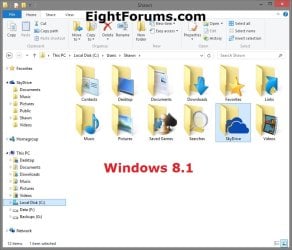
EXAMPLE: User Folders
NOTE: This is at the default C:\Users\(user-name) location.
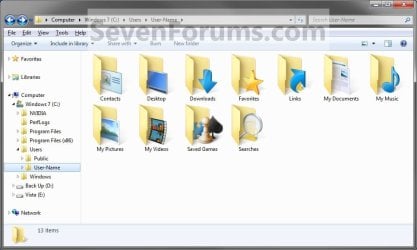
Example1.jpg

Windows_8.1.jpg


OPTION ONE

To Change Main User Profile Folder Location


1. For how, see:
http://www.sevenforums.com/tutorials/87555-user-profile-change-default-location.html

OR

How to Relocate User Profiles to another Partition or Disk in Windows 8


OPTION TWO

To Change User Folders Location from within User Profile Folder


1. If you a part of a homegroup, then you will need to change the homegroup settings to no longer share the user folder (ex: My Music) that you want to move first by unchecking the folder and clicking on Save Changes. (see screenshot below)
NOTE: This is so the user folder (ex: My Music) will not be shared on the homegroup anymore.
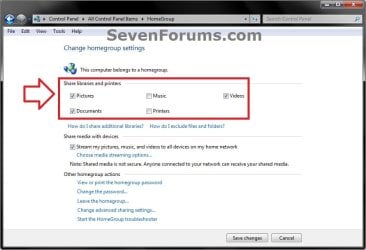
Homegroup.jpg
2. In Windows Explorer, navigate to where (ex: D: drive) you want to move the default user folder (ex: My Music) location to.

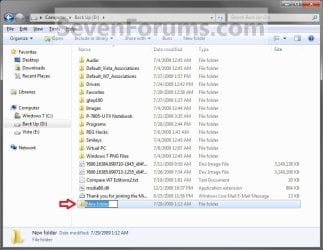
3. Create a New Folder by right clicking or press and hold on a empty space in the main window there, and click/tap on New and Folder. Name the new folder without spaces (ex: "Music" for My Music) for the user folder that you want to move there. (See screenshots below)
NOTE: The name that you type in for the new folder will be what you see as the user folder name in the Start Menu (shell:UsersFilesFolder) location when finished with all of these steps. It would be best to use the same name as the user folder to avoid confusion.
Rename1.jpg

Rename2.jpg

4. Close this window. (See screenshots above)

5. Press the Windows+R keys to open the Run dialog, type shell:UsersFilesFolder, and press enter.
NOTE: This will open your C:\Users\(user-name) folder.

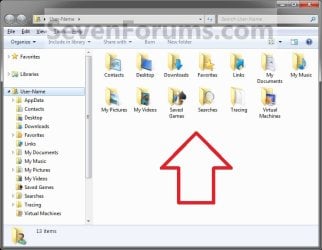
6. Right click or press and hold on a user folder (ex: My Music, My Documents, My Pictures, etc.....) that you want to move the default location for, and click/tap on Properties. (See screenshot below)
Right_Click_On_A_User_Folder.jpg
7. Click/tap on the Location tab, and Move button. (See screenshot below)
Properties1.jpg
8. Navigate to the same location as in step 2 and 3 above, then select the renamed new folder (ex: Music), and click/tap on the Select Folder button. (See screenshot below)
Properties2.jpg
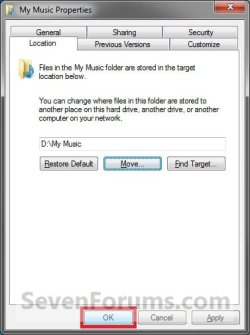
9. Click/tap on OK. (See screenshot below)
Properties3.jpg
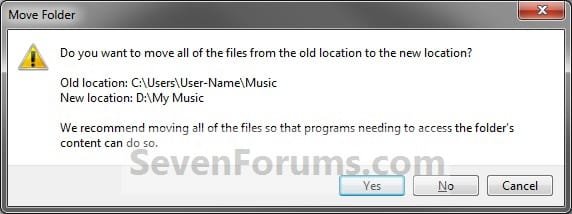
10. Click/tap on Yes. (See screenshot below)
Properties4.jpg
11. After a few seconds when the location has been changed, the Properties window (screenshot under step 9) will then close.

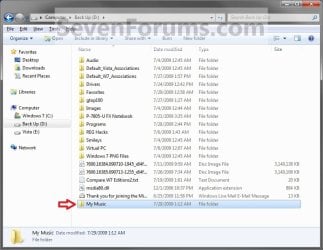
12. Check back at the C:\Users\(user-name) location to make sure that the old user folder (ex: My Music) that you moved is no longer there. If it is, then make sure that the contents of the folder were moved to the new location, and delete it. (See screenshot below)
NOTE: If you are unable to delete the folder, then restart the computer and try again.
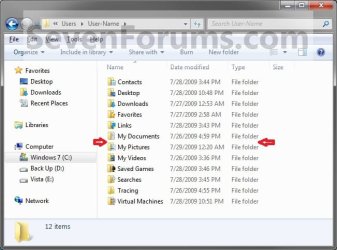
Finished2.jpg
13. You will notice that the folder at the shell:UsersFilesFolder location and the new location (ex: D drive) you moved the user folder to, now has the default user folder (ex: My Music) icon. (See screenshot below)
NOTE: The Start Menu in Windows 7 now opens the user folder from the new location (ex: D: drive) that you moved the user folder to.
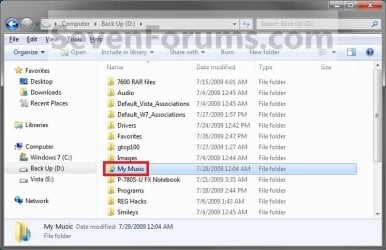
Finished.jpg
14. If you a part of a homegroup, then you can now change the homegroup settings back to share the user folder (ex: My Music) again if you like by checking the folder, and click/tap on Save Changes. (see screenshot below)
Homegroup.jpg
   Tip
If you wanted to restore the default location of the user folder, then see:

How to Restore the Default Location of User Folders in Windows 7 and Windows 8


That's it,
Shawn


Last edited:
  • Like
Reactions: Lee
Sorry, I meant that if you put UsersFilesFolder in the run dialogue and press enter, it would come up with a not existing dialogue. I am actually quite familiar with user folders and moving them around, have done it a lot, but admittedly did not know about this shell:UsersFilesFolder command.
 

My Computer

Computer type
PC/Desktop
Computer Manufacturer/Model Number
Awesome Custom
OS
Windows 7 Home Premium SP1 64-bit (second reinstall)
CPU
Intel(R) Core(TM) i7-3770 CPU @ 3.40GHz Quad Core
Motherboard
ASUS P8Z77-V Pro
Memory
2 x 4GB Corsair Vengeance DDR3 gaming RAM with Heatsink
Graphics Card(s)
AMD Sapphire Radeon HD6670 1GB GDDR5
Sound Card
Onboard Realtek HD Audio, Onboard HDMI Intel Display Audio
Monitor(s) Displays
Philips E-line 23" (58.4cm)
Screen Resolution
1680x1050@60Hz
Hard Drives
Main: 320GB laptop harddrive, 283GB NTFS Partition called Windows 7 set to drive C: (See 'other info' for more)
PSU
Corsair Enthusiast Series Modular TX550M (550 W)
Case
NZXT Tempest 410 Elite
Cooling
Case comes with 3 fans, PSU, CPU and graphics each have one
Keyboard
Dell RT7D00
Mouse
Normal Office Mouse
Antivirus
MSE, SUPERAntiSpyware and MBAM
Browser
Google Chrome and Firefox as main, 9 browsers in total
Other Info
walkman100.github.com/specs
Go there for a complete view of my specs.
Harddrives:
WDC WD3200BEVT-75A23T0 ATA Device - 320GB, laptop harddrive with Windows 7 OS, only partitions are 100MB OEM, 15GB Recovery NTFS set to drive A:, 283GB NTFS Windows 7 set to drive C:
I was just reading posts to extend my knowledge, I don't have a problem with this. I do use an external drive for my videos and pictures folder, in case you were wondering :D
 

My Computer

Computer type
PC/Desktop
Computer Manufacturer/Model Number
Awesome Custom
OS
Windows 7 Home Premium SP1 64-bit (second reinstall)
CPU
Intel(R) Core(TM) i7-3770 CPU @ 3.40GHz Quad Core
Motherboard
ASUS P8Z77-V Pro
Memory
2 x 4GB Corsair Vengeance DDR3 gaming RAM with Heatsink
Graphics Card(s)
AMD Sapphire Radeon HD6670 1GB GDDR5
Sound Card
Onboard Realtek HD Audio, Onboard HDMI Intel Display Audio
Monitor(s) Displays
Philips E-line 23" (58.4cm)
Screen Resolution
1680x1050@60Hz
Hard Drives
Main: 320GB laptop harddrive, 283GB NTFS Partition called Windows 7 set to drive C: (See 'other info' for more)
PSU
Corsair Enthusiast Series Modular TX550M (550 W)
Case
NZXT Tempest 410 Elite
Cooling
Case comes with 3 fans, PSU, CPU and graphics each have one
Keyboard
Dell RT7D00
Mouse
Normal Office Mouse
Antivirus
MSE, SUPERAntiSpyware and MBAM
Browser
Google Chrome and Firefox as main, 9 browsers in total
Other Info
walkman100.github.com/specs
Go there for a complete view of my specs.
Harddrives:
WDC WD3200BEVT-75A23T0 ATA Device - 320GB, laptop harddrive with Windows 7 OS, only partitions are 100MB OEM, 15GB Recovery NTFS set to drive A:, 283GB NTFS Windows 7 set to drive C:
Sorry, I meant that if you put UsersFilesFolder in the run dialogue and press enter, it would come up with a not existing dialogue. I am actually quite familiar with user folders and moving them around, have done it a lot, but admittedly did not know about this shell:UsersFilesFolder command.
I see. Thanks for explaining.

I'm on the other end of the spectrum. I have not had much need to move folders around, but I use OS variables in batch files and scripts so that I don't have to know where the user has moved a folder to. Unfortunately, some users move folders in a way that the OS loses track of them.

Enjoy the forums :-)
 

My Computer

Computer type
Laptop
Computer Manufacturer/Model Number
Employer provided Dell Latitude
OS
W7 Pro SP1 64bit
CPU
i7
Memory
8GB
Graphics Card(s)
Intel HD Graphics
Hard Drives
crappy SSD
Antivirus
Employer mandated Symantec Endpoint Protection
Browser
Pale Moon 64bit, IE11 64bit & Chrome 64bit
[Win7 x64 ; I apologize for not reading all the pages above... Please let me know if my question has been answered.]

I want to change the location of some User Folders (My Documents, My music...) to D:/Users/User/ while keeping 3 principles:

1. I'm thinking to use Junction Points (mklink /j ) for each folder I'm moving from C:/Users/User/ (EXAMPLE: mklink /j C:\Users\User\Documents D:\Users\User\Documents), because I want that C:\Users\User\Documents will lead to D:\Users\User\Documents.

2. I have noticed that the Visual Folder Name is different from the Real Folder Name. Example: A Visual Folder Name is My Documents while the Real Folder Name is actually Documents (C:\Users\User\Documents). I want to keep it. The real paths would be C:\Users\User\Documents & D:\Users\User\Documents, while the Visual Folder Names would be My Documents.

3. I have noticed that before you change any location, the %userprofile% Folder is actually a mirror of C:\Users\User. I want to keep it as a mirror even after changing of locations. [%userprofile% would be exactly like C:\Users\User. No duplicates of "My Documents" etc in %userprofile%, and No missing folders in C:\Users\User.]

Can I achieve it somehow?
 

My Computer

OS
W7 64 IE 8
Hello Stamimail,

You could use OPTION TWO in the tutorial on the first page to accomplish this.

However, if you are doing this just to save space, then you might consider doing what's in the yellow Tip box at the top of the tutorial with libraries instead.

Hope this helps, :)
Shawn
 

My Computer

Computer type
PC/Desktop
Computer Manufacturer/Model Number
Self built custom
OS
64-bit Windows 11 Pro for Workstations
CPU
Intel i7-8700K OC'd to 5 GHz
Motherboard
ASUS ROG Maximus XI Formula Z390
Memory
64 GB (4x16GB) G.SKILL TridentZ RGB DDR4 3600 MHz
Graphics Card(s)
ASUS ROG-STRIX-GTX1080TI-O11G-GAMING
Sound Card
Integrated
Monitor(s) Displays
2 x Samsung Odyssey G7 27"
Screen Resolution
2560x1440
Hard Drives
1TB Samsung 990 PRO M.2,
4TB Samsung 990 PRO PRO M.2,
TerraMaster F8 SSD Plus NAS
PSU
Seasonic Prime Titanium 850W
Case
Thermaltake Core P3
Cooling
Corsair Hydro H115i
Keyboard
Logitech wireless K800
Mouse
Logitech MX Master 4
Internet Speed
2 Gb/s Download and 100 Mb/s Upload
Antivirus
Malwarebyte Anti-Malware Premium
Browser
Google Chrome
Other Info
Logitech Z625 speaker system,
Logitech BRIO 4K Pro webcam,
HP Color LaserJet Pro MFP M477fdn,
APC SMART-UPS RT 1000 XL - SURT1000XLI,
Galaxy S23 Plus phone
Hi shawn, thank you for replying.

I've seen the tutorial already.
I do not see how your answer fulfills the first and the third conditions I mentioned.
 

My Computer

OS
W7 64 IE 8
You're welcome.

It accomplishes that as well since they are already linked, and will be as well to the new location.

The old name say "Documents" is a junction point that is linked with the actual folder say "My Documents" for backwards compatibility of older programs that still reference the old say "Documents" location than the newer "My Documents" location. These two different names are still one in the same folder referenced by both names.

When you move a user folder using the method in Option Two, it will keep this junction point and link for the new location.

It's best to not try and rename these folders to avoid messing up their junction point.
 

My Computer

Computer type
PC/Desktop
Computer Manufacturer/Model Number
Self built custom
OS
64-bit Windows 11 Pro for Workstations
CPU
Intel i7-8700K OC'd to 5 GHz
Motherboard
ASUS ROG Maximus XI Formula Z390
Memory
64 GB (4x16GB) G.SKILL TridentZ RGB DDR4 3600 MHz
Graphics Card(s)
ASUS ROG-STRIX-GTX1080TI-O11G-GAMING
Sound Card
Integrated
Monitor(s) Displays
2 x Samsung Odyssey G7 27"
Screen Resolution
2560x1440
Hard Drives
1TB Samsung 990 PRO M.2,
4TB Samsung 990 PRO PRO M.2,
TerraMaster F8 SSD Plus NAS
PSU
Seasonic Prime Titanium 850W
Case
Thermaltake Core P3
Cooling
Corsair Hydro H115i
Keyboard
Logitech wireless K800
Mouse
Logitech MX Master 4
Internet Speed
2 Gb/s Download and 100 Mb/s Upload
Antivirus
Malwarebyte Anti-Malware Premium
Browser
Google Chrome
Other Info
Logitech Z625 speaker system,
Logitech BRIO 4K Pro webcam,
HP Color LaserJet Pro MFP M477fdn,
APC SMART-UPS RT 1000 XL - SURT1000XLI,
Galaxy S23 Plus phone
It accomplishes that as well since they are already linked, and will be as well to the new location.

1. You are right, but only for the 2 folders: The new locatiion and the linked folder in shell:UsersFilesFolder.

The problem is: In the original location "C:\Users\User" (it is not the same as shell:UsersFilesFolder) My Documents is now missing. If you try to type and get "C:\Users\User\Documents", or subfolders based on it (ex: "C:\Users\User\Documents\MyFolder"), you get an error.

Therefore I wanted to use Junction Points in the original location "C:\Users\User", to direct old paths (based on the original location) to the right and new location. The problem now is: While doing this, I can't accomplished the other conditions. HELP

2. BTW, In my system (W7 x64) I think the actual folder say "Documents", as the path of "My Documents" in CMD is "C:\Users\User\Documents". "My Documents" is a name found in Desktop.ini file.
 

My Computer

OS
W7 64 IE 8
Correct. The actual folder name is "Documents", but only referenced as "My Documents". "Documents" is used for the actual folder path for backwards compatibility.

There's no need for you to do a MKlink since one already exists. If you do, you will break the junction point that already exists with the user folders and cause issues in your Windows.

If you move the "C:\Users\User\Documents" folder to another location, then of course that "Document" folder will no longer be there. Instead, it will be at the location you moved it to.

The shell command shell:Personal will open your Documents folder no matter where you move it to. Here's a complete list of shell commands for the others if you like.

http://www.sevenforums.com/tutorials/4941-shell-command.html
 

My Computer

Computer type
PC/Desktop
Computer Manufacturer/Model Number
Self built custom
OS
64-bit Windows 11 Pro for Workstations
CPU
Intel i7-8700K OC'd to 5 GHz
Motherboard
ASUS ROG Maximus XI Formula Z390
Memory
64 GB (4x16GB) G.SKILL TridentZ RGB DDR4 3600 MHz
Graphics Card(s)
ASUS ROG-STRIX-GTX1080TI-O11G-GAMING
Sound Card
Integrated
Monitor(s) Displays
2 x Samsung Odyssey G7 27"
Screen Resolution
2560x1440
Hard Drives
1TB Samsung 990 PRO M.2,
4TB Samsung 990 PRO PRO M.2,
TerraMaster F8 SSD Plus NAS
PSU
Seasonic Prime Titanium 850W
Case
Thermaltake Core P3
Cooling
Corsair Hydro H115i
Keyboard
Logitech wireless K800
Mouse
Logitech MX Master 4
Internet Speed
2 Gb/s Download and 100 Mb/s Upload
Antivirus
Malwarebyte Anti-Malware Premium
Browser
Google Chrome
Other Info
Logitech Z625 speaker system,
Logitech BRIO 4K Pro webcam,
HP Color LaserJet Pro MFP M477fdn,
APC SMART-UPS RT 1000 XL - SURT1000XLI,
Galaxy S23 Plus phone
Thank You.

From my experience, the closest way to achieve what I wanted is to use Recovery Console:
Code:
robocopy /copyall /mir /xj C:\Users\User\Documents D:\Users\User\Documents
rmdir /s /q C:\Users\User\Documents
mklink /j C:\Users\User\Documents D:\Users\User\Documents

The only problem in this way is that it does not accomplished the second condition.

Is there an issue in that way or another way to improve it?
 

My Computer

OS
W7 64 IE 8
Stamimail,

Could you not reference the new location instead using the path or shell command?

If not, then why not leave your Documents folder in it's original location.

From the sound of what you may be wanting to do, have you considered creating a New Folder on D, include it in your Documents library, then set your default save folder for the Documents library to be the New Folder on D. This way you could just reference your Documents library to have anything saved to the New Folder on D. :)
 

My Computer

Computer type
PC/Desktop
Computer Manufacturer/Model Number
Self built custom
OS
64-bit Windows 11 Pro for Workstations
CPU
Intel i7-8700K OC'd to 5 GHz
Motherboard
ASUS ROG Maximus XI Formula Z390
Memory
64 GB (4x16GB) G.SKILL TridentZ RGB DDR4 3600 MHz
Graphics Card(s)
ASUS ROG-STRIX-GTX1080TI-O11G-GAMING
Sound Card
Integrated
Monitor(s) Displays
2 x Samsung Odyssey G7 27"
Screen Resolution
2560x1440
Hard Drives
1TB Samsung 990 PRO M.2,
4TB Samsung 990 PRO PRO M.2,
TerraMaster F8 SSD Plus NAS
PSU
Seasonic Prime Titanium 850W
Case
Thermaltake Core P3
Cooling
Corsair Hydro H115i
Keyboard
Logitech wireless K800
Mouse
Logitech MX Master 4
Internet Speed
2 Gb/s Download and 100 Mb/s Upload
Antivirus
Malwarebyte Anti-Malware Premium
Browser
Google Chrome
Other Info
Logitech Z625 speaker system,
Logitech BRIO 4K Pro webcam,
HP Color LaserJet Pro MFP M477fdn,
APC SMART-UPS RT 1000 XL - SURT1000XLI,
Galaxy S23 Plus phone
While moving my Contacts folder, I somehow accidentally made it be the directory in which the other user folders are placed.

So instead of having D:\Kurt\Contacts
I ended with D:\Contacts\[Documents, Videos, Music, etc]

I was able to partially undo the mistake but had the issue of games now creating new save files in D:\Kurt\Contacts\Game instead of searching for the files in My Documents.

I've mostly fixed this as well by attempting to restore everything that I could find to defaults and starting over from scratch, and this seems to have solved almost every issue. However I still get the occasional program that creates a new folder in Contacts, like iTunes or the PlanetSide video recording system.

Any thoughts?
 

My Computer

Computer type
PC/Desktop
Computer Manufacturer/Model Number
Custom build
OS
Windows 8 64-bit
CPU
Intel Core i5-4570 3.2GHz
Motherboard
MSI Z87-G45 Gaming
Memory
Patriot Viper 3 8GB DDR3-1600
Graphics Card(s)
MSI GeForce GTX 770 2GB Twin Frozr
Monitor(s) Displays
Asus VS239H-P 23"
Screen Resolution
1980x1080
Hard Drives
128GB Crucial M4 SSD, 1 TB Western Digital Caviar Blue 7200 RPM HDD
PSU
Corsair TX650 V2
Case
BitFenix Shinobi Window
Keyboard
Razer BlackWidow
Mouse
Logitech G700
Internet Speed
20 MB/s down | 2 MB/s up
Browser
Mozilla Firefox, Google Chrome

My Computer

Computer type
PC/Desktop
Computer Manufacturer/Model Number
Self built custom
OS
64-bit Windows 11 Pro for Workstations
CPU
Intel i7-8700K OC'd to 5 GHz
Motherboard
ASUS ROG Maximus XI Formula Z390
Memory
64 GB (4x16GB) G.SKILL TridentZ RGB DDR4 3600 MHz
Graphics Card(s)
ASUS ROG-STRIX-GTX1080TI-O11G-GAMING
Sound Card
Integrated
Monitor(s) Displays
2 x Samsung Odyssey G7 27"
Screen Resolution
2560x1440
Hard Drives
1TB Samsung 990 PRO M.2,
4TB Samsung 990 PRO PRO M.2,
TerraMaster F8 SSD Plus NAS
PSU
Seasonic Prime Titanium 850W
Case
Thermaltake Core P3
Cooling
Corsair Hydro H115i
Keyboard
Logitech wireless K800
Mouse
Logitech MX Master 4
Internet Speed
2 Gb/s Download and 100 Mb/s Upload
Antivirus
Malwarebyte Anti-Malware Premium
Browser
Google Chrome
Other Info
Logitech Z625 speaker system,
Logitech BRIO 4K Pro webcam,
HP Color LaserJet Pro MFP M477fdn,
APC SMART-UPS RT 1000 XL - SURT1000XLI,
Galaxy S23 Plus phone
Hi Brink, thanks,

I've just gone through all of Option Two, but the issue persists :huh:

Edit: Nevermind, it looks like you can manually change the PlanetSide video output directory within the game itself. It might have latched on to Contacts when I made the mistake and just stuck there. Could be the same with the few other programs who don't seem to want to autosave to the proper folder.
 

My Computer

Computer type
PC/Desktop
Computer Manufacturer/Model Number
Custom build
OS
Windows 8 64-bit
CPU
Intel Core i5-4570 3.2GHz
Motherboard
MSI Z87-G45 Gaming
Memory
Patriot Viper 3 8GB DDR3-1600
Graphics Card(s)
MSI GeForce GTX 770 2GB Twin Frozr
Monitor(s) Displays
Asus VS239H-P 23"
Screen Resolution
1980x1080
Hard Drives
128GB Crucial M4 SSD, 1 TB Western Digital Caviar Blue 7200 RPM HDD
PSU
Corsair TX650 V2
Case
BitFenix Shinobi Window
Keyboard
Razer BlackWidow
Mouse
Logitech G700
Internet Speed
20 MB/s down | 2 MB/s up
Browser
Mozilla Firefox, Google Chrome
Ok. Double check to see if the programs that are still saving to the other locations may have a setting of it's own to allow you to change where the program saves to.
 

My Computer

Computer type
PC/Desktop
Computer Manufacturer/Model Number
Self built custom
OS
64-bit Windows 11 Pro for Workstations
CPU
Intel i7-8700K OC'd to 5 GHz
Motherboard
ASUS ROG Maximus XI Formula Z390
Memory
64 GB (4x16GB) G.SKILL TridentZ RGB DDR4 3600 MHz
Graphics Card(s)
ASUS ROG-STRIX-GTX1080TI-O11G-GAMING
Sound Card
Integrated
Monitor(s) Displays
2 x Samsung Odyssey G7 27"
Screen Resolution
2560x1440
Hard Drives
1TB Samsung 990 PRO M.2,
4TB Samsung 990 PRO PRO M.2,
TerraMaster F8 SSD Plus NAS
PSU
Seasonic Prime Titanium 850W
Case
Thermaltake Core P3
Cooling
Corsair Hydro H115i
Keyboard
Logitech wireless K800
Mouse
Logitech MX Master 4
Internet Speed
2 Gb/s Download and 100 Mb/s Upload
Antivirus
Malwarebyte Anti-Malware Premium
Browser
Google Chrome
Other Info
Logitech Z625 speaker system,
Logitech BRIO 4K Pro webcam,
HP Color LaserJet Pro MFP M477fdn,
APC SMART-UPS RT 1000 XL - SURT1000XLI,
Galaxy S23 Plus phone
Ok. Double check to see if the programs that are still saving to the other locations may have a setting of it's own to allow you to change where the program saves to.
Yep, see my edit. I think that's probably the issue. Will report back if I have any more problems, thanks again Brink (:
 

My Computer

Computer type
PC/Desktop
Computer Manufacturer/Model Number
Custom build
OS
Windows 8 64-bit
CPU
Intel Core i5-4570 3.2GHz
Motherboard
MSI Z87-G45 Gaming
Memory
Patriot Viper 3 8GB DDR3-1600
Graphics Card(s)
MSI GeForce GTX 770 2GB Twin Frozr
Monitor(s) Displays
Asus VS239H-P 23"
Screen Resolution
1980x1080
Hard Drives
128GB Crucial M4 SSD, 1 TB Western Digital Caviar Blue 7200 RPM HDD
PSU
Corsair TX650 V2
Case
BitFenix Shinobi Window
Keyboard
Razer BlackWidow
Mouse
Logitech G700
Internet Speed
20 MB/s down | 2 MB/s up
Browser
Mozilla Firefox, Google Chrome
OK, so I followed the instructions for moving the folders with the Location tab in properties, in order to move the user folders to a separate drive, and everything went well... except that now any user can access everyone else's user folders and files! Why hasn't the ownership and access rights been kept? Do I have to manually change them all on the second drive now?
 

My Computer

OS
Windows 7 Ultimate x64

My Computer

Computer type
PC/Desktop
Computer Manufacturer/Model Number
Self built custom
OS
64-bit Windows 11 Pro for Workstations
CPU
Intel i7-8700K OC'd to 5 GHz
Motherboard
ASUS ROG Maximus XI Formula Z390
Memory
64 GB (4x16GB) G.SKILL TridentZ RGB DDR4 3600 MHz
Graphics Card(s)
ASUS ROG-STRIX-GTX1080TI-O11G-GAMING
Sound Card
Integrated
Monitor(s) Displays
2 x Samsung Odyssey G7 27"
Screen Resolution
2560x1440
Hard Drives
1TB Samsung 990 PRO M.2,
4TB Samsung 990 PRO PRO M.2,
TerraMaster F8 SSD Plus NAS
PSU
Seasonic Prime Titanium 850W
Case
Thermaltake Core P3
Cooling
Corsair Hydro H115i
Keyboard
Logitech wireless K800
Mouse
Logitech MX Master 4
Internet Speed
2 Gb/s Download and 100 Mb/s Upload
Antivirus
Malwarebyte Anti-Malware Premium
Browser
Google Chrome
Other Info
Logitech Z625 speaker system,
Logitech BRIO 4K Pro webcam,
HP Color LaserJet Pro MFP M477fdn,
APC SMART-UPS RT 1000 XL - SURT1000XLI,
Galaxy S23 Plus phone
I would like the default location for the document, pics, video and music folders only. My thinking is that the other folders, especially the hidden ones, should be on the ssd drive as they are required for initialisation and it will be faster if they are on the ssd while the others are safer on the hard drive where there is more space and less likelihood of corruption.

Can this be done?
 

My Computer

OS
Windows 7
I would like the default location for the document, pics, video and music folders only. My thinking is that the other folders, especially the hidden ones, should be on the ssd drive as they are required for initialisation and it will be faster if they are on the ssd while the others are safer on the hard drive where there is more space and less likelihood of corruption.

Can this be done?
The easiest way would be to follow the guide in the Yellow Tip box concerning Libraries, then you can relocate the folders you want.
 

My Computer

Computer type
PC/Desktop
Computer Manufacturer/Model Number
Home Built Desktop By DataTech
OS
Windows 7 Ultimate X64 SP1
CPU
Intel i5-2550K, Differing ~4.4-4.8GHz No built in GPU
Motherboard
ASUS P8Z68-V PRO/GEN3
Memory
16GB G.Skill Sniper 1866MHz @ 2133MHz 2x8GB
Graphics Card(s)
ASUS GTX650TIB-DC2OC-2GD5, (650TI Boost)
Sound Card
Onboard Realtek 5-1
Monitor(s) Displays
Samsung P2570HD
Screen Resolution
1920x1080
Hard Drives
Samsung 840 Pro 256GB SSD for OS, 500GB Seagate Constellation (Enterprise drive) for Data
PSU
Corsair HX650W
Case
Inwin Dragon Rider
Cooling
Hyper 212 EVO w/two Noctua fans, push-pull, @1300 RPM
Keyboard
E-Z Eyes, bright yellow keys with large characters
Mouse
steelseries SENSEI Laser Pro Gaming
Internet Speed
48-51Mbs Mbs down, 11 Mbs up Xfinity Cable
Antivirus
Norton Internet Security 2013
Browser
IE 10, Opera, Pale Moon if needed
Other Info
4 case fans, LG BluRay-RE, ASUS DVD-RW, Mr. Fusion power supply, 1.21 gigawatts.
Back
Top