User Folders - Change Default Location

How to Change the Default Location of User Folders in Windows 7 and Windows 8

   Information
This will show you how to change (move) the default location of your account's C:\Users\(user-name) folders to another location of your choice instead in Windows 7 and Windows 8, and still have access to the user folder from the Start Menu (Windows 7 only) location.

   Tip
If you are just wanting to save HDD space, then you might consider this below to be able to access the files from your libraries with the files actually located where you like instead. This way you will not have to worry about any potential issues that come with moving user folder locations. For example, whatever partition you move your user folders to will now be included in a system image in Windows 7 and Windows 8.

  • Create a new folder at any location you want.
  • Move any files you want into the new folder.
  • Include the new folder into a library (Windows 7 or Windows 8) of your choice.
  • If you like, you can also set the new folder to be the default save to location (Windows 7 or Windows 8) for the library as well.
   Warning
If you change the default location of your Favorites folder in Windows 8 or 8.1, your Favorites in Internet Explorer will no longer be available until you move your Favorites back to the default "C:\Users\(user-name)" location.


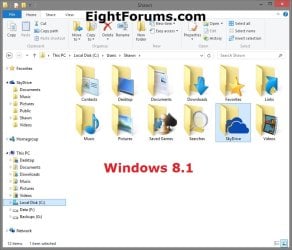
EXAMPLE: User Folders
NOTE: This is at the default C:\Users\(user-name) location.
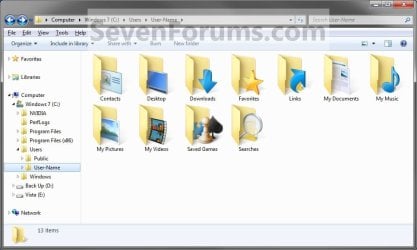
Example1.jpg

Windows_8.1.jpg


OPTION ONE

To Change Main User Profile Folder Location


1. For how, see:
http://www.sevenforums.com/tutorials/87555-user-profile-change-default-location.html

OR

How to Relocate User Profiles to another Partition or Disk in Windows 8


OPTION TWO

To Change User Folders Location from within User Profile Folder


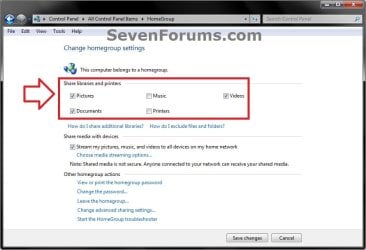
1. If you a part of a homegroup, then you will need to change the homegroup settings to no longer share the user folder (ex: My Music) that you want to move first by unchecking the folder and clicking on Save Changes. (see screenshot below)
NOTE: This is so the user folder (ex: My Music) will not be shared on the homegroup anymore.
Homegroup.jpg
2. In Windows Explorer, navigate to where (ex: D: drive) you want to move the default user folder (ex: My Music) location to.

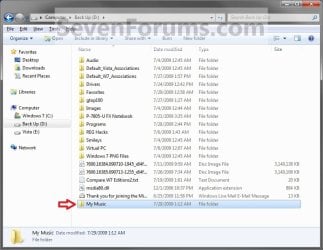
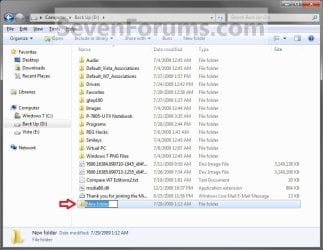
3. Create a New Folder by right clicking or press and hold on a empty space in the main window there, and click/tap on New and Folder. Name the new folder without spaces (ex: "Music" for My Music) for the user folder that you want to move there. (See screenshots below)
NOTE: The name that you type in for the new folder will be what you see as the user folder name in the Start Menu (shell:UsersFilesFolder) location when finished with all of these steps. It would be best to use the same name as the user folder to avoid confusion.
Rename1.jpg

Rename2.jpg

4. Close this window. (See screenshots above)

5. Press the Windows+R keys to open the Run dialog, type shell:UsersFilesFolder, and press enter.
NOTE: This will open your C:\Users\(user-name) folder.

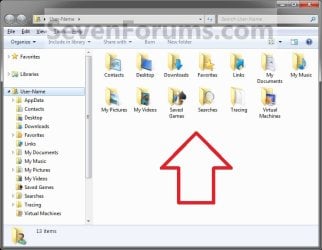
6. Right click or press and hold on a user folder (ex: My Music, My Documents, My Pictures, etc.....) that you want to move the default location for, and click/tap on Properties. (See screenshot below)
Right_Click_On_A_User_Folder.jpg
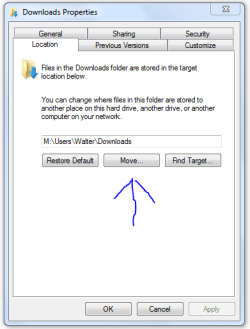
7. Click/tap on the Location tab, and Move button. (See screenshot below)
Properties1.jpg
8. Navigate to the same location as in step 2 and 3 above, then select the renamed new folder (ex: Music), and click/tap on the Select Folder button. (See screenshot below)
Properties2.jpg
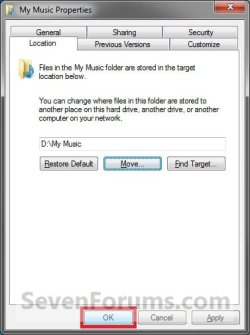
9. Click/tap on OK. (See screenshot below)
Properties3.jpg
10. Click/tap on Yes. (See screenshot below)
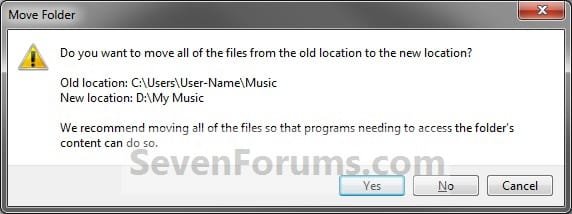
Properties4.jpg
11. After a few seconds when the location has been changed, the Properties window (screenshot under step 9) will then close.

12. Check back at the C:\Users\(user-name) location to make sure that the old user folder (ex: My Music) that you moved is no longer there. If it is, then make sure that the contents of the folder were moved to the new location, and delete it. (See screenshot below)
NOTE: If you are unable to delete the folder, then restart the computer and try again.
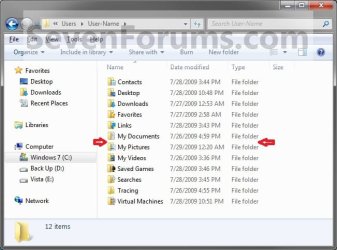
Finished2.jpg
13. You will notice that the folder at the shell:UsersFilesFolder location and the new location (ex: D drive) you moved the user folder to, now has the default user folder (ex: My Music) icon. (See screenshot below)
NOTE: The Start Menu in Windows 7 now opens the user folder from the new location (ex: D: drive) that you moved the user folder to.
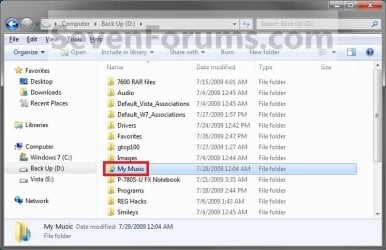
Finished.jpg
14. If you a part of a homegroup, then you can now change the homegroup settings back to share the user folder (ex: My Music) again if you like by checking the folder, and click/tap on Save Changes. (see screenshot below)
Homegroup.jpg
   Tip
If you wanted to restore the default location of the user folder, then see:

How to Restore the Default Location of User Folders in Windows 7 and Windows 8


That's it,
Shawn


Last edited:
  • Like
Reactions: Lee
Hello Churin,

I'm not sure. :(
 

My Computer

Computer type
PC/Desktop
Computer Manufacturer/Model Number
Self built custom
OS
64-bit Windows 11 Pro for Workstations
CPU
Intel i7-8700K OC'd to 5 GHz
Motherboard
ASUS ROG Maximus XI Formula Z390
Memory
64 GB (4x16GB) G.SKILL TridentZ RGB DDR4 3600 MHz
Graphics Card(s)
ASUS ROG-STRIX-GTX1080TI-O11G-GAMING
Sound Card
Integrated
Monitor(s) Displays
2 x Samsung Odyssey G7 27"
Screen Resolution
2560x1440
Hard Drives
1TB Samsung 990 PRO M.2,
4TB Samsung 990 PRO PRO M.2,
TerraMaster F8 SSD Plus NAS
PSU
Seasonic Prime Titanium 850W
Case
Thermaltake Core P3
Cooling
Corsair Hydro H115i
Keyboard
Logitech wireless K800
Mouse
Logitech MX Master 4
Internet Speed
2 Gb/s Download and 100 Mb/s Upload
Antivirus
Malwarebyte Anti-Malware Premium
Browser
Google Chrome
Other Info
Logitech Z625 speaker system,
Logitech BRIO 4K Pro webcam,
HP Color LaserJet Pro MFP M477fdn,
APC SMART-UPS RT 1000 XL - SURT1000XLI,
Galaxy S23 Plus phone
Hi Brink,

Great stepthrough, many thanks :D

After successfully moving the My documents folders to a larger partition, I have one issue remaining however...

My old user folder on the C: drive now contains separate Music, Pictures and Videos folders to the ones that I moved, which are also appearing.

When I try to access these (presumably empty) folders I'm getting "C:Users\Phil\Pictures is not accessible. Access is denied."

I don't need these, is there any problem with just deleting them?
 

My Computer

OS
Wondows 7 home premium
Hello Phil, and welcome to Seven Forums.

What does is say under the "Location" tab as the path in these folders' Properties page?

If you delete them, leave them in the Recycle Bin for now if it will let you and test to make sure the ones you moved still work first. If they do then it's safe to permanently delete them.
 

My Computer

Computer type
PC/Desktop
Computer Manufacturer/Model Number
Self built custom
OS
64-bit Windows 11 Pro for Workstations
CPU
Intel i7-8700K OC'd to 5 GHz
Motherboard
ASUS ROG Maximus XI Formula Z390
Memory
64 GB (4x16GB) G.SKILL TridentZ RGB DDR4 3600 MHz
Graphics Card(s)
ASUS ROG-STRIX-GTX1080TI-O11G-GAMING
Sound Card
Integrated
Monitor(s) Displays
2 x Samsung Odyssey G7 27"
Screen Resolution
2560x1440
Hard Drives
1TB Samsung 990 PRO M.2,
4TB Samsung 990 PRO PRO M.2,
TerraMaster F8 SSD Plus NAS
PSU
Seasonic Prime Titanium 850W
Case
Thermaltake Core P3
Cooling
Corsair Hydro H115i
Keyboard
Logitech wireless K800
Mouse
Logitech MX Master 4
Internet Speed
2 Gb/s Download and 100 Mb/s Upload
Antivirus
Malwarebyte Anti-Malware Premium
Browser
Google Chrome
Other Info
Logitech Z625 speaker system,
Logitech BRIO 4K Pro webcam,
HP Color LaserJet Pro MFP M477fdn,
APC SMART-UPS RT 1000 XL - SURT1000XLI,
Galaxy S23 Plus phone
And if you ever move them back from where they are now (assuming they still have a location tab) the system will automatically recreate the folders.
 

My Computer

Computer Manufacturer/Model Number
HP, Dell, Gateway, Toshiba - 4 laptops and 2 desktops
OS
Vista, Windows7, Mint Mate, Zorin, Windows 8
CPU
from 1.6GHz Duo to i7
Monitor(s) Displays
2x HP w2207
Hard Drives
5x HDD, 7x SSD, 12x Externals
Keyboard
with trackball - no mices
Mouse
Trackball mice
Internet Speed
DSL 6000
Hi Brink (and whs),

Good question. There is no location tab for these files.

Under general tab its;
Type: file folder
location: C:\users\Phil
Size: 0 bytes
on disc: 0 bytes
Contains: 0 files, 0 folders

No problem deleting, and the relocated "My Docs" folders are still working fine. looks like the issue solved, great!

As a side note that might be of interest - when logging on today there was no issue with access to these empty folders.

Appreciate the help!
 

My Computer

OS
Wondows 7 home premium
That's great news Chal00d. I'm happy to hear that it seemed to sort itself out for you. :)
 

My Computer

Computer type
PC/Desktop
Computer Manufacturer/Model Number
Self built custom
OS
64-bit Windows 11 Pro for Workstations
CPU
Intel i7-8700K OC'd to 5 GHz
Motherboard
ASUS ROG Maximus XI Formula Z390
Memory
64 GB (4x16GB) G.SKILL TridentZ RGB DDR4 3600 MHz
Graphics Card(s)
ASUS ROG-STRIX-GTX1080TI-O11G-GAMING
Sound Card
Integrated
Monitor(s) Displays
2 x Samsung Odyssey G7 27"
Screen Resolution
2560x1440
Hard Drives
1TB Samsung 990 PRO M.2,
4TB Samsung 990 PRO PRO M.2,
TerraMaster F8 SSD Plus NAS
PSU
Seasonic Prime Titanium 850W
Case
Thermaltake Core P3
Cooling
Corsair Hydro H115i
Keyboard
Logitech wireless K800
Mouse
Logitech MX Master 4
Internet Speed
2 Gb/s Download and 100 Mb/s Upload
Antivirus
Malwarebyte Anti-Malware Premium
Browser
Google Chrome
Other Info
Logitech Z625 speaker system,
Logitech BRIO 4K Pro webcam,
HP Color LaserJet Pro MFP M477fdn,
APC SMART-UPS RT 1000 XL - SURT1000XLI,
Galaxy S23 Plus phone
Thanks immensely for this tutorial. Worked perfectly. A couple of observations:

I knew that iTunes was picky about the location and moving of its files but there were no issues using this procedure to move iTunes (as subfolder in My Music) to a different partition. Brilliant!

A small command line tool for creating all the ...\User\username\folders at one swell foop. Assuming G: is drive letter for new partition and command window opened at C:\Users\{username}:
Code:
C:\Users\{username}>for /d %a in (*) do md g:\%a

George
 

My Computer

Computer type
PC/Desktop
Computer Manufacturer/Model Number
HP 6730s laptop
OS
10 Windows 7 Pro 32-bit
CPU
Intel P7370
Motherboard
Base Board 30E8; KBC Version 94.1D
Memory
4GB
Graphics Card(s)
Mobile Intel(R) 4 Series Express Chipset Family (Microsoft C
Sound Card
SoundMAX Integrated Digital HD Audio
Monitor(s) Displays
Generic PnP Monitor (per Device Manager)
Screen Resolution
1280 x 800 x 32 bits (4294967296 colors) @ 59 Hz
Hard Drives
WDC WD5000BEVT-60ZAT1 ATA Device: 465.76 GB
PSU
HP 6730s
Case
HP 6730s
Cooling
HP 6730s
Keyboard
HID Keyboard Device (per Device Manager)
Mouse
Synaptics PS/2 Port TouchPad
Internet Speed
varies
Antivirus
Norton Internet Security
Browser
Firefox 47
Other Info
Where no detailed information from SystemInfo is available HP 6730s has been entered.
You're welcome George. :)

Thank you for the tip. It's great for making copies of the user folders there only, but it will make moving them to that location easier with the new folders created using this.
 

My Computer

Computer type
PC/Desktop
Computer Manufacturer/Model Number
Self built custom
OS
64-bit Windows 11 Pro for Workstations
CPU
Intel i7-8700K OC'd to 5 GHz
Motherboard
ASUS ROG Maximus XI Formula Z390
Memory
64 GB (4x16GB) G.SKILL TridentZ RGB DDR4 3600 MHz
Graphics Card(s)
ASUS ROG-STRIX-GTX1080TI-O11G-GAMING
Sound Card
Integrated
Monitor(s) Displays
2 x Samsung Odyssey G7 27"
Screen Resolution
2560x1440
Hard Drives
1TB Samsung 990 PRO M.2,
4TB Samsung 990 PRO PRO M.2,
TerraMaster F8 SSD Plus NAS
PSU
Seasonic Prime Titanium 850W
Case
Thermaltake Core P3
Cooling
Corsair Hydro H115i
Keyboard
Logitech wireless K800
Mouse
Logitech MX Master 4
Internet Speed
2 Gb/s Download and 100 Mb/s Upload
Antivirus
Malwarebyte Anti-Malware Premium
Browser
Google Chrome
Other Info
Logitech Z625 speaker system,
Logitech BRIO 4K Pro webcam,
HP Color LaserJet Pro MFP M477fdn,
APC SMART-UPS RT 1000 XL - SURT1000XLI,
Galaxy S23 Plus phone
What is the shell command to change the location of public folders?
 

My Computer

Computer Manufacturer/Model Number
self / none
OS
Windows 7 Home Premium
CPU
Intel Core Duo i5-750
Motherboard
Gigabyte GA-P55A-UD6
Memory
8GB, G.SKILL Trident F3-16000CL9D-4GBTD (PC3 16000)
Graphics Card(s)
XFX HD-577A-ZNDC Radeon HD 5770 XXX Edition
Sound Card
None
Monitor(s) Displays
Samsung Syncmaster 226BW
Hard Drives
Western Digital VelociRaptor WD3000HLFS 300GB 10000 RPM
RAID1: 2X SAMSUNG F1 RAID Class HE103UJ 1TB 7200 RPM
PSU
COOLER MASTER Silent Pro 600
Case
COOLER MASTER COSMOS 1000
Cooling
COOLER MASTER Hyper 212 Plus
Keyboard
Logitech G11
Mouse
hp Wireless
Internet Speed
Comcrap, er, I mean Comcast
Other Info
2 LITE-ON 24X DVD Writer Black SATA Model iHAS424-98
What is the shell command to change the location of public folders?
If nothing else, you can move them from the location tab in properties - that is if you mean like public music, public pictures, etc.
 

My Computer

Computer Manufacturer/Model Number
HP, Dell, Gateway, Toshiba - 4 laptops and 2 desktops
OS
Vista, Windows7, Mint Mate, Zorin, Windows 8
CPU
from 1.6GHz Duo to i7
Monitor(s) Displays
2x HP w2207
Hard Drives
5x HDD, 7x SSD, 12x Externals
Keyboard
with trackball - no mices
Mouse
Trackball mice
Internet Speed
DSL 6000
What is the shell command to change the location of public folders?
If nothing else, you can move them from the location tab in properties - that is if you mean like public music, public pictures, etc.
Yes, but there's no "MOVE" button there, and it will be sweeter to have the OS do the work of moving the files.
 

My Computer

Computer Manufacturer/Model Number
self / none
OS
Windows 7 Home Premium
CPU
Intel Core Duo i5-750
Motherboard
Gigabyte GA-P55A-UD6
Memory
8GB, G.SKILL Trident F3-16000CL9D-4GBTD (PC3 16000)
Graphics Card(s)
XFX HD-577A-ZNDC Radeon HD 5770 XXX Edition
Sound Card
None
Monitor(s) Displays
Samsung Syncmaster 226BW
Hard Drives
Western Digital VelociRaptor WD3000HLFS 300GB 10000 RPM
RAID1: 2X SAMSUNG F1 RAID Class HE103UJ 1TB 7200 RPM
PSU
COOLER MASTER Silent Pro 600
Case
COOLER MASTER COSMOS 1000
Cooling
COOLER MASTER Hyper 212 Plus
Keyboard
Logitech G11
Mouse
hp Wireless
Internet Speed
Comcrap, er, I mean Comcast
Other Info
2 LITE-ON 24X DVD Writer Black SATA Model iHAS424-98
What is the shell command to change the location of public folders?
If nothing else, you can move them from the location tab in properties - that is if you mean like public music, public pictures, etc.
Yes, but there's no "MOVE" button there, and it will be sweeter to have the OS do the work of moving the files.
You really like creature comforts. But there is not much to move - unless you fattened those folders.
 

My Computer

Computer Manufacturer/Model Number
HP, Dell, Gateway, Toshiba - 4 laptops and 2 desktops
OS
Vista, Windows7, Mint Mate, Zorin, Windows 8
CPU
from 1.6GHz Duo to i7
Monitor(s) Displays
2x HP w2207
Hard Drives
5x HDD, 7x SSD, 12x Externals
Keyboard
with trackball - no mices
Mouse
Trackball mice
Internet Speed
DSL 6000

My Computer

Computer Manufacturer/Model Number
Wally, Innc.
OS
Windows 7 x64 finally!
CPU
AMD Athlon II X2 240
Motherboard
Biostar TA790GX XE
Memory
OCZ Platinum 4GB DDR2 1066 (will not work past 800MHz)
Graphics Card(s)
MSI R4670-MD1G Radeon HD 4670 1GB 128-bit GDDR3
Sound Card
ATI High Definition Audio Device Realtek ALC888
Monitor(s) Displays
HP w19e
Screen Resolution
1440x900
Hard Drives
Western Digital Caviar Green WD5000AADS 500GB SATA
Western Digital Caviar Blue WD5000AAKS 500GB SATA
PSU
Athena Power Micro ATX 400W
Case
HEC 6T 6T10BB Black MicroATX Mini Tower
Cooling
stock
Keyboard
wired, many keys
Mouse
HP wireless, 2 buttons, 1 wheel
Internet Speed
DSL 2Mb (recently getting 1.65M!)
Move button

There is no option to "move" in a LAN Server environment. My machines that are members of a domain do not have this option. (from memory it is grayed out)
 

My Computer

OS
Win 7
Brink, thanks so much for the very helpful tutorial. I did it and it worked like a charm. I now don't see the folders in the C:\Users\{username} folder, as they are all on the partition.

I did have one hitch, though. I used geob's method of creating all the folders at once that he posted here, but when I did that I failed to notice that the new folders had "My" removed from the title of the Music, Pictures, and Videos folders. When I moved them, it created a second folder in the username folder w/o My, thereby displaying two of each (one w/ "My" and one without). To rectify this, I attempted to restore them to the C: and rename the new folders and move again. But I could not restore to C: since it would not allow me access to the folders w/o My on the C:. So, I added My to the restore name, it asked me to create those folders so I did, then I created the My folders on the partition and moved them back. I went back to the C: to delete the non-My'd folders, but access is denied! WTH?!? I am the only user! I am not administrator of my own machine???

I tried to run cmd as admin and go into the Users folder that way, but I could still not rd the three folders. Aside from the folder Games (which did not have an option to move), they are the only folders remaining in the C:\Users\{username} as everything else is on the partition.


Update:
I reread the tutorial and all the comments and came across Megalodon's post here that linked to your tutorial on enabling the Built-In Administrator. Using that profile, I was able to delete the extra, non-My'd folders from my C:\Users\{username} folder. I went back into my profile and decided that I actually wanted to have the folders under a username folder on the partition in case I want to create a separate profile for my wife in the future (that way everything will look the same when I move those folders over, too). But I ran into the same problem of not being able to delete the My Music, Pictures, and Videos folders from the root partition after moving them.

So, my other question in my last post still stands: is there any way to give my username total control over my system? If not, can I rename Administrator as me and then just delete the profile I created for me? This is frustrating. I completely skipped Vista not wanting to have to deal with UAC, et al, but it looks like it finally caught up with me. :(

VSP
 
Last edited by a moderator:

My Computer

Computer Manufacturer/Model Number
Custom Built
OS
Win7 Pro x64
CPU
i7 860 @ 2.80GHZ
Motherboard
Gigabyte P55A-UD4P
Memory
Corsair Dominator DDR3 1600 (8GB) in XMP mode
Graphics Card(s)
Radeon HD 5850 XFX XXX Edition
Monitor(s) Displays
Hanns-G HG281D
Screen Resolution
1920 x 1200
Hard Drives
Seagate Barracuda 7200.11 1.5TB (300GB C: part ;) )
PSU
Corsair TX750W
Case
NZXT Tempest EVO
Cooling
Asetek LCLC 120, NZXT Stock Fans (4x120mm, 2x140mm)
Keyboard
Cyber Snipa V2 (oh, and MS Natural Multimedia 1.0A)
Mouse
Wolfking Trooper MVP Blue
Internet Speed
FiOS 15/5
Hello VSP, and welcome to Seven Forums.

I would recommend to use your default administrator account with UAC for everyday use instead of the built-in Administrator account, and only use the built-in Administrator account as needed. UAC is a last line of defense to help prevent malware/viruses from running without you knowing about it. Anything the wants to run with elevated priviledges (run as administrator) must have your UAC permission first. Remember that if you have full control and access as a user (ex: built-in Administrator account), then so does everything that is running on the computer.
 
Last edited:

My Computer

Computer type
PC/Desktop
Computer Manufacturer/Model Number
Self built custom
OS
64-bit Windows 11 Pro for Workstations
CPU
Intel i7-8700K OC'd to 5 GHz
Motherboard
ASUS ROG Maximus XI Formula Z390
Memory
64 GB (4x16GB) G.SKILL TridentZ RGB DDR4 3600 MHz
Graphics Card(s)
ASUS ROG-STRIX-GTX1080TI-O11G-GAMING
Sound Card
Integrated
Monitor(s) Displays
2 x Samsung Odyssey G7 27"
Screen Resolution
2560x1440
Hard Drives
1TB Samsung 990 PRO M.2,
4TB Samsung 990 PRO PRO M.2,
TerraMaster F8 SSD Plus NAS
PSU
Seasonic Prime Titanium 850W
Case
Thermaltake Core P3
Cooling
Corsair Hydro H115i
Keyboard
Logitech wireless K800
Mouse
Logitech MX Master 4
Internet Speed
2 Gb/s Download and 100 Mb/s Upload
Antivirus
Malwarebyte Anti-Malware Premium
Browser
Google Chrome
Other Info
Logitech Z625 speaker system,
Logitech BRIO 4K Pro webcam,
HP Color LaserJet Pro MFP M477fdn,
APC SMART-UPS RT 1000 XL - SURT1000XLI,
Galaxy S23 Plus phone
Thanks, Brink... that makes sense. Guess I will just have to get over my control-freak self. :p

Since I don't want to have to click on an account when starting Windows, would it be advisable to disable the Admin now and only enable it when I need it?

Or, is there a way to put a timer on the selection and have it default to the {username} account if nothing is selected after a few seconds?

Thanks again!

VSP
 

My Computer

Computer Manufacturer/Model Number
Custom Built
OS
Win7 Pro x64
CPU
i7 860 @ 2.80GHZ
Motherboard
Gigabyte P55A-UD4P
Memory
Corsair Dominator DDR3 1600 (8GB) in XMP mode
Graphics Card(s)
Radeon HD 5850 XFX XXX Edition
Monitor(s) Displays
Hanns-G HG281D
Screen Resolution
1920 x 1200
Hard Drives
Seagate Barracuda 7200.11 1.5TB (300GB C: part ;) )
PSU
Corsair TX750W
Case
NZXT Tempest EVO
Cooling
Asetek LCLC 120, NZXT Stock Fans (4x120mm, 2x140mm)
Keyboard
Cyber Snipa V2 (oh, and MS Natural Multimedia 1.0A)
Mouse
Wolfking Trooper MVP Blue
Internet Speed
FiOS 15/5

My Computer

Computer type
PC/Desktop
Computer Manufacturer/Model Number
Self built custom
OS
64-bit Windows 11 Pro for Workstations
CPU
Intel i7-8700K OC'd to 5 GHz
Motherboard
ASUS ROG Maximus XI Formula Z390
Memory
64 GB (4x16GB) G.SKILL TridentZ RGB DDR4 3600 MHz
Graphics Card(s)
ASUS ROG-STRIX-GTX1080TI-O11G-GAMING
Sound Card
Integrated
Monitor(s) Displays
2 x Samsung Odyssey G7 27"
Screen Resolution
2560x1440
Hard Drives
1TB Samsung 990 PRO M.2,
4TB Samsung 990 PRO PRO M.2,
TerraMaster F8 SSD Plus NAS
PSU
Seasonic Prime Titanium 850W
Case
Thermaltake Core P3
Cooling
Corsair Hydro H115i
Keyboard
Logitech wireless K800
Mouse
Logitech MX Master 4
Internet Speed
2 Gb/s Download and 100 Mb/s Upload
Antivirus
Malwarebyte Anti-Malware Premium
Browser
Google Chrome
Other Info
Logitech Z625 speaker system,
Logitech BRIO 4K Pro webcam,
HP Color LaserJet Pro MFP M477fdn,
APC SMART-UPS RT 1000 XL - SURT1000XLI,
Galaxy S23 Plus phone
Thanks for the link to that tutorial. I think I will again take your advice and disable Admin until I need it once again.

I have to say, you guys are a wealth of information over here. Glad I found you. I am sure I will be coming back with more Q's, and hopefully find more A's! ;)

VSP
 

My Computer

Computer Manufacturer/Model Number
Custom Built
OS
Win7 Pro x64
CPU
i7 860 @ 2.80GHZ
Motherboard
Gigabyte P55A-UD4P
Memory
Corsair Dominator DDR3 1600 (8GB) in XMP mode
Graphics Card(s)
Radeon HD 5850 XFX XXX Edition
Monitor(s) Displays
Hanns-G HG281D
Screen Resolution
1920 x 1200
Hard Drives
Seagate Barracuda 7200.11 1.5TB (300GB C: part ;) )
PSU
Corsair TX750W
Case
NZXT Tempest EVO
Cooling
Asetek LCLC 120, NZXT Stock Fans (4x120mm, 2x140mm)
Keyboard
Cyber Snipa V2 (oh, and MS Natural Multimedia 1.0A)
Mouse
Wolfking Trooper MVP Blue
Internet Speed
FiOS 15/5
Hello Brink

I found that Adobe Bridge CS4's photo downloader opened to my C:\Users\Mary\Pictures folder; and it took 9 clicks to navigate to the subfolder on another HD where I store my initial raw photo uploads. So I followed your tutorial, and changed the default location of my \Users\Pictures folder, to a third HD.

Bridge now opened to that folder. I navigated to the disk and subfolder that I actually wanted to use, uploaded some files, closed Bridge, rebooted, and re-opened Bridge. The Photo Downloader re-opened to the last folder I'd used, on HD 2, which is exactly what I wanted. (That was its default behaviour in XP, if I remember right.)

But I'm perplexed. Why doesn't Bridge now open to \Users\Mary\Pictures on HD3, as stubbornly as it formerly opened to that folder in its C:\.... location?

And are there any downsides to changing the location of that default folder, or the Music and Videos folders?

Your tutorial was wonderfully clear, as usual - thank you.

Mary
 

My Computer

Computer Manufacturer/Model Number
self-built
OS
Windows 7x64 + XP Mode
CPU
i7-740
Motherboard
Asus P6T Deluxe
Memory
12 GB DDR3
Graphics Card(s)
Sapphire Radeon HD 4870
Sound Card
on board
Monitor(s) Displays
Eizo 30" CG301; Dell 20" 2007FP,
Screen Resolution
Eizo: 2560x1600; Dell: 1600x1024
Hard Drives
3 x WD Velociraptors, 320 GB
2 x Seagate Barracuda 1.5 GB
PSU
Zalman ZM850
Case
Coolermaster ATCS 840
Cooling
Swiftech H20-220 watercooling kit
Keyboard
Logitech G11
Mouse
Logitech cordless
Internet Speed
slow broadband
Back
Top