User Interface Failure

JimWin7

New member
Member
Local time
4:34 PM
Messages
25
Location
Michigan
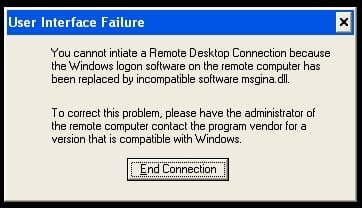
After updating Windows 7 XP mode on 12/26/12, Update Restart hung on Log-off. Now it gives User Interface Failure message when restarting XP Mode.

The message reads:
"You cannot initiate Remote Desktop Connection because the Windows logon software on the remote computer has been replaced by incompatible software msgina.dll.

To correct this problem, please have the administrator of the remote computer contact the program vendor for a version that is compatible with Windows." See attached picture. :cry:
 

Attachments

  • User Interface Failure.jpg
    User Interface Failure.jpg
    15.6 KB · Views: 5

My Computer

Computer Manufacturer/Model Number
Toshiba Satellite l500
OS
Microsoft Windows 7 Professional 32 Bit
CPU
Intel Corei3 m330 @2.13GHZ
Motherboard
Toshiba
Memory
4.00 GB
Graphics Card(s)
Intel Graphics Media Accelerator HD
Sound Card
Intel
Screen Resolution
1366 x 768 x59 hertz
Hard Drives
TI105774WOB
PSU
Standard Laptop Supply
Case
Standard Laptop Case
Cooling
Standard Laptop Cooling
Keyboard
Integrated Laptop
Mouse
Mitsumi
Internet Speed
52kbps
After updating Windows 7 XP mode on 12/26/12, Update Restart hung on Log-off. Now it gives User Interface Failure message when restarting XP Mode.

The message reads:
"You cannot initiate Remote Desktop Connection because the Windows logon software on the remote computer has been replaced by incompatible software msgina.dll.

To correct this problem, please have the administrator of the remote computer contact the program vendor for a version that is compatible with Windows." See attached picture. :cry:
Can you start the XP mode in safe mode, hit F8 when booting and see if you can start it that way.
 

My Computer

Computer type
PC/Desktop
Computer Manufacturer/Model Number
Bluethunder II
OS
Windows 7 x64 Ultimate and numerous virtual machines
CPU
AMD FX-8350 Vishera 32nm Technology @ 4.2 GHz default
Motherboard
ASUSTeK COMPUTER INC. SABERTOOTH 990FX R2.0 (Socket 942)
Memory
G Skill 32.0GB Dual-Channel DDR3 @ 1204MHz (11-13-13-31)
Graphics Card(s)
EVGA GeForce GTX 960 4GB Super SC ACX 2.0+ with Back Plate
Sound Card
Creative X-Fi Titanium HD Audiophile PCIe
Monitor(s) Displays
LG L227WTG x 3
Screen Resolution
1680 x 1050 16:10
Hard Drives
238GB Samsung850 PRO SATA Disk Device (SSD)
1863GB Seagate ST2000DM 001-1CH164 (SATA)
1397GB Seagate ST1500DL 003-9VT16L(SATA)
466GB Western Digital WDC WD50 03AZEX-00K1GA0 (SATA) x 2
932GB Seagate ST310005 28AS SATA Disk Device (SATA)
PSU
Enermax Revolution87+ 1000 Watts Gold Certified Power Supply
Case
Rocketfish Full Tower
Cooling
Cooler Master Hyper 212 EVO Push Pull 120mm Fans
Keyboard
Logitech K740
Mouse
Logitech G100S Laser LED + Logitech Gamepad F310
Internet Speed
500 mbs down and 30mbs up
Antivirus
Malwarebytes Pro & Avast and MSE on certain Virtual Machines
Browser
Firefox (Main) Chrome, Internet Explorer (Back Up)
Other Info
Logitech X 230 2.1 Stereo System and 5.1 Yamaha RX V2090
B&W DM6 Monitor Speakers + Center and Surround Speakers
Using Mouse Without Borders (Google it)
XP Mode won't start in Safe Mode. Message appears "Cannot start Windows Virtual PC Host Process. Check the system event log for more details. Server execution failed."
Event Log showed only the normal start up items for XP Mode.

Additional notes on starting XP Mode in Normal operation:
1. Icon starts Windows XP Mode.vmc
2. Starting Virtual Machine dialog box appears.
3. User Interface dialog box appears.
4. Hibernating dialog box appears and closes after completion.

I had also tried a System Restore but that didn't help.
 

My Computer

Computer Manufacturer/Model Number
Toshiba Satellite l500
OS
Microsoft Windows 7 Professional 32 Bit
CPU
Intel Corei3 m330 @2.13GHZ
Motherboard
Toshiba
Memory
4.00 GB
Graphics Card(s)
Intel Graphics Media Accelerator HD
Sound Card
Intel
Screen Resolution
1366 x 768 x59 hertz
Hard Drives
TI105774WOB
PSU
Standard Laptop Supply
Case
Standard Laptop Case
Cooling
Standard Laptop Cooling
Keyboard
Integrated Laptop
Mouse
Mitsumi
Internet Speed
52kbps
XP Mode won't start in Safe Mode. Message appears "Cannot start Windows Virtual PC Host Process. Check the system event log for more details. Server execution failed."
Event Log showed only the normal start up items for XP Mode.

Additional notes on starting XP Mode in Normal operation:
1. Icon starts Windows XP Mode.vmc
2. Starting Virtual Machine dialog box appears.
3. User Interface dialog box appears.
4. Hibernating dialog box appears and closes after completion.

I had also tried a System Restore but that didn't help.
Unless someone else has an idea I think you'll need to reinstall XP Mode and start over. :(
 

My Computer

Computer type
PC/Desktop
Computer Manufacturer/Model Number
Bluethunder II
OS
Windows 7 x64 Ultimate and numerous virtual machines
CPU
AMD FX-8350 Vishera 32nm Technology @ 4.2 GHz default
Motherboard
ASUSTeK COMPUTER INC. SABERTOOTH 990FX R2.0 (Socket 942)
Memory
G Skill 32.0GB Dual-Channel DDR3 @ 1204MHz (11-13-13-31)
Graphics Card(s)
EVGA GeForce GTX 960 4GB Super SC ACX 2.0+ with Back Plate
Sound Card
Creative X-Fi Titanium HD Audiophile PCIe
Monitor(s) Displays
LG L227WTG x 3
Screen Resolution
1680 x 1050 16:10
Hard Drives
238GB Samsung850 PRO SATA Disk Device (SSD)
1863GB Seagate ST2000DM 001-1CH164 (SATA)
1397GB Seagate ST1500DL 003-9VT16L(SATA)
466GB Western Digital WDC WD50 03AZEX-00K1GA0 (SATA) x 2
932GB Seagate ST310005 28AS SATA Disk Device (SATA)
PSU
Enermax Revolution87+ 1000 Watts Gold Certified Power Supply
Case
Rocketfish Full Tower
Cooling
Cooler Master Hyper 212 EVO Push Pull 120mm Fans
Keyboard
Logitech K740
Mouse
Logitech G100S Laser LED + Logitech Gamepad F310
Internet Speed
500 mbs down and 30mbs up
Antivirus
Malwarebytes Pro & Avast and MSE on certain Virtual Machines
Browser
Firefox (Main) Chrome, Internet Explorer (Back Up)
Other Info
Logitech X 230 2.1 Stereo System and 5.1 Yamaha RX V2090
B&W DM6 Monitor Speakers + Center and Surround Speakers
Using Mouse Without Borders (Google it)
You could first try to remove hibernation data and force XP Mode to reboot. When XP Mode's hibernation file C:\Users\Your_Username\AppData\Local\Microsoft\Windows Virtual PC\Virtual Machines\Windows XP Mode.vsv is removed, hibernated XP Mode is forced to boot from scratch.

Kari
 

My Computer

Computer type
Laptop
Computer Manufacturer/Model Number
HP ENVY 17-1150eg
OS
Windows 10 Pro x64 EN-GB
CPU
1.6 GHz Intel Core i7-720QM Processor
Memory
6 GB
Graphics Card(s)
ATI Mobility Radeon HD 5850 Graphics
Sound Card
Beats sound system with integrated subwoofer
Monitor(s) Displays
17" laptop display, 22" LED and 32" Full HD TV through HDMI
Screen Resolution
1600*900 (1), 1920*1080 (2&3)
Hard Drives
Internal: 2 x 500 GB SATA Hard Disk Drive 7200 rpm
External: 2TB for backups, 3TB USB3 network drive for media
Cooling
As Envy runs a bit warm, I have it on a Cooler Master pad
Keyboard
Logitech diNovo Media Desktop Laser (bluetooth)
Mouse
Logitech Performance Mouse MX
Internet Speed
50/10 Mbps VDSL
Antivirus
Windows Defender 4.3.9431.0
Browser
Maxthon 3.5.2., IE11
Kari,
Hurray, it fixed the problem and generated a new Windows XP Mode.vsv. It's just like new.

Thanks for your help. You guys never fail. :D
 

My Computer

Computer Manufacturer/Model Number
Toshiba Satellite l500
OS
Microsoft Windows 7 Professional 32 Bit
CPU
Intel Corei3 m330 @2.13GHZ
Motherboard
Toshiba
Memory
4.00 GB
Graphics Card(s)
Intel Graphics Media Accelerator HD
Sound Card
Intel
Screen Resolution
1366 x 768 x59 hertz
Hard Drives
TI105774WOB
PSU
Standard Laptop Supply
Case
Standard Laptop Case
Cooling
Standard Laptop Cooling
Keyboard
Integrated Laptop
Mouse
Mitsumi
Internet Speed
52kbps
Nice to know it worked :).
 

My Computer

Computer type
Laptop
Computer Manufacturer/Model Number
HP ENVY 17-1150eg
OS
Windows 10 Pro x64 EN-GB
CPU
1.6 GHz Intel Core i7-720QM Processor
Memory
6 GB
Graphics Card(s)
ATI Mobility Radeon HD 5850 Graphics
Sound Card
Beats sound system with integrated subwoofer
Monitor(s) Displays
17" laptop display, 22" LED and 32" Full HD TV through HDMI
Screen Resolution
1600*900 (1), 1920*1080 (2&3)
Hard Drives
Internal: 2 x 500 GB SATA Hard Disk Drive 7200 rpm
External: 2TB for backups, 3TB USB3 network drive for media
Cooling
As Envy runs a bit warm, I have it on a Cooler Master pad
Keyboard
Logitech diNovo Media Desktop Laser (bluetooth)
Mouse
Logitech Performance Mouse MX
Internet Speed
50/10 Mbps VDSL
Antivirus
Windows Defender 4.3.9431.0
Browser
Maxthon 3.5.2., IE11
Nice to know it worked :).
I was hoping you would take a look. I use VM Ware Workstaion 9 daily and rarely use XP mode on 7. I have recently set up a Windows 7 VM and installed XP mode on that to help with queries but you seem to be the man to go to....:D:geek:
 

My Computer

Computer type
PC/Desktop
Computer Manufacturer/Model Number
Bluethunder II
OS
Windows 7 x64 Ultimate and numerous virtual machines
CPU
AMD FX-8350 Vishera 32nm Technology @ 4.2 GHz default
Motherboard
ASUSTeK COMPUTER INC. SABERTOOTH 990FX R2.0 (Socket 942)
Memory
G Skill 32.0GB Dual-Channel DDR3 @ 1204MHz (11-13-13-31)
Graphics Card(s)
EVGA GeForce GTX 960 4GB Super SC ACX 2.0+ with Back Plate
Sound Card
Creative X-Fi Titanium HD Audiophile PCIe
Monitor(s) Displays
LG L227WTG x 3
Screen Resolution
1680 x 1050 16:10
Hard Drives
238GB Samsung850 PRO SATA Disk Device (SSD)
1863GB Seagate ST2000DM 001-1CH164 (SATA)
1397GB Seagate ST1500DL 003-9VT16L(SATA)
466GB Western Digital WDC WD50 03AZEX-00K1GA0 (SATA) x 2
932GB Seagate ST310005 28AS SATA Disk Device (SATA)
PSU
Enermax Revolution87+ 1000 Watts Gold Certified Power Supply
Case
Rocketfish Full Tower
Cooling
Cooler Master Hyper 212 EVO Push Pull 120mm Fans
Keyboard
Logitech K740
Mouse
Logitech G100S Laser LED + Logitech Gamepad F310
Internet Speed
500 mbs down and 30mbs up
Antivirus
Malwarebytes Pro & Avast and MSE on certain Virtual Machines
Browser
Firefox (Main) Chrome, Internet Explorer (Back Up)
Other Info
Logitech X 230 2.1 Stereo System and 5.1 Yamaha RX V2090
B&W DM6 Monitor Speakers + Center and Surround Speakers
Using Mouse Without Borders (Google it)
If you check our XP Mode threads from past, a surprisingly big part of issues have been solved simply by removing the hibernation data and rebooting.

The .vsv file (= virtual saved state, hibernation data) is for Virtual PC virtual machines about the same as hiberfil.sys for physical Windows computers. If it exists when vm is started and you have issues, close vm and remove it.

The file does not exist if vm is shut down instead of hibernated.
 

My Computer

Computer type
Laptop
Computer Manufacturer/Model Number
HP ENVY 17-1150eg
OS
Windows 10 Pro x64 EN-GB
CPU
1.6 GHz Intel Core i7-720QM Processor
Memory
6 GB
Graphics Card(s)
ATI Mobility Radeon HD 5850 Graphics
Sound Card
Beats sound system with integrated subwoofer
Monitor(s) Displays
17" laptop display, 22" LED and 32" Full HD TV through HDMI
Screen Resolution
1600*900 (1), 1920*1080 (2&3)
Hard Drives
Internal: 2 x 500 GB SATA Hard Disk Drive 7200 rpm
External: 2TB for backups, 3TB USB3 network drive for media
Cooling
As Envy runs a bit warm, I have it on a Cooler Master pad
Keyboard
Logitech diNovo Media Desktop Laser (bluetooth)
Mouse
Logitech Performance Mouse MX
Internet Speed
50/10 Mbps VDSL
Antivirus
Windows Defender 4.3.9431.0
Browser
Maxthon 3.5.2., IE11
Back
Top