
User Profile - Change Default Location

How to Change the Default Location of a User Profile in Vista and Windows 7


   Information
A user profile is the main C:\Users\(user-name) folder of a user account that contains all of the account's settings, shortcuts, information, and user folders (ex: My Music) with the files in them.

This will show you how to Move the default location of a user profile in Windows 7 and Vista to another location of your choice so it will be stored and used from the new location instead.

This can be handy if you are low on free space on your C: drive.

You must be logged in as an administrator to be able to do the steps in this tutorial.

   Warning
Before doing this, you should create a system image to be safe. This way you can do a system image recovery to undo any mistake you might make in the instructions below that could result in the user profile you are moving, or Windows, to no longer work.
   Note
The drive or partition that you move the user profile folder(s) to, will now be included in a system image if created since it will now be considered a system drive.
   Tip
If you are just wanting to save HDD space from the files in your user folders, then you might consider this below to be able to access the files from your libraries with the files actually located where you like instead. This way you will not have to worry about any potential issues that come with moving user folder locations.


OPTION ONE

For Already Existing User Accounts


   Warning
Some of the programs you have installed may not work properly after moving your user profile folder since they are still looking for their information in the user profile folder's original AppData folder location which of course no longer exists.

If you have this problem afterwards, then you may be able to uninstall and reinstall these programs, or use OPTION TWO in the tutorial to create a new user account and create new shortcuts for the programs to fix this.


Method One

To Change the Default Location of an Existing User Profile


1. Log on to the user account that you want to move. In Windows Explorer, navigate to it's C:\Users\(user-name) folder, right click on the user folder, click on Share with and Nobody.

2. Log off.

3. Log on to an administrator account that you are not moving it's user folder for.
NOTE: If you do not have another administrator account to use, then you will need to create a new account first and log in to it. When done with the tutorial, you can delete the new account.

4. In Windows Explorer, navigate to the C:\Users\(user-name) folder (ex: C:\Users\User account to move) that you want to move. Right click on it and click on Copy. (see screenshot below)
Step1.jpg
5. In Windows Explorer, navigate to the new location (ex: E: drive) that you want to move the C:\Users\(user-name) folder to. Right click on a empty space in the main window (middle), and click on Paste. (see screenshot below)
NOTE: This should be another internal hard drive or partition.
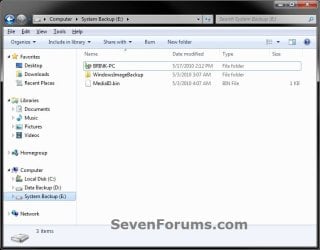
Step2.jpg
6. If prompted, click on Continue. (see screenshot below)
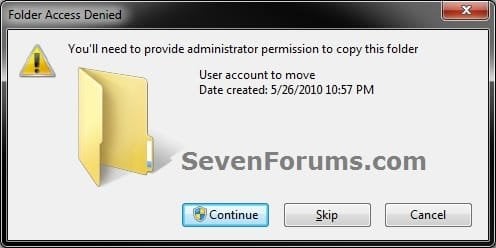
Step3-UAC.jpg
7. If prompted by UAC, then click on Yes (Windows 7) or Continue (Vista).

8. The C:\Users\(user-name) folder (step 4) is now copied over to the new location (ex: E:\User account to move). You can close Windows Explorer. (see screenshot below)
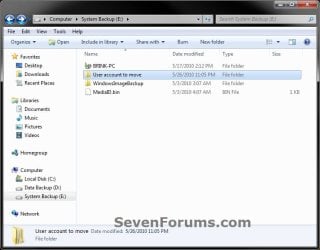
Step4.jpg
9. Open the Start Menu, then type regedit in the search box and press enter.

10. If prompted by UAC, then click on Yes (Windows 7) or Continue (Vista).

11. In regedit, navigate to the location below. (see screenshot below)

Code:
HKEY_LOCAL_MACHINE\SOFTWARE\Microsoft\Windows NT\CurrentVersion\ProfileList
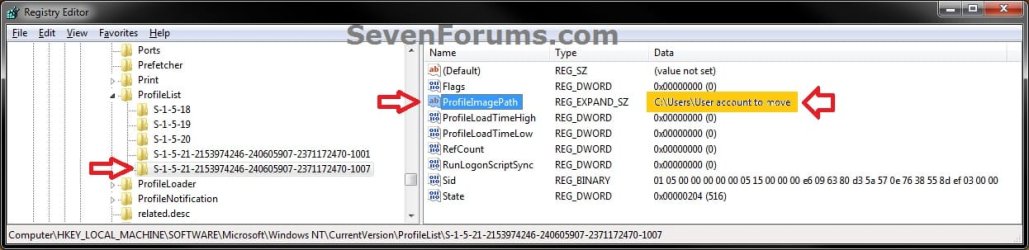
Step5.jpg
12. In the left pane under the Profilelist key, select and look at each S-1-5 key with the long number until you see the user account name and path (step 3) that you want to move in the value Data column of ProfileImagePath in the right pane. When the correct user name is found, right click on ProfileImagePath, and click on Modify. (see screenshot above)

13. Type in the full path of the location (ex: E:\User account to move) that you copied the user profile folder to in step 7, and click on OK. (see screenshot below)
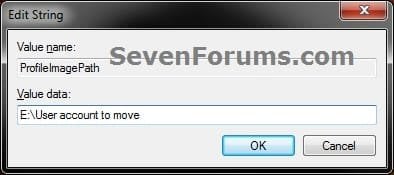
Step6.jpg
14. Regedit will now look similiar to this with the new location now. Close regedit. (see screenshot below)
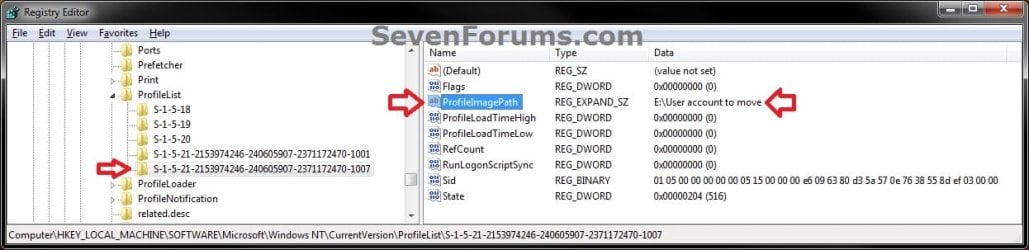
Step7.jpg
15. To Verify that the User Profile has been Moved Successfully
A) Log off or Switch User, then log in to the user account that you moved the user profile folder of.

B) Open the Start Menu and open the user profile folder from this location. (see screenshot below)
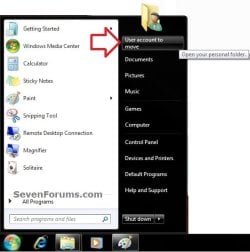
Log-in-1.jpg
C) Right click on one of the user folders (ex: Desktop), click on Properties, and click on the Location tab. (see screenshot below)
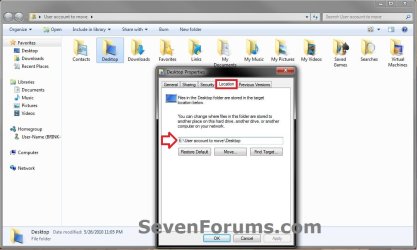
Log-in-2.jpg
D) You should see the new location (ex: E:\User account to move\Desktop) from step 8 as the now new default location. Click on OK. (see screenshot above)
16. To Delete the User Profile from the Old Location
NOTE: Once you have verified (step 15) that the moved user profile has been moved successfully, you can now safely delete the user profile folder from the old location (ex: C:\Users\User account to move) from step 4.
A) Log off of the user account that you moved if you are logged into it from step 15.

B) Log on to an administrator account that you did not move it's user folder for.

C) In Windows Explorer, navigate to the old C:\Users\(user-name) folder (ex: C:\Users\User account to move) that you had copied (step 4). Right click on it and click on Delete. (see screenshot below)
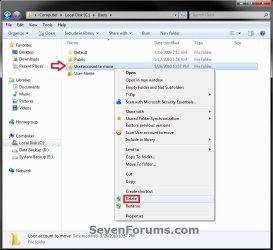
Delete-1_UAC.jpg
D) If prompted by UAC, then click on Yes (Windows 7) or Continue (Vista).

E) If prompted, click on Continue. (see screenshot below)
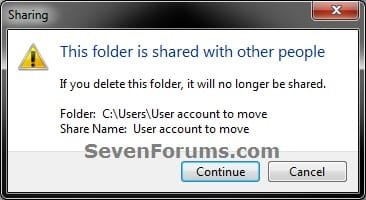
Delete-2.jpg
F) You can now empty the Recycle Bin to finish deleting the old user profile folder from the old location.
NOTE: You will need to approve emptying the Recycle Bin.
17. The existing user profile folder has now been completely moved to the new default location where Windows 7 or Vista will now run it from when logged on to it.


Method Two

To Restore the Existing User Profile's Default Location


1. Repeat OPTION ONE, but move the new default User Profile folder (ex: E:\User account to move) and registry entries back to the original C:\Users folder location (ex: C:\Users\User account to move).


OPTION TWO

For All New User Accounts Created


   Note
This will change where all newly created user accounts will have their user profile folder created at in a default location of your choice instead of the old default C:\Users location.

Thank you to Alain for pointing this out.

1. To Change the Default User Profile Location of New User Accounts
A) Open the Start Menu, then type regedit in the search box and press enter.
B) If prompted by UAC, then click on Yes (Windows 7) or Continue (Vista).

C) In regedit, navigate to the location below. (see screenshot below)

Code:
HKEY_LOCAL_MACHINE\SOFTWARE\Microsoft\Windows NT\CurrentVersion\ProfileList
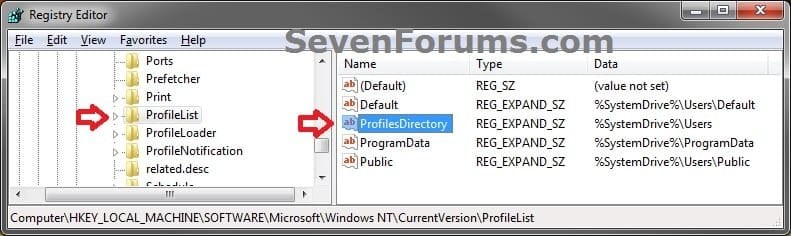
New-1.jpg
D) In the right pane of ProfileList, right click on ProfilesDirectory and click on Modify. (see screenshot above)

E) Type in the full path (ex: E:\Users) of where you want new user accounts to be created at, and click on OK. (see screenshot below)
New-2.jpg
F) The registry will now look similar to this. (see screenshot below)
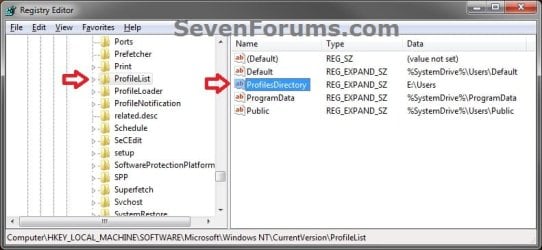
New-3.jpg
G) When you create a new user account, it's user profile folder will now be created at the location you specified in step 1E.
2. To Restore the Default User Profile Location of New User Accounts
A) Repeat step 1, but type %SystemDrive%\Users at step 1E instead.
NOTE: This step only changes the user profile folder location of any newly created user accounts back to this default location, and not any existing user accounts.

B) If you wish to change an already existing new account's user profile folder location, then you will need to do Method Two in OPTION ONE above to change it back to C:\Users.
3. Close regedit.

That's it,
Shawn


Last edited:
Hi Brink. I had noted the advice to take a System Image and that has enabled me to go back safely to where I was before I started fickering with moving the profile.

So now I will be sensible and follow the suggestion in the yellow tip box - once I have digested it. This library thing has me a tad confused.

Anyway I'm back up and running again.

Am off for a long week-end down south with the grandchildren so will pick up again when I return.

Kindest. Aurondium.:)
 

My Computer

Computer type
PC/Desktop
Computer Manufacturer/Model Number
Dell Dimension 9200 (March 2007) Model XP061 (originally Vista 32bit))
OS
Windows 7 Home Premium 64bit
CPU
Intel(R)Core (TM)2 CPU [email protected] Ghz 2.39 Ghz
Motherboard
KU345 Conroe E6600 2.40G 4MB 1066FSB B2 -I think
Memory
Dual Channel 2048mb (2x1024) 667mhz DDR2
Graphics Card(s)
Single 256mb nvidia GeForce 7900GS (2VDI 1xS-video)
Hard Drives
500GB(2x250GB) Serial ATA (7200rpm) Dual HDD Config Raid 0 Stripe
Antivirus
MSE
Browser
Firefox
Good news. If you have any questions about libraries, please feel free to ask.

Have fun with the grandkids. :)
 

My Computer

Computer type
PC/Desktop
Computer Manufacturer/Model Number
Self built custom
OS
64-bit Windows 11 Pro for Workstations
CPU
Intel i7-8700K OC'd to 5 GHz
Motherboard
ASUS ROG Maximus XI Formula Z390
Memory
64 GB (4x16GB) G.SKILL TridentZ RGB DDR4 3600 MHz
Graphics Card(s)
ASUS ROG-STRIX-GTX1080TI-O11G-GAMING
Sound Card
Integrated
Monitor(s) Displays
2 x Samsung Odyssey G7 27"
Screen Resolution
2560x1440
Hard Drives
1TB Samsung 990 PRO M.2,
4TB Samsung 990 PRO PRO M.2,
TerraMaster F8 SSD Plus NAS
PSU
Seasonic Prime Titanium 850W
Case
Thermaltake Core P3
Cooling
Corsair Hydro H115i
Keyboard
Logitech wireless K800
Mouse
Logitech MX Master 4
Internet Speed
2 Gb/s Download and 100 Mb/s Upload
Antivirus
Malwarebyte Anti-Malware Premium
Browser
Google Chrome
Other Info
Logitech Z625 speaker system,
Logitech BRIO 4K Pro webcam,
HP Color LaserJet Pro MFP M477fdn,
APC SMART-UPS RT 1000 XL - SURT1000XLI,
Galaxy S23 Plus phone
I believe I have managed it successfully in Win8.1x64! It's been stable for a week now.

I used method 1 but there were some important things not mentioned.

First, there are a few additional registry keys which make things go a lot smoother:

*MAKE SURE YOU DO THE REGISTRY EDITS BEFORE YOU MOVE YOUR FILES!

  • Tell Windows where to find ntuser.dat and userclass.dat
**Note: If you've already moved your files you have to move ntuser.dat and usrclass.dat AGAIN, because these registry entries are being changed in your local copy of those files.

**Note: The Volume# in HarddiskVolume# is counted from the first partition on the first drive STARTING WITH 1, not 0 as you see it in Windows or Linux. So mine was HarddiskVolume8 since it's behind 7 partitions.


  • HKEY_LOCAL_MACHINE\SYSTEM\CurrentControlSet\Control\hivelist\
  • Registry\User\S-1-5-21.... = \Device\HarddiskVolume1\Users\YOU\NTUSER.DAT
  • Registry\User\S-1-5-21.... = \Device\HarddiskVolume1\Users\YOU\AppData\Local\Microsoft\Windows\UsrClass.dat
I also changed (=Your new path):

  • HKEY_CURRENT_USER\Volatile Environment\Appdata
  • HKEY_CURRENT_USER\Volatile Environment\Homepath
  • HKEY_CURRENT_USER\Volatile Environment\LocalAppdata
  • HKEY_CURRENT_USER\Volatile Environment\Userprofile
    • Leave Homedrive alone.
and of course

  • HKEY_LOCAL_MACHINE\SOFTWARE\Microsoft\Windows NT\CurrentVersion\ProfileList.....\ProfileImagePath\ = Your new path.

Second, what to do about the Junctions (reparse points to the real folders)? They are broken when you move the folders. You have to reconnect them exactly like the folder structure on the C:\ drive. I use Hard link shell extension.

Update: Copy the Junctions in one simple step with Far Manager. See my post here (gggirlgeek.)

Third, what to do with the stubborn ntuser, usrclass and crypt files that don't want to move. I logged into another installation of Windows, took ownership and then used Unlocker to force them.

Reboot once or twice and Windows should catch on. If not, check your HarddiskVolume# again. And make sure you move NTUSER.DAT and USRCLASS.DAT after you edit the registry!

FWIW: I am using the built in Admin account as my own. This should have made things harder but it worked!


NONE OF YOU ARE CHANGING THE NTUSER.DAT AND USRCLASS.DAT LOCATIONS IN THE REGISTRY!! That is why you're getting these errors. You also have to copy the Junctions, not the contents of the junctions! Please read my post. I'm trying to help. (I've also updated it.)
 

My Computer

Computer Manufacturer/Model Number
HP Pavillion DV2000 Notebook
OS
Windows 7/ Ubuntu
CPU
AMD Turion X2 1.6ghz
Motherboard
Wistron 30B5
Memory
1.5Gb
Graphics Card(s)
Nvidia Geforce Go 6150
Sound Card
Conexant HD/ Creative Xmod USB
Monitor(s) Displays
Laptop Built in
Hard Drives
Fujitsu 120Gb
Cooling
GPU Runs Hot! Using NHC to cycle down cpu and keep cool.
Moving User Folders

I have Read Many Different Descriptions for this but find them mostly very complicated.
Especially for the average User.
Here's my Method, and I have been Using it for Years without any problems, Windows 7 and 8.
Lets Say My Present User Account is in C:\Users\Tom.
And I want to Move it to to d:\My Documents.
I Create a Folder in D: Called My Documents.
I then Copy all the Folders I want from c:\Users\Tom to d:\My Documents.
Then One by One, Open each of the Original Folders and Change the Location to Reflect the New Location.
Simple But it Works.
 

My Computer

OS
windows 7 ultimate

My Computer

Computer type
PC/Desktop
Computer Manufacturer/Model Number
Self built custom
OS
64-bit Windows 11 Pro for Workstations
CPU
Intel i7-8700K OC'd to 5 GHz
Motherboard
ASUS ROG Maximus XI Formula Z390
Memory
64 GB (4x16GB) G.SKILL TridentZ RGB DDR4 3600 MHz
Graphics Card(s)
ASUS ROG-STRIX-GTX1080TI-O11G-GAMING
Sound Card
Integrated
Monitor(s) Displays
2 x Samsung Odyssey G7 27"
Screen Resolution
2560x1440
Hard Drives
1TB Samsung 990 PRO M.2,
4TB Samsung 990 PRO PRO M.2,
TerraMaster F8 SSD Plus NAS
PSU
Seasonic Prime Titanium 850W
Case
Thermaltake Core P3
Cooling
Corsair Hydro H115i
Keyboard
Logitech wireless K800
Mouse
Logitech MX Master 4
Internet Speed
2 Gb/s Download and 100 Mb/s Upload
Antivirus
Malwarebyte Anti-Malware Premium
Browser
Google Chrome
Other Info
Logitech Z625 speaker system,
Logitech BRIO 4K Pro webcam,
HP Color LaserJet Pro MFP M477fdn,
APC SMART-UPS RT 1000 XL - SURT1000XLI,
Galaxy S23 Plus phone
I try the 2 way and doesn't work at all to my one and only profile with mozilla firefox 29.0.1 i use as default browser.
 

My Computer

Computer type
PC/Desktop
OS
Windows 7 sp1
CPU
Intel core2duo e8300
Motherboard
ECS G31T-M
Memory
2 x 2gb ddr2-800
Graphics Card(s)
Sapphire ati radeon hd 5450
Sound Card
Motherboard and graphic card
Monitor(s) Displays
Samsung q80t 4k tv
Screen Resolution
4k
PSU
450watt
I noticed that in the last screen short you have left the public folders in the default location. Can these also be changed in the way described or is there a reason why they should remain on the c drive?
 

My Computer

OS
Windows 7

My Computer

Computer type
PC/Desktop
Computer Manufacturer/Model Number
Self built custom
OS
64-bit Windows 11 Pro for Workstations
CPU
Intel i7-8700K OC'd to 5 GHz
Motherboard
ASUS ROG Maximus XI Formula Z390
Memory
64 GB (4x16GB) G.SKILL TridentZ RGB DDR4 3600 MHz
Graphics Card(s)
ASUS ROG-STRIX-GTX1080TI-O11G-GAMING
Sound Card
Integrated
Monitor(s) Displays
2 x Samsung Odyssey G7 27"
Screen Resolution
2560x1440
Hard Drives
1TB Samsung 990 PRO M.2,
4TB Samsung 990 PRO PRO M.2,
TerraMaster F8 SSD Plus NAS
PSU
Seasonic Prime Titanium 850W
Case
Thermaltake Core P3
Cooling
Corsair Hydro H115i
Keyboard
Logitech wireless K800
Mouse
Logitech MX Master 4
Internet Speed
2 Gb/s Download and 100 Mb/s Upload
Antivirus
Malwarebyte Anti-Malware Premium
Browser
Google Chrome
Other Info
Logitech Z625 speaker system,
Logitech BRIO 4K Pro webcam,
HP Color LaserJet Pro MFP M477fdn,
APC SMART-UPS RT 1000 XL - SURT1000XLI,
Galaxy S23 Plus phone
Why public any less than default or individual users? I'm in 2 minds whether to go the full hog or just redirect the data folders through the move location option. Problem is that AppData mushrooms to many gigs so I would prefer to keep it separate to the os. Any views?
 

My Computer

OS
Windows 7
The Public folders have sharing tied to them, and could have unknown issues from moving them.

It'll be just as easy to do what's in the yellow tip box at the top of that tutorial for the Public folders with libraries as well without having to move them.
 

My Computer

Computer type
PC/Desktop
Computer Manufacturer/Model Number
Self built custom
OS
64-bit Windows 11 Pro for Workstations
CPU
Intel i7-8700K OC'd to 5 GHz
Motherboard
ASUS ROG Maximus XI Formula Z390
Memory
64 GB (4x16GB) G.SKILL TridentZ RGB DDR4 3600 MHz
Graphics Card(s)
ASUS ROG-STRIX-GTX1080TI-O11G-GAMING
Sound Card
Integrated
Monitor(s) Displays
2 x Samsung Odyssey G7 27"
Screen Resolution
2560x1440
Hard Drives
1TB Samsung 990 PRO M.2,
4TB Samsung 990 PRO PRO M.2,
TerraMaster F8 SSD Plus NAS
PSU
Seasonic Prime Titanium 850W
Case
Thermaltake Core P3
Cooling
Corsair Hydro H115i
Keyboard
Logitech wireless K800
Mouse
Logitech MX Master 4
Internet Speed
2 Gb/s Download and 100 Mb/s Upload
Antivirus
Malwarebyte Anti-Malware Premium
Browser
Google Chrome
Other Info
Logitech Z625 speaker system,
Logitech BRIO 4K Pro webcam,
HP Color LaserJet Pro MFP M477fdn,
APC SMART-UPS RT 1000 XL - SURT1000XLI,
Galaxy S23 Plus phone
So. I was able to get this to work with WS2008R2 a while back (couple of years) including being able to move the Program Files to another physical drive. All works great and when installing new apps, it knows the place to look to install. Same thing with IIS etc...

But its been a while and there were a few steps that I had to do to get it to work.

But now thinking afresh, I am going to be installing Windows 8.1 or Server 2012 R2. How can I do the same thing? I mean, I want to move the Users folder to another partition including the program files and also inetpuib (IIS).
I want the system to know the new correct location in the environment variables I guess, of the new home of the program files and the like.

any advice on this?
 

My Computer

Computer type
PC/Desktop
OS
Microsoft Windows 7 Ultimate 64-bit 7601 Multiprocessor Free Service Pack 1
CPU
Intel(R) Core(TM) i7 CPU X 990 @ 3.47GHz
Motherboard
ASUSTeK Computer INC. P6X58D-E
Memory
24.00 GB
Graphics Card(s)
NVIDIA GeForce GTX 550 Ti
Sound Card
(1) NVIDIA High Definition Audio (2) NVIDIA High Definitio
Screen Resolution
1920 x 1200 x 32 bits (4294967296 colors) @ 59 Hz
Hard Drives
(1) OCZ-AGILITY3 ATA Device (2) WDC WD2002FAEX-007BA0 ATA Device (3) WDC WD2002FAEX-007BA0 ATA Device (4) WDC WD30EZRX-00DC0B0 ATA Device (5) WDC WD30EZRX-00MMMB0 ATA Device (6) WDC WD5000AAKS-00A7B0 ATA Device
Hello Ahmedilyas, :)

To not risk messing up your user profile and still have the same effect, you might see if using the yellow tip box at the top of the tutorial for libraries may work instead.

Some programs will allow you to select where to install them at.
 

My Computer

Computer type
PC/Desktop
Computer Manufacturer/Model Number
Self built custom
OS
64-bit Windows 11 Pro for Workstations
CPU
Intel i7-8700K OC'd to 5 GHz
Motherboard
ASUS ROG Maximus XI Formula Z390
Memory
64 GB (4x16GB) G.SKILL TridentZ RGB DDR4 3600 MHz
Graphics Card(s)
ASUS ROG-STRIX-GTX1080TI-O11G-GAMING
Sound Card
Integrated
Monitor(s) Displays
2 x Samsung Odyssey G7 27"
Screen Resolution
2560x1440
Hard Drives
1TB Samsung 990 PRO M.2,
4TB Samsung 990 PRO PRO M.2,
TerraMaster F8 SSD Plus NAS
PSU
Seasonic Prime Titanium 850W
Case
Thermaltake Core P3
Cooling
Corsair Hydro H115i
Keyboard
Logitech wireless K800
Mouse
Logitech MX Master 4
Internet Speed
2 Gb/s Download and 100 Mb/s Upload
Antivirus
Malwarebyte Anti-Malware Premium
Browser
Google Chrome
Other Info
Logitech Z625 speaker system,
Logitech BRIO 4K Pro webcam,
HP Color LaserJet Pro MFP M477fdn,
APC SMART-UPS RT 1000 XL - SURT1000XLI,
Galaxy S23 Plus phone
thanks.
I just cannot remember exactly what I did before to make it all work including Windows Update.

What approach do you recommend to redirect the users, program files, programdata etc... to another disk?
I remember I created an Environment variable called %RAIDDRIVE% and then changed some of the C:\ to %RAIDDRIVE% for things like the InetPub stuff, the user profiles and maybe some others too.
 

My Computer

Computer type
PC/Desktop
OS
Microsoft Windows 7 Ultimate 64-bit 7601 Multiprocessor Free Service Pack 1
CPU
Intel(R) Core(TM) i7 CPU X 990 @ 3.47GHz
Motherboard
ASUSTeK Computer INC. P6X58D-E
Memory
24.00 GB
Graphics Card(s)
NVIDIA GeForce GTX 550 Ti
Sound Card
(1) NVIDIA High Definition Audio (2) NVIDIA High Definitio
Screen Resolution
1920 x 1200 x 32 bits (4294967296 colors) @ 59 Hz
Hard Drives
(1) OCZ-AGILITY3 ATA Device (2) WDC WD2002FAEX-007BA0 ATA Device (3) WDC WD2002FAEX-007BA0 ATA Device (4) WDC WD30EZRX-00DC0B0 ATA Device (5) WDC WD30EZRX-00MMMB0 ATA Device (6) WDC WD5000AAKS-00A7B0 ATA Device
I'm afraid I don't know for all of it like that. :(
 

My Computer

Computer type
PC/Desktop
Computer Manufacturer/Model Number
Self built custom
OS
64-bit Windows 11 Pro for Workstations
CPU
Intel i7-8700K OC'd to 5 GHz
Motherboard
ASUS ROG Maximus XI Formula Z390
Memory
64 GB (4x16GB) G.SKILL TridentZ RGB DDR4 3600 MHz
Graphics Card(s)
ASUS ROG-STRIX-GTX1080TI-O11G-GAMING
Sound Card
Integrated
Monitor(s) Displays
2 x Samsung Odyssey G7 27"
Screen Resolution
2560x1440
Hard Drives
1TB Samsung 990 PRO M.2,
4TB Samsung 990 PRO PRO M.2,
TerraMaster F8 SSD Plus NAS
PSU
Seasonic Prime Titanium 850W
Case
Thermaltake Core P3
Cooling
Corsair Hydro H115i
Keyboard
Logitech wireless K800
Mouse
Logitech MX Master 4
Internet Speed
2 Gb/s Download and 100 Mb/s Upload
Antivirus
Malwarebyte Anti-Malware Premium
Browser
Google Chrome
Other Info
Logitech Z625 speaker system,
Logitech BRIO 4K Pro webcam,
HP Color LaserJet Pro MFP M477fdn,
APC SMART-UPS RT 1000 XL - SURT1000XLI,
Galaxy S23 Plus phone

My Computer

Computer type
PC/Desktop
Computer Manufacturer/Model Number
Home Built Desktop By DataTech
OS
Windows 7 Ultimate X64 SP1
CPU
Intel i5-2550K, Differing ~4.4-4.8GHz No built in GPU
Motherboard
ASUS P8Z68-V PRO/GEN3
Memory
16GB G.Skill Sniper 1866MHz @ 2133MHz 2x8GB
Graphics Card(s)
ASUS GTX650TIB-DC2OC-2GD5, (650TI Boost)
Sound Card
Onboard Realtek 5-1
Monitor(s) Displays
Samsung P2570HD
Screen Resolution
1920x1080
Hard Drives
Samsung 840 Pro 256GB SSD for OS, 500GB Seagate Constellation (Enterprise drive) for Data
PSU
Corsair HX650W
Case
Inwin Dragon Rider
Cooling
Hyper 212 EVO w/two Noctua fans, push-pull, @1300 RPM
Keyboard
E-Z Eyes, bright yellow keys with large characters
Mouse
steelseries SENSEI Laser Pro Gaming
Internet Speed
48-51Mbs Mbs down, 11 Mbs up Xfinity Cable
Antivirus
Norton Internet Security 2013
Browser
IE 10, Opera, Pale Moon if needed
Other Info
4 case fans, LG BluRay-RE, ASUS DVD-RW, Mr. Fusion power supply, 1.21 gigawatts.
so I am almost done testing the changes and it almost works.
I managed to move the users, program files, program files x86 and programdata to the new drive.
I also modified a few registry entries to update the environment variables and also making sure Iexplore (Internet Explorer) points to the other drive. That works too.

The problem I face now is that when I install any application, it picks up the default location of Program files (C:\) rather than the moved location.

Looking at the environment variables from the CMD prompt, they seem correct (%ProgramFiles% and %ProgramFiles(x86)% point to the new drive)

what setting have I missed?

BTW - I have this already working on my existing system running Win7 but its been a while since I have done it.
 

My Computer

Computer type
PC/Desktop
OS
Microsoft Windows 7 Ultimate 64-bit 7601 Multiprocessor Free Service Pack 1
CPU
Intel(R) Core(TM) i7 CPU X 990 @ 3.47GHz
Motherboard
ASUSTeK Computer INC. P6X58D-E
Memory
24.00 GB
Graphics Card(s)
NVIDIA GeForce GTX 550 Ti
Sound Card
(1) NVIDIA High Definition Audio (2) NVIDIA High Definitio
Screen Resolution
1920 x 1200 x 32 bits (4294967296 colors) @ 59 Hz
Hard Drives
(1) OCZ-AGILITY3 ATA Device (2) WDC WD2002FAEX-007BA0 ATA Device (3) WDC WD2002FAEX-007BA0 ATA Device (4) WDC WD30EZRX-00DC0B0 ATA Device (5) WDC WD30EZRX-00MMMB0 ATA Device (6) WDC WD5000AAKS-00A7B0 ATA Device
managed to find the culprit. This was the HKLM\Software\Wow6432Node\Microsoft\Windows\CurrentVersion regkey
 

My Computer

Computer type
PC/Desktop
OS
Microsoft Windows 7 Ultimate 64-bit 7601 Multiprocessor Free Service Pack 1
CPU
Intel(R) Core(TM) i7 CPU X 990 @ 3.47GHz
Motherboard
ASUSTeK Computer INC. P6X58D-E
Memory
24.00 GB
Graphics Card(s)
NVIDIA GeForce GTX 550 Ti
Sound Card
(1) NVIDIA High Definition Audio (2) NVIDIA High Definitio
Screen Resolution
1920 x 1200 x 32 bits (4294967296 colors) @ 59 Hz
Hard Drives
(1) OCZ-AGILITY3 ATA Device (2) WDC WD2002FAEX-007BA0 ATA Device (3) WDC WD2002FAEX-007BA0 ATA Device (4) WDC WD30EZRX-00DC0B0 ATA Device (5) WDC WD30EZRX-00MMMB0 ATA Device (6) WDC WD5000AAKS-00A7B0 ATA Device
crap. I thought I had it working but now when it came for doing it on the real hardware.... it failed. Internet explorer will not start even after registering the IEProxy.dll

The reason it wont start is because I changed the program files path to the new drive. But I don't get it... works fine on my WS2008R2 system. :-/
 

My Computer

Computer type
PC/Desktop
OS
Microsoft Windows 7 Ultimate 64-bit 7601 Multiprocessor Free Service Pack 1
CPU
Intel(R) Core(TM) i7 CPU X 990 @ 3.47GHz
Motherboard
ASUSTeK Computer INC. P6X58D-E
Memory
24.00 GB
Graphics Card(s)
NVIDIA GeForce GTX 550 Ti
Sound Card
(1) NVIDIA High Definition Audio (2) NVIDIA High Definitio
Screen Resolution
1920 x 1200 x 32 bits (4294967296 colors) @ 59 Hz
Hard Drives
(1) OCZ-AGILITY3 ATA Device (2) WDC WD2002FAEX-007BA0 ATA Device (3) WDC WD2002FAEX-007BA0 ATA Device (4) WDC WD30EZRX-00DC0B0 ATA Device (5) WDC WD30EZRX-00MMMB0 ATA Device (6) WDC WD5000AAKS-00A7B0 ATA Device
I'm afraid that's why we don't recommend to move them. It doesn't always work out so well. :(
 

My Computer

Computer type
PC/Desktop
Computer Manufacturer/Model Number
Self built custom
OS
64-bit Windows 11 Pro for Workstations
CPU
Intel i7-8700K OC'd to 5 GHz
Motherboard
ASUS ROG Maximus XI Formula Z390
Memory
64 GB (4x16GB) G.SKILL TridentZ RGB DDR4 3600 MHz
Graphics Card(s)
ASUS ROG-STRIX-GTX1080TI-O11G-GAMING
Sound Card
Integrated
Monitor(s) Displays
2 x Samsung Odyssey G7 27"
Screen Resolution
2560x1440
Hard Drives
1TB Samsung 990 PRO M.2,
4TB Samsung 990 PRO PRO M.2,
TerraMaster F8 SSD Plus NAS
PSU
Seasonic Prime Titanium 850W
Case
Thermaltake Core P3
Cooling
Corsair Hydro H115i
Keyboard
Logitech wireless K800
Mouse
Logitech MX Master 4
Internet Speed
2 Gb/s Download and 100 Mb/s Upload
Antivirus
Malwarebyte Anti-Malware Premium
Browser
Google Chrome
Other Info
Logitech Z625 speaker system,
Logitech BRIO 4K Pro webcam,
HP Color LaserJet Pro MFP M477fdn,
APC SMART-UPS RT 1000 XL - SURT1000XLI,
Galaxy S23 Plus phone
agreed. But I was able to get this working on the WS2008R2 system I had for 3 years without issues. Thought I can get it done the same way for WS2012 R2.
must be doing something or missing something here. Crap.

happy for IE to run from C:\Program files etc... but want everything else (other program files and references) to be pointing to the other drive
 

My Computer

Computer type
PC/Desktop
OS
Microsoft Windows 7 Ultimate 64-bit 7601 Multiprocessor Free Service Pack 1
CPU
Intel(R) Core(TM) i7 CPU X 990 @ 3.47GHz
Motherboard
ASUSTeK Computer INC. P6X58D-E
Memory
24.00 GB
Graphics Card(s)
NVIDIA GeForce GTX 550 Ti
Sound Card
(1) NVIDIA High Definition Audio (2) NVIDIA High Definitio
Screen Resolution
1920 x 1200 x 32 bits (4294967296 colors) @ 59 Hz
Hard Drives
(1) OCZ-AGILITY3 ATA Device (2) WDC WD2002FAEX-007BA0 ATA Device (3) WDC WD2002FAEX-007BA0 ATA Device (4) WDC WD30EZRX-00DC0B0 ATA Device (5) WDC WD30EZRX-00MMMB0 ATA Device (6) WDC WD5000AAKS-00A7B0 ATA Device
Back
Top