
User Profile Service failed the logon. User profile cannot be loaded.

Fix "The User Profile Service failed the logon. User profile cannot be loaded." Error in Windows 7

   Information
A user profile is a collection of settings that make the computer look and work the way you want it to for a user account. It contains the account's settings for desktop backgrounds, screen savers, pointer preferences, sound settings, and other features. User profiles ensure that your personal preferences are used whenever you sign in to Windows.

A user profile is different from a user account, which you use to sign in to Windows. Each user account has at least one user profile associated with it.

This tutorial will show you how to fix when you log on to Windows 7 using a temporary profile, and get the following error message:

The User Profile Service failed the logon. User profile cannot be loaded.

This tutorial was updated from our Vista Forums tutorial created 02-10-2008:
The User Profile Service failed the logon. User profile cannot be loaded. - Vista Forums

For additional details on this user profile error, see also:
Error message: "The User Profile Service failed the logon. User profile cannot be loaded

   Note
Known Causes:
  • The C:\Users\(user-name) user profile folder was manually deleted instead of properly deleting the user account through User Accounts in the Control Panel. A user profile that is manually deleted does not remove the security identifier (SID) from the profile list in the registry. Since the SID is still present, Windows 7 will still try to load the profile by using the ProfileImagePath that points to a nonexistent path. Therefore, the profile cannot be loaded.
  • The C:\Users\(user-name) user profile folder itself was manually renamed, instead of using the proper method in this tutorial.
  • An unknown issue with the user profile entering into a backup state occurred.
  • Corrupted user profile.
  • Occasionally, Windows 7 might not read your user profile correctly, for example, if your antivirus software is scanning your computer while you try to log on. Try restarting your computer and logging on with your user account again to resolve the issue before following the options below.


In Preparation:

Log On to an Administrator Account


NOTE: You must be logged on to another administrator account using either step below before you will be able to move on to either OPTION ONEor OPTION TWO below.
1. To Log on to another Administrator account.
NOTE: If you do not have another Administrator account, then proceed to step 2.
A) Log off, and log on to an available administrator account that doesn't have this error.

B) Go to either OPTION ONEor OPTION TWO below for what you would like to do.
OR

2. To Boot into "Safe Mode" and Use the built-in Administrator account
A) Using your "retail" Windows 7 installation disc or a created system repair disc, boot into Safe Mode.

B) Do either step C or D below depending if Safe Mode booted into the built-in Administrator account by default or not.
NOTE: If this user account with the user profile error was the only administrator account you had created or enabled, then Safe Mode may automatically boot into the built-in Administrator account.

C) If Safe Mode did not boot into the built-in Administrator account by default, then enable the built-in Administrator account, log off in Safe Mode, and log on to the built-in Administrator account to logon to that account in Safe Mode.

D) If Safe Mode did boot into the built-in Administrator account by default, then go to either OPTION ONE or OPTION TWO below for what you would like to do.
OR

3. To Enable the Built-in Administrator account at Boot
A) For how, see: How to Enable the Built-in Elevated "Administrator" Account from WinRE

B) When enabled, log in to the built-in Administrator account, and go to either OPTION ONE or OPTION TWO below for what you would like to do


OPTION ONE

To Fix the User Account Profile


1. Before starting, it is highly recommended that you create a system restore point in case you make a mistake while in the registry. This way you will easily be able to do a system restore to use the created restore point to undo the mistake.

2. Open the Start Menu, type regedit in the search box, and press Enter.

3. If prompted by UAC, then click on Yes.

4. In regedit, navigate to the location below. (see screenshot below step 5A)
Code:
HKEY_LOCAL_MACHINE\SOFTWARE\Microsoft\Windows NT\CurrentVersion\ProfileList
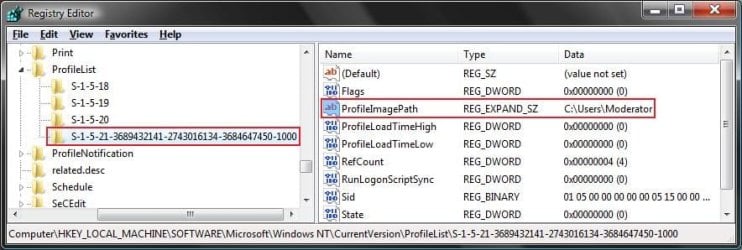
5. In the left pane, click on a S-1-5 (SID) key with a long number.
A) In the right pane of the selected S-1-5 (SID) key, look at the Data value of ProfileImagePath to see if it is the user account (ex: Moderator) with the error.
SID_Reg.jpg
B) If not, then repeat steps 5 and 5A until you have the correct S-1-5 (SID) key with a long number selected.

C) If it is, then continue on to step 6 or step 7 depending on if you have either one or two S-1-5 (SID) keys listed with the exact same long number. One without .bak, and one with .bak at the end.
6. If you have Two S-1-5 (SID) keys with the Same Long Numbers
NOTE: This is if you have two S-1-5 folders (SID key) with the exact same long numbers, but the second one has .bak at the end of the long numbers and the first one doesn't.
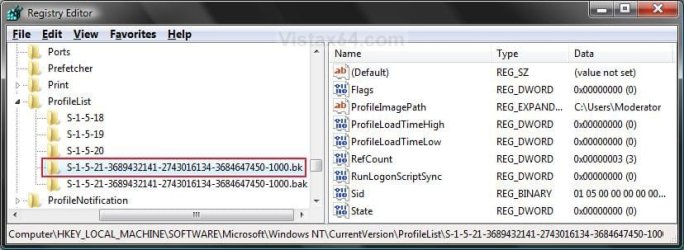
A) In the left pane, right click on the first (top) S-1-5..... folder (SID key) that does not have .bak at the end of the numbers and click Rename. (see screenshot below)
Repair.jpg
B) Add .bk to the end of the numbers. (see screenshot below)
Repair_bk.jpg
C) In the left pane, right click on the second S-1-5..... folder (SID key) with .bak at the end of the numbers and click Rename. (see screenshot below step 6B)

D) Remove only .bak from the end of the numbers and press Enter. (see screenshot below step 6B)

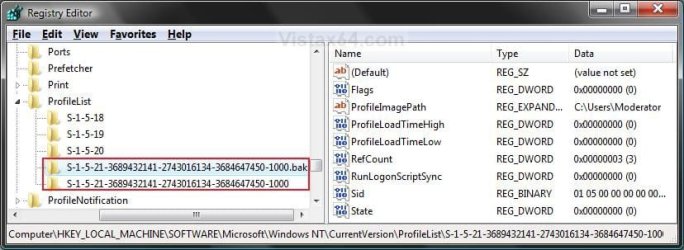
E) Now go back and Rename the first one with .bk to .bak now at the end of the numbers and press Enter. (see screenshot below)
Repar_bak.jpg
F) Go to step 8.
7. If you have Only One S-1-5 (SID) key with .bak
NOTE: This is if you have only one S-1-5 folder (SID key) with long numbers and ended with .bak.
A) In the left pane, right click on the S-1-5..... folder (SID key) with .bak at the end of the numbers and click Rename. (see screenshot below step 7B)

B) Remove only .bak at the end of the numbers and press Enter. (see screenshot below and below step 10)
Repair_Reg2.jpg
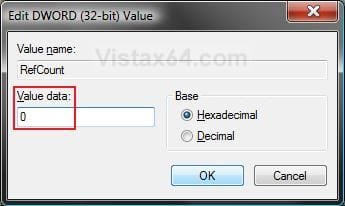
8. In the right pane of the one without .bak now, right click on RefCount and click on Modify. (see screenshot below step 10)
NOTE: If you do not have RefCount, then right click on a empty space in the right pane and click New and DWORD (32 bit) Value, then type RefCount and press Enter. This value for this entry will reset and return back to the original value after you have restarted the computer and logged on to the account.
A) Type 0 (number) and click on OK. (see screenshot below)
Modify_RefCount.jpg
9. In the right pane of the one without .bak now, right click on State and click on Modify. (see screenshot below step 10)
NOTE: This value for this entry will reset and return back to the original value after you have restarted the computer and logged on to the account.
A) Type 0 (number) and click on OK. (see screenshot below)
Modify_State.jpg
10. The registry will now look like this for the one without .bak now. (see screenshot below)
Repair_Reg2.jpg
11. Close regedit, and restart the computer.

12. See if you are able to log on to the use account now without getting this error.

   Tip
If this still does not help, then either try:


OPTION TWO

To Delete the User Account and Create a New User Account


NOTE: This option is only if you do not care about losing the user account with this error and possibly all contents of it's C:\Users\(user-name) user profile folder. Your programs will still be installed and unaffected.
1. Before starting, it is highly recommended that you create a system restore point in case you make a mistake while in the registry. This way you will easily be able to do a system restore to use the created restore point to undo the mistake.

2. Create a new user account that is the same type (standard or administrator) as the user account with this error.

3. If you are able to, you could copy the contents of the user folders from the old user account's C:\Users\(user-name) user profile folder with the error into the new account's (step 2) C:\Users\(user-name) user profile folder. Be sure to also copy any shortcuts in the Start Menu from the old user account into the new user account as well.

4. In User Accounts from the Control Panel, delete the user account with the error.

5. Open the Start Menu, type regedit in the search box, and press Enter.

6. If prompted by UAC, then click on Yes.

7. In regedit, navigate to the location below. (see screenshot below step 8A)
Code:
HKEY_LOCAL_MACHINE\SOFTWARE\Microsoft\Windows NT\CurrentVersion\ProfileList
8. In the left pane, click on a S-1-5 (SID) key with a long number.
A) In the right pane of the selected S-1-5 (SID) key, look at the Data value of ProfileImagePath to see if it is the user account (ex: Moderator) with the error.
SID_Reg.jpg
B) If not, then repeat steps 8 and 8A until you have the correct S-1-5 (SID) key with a long number selected.

C) If it is, then continue on to step 9.
9. Right click on the selected SID key with the long number, and click on Delete.

10. Click on Yes to confirm deletion. (see screenshot below)
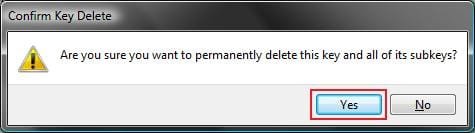
Confirm.jpg
11. If there is another SID key directly below the selected SID key (step 9) with the exact same long number with .bak at the end, then right click on this same SID key with .bak on it, and click on Delete. (see screenshot below)
Repair.jpg

A) Click on Yes to confirm deletion. (see screenshot below)
Confirm.jpg
12. When finished, close regedit.

13. Restart the computer, and log on to your new account.


That's it,
Shawn


Last edited:
Hi,
Its me again :) I have tried some things to repair this error, but i ended up with reinstalling windows... Now i can access my account, but mouse pointer is still not working... Ive tried reinstalling driver for touch pad, but still nothing... pls help :(

Was it a clean install?

No, I only formated C partition, because I have very important documents on D partition and currently im not able to save them somewhere else...
 

My Computer My Computer

At a glance

Windows 7 Home Premium 32bit
Computer type
Laptop
OS
Windows 7 Home Premium 32bit
Antivirus
Avast
Browser
Google Chrome
In that case, you might go ahead and create a new separate thread for the mouse pointer issue to see what we can do to help there to keep this tutorial on topic. :)
 

My Computer My Computer

At a glance

64-bit Windows 11 Pro for WorkstationsIntel i7-8700K OC'd to 5 GHz64 GB (4x16GB) G.SKILL TridentZ RGB DDR4 3600...ASUS ROG-STRIX-GTX1080TI-O11G-GAMING
Computer type
PC/Desktop
Computer Manufacturer/Model Number
Self built custom
OS
64-bit Windows 11 Pro for Workstations
CPU
Intel i7-8700K OC'd to 5 GHz
Motherboard
ASUS ROG Maximus XI Formula Z390
Memory
64 GB (4x16GB) G.SKILL TridentZ RGB DDR4 3600 MHz
Graphics Card(s)
ASUS ROG-STRIX-GTX1080TI-O11G-GAMING
Sound Card
Integrated
Monitor(s) Displays
2 x Samsung Odyssey G7 27"
Screen Resolution
2560x1440
Hard Drives
1TB Samsung 990 PRO M.2,
4TB Samsung 990 PRO PRO M.2,
TerraMaster F8 SSD Plus NAS
PSU
Seasonic Prime Titanium 850W
Case
Thermaltake Core P3
Cooling
Corsair Hydro H115i
Keyboard
Logitech wireless K800
Mouse
Logitech MX Master 4
Internet Speed
2 Gb/s Download and 100 Mb/s Upload
Antivirus
Malwarebyte Anti-Malware Premium
Browser
Google Chrome
Other Info
Logitech Z625 speaker system,
Logitech BRIO 4K Pro webcam,
HP Color LaserJet Pro MFP M477fdn,
APC SMART-UPS RT 1000 XL - SURT1000XLI,
Galaxy S23 Plus phone
I had this happen to me because my user folders were on a separate drive which I did based off Kari's guide to moving user folders to another drive. What happened was I disconnected one of the drives while I was fiddling with my rig and tried booting without the user folder drive connected (I was wiping one of my back up hard drives and I just wanted to make sure I wasn't wiping my data drive so i disconnected and booted to test). The C system drive obviously gave this error as it was trying to load my profile from a now non existent hard drive.

So I figured if I just reconnect it back everything should be fine, but the error came back and by this time I was freaking out, thinking that all my hard links were destroyed and I would have to reinstall everything

what I did was entered safe mode with CMD and from there I checked that my hard drive had been RENAMED to another drive letter. So using CMD I entered diskpart and selected the appropriate volume and assigned it the correct letter D:/.
Rebooted and everything was back to normal

I guess the solution in this thread only applies to normal installations where everything is on one drive not the split method I've been using with system files on SSD and user profile on a slower HDD.

anyway hope this helps anybody in the same situation I was in.
 

My Computer My Computer

At a glance

Windows 7 Home Premium X 64i2500kCorsair Vengeance Low Profile 2 x4 gb 1600 mhzSapphire 2gb 6950
Computer type
PC/Desktop
Computer Manufacturer/Model Number
Custom
OS
Windows 7 Home Premium X 64
CPU
i2500k
Motherboard
Asrock Z68 Extreme 3 Gen3
Memory
Corsair Vengeance Low Profile 2 x4 gb 1600 mhz
Graphics Card(s)
Sapphire 2gb 6950
Hard Drives
Crucial M4
WD 1001 FALS
2 x Spinpoint F3 1 tb
Antivirus
Webroot
Hello Charles, and welcome to Seven Forums.

Thank you for the addition. :)
 

My Computer My Computer

At a glance

64-bit Windows 11 Pro for WorkstationsIntel i7-8700K OC'd to 5 GHz64 GB (4x16GB) G.SKILL TridentZ RGB DDR4 3600...ASUS ROG-STRIX-GTX1080TI-O11G-GAMING
Computer type
PC/Desktop
Computer Manufacturer/Model Number
Self built custom
OS
64-bit Windows 11 Pro for Workstations
CPU
Intel i7-8700K OC'd to 5 GHz
Motherboard
ASUS ROG Maximus XI Formula Z390
Memory
64 GB (4x16GB) G.SKILL TridentZ RGB DDR4 3600 MHz
Graphics Card(s)
ASUS ROG-STRIX-GTX1080TI-O11G-GAMING
Sound Card
Integrated
Monitor(s) Displays
2 x Samsung Odyssey G7 27"
Screen Resolution
2560x1440
Hard Drives
1TB Samsung 990 PRO M.2,
4TB Samsung 990 PRO PRO M.2,
TerraMaster F8 SSD Plus NAS
PSU
Seasonic Prime Titanium 850W
Case
Thermaltake Core P3
Cooling
Corsair Hydro H115i
Keyboard
Logitech wireless K800
Mouse
Logitech MX Master 4
Internet Speed
2 Gb/s Download and 100 Mb/s Upload
Antivirus
Malwarebyte Anti-Malware Premium
Browser
Google Chrome
Other Info
Logitech Z625 speaker system,
Logitech BRIO 4K Pro webcam,
HP Color LaserJet Pro MFP M477fdn,
APC SMART-UPS RT 1000 XL - SURT1000XLI,
Galaxy S23 Plus phone
Hi Shawn

just letting you know that I could solve my issue thanks to your tutorials here, they kept my sanity and made me think straight to find a solution.

I could not run a system recovery over my disc what was a bit funny, so I tried today the Safe Mode access what worked. I first tried to setup a new password but that was not the problem.

I actually had a virus called "autorun.inf W32.Downadup!autorun" which deleted the long number files you ask us to rename.

So the only way was to restore the system to an older date, what worked in Safe Mode. I needed a few hours to fix the Windows Defender and Norton Antivirus after that but I'm happy to get back into my machine.

Thanks you a ton Shawn

G.
 

My Computer My Computer

At a glance

windows 7
Computer type
Laptop
Computer Manufacturer/Model Number
Samsung
OS
windows 7
Browser
Chrome
I'm glad they could help G..

I'd recommend to do a full scan of your system every so often for a bit to help make sure it's still clean though. :)
 

My Computer My Computer

At a glance

64-bit Windows 11 Pro for WorkstationsIntel i7-8700K OC'd to 5 GHz64 GB (4x16GB) G.SKILL TridentZ RGB DDR4 3600...ASUS ROG-STRIX-GTX1080TI-O11G-GAMING
Computer type
PC/Desktop
Computer Manufacturer/Model Number
Self built custom
OS
64-bit Windows 11 Pro for Workstations
CPU
Intel i7-8700K OC'd to 5 GHz
Motherboard
ASUS ROG Maximus XI Formula Z390
Memory
64 GB (4x16GB) G.SKILL TridentZ RGB DDR4 3600 MHz
Graphics Card(s)
ASUS ROG-STRIX-GTX1080TI-O11G-GAMING
Sound Card
Integrated
Monitor(s) Displays
2 x Samsung Odyssey G7 27"
Screen Resolution
2560x1440
Hard Drives
1TB Samsung 990 PRO M.2,
4TB Samsung 990 PRO PRO M.2,
TerraMaster F8 SSD Plus NAS
PSU
Seasonic Prime Titanium 850W
Case
Thermaltake Core P3
Cooling
Corsair Hydro H115i
Keyboard
Logitech wireless K800
Mouse
Logitech MX Master 4
Internet Speed
2 Gb/s Download and 100 Mb/s Upload
Antivirus
Malwarebyte Anti-Malware Premium
Browser
Google Chrome
Other Info
Logitech Z625 speaker system,
Logitech BRIO 4K Pro webcam,
HP Color LaserJet Pro MFP M477fdn,
APC SMART-UPS RT 1000 XL - SURT1000XLI,
Galaxy S23 Plus phone
Hey this worked perfectly! Thanks!!
 

My Computer My Computer

At a glance

Windows 7 Home Premium 32bit
Computer type
Laptop
OS
Windows 7 Home Premium 32bit
glad you got fixed, this tutorial is a life saver i used myself a while ago.
 

My Computer My Computer

At a glance

Microsoft Windows 7 Home Premium 64-bit 7600IIx4 amd athelon 635 processor2x2gbati radeon HD 5450
Computer Manufacturer/Model Number
Hewlett packard/p6512uk
OS
Microsoft Windows 7 Home Premium 64-bit 7600
CPU
IIx4 amd athelon 635 processor
Motherboard
FOXCONN 2AA9
Memory
2x2gb
Graphics Card(s)
ati radeon HD 5450
Sound Card
(1) Realtek High Definition Audio (2) AMD High Definition
Monitor(s) Displays
samsung lcd tv 32"
Screen Resolution
1360x 768
Hard Drives
(1) WDC WD10 01FAES-60Z2A0 SATA Disk Device (2) Maxtor OneTouch USB Device (3) ST310003 33AS USB Device (4) WD My Book 1111 USB Device
PSU
?
Cooling
air!
Keyboard
wireless hp
Mouse
wireless Hp,optical
Internet Speed
1.10mb/s
Antivirus
MSE
Browser
Firefox
Thank you!!

I couldn't even fill in half the info you wanted on the registration about my pc - I am that useless!!

However much to my amazement I managed to follow that tutorial and I am all up and running again. You are an angel, thank you very very much :D
 

My Computer My Computer

At a glance

Windows 7 Home3gb
Computer type
PC/Desktop
Computer Manufacturer/Model Number
Acer
OS
Windows 7 Home
Memory
3gb
Browser
Chrome
You're most welcome puddingbasin, and welcome to Seven Forums. :)
 

My Computer My Computer

At a glance

64-bit Windows 11 Pro for WorkstationsIntel i7-8700K OC'd to 5 GHz64 GB (4x16GB) G.SKILL TridentZ RGB DDR4 3600...ASUS ROG-STRIX-GTX1080TI-O11G-GAMING
Computer type
PC/Desktop
Computer Manufacturer/Model Number
Self built custom
OS
64-bit Windows 11 Pro for Workstations
CPU
Intel i7-8700K OC'd to 5 GHz
Motherboard
ASUS ROG Maximus XI Formula Z390
Memory
64 GB (4x16GB) G.SKILL TridentZ RGB DDR4 3600 MHz
Graphics Card(s)
ASUS ROG-STRIX-GTX1080TI-O11G-GAMING
Sound Card
Integrated
Monitor(s) Displays
2 x Samsung Odyssey G7 27"
Screen Resolution
2560x1440
Hard Drives
1TB Samsung 990 PRO M.2,
4TB Samsung 990 PRO PRO M.2,
TerraMaster F8 SSD Plus NAS
PSU
Seasonic Prime Titanium 850W
Case
Thermaltake Core P3
Cooling
Corsair Hydro H115i
Keyboard
Logitech wireless K800
Mouse
Logitech MX Master 4
Internet Speed
2 Gb/s Download and 100 Mb/s Upload
Antivirus
Malwarebyte Anti-Malware Premium
Browser
Google Chrome
Other Info
Logitech Z625 speaker system,
Logitech BRIO 4K Pro webcam,
HP Color LaserJet Pro MFP M477fdn,
APC SMART-UPS RT 1000 XL - SURT1000XLI,
Galaxy S23 Plus phone
hi all,

i am no computer expert and am struggling with this. any simple suggestions or fixes? details below. thanks.

when logging on to windows a message comes up saying "the user profile service failed the logon". i have reset computer to state before the last update which was a java update but didn't help. i tried to set up a new user account in safe mode but the link to do this in control panel didn't work. i then tried to follow step by step instructions from microsoft but got stuck at first hurdle when it said to type regedit into start menu. nothing came up at all so couldn't back u registry or alter it. i'm stuck!
 

My Computer My Computer

At a glance

Windows 7
Computer type
PC/Desktop
OS
Windows 7

My Computer My Computer

At a glance

Win 7 Home Premium SP1 32 bitAMD Athlon 64 X2 5000B4.00 GB Dual-Channel DDR2 @ 370MHz (6-6-6-18)Acer E181H (1366x768@60Hz) 64MB GeForce 6150 ...
Computer type
PC/Desktop
Computer Manufacturer/Model Number
Dell optiplex 740
OS
Win 7 Home Premium SP1 32 bit
CPU
AMD Athlon 64 X2 5000B
Motherboard
Dell Inc. 0YP696 (Socket M2 )
Memory
4.00 GB Dual-Channel DDR2 @ 370MHz (6-6-6-18)
Graphics Card(s)
Acer E181H (1366x768@60Hz) 64MB GeForce 6150 LE (Dell)
Sound Card
SigmaTel High Definition Audio CODEC
Monitor(s) Displays
Acer E181H (1366x768@60Hz) 64MB GeForce 6150 LE (Dell)
Hard Drives
699GB Seagate ST375064 0NS SCSI Disk Device (ATA)
Case
Mini tower
Internet Speed
Ping 36 ms, Download 57.71 mbps , Upload 11.79mbps
Antivirus
Free Avast. Pro paid Mbam , Free Sas
Browser
Palemoon .
Thanks for the reply. What will this achieve and what are the next steps? I'm sorry this is all very new to me.
 

My Computer My Computer

At a glance

Windows 7
Computer type
PC/Desktop
OS
Windows 7
Hello Ghurst, and welcome to Seven Forums.

That would basically be doing the "In Preparation" section in the tutorial on the first page. Please try doing it step by step to see if it may help. :)
 

My Computer My Computer

At a glance

64-bit Windows 11 Pro for WorkstationsIntel i7-8700K OC'd to 5 GHz64 GB (4x16GB) G.SKILL TridentZ RGB DDR4 3600...ASUS ROG-STRIX-GTX1080TI-O11G-GAMING
Computer type
PC/Desktop
Computer Manufacturer/Model Number
Self built custom
OS
64-bit Windows 11 Pro for Workstations
CPU
Intel i7-8700K OC'd to 5 GHz
Motherboard
ASUS ROG Maximus XI Formula Z390
Memory
64 GB (4x16GB) G.SKILL TridentZ RGB DDR4 3600 MHz
Graphics Card(s)
ASUS ROG-STRIX-GTX1080TI-O11G-GAMING
Sound Card
Integrated
Monitor(s) Displays
2 x Samsung Odyssey G7 27"
Screen Resolution
2560x1440
Hard Drives
1TB Samsung 990 PRO M.2,
4TB Samsung 990 PRO PRO M.2,
TerraMaster F8 SSD Plus NAS
PSU
Seasonic Prime Titanium 850W
Case
Thermaltake Core P3
Cooling
Corsair Hydro H115i
Keyboard
Logitech wireless K800
Mouse
Logitech MX Master 4
Internet Speed
2 Gb/s Download and 100 Mb/s Upload
Antivirus
Malwarebyte Anti-Malware Premium
Browser
Google Chrome
Other Info
Logitech Z625 speaker system,
Logitech BRIO 4K Pro webcam,
HP Color LaserJet Pro MFP M477fdn,
APC SMART-UPS RT 1000 XL - SURT1000XLI,
Galaxy S23 Plus phone
Same problem

Hi - I am trying to fix a laptop for a friend who has the same problem, and hope you can help.

I've tried following all the instructions, but I come unstuck at every turn. It won't boot in safe mode - just gets so far, then reboots normally.

I can't log on with the admin password, or make any registry changes, as I'm only in on a guest account. I have tried to activate the hidden admin account using the command prompt (net user administrator /active:yes), but still don't get access to it when I boot.

Any suggestions please??

Thanks,
Jo
 

My Computer My Computer

At a glance

32 vista home
Computer type
Laptop
Computer Manufacturer/Model Number
Acer
OS
32 vista home
Hello Jo, and welcome to Seven Forums.

You might see if you may be able to enable the built-in Administrator at boot (step 3 in "In Preparation") to see if it may be available to you afterwards to be able to do the rest of the tutorial.

Hope this helps, :)
Shawn
 

My Computer My Computer

At a glance

64-bit Windows 11 Pro for WorkstationsIntel i7-8700K OC'd to 5 GHz64 GB (4x16GB) G.SKILL TridentZ RGB DDR4 3600...ASUS ROG-STRIX-GTX1080TI-O11G-GAMING
Computer type
PC/Desktop
Computer Manufacturer/Model Number
Self built custom
OS
64-bit Windows 11 Pro for Workstations
CPU
Intel i7-8700K OC'd to 5 GHz
Motherboard
ASUS ROG Maximus XI Formula Z390
Memory
64 GB (4x16GB) G.SKILL TridentZ RGB DDR4 3600 MHz
Graphics Card(s)
ASUS ROG-STRIX-GTX1080TI-O11G-GAMING
Sound Card
Integrated
Monitor(s) Displays
2 x Samsung Odyssey G7 27"
Screen Resolution
2560x1440
Hard Drives
1TB Samsung 990 PRO M.2,
4TB Samsung 990 PRO PRO M.2,
TerraMaster F8 SSD Plus NAS
PSU
Seasonic Prime Titanium 850W
Case
Thermaltake Core P3
Cooling
Corsair Hydro H115i
Keyboard
Logitech wireless K800
Mouse
Logitech MX Master 4
Internet Speed
2 Gb/s Download and 100 Mb/s Upload
Antivirus
Malwarebyte Anti-Malware Premium
Browser
Google Chrome
Other Info
Logitech Z625 speaker system,
Logitech BRIO 4K Pro webcam,
HP Color LaserJet Pro MFP M477fdn,
APC SMART-UPS RT 1000 XL - SURT1000XLI,
Galaxy S23 Plus phone
Great, I'll give it a go and let you know...
 

My Computer My Computer

At a glance

32 vista home
Computer type
Laptop
Computer Manufacturer/Model Number
Acer
OS
32 vista home
Whoop! All sorted now, thanks.:D
 

My Computer My Computer

At a glance

32 vista home
Computer type
Laptop
Computer Manufacturer/Model Number
Acer
OS
32 vista home
Great news. You're welcome. :)
 

My Computer My Computer

At a glance

64-bit Windows 11 Pro for WorkstationsIntel i7-8700K OC'd to 5 GHz64 GB (4x16GB) G.SKILL TridentZ RGB DDR4 3600...ASUS ROG-STRIX-GTX1080TI-O11G-GAMING
Computer type
PC/Desktop
Computer Manufacturer/Model Number
Self built custom
OS
64-bit Windows 11 Pro for Workstations
CPU
Intel i7-8700K OC'd to 5 GHz
Motherboard
ASUS ROG Maximus XI Formula Z390
Memory
64 GB (4x16GB) G.SKILL TridentZ RGB DDR4 3600 MHz
Graphics Card(s)
ASUS ROG-STRIX-GTX1080TI-O11G-GAMING
Sound Card
Integrated
Monitor(s) Displays
2 x Samsung Odyssey G7 27"
Screen Resolution
2560x1440
Hard Drives
1TB Samsung 990 PRO M.2,
4TB Samsung 990 PRO PRO M.2,
TerraMaster F8 SSD Plus NAS
PSU
Seasonic Prime Titanium 850W
Case
Thermaltake Core P3
Cooling
Corsair Hydro H115i
Keyboard
Logitech wireless K800
Mouse
Logitech MX Master 4
Internet Speed
2 Gb/s Download and 100 Mb/s Upload
Antivirus
Malwarebyte Anti-Malware Premium
Browser
Google Chrome
Other Info
Logitech Z625 speaker system,
Logitech BRIO 4K Pro webcam,
HP Color LaserJet Pro MFP M477fdn,
APC SMART-UPS RT 1000 XL - SURT1000XLI,
Galaxy S23 Plus phone
Great job Brink. Option 2 solved the problem after I got the admin account enabled. Thank you.
 

My Computer My Computer

At a glance

Win7 pro x64
Computer type
PC/Desktop
OS
Win7 pro x64
Back
Top