User Profiles - Create and Move During Windows 7 Installation

How to Create User Accounts on another Partition or Disk During Windows 7 Installation

   Information
There are several methods to move user profiles to another disk or partition after you have installed Windows 7. The easiest way is to use Audit Mode and System Preparation Tool, both built-in Windows 7 features, to permanently move the location of the folder Users.

This tutorial shows how to relocate both Users and ProgramData to another disk or partition when doing a new, fresh and clean install of Windows 7. If you have already installed Seven, and you'd like to move those folders away from their default location in C: drive, please read first post number 22 in this thread. Follow the steps told in that post, and continue then from beginning of the page 4 in this tutorial.
When Windows 7 is installed, 5 or 6 system folders are created depending on chosen bit-version:

  • PerfLogs (Performance Logs), where Windows stores performance and reliability logs
  • Program Files, where applications and software are installed. Windows x86 (32-bit) stores all applications here, Windows x64 (64-bit) only native 64-bit applications
  • Program Files (x86), only in Windows x64. All non-x64 applications are stored here
  • Windows, which contains core operating system files and drivers
  • ProgramData, where some applications store application and user specific settings and configuration files
  • Users. This is the "home" of all user folders. When a new user account is created and this new user logs in first time, Windows creates a set of user specific folders Users\New_User
Moving Windows and Program Files folders is not recommend by Microsoft. However, moving both Users and ProgramData folders is safe and can save a lot of space on system disk. Pictures, mp3’s videos, documents and so on, a user folder with its subfolders can be tens, sometimes hundreds of gigabytes.

For instance, using this laptop of mine as an example, the total size of Users folder and subfolders is at the moment about 240 GB. The size of ProgramData folder is at the moment almost 18 GB. I simply could not have these folders stored in my system C: drive, there’s not enough space.

When installing Windows 7, I recommend using Windows System Preparation Tool (Sysprep) in so called Audit Mode to relocate Users and ProgramData, leaving C: drive only for Windows and applications.

   Warning

An upgraded Windows cannot be sysprepped. As this method is based in sysprepping, this tutorial is valid only for Windows setups which have not been upgraded.

This means that if you have for instance in-place upgraded Vista to Seven, you cannot sysprep. The same applies if you have upgraded from a lesser edition to a better edition, for instance from Windows 7 Home Premium to Professional.

Notice that a repair install is also an upgrade install, so if you have ever done a repair install (= in-place upgrade to same edition), you cannot sysprep.

In other words, when sysprepping an existing Windows setup it only works if the Windows was installed clean and has never been upgraded or repaired using repair install, or if it is the original pre-installed Windows.

Using this method causes Windows 7 to lose activation information, and it needs to be reactivated afterwards. If your Windows 7 is an OEM version, you might not be able to reactivate it, at least not without phone activation option.

   Warning
IE10 Users: Please read this article first: Sysprep Fatal Error With IE 10 (FIX) | System Administration


Complete tutorial as PDF: View attachment Relocate User folders during Windows 7 installation.pdf (1.22 MB)

Kari


Last edited:
I leave Prefetch on. One GB for paging should be fine, some programs still use it. But turn Hibernation off.
 

My Computer My Computer

At a glance

Windows 7 Ultimate X64 SP1Intel i5-2550K, Differing ~4.4-4.8GHz No buil...16GB G.Skill Sniper 1866MHz @ 2133MHz 2x8GBASUS GTX650TIB-DC2OC-2GD5, (650TI Boost)
Computer type
PC/Desktop
Computer Manufacturer/Model Number
Home Built Desktop By DataTech
OS
Windows 7 Ultimate X64 SP1
CPU
Intel i5-2550K, Differing ~4.4-4.8GHz No built in GPU
Motherboard
ASUS P8Z68-V PRO/GEN3
Memory
16GB G.Skill Sniper 1866MHz @ 2133MHz 2x8GB
Graphics Card(s)
ASUS GTX650TIB-DC2OC-2GD5, (650TI Boost)
Sound Card
Onboard Realtek 5-1
Monitor(s) Displays
Samsung P2570HD
Screen Resolution
1920x1080
Hard Drives
Samsung 840 Pro 256GB SSD for OS, 500GB Seagate Constellation (Enterprise drive) for Data
PSU
Corsair HX650W
Case
Inwin Dragon Rider
Cooling
Hyper 212 EVO w/two Noctua fans, push-pull, @1300 RPM
Keyboard
E-Z Eyes, bright yellow keys with large characters
Mouse
steelseries SENSEI Laser Pro Gaming
Internet Speed
48-51Mbs Mbs down, 11 Mbs up Xfinity Cable
Antivirus
Norton Internet Security 2013
Browser
IE 10, Opera, Pale Moon if needed
Other Info
4 case fans, LG BluRay-RE, ASUS DVD-RW, Mr. Fusion power supply, 1.21 gigawatts.
Hibernation is off. Is pagefile any use actually?
 

My Computer My Computer

At a glance

Windows 7 Home Premium 64 bit3.20 gigahertz Intel Core i7-3930K16.0 GBNVIDIA GeForce GTX 680 2GB
Computer type
PC/Desktop
Computer Manufacturer/Model Number
Custom Built
OS
Windows 7 Home Premium 64 bit
CPU
3.20 gigahertz Intel Core i7-3930K
Motherboard
Board: ASUS P9X79 PRO Rev 1.xx
Memory
16.0 GB
Graphics Card(s)
NVIDIA GeForce GTX 680 2GB
Sound Card
NVIDIA High Definition Audio
Monitor(s) Displays
CMO CMC 22 W
Screen Resolution
1680x1050
Hard Drives
ATA SanDisk SDSSDX12 SCSI Disk Device (120.03 GB)
ATA ST2000DM001-1CH1 SCSI Disk Device (2000.40 GB)
Case
Coolermaster HAF XM Case with Window
Cooling
Coolermaster Hyper 212 EVO CPU Cooler
Keyboard
Microsoft
Mouse
Microsoft
Yes it has some as I stated, but you can run without one if you want, I keep a smallish one, 2GB.
 

My Computer My Computer

At a glance

Windows 7 Ultimate X64 SP1Intel i5-2550K, Differing ~4.4-4.8GHz No buil...16GB G.Skill Sniper 1866MHz @ 2133MHz 2x8GBASUS GTX650TIB-DC2OC-2GD5, (650TI Boost)
Computer type
PC/Desktop
Computer Manufacturer/Model Number
Home Built Desktop By DataTech
OS
Windows 7 Ultimate X64 SP1
CPU
Intel i5-2550K, Differing ~4.4-4.8GHz No built in GPU
Motherboard
ASUS P8Z68-V PRO/GEN3
Memory
16GB G.Skill Sniper 1866MHz @ 2133MHz 2x8GB
Graphics Card(s)
ASUS GTX650TIB-DC2OC-2GD5, (650TI Boost)
Sound Card
Onboard Realtek 5-1
Monitor(s) Displays
Samsung P2570HD
Screen Resolution
1920x1080
Hard Drives
Samsung 840 Pro 256GB SSD for OS, 500GB Seagate Constellation (Enterprise drive) for Data
PSU
Corsair HX650W
Case
Inwin Dragon Rider
Cooling
Hyper 212 EVO w/two Noctua fans, push-pull, @1300 RPM
Keyboard
E-Z Eyes, bright yellow keys with large characters
Mouse
steelseries SENSEI Laser Pro Gaming
Internet Speed
48-51Mbs Mbs down, 11 Mbs up Xfinity Cable
Antivirus
Norton Internet Security 2013
Browser
IE 10, Opera, Pale Moon if needed
Other Info
4 case fans, LG BluRay-RE, ASUS DVD-RW, Mr. Fusion power supply, 1.21 gigawatts.
Thanks for the info Britton.
 

My Computer My Computer

At a glance

Windows 7 Home Premium 64 bit3.20 gigahertz Intel Core i7-3930K16.0 GBNVIDIA GeForce GTX 680 2GB
Computer type
PC/Desktop
Computer Manufacturer/Model Number
Custom Built
OS
Windows 7 Home Premium 64 bit
CPU
3.20 gigahertz Intel Core i7-3930K
Motherboard
Board: ASUS P9X79 PRO Rev 1.xx
Memory
16.0 GB
Graphics Card(s)
NVIDIA GeForce GTX 680 2GB
Sound Card
NVIDIA High Definition Audio
Monitor(s) Displays
CMO CMC 22 W
Screen Resolution
1680x1050
Hard Drives
ATA SanDisk SDSSDX12 SCSI Disk Device (120.03 GB)
ATA ST2000DM001-1CH1 SCSI Disk Device (2000.40 GB)
Case
Coolermaster HAF XM Case with Window
Cooling
Coolermaster Hyper 212 EVO CPU Cooler
Keyboard
Microsoft
Mouse
Microsoft
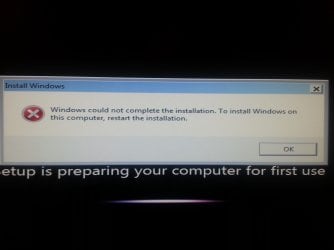
Hi! I recently used this to install my OS onto my SSD and have Users and ProgramData on my HDD. Worked perfectly, no problems at all. Unfortunately I broke the power connector on SSD and needed to get a new one. Went to go do this exact same process and got the two error messages attached to this post.... Idk why because I did everything the same. I am now reinstalling per normal and moving the user accounts later once I figure out why the script messes up that point I triple checked it!!

Any help would be great!
 

Attachments

  • IMG_20121222_004518.jpg
    IMG_20121222_004518.jpg
    299 KB · Views: 326
  • IMG_20121222_004613.jpg
    IMG_20121222_004613.jpg
    218.3 KB · Views: 430

My Computer My Computer

At a glance

Microsoft Windows 7 Home Premium 64-bit Servi...AMD FX-8320 @ 4.4 GHzG.Skill Ripjaw X Series 1866 16GBNVIDIA GeForce GTX 670
Computer type
PC/Desktop
Computer Manufacturer/Model Number
Custom
OS
Microsoft Windows 7 Home Premium 64-bit Service Pack 1
CPU
AMD FX-8320 @ 4.4 GHz
Motherboard
Asus M5A99X
Memory
G.Skill Ripjaw X Series 1866 16GB
Graphics Card(s)
NVIDIA GeForce GTX 670
Sound Card
N/A
Monitor(s) Displays
Asus 24" VS248H-P
Screen Resolution
1920x1080
Hard Drives
256 GB Samsung 840 Series SSD
1TB WD w 16 MB cache @ 10,000 RPM
Antivirus
Avast
Browser
Chrome
Cwburns32, I am not sure I understand you correctly? This is what I get from your post:

Users and Programdata already moved to another drive. SSD (system drive) broke down, was replaced, Windows installed on new SSD and trying to sysprep to move Users and ProgramData, these errors occurred?

If this is the case the errors most probably occurred because the drive you were trying to put Users and Programdata on already had those folders. Based on my own experience when something like this happens you need to first remove or rename Users and ProgramData on that other drive; if sysprep finds those folders exists, it wont work.

Again, if I understood you correctly, here's the procedure I have successfully done in similar cases. In this example system drive C: has broken down, users and ProgramData sysprepped to D:
  • Boot with a WinPE or for instance Linux Live CD/DVD
  • Backup Users from D: to an external drive (ProgramData does not need to be backed up, after installing Windows to replacement system drive you need to reinstall applications and software in anyway which creates new entries to ProgramData)
  • Delete Users and ProgramData from D:, even better to reformat D:
  • Disconnect D:
  • Reinstall Windows on replacement system drive C:
  • Reconnect D:
  • Reboot to Audit Mode, do sysprep to move Users and ProgramData

Kari
 

My Computer My Computer

At a glance

Windows 10 Pro x64 EN-GB1.6 GHz Intel Core i7-720QM Processor6 GBATI Mobility Radeon HD 5850 Graphics
Computer type
Laptop
Computer Manufacturer/Model Number
HP ENVY 17-1150eg
OS
Windows 10 Pro x64 EN-GB
CPU
1.6 GHz Intel Core i7-720QM Processor
Memory
6 GB
Graphics Card(s)
ATI Mobility Radeon HD 5850 Graphics
Sound Card
Beats sound system with integrated subwoofer
Monitor(s) Displays
17" laptop display, 22" LED and 32" Full HD TV through HDMI
Screen Resolution
1600*900 (1), 1920*1080 (2&3)
Hard Drives
Internal: 2 x 500 GB SATA Hard Disk Drive 7200 rpm
External: 2TB for backups, 3TB USB3 network drive for media
Cooling
As Envy runs a bit warm, I have it on a Cooler Master pad
Keyboard
Logitech diNovo Media Desktop Laser (bluetooth)
Mouse
Logitech Performance Mouse MX
Internet Speed
50/10 Mbps VDSL
Antivirus
Windows Defender 4.3.9431.0
Browser
Maxthon 3.5.2., IE11
Cwburns32, I am not sure I understand you correctly? This is what I get from your post:

Users and Programdata already moved to another drive. SSD (system drive) broke down, was replaced, Windows installed on new SSD and trying to sysprep to move Users and ProgramData, these errors occurred?

If this is the case the errors most probably occurred because the drive you were trying to put Users and Programdata on already had those folders. Based on my own experience when something like this happens you need to first remove or rename Users and ProgramData on that other drive; if sysprep finds those folders exists, it wont work.

Again, if I understood you correctly, here's the procedure I have successfully done in similar cases. In this example system drive C: has broken down, users and ProgramData sysprepped to D:
  • Boot with a WinPE or for instance Linux Live CD/DVD
  • Backup Users from D: to an external drive (ProgramData does not need to be backed up, after installing Windows to replacement system drive you need to reinstall applications and software in anyway which creates new entries to ProgramData)
  • Delete Users and ProgramData from D:, even better to reformat D:
  • Disconnect D:
  • Reinstall Windows on replacement system drive C:
  • Reconnect D:
  • Reboot to Audit Mode, do sysprep to move Users and ProgramData

Kari

That is exactly right I used to have OS on C and Users on E. Old SSD broke now left with Users on E. I did indeed rename file but that still pulled that error. Instead of using a WinPE or Linux Live CD/DVD could I just boot into Audit mode, plug my external HD in, transfer Users and then reformat E? I don't have access to one of those discs.
 

My Computer My Computer

At a glance

Microsoft Windows 7 Home Premium 64-bit Servi...AMD FX-8320 @ 4.4 GHzG.Skill Ripjaw X Series 1866 16GBNVIDIA GeForce GTX 670
Computer type
PC/Desktop
Computer Manufacturer/Model Number
Custom
OS
Microsoft Windows 7 Home Premium 64-bit Service Pack 1
CPU
AMD FX-8320 @ 4.4 GHz
Motherboard
Asus M5A99X
Memory
G.Skill Ripjaw X Series 1866 16GB
Graphics Card(s)
NVIDIA GeForce GTX 670
Sound Card
N/A
Monitor(s) Displays
Asus 24" VS248H-P
Screen Resolution
1920x1080
Hard Drives
256 GB Samsung 840 Series SSD
1TB WD w 16 MB cache @ 10,000 RPM
Antivirus
Avast
Browser
Chrome
Yes, that works, too. Enter audit Mode, backup Users, reformat disk.

Your case interest me, so please keep us updated!
 

My Computer My Computer

At a glance

Windows 10 Pro x64 EN-GB1.6 GHz Intel Core i7-720QM Processor6 GBATI Mobility Radeon HD 5850 Graphics
Computer type
Laptop
Computer Manufacturer/Model Number
HP ENVY 17-1150eg
OS
Windows 10 Pro x64 EN-GB
CPU
1.6 GHz Intel Core i7-720QM Processor
Memory
6 GB
Graphics Card(s)
ATI Mobility Radeon HD 5850 Graphics
Sound Card
Beats sound system with integrated subwoofer
Monitor(s) Displays
17" laptop display, 22" LED and 32" Full HD TV through HDMI
Screen Resolution
1600*900 (1), 1920*1080 (2&3)
Hard Drives
Internal: 2 x 500 GB SATA Hard Disk Drive 7200 rpm
External: 2TB for backups, 3TB USB3 network drive for media
Cooling
As Envy runs a bit warm, I have it on a Cooler Master pad
Keyboard
Logitech diNovo Media Desktop Laser (bluetooth)
Mouse
Logitech Performance Mouse MX
Internet Speed
50/10 Mbps VDSL
Antivirus
Windows Defender 4.3.9431.0
Browser
Maxthon 3.5.2., IE11
Yes, that works, too. Enter audit Mode, backup Users, reformat disk.

Your case interest me, so please keep us updated!

I have work all day today until about 6 I will try to do this as soon as I get home. Just so we are clear and I get everything right...

1 With HDD unplugged, reinstall Windows onto SSD (C drive).
2 When you get to create administrator and PC name boot into Audit Mode.
3 From Audit Mode select boot into Audit Mode and shutdown.
4 With computer shut down, plug in HDD.
5 Turn on computer. Computer boots into Audit Mode again.
6 Plug in external HDD and back up users to it.
7 Reformat HDD (E drive) to NTFS via Disk Management.
8 Run script.
 

My Computer My Computer

At a glance

Microsoft Windows 7 Home Premium 64-bit Servi...AMD FX-8320 @ 4.4 GHzG.Skill Ripjaw X Series 1866 16GBNVIDIA GeForce GTX 670
Computer type
PC/Desktop
Computer Manufacturer/Model Number
Custom
OS
Microsoft Windows 7 Home Premium 64-bit Service Pack 1
CPU
AMD FX-8320 @ 4.4 GHz
Motherboard
Asus M5A99X
Memory
G.Skill Ripjaw X Series 1866 16GB
Graphics Card(s)
NVIDIA GeForce GTX 670
Sound Card
N/A
Monitor(s) Displays
Asus 24" VS248H-P
Screen Resolution
1920x1080
Hard Drives
256 GB Samsung 840 Series SSD
1TB WD w 16 MB cache @ 10,000 RPM
Antivirus
Avast
Browser
Chrome
Yes, that should work.
 

My Computer My Computer

At a glance

Windows 10 Pro x64 EN-GB1.6 GHz Intel Core i7-720QM Processor6 GBATI Mobility Radeon HD 5850 Graphics
Computer type
Laptop
Computer Manufacturer/Model Number
HP ENVY 17-1150eg
OS
Windows 10 Pro x64 EN-GB
CPU
1.6 GHz Intel Core i7-720QM Processor
Memory
6 GB
Graphics Card(s)
ATI Mobility Radeon HD 5850 Graphics
Sound Card
Beats sound system with integrated subwoofer
Monitor(s) Displays
17" laptop display, 22" LED and 32" Full HD TV through HDMI
Screen Resolution
1600*900 (1), 1920*1080 (2&3)
Hard Drives
Internal: 2 x 500 GB SATA Hard Disk Drive 7200 rpm
External: 2TB for backups, 3TB USB3 network drive for media
Cooling
As Envy runs a bit warm, I have it on a Cooler Master pad
Keyboard
Logitech diNovo Media Desktop Laser (bluetooth)
Mouse
Logitech Performance Mouse MX
Internet Speed
50/10 Mbps VDSL
Antivirus
Windows Defender 4.3.9431.0
Browser
Maxthon 3.5.2., IE11
Yes, that should work.

Worked like a charm!! So it appears that renaming the folders (Users and ProgramData) do you no good. It seems that the PC reverts the old names of the files upon reboot and even if you rename before you run script it still messes it up. Advise everyone to reformat the disk before running script just to be "safe" and to save them a lot of time. I tried the process 4 times before I was successful, thanks to you!

Much appreciate the fast responses! Thanks again!

P.S. Having a USB 3.0 2 TB external drive helped when backing user data, 386 GBs in a little under an hour :)
 

My Computer My Computer

At a glance

Microsoft Windows 7 Home Premium 64-bit Servi...AMD FX-8320 @ 4.4 GHzG.Skill Ripjaw X Series 1866 16GBNVIDIA GeForce GTX 670
Computer type
PC/Desktop
Computer Manufacturer/Model Number
Custom
OS
Microsoft Windows 7 Home Premium 64-bit Service Pack 1
CPU
AMD FX-8320 @ 4.4 GHz
Motherboard
Asus M5A99X
Memory
G.Skill Ripjaw X Series 1866 16GB
Graphics Card(s)
NVIDIA GeForce GTX 670
Sound Card
N/A
Monitor(s) Displays
Asus 24" VS248H-P
Screen Resolution
1920x1080
Hard Drives
256 GB Samsung 840 Series SSD
1TB WD w 16 MB cache @ 10,000 RPM
Antivirus
Avast
Browser
Chrome
That is all good to know cwburns32.
 

My Computer My Computer

At a glance

Windows 7 Ultimate X64 SP1Intel i5-2550K, Differing ~4.4-4.8GHz No buil...16GB G.Skill Sniper 1866MHz @ 2133MHz 2x8GBASUS GTX650TIB-DC2OC-2GD5, (650TI Boost)
Computer type
PC/Desktop
Computer Manufacturer/Model Number
Home Built Desktop By DataTech
OS
Windows 7 Ultimate X64 SP1
CPU
Intel i5-2550K, Differing ~4.4-4.8GHz No built in GPU
Motherboard
ASUS P8Z68-V PRO/GEN3
Memory
16GB G.Skill Sniper 1866MHz @ 2133MHz 2x8GB
Graphics Card(s)
ASUS GTX650TIB-DC2OC-2GD5, (650TI Boost)
Sound Card
Onboard Realtek 5-1
Monitor(s) Displays
Samsung P2570HD
Screen Resolution
1920x1080
Hard Drives
Samsung 840 Pro 256GB SSD for OS, 500GB Seagate Constellation (Enterprise drive) for Data
PSU
Corsair HX650W
Case
Inwin Dragon Rider
Cooling
Hyper 212 EVO w/two Noctua fans, push-pull, @1300 RPM
Keyboard
E-Z Eyes, bright yellow keys with large characters
Mouse
steelseries SENSEI Laser Pro Gaming
Internet Speed
48-51Mbs Mbs down, 11 Mbs up Xfinity Cable
Antivirus
Norton Internet Security 2013
Browser
IE 10, Opera, Pale Moon if needed
Other Info
4 case fans, LG BluRay-RE, ASUS DVD-RW, Mr. Fusion power supply, 1.21 gigawatts.
Thanks for the feedback. Good to know you got it finally.

Kari
 

My Computer My Computer

At a glance

Windows 10 Pro x64 EN-GB1.6 GHz Intel Core i7-720QM Processor6 GBATI Mobility Radeon HD 5850 Graphics
Computer type
Laptop
Computer Manufacturer/Model Number
HP ENVY 17-1150eg
OS
Windows 10 Pro x64 EN-GB
CPU
1.6 GHz Intel Core i7-720QM Processor
Memory
6 GB
Graphics Card(s)
ATI Mobility Radeon HD 5850 Graphics
Sound Card
Beats sound system with integrated subwoofer
Monitor(s) Displays
17" laptop display, 22" LED and 32" Full HD TV through HDMI
Screen Resolution
1600*900 (1), 1920*1080 (2&3)
Hard Drives
Internal: 2 x 500 GB SATA Hard Disk Drive 7200 rpm
External: 2TB for backups, 3TB USB3 network drive for media
Cooling
As Envy runs a bit warm, I have it on a Cooler Master pad
Keyboard
Logitech diNovo Media Desktop Laser (bluetooth)
Mouse
Logitech Performance Mouse MX
Internet Speed
50/10 Mbps VDSL
Antivirus
Windows Defender 4.3.9431.0
Browser
Maxthon 3.5.2., IE11
So I have Windows and my program files on my SSD and program data and my user folder on my secondary HDD. I recently upgraded my HDD, and I just copied all the files over to the new one from within Windows and I changed the drive letter on the new drive to what it was, yet windows doesn't seem to be showing my programs, my libraries, or my desktop. And when I open windows Explorer, it says "C:\Windows\System32\config\systemprofile\Desktop refers to a location that is unavailable." so it sounds like it's looking for all this stuff on the C drive, my SSD.

How do I fix this?

Sent from my SAMSUNG-SGH-I747 using Tapatalk 2
 

My Computer My Computer

At a glance

Windows 7 HP x64Core i7 2630 QMRadeon HD 6970m
Computer Manufacturer/Model Number
Alienware m17x r3
OS
Windows 7 HP x64
CPU
Core i7 2630 QM
Graphics Card(s)
Radeon HD 6970m
Hard Drives
Intel 320 series 120GB SSD
Seagate 320GB HDD
So I have Windows and my program files on my SSD and program data and my user folder on my secondary HDD. I recently upgraded my HDD, and I just copied all the files over to the new one from within Windows and I changed the drive letter on the new drive to what it was, yet windows doesn't seem to be showing my programs, my libraries, or my desktop. And when I open windows Explorer, it says "C:\Windows\System32\config\systemprofile\Desktop refers to a location that is unavailable." so it sounds like it's looking for all this stuff on the C drive, my SSD.

How do I fix this?

Sent from my SAMSUNG-SGH-I747 using Tapatalk 2
Hopefully you have the original secondary drive intact. You could try cloning it to the new drive or create an image of it to put on the new one. Use Macrium Reflect FREE Edition - Information and download to try it.

I have been wanting to know if this method would work without a fresh install.
 

My Computer My Computer

At a glance

Windows 7 Ultimate X64 SP1Intel i5-2550K, Differing ~4.4-4.8GHz No buil...16GB G.Skill Sniper 1866MHz @ 2133MHz 2x8GBASUS GTX650TIB-DC2OC-2GD5, (650TI Boost)
Computer type
PC/Desktop
Computer Manufacturer/Model Number
Home Built Desktop By DataTech
OS
Windows 7 Ultimate X64 SP1
CPU
Intel i5-2550K, Differing ~4.4-4.8GHz No built in GPU
Motherboard
ASUS P8Z68-V PRO/GEN3
Memory
16GB G.Skill Sniper 1866MHz @ 2133MHz 2x8GB
Graphics Card(s)
ASUS GTX650TIB-DC2OC-2GD5, (650TI Boost)
Sound Card
Onboard Realtek 5-1
Monitor(s) Displays
Samsung P2570HD
Screen Resolution
1920x1080
Hard Drives
Samsung 840 Pro 256GB SSD for OS, 500GB Seagate Constellation (Enterprise drive) for Data
PSU
Corsair HX650W
Case
Inwin Dragon Rider
Cooling
Hyper 212 EVO w/two Noctua fans, push-pull, @1300 RPM
Keyboard
E-Z Eyes, bright yellow keys with large characters
Mouse
steelseries SENSEI Laser Pro Gaming
Internet Speed
48-51Mbs Mbs down, 11 Mbs up Xfinity Cable
Antivirus
Norton Internet Security 2013
Browser
IE 10, Opera, Pale Moon if needed
Other Info
4 case fans, LG BluRay-RE, ASUS DVD-RW, Mr. Fusion power supply, 1.21 gigawatts.
How do I fix this?
Copying system files and folders to a new HD never works. Not even on a system that has never been sysprepped. What on earth made you think it could work?

I have told this already a few times in this thread but here's the procedure once again:

When replacing the secondary HD where the folders ProgramData and Users are located, first before swapping HDs boot to Audit Mode by giving this command in Start > Run or Command Prompt:
Code:
C:\Windows\System32\Sysprep\sysprep.exe /audit /reboot
When in Audit Mode, edit the answer file (script) to change the values of FolderLocations tags back to default locations on C: as shown here:
Code:
<[B]FolderLocations[/B]>
<ProfilesDirectory>[B][COLOR="DarkRed"]C:\Users[/COLOR][/B]</ProfilesDirectory>
<ProgramData>[B][COLOR="DarkRed"]C:\ProgramData[/COLOR][/B]</ProgramData>
</[B]FolderLocations[/B]>
Rest of the answer file should remain intact, be as it was when you syprepped first time to move the folders to secondary drive.

Sysprep now as told in the tutorial, using this modified answer file to put Users and ProgramData back to C:, after reboot exit Audit Mode and boot to OOBE / Welcome Mode as told in tutorial.

Now shut down your computer, replace the secondary drive, reboot, reboot again to Audit Mode as told above and repeat the procedure, this time editing FolderLocations tags in script to put folders to a new drive.

Something worth remembering:

Moving folders back to defaults on C: can take a while, depending on how much there is to move. To avoid an hour long sysprep phase I normally backup docs, pics, music, videos etc. and delete them from user folders to make folders to be moved as empty as possible. DO NOT DELETE ANYTHING ELSE THAN YOUR PERSONAL FILES i.e. let AppData remain intact, as well as the folder structure (it's OK to delete docs from My Documents but leave the folder itself).

Every time you exit Audit Mode and boot normally for first time, it is a so called OOBE / Welcome boot. It means that the computer "thinks" Windows is booted first time ever thus stopping to ask for the initial user name and computer name. Existing user profiles are there but can not be used. If you try to enter the username you already have on that computer, this happens:

128588d1294005108-windows-7-installation-transfer-new-computer-sysprep_first_boot_3.png


I usually use a temporary username Test at this stage.

When you then finally arrive to Welcome screen, just ignore the new user account (Test) you had to create in OOBE / Welcome and log in to your normal account:

128589d1294005193-windows-7-installation-transfer-new-computer-sysprep_first_boot_5.png


Windows boots now to default OOBE first boot desktop, with default 800*600 resolution and default theme. All your installed applications are there, as well as your old user profiles and folders. Windows has installed the default drivers for your setup, you can update them if needed.

Now go to Control Panel > User Accounts and delete the temporary user account (in this case Test) that you just created.

Kari
 

My Computer My Computer

At a glance

Windows 10 Pro x64 EN-GB1.6 GHz Intel Core i7-720QM Processor6 GBATI Mobility Radeon HD 5850 Graphics
Computer type
Laptop
Computer Manufacturer/Model Number
HP ENVY 17-1150eg
OS
Windows 10 Pro x64 EN-GB
CPU
1.6 GHz Intel Core i7-720QM Processor
Memory
6 GB
Graphics Card(s)
ATI Mobility Radeon HD 5850 Graphics
Sound Card
Beats sound system with integrated subwoofer
Monitor(s) Displays
17" laptop display, 22" LED and 32" Full HD TV through HDMI
Screen Resolution
1600*900 (1), 1920*1080 (2&3)
Hard Drives
Internal: 2 x 500 GB SATA Hard Disk Drive 7200 rpm
External: 2TB for backups, 3TB USB3 network drive for media
Cooling
As Envy runs a bit warm, I have it on a Cooler Master pad
Keyboard
Logitech diNovo Media Desktop Laser (bluetooth)
Mouse
Logitech Performance Mouse MX
Internet Speed
50/10 Mbps VDSL
Antivirus
Windows Defender 4.3.9431.0
Browser
Maxthon 3.5.2., IE11
So if I change my old drive back to X and put it back in my computer, will it work normally so I can go through the procedure you posted?
 

My Computer My Computer

At a glance

Windows 7 HP x64Core i7 2630 QMRadeon HD 6970m
Computer Manufacturer/Model Number
Alienware m17x r3
OS
Windows 7 HP x64
CPU
Core i7 2630 QM
Graphics Card(s)
Radeon HD 6970m
Hard Drives
Intel 320 series 120GB SSD
Seagate 320GB HDD
It should work, but there's no way to tell before you try. Worst case scenario is new install.
 

My Computer My Computer

At a glance

Windows 10 Pro x64 EN-GB1.6 GHz Intel Core i7-720QM Processor6 GBATI Mobility Radeon HD 5850 Graphics
Computer type
Laptop
Computer Manufacturer/Model Number
HP ENVY 17-1150eg
OS
Windows 10 Pro x64 EN-GB
CPU
1.6 GHz Intel Core i7-720QM Processor
Memory
6 GB
Graphics Card(s)
ATI Mobility Radeon HD 5850 Graphics
Sound Card
Beats sound system with integrated subwoofer
Monitor(s) Displays
17" laptop display, 22" LED and 32" Full HD TV through HDMI
Screen Resolution
1600*900 (1), 1920*1080 (2&3)
Hard Drives
Internal: 2 x 500 GB SATA Hard Disk Drive 7200 rpm
External: 2TB for backups, 3TB USB3 network drive for media
Cooling
As Envy runs a bit warm, I have it on a Cooler Master pad
Keyboard
Logitech diNovo Media Desktop Laser (bluetooth)
Mouse
Logitech Performance Mouse MX
Internet Speed
50/10 Mbps VDSL
Antivirus
Windows Defender 4.3.9431.0
Browser
Maxthon 3.5.2., IE11
It should work, but there's no way to tell before you try. Worst case scenario is new install.

It still seems to be looking for everything on the C drive. Is there any way to go into audit mode and set up a connection or mklink or something to make it look in the right place?
 

My Computer My Computer

At a glance

Windows 7 HP x64Core i7 2630 QMRadeon HD 6970m
Computer Manufacturer/Model Number
Alienware m17x r3
OS
Windows 7 HP x64
CPU
Core i7 2630 QM
Graphics Card(s)
Radeon HD 6970m
Hard Drives
Intel 320 series 120GB SSD
Seagate 320GB HDD
I honestly think your best shot is to reinstall. Copying Usrs and Programdata manually and removing the drive where they were originally located has screwed your setup and registry.

Creating links now could cause bigger irreparable problems.

My recommendation is to reinstall. You have messed up, to make things OK again it's the best you could do. It also helps you to avoid related future issues.

If you are not willing to do that, you could try this method to move your user folders (do not move ProgramData and AppData folders with it). However, your screwed settings and registry can cause problems whatever you'll do.

Kari
 

My Computer My Computer

At a glance

Windows 10 Pro x64 EN-GB1.6 GHz Intel Core i7-720QM Processor6 GBATI Mobility Radeon HD 5850 Graphics
Computer type
Laptop
Computer Manufacturer/Model Number
HP ENVY 17-1150eg
OS
Windows 10 Pro x64 EN-GB
CPU
1.6 GHz Intel Core i7-720QM Processor
Memory
6 GB
Graphics Card(s)
ATI Mobility Radeon HD 5850 Graphics
Sound Card
Beats sound system with integrated subwoofer
Monitor(s) Displays
17" laptop display, 22" LED and 32" Full HD TV through HDMI
Screen Resolution
1600*900 (1), 1920*1080 (2&3)
Hard Drives
Internal: 2 x 500 GB SATA Hard Disk Drive 7200 rpm
External: 2TB for backups, 3TB USB3 network drive for media
Cooling
As Envy runs a bit warm, I have it on a Cooler Master pad
Keyboard
Logitech diNovo Media Desktop Laser (bluetooth)
Mouse
Logitech Performance Mouse MX
Internet Speed
50/10 Mbps VDSL
Antivirus
Windows Defender 4.3.9431.0
Browser
Maxthon 3.5.2., IE11
Back
Top