Using old drive in new computer

My Computer

Computer type
PC/Desktop
Computer Manufacturer/Model Number
Home made Desktop
OS
Windows 10 Pro. 64/ version 1709 Windows 7 Pro/64
CPU
Intel i7-6800K @ 4.3
Motherboard
ASUS X-99 Deluxe II
Memory
Corsair Platinum 16 gig @2400
Graphics Card(s)
EVGA GTX 1070 OC
Monitor(s) Displays
Asus 27" LED LCD/VE278Q
Screen Resolution
1920-1080 or 1280-720 HDMI
Hard Drives
INTEL SSD 730-240 Gb Sata 3.0/
PSU
EVGA Platium 1200W
Case
Phanteks Luxe Tempered Glass 8 fans/ one radiator
Cooling
XSPC/ Water Cooled CPU
Keyboard
Das 4 Professional
Mouse
Logitech M705/MX Anywhere 2-S
Internet Speed
100 mbits
Antivirus
Microsoft Security Essentials/ Malwarebytes Premium 3.0/ SAS
Browser
I.E. 11 default/Firefox/ ISP Time Warner Cable/Spectrum
Other Info
LG BluRay Burner/
Sound system-KLipsch-THX/
Icy Dock ssd Hot Swap bays.
As a final note, you folks have been extremely helpful in getting me and my trivial problems ironed out, I thank you very much!
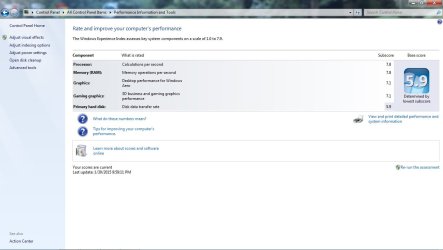
I ended up with a i7, 4500 series processor, 8 g ram(for now), 500g hdd, nvidea 750 video card, windows 7 pro-64 bit. Final tally was just under $700. It should be on my desk tomorrow or Wednesday, I will post a screen shot of the specs as it recognizes them at that time.
 

My Computer

Computer type
PC/Desktop
Computer Manufacturer/Model Number
compaq
OS
7 home premium 32 bit
CPU
AMD Athlon LE1640
Memory
2g
I will post a screen shot of the specs as it recognizes them at that time.

OK--if you can, try to give us some idea of how much faster it is than the old PC using your CAD software as you normally would use it.

For instance, if a job took an hour on the old machine, how quickly could it be done on the new one? I'm just looking for a real world comparison that might tell more than a Passmark benchmark comparison.

You should be able to easily figure out if adding more RAM would help.
 

My Computer

Computer type
PC/Desktop
Computer Manufacturer/Model Number
Ignatz Special; 4 speed manual gearbox; factory air conditioning; one of one
OS
Windows 7 Home Premium SP1, 64-bit
CPU
Intel Skylake i5-6600K, not overclocked
Motherboard
AsRock Z170M Extreme 4, micro ATX
Memory
8 GB HyperX DDR4-2666 (2 x 4 GB)
Graphics Card(s)
none; graphics are integrated on CPU
Sound Card
onboard: Realtek ALC1150; external: USB Behringer UF0-202
Monitor(s) Displays
Dell S2340M 23 inch IPS
Screen Resolution
1600 x 900
Hard Drives
System: Crucial MX100 series SSD, 128 GB;
Data: Samsung Spinpoint 103SJ, 1 TB;
Backup: WD Caviar Green WD30EZRX-00D8PB0, 3 TB
PSU
Rosewill SilentNight 500 watt fanless, semi-modular
Case
Antec Solo II
Cooling
Noctua NH-U12S; Noctua F12 intake, Noctua S12A exhaust
Keyboard
Microsoft 200 6JH-00001 USB
Mouse
Dell or Microsoft optical wired; USB
Antivirus
Microsoft Security Essentials and Malwarebytes Premium
Browser
Pale Moon
Other Info
All fans PWM; speeds at idle: CPU circa 500 rpm; intake circa 600 rpm; exhaust circa 600 rpm; CPU temps 27 idle and 47 C load in a warm room (27 C/81 F) when running Intel Extreme Tuning Utility stress test.
I only opted for the smaller ram, a single 8g at this time because end of year money is tight, It has an empty slot so adding a second one will be easy if needed

As a comparison I have intended on playing a few mp3 tunes in the background and develop a drawing, and do a motion rendering on this unit, then play same mp3 and draw same drawing on new machine, to do just what you suggest. Will advise!
 

My Computer

Computer type
PC/Desktop
Computer Manufacturer/Model Number
compaq
OS
7 home premium 32 bit
CPU
AMD Athlon LE1640
Memory
2g
Please keep in mind a couple of things.

1. Make sure you have a quality proper size power supply. Its the heart of your system. If it's not proper nothing works proper.

2. Most of todays motherboards are dual channel which will help with speed.
When you only install 1 module (stick) of ram your motherboard is now in single channel. (slower).
Knowing exactly what ram and motherboard you are going to be using would be helpful.
In most cases 2 sticks of ram 4gb each would be better than 1 stick of ram 8gb. It would allow your motherboard to run in dual channel.

If you are going to stick with the 8gb ram stick it would be best to use 2 sticks on a dual channel motherboard.
Motherboard specs and manual is a must. If we new EXACTLY what motherboard you were getting better guidance could be given.

They call it a motherboard for a reason.
The motherboard and it's bios control how all hardware hooked to it works in conjunction with each other.
 

My Computer

Computer type
PC/Desktop
Computer Manufacturer/Model Number
Home made Desktop
OS
Windows 10 Pro. 64/ version 1709 Windows 7 Pro/64
CPU
Intel i7-6800K @ 4.3
Motherboard
ASUS X-99 Deluxe II
Memory
Corsair Platinum 16 gig @2400
Graphics Card(s)
EVGA GTX 1070 OC
Monitor(s) Displays
Asus 27" LED LCD/VE278Q
Screen Resolution
1920-1080 or 1280-720 HDMI
Hard Drives
INTEL SSD 730-240 Gb Sata 3.0/
PSU
EVGA Platium 1200W
Case
Phanteks Luxe Tempered Glass 8 fans/ one radiator
Cooling
XSPC/ Water Cooled CPU
Keyboard
Das 4 Professional
Mouse
Logitech M705/MX Anywhere 2-S
Internet Speed
100 mbits
Antivirus
Microsoft Security Essentials/ Malwarebytes Premium 3.0/ SAS
Browser
I.E. 11 default/Firefox/ ISP Time Warner Cable/Spectrum
Other Info
LG BluRay Burner/
Sound system-KLipsch-THX/
Icy Dock ssd Hot Swap bays.
Did you decide you want to move the hard drive into the new PC to try that first, use the factory installed Win7, or do a Clean Reinstall Windows 7?

Since it hasn't been explicated beyond the link Ignatz posted earlier, to move the hard drive you presently have it would need to be SATA, swapped in to replace the present one for adjustment. Then enter BIOS setup to enable CSM or Legacy BIOS to disable any UEFI settings present.

Now boot the PAR disk provided to Adjust Win7 to boot on new hardware with Paragon Adaptive Restore CD to do P2P Adjust which might prompt for SATA controller driver in order to do its magic. That driver along with all others will be on the PC's Support Downloads webpage if not in the PAR disk which contains the Win7 driverstore.

After adjust, reboot the PC to see if it will start and if not confirm that the correct partition is Partition Marked Active then run Startup Repair - Run 3 Separate Times until it starts. If it won't start even then there is likely more BIOS settings that need adjustment, so post back camera snaps of any UEFI, CSM, Legacy BIOS and BIOS BOot Priority order settings.

Once it starts it should swap out all drivers in a cascade which can be monitored from the animation in the System Tray. After several reboots, once all drivers are swapped, install the PC's Network driver from its Support Downloads webpage if necessary - you can plug in by ethernet wire to maximize chance it will start up connected.

Once online enable Automatically deliver drivers via Windows Update (Step 3), Check for Updates, install all Important and Optional except Bingware, with reboots, until no more are offered. Even under Optional there will be patches needed to make hardware and software run correctly.

Next check Device Manager to import any drivers still missing from the PC's Downloads page. We can help you find any of these. Observe functions like cam, hotkeys, backlighting, etc. to see if they work as these softwares may be needed from the Downloads page too, but should only be added as needed to keep the install cleanest.

Now you're ready to test performance to see how this compares to the factory install or if there is any doubt doing a perfect Clean Reinstall Windows 7. Even if you don't do one the tools and methods in that tutorial will assure you are doing everything that works best with Win7 based on tens of thousands of cases we've helped with here.

 
My builder claimed the MB was a dual, and my running only one strip will bog it a bit(just as you say), but as I mentioned earlier, money is tight today, in about 5 weeks i'll buy the other strip and it'll be perking at whatever it is supposed to be doing,,hopefully.
 

My Computer

Computer type
PC/Desktop
Computer Manufacturer/Model Number
compaq
OS
7 home premium 32 bit
CPU
AMD Athlon LE1640
Memory
2g
My builder claimed the MB was a dual, and my running only one strip will bog it a bit(just as you say), but as I mentioned earlier, money is tight today, in about 5 weeks i'll buy the other strip and it'll be perking at whatever it is supposed to be doing,,hopefully.

Yeah, if I understand you correctly your new PC's motherboard has only 2 slots---and you are using just 1 of those 2.

You will suffer, but only slightly, from using that single 8 GB stick compared to using two 4 GB sticks.

In a RAM hungry situation, you are better off with more slow RAM than less faster RAM, so you are doing the right thing if you need more than 8 total eventually and money is short right now. When you buy the additional 8 GB stick, match it as close as possible to the one that's in there now--down to the level of size, voltage, brand name and model number if possible.
 

My Computer

Computer type
PC/Desktop
Computer Manufacturer/Model Number
Ignatz Special; 4 speed manual gearbox; factory air conditioning; one of one
OS
Windows 7 Home Premium SP1, 64-bit
CPU
Intel Skylake i5-6600K, not overclocked
Motherboard
AsRock Z170M Extreme 4, micro ATX
Memory
8 GB HyperX DDR4-2666 (2 x 4 GB)
Graphics Card(s)
none; graphics are integrated on CPU
Sound Card
onboard: Realtek ALC1150; external: USB Behringer UF0-202
Monitor(s) Displays
Dell S2340M 23 inch IPS
Screen Resolution
1600 x 900
Hard Drives
System: Crucial MX100 series SSD, 128 GB;
Data: Samsung Spinpoint 103SJ, 1 TB;
Backup: WD Caviar Green WD30EZRX-00D8PB0, 3 TB
PSU
Rosewill SilentNight 500 watt fanless, semi-modular
Case
Antec Solo II
Cooling
Noctua NH-U12S; Noctua F12 intake, Noctua S12A exhaust
Keyboard
Microsoft 200 6JH-00001 USB
Mouse
Dell or Microsoft optical wired; USB
Antivirus
Microsoft Security Essentials and Malwarebytes Premium
Browser
Pale Moon
Other Info
All fans PWM; speeds at idle: CPU circa 500 rpm; intake circa 600 rpm; exhaust circa 600 rpm; CPU temps 27 idle and 47 C load in a warm room (27 C/81 F) when running Intel Extreme Tuning Utility stress test.
Last edited:

My Computer

Computer type
PC/Desktop
Computer Manufacturer/Model Number
Skylake Special #666
OS
Windows 10 Pro x64
CPU
Intel Core i7 6700K
Motherboard
Asus Sabertooth Z170 Mark 1
Memory
GSkill TridentZ RGB 16GB 3600 16-16-16-36
Graphics Card(s)
EVGA GTX 980 Ti SC x2
Sound Card
Realtek High Definition
Monitor(s) Displays
AOC G2460PG
Screen Resolution
1920 x 1080 144Hz
Hard Drives
Samsung 860 Pro 256GB, Seagate Barracuda 4TB x2
PSU
EVGA 1000 P2, EVGA White Custom Braided Cables
Case
Corsair Vengeance C70 Gunmetal Black
Cooling
Corsair H100i v2, Corsair ML120 x2, Thermal Grizzly Kryonaut
Keyboard
Logitech G910 Orion Spectrum
Mouse
Logitech G700s
Internet Speed
Verizon Fios Quantum Gateway 75/75
Antivirus
Windows Defender, Malwarebytes Free 3.8.3
Browser
Chrome
Other Info
Corsair SP120 x4, LG Blu-ray Drive, Durabrand HT-395 100 Watt Dolby Digital Amp, Corsair H2100 Wireless 7.1 Headset
That is what was recommended by folks here, and in one of the links that was given for a school mini requirement
 

My Computer

Computer type
PC/Desktop
Computer Manufacturer/Model Number
compaq
OS
7 home premium 32 bit
CPU
AMD Athlon LE1640
Memory
2g
And guess who recommended it ?

Still a good choice, but let us know if it does what you need.
 
Last edited:

My Computer

Computer type
PC/Desktop
Computer Manufacturer/Model Number
Skylake Special #666
OS
Windows 10 Pro x64
CPU
Intel Core i7 6700K
Motherboard
Asus Sabertooth Z170 Mark 1
Memory
GSkill TridentZ RGB 16GB 3600 16-16-16-36
Graphics Card(s)
EVGA GTX 980 Ti SC x2
Sound Card
Realtek High Definition
Monitor(s) Displays
AOC G2460PG
Screen Resolution
1920 x 1080 144Hz
Hard Drives
Samsung 860 Pro 256GB, Seagate Barracuda 4TB x2
PSU
EVGA 1000 P2, EVGA White Custom Braided Cables
Case
Corsair Vengeance C70 Gunmetal Black
Cooling
Corsair H100i v2, Corsair ML120 x2, Thermal Grizzly Kryonaut
Keyboard
Logitech G910 Orion Spectrum
Mouse
Logitech G700s
Internet Speed
Verizon Fios Quantum Gateway 75/75
Antivirus
Windows Defender, Malwarebytes Free 3.8.3
Browser
Chrome
Other Info
Corsair SP120 x4, LG Blu-ray Drive, Durabrand HT-395 100 Watt Dolby Digital Amp, Corsair H2100 Wireless 7.1 Headset
it is one of the three recommended in a link on post #35
 

My Computer

Computer type
PC/Desktop
Computer Manufacturer/Model Number
compaq
OS
7 home premium 32 bit
CPU
AMD Athlon LE1640
Memory
2g
If you're into Cad You should check here, and put in your Program information and it should give you a list of recommended hardware. Autodesk - Certified Hardware - Find Recommended Hardware

This is something to think about in the future if you're serious about your work, Get a workstation.

Also for CAD the GTX 750 is not for cad. its a cheap alternative to PC gaming, Not workstation. But I guess anything is better than what you've recently been using.

For now if you want you can try these GPU's which work very well. The 5 Best Graphic Cards for Gaming and CAD
 

My Computer

Computer type
PC/Desktop
Computer Manufacturer/Model Number
Custom
OS
Windows 7 Ultimate 64-bit SP1
CPU
Intel Core i7 3930K @ 3.20GHz 4.24 OC Sandy Bridge-E Tech
Motherboard
ASUSTeK COMPUTER INC. RAMPAGE IV EXTREME (LGA2011)
Memory
16 GB RipJaws 2400mhz OC - operating 16.0GB DDR3 @ 833MHz x2
Graphics Card(s)
NVIDIA GeForce GTX 770 x2 SLI Enabled
Sound Card
Yamaha Steinberg USB Audio
Monitor(s) Displays
ASUS PB278
Screen Resolution
ASUS PB278 (2560x1440@60Hz)
Hard Drives
2TB Western Digital WDC WD2002FAEX-007BA SCSI Disk Device (SATA)
250GB Samsung SSD 840 EVO 120G SCSI Disk Device (SSD) 32 °C
2TB Hitachi HDS722020ALA330 SCSI Disk Device (SATA)
PSU
1200watts.
Case
Switch 810 GunMetal
Cooling
H100i + 12 fans
Keyboard
Razer DeathStalker
Mouse
Logitech G502
Internet Speed
60/Mbs
Antivirus
AVG/Malwarebytes/Hitman Pro
Browser
Chrome
Their are so many choices.
I would suggest a starting place before one buys anything.

Understand how serious is one going to be about getting a quality product to their customers in a timely fashion. CAD of Video Editing can be done on a bottom shelf computer if quality and the amount of time it takes is no concern.

If timely fashion and quality is really of concern one is going to have to spend a lot of money for computer power. Only the person doing CAD and Video Editing can make that decision.

If one makes the wrong decision their customers will let them know in a heart beat.

It's a difficult decision between dollars invested and expected income of the investment.
 

My Computer

Computer type
PC/Desktop
Computer Manufacturer/Model Number
Home made Desktop
OS
Windows 10 Pro. 64/ version 1709 Windows 7 Pro/64
CPU
Intel i7-6800K @ 4.3
Motherboard
ASUS X-99 Deluxe II
Memory
Corsair Platinum 16 gig @2400
Graphics Card(s)
EVGA GTX 1070 OC
Monitor(s) Displays
Asus 27" LED LCD/VE278Q
Screen Resolution
1920-1080 or 1280-720 HDMI
Hard Drives
INTEL SSD 730-240 Gb Sata 3.0/
PSU
EVGA Platium 1200W
Case
Phanteks Luxe Tempered Glass 8 fans/ one radiator
Cooling
XSPC/ Water Cooled CPU
Keyboard
Das 4 Professional
Mouse
Logitech M705/MX Anywhere 2-S
Internet Speed
100 mbits
Antivirus
Microsoft Security Essentials/ Malwarebytes Premium 3.0/ SAS
Browser
I.E. 11 default/Firefox/ ISP Time Warner Cable/Spectrum
Other Info
LG BluRay Burner/
Sound system-KLipsch-THX/
Icy Dock ssd Hot Swap bays.
Got my new computer on the desk, loaded my cad/cam. It is night and day difference!
 

Attachments

  • first day new comp.jpg
    first day new comp.jpg
    64.1 KB · Views: 3

My Computer

Computer type
PC/Desktop
Computer Manufacturer/Model Number
compaq
OS
7 home premium 32 bit
CPU
AMD Athlon LE1640
Memory
2g
NVIDIA GeForce GT 640, 2gb DDR3
Intel I 7-3790 processor
Asus b85m-e-csm board
600W power Supply
1T hard drive
samsung 24x writer
8g mem
Windows 7 Enterprise, 64 bit

in the $755 neighborhood.
 
Last edited:

My Computer

Computer type
PC/Desktop
Computer Manufacturer/Model Number
compaq
OS
7 home premium 32 bit
CPU
AMD Athlon LE1640
Memory
2g
Just some observations based on many similar searches done here:

8gb is fine - watch the Resource Manager to see how much you ever use of it vs. the CPU cycles used.

But IMO i7 is really only needed for extreme gaming, video editing, unless some of your mechanical programs would need that sort of power.

The irony is that for the price of i5 you could have added a large SSD and had twice the speed anyway.

I'd still add an SSD the size of your OS and all programs and keep your storage on the HD.
 
Last edited:
Is the SSD a Solid State Drive? It is on the horizon, just opted to build better box for now, so when i can afford a drive it will be in a good home
 

My Computer

Computer type
PC/Desktop
Computer Manufacturer/Model Number
compaq
OS
7 home premium 32 bit
CPU
AMD Athlon LE1640
Memory
2g
Thanks to all here who have helped school me without the condescending attitudes I had expected, you folks have been great working with me on this.I should mark this solved, eh?
 

My Computer

Computer type
PC/Desktop
Computer Manufacturer/Model Number
compaq
OS
7 home premium 32 bit
CPU
AMD Athlon LE1640
Memory
2g
Is the SSD a Solid State Drive? It is on the horizon, just opted to build better box for now, so when i can afford a drive it will be in a good home

Sounds like you did good, Bob.

How much more quickly does the new PC do a job than your old setup? Half the time? Less than that?

Yeah, SSD is a solid state drive. It will speed up stuff like booting, opening programs, virus scans, and help with overall "snappiness"---not sure how much it will help in CAD/CAM directly.

You can buy a good 128 GB SSD for $60 or $70. Windows itself takes up 20 or 30 GB. Don't know how much space your CAD/CAM stuff takes.

Most common thing to do would be to put Windows and applications on the SSD and use your 1 TB hard drive for all storage and personal files.

You could either do a fresh install to the SSD or copy your current C drive to the SSD via "imaging" or "cloning".
 

My Computer

Computer type
PC/Desktop
Computer Manufacturer/Model Number
Ignatz Special; 4 speed manual gearbox; factory air conditioning; one of one
OS
Windows 7 Home Premium SP1, 64-bit
CPU
Intel Skylake i5-6600K, not overclocked
Motherboard
AsRock Z170M Extreme 4, micro ATX
Memory
8 GB HyperX DDR4-2666 (2 x 4 GB)
Graphics Card(s)
none; graphics are integrated on CPU
Sound Card
onboard: Realtek ALC1150; external: USB Behringer UF0-202
Monitor(s) Displays
Dell S2340M 23 inch IPS
Screen Resolution
1600 x 900
Hard Drives
System: Crucial MX100 series SSD, 128 GB;
Data: Samsung Spinpoint 103SJ, 1 TB;
Backup: WD Caviar Green WD30EZRX-00D8PB0, 3 TB
PSU
Rosewill SilentNight 500 watt fanless, semi-modular
Case
Antec Solo II
Cooling
Noctua NH-U12S; Noctua F12 intake, Noctua S12A exhaust
Keyboard
Microsoft 200 6JH-00001 USB
Mouse
Dell or Microsoft optical wired; USB
Antivirus
Microsoft Security Essentials and Malwarebytes Premium
Browser
Pale Moon
Other Info
All fans PWM; speeds at idle: CPU circa 500 rpm; intake circa 600 rpm; exhaust circa 600 rpm; CPU temps 27 idle and 47 C load in a warm room (27 C/81 F) when running Intel Extreme Tuning Utility stress test.
Back
Top