Various programs stops working

gajendra72

New member
Local time
8:01 AM
Messages
7
Hi all,

My Desktop (2GB Ram - Intel (R) G41 Express Chipset - ACPI x64 - 80gb HD) was running just fine with XP up until a few days ago. Then all of a sudden when i booted up all i would see is my wallpaper and no icons or taskbar, Got Icons & Start menu trying by restarting manually and then certain programs like Tally ERP9 & MS Office 2007 would not open.

So after formating tried fresh instal of Windows 7, To see if upgrading to Win 7 would help me. Whilst it certainly erased the missing taskbar and icon problem.

Now the problem of Programs (Installed only MS Office 2007 - by CD, Tally ERP9 - by CD, Chrome, Mozilla [Downloaded from net, latest versions] & all these stopped working) Not Working/Stopped came back. The programs would work once and function perfectly after they installed, then would not open thereafter.

(All programmes of Win7 works fine like Notepad, IE)
Upgraded MS Office 2007 to 2010 but same problem.

Tried
Several more fresh installs of Win 7 after formatting HD
Scanned all Programmes I installed
Closed Firewall, auto updating
But still same problem.

Please help

 
Last edited by a moderator:

My Computer

Computer type
PC/Desktop
OS
Microsoft Windows 7 Ultimate 64-bit 7600 Multiprocessor Free
CPU
Pentium(R) Dual-Core CPU E5700 @ 3.00GHz
Motherboard
Gigabyte Technology Co., Ltd. G41M-Combo
Memory
2.00 GB
Graphics Card(s)
Intel(R) G41 Express Chipset
Sound Card
VIA High Definition Audio
Screen Resolution
1366 x 768 x 32 bits (4294967296 colors) @ 59 Hz
Hard Drives
(1) ST380215SCE ATA Device (2) ZTE MMC Storage USB Device
Keyboard
Normal wired PS2 Keyboard
Mouse
Wired USB Mouse

My Computers

System One System Two

  • Computer type
    PC/Desktop
    Computer Manufacturer/Model Number
    ALWAYS UNDER CONSTRUCTION
    OS
    Windows 11 Pro
    CPU
    Ryzen 9 5900X
    Motherboard
    Asus X570 Crosshair Viii Hero
    Memory
    32GB G Skill DDR4-3600
    Graphics Card(s)
    EVGA RTX 3080 FTW 3 Ultra
    Sound Card
    On Board/Sennheiser PC37X Headset
    Monitor(s) Displays
    3 X Asus 27"
    Screen Resolution
    2560x1440
    Hard Drives
    2 X 1 TB NVME drives
    PSU
    EVGA 850
    Case
    Phanteks Eclipse P400A
    Cooling
    EVGA 280 AIO
    Keyboard
    Logitech G510s/ Logitech G13
    Mouse
    Logitech G502
    Internet Speed
    24/1
    Antivirus
    ESET/MBAM Pro/SAS Pro
    Browser
    Chrome/ Firefox/ Edge
  • Computer type
    Laptop
    System Manufacturer/Model Number
    Dell 16 Plus
    OS
    Windows 11 Pro
    CPU
    Intel Ultra 9 288V
    Memory
    32 GB LPDDR5X 8533
    Monitor(s) Displays
    16" Mini-LED HDR600 Touch 90 Hz
    Screen Resolution
    2560X1600
    Hard Drives
    1 TB NVME
Hi,

Yesterday I formatted & reinstalled Windows 7 , MS Office 2010, Tally ERP9, Modem & Wifi drivers. Its working fine till now.
But If I 'll install some other Browser or programme, all of first MS Office stops working.

Attached here with Zip file of DM Log Collector report.

Hope now the problem will be solved
 

Attachments

My Computer

Computer type
PC/Desktop
OS
Microsoft Windows 7 Ultimate 64-bit 7600 Multiprocessor Free
CPU
Pentium(R) Dual-Core CPU E5700 @ 3.00GHz
Motherboard
Gigabyte Technology Co., Ltd. G41M-Combo
Memory
2.00 GB
Graphics Card(s)
Intel(R) G41 Express Chipset
Sound Card
VIA High Definition Audio
Screen Resolution
1366 x 768 x 32 bits (4294967296 colors) @ 59 Hz
Hard Drives
(1) ST380215SCE ATA Device (2) ZTE MMC Storage USB Device
Keyboard
Normal wired PS2 Keyboard
Mouse
Wired USB Mouse
gajendra72, There are no dump files in the logs you uploaded. Those are what we work from. I need to know what hardware you have

Please fill out your System Specs

   Information
Your System Specs will help us to help you, and doing it in this manner will make them available to all helpers in every post and keep us from hunting for them. We ask that you fill them out in as much detail as possible including Desktop or Laptop, Model number if it is an OEM computer and all components with the Manufacturer and Model number if possible.

If you will go to your last post and click the 'System Specs' in the bottom left of the post, you will find a link to update your system specs. Please fill those out in as much detail as possible, making sure to click save at the bottom of the page. If you would like to know what we would like, you can click 'My System Specs' at the bottom left of this post to see mine. If you do not know what your components are, this will help you accomplish this task. http://www.sevenforums.com/tutorials/180324-system-info-see-your-system-specs.html


If you have a BSOD please upload again the
http://www.sevenforums.com/bsod-help-support/96879-blue-screen-death-bsod-posting-instructions.html
 

My Computers

System One System Two

  • Computer type
    PC/Desktop
    Computer Manufacturer/Model Number
    ALWAYS UNDER CONSTRUCTION
    OS
    Windows 11 Pro
    CPU
    Ryzen 9 5900X
    Motherboard
    Asus X570 Crosshair Viii Hero
    Memory
    32GB G Skill DDR4-3600
    Graphics Card(s)
    EVGA RTX 3080 FTW 3 Ultra
    Sound Card
    On Board/Sennheiser PC37X Headset
    Monitor(s) Displays
    3 X Asus 27"
    Screen Resolution
    2560x1440
    Hard Drives
    2 X 1 TB NVME drives
    PSU
    EVGA 850
    Case
    Phanteks Eclipse P400A
    Cooling
    EVGA 280 AIO
    Keyboard
    Logitech G510s/ Logitech G13
    Mouse
    Logitech G502
    Internet Speed
    24/1
    Antivirus
    ESET/MBAM Pro/SAS Pro
    Browser
    Chrome/ Firefox/ Edge
  • Computer type
    Laptop
    System Manufacturer/Model Number
    Dell 16 Plus
    OS
    Windows 11 Pro
    CPU
    Intel Ultra 9 288V
    Memory
    32 GB LPDDR5X 8533
    Monitor(s) Displays
    16" Mini-LED HDR600 Touch 90 Hz
    Screen Resolution
    2560X1600
    Hard Drives
    1 TB NVME
System Specs updated

Hi,

To Run SystemInfo.exe Windows showed that I need .NET Framework, downloaded that & Updated 'System Specs'

Hope this will do & now problem/errors can b solved.
 

My Computer

Computer type
PC/Desktop
OS
Microsoft Windows 7 Ultimate 64-bit 7600 Multiprocessor Free
CPU
Pentium(R) Dual-Core CPU E5700 @ 3.00GHz
Motherboard
Gigabyte Technology Co., Ltd. G41M-Combo
Memory
2.00 GB
Graphics Card(s)
Intel(R) G41 Express Chipset
Sound Card
VIA High Definition Audio
Screen Resolution
1366 x 768 x 32 bits (4294967296 colors) @ 59 Hz
Hard Drives
(1) ST380215SCE ATA Device (2) ZTE MMC Storage USB Device
Keyboard
Normal wired PS2 Keyboard
Mouse
Wired USB Mouse
MS Office 2010 , Firefox stopped working again now

Hi,

I downloaded/installed fresh Firefox - All programmes were working
Installed Yahoo messenger from CD - All programmes were working
But when I installed Skype from CD - MS Office 2010 stopped working

REGEDIT & TaskManager got deactivated

Uploading DM Log Collector report of now

Pls help
 

Attachments

My Computer

Computer type
PC/Desktop
OS
Microsoft Windows 7 Ultimate 64-bit 7600 Multiprocessor Free
CPU
Pentium(R) Dual-Core CPU E5700 @ 3.00GHz
Motherboard
Gigabyte Technology Co., Ltd. G41M-Combo
Memory
2.00 GB
Graphics Card(s)
Intel(R) G41 Express Chipset
Sound Card
VIA High Definition Audio
Screen Resolution
1366 x 768 x 32 bits (4294967296 colors) @ 59 Hz
Hard Drives
(1) ST380215SCE ATA Device (2) ZTE MMC Storage USB Device
Keyboard
Normal wired PS2 Keyboard
Mouse
Wired USB Mouse
Did you build this machine yourself? Uninstall Skype and see if Office works.
 

My Computers

System One System Two

  • Computer type
    PC/Desktop
    Computer Manufacturer/Model Number
    ALWAYS UNDER CONSTRUCTION
    OS
    Windows 11 Pro
    CPU
    Ryzen 9 5900X
    Motherboard
    Asus X570 Crosshair Viii Hero
    Memory
    32GB G Skill DDR4-3600
    Graphics Card(s)
    EVGA RTX 3080 FTW 3 Ultra
    Sound Card
    On Board/Sennheiser PC37X Headset
    Monitor(s) Displays
    3 X Asus 27"
    Screen Resolution
    2560x1440
    Hard Drives
    2 X 1 TB NVME drives
    PSU
    EVGA 850
    Case
    Phanteks Eclipse P400A
    Cooling
    EVGA 280 AIO
    Keyboard
    Logitech G510s/ Logitech G13
    Mouse
    Logitech G502
    Internet Speed
    24/1
    Antivirus
    ESET/MBAM Pro/SAS Pro
    Browser
    Chrome/ Firefox/ Edge
  • Computer type
    Laptop
    System Manufacturer/Model Number
    Dell 16 Plus
    OS
    Windows 11 Pro
    CPU
    Intel Ultra 9 288V
    Memory
    32 GB LPDDR5X 8533
    Monitor(s) Displays
    16" Mini-LED HDR600 Touch 90 Hz
    Screen Resolution
    2560X1600
    Hard Drives
    1 TB NVME

My Computers

System One System Two

  • Computer type
    PC/Desktop
    Computer Manufacturer/Model Number
    ALWAYS UNDER CONSTRUCTION
    OS
    Windows 11 Pro
    CPU
    Ryzen 9 5900X
    Motherboard
    Asus X570 Crosshair Viii Hero
    Memory
    32GB G Skill DDR4-3600
    Graphics Card(s)
    EVGA RTX 3080 FTW 3 Ultra
    Sound Card
    On Board/Sennheiser PC37X Headset
    Monitor(s) Displays
    3 X Asus 27"
    Screen Resolution
    2560x1440
    Hard Drives
    2 X 1 TB NVME drives
    PSU
    EVGA 850
    Case
    Phanteks Eclipse P400A
    Cooling
    EVGA 280 AIO
    Keyboard
    Logitech G510s/ Logitech G13
    Mouse
    Logitech G502
    Internet Speed
    24/1
    Antivirus
    ESET/MBAM Pro/SAS Pro
    Browser
    Chrome/ Firefox/ Edge
  • Computer type
    Laptop
    System Manufacturer/Model Number
    Dell 16 Plus
    OS
    Windows 11 Pro
    CPU
    Intel Ultra 9 288V
    Memory
    32 GB LPDDR5X 8533
    Monitor(s) Displays
    16" Mini-LED HDR600 Touch 90 Hz
    Screen Resolution
    2560X1600
    Hard Drives
    1 TB NVME
Hi,

Its assembled PC, Common here in India.

I uninstalled Skype.

*** BTW I did

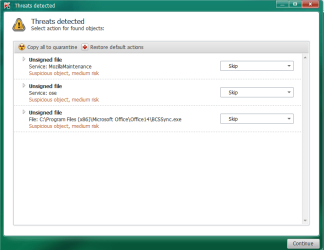
1. Downloaded and ran TDSSKiller [Kasperkey].
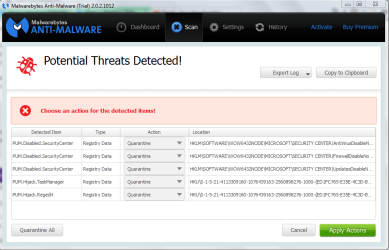
2. Installed Malwarebytes (Free Version) & "Threat Scanned"
[ScreenShots of both scans attached herewith]

3. Downloaded Windows Defender Offline & Scanned
Here I found 'Sality.AT' virus , After repairing this MS Office 2010 & Firefox started working.
But I think this virus isnt got removed completely.

Now what I think is I format all parts of HD again & reinstall Win & Other softwares again.

What you will suggest, Pls reply
 

Attachments

  • Snapshot_2014-09-07_135531.png
    Snapshot_2014-09-07_135531.png
    18.2 KB · Views: 0
  • Snapshot_2014-09-07_135741.png
    Snapshot_2014-09-07_135741.png
    27.4 KB · Views: 0

My Computer

Computer type
PC/Desktop
OS
Microsoft Windows 7 Ultimate 64-bit 7600 Multiprocessor Free
CPU
Pentium(R) Dual-Core CPU E5700 @ 3.00GHz
Motherboard
Gigabyte Technology Co., Ltd. G41M-Combo
Memory
2.00 GB
Graphics Card(s)
Intel(R) G41 Express Chipset
Sound Card
VIA High Definition Audio
Screen Resolution
1366 x 768 x 32 bits (4294967296 colors) @ 59 Hz
Hard Drives
(1) ST380215SCE ATA Device (2) ZTE MMC Storage USB Device
Keyboard
Normal wired PS2 Keyboard
Mouse
Wired USB Mouse
Have you much experience using the command prompt? Also, where did you get your Windows installation disk? And your Microsoft Office Disk?
 

My Computers

System One System Two

  • Computer type
    PC/Desktop
    Computer Manufacturer/Model Number
    ALWAYS UNDER CONSTRUCTION
    OS
    Windows 11 Pro
    CPU
    Ryzen 9 5900X
    Motherboard
    Asus X570 Crosshair Viii Hero
    Memory
    32GB G Skill DDR4-3600
    Graphics Card(s)
    EVGA RTX 3080 FTW 3 Ultra
    Sound Card
    On Board/Sennheiser PC37X Headset
    Monitor(s) Displays
    3 X Asus 27"
    Screen Resolution
    2560x1440
    Hard Drives
    2 X 1 TB NVME drives
    PSU
    EVGA 850
    Case
    Phanteks Eclipse P400A
    Cooling
    EVGA 280 AIO
    Keyboard
    Logitech G510s/ Logitech G13
    Mouse
    Logitech G502
    Internet Speed
    24/1
    Antivirus
    ESET/MBAM Pro/SAS Pro
    Browser
    Chrome/ Firefox/ Edge
  • Computer type
    Laptop
    System Manufacturer/Model Number
    Dell 16 Plus
    OS
    Windows 11 Pro
    CPU
    Intel Ultra 9 288V
    Memory
    32 GB LPDDR5X 8533
    Monitor(s) Displays
    16" Mini-LED HDR600 Touch 90 Hz
    Screen Resolution
    2560X1600
    Hard Drives
    1 TB NVME
No , I donno ABCD of command prompt, I simply downloaded these from net using IE.

This installation disk I got with the PC I bought from.
 

My Computer

Computer type
PC/Desktop
OS
Microsoft Windows 7 Ultimate 64-bit 7600 Multiprocessor Free
CPU
Pentium(R) Dual-Core CPU E5700 @ 3.00GHz
Motherboard
Gigabyte Technology Co., Ltd. G41M-Combo
Memory
2.00 GB
Graphics Card(s)
Intel(R) G41 Express Chipset
Sound Card
VIA High Definition Audio
Screen Resolution
1366 x 768 x 32 bits (4294967296 colors) @ 59 Hz
Hard Drives
(1) ST380215SCE ATA Device (2) ZTE MMC Storage USB Device
Keyboard
Normal wired PS2 Keyboard
Mouse
Wired USB Mouse
You are using an HP OEM_SLP key. An OEM_SLP Key is only good on the computer it came from the manufacturer on. It cannot be put on any other computer and Validated. If it was ever Validated on your computer, it could only have done so with a hacker's exploit that heavily alters Windows System Files. For that reason most BSOD Analysts will not even attempt to debug that system, as it is very close to impossible. I suspect the same holds true for your Microsoft Office. I think, to some extent, that is what you are seeing in some of the screenshots and the reason you are having many of the problems you are having.

My best suggestion is to get a legal copy of Windows and Office and install it. Once you have installed a legal Windows Operating system and are still having problems, we will be more than happy to help you. Otherwise, there is little we can do.
 

My Computers

System One System Two

  • Computer type
    PC/Desktop
    Computer Manufacturer/Model Number
    ALWAYS UNDER CONSTRUCTION
    OS
    Windows 11 Pro
    CPU
    Ryzen 9 5900X
    Motherboard
    Asus X570 Crosshair Viii Hero
    Memory
    32GB G Skill DDR4-3600
    Graphics Card(s)
    EVGA RTX 3080 FTW 3 Ultra
    Sound Card
    On Board/Sennheiser PC37X Headset
    Monitor(s) Displays
    3 X Asus 27"
    Screen Resolution
    2560x1440
    Hard Drives
    2 X 1 TB NVME drives
    PSU
    EVGA 850
    Case
    Phanteks Eclipse P400A
    Cooling
    EVGA 280 AIO
    Keyboard
    Logitech G510s/ Logitech G13
    Mouse
    Logitech G502
    Internet Speed
    24/1
    Antivirus
    ESET/MBAM Pro/SAS Pro
    Browser
    Chrome/ Firefox/ Edge
  • Computer type
    Laptop
    System Manufacturer/Model Number
    Dell 16 Plus
    OS
    Windows 11 Pro
    CPU
    Intel Ultra 9 288V
    Memory
    32 GB LPDDR5X 8533
    Monitor(s) Displays
    16" Mini-LED HDR600 Touch 90 Hz
    Screen Resolution
    2560X1600
    Hard Drives
    1 TB NVME
Hi All,

1. Downloaded and ran TDSSKiller [Kasperkey].
2. Installed Malwarebytes (Free Version) & "Threat Scanned"
3. Downloaded Windows Defender Offline & Scanned
Here I found 'Sality.AT' virus , After repairing this MS Office 2010 & Firefox started working.
But I think this virus isnt got removed completely.

4. So I just formatted all parts of Hard Disk & reinstalled Windows 7 & just next installed
'Microsoft Security Essential' & made it set to 'Real Time Protection'
Only after that I started installing other Programmes & Drivers.

Right now PC is working fine, Hope it will.

Thanks to all those who helped directly or indirectly.
 

My Computer

Computer type
PC/Desktop
OS
Microsoft Windows 7 Ultimate 64-bit 7600 Multiprocessor Free
CPU
Pentium(R) Dual-Core CPU E5700 @ 3.00GHz
Motherboard
Gigabyte Technology Co., Ltd. G41M-Combo
Memory
2.00 GB
Graphics Card(s)
Intel(R) G41 Express Chipset
Sound Card
VIA High Definition Audio
Screen Resolution
1366 x 768 x 32 bits (4294967296 colors) @ 59 Hz
Hard Drives
(1) ST380215SCE ATA Device (2) ZTE MMC Storage USB Device
Keyboard
Normal wired PS2 Keyboard
Mouse
Wired USB Mouse
Back
Top