

I made this quite a while back but here's a quick guide to getting your head around the different image types out there.
Its hard to explain graphics software without first establishing an understanding of the differences between the two major graphic types: bitmap and vector images. This is an important lesson and often a tough one to grasp. If you work with graphics at all, it's bound to come up, so it's an important concept to understand. The most common type is the bitmap image.
Bitmap images (also known as raster images) are made up of pixels in a grid. Pixels are picture elements; tiny dots of individual color that make up what you see on your screen. All these tiny dots of color come together to form the images you see.
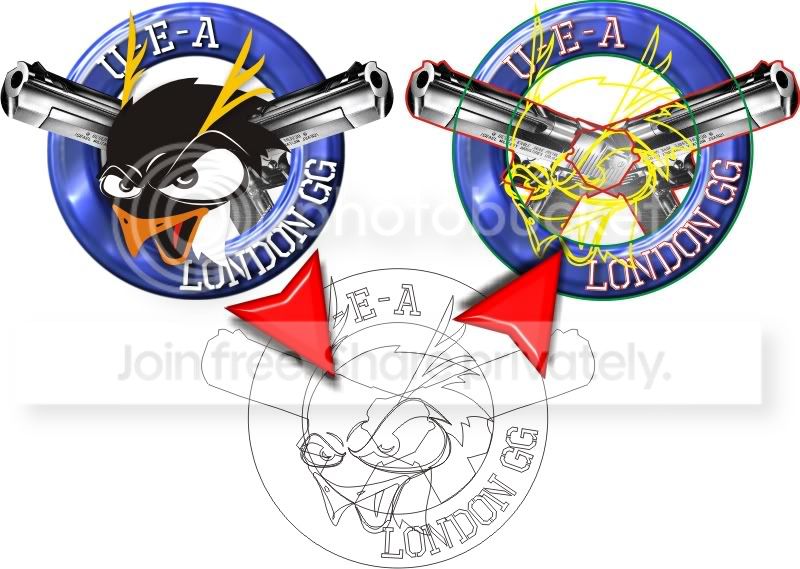
To illustrate this. I’ve laid out a picture in it’s different elements. The first picture shows the Vector image with its colour. The image in the middle shows the vector in wireframe (or with no colour) and how it was originally drawn. The image on the right shows it converted to its bitmap state.
When I originally drew this crest it would have been very difficult and near impossible to just use a bitmap imaging program like photoshop etc. which is why I vectorised the image using CorelDRAW so that I could manipulate it freely. (resize, change curves, re-colour etc.)
Bitmap images are resolution dependent. Resolution refers to the number of pixels in an image and is usually stated as dpi (dots per inch) or ppi (pixels per inch). Bitmap images are displayed on your computer screen at screen resolution. However, when printing bitmaps, your printer needs much more data than a monitor. In order to render a bitmap image accurately. If you've ever wondered why your 300 dpi scanned image appears so much larger on your monitor, this is why.

Because bitmaps are resolution dependent, it's difficult to increase or decrease their size without sacrificing a degree of image quality. When you reduce the size of a bitmap image through your software's resample or resize command, you must discard pixels. When you increase the size of a bitmap image through your software's resample or resize command, the software has to create new pixels. When creating pixels, the software must estimate the color values of the new pixels based on the surrounding pixels. This process is called interpolation.
You may have noticed, when specifically talking about resizing images "through your software's resample or resize command" You must make the distinction between the method of resizing versus zooming in and out, or dragging the edges of your images in a page layout program to resize it. This type of resizing is more accurately called scaling. Scaling an image does not effect the image permanently. In other words, it does not change the number of pixels in the image. However, if you scale a bitmap image to a larger size in your page layout software, you are going to see a definite jagged appearance. Even if you don't see it on your screen, it will be very apparent in the printed image. Scaling a bitmap image to a smaller size doesn't have any effect; in fact, when you do this you are effectively increasing the ppi of the image so that it will print clearer.
Common bitmap formats include:
• BMP
• GIF
• JPEG, JPG
• PNG
• PICT (Macintosh)
• PCX
• TIFF
• PSD (Adobe Photoshop)
Popular bitmap editing programs are:
• Microsoft Paint
• Adobe Photoshop
• Corel Photo-Paint
• Corel Paint Shop Pro
• GIMP
All scanned images are bitmaps, and all images from digital cameras are bitmaps.
Converting between bitmap formats is generally as simple as opening the image to be converted and using your software's Save As... command to save it in any other bitmap format supported by your software.
Bitmap images in general do not inherently support transparency. A couple of specific formats--namely GIF and PNG--support transparency. In addition, most image editing programs support transparency, but only when the image is saved in the software program's native format. A common misconception is that the transparent areas in an image will remain transparent when an image is saved to another format or copied and pasted into another program. That just doesn't work; however, there are techniques for hiding or blocking out areas in a bitmap that you intend to use in other software.
Key Points About Bitmap Images:
• pixels in a grid
• resolution dependent
• resizing reduces quality
• easily converted
• restricted to rectangle
• minimal support for transparency
Although not as commonly used as bitmap graphics, vector graphics have a lot of virtues.
Vector images are made up of many individual, scalable objects. These objects are defined by mathematical equations rather than pixels, so they always render at the highest quality. Objects may consist of lines, curves, and shapes with editable attributes such as color, fill, and outline. Changing the attributes of a vector object does not effect the object itself. You can freely change any number of object attributes without destroying the basic object. An object can be modified not only by changing its attributes, but also by shaping and transforming it using nodes and control handles.
Because they're scalable, vector-based images are resolution independent. You can increase and decrease the size of vector images to any degree and your lines will remain crisp and sharp, both on screen and in print. Fonts are a type of vector object.
Another advantage of vector images is that they're not restricted to a rectangular shape like bitmaps. Vector objects can be placed over other objects, and the object below will show through. See the example images on this page. The vector circle and bitmap circle appear to be exactly the same when seen on a white background. But when you place the bitmap circle over another color, it has a rectangular box around it, from the white pixels in the image.
Vector images have many advantages, but the primary disadvantage is that they're unsuitable for producing photo-realistic imagery. Vector images are usually made up of solid areas of color or gradients, but they cannot depict the continuous subtle tones of a photograph. That's why most of the vector images you see tend to have a cartoon-like appearance. Even so, vector graphics are continually becoming more advanced, and we can do a lot more with vector drawings now than we could a decade ago. Today's vector tools allow you to apply bitmapped textures to objects giving them a photo-realistic appearance, and you can now create soft blends, transparency, and shading that once was difficult to achieve in vector drawing programs.
Vector images primarily originate from software. You can't scan an image and save it as a vector file without using special conversion software. On the other hand, vector images can, quite easily, be converted to bitmaps. This process is called rasterizing. When you convert a vector image to a bitmap, you can specify the output resolution of the final bitmap for whatever size you need. It's always important to save a copy of your original vector artwork in its native format before converting it to a bitmap; once it has been converted to a bitmap, the image loses all the wonderful qualities it had in its vector state. If you convert a vector to a bitmap at a size of 100 by 100 pixels and then decide you need the image to be larger, you'll need to go back to the original vector file and export the image again. Also keep in mind that opening a vector image in a bitmap editing program usually destroys the vector qualities of the image and converts it to raster data.
The most common reason for wanting to convert a vector to a bitmap would be for use on the Web. Due to the nature of vector images, they are best converted to GIF, PNG or JPG format for use on the Web.
Common vector formats include:
• AI (Adobe Illustrator)
• CDR (CorelDRAW)
• CGM Computer Graphics Metafile
• DXF AutoCAD
• WMF Windows Metafile
Popular vector drawing programs are:
• Adobe Illustrator
• CorelDRAW
• Xara Xtreme
• Serif DrawPlus
Metafiles?
Metafiles are graphics that contain both raster and vector data. For example, a vector image that contains an object which has a bitmap pattern applied as a fill, would be a metafile. The object is still a vector, but the fill attribute consists of bitmap data. The UEA example below shows how the two can co-exist for the design stage before finally converting to a bitmap for web use. I designed this using CorelDRAW to create the Vector then used CorelPHOTOpaint to do all the fancy stuff and create the finished product.
Key Points About Vector Images
• scalable
• resolution independent
• no background
• cartoon-like
• inappropriate for photo-realistic images
• metafiles contain both raster and vector data
Well I hope this helps explain it a bit better without getting to technical ... enjoy ...
Its hard to explain graphics software without first establishing an understanding of the differences between the two major graphic types: bitmap and vector images. This is an important lesson and often a tough one to grasp. If you work with graphics at all, it's bound to come up, so it's an important concept to understand. The most common type is the bitmap image.
Bitmap images (also known as raster images) are made up of pixels in a grid. Pixels are picture elements; tiny dots of individual color that make up what you see on your screen. All these tiny dots of color come together to form the images you see.
To illustrate this. I’ve laid out a picture in it’s different elements. The first picture shows the Vector image with its colour. The image in the middle shows the vector in wireframe (or with no colour) and how it was originally drawn. The image on the right shows it converted to its bitmap state.
When I originally drew this crest it would have been very difficult and near impossible to just use a bitmap imaging program like photoshop etc. which is why I vectorised the image using CorelDRAW so that I could manipulate it freely. (resize, change curves, re-colour etc.)
Bitmap images are resolution dependent. Resolution refers to the number of pixels in an image and is usually stated as dpi (dots per inch) or ppi (pixels per inch). Bitmap images are displayed on your computer screen at screen resolution. However, when printing bitmaps, your printer needs much more data than a monitor. In order to render a bitmap image accurately. If you've ever wondered why your 300 dpi scanned image appears so much larger on your monitor, this is why.
Because bitmaps are resolution dependent, it's difficult to increase or decrease their size without sacrificing a degree of image quality. When you reduce the size of a bitmap image through your software's resample or resize command, you must discard pixels. When you increase the size of a bitmap image through your software's resample or resize command, the software has to create new pixels. When creating pixels, the software must estimate the color values of the new pixels based on the surrounding pixels. This process is called interpolation.
You may have noticed, when specifically talking about resizing images "through your software's resample or resize command" You must make the distinction between the method of resizing versus zooming in and out, or dragging the edges of your images in a page layout program to resize it. This type of resizing is more accurately called scaling. Scaling an image does not effect the image permanently. In other words, it does not change the number of pixels in the image. However, if you scale a bitmap image to a larger size in your page layout software, you are going to see a definite jagged appearance. Even if you don't see it on your screen, it will be very apparent in the printed image. Scaling a bitmap image to a smaller size doesn't have any effect; in fact, when you do this you are effectively increasing the ppi of the image so that it will print clearer.
Common bitmap formats include:
• BMP
• GIF
• JPEG, JPG
• PNG
• PICT (Macintosh)
• PCX
• TIFF
• PSD (Adobe Photoshop)
Popular bitmap editing programs are:
• Microsoft Paint
• Adobe Photoshop
• Corel Photo-Paint
• Corel Paint Shop Pro
• GIMP
All scanned images are bitmaps, and all images from digital cameras are bitmaps.
Converting between bitmap formats is generally as simple as opening the image to be converted and using your software's Save As... command to save it in any other bitmap format supported by your software.
Bitmap images in general do not inherently support transparency. A couple of specific formats--namely GIF and PNG--support transparency. In addition, most image editing programs support transparency, but only when the image is saved in the software program's native format. A common misconception is that the transparent areas in an image will remain transparent when an image is saved to another format or copied and pasted into another program. That just doesn't work; however, there are techniques for hiding or blocking out areas in a bitmap that you intend to use in other software.
Key Points About Bitmap Images:
• pixels in a grid
• resolution dependent
• resizing reduces quality
• easily converted
• restricted to rectangle
• minimal support for transparency
Although not as commonly used as bitmap graphics, vector graphics have a lot of virtues.
Vector images are made up of many individual, scalable objects. These objects are defined by mathematical equations rather than pixels, so they always render at the highest quality. Objects may consist of lines, curves, and shapes with editable attributes such as color, fill, and outline. Changing the attributes of a vector object does not effect the object itself. You can freely change any number of object attributes without destroying the basic object. An object can be modified not only by changing its attributes, but also by shaping and transforming it using nodes and control handles.
Because they're scalable, vector-based images are resolution independent. You can increase and decrease the size of vector images to any degree and your lines will remain crisp and sharp, both on screen and in print. Fonts are a type of vector object.
Another advantage of vector images is that they're not restricted to a rectangular shape like bitmaps. Vector objects can be placed over other objects, and the object below will show through. See the example images on this page. The vector circle and bitmap circle appear to be exactly the same when seen on a white background. But when you place the bitmap circle over another color, it has a rectangular box around it, from the white pixels in the image.
Vector images have many advantages, but the primary disadvantage is that they're unsuitable for producing photo-realistic imagery. Vector images are usually made up of solid areas of color or gradients, but they cannot depict the continuous subtle tones of a photograph. That's why most of the vector images you see tend to have a cartoon-like appearance. Even so, vector graphics are continually becoming more advanced, and we can do a lot more with vector drawings now than we could a decade ago. Today's vector tools allow you to apply bitmapped textures to objects giving them a photo-realistic appearance, and you can now create soft blends, transparency, and shading that once was difficult to achieve in vector drawing programs.
Vector images primarily originate from software. You can't scan an image and save it as a vector file without using special conversion software. On the other hand, vector images can, quite easily, be converted to bitmaps. This process is called rasterizing. When you convert a vector image to a bitmap, you can specify the output resolution of the final bitmap for whatever size you need. It's always important to save a copy of your original vector artwork in its native format before converting it to a bitmap; once it has been converted to a bitmap, the image loses all the wonderful qualities it had in its vector state. If you convert a vector to a bitmap at a size of 100 by 100 pixels and then decide you need the image to be larger, you'll need to go back to the original vector file and export the image again. Also keep in mind that opening a vector image in a bitmap editing program usually destroys the vector qualities of the image and converts it to raster data.
The most common reason for wanting to convert a vector to a bitmap would be for use on the Web. Due to the nature of vector images, they are best converted to GIF, PNG or JPG format for use on the Web.
Common vector formats include:
• AI (Adobe Illustrator)
• CDR (CorelDRAW)
• CGM Computer Graphics Metafile
• DXF AutoCAD
• WMF Windows Metafile
Popular vector drawing programs are:
• Adobe Illustrator
• CorelDRAW
• Xara Xtreme
• Serif DrawPlus
Metafiles?
Metafiles are graphics that contain both raster and vector data. For example, a vector image that contains an object which has a bitmap pattern applied as a fill, would be a metafile. The object is still a vector, but the fill attribute consists of bitmap data. The UEA example below shows how the two can co-exist for the design stage before finally converting to a bitmap for web use. I designed this using CorelDRAW to create the Vector then used CorelPHOTOpaint to do all the fancy stuff and create the finished product.
Key Points About Vector Images
• scalable
• resolution independent
• no background
• cartoon-like
• inappropriate for photo-realistic images
• metafiles contain both raster and vector data
Well I hope this helps explain it a bit better without getting to technical ... enjoy ...
My Computer
At a glance
Windows 7 Ultimate 64bitAMD Phenom Quad core 9950 black edition16Gb2x XFX Radeon 5850
- Computer type
- PC/Desktop
- Computer Manufacturer/Model Number
- Self Built
- OS
- Windows 7 Ultimate 64bit
- CPU
- AMD Phenom Quad core 9950 black edition
- Motherboard
- Gigabyte
- Memory
- 16Gb
- Graphics Card(s)
- 2x XFX Radeon 5850
- Sound Card
- PCI Express X-Fi Titanium / Logitech G35
- Monitor(s) Displays
- 2x HP 2410i
- Screen Resolution
- 1920x1080
- Hard Drives
- 2x 500Gb Seagate
1x 300Gb Seagate
1x 1Tb Seagate
2x 1Tb Hitatchi
- PSU
- Jean Tech Storm 700W
- Case
- Cooler Master COSMOS S
- Cooling
- Akasa Evo Blue Pro
- Keyboard
- Logitech G15
- Mouse
- Mad Catz M.M.O. 7
- Internet Speed
- 12mb

 Well, This is very informative for new users, I guess (already knowing about this... :devil


