Very high response time

Ponen

New member
Local time
9:43 AM
Messages
3
[SOLVED] Very high response time in Win7 64bit

Hello.
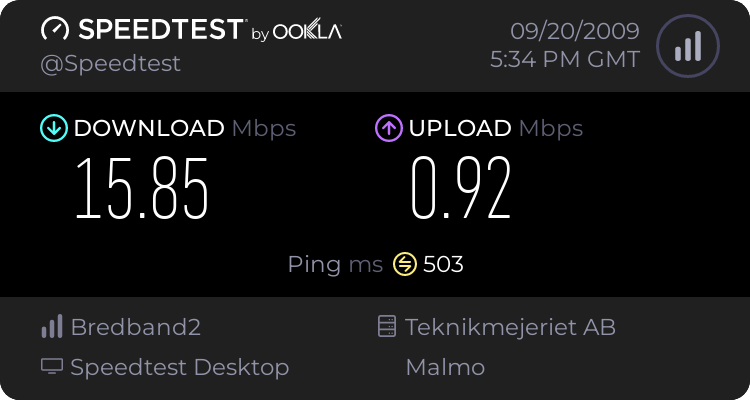
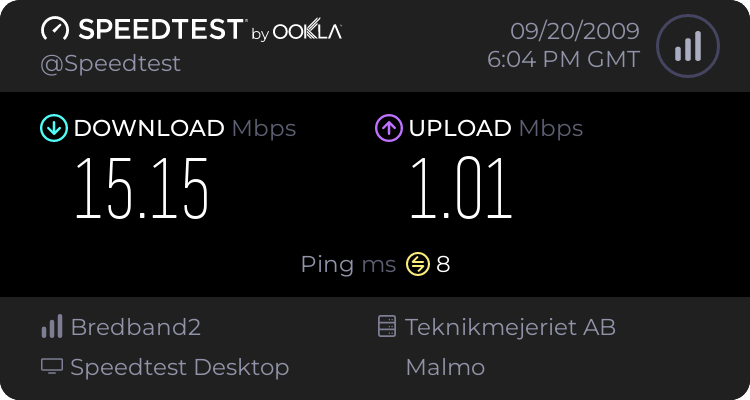
I've just moved from an apartment where I used to have a 100mbit fibre connection and at my current place I've got a 15mbit/1mbit connection. The problem is that I have an extremely high ping and it's definitely a local problem since another machine (running XP) has a normal ping of 10ms to the local station we measure with. I had about 500+.

If I enter Safemode with networking everything is fine and my ping is really low. Therefore I thought it could be something with the Firewall so I turned them off (Win7 FW + Comodo 64bit Internet Security) but there was no difference.

I tried disabling Nagle's algorithm but it didn't do any difference either.. And, well, now I'm kind of out of ideas. Anyone want to share some with me?

Thanks!
Ponen

P.S.: I'm using Windows 7 Ultimate 64-bits

Oh and also, before I moved I was playing around some with Nagle's algorithm (instructed by SpeedGuide.net :: Windows Vista / 2008 Tweaks) but without any results at all.. I found that page again and I'm pretty sure I have undone everything I did that time. The steps I followed was "Gaming Tweak - Disable Nagle's Algorithm"

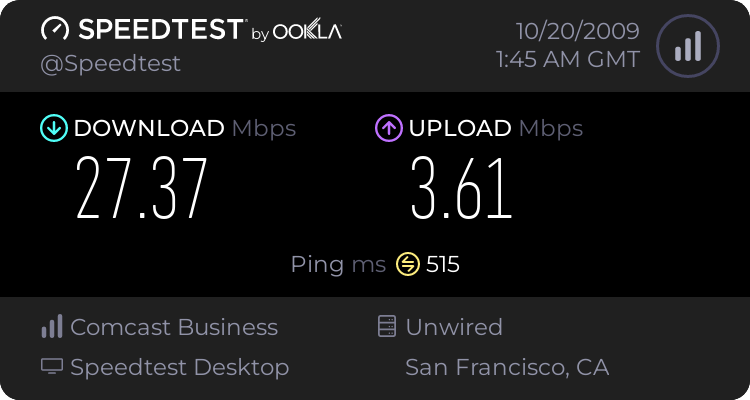
Here's my speedtest results:


Problem solved, obviously my Comodo Firewall was causing some problems and when I had uninstalled it, everything worked like a charm.

 
Last edited:

My Computer

OS
Windows 7
Make sure you uninstall Comodo rather than just disabling it. "Disabling" to a FW means "I'd like you to do whatever you feel like in response to my 'OFF' command". Enterprise-level firewalls actually go into lockdown mode when you disable their control interfaces - literally nothing gets in or out.

After that, you might want to try uninstalling your anti-virus as a test. Your culprit is very probably a kernel-mode driver like those FW solutions. Once you're confident it's not the FWs, the AV is the next logical suspect.

Also, nagling happens at the transport layer (TCP) and it therefore has no impact whatsoever on latency at the low network level (ICMP). I'd suggest you put those settings back the way you found them, otherwise you may produce other weird and wonderful symptoms which are difficult to troubleshoot :)
 

My Computer

Computer Manufacturer/Model Number
Multiple machines in various stages of decomposition.
OS
Win7x64
Thanks for the answer sulphuric acid, I'm going to try that right away.
Although I doubt it's my AV since I'm using Nod32 and it shouldn't do anything at all to my internet connection. Atleast that's what I think but I'll still try it out!

Also, check out the speedtest picture I posted in my first post. Insane. :P

Thanks again for your time :)
 

My Computer

OS
Windows 7
Okay, that's weird. Obviously, it was Comodo delaying the packets or something because it worked wonderfully after it was uninstalled.

Thanks _A LOT_ h2so4 :)

Weird tho, I tried to first disable comodo FW, exit the program and then close it's processes and sure, I still had internet connection but there wasn't any difference. So thanks again, without you I wouldn't have thought it out :D
 

My Computer

OS
Windows 7
Okay, that's weird. Obviously, it was Comodo delaying the packets or something because it worked wonderfully after it was uninstalled.

Thanks _A LOT_ h2so4 :)

Weird tho, I tried to first disable comodo FW, exit the program and then close it's processes and sure, I still had internet connection but there wasn't any difference. So thanks again, without you I wouldn't have thought it out :D

No problem, glad to hear it worked.

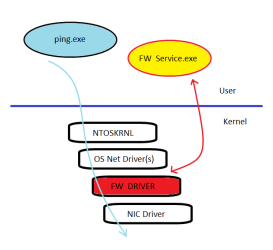
Perhaps the (over-simplified) diagram I attached might help to explain what is happening. The firewall's (FW's) configuration interface(s) and service(s) is the yellow blob up in user-mode. That's what you're closing down when you exit the program and end-task its services. However, note that those processes have (had) a private form of communication (red line) down to a FW driver in kernel-mode (red blob), and you cannot easily get rid of the driver without uninstalling the FW application.

How the driver behaves once its line of communication to its configuration services is severed is entirely driver-specific. In some cases they will disengage completely, or they might continue to "inspect" the traffic flowing through them without dropping anything, or they might panic and stop all traffic flow. In your case, the FW driver was obviously still active to an extent, and its handling of en-route traffic to and from apps like ping.exe and your games (blue line) was causing perceptible delays.

(When people ask me what I like best about Win7 I say 'the new mspaint' :))
 

Attachments

  • FwDiag.png
    FwDiag.png
    9.1 KB · Views: 16

My Computer

Computer Manufacturer/Model Number
Multiple machines in various stages of decomposition.
OS
Win7x64
Hey Guys. I have the exact same issue.

When I installed Comodo Internet Security my ping went up (~500ms) on speedtest.net (just like the original poster), but my ping batch file (ping -t Google) would still have great response time. After reading similar issues with Comodo IS, x64 edition on Windows 7, I uninstalled it. My speedtest.net and browsing latency went back to normal. But then when I installed Malwarebytes' Anti-Malware, the latency went back up to ~500ms.

Could this be a TCP issue (as ICMP seems to be unaffected)? The only thing that is weird (besides the issue itself) is that this affects my games as well (most use UDP). L4D, TF2 and several others have at least double the latency with this issue. I have tried reinstalling Comodo IS and then uninstalling it, but I can't seem to recreate the same fix.

Any ideas on how to fix this? Or any ideas as to the underlying cause?
 

My Computer

OS
Windows 7 RC1 x64 (Build 7100)
CPU
Core 2 Duo E8400 (OC'd to 3.6 GHz)
Motherboard
ASUS Rampage Extreme
Memory
4 GB DDR3-1600 GSkill (7-7-7-18 1.9v)
Graphics Card(s)
Sapphire ATI Radeon HD 5870 1GB
Sound Card
HT Omega Striker 7.1
Monitor(s) Displays
Samsung SyncMaster 2693HM 25.5"
Screen Resolution
1920x1200
Hard Drives
(2) Corsair P128 (RAID 0)
(4) WD Caviar Blue 500GB (RAID 5)
PSU
Antec TPQ-850 850W
Case
LIAN LI PC-A70B
Keyboard
Logitech G15 (1st Gen)
Mouse
Logitech MX518
Could this be a TCP issue (as ICMP seems to be unaffected)?

In the sense that the presence of the FW driver only negatively impacts transport-layer communication (TCP & UDP) - yes.

It gets very complex down there in the kernel-mode network stack. Firewall drivers are not all similar with respect to architecture. Bugs in a driver may easily affect only one layer (transport) or even one protocol type.

The only thing that is weird (besides the issue itself) is that this affects my games as well (most use UDP).

"Weird" is par for the course with these issues :)

Any ideas on how to fix this? Or any ideas as to the underlying cause?

Deterministically troubleshooting something like this is hard; it would be best left to the Comodo developers.

Is the product certified for use with Win7? If not, there may be real technical reasons why it's still unsuitable.

Have you tried testing what happens with a clean OS install and just Comodo? It's possible that interplay with other so-called "NDIS Intermediate" filter drivers is the cause.

If it happens on a clean install and you've paid money for the firewall product, perhaps the developers would be willing to act on your problem report. Otherwise, I'd suggest just finding a (win7 certified) solution that does work for you.

BTW, there's absolutely nothing wrong with the built-in Windows firewall.
 

My Computer

Computer Manufacturer/Model Number
Multiple machines in various stages of decomposition.
OS
Win7x64
Well it seems like I'll need to try Comodo (free btw) on a fresh install on my server. On Comodo's site, they even state that their firewall is W7 compatible, so this issue kind of irks me.

Anyway, I'll see what happens on a fresh install and get back to you. Thanks!

BTW, there's absolutely nothing wrong with the built-in Windows firewall.

I know, but I like Comodo's GUI and I had an issue with some ARP poisoning on my network and Comodo was a bit of an easier fix.
 

My Computer

OS
Windows 7 RC1 x64 (Build 7100)
CPU
Core 2 Duo E8400 (OC'd to 3.6 GHz)
Motherboard
ASUS Rampage Extreme
Memory
4 GB DDR3-1600 GSkill (7-7-7-18 1.9v)
Graphics Card(s)
Sapphire ATI Radeon HD 5870 1GB
Sound Card
HT Omega Striker 7.1
Monitor(s) Displays
Samsung SyncMaster 2693HM 25.5"
Screen Resolution
1920x1200
Hard Drives
(2) Corsair P128 (RAID 0)
(4) WD Caviar Blue 500GB (RAID 5)
PSU
Antec TPQ-850 850W
Case
LIAN LI PC-A70B
Keyboard
Logitech G15 (1st Gen)
Mouse
Logitech MX518
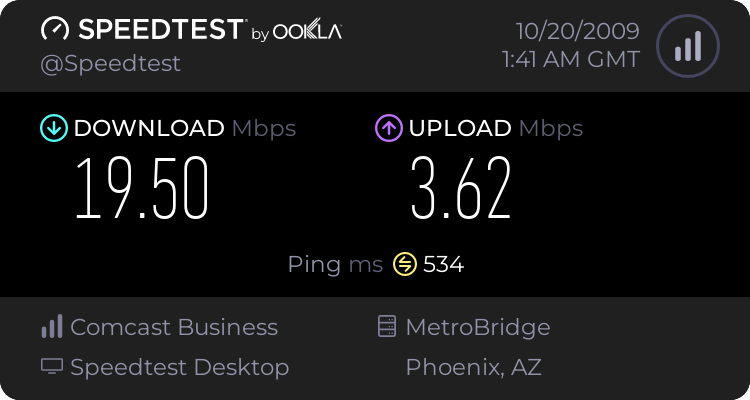
I havn't tried a fresh install yet, but I found another oddity.


The Grant's Pass server has much lower latency than all other servers.

Examples:


My Computer

OS
Windows 7 RC1 x64 (Build 7100)
CPU
Core 2 Duo E8400 (OC'd to 3.6 GHz)
Motherboard
ASUS Rampage Extreme
Memory
4 GB DDR3-1600 GSkill (7-7-7-18 1.9v)
Graphics Card(s)
Sapphire ATI Radeon HD 5870 1GB
Sound Card
HT Omega Striker 7.1
Monitor(s) Displays
Samsung SyncMaster 2693HM 25.5"
Screen Resolution
1920x1200
Hard Drives
(2) Corsair P128 (RAID 0)
(4) WD Caviar Blue 500GB (RAID 5)
PSU
Antec TPQ-850 850W
Case
LIAN LI PC-A70B
Keyboard
Logitech G15 (1st Gen)
Mouse
Logitech MX518
Thanks for this post! This is exactly the issue that I had and have spent the last 2 days on the phone with my ISP trying to figure it out! Who would have known that simply disabling comodo firewall is not enough and you need to do a full uninstall in order to fix this issue.

In the meantime I've taken the liberty of posting about this on the COMODO forums. Hopefully someone there will offer a fix to this issue thus enabling the use of COMODO Firewall with Windows 7 and without suffering these connection performance issues.

For anyone who's interested the post can be found here:
https://forums.comodo.com/firewall-...y-high-pings-in-windows-7-64bit-t61798.0.html
 

My Computer

OS
Windows 7 Ultimate x64 (SP1)
CPU
Intel Core i5 760 OC @ 4.0GHz
Motherboard
Gigabyte GA-P55-UD5
Memory
A-Data 4GB DDR3 OC @ 1600MHz
Graphics Card(s)
ASUS ENGTX580 DCII
Sound Card
Realtek HD Audio (On Board)
Monitor(s) Displays
Dell 2209WA
Screen Resolution
1680x1050
Hard Drives
OCZ Vertex 3 SSD 120GB | WD Caviar Blue 500GB | WD Caviar Green 1000GB
PSU
600W
Case
Thermaltake Element G
Cooling
Noctua NH-D14
Internet Speed
12Mbps
Back
Top