VIA HD Audio Deck

OneSerious

New member
Power User
VIP
Local time
9:29 PM
Messages
324
Hi folks.

Bit of annoying issue I just can't seem to sort. My speakers packed in a few weeks back and since I've been using headphones. Just picked up a new set of speakers today that have subs built in. Naturally they are very bassy which is good when you want them to be. I started playing Bad Company 2 and found it to be too much so. I've looked around the net and have discovered Win 7 doesn't have it's own equalizer. I decided to install VIA HD Audio Deck but every time I install it there is no icons anywhere for it. The files are in program files and it's listed in installed programs list. However I can't launch the application. I've tried drivers from VIA, Asus and other sources and I always end up with the same issues.

I don't know how much help you guys can provide but I'm open to anything at the moment.

Cheers.
 

My Computer

OS
MS Windows 7 Home Premium 64-bit
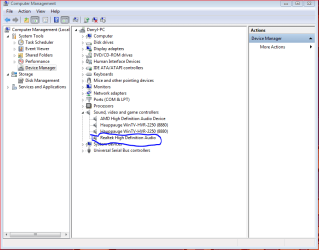
What's you're onboard audio.......Realtek, VIA?
Capture1.PNG
 

My Computer

Computer type
PC/Desktop
Computer Manufacturer/Model Number
Custom Build
OS
Windows 7 Home Premium 64 bit
CPU
Intel Core i7-4790
Motherboard
GA-Z87X-D3H
Memory
G.SKILL 8GB (2 x 4GB) DDR3 F3-10666CL9D-8GBNT
Graphics Card(s)
AMD Radeon R7 250
Sound Card
Realtek ALC892
Monitor(s) Displays
Samsung UN32EH5000, Dell 1703FPT
Screen Resolution
1920 x 1080, 1280 x 1024
Hard Drives
WD5003AZEX
WD10EZEX
Samsung HD103SJ
Samsung 128 GB 840 PRO
PSU
SeaSonic M12II SS-500GM
Case
Fractal Design Define R4
Cooling
Zalman CNPS9900ALED
Keyboard
Logitech K800
Mouse
Logitech M705
Internet Speed
16 Mbps
Antivirus
Avast
Browser
Firefox
Other Info
Bose Companion 2 Multimedia Speakers
It's VIA. I've had it installed before. That's why it's strange that it wont install now.
 

My Computer

OS
MS Windows 7 Home Premium 64-bit
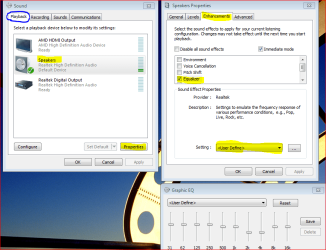
Windows 7 may have EQ properties depending on your onboard audio chip.
If available, you'll find it by clicking on your volume icon and choosing Playback devices.
Capture.PNG
 

My Computer

Computer type
PC/Desktop
Computer Manufacturer/Model Number
Custom Build
OS
Windows 7 Home Premium 64 bit
CPU
Intel Core i7-4790
Motherboard
GA-Z87X-D3H
Memory
G.SKILL 8GB (2 x 4GB) DDR3 F3-10666CL9D-8GBNT
Graphics Card(s)
AMD Radeon R7 250
Sound Card
Realtek ALC892
Monitor(s) Displays
Samsung UN32EH5000, Dell 1703FPT
Screen Resolution
1920 x 1080, 1280 x 1024
Hard Drives
WD5003AZEX
WD10EZEX
Samsung HD103SJ
Samsung 128 GB 840 PRO
PSU
SeaSonic M12II SS-500GM
Case
Fractal Design Define R4
Cooling
Zalman CNPS9900ALED
Keyboard
Logitech K800
Mouse
Logitech M705
Internet Speed
16 Mbps
Antivirus
Avast
Browser
Firefox
Other Info
Bose Companion 2 Multimedia Speakers
Most, if not all, on-board audio chips have the ability to use an equaliser. However, this feature needs to be enabled by the driver, and the driver that the manufacturer provides to Microsoft to include in Windows 7 doesn't typically include this capability.
 

My Computer

Computer type
PC/Desktop
Computer Manufacturer/Model Number
Dwarf Dwf/11/2012 r09/2013
OS
Windows 8.1 Pro RTM x64
CPU
Intel Core-i5-3570K 4-core @ 3.4GHz (Ivy Bridge) (OC 4.4GHz)
Motherboard
ASRock Z77 Extreme4-M
Memory
4 x 4GB DDR3-1600 Corsair Vengeance CMZ8GX3M2A1600C9B (16GB)
Graphics Card(s)
MSI GeForce GTX770 Gaming OC 2GB
Sound Card
Realtek High Definition on board solution (ALC 898)
Monitor(s) Displays
ViewSonic VA1912w Widescreen (VGA)
Screen Resolution
1440x900
Hard Drives
OCZ Agility 3 SSD 120GB SATA III x2 (RAID 0)
Samsung HD501LJ 500GB SATA II x2
Hitachi HDS721010CLA332 1TB SATA II
Iomega 1.5TB Ext USB 2.0
WD 2.0TB Ext USB 3.0
PSU
XFX Pro Series 850W Semi-Modular
Case
Gigabyte IF233
Cooling
1 x 120mm Front Inlet 1 x 120mm Rear Exhaust
Keyboard
Microsoft Comfort Curve Keyboard 3000 (USB)
Mouse
Microsoft Comfort Mouse 3000 for Business (USB)
Internet Speed
NetGear DG834Gv3 ADSL Modem/Router (Ethernet) ~4.0 Mb/s (O2)
Antivirus
Avast! 8.0.1497
Browser
IE 11
Other Info
Optical Drive: HL-DT-ST BD-RE BH10LS30 SATA Bluray
Lexmark S305 Printer/Scanner/Copier (USB)
WEI Score: 8.1/8.1/8.5/8.5/8.25
Asus Eee PC 1011PX Netbook (Windows 7 x86 Starter)
Windows 7 may have EQ properties depending on your onboard audio chip.
If available, you'll find it by clicking on your volume icon and choosing Playback devices.
View attachment 126936
Unfortunately it does not have that option I checked earlier and it's not there.

Most, if not all, on-board audio chips have the ability to use an equaliser. However, this feature needs to be enabled by the driver, and the driver that the manufacturer provides to Microsoft to include in Windows 7 doesn't typically include this capability.
The odd thing is I had the VIA drivers installed before but got rid of them because I had no real need for them. With the new speakers having subs on board I decided I'd like the EQ so I could turn the bass down a tad.

I have managed to get an older version of the VIA audio deck installed. It will do for the mean time though it's not ideal. Can't for the life of me work out why this wont work. The older versions interface isn't to nice looking or feature rich as far as I can remember.
 

My Computer

OS
MS Windows 7 Home Premium 64-bit
Okay people, turns out the problems weren't dodgy drivers but the end user AKA me, being a tool.

The VIA drivers for my mobo don't have a dedicated Audio Deck so to speak. p5bdkw as you suggested there was an EQ in the sound settings. I said I checked and it wasn't there but that's because I checked after I uninstalled the drivers becuase I didn't think they worked (due to the lack of interface). My VIA drivers work with Creative X-Fi drivers and so the expanded EQ is with the Creative software and the regular EQ is in the settings as stated.

Must of had my head up my rear, anyway, it's fixed now. Cheers for the help.
 

My Computer

OS
MS Windows 7 Home Premium 64-bit
Glad it work out!!:D
 

My Computer

Computer type
PC/Desktop
Computer Manufacturer/Model Number
Custom Build
OS
Windows 7 Home Premium 64 bit
CPU
Intel Core i7-4790
Motherboard
GA-Z87X-D3H
Memory
G.SKILL 8GB (2 x 4GB) DDR3 F3-10666CL9D-8GBNT
Graphics Card(s)
AMD Radeon R7 250
Sound Card
Realtek ALC892
Monitor(s) Displays
Samsung UN32EH5000, Dell 1703FPT
Screen Resolution
1920 x 1080, 1280 x 1024
Hard Drives
WD5003AZEX
WD10EZEX
Samsung HD103SJ
Samsung 128 GB 840 PRO
PSU
SeaSonic M12II SS-500GM
Case
Fractal Design Define R4
Cooling
Zalman CNPS9900ALED
Keyboard
Logitech K800
Mouse
Logitech M705
Internet Speed
16 Mbps
Antivirus
Avast
Browser
Firefox
Other Info
Bose Companion 2 Multimedia Speakers
Back
Top