Solved Virtual Disk Manager

daw1cb

New member
Member
Local time
3:57 PM
Messages
15
When trying to shrink a partition in Win7 x64 the following alert is given:

Virtual Disk Manager: The service cannot be started, either because it is disabled or because it has no enabled devices associated with it.

How can I enable the service, and also it cannot be found in services.msc

Update: >_< The issue was the disk defragmenter service was disabled as I have an SSD however the virtual drive manager is tied to the service. Disabling disk defragementer will disable virtual drive manager which is required for partition shrinking.

That and two hours of fiddling yielded no solution but a single post to sevenforums resulted in an epiphany that revealed the answer :-)
 
Last edited:

My Computer

Computer type
PC/Desktop
Computer Manufacturer/Model Number
Homebrew
OS
Windows 7 Professional x64
CPU
AMD Phenom II X4 955
Motherboard
MSI 790XT-G45
Memory
Corsair XMS2 DDR2-800 (2x2gb)
Graphics Card(s)
Sapphire Vapor-X Radeon HD 5770
Sound Card
Onboard
Monitor(s) Displays
Dell E193FP + Dell 1702FP
Hard Drives
Kingston SNVP325-S2B
Segate ST3320820AS
WD Black 750GB
PSU
Corsair CMPSU-750HX
Case
Antec 300
Cooling
Dark Knight, 2x120mm Intakes, 140mm+120mm Exhaust
Keyboard
Whichever one is currently working.
Mouse
Logitech M500
Had this same problem when trying to shrink some volumes in disk management, couldn't figure out why. Turned disk defragmenter back on temporarily and that did it.

Something it seems no one mentions as a possible side effect when turning off disk defragmenter on an SSD. At least of all the writeups I've seen on it. Should probably be mentioned.

Thanks, was about to freak out.
 

My Computer

Computer type
PC/Desktop
Computer Manufacturer/Model Number
Airbot 2.0
OS
Windows 7 Ultimate x64 SP1
CPU
Core i7 920 (D0) @ 4Ghz, *26c idle *65c full load on air
Motherboard
Asus P6X58D Premium - Sata 6Gb/s - USB 3.0
Memory
12GB DDR3 Corsair Dominator -CMD12GX3M6A1600C8 at 1600MHz
Graphics Card(s)
Zotac Geforce GTX 770
Sound Card
ASUS Xonar D2X
Monitor(s) Displays
1 LG 24" Flatron W2453V-PF 1 Samsung 24" P2450H both 2ms RT
Screen Resolution
1920x1080@60hz
Hard Drives
1 Samsung 250GB 840 Evo SSD
1 OCZ Vertex2 180GB SSD
1 TB Samsung Spinpoint F1 7200RPM 32MB cache
2 500GB WD Caviar Blacks 7200RPM 32MB cache (WD5001AALS)

Pioneer DVD Burner DVR-S18M
PSU
Corsair HX1000W
Case
Cooler Master HAF 932
Cooling
Case Fans *3 230mm, *1 140mm/CPU - *Tuniq Tower 120 Extreme
Keyboard
Logitech Wireless MK700
Mouse
Logitech Wireless MK700
Internet Speed
DL 15 Mbps UL 0.98 Mbps
Antivirus
None
Browser
Firefox Nightly
Other Info
Processor-7.7 *RAM- 7.9 *Graphics-7.9 *Gaming Graphics- 7.9 *SSD- 7.8 W.E.I final score= 7.7
*Phone- LG Nexus 5
That is strange Aaron. I don't see how Disk Defragmenter is related to the Virtual Disk service being disabled. :confused:

Did you turn off only the Disk Defragmenter Schedule for the SSD? I have the schedule turned off completely, and do not have any problems using Disk Management to shrink a partition.


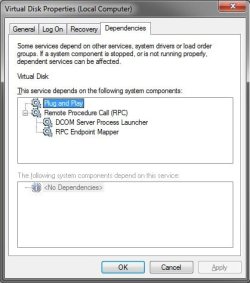
Here's what I have for the Virtual Disk service and it's dependencies.

Services.jpgDependencies.jpg
 

My Computer

Computer type
PC/Desktop
Computer Manufacturer/Model Number
Self built custom
OS
64-bit Windows 11 Pro for Workstations
CPU
Intel i7-8700K OC'd to 5 GHz
Motherboard
ASUS ROG Maximus XI Formula Z390
Memory
64 GB (4x16GB) G.SKILL TridentZ RGB DDR4 3600 MHz
Graphics Card(s)
ASUS ROG-STRIX-GTX1080TI-O11G-GAMING
Sound Card
Integrated
Monitor(s) Displays
2 x Samsung Odyssey G7 27"
Screen Resolution
2560x1440
Hard Drives
1TB Samsung 990 PRO M.2,
4TB Samsung 990 PRO PRO M.2,
TerraMaster F8 SSD Plus NAS
PSU
Seasonic Prime Titanium 850W
Case
Thermaltake Core P3
Cooling
Corsair Hydro H115i
Keyboard
Logitech wireless K800
Mouse
Logitech MX Master 4
Internet Speed
2 Gb/s Download and 100 Mb/s Upload
Antivirus
Malwarebyte Anti-Malware Premium
Browser
Google Chrome
Other Info
Logitech Z625 speaker system,
Logitech BRIO 4K Pro webcam,
HP Color LaserJet Pro MFP M477fdn,
APC SMART-UPS RT 1000 XL - SURT1000XLI,
Galaxy S23 Plus phone
My Virtual Disk service wasn't disabled or missing with Disk defragmenter service disabled (and defrag tasks disabled). It was like yours there - Started/manual, but it would throw that error up that the OP had as well, trying to shrink any volume. Even stopped and restarted it a few times without success.

Virtual Disk Manager: The service cannot be started, either because it is disabled or because it has no enabled devices associated with it.

I found this thread, and enabled and started the defrag service, and worked right away. Must be related to it in someway.
 

My Computer

Computer type
PC/Desktop
Computer Manufacturer/Model Number
Airbot 2.0
OS
Windows 7 Ultimate x64 SP1
CPU
Core i7 920 (D0) @ 4Ghz, *26c idle *65c full load on air
Motherboard
Asus P6X58D Premium - Sata 6Gb/s - USB 3.0
Memory
12GB DDR3 Corsair Dominator -CMD12GX3M6A1600C8 at 1600MHz
Graphics Card(s)
Zotac Geforce GTX 770
Sound Card
ASUS Xonar D2X
Monitor(s) Displays
1 LG 24" Flatron W2453V-PF 1 Samsung 24" P2450H both 2ms RT
Screen Resolution
1920x1080@60hz
Hard Drives
1 Samsung 250GB 840 Evo SSD
1 OCZ Vertex2 180GB SSD
1 TB Samsung Spinpoint F1 7200RPM 32MB cache
2 500GB WD Caviar Blacks 7200RPM 32MB cache (WD5001AALS)

Pioneer DVD Burner DVR-S18M
PSU
Corsair HX1000W
Case
Cooler Master HAF 932
Cooling
Case Fans *3 230mm, *1 140mm/CPU - *Tuniq Tower 120 Extreme
Keyboard
Logitech Wireless MK700
Mouse
Logitech Wireless MK700
Internet Speed
DL 15 Mbps UL 0.98 Mbps
Antivirus
None
Browser
Firefox Nightly
Other Info
Processor-7.7 *RAM- 7.9 *Graphics-7.9 *Gaming Graphics- 7.9 *SSD- 7.8 W.E.I final score= 7.7
*Phone- LG Nexus 5
Yep, that's what it is. I only had the Disk Defragmenter schedule turned off so that Disk Defrafmenter would not run automatically. When I disabled the Disk Defragmenter service, I got the same error.

I'll add a warning to all of the partition tutorials now about this.
 

My Computer

Computer type
PC/Desktop
Computer Manufacturer/Model Number
Self built custom
OS
64-bit Windows 11 Pro for Workstations
CPU
Intel i7-8700K OC'd to 5 GHz
Motherboard
ASUS ROG Maximus XI Formula Z390
Memory
64 GB (4x16GB) G.SKILL TridentZ RGB DDR4 3600 MHz
Graphics Card(s)
ASUS ROG-STRIX-GTX1080TI-O11G-GAMING
Sound Card
Integrated
Monitor(s) Displays
2 x Samsung Odyssey G7 27"
Screen Resolution
2560x1440
Hard Drives
1TB Samsung 990 PRO M.2,
4TB Samsung 990 PRO PRO M.2,
TerraMaster F8 SSD Plus NAS
PSU
Seasonic Prime Titanium 850W
Case
Thermaltake Core P3
Cooling
Corsair Hydro H115i
Keyboard
Logitech wireless K800
Mouse
Logitech MX Master 4
Internet Speed
2 Gb/s Download and 100 Mb/s Upload
Antivirus
Malwarebyte Anti-Malware Premium
Browser
Google Chrome
Other Info
Logitech Z625 speaker system,
Logitech BRIO 4K Pro webcam,
HP Color LaserJet Pro MFP M477fdn,
APC SMART-UPS RT 1000 XL - SURT1000XLI,
Galaxy S23 Plus phone
As you did Brink, I found that there are no dependencies linking Disk defrag to volume shrinking with virtual disk service, according to technical documents, however I have found as in my first post that it is not possible to shrink a partition without disk defrag service enabled.

My understanding after some research is that the issue is not related to service dependencies but rather hinges on the manner in which the virtual disk service relies on the disk defragmenter service to reallocate space reserved for meta data/virtual page file. While there could be no data in the end of the partition the last block is always reserved for meta data that for some reason can only be placed at the end of the drive and this section can only be moved by the built in ms defrag tool.

I have used numerous third party defrag programs to pack all the data into the front of a drive both SSD and HDD and the result was the same, without the disk defrag service enabled the partition cannot be shrunk.

As for partition expansion that was not something I tested but may do so just to see what the result is.

Edit: This issue is only relevant to shrinking a partition, and has no bearing on extending a partition.
 
Last edited:

My Computer

Computer type
PC/Desktop
Computer Manufacturer/Model Number
Homebrew
OS
Windows 7 Professional x64
CPU
AMD Phenom II X4 955
Motherboard
MSI 790XT-G45
Memory
Corsair XMS2 DDR2-800 (2x2gb)
Graphics Card(s)
Sapphire Vapor-X Radeon HD 5770
Sound Card
Onboard
Monitor(s) Displays
Dell E193FP + Dell 1702FP
Hard Drives
Kingston SNVP325-S2B
Segate ST3320820AS
WD Black 750GB
PSU
Corsair CMPSU-750HX
Case
Antec 300
Cooling
Dark Knight, 2x120mm Intakes, 140mm+120mm Exhaust
Keyboard
Whichever one is currently working.
Mouse
Logitech M500
Wow thanks. I knew it was tied to something I turned off in system configurator. You saved me alot of work
 

My Computer

OS
windows 7 64bit
CPU
i5 3.2 oc
Motherboard
gigabyte ud4
Memory
patriot viper2 4 gig
Graphics Card(s)
5850 crossfire
Monitor(s) Displays
samsung 2048x1152
Hard Drives
Western digital 500gigx2 raid0
PSU
ace 750watt
Case
antec 600
Cooling
h50
I just want to note that the 'tune' function provided in the Samsung SSD Magician software prevents the defragmenter tool from opening at all. This is quite frustrating if you like me don't know how to enable the service again manually.

Luckily the Samsung software also has an 'untune' button wich fixes the issue.
 

My Computer

OS
Windows 7 Ultimate x64
I just had this same problem and it was driving me nuts.

Seven Forums to the rescue once again.

Re-enabled Disk Defragmenter then turned off the schedule as Brink instructed and can now use the Virtual Disk Service to shrink a volume.

Thank you everyone. :)
 

My Computer

Computer type
PC/Desktop
Computer Manufacturer/Model Number
Me
OS
Windows 7 Ultimate 64-bit
CPU
Intel Core i7 3770K
Motherboard
Asus P8Z77-V PRO
Memory
G.Skill ARES DDR3 1600 - 3 x 4GB
Graphics Card(s)
ASUS HD7770-DC-1GD5-V2
Sound Card
on board
Monitor(s) Displays
ASUS PB278Q PLS LED LCD 6ms
Screen Resolution
2560 x 1440
Hard Drives
Samsung 840 EVO SSD 500GB
2 x Seagate SATA3 2TB 64Mb Cache (ST2000DM001)
PSU
Corsair HX-650
Case
Coolermaster Centurion 5 II
Cooling
Coolermaster Hyper 212 Plus
Keyboard
Logitech K290
Mouse
MS Wireless Laser Mouse 5000
Internet Speed
100Mb down / 2.5Mb up
Other Info
Leadtek DTV2000DS Dual HD TV Tuner
USB3 kit for 2 front panel USB3 ports
Back
Top