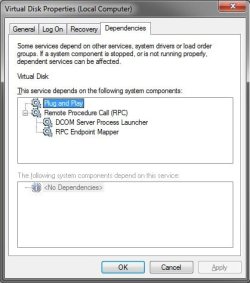
When trying to shrink a partition in Win7 x64 the following alert is given:
Virtual Disk Manager: The service cannot be started, either because it is disabled or because it has no enabled devices associated with it.
How can I enable the service, and also it cannot be found in services.msc
Update: >_< The issue was the disk defragmenter service was disabled as I have an SSD however the virtual drive manager is tied to the service. Disabling disk defragementer will disable virtual drive manager which is required for partition shrinking.
That and two hours of fiddling yielded no solution but a single post to sevenforums resulted in an epiphany that revealed the answer
Virtual Disk Manager: The service cannot be started, either because it is disabled or because it has no enabled devices associated with it.
How can I enable the service, and also it cannot be found in services.msc
Update: >_< The issue was the disk defragmenter service was disabled as I have an SSD however the virtual drive manager is tied to the service. Disabling disk defragementer will disable virtual drive manager which is required for partition shrinking.
That and two hours of fiddling yielded no solution but a single post to sevenforums resulted in an epiphany that revealed the answer
Last edited:
My Computer
- Computer type
- PC/Desktop
- Computer Manufacturer/Model Number
- Homebrew
- OS
- Windows 7 Professional x64
- CPU
- AMD Phenom II X4 955
- Motherboard
- MSI 790XT-G45
- Memory
- Corsair XMS2 DDR2-800 (2x2gb)
- Graphics Card(s)
- Sapphire Vapor-X Radeon HD 5770
- Sound Card
- Onboard
- Monitor(s) Displays
- Dell E193FP + Dell 1702FP
- Hard Drives
- Kingston SNVP325-S2B
Segate ST3320820AS
WD Black 750GB
- PSU
- Corsair CMPSU-750HX
- Case
- Antec 300
- Cooling
- Dark Knight, 2x120mm Intakes, 140mm+120mm Exhaust
- Keyboard
- Whichever one is currently working.
- Mouse
- Logitech M500