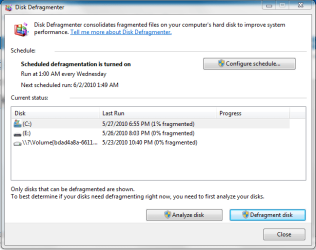
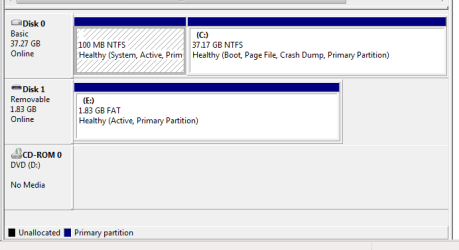
I had the same issue.
Dell laptop, Seagate hard drives used previously for a RAID array.
To eliminate this ghost volume follow these steps.
THIS WILL ERASE / DELETE EVERYTHING OFF YOUR HARD DRIVE...
BE SURE TO MAKE A BACK UP.
THIS WILL REQUIRE THAT YOU RE-INSTALL WINDOWS OR OTHER OPERATING SYSTEM AND ANY APPLICATIONS/PROGRAMS YOU CURRENTLY USE.
Go to another Win7 PC, download Parted Magic .iso .
Burn ISO to a CD or in my case I used a DVD.
Take the hard drive with the \\?\Volume {} thing over to another computer.
Connect it via USB directly not a hub, you may also need to apply power to the raw drive.
You can also connect it to the SATA or IDE channel...you can disconnect the system drive if you choose and it might be a good idea.
Boot the other computer with the Parted Magic disk you just created.
( Is your BIOS set to boot to CD/DVD optical drive before hard drive? )
When Parted Magic loads, it will look like a graphical user interface, a desktop with icons. The Parted Magic disk should automatically eject...take it out, put it aside.
Click the icon that looks like a red and white eraser. Eraser.
THIS WILL ERASE / DELETE EVERYTHING OFF YOUR HARD DRIVE
READ: BE SURE, IF YOU DIDN'T DISCONNECT THIS SYSTEMS' HARD DRIVE, IN THE NEXT STEP, CHOOSE THE CORRECT DISK, OTHERWISE YOU'LL ERASE THE WRONG HARD DRIVE.
BE SAFE: shut down,
unplug power, disconnect that drive, plug power back in, re-boot to the Parted Magic disc and continue.
In Parted Magic, click Erase Disk icon...
Choose EXTERNAL Wipe MBR / GPT.
The drive is now raw unallocated.
In my case, I stopped here and moved the drive back...
If you have self-encrypting hard drives, do not do anything else.
Put the drive back in the computer and install Windows ( Win 7 64 BIT in my case ) and install Windows to the unallocated space.
That's it.
If you have self-encrypting drives, do not format the unallocated space with the Windows install disc, just install to unallocated space otherwise the \\?\volum~ thing will come back.
Download Parted Magic here