Solved W7 Updates May 2011

You can't force them to install.

As I pointed out in above posting the person who was prompted to install the XP update on Win7- no one explained that one did they.

I gave you my best advice. I have no more ideas that can help. ;) :D

Mike
 

My Computer My Computer

At a glance

Windows7 Pro 64bit SP-1; Windows XP Pro 32bitIntel Core i7-870 Lynnfield 2.93GHz LGA 1156 ...8GB@1400MHz Crucial Ballistix DDR3-1600 4x2GBASUS ENGTX460 DirectCU/2DI/1GD5 1GB 256-bit G...
Computer Manufacturer/Model Number
Hopalong/ Godzilla
OS
Windows7 Pro 64bit SP-1; Windows XP Pro 32bit
CPU
Intel Core i7-870 Lynnfield 2.93GHz LGA 1156 95W Quad-Core
Motherboard
ASUS P7P55D-E PRO
Memory
8GB@1400MHz Crucial Ballistix DDR3-1600 4x2GB
Graphics Card(s)
ASUS ENGTX460 DirectCU/2DI/1GD5 1GB 256-bit GDDR5
Sound Card
VIA Onboard
Monitor(s) Displays
Asus VS248H-P 24"; Samsung SyncMaster 941BW 19"ws
Screen Resolution
1920x1080; 1440x900
Hard Drives
Samsung 830 120GB SSD
Intel 320 120GB SSD
Western Digital Caviar Black WD7501AALS 750GB 7200 RPM SATA 3.0Gb/s
Western Digital Caviar Black WD6401AALS 640GB 7200 RPM SATA 3.0Gb/s
PSU
COOLER MASTER Silent Pro RS850-AMBAJ3-US 850W Modular
Case
COOLER MASTER HAF 932 RC-932-KKN5-GP Black
Cooling
Scythe "Mugen-2 Rev.B" (2 ScytheKaze-Jyuni PWM fans)
Keyboard
Logitech K-320
Mouse
Kensington
Antivirus
Avast Inernet Suite
Browser
IE 9 ; Chrome
Mike I agree with you 100% so I'm just going to hide them and move on.
 

My Computer My Computer

At a glance

Windows 7 Professional SP1 64 bitIntel(R)Core(TM)2Quad procQ9550(2.83GHZ)8 GB768MB NVIDIA GEFORCE GT610
Computer type
PC/Desktop
Computer Manufacturer/Model Number
HP Pavilion Elite d5200t ATX PC
OS
Windows 7 Professional SP1 64 bit
CPU
Intel(R)Core(TM)2Quad procQ9550(2.83GHZ)
Motherboard
Pegatron
Memory
8 GB
Graphics Card(s)
768MB NVIDIA GEFORCE GT610
Sound Card
Creative Sound Blaster X-Fi Xtreme
Monitor(s) Displays
Samsung S24D300
Screen Resolution
1440x900
Hard Drives
640GB 7200RPM Sata 3Gb/s
PSU
HP
Case
HP
Cooling
2 Fans
Keyboard
Microsoft Internet Keyboard
Mouse
MicroSoft IntelliMouse Optical
Internet Speed
Cox Cable
Antivirus
Norton
Browser
FireFox
I gave my facts as stated in the links. Just because they won't intstall doesn't mean you don't need them, It just means something preventing them from installing. ;)

The fact that someone is just telling you to hide them isn't "fixing" the problem, it's just hiding it.

My advice :)

BTW.....

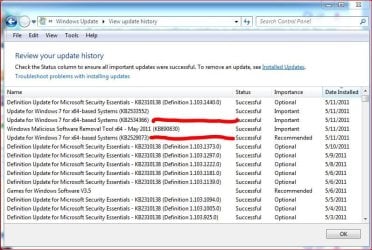
Updates.JPG

Windows 7 Ultimate X64, SP1 Installed.

KB2529073 is for 'after you install SP1, so it doesn't apply if SP1 has not been installed yet.

Now, if you don't have SP1 installed, the above "won't install" - however it doesn’t mean it's not "required" It just means a "prerequisite" is missing..... in this case SP1.
Now, we can argue as to whether SP1 is "required" I suppose, but....
 

My Computer My Computer

At a glance

Windows 10 ProIntel Core i7-4770K (3.5Ghz)32 gig Corsair Dominator Platinum (4x8Gig)Sapphire Tri-X R9 Fury
Computer type
PC/Desktop
Computer Manufacturer/Model Number
Custom built by me.
OS
Windows 10 Pro
CPU
Intel Core i7-4770K (3.5Ghz)
Motherboard
Gigabyte G1 Sniper 5 (F10 Bios)
Memory
32 gig Corsair Dominator Platinum (4x8Gig)
Graphics Card(s)
Sapphire Tri-X R9 Fury
Sound Card
Soundblaster ZXR
Monitor(s) Displays
NEC PA242W 24" LCD Monitor
Screen Resolution
1920 x 1200
Hard Drives
Primary - Samsung 850 Pro (512gig), Samsung 840 Pro (256gig), 2TB WD Caviar Black.
PSU
EVGA Supernova 1000 G2
Case
Cooler Master HAF X
Cooling
Corsair H100i with Corsair Air Series SP120 Quiet Fans
Keyboard
Logitech Wireless Wave
Mouse
Logitech Performance MX
Internet Speed
High Speed Cable
Antivirus
Norton Security
Browser
IE11
Other Info
Memory Timings - 1866MHz @ 9-9-9-27-1T @ 1.5 volts
One last thing, Mike (Hopalong X) is right with regards to "hiding" the updates you don't want to install.

My point is I don't think "Important" updates or Service Packs should be hidden or not installed - that is they should/need to be installed.

The other point I'm making is that those updates wouldn't appear if they weren't Important/Recommended.

So, if you don't want to install SP1, and the updates for it, and don't want to be nagged, hide them. I don't recommend it, but that's me.

I'm out.

BTW here's a possible solution to your problem, provided you have all the prerequisite updates installed and still can't install updates - http://www.sevenforums.com/tutorials/91738-windows-update-reset.html
 

My Computer My Computer

At a glance

Windows 10 ProIntel Core i7-4770K (3.5Ghz)32 gig Corsair Dominator Platinum (4x8Gig)Sapphire Tri-X R9 Fury
Computer type
PC/Desktop
Computer Manufacturer/Model Number
Custom built by me.
OS
Windows 10 Pro
CPU
Intel Core i7-4770K (3.5Ghz)
Motherboard
Gigabyte G1 Sniper 5 (F10 Bios)
Memory
32 gig Corsair Dominator Platinum (4x8Gig)
Graphics Card(s)
Sapphire Tri-X R9 Fury
Sound Card
Soundblaster ZXR
Monitor(s) Displays
NEC PA242W 24" LCD Monitor
Screen Resolution
1920 x 1200
Hard Drives
Primary - Samsung 850 Pro (512gig), Samsung 840 Pro (256gig), 2TB WD Caviar Black.
PSU
EVGA Supernova 1000 G2
Case
Cooler Master HAF X
Cooling
Corsair H100i with Corsair Air Series SP120 Quiet Fans
Keyboard
Logitech Wireless Wave
Mouse
Logitech Performance MX
Internet Speed
High Speed Cable
Antivirus
Norton Security
Browser
IE11
Other Info
Memory Timings - 1866MHz @ 9-9-9-27-1T @ 1.5 volts
Running Win7 Home Premium - I've been experiencing the same problems with hanging updates the same no's as all & any of those mentioned above for the past week - on top of that it seems that this latest batch of updates is somewhat excessive! installs drag, looping restarts and reverts are frustrating but more so is the lack of any acknowledgement by MS as to the problem and any possible resolution. Why all of a sudden has the error rate for automatic updates spiked? Isolating problem updates and Installing them one at a time is a ridiculous time consuming process, surely MS need to be isolating this issue and resolving it, naive perhaps! But this issue mutliplied over four home pc's, do me a favour!
 

My Computer My Computer

At a glance

Win 7 Home Premium 64 bit
Computer Manufacturer/Model Number
Dell Inspiron 575
OS
Win 7 Home Premium 64 bit
Sygnus

I agree Important updates should be installed. When they are attempted to be installed and Windows says not needed??????????

Squid13 manually downloaded them and upon installation Windows popped up a message that states the update is not needed.

There was no Error message of installation. Just your system does not need this.
 

My Computer My Computer

At a glance

Windows7 Pro 64bit SP-1; Windows XP Pro 32bitIntel Core i7-870 Lynnfield 2.93GHz LGA 1156 ...8GB@1400MHz Crucial Ballistix DDR3-1600 4x2GBASUS ENGTX460 DirectCU/2DI/1GD5 1GB 256-bit G...
Computer Manufacturer/Model Number
Hopalong/ Godzilla
OS
Windows7 Pro 64bit SP-1; Windows XP Pro 32bit
CPU
Intel Core i7-870 Lynnfield 2.93GHz LGA 1156 95W Quad-Core
Motherboard
ASUS P7P55D-E PRO
Memory
8GB@1400MHz Crucial Ballistix DDR3-1600 4x2GB
Graphics Card(s)
ASUS ENGTX460 DirectCU/2DI/1GD5 1GB 256-bit GDDR5
Sound Card
VIA Onboard
Monitor(s) Displays
Asus VS248H-P 24"; Samsung SyncMaster 941BW 19"ws
Screen Resolution
1920x1080; 1440x900
Hard Drives
Samsung 830 120GB SSD
Intel 320 120GB SSD
Western Digital Caviar Black WD7501AALS 750GB 7200 RPM SATA 3.0Gb/s
Western Digital Caviar Black WD6401AALS 640GB 7200 RPM SATA 3.0Gb/s
PSU
COOLER MASTER Silent Pro RS850-AMBAJ3-US 850W Modular
Case
COOLER MASTER HAF 932 RC-932-KKN5-GP Black
Cooling
Scythe "Mugen-2 Rev.B" (2 ScytheKaze-Jyuni PWM fans)
Keyboard
Logitech K-320
Mouse
Kensington
Antivirus
Avast Inernet Suite
Browser
IE 9 ; Chrome
I think a lot of issues are due to the fact that quite a few users don't have SP1 installed, thus updates requiring SP1 won't install and cause problems.

In short a lot of the new updates coming out now require SP1 to be installed.

I for one have never had an issue installing updates. On the other hand I make sure I all "Important" updates are installed. I also have SP1 installed.

Sygnus

I agree Important updates should be installed. When they are attempted to be installed and Windows says not needed??????????

Squid13 manually downloaded them and upon installation Windows popped up a message that states the update is not needed.

There was no Error message of installation. Just your system does not need this.

To be honest Mike I don't know what's going on there. I know they installed for me. I would suggest Squid look at the link I provided to Brinks tutorial - Windows Update - Reset

And for what it's worth, we're cool, even in debate. Just thought I'd throw that out there :)
 

My Computer My Computer

At a glance

Windows 10 ProIntel Core i7-4770K (3.5Ghz)32 gig Corsair Dominator Platinum (4x8Gig)Sapphire Tri-X R9 Fury
Computer type
PC/Desktop
Computer Manufacturer/Model Number
Custom built by me.
OS
Windows 10 Pro
CPU
Intel Core i7-4770K (3.5Ghz)
Motherboard
Gigabyte G1 Sniper 5 (F10 Bios)
Memory
32 gig Corsair Dominator Platinum (4x8Gig)
Graphics Card(s)
Sapphire Tri-X R9 Fury
Sound Card
Soundblaster ZXR
Monitor(s) Displays
NEC PA242W 24" LCD Monitor
Screen Resolution
1920 x 1200
Hard Drives
Primary - Samsung 850 Pro (512gig), Samsung 840 Pro (256gig), 2TB WD Caviar Black.
PSU
EVGA Supernova 1000 G2
Case
Cooler Master HAF X
Cooling
Corsair H100i with Corsair Air Series SP120 Quiet Fans
Keyboard
Logitech Wireless Wave
Mouse
Logitech Performance MX
Internet Speed
High Speed Cable
Antivirus
Norton Security
Browser
IE11
Other Info
Memory Timings - 1866MHz @ 9-9-9-27-1T @ 1.5 volts
I think a lot of issues are due to the fact that quite a few users don't have SP1 installed, thus updates requiring SP1 won't install and cause problems.

I've SP1 installed on all my home machines problem still occurs on ALL 4

Mike2:D
 

My Computer My Computer

At a glance

Win 7 Home Premium 64 bit
Computer Manufacturer/Model Number
Dell Inspiron 575
OS
Win 7 Home Premium 64 bit
Well, that's only one of many many many reasons some updates don't install.

Anyway if you're having an issue see the post above yours for possible solution. If that doesn't work, well I'll admit that I don't have all the answers :D
 

My Computer My Computer

At a glance

Windows 10 ProIntel Core i7-4770K (3.5Ghz)32 gig Corsair Dominator Platinum (4x8Gig)Sapphire Tri-X R9 Fury
Computer type
PC/Desktop
Computer Manufacturer/Model Number
Custom built by me.
OS
Windows 10 Pro
CPU
Intel Core i7-4770K (3.5Ghz)
Motherboard
Gigabyte G1 Sniper 5 (F10 Bios)
Memory
32 gig Corsair Dominator Platinum (4x8Gig)
Graphics Card(s)
Sapphire Tri-X R9 Fury
Sound Card
Soundblaster ZXR
Monitor(s) Displays
NEC PA242W 24" LCD Monitor
Screen Resolution
1920 x 1200
Hard Drives
Primary - Samsung 850 Pro (512gig), Samsung 840 Pro (256gig), 2TB WD Caviar Black.
PSU
EVGA Supernova 1000 G2
Case
Cooler Master HAF X
Cooling
Corsair H100i with Corsair Air Series SP120 Quiet Fans
Keyboard
Logitech Wireless Wave
Mouse
Logitech Performance MX
Internet Speed
High Speed Cable
Antivirus
Norton Security
Browser
IE11
Other Info
Memory Timings - 1866MHz @ 9-9-9-27-1T @ 1.5 volts
Try resuming download and installing first KB2533552 if failed or incompletely downloaded, then KB2529073, then KB2534366 one at a time. :)
 

My Computer My Computer

At a glance

Windows 7 Ultimate x64
OS
Windows 7 Ultimate x64
Perhaps an AV or Firewall settings badly managed with Windows Update...Could try to disable one or the other the time to update?
 

My Computer My Computer

At a glance

Windows 7 Professional SP1 - x64 [Non-UEFI Boot]Ivy Bridge Core i5 3570K (Delidded)G.Skill "Ares" DDR3 PC3-12800 - 1600MHz (16Gb)Asus Dual-RX480-O4G
Computer type
PC/Desktop
Computer Manufacturer/Model Number
Custom Build
OS
Windows 7 Professional SP1 - x64 [Non-UEFI Boot]
CPU
Ivy Bridge Core i5 3570K (Delidded)
Motherboard
Asus P8Z77-V LE PLUS
Memory
G.Skill "Ares" DDR3 PC3-12800 - 1600MHz (16Gb)
Graphics Card(s)
Asus Dual-RX480-O4G
Sound Card
Creative Sound Blaster Z w/5.1 sound system
Monitor(s) Displays
Asus IPS 23"
Screen Resolution
16/9
Hard Drives
Internal:
500Go Sata 6Gb/s (x2)
500Go Sata 3Gb/s (x2)
SSD 60Go Sata 6Gb/s
PSU
In Win C 900W Series 80+ Platinum
Case
Thermaltake Chaser A71
Cooling
Custom Water Cooling Loop
Keyboard
Cooler Master QuickFire XTi
Mouse
Razer Imperator 2012 (4G)
Antivirus
MSE
Browser
IE 11.0.xxx Rtm
Other Info
"Raid0" with Intel Smart Response Technology (HDD/SSD)
The problem is that KB2529073 breaks the current Logitech Setpoint drivers.

When I installed that particular update my keyboard quit functioning. Unplugging it and plugging it back had no effect. Re-installation of the Logitech software also had no effect (latest version). A reboot didn't work either.

The only fix was to remove KB2529073
 

My Computer My Computer

At a glance

Windows 7 Ultimate SP1- x64
OS
Windows 7 Ultimate SP1- x64
Just for comparisions I have a Logitech wireless Wave keyboard, and a Logitech Performance MX mouse using the latest setpoint drivers and have suffered no issues with KB2529073 installed.

Not saying you don't have the issue, just posting my results.
 

My Computer My Computer

At a glance

Windows 10 ProIntel Core i7-4770K (3.5Ghz)32 gig Corsair Dominator Platinum (4x8Gig)Sapphire Tri-X R9 Fury
Computer type
PC/Desktop
Computer Manufacturer/Model Number
Custom built by me.
OS
Windows 10 Pro
CPU
Intel Core i7-4770K (3.5Ghz)
Motherboard
Gigabyte G1 Sniper 5 (F10 Bios)
Memory
32 gig Corsair Dominator Platinum (4x8Gig)
Graphics Card(s)
Sapphire Tri-X R9 Fury
Sound Card
Soundblaster ZXR
Monitor(s) Displays
NEC PA242W 24" LCD Monitor
Screen Resolution
1920 x 1200
Hard Drives
Primary - Samsung 850 Pro (512gig), Samsung 840 Pro (256gig), 2TB WD Caviar Black.
PSU
EVGA Supernova 1000 G2
Case
Cooler Master HAF X
Cooling
Corsair H100i with Corsair Air Series SP120 Quiet Fans
Keyboard
Logitech Wireless Wave
Mouse
Logitech Performance MX
Internet Speed
High Speed Cable
Antivirus
Norton Security
Browser
IE11
Other Info
Memory Timings - 1866MHz @ 9-9-9-27-1T @ 1.5 volts
ah, very good. I love to see other people chime in. I wanted to post my findings in case others run into the same issue.

The keyboard I have is the Logitech Illuminated Keyboard. The illumination works during this process and it appears in the device manager, but text input just doesn't work.

I also have an old Mx500 which continues to work.

Maybe I can fire off an email to Logitech to see if they are seeing instances of this.
 

My Computer My Computer

At a glance

Windows 7 Ultimate SP1- x64
OS
Windows 7 Ultimate SP1- x64
I too had problems with the latest wave of updates. Got a couple of "configuring windows updates 0%" hangs...or at least 5 minutes of sitting there. Finally walked away and it was at logon prompt. Took about 3-4 reboots, updated some USB stuff, my keyboard and mouse quit working on final reboot for about 15 seconds, lights when out on keyboard and then lights came back on and mouse was working and so was keyboard. I use a Logitech G9 laser and mines working fine after these updates.
 

My Computer My Computer

At a glance

Windows 7 Ultimate x64Intel Q9550 2.83Ghz OC'd to 3.40Ghz8GB G.Skill PI DDR2-800, 4-4-4-12 timingsEVGA 1280MB Nvidia GeForce GTX570
Computer Manufacturer/Model Number
Self-Built in July 2009
OS
Windows 7 Ultimate x64
CPU
Intel Q9550 2.83Ghz OC'd to 3.40Ghz
Motherboard
Gigabyte GA-EP45-UD3R rev. 1.1, F12 BIOS
Memory
8GB G.Skill PI DDR2-800, 4-4-4-12 timings
Graphics Card(s)
EVGA 1280MB Nvidia GeForce GTX570
Sound Card
Realtek ALC899A 8 channel onboard audio
Monitor(s) Displays
23" Acer x233H
Screen Resolution
1920x1080
Hard Drives
Intel X25-M 80GB Gen 2 SSD
Western Digital 1TB Caviar Black, 32MB cache. WD1001FALS
PSU
Corsair 620HX modular
Case
Antec P182
Cooling
stock
Keyboard
ABS M1 Mechanical
Mouse
Logitech G9 Laser Mouse
Internet Speed
15/2 cable modem
Other Info
Windows and Linux enthusiast. Logitech G35 Headset.
Got a couple of "configuring windows updates 0%" hangs...or at least 5 minutes of sitting there.

I got this as well but is was at 35%. I nearly restarted the computer when the update finished. Didn't have KB or mouse issues though.
 

My Computer My Computer

At a glance

Windows 10 ProIntel Core i7-4770K (3.5Ghz)32 gig Corsair Dominator Platinum (4x8Gig)Sapphire Tri-X R9 Fury
Computer type
PC/Desktop
Computer Manufacturer/Model Number
Custom built by me.
OS
Windows 10 Pro
CPU
Intel Core i7-4770K (3.5Ghz)
Motherboard
Gigabyte G1 Sniper 5 (F10 Bios)
Memory
32 gig Corsair Dominator Platinum (4x8Gig)
Graphics Card(s)
Sapphire Tri-X R9 Fury
Sound Card
Soundblaster ZXR
Monitor(s) Displays
NEC PA242W 24" LCD Monitor
Screen Resolution
1920 x 1200
Hard Drives
Primary - Samsung 850 Pro (512gig), Samsung 840 Pro (256gig), 2TB WD Caviar Black.
PSU
EVGA Supernova 1000 G2
Case
Cooler Master HAF X
Cooling
Corsair H100i with Corsair Air Series SP120 Quiet Fans
Keyboard
Logitech Wireless Wave
Mouse
Logitech Performance MX
Internet Speed
High Speed Cable
Antivirus
Norton Security
Browser
IE11
Other Info
Memory Timings - 1866MHz @ 9-9-9-27-1T @ 1.5 volts
I agree with sygnus21. If is important update do it. I had no problems with updates today. Just because there is something on your computer that is stopping it to work properly doesn't mean you don't need it. You all did well and got it figured out I think. The keyboard doesn't play well with this update. Some how you still need the update. I have read about a virus that will attach itself to a key on your keyboard, when you hit the key presto you got it. I use to use Logitech and I had a heck of a time with it. Some of them just don't get along with Microsoft but not all of them. It's not a right or wrong thing it's just a thing and it's been going on for a long time. I got updates for two machines today, one blue tooth M.S. and the other wireless M.S. and had no problems. A little trick I do when rebooting after install something is wait until the little light quiets blinking. If the boot has got all the way to the desktop and cursor but the light is still blinking I don't anything until it quiets. I would never hide a important update. I would do as the OP did, come here and ask for help. Microsoft does not issue security updates just for the hell of it.
 

My Computer My Computer

At a glance

Windows 10 Pro. 64/ version 1709 Windows 7 Pr...Intel i7-6800K @ 4.3Corsair Platinum 16 gig @2400EVGA GTX 1070 OC
Computer type
PC/Desktop
Computer Manufacturer/Model Number
Home made Desktop
OS
Windows 10 Pro. 64/ version 1709 Windows 7 Pro/64
CPU
Intel i7-6800K @ 4.3
Motherboard
ASUS X-99 Deluxe II
Memory
Corsair Platinum 16 gig @2400
Graphics Card(s)
EVGA GTX 1070 OC
Monitor(s) Displays
Asus 27" LED LCD/VE278Q
Screen Resolution
1920-1080 or 1280-720 HDMI
Hard Drives
INTEL SSD 730-240 Gb Sata 3.0/
PSU
EVGA Platium 1200W
Case
Phanteks Luxe Tempered Glass 8 fans/ one radiator
Cooling
XSPC/ Water Cooled CPU
Keyboard
Das 4 Professional
Mouse
Logitech M705/MX Anywhere 2-S
Internet Speed
100 mbits
Antivirus
Microsoft Security Essentials/ Malwarebytes Premium 3.0/ SAS
Browser
I.E. 11 default/Firefox/ ISP Time Warner Cable/Spectrum
Other Info
LG BluRay Burner/
Sound system-KLipsch-THX/
Icy Dock ssd Hot Swap bays.
One last thing, Mike (Hopalong X) is right with regards to "hiding" the updates you don't want to install.

My point is I don't think "Important" updates or Service Packs should be hidden or not installed - that is they should/need to be installed.

The other point I'm making is that those updates wouldn't appear if they weren't Important/Recommended.

So, if you don't want to install SP1, and the updates for it, and don't want to be nagged, hide them. I don't recommend it, but that's me.

I'm out.

BTW here's a possible solution to your problem, provided you have all the prerequisite updates installed and still can't install updates - http://www.sevenforums.com/tutorials/91738-windows-update-reset.html

I don't entirely agree with that. Windows 7 detected Avast and WD on my computer yet it still offered me MSE in an update. To me that is just spam. I hid that update and have been none the worse for it.:D

As recall Windows Live Essentials came pre-loaded on my computer. I have no use for it so I uninstalled all the WLE programs. After I uninstalled it the Windows Update recommended that I install it. I hid that recommendation also.
 

My Computer My Computer

At a glance

Windows 7 Home Premium 64bitAthlon XII4GBATI Radeon 4200
Computer Manufacturer/Model Number
Dell 570MT
OS
Windows 7 Home Premium 64bit
CPU
Athlon XII
Motherboard
?
Memory
4GB
Graphics Card(s)
ATI Radeon 4200
Sound Card
?
Monitor(s) Displays
Asus and Dell
Hard Drives
Unknown
PSU
unknown
Case
unknown
Cooling
unknown
Well, interesting to hear of all the comments . In my case, after getting frustrated yesterday, the two updates seem to have installed OK. The second part of the installation again hung at 32% but I went for a coffee and 30 minutes later I had 'Windows has recovered from an unexpexcted error...' but all seems to be OK.

Here's hoping

Alangr
 

My Computer My Computer

At a glance

Windows 7 professional??Nvidia ?model
Computer Manufacturer/Model Number
Plaisio TurboX S/N: 20091173209
OS
Windows 7 professional
CPU
?
Motherboard
ASUS M2A74-AM SE
Memory
?
Graphics Card(s)
Nvidia ?model
Sound Card
?
Monitor(s) Displays
Phillips LCD
Hard Drives
?
PSU
Plaisio TurboX
Case
?
Cooling
?
I'm not sure but it could be the case that everybody all over the world trying to up date at the same time could be causing all the servers at Microsoft a little problem. That causes the delays.
 

My Computer My Computer

At a glance

Windows 10 Pro. 64/ version 1709 Windows 7 Pr...Intel i7-6800K @ 4.3Corsair Platinum 16 gig @2400EVGA GTX 1070 OC
Computer type
PC/Desktop
Computer Manufacturer/Model Number
Home made Desktop
OS
Windows 10 Pro. 64/ version 1709 Windows 7 Pro/64
CPU
Intel i7-6800K @ 4.3
Motherboard
ASUS X-99 Deluxe II
Memory
Corsair Platinum 16 gig @2400
Graphics Card(s)
EVGA GTX 1070 OC
Monitor(s) Displays
Asus 27" LED LCD/VE278Q
Screen Resolution
1920-1080 or 1280-720 HDMI
Hard Drives
INTEL SSD 730-240 Gb Sata 3.0/
PSU
EVGA Platium 1200W
Case
Phanteks Luxe Tempered Glass 8 fans/ one radiator
Cooling
XSPC/ Water Cooled CPU
Keyboard
Das 4 Professional
Mouse
Logitech M705/MX Anywhere 2-S
Internet Speed
100 mbits
Antivirus
Microsoft Security Essentials/ Malwarebytes Premium 3.0/ SAS
Browser
I.E. 11 default/Firefox/ ISP Time Warner Cable/Spectrum
Other Info
LG BluRay Burner/
Sound system-KLipsch-THX/
Icy Dock ssd Hot Swap bays.
Back
Top