W7 won't recognize 2nd HD

brucemc777

New member
Member
Local time
8:21 AM
Messages
53
I have seen a number of similar posts, but no particular solution as of yet, and some things here might differ - here are the circumstances:

BIOS recognizes the second HD.

When I try Explorer or Drive Management through W7, it says that Windows can not access the disk.

If I run X-Tech SetUp Pro and am using the folder selector for a setting, it sees and I can select any folder on that drive I want to, which is running under W7!!!

Directory Opus also will not read the drive, though like Windows Explorer and the driver management utility, it shows it there.

When I reinstalled WXP Pro, it had no problem reading the drive.

Reload W7, and I am right back to everything saying the drive is there, X-Tech reads it fine, but Windows Explorer, Windows Drive Management and Directory Opus all can't read it. Though they all read the primary drive, it's twin. Everything says it is OK - Hardware Mgr says it is installed and working fine, every tab and option shows everything should be working without a problem.

The key has to be in the fact that X-Tech, running under W7, reads it fine, but under the same OS Windows Explorer and Directory Opus can not read it, but what that means is above my head so I ask all of you, what the heck is going on???
 

My Computer

Computer Manufacturer/Model Number
Powerspec
OS
W7
I have seen a number of similar posts, but no particular solution as of yet, and some things here might differ - here are the circumstances:

BIOS recognizes the second HD.

When I try Explorer or Drive Management through W7, it says that Windows can not access the disk.

If I run X-Tech SetUp Pro and am using the folder selector for a setting, it sees and I can select any folder on that drive I want to, which is running under W7!!!

Directory Opus also will not read the drive, though like Windows Explorer and the driver management utility, it shows it there.

When I reinstalled WXP Pro, it had no problem reading the drive.

Reload W7, and I am right back to everything saying the drive is there, X-Tech reads it fine, but Windows Explorer, Windows Drive Management and Directory Opus all can't read it. Though they all read the primary drive, it's twin. Everything says it is OK - Hardware Mgr says it is installed and working fine, every tab and option shows everything should be working without a problem.

The key has to be in the fact that X-Tech, running under W7, reads it fine, but under the same OS Windows Explorer and Directory Opus can not read it, but what that means is above my head so I ask all of you, what the heck is going on???
Hello Bruce and welcome to windows 7 forum, sounds like there is no letter assigned to the new hard drive. Would you please go to My Computer and right click on it and go to Management, in the console look for drives and double click on it, You may see the new drice as 0, in which you will need to add volume to it and then assign a letter to it.

Adrian
 

My Computer

Computer Manufacturer/Model Number
Custom Build
OS
Windows 7 7600 1 X64
CPU
AMD PHENOM II X 550 PROCESSOR 3.1 ghz
Motherboard
ASUS M4A78-TE
Memory
Corsair 4 gig ddr 3
Graphics Card(s)
ati radeon 3300
Sound Card
ati hd
Monitor(s) Displays
syncmaster 2033sw
Screen Resolution
1600X900 60 hz refresh
Hard Drives
twin_seagates SATA's 1 TB & 500 Gig, hitachi_slimline 160 gig
PSU
antec_550 watt
Case
cooler master GLite
Cooling
stock_heat sink
Internet Speed
20mbs up/ 1.5mbs down
Other Info
favorite child "stewie"
favorite dog "brian"
I hate to have to say it, but not only has it a drive letter, but I also tried changing the drive letter to see if that would make a difference, but not! I also tried plugging the SATA cable in another portr, but that also was useless - still a drive that W7 won't access. When I access it through X-Tech (running under W7), it sees it under the drive letter I assigned to it!!!
 

My Computer

Computer Manufacturer/Model Number
Powerspec
OS
W7
Also, I should have written "Xteq Systems X-Setup Pro" instead of "X-Tech"!!!
 

My Computer

Computer Manufacturer/Model Number
Powerspec
OS
W7

My Computer

Computer Manufacturer/Model Number
Custom Build
OS
Windows 7 7600 1 X64
CPU
AMD PHENOM II X 550 PROCESSOR 3.1 ghz
Motherboard
ASUS M4A78-TE
Memory
Corsair 4 gig ddr 3
Graphics Card(s)
ati radeon 3300
Sound Card
ati hd
Monitor(s) Displays
syncmaster 2033sw
Screen Resolution
1600X900 60 hz refresh
Hard Drives
twin_seagates SATA's 1 TB & 500 Gig, hitachi_slimline 160 gig
PSU
antec_550 watt
Case
cooler master GLite
Cooling
stock_heat sink
Internet Speed
20mbs up/ 1.5mbs down
Other Info
favorite child "stewie"
favorite dog "brian"
Thank-you, Adrian. I am not certain what you are asking me. I can tell you that the drive has roughly 180GB of data on it that was just as accessible under WXP Pro as was the 0 (first, or "master" drive), and that the entire folder "tree" structure can be seen when I use X-Setup Pro. I also have everything intact when I revert back to XP Pro by re-installing XP Pro and running that instead. When I re-install W7, the exact same problem and conditions are replicated. I have asked the folks at X-Systems for any clue, and Western Digital - I am anxiously awaiting their responses!
 

My Computer

Computer Manufacturer/Model Number
Powerspec
OS
W7
Thank-you, Adrian. I am not certain what you are asking me. I can tell you that the drive has roughly 180GB of data on it that was just as accessible under WXP Pro as was the 0 (first, or "master" drive), and that the entire folder "tree" structure can be seen when I use X-Setup Pro. I also have everything intact when I revert back to XP Pro by re-installing XP Pro and running that instead. When I re-install W7, the exact same problem and conditions are replicated. I have asked the folks at X-Systems for any clue, and Western Digital - I am anxiously awaiting their responses!
Hang on for a minute I need to look at my DM
 

My Computer

Computer Manufacturer/Model Number
Custom Build
OS
Windows 7 7600 1 X64
CPU
AMD PHENOM II X 550 PROCESSOR 3.1 ghz
Motherboard
ASUS M4A78-TE
Memory
Corsair 4 gig ddr 3
Graphics Card(s)
ati radeon 3300
Sound Card
ati hd
Monitor(s) Displays
syncmaster 2033sw
Screen Resolution
1600X900 60 hz refresh
Hard Drives
twin_seagates SATA's 1 TB & 500 Gig, hitachi_slimline 160 gig
PSU
antec_550 watt
Case
cooler master GLite
Cooling
stock_heat sink
Internet Speed
20mbs up/ 1.5mbs down
Other Info
favorite child "stewie"
favorite dog "brian"
Disk manager

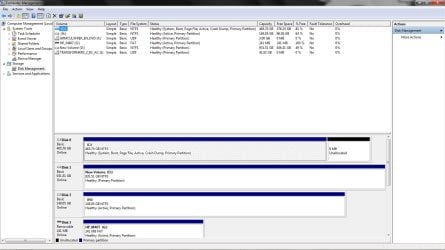
Bruce can you perform a screen shot of your disks?
Attached is what it looks like on my system
 

Attachments

  • disk_manager.jpg
    disk_manager.jpg
    125.2 KB · Views: 87

My Computer

Computer Manufacturer/Model Number
Custom Build
OS
Windows 7 7600 1 X64
CPU
AMD PHENOM II X 550 PROCESSOR 3.1 ghz
Motherboard
ASUS M4A78-TE
Memory
Corsair 4 gig ddr 3
Graphics Card(s)
ati radeon 3300
Sound Card
ati hd
Monitor(s) Displays
syncmaster 2033sw
Screen Resolution
1600X900 60 hz refresh
Hard Drives
twin_seagates SATA's 1 TB & 500 Gig, hitachi_slimline 160 gig
PSU
antec_550 watt
Case
cooler master GLite
Cooling
stock_heat sink
Internet Speed
20mbs up/ 1.5mbs down
Other Info
favorite child "stewie"
favorite dog "brian"
At the request of the folks at Western Digital I reinstalled W7 yesterday and checked the DM info, sent it all to them, and then they responded "It is an OS problem so contact them"... Real impressive. Especially since I told them in my initial contact the drive works under WXP Pro and not W7. I used to have a rule never to buy Western Digital because when I managed corporate computers prior to getting a real IT person onboard, WD drives were the only ones that I constantly had problems with. They are not doing anything to improve their image (These drives came with the system).

Anyway, I think I did take a shot of that page, but as it will take me longer to figure out how to attach it (especially if I have to do any changing of resolutions or the like), I will send here what I sent to WD yesterday, which was most of what I believe important from that and a couple other tabs. Note that HD2 - Disk 1 - is the problem drive and is identical to the primary, Disk 0 -

Disk Management:

HD2 (D:)
186.31 GB NTFS
Healthy (Active, Primary Partition)

Disk O
Basic
186.31 GB
Online

Disk 1
Basic
186.31 GB
Online

When I select it and click (open) I get a window with the title: Location is not available. The error statement is: D:\ is not accessible. Access is denied.

Used 125
Free 61.2
Compression was on, I unchecked it.
Tools:
Ran checkdisk - found some errors and fixed. Details showed nothing of note, but I saved a screenshot of it.

Device properties: This device is working properly
Location 1 (Channel 0, Target 1, Lun 0)

So usage is being shown, tools like checkdisk run on it, but when I go to display it I am told Windows can not access it. Yeah, right...

p.s. Can you point me to a resource that will tell me what I need to do to include screenshots?
 

My Computer

Computer Manufacturer/Model Number
Powerspec
OS
W7
Make a Screenshot

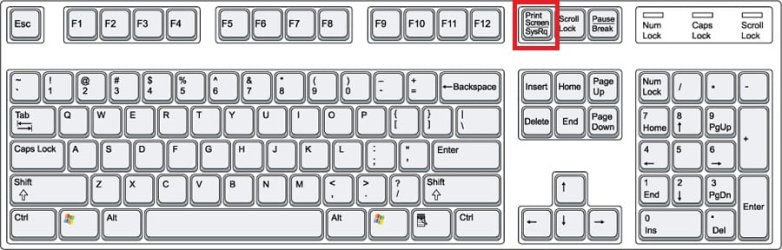
Good morning Bruce, here is how you make a screenshot.
  • When viewing an image with your browser and you want to make a capture use the "prt_scr" key on the upper right of a qwerty keyboard. (see attached keyboard image)
  • When you touched the prt_scr key you saved the image to a clipboard.
  • If you don't save the image to a file format you will lose it.
  • Using a foto capture program, my choice is Microsoft Paint you can pull the image from the clipboard and edit/manipulate the image and save it to jpeg,png, or bitmap (see image)
 

Attachments

  • keyboard4.jpg
    keyboard4.jpg
    48.9 KB · Views: 11
  • paint.jpg
    paint.jpg
    42 KB · Views: 33

My Computer

Computer Manufacturer/Model Number
Custom Build
OS
Windows 7 7600 1 X64
CPU
AMD PHENOM II X 550 PROCESSOR 3.1 ghz
Motherboard
ASUS M4A78-TE
Memory
Corsair 4 gig ddr 3
Graphics Card(s)
ati radeon 3300
Sound Card
ati hd
Monitor(s) Displays
syncmaster 2033sw
Screen Resolution
1600X900 60 hz refresh
Hard Drives
twin_seagates SATA's 1 TB & 500 Gig, hitachi_slimline 160 gig
PSU
antec_550 watt
Case
cooler master GLite
Cooling
stock_heat sink
Internet Speed
20mbs up/ 1.5mbs down
Other Info
favorite child "stewie"
favorite dog "brian"
Right click on the drive in disk management, or computer folder - properties - security - advanced - owner - edit - then change owner to yourself.

If your still having problems read the following, as it maybe useful knowledge in any case, even if it isnt relevant.

Move Disks to Another Computer[This topic is pre-release documentation and is subject to change in future releases. Blank topics are included as placeholders.]

This section describes the steps to take and considerations associated with moving disks to another computer. You might want to print this procedure or write down the steps before attempting to move disks from one computer to another.
Backup Operator or Administrator is the minimum membership required to perform these steps.
Verify volume health
Use Disk Management to make sure the status of the volumes on the disks is Healthy. If the status is not Healthy, you should repair the volumes before you move the disks.
To verify the volume status, check the Status column in the Volume List view or under the volume size and file system information in the Graphical view.
Uninstall the disks
Uninstall the disks you want to move using Device Manager.
To uninstall disks
Open Device Manager in Computer Management.
In the device list, double-click Disk drives.
Right-click the disks you want to uninstall, and then click Uninstall.
In the Confirm Device Removal dialog box, click OK.
Remove dynamic disks
If the disks you want to move are dynamic disks, in Disk Management, right-click the disks that you want to move, and then click Remove Disk.
After having removed dynamic disks or if you are moving basic disks, you can now physically disconnect them. If the disks are external, you can now unplug them from the computer. If they are internal, turn off the computer, and then physically remove the disks.
Install disks in the new computer
If the disks are external, plug them into the computer. If the disks are internal, make sure the computer is turned off and then physically install the disks in that computer.
Start the computer that contains the disks you moved and follow the instructions on the Found New Hardware dialog box.
Detect new disks
On the new computer, open Disk Management. Click Action and then click Rescan Disks. Right-click any disk marked Foreign, click Import Foreign Disks, and then follow the instructions on your screen.
Additional considerations
When moved to another computer, basic volumes receive the next available drive letter on that computer. Dynamic volumes retain the drive letter they had on the previous computer. If a dynamic volume did not have a drive letter on the previous computer, it does not receive a drive letter when moved to another computer. If the drive letter is already used on the computer where they are moved, the volume receives the next available drive letter. If an administrator has used the mountvol /n or the diskpart automount commands to prevent new volumes from being added to the system, volumes moved from another computer are prevented from being mounted and from receiving a drive letter. To use the volume, you must manually mount the volume and assign it a drive letter using Disk Management or the DiskPart and mountvol commands.

If you are moving spanned, striped, mirrored, or RAID-5 volumes, it is highly recommended that you move all disks containing the volume together. Otherwise, the volumes on the disks cannot be brought online and will not be accessible except to delete them.

You can move multiple disks from different computers to a computer by installing the disks, opening Disk Management, right-clicking any of the new disks, and then clicking Import Foreign Disks. When importing multiple disks from different computers, always import all of the disks from one computer at a time. For example, if you want to move disks from two computers, import disks from the first computer and then import disks from the second computer.

Disk Management describes the condition of the volumes on the disks before they are imported. Review this information carefully. If there are any problems, this will tell you what will happen to each volume on these disks once the disks have been imported.

If you move a GUID partition table disk containing the Windows operating system to an x86-based or x64-based computer, you can access the data, but you cannot boot from that operating system.
 

My Computer

OS
XP, Vista, W7 64bit Home Premium
CPU
Intel Core Duo 6850 3.0 ghz @ 3.7 ghz
Motherboard
Asus P5E
Memory
4GB Corsair DDR 2 PC-6400
Graphics Card(s)
Ati 4870 1ghz
Sound Card
Supreme FX 11
Monitor(s) Displays
View Sonic VX1962wm
Screen Resolution
1680 X1050
Hard Drives
3 Seagate Sata Drives 160gb 250gb 500gb
PSU
Thermaltake 600 watt
Case
NZXT Alpha
Cooling
3X120cm Fans
Keyboard
Microsoft Digital Media Pro Keyboard
Mouse
Microsoft Wheel Mouse Optical
Internet Speed
1.5Mb to 8Mb/384k
@ Adrain: I have that part down, I just don't know the right way to attach it to my posts! In the past I have tried on various forums and have run into criticism for making the shot a part of the message and not an attachment, or it was too many MB, or too many pixels (pick a reason, any reason!), so I now am apprehensive... @Whest: Wow... Thank-you - I am going to have to print this off and read it while I am at work...
 

My Computer

Computer Manufacturer/Model Number
Powerspec
OS
W7
@ Adrain: I have that part down, I just don't know the right way to attach it to my posts! In the past I have tried on various forums and have run into criticism for making the shot a part of the message and not an attachment, or it was too many MB, or too many pixels (pick a reason, any reason!), so I now am apprehensive... @Whest: Wow... Thank-you - I am going to have to print this off and read it while I am at work...
Bruce look at the paper clip.
 

Attachments

  • clip.jpg
    clip.jpg
    120.7 KB · Views: 46

My Computer

Computer Manufacturer/Model Number
Custom Build
OS
Windows 7 7600 1 X64
CPU
AMD PHENOM II X 550 PROCESSOR 3.1 ghz
Motherboard
ASUS M4A78-TE
Memory
Corsair 4 gig ddr 3
Graphics Card(s)
ati radeon 3300
Sound Card
ati hd
Monitor(s) Displays
syncmaster 2033sw
Screen Resolution
1600X900 60 hz refresh
Hard Drives
twin_seagates SATA's 1 TB & 500 Gig, hitachi_slimline 160 gig
PSU
antec_550 watt
Case
cooler master GLite
Cooling
stock_heat sink
Internet Speed
20mbs up/ 1.5mbs down
Other Info
favorite child "stewie"
favorite dog "brian"
Hmmmmmm (embarrassment) "paperclip", hunh? Like "attach to"?...

Two birds. I now know how to attach screen shots when needed here, and by changing ownership to me, drive problem fixed.

THANK-YOU gentlemen!!!
 

My Computer

Computer Manufacturer/Model Number
Powerspec
OS
W7
Hmmmmmm (embarrassment) "paperclip", hunh? Like "attach to"?...

Two birds. I now know how to attach screen shots when needed here, and by changing ownership to me, drive problem fixed.

THANK-YOU gentlemen!!!
YIPEEE!!!!:geek::geek::geek::geek:
Ready for Windows 8????LOL
 

My Computer

Computer Manufacturer/Model Number
Custom Build
OS
Windows 7 7600 1 X64
CPU
AMD PHENOM II X 550 PROCESSOR 3.1 ghz
Motherboard
ASUS M4A78-TE
Memory
Corsair 4 gig ddr 3
Graphics Card(s)
ati radeon 3300
Sound Card
ati hd
Monitor(s) Displays
syncmaster 2033sw
Screen Resolution
1600X900 60 hz refresh
Hard Drives
twin_seagates SATA's 1 TB & 500 Gig, hitachi_slimline 160 gig
PSU
antec_550 watt
Case
cooler master GLite
Cooling
stock_heat sink
Internet Speed
20mbs up/ 1.5mbs down
Other Info
favorite child "stewie"
favorite dog "brian"
There one was a time I would install the first beta I could get my hands on, one way or any other. I'm getting too old and confused for that stuff - leave it up to you young folk...

Any idea why this situation would have happened to me, and apparently next to no one else? I mean, some sort of answer other than maybe I am cursed!

Western Digital tech support, who should have some command of not only how to make their drives, but how to properly check configuration in the largest mfr of OSs in the world, were total morons and refused to do anything but tell me to call MS; this was a configuration error of their drive and they should have know best what to check for. I just don't get why 1) one drive installed just fine and the other had a bad configuration, 2) Why have I never run into this before and 3) Why is this problem apparently so rare (But once again, I managed to "catch" it)?
 

My Computer

Computer Manufacturer/Model Number
Powerspec
OS
W7
Oh good.

Either the mb or the CPU fried last night on that computer. How much fun can I have?
 

My Computer

Computer Manufacturer/Model Number
Powerspec
OS
W7
Back
Top