Want to dual boot Ubuntu with Win 7

Arc

New member
SF Team
Local time
4:05 AM
Messages
35,002
Hi !
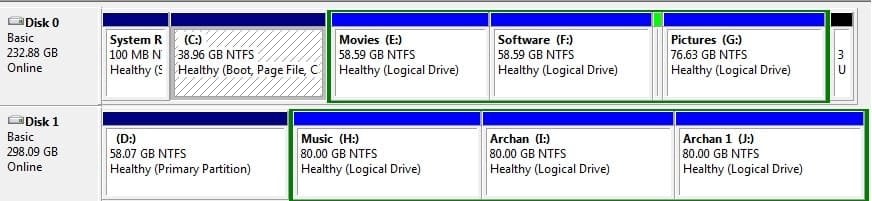
This is the disk management screenshot. In disk 0 Partition C, Win 7 is installed. In Disk 1 partition D, there was Win XP, but I formatted is as primary to install Ubuntu there as dual boot. Practically I know almost nothing about Linux installation. When I am trying to install it, I am not able to find out which one is the D drive.

I tried the Gparted option there, but it seemed to me a puzzle :o.

Can anybody please help me?
 

Attachments
  • Untitled.jpg
    Untitled.jpg
    34 KB · Views: 77

My Computer My Computer

At a glance

Microsoft Windows 10 Pro Insider Preview 64-bitIntel(R) Core(TM) i3-4130 CPU @ 3.40GHzCorsair Vengence 4GB x2 (8.00GB Dual-Channel ...2047MB GeForce GTS 450 (ZOTAC International)
Computer type
PC/Desktop
Computer Manufacturer/Model Number
Self Assembled
OS
Microsoft Windows 10 Pro Insider Preview 64-bit
CPU
Intel(R) Core(TM) i3-4130 CPU @ 3.40GHz
Motherboard
Gigabyte Technology Co., Ltd. B85M-D3H
Memory
Corsair Vengence 4GB x2 (8.00GB Dual-Channel DDR3 @ 798MHz)
Graphics Card(s)
2047MB GeForce GTS 450 (ZOTAC International)
Sound Card
Onboard (Realtek High Definition Audio)
Monitor(s) Displays
LG Flatron E2040T
Screen Resolution
1600x900
Hard Drives
Western Digital 1 TB
Seagate 500 GB
PSU
Corsair VS550
Case
Cooler Master K380
Cooling
Cooler Master Seidon 120V Plus
Keyboard
Logitech MK260r
Mouse
Logitech MK260r
Internet Speed
PMPL Broadband
Antivirus
Windows Defender + MBAM
Browser
Firefox
Other Info
Dell Studio 15" Laptop
Welcome!

The D partition should be the first partition on the second hard drive. It is also the smaller of the approx 58GB partitions.

The Ubuntu setup should show the different hard drives.
 

My Computer My Computer

At a glance

Windows 7 Professional x64Intel i7 2600K OC'd @ 4620 MHz16GB GSkill Sniper 2133 Mhz (4x4GB)EVGA GeForce GTX 480 SuperClocked+
Computer Manufacturer/Model Number
Custom
OS
Windows 7 Professional x64
CPU
Intel i7 2600K OC'd @ 4620 MHz
Motherboard
Asus P8Z68-V Pro
Memory
16GB GSkill Sniper 2133 Mhz (4x4GB)
Graphics Card(s)
EVGA GeForce GTX 480 SuperClocked+
Sound Card
Realtek High Definition Audio
Monitor(s) Displays
2x Acer S273HLbmii 27"
Screen Resolution
2 x 1920x1080
Hard Drives
64GB Crucial M4 SSD

Storage: Hitachi 1TB 5400RPM, Samsung 1.5TB 5400RPM
PSU
Corsair HW Series 750w (modular)
Case
Cooler Master HAF 932 Advanced Blue Edition
Cooling
CM Hyper 212+ CPU cooler, 3x 230mm + 1x 140mm case fans
Keyboard
Logitech MK320 (wireless)
Mouse
Logitech MK320 (wireless)
Internet Speed
30 Mb/s : 2 Mb/s
Hi !
This is the disk management screenshot. In disk 0 Partition C, Win 7 is installed. In Disk 1 partition D, there was Win XP, but I formatted is as primary to install Ubuntu there as dual boot. Practically I know almost nothing about Linux installation. When I am trying to install it, I am not able to find out which one is the D drive.

I tried the Gparted option there, but it seemed to me a puzzle :o.

Can anybody please help me?
Linux identifies hard drives and partitions as: SDA (or sometimes hda), so the first partition on the first hard drive shown (drive 0) would be sda1, the second partition sda2 etc.

The first partition on the second hard drive would be sdb1, the second partition sdb2 etc.

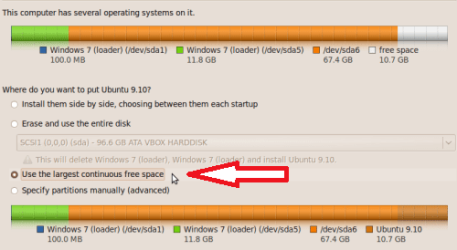
When installing Ubuntu, from this screen: you will select partition sdb1 and it will show as 58GB (or perhaps a little less). The screen shot only shows a single hard drive, but you should see the ids sda1 etc. and sdb1 etc. form your setup.

win7_plus_ubun2_06.PNG

Question: Have you planned how you will setup your dual boot?

Cheers!
Robert
 

My Computer My Computer

At a glance

...
OS
...
Hi !
This is the disk management screenshot. In disk 0 Partition C, Win 7 is installed. In Disk 1 partition D, there was Win XP, but I formatted is as primary to install Ubuntu there as dual boot. Practically I know almost nothing about Linux installation. When I am trying to install it, I am not able to find out which one is the D drive.

I tried the Gparted option there, but it seemed to me a puzzle :o.

Can anybody please help me?
Linux identifies hard drives and partitions as: SDA (or sometimes hda), so the first partition on the first hard drive shown (drive 0) would be sda1, the second partition sda2 etc.

The first partition on the second hard drive would be sdb1, the second partition sdb2 etc.

When installing Ubuntu, from this screen: you will select partition sdb1 and it will show as 58GB (or perhaps a little less). The screen shot only shows a single hard drive, but you should see the ids sda1 etc. and sdb1 etc. form your setup.

View attachment 53110

Question: Have you planned how you will setup your dual boot?

Cheers!
Robert

Thanx a lot Robert!
I remember that the partition names was sda and sdb there, and the size was expressed in mbs ( not in gbs). Now it is clear to me that I am to select sdb1 to install Ubuntu.

If I install Ubuntu now, and then if I add a linux entry as Grub bootloader in the system reserved (Boot) drive using EasyBCD from within Windows 7, will not it dual boot?

Let me have another try :D , after that , I will inform you what happened.
 

My Computer My Computer

At a glance

Microsoft Windows 10 Pro Insider Preview 64-bitIntel(R) Core(TM) i3-4130 CPU @ 3.40GHzCorsair Vengence 4GB x2 (8.00GB Dual-Channel ...2047MB GeForce GTS 450 (ZOTAC International)
Computer type
PC/Desktop
Computer Manufacturer/Model Number
Self Assembled
OS
Microsoft Windows 10 Pro Insider Preview 64-bit
CPU
Intel(R) Core(TM) i3-4130 CPU @ 3.40GHz
Motherboard
Gigabyte Technology Co., Ltd. B85M-D3H
Memory
Corsair Vengence 4GB x2 (8.00GB Dual-Channel DDR3 @ 798MHz)
Graphics Card(s)
2047MB GeForce GTS 450 (ZOTAC International)
Sound Card
Onboard (Realtek High Definition Audio)
Monitor(s) Displays
LG Flatron E2040T
Screen Resolution
1600x900
Hard Drives
Western Digital 1 TB
Seagate 500 GB
PSU
Corsair VS550
Case
Cooler Master K380
Cooling
Cooler Master Seidon 120V Plus
Keyboard
Logitech MK260r
Mouse
Logitech MK260r
Internet Speed
PMPL Broadband
Antivirus
Windows Defender + MBAM
Browser
Firefox
Other Info
Dell Studio 15" Laptop
If I install Ubuntu now, and then if I add a linux entry as Grub bootloader in the system reserved (Boot) drive using EasyBCD from within Windows 7, will not it dual boot?

Let me have another try :D , after that , I will inform you what happened.
The main reason for my question was your statement: " Practically I know almost nothing about Linux installation."

If you tell Grub to install in the MBR of the second hard drive (SDB) you should be OK. You will then need to select which hard drive to boot to in the BIOS, and/or add the entry as you described. You can (even unintentionally) overwrite your Windows boot manager and be left with only the Grub boot loader. You might simplify things for yourself by unplugging the Windows hard drive before you install Ubuntu. In that case, as there would only be one hard drive visible, it would be identified as sda1. You can safely install Ubuntu without making changes to the Windows boot manager, then add the grub entry to Windows.

Cheers!
Robert
 

My Computer My Computer

At a glance

...
OS
...
Had I listened to you earlier, I wouldn't have screwed up !!!

I created a free space in Disk 1 (SDB) using partition wizard live cd, and installed Ubuntu there. Now there is no seen of windows boot manager at all. In bootloader, there are four linux entries, and at last there is the windows vista (!!) boot entry. Practically I dont want this!

I want windows 7 to be my default boot, and then the linux may come. What to do to rectify this situation?
 

My Computer My Computer

At a glance

Microsoft Windows 10 Pro Insider Preview 64-bitIntel(R) Core(TM) i3-4130 CPU @ 3.40GHzCorsair Vengence 4GB x2 (8.00GB Dual-Channel ...2047MB GeForce GTS 450 (ZOTAC International)
Computer type
PC/Desktop
Computer Manufacturer/Model Number
Self Assembled
OS
Microsoft Windows 10 Pro Insider Preview 64-bit
CPU
Intel(R) Core(TM) i3-4130 CPU @ 3.40GHz
Motherboard
Gigabyte Technology Co., Ltd. B85M-D3H
Memory
Corsair Vengence 4GB x2 (8.00GB Dual-Channel DDR3 @ 798MHz)
Graphics Card(s)
2047MB GeForce GTS 450 (ZOTAC International)
Sound Card
Onboard (Realtek High Definition Audio)
Monitor(s) Displays
LG Flatron E2040T
Screen Resolution
1600x900
Hard Drives
Western Digital 1 TB
Seagate 500 GB
PSU
Corsair VS550
Case
Cooler Master K380
Cooling
Cooler Master Seidon 120V Plus
Keyboard
Logitech MK260r
Mouse
Logitech MK260r
Internet Speed
PMPL Broadband
Antivirus
Windows Defender + MBAM
Browser
Firefox
Other Info
Dell Studio 15" Laptop
Had I listened to you earlier, I wouldn't have screwed up !!!

I created a free space in Disk 1 (SDB) using partition wizard live cd, and installed Ubuntu there. Now there is no seen of windows boot manager at all. In bootloader, there are four linux entries, and at last there is the windows vista (!!) boot entry. Practically I dont want this!

I want windows 7 to be my default boot, and then the linux may come. What to do to rectify this situation?
You are still OK ... this is not a hard fix.

Of course, first shut down your computer, then unplug the second hard drive (Ubuntu). Now you will use your Windows 7 install DVD or the "System Repair" CD windows will burn for you to restore the Windows 7 boot manager. Please look over these two threads and let us know if you have any difficulties?

http://www.sevenforums.com/tutorials/20864-mbr-restore-windows-7-master-boot-record.html

http://www.sevenforums.com/installation-setup/62209-remove-grub-restore-windows-7-a.html

Then we will fix your Ubuntu so it can boot.

Cheers!
Robert
 

My Computer My Computer

At a glance

...
OS
...
Had I listened to you earlier, I wouldn't have screwed up !!!

I created a free space in Disk 1 (SDB) using partition wizard live cd, and installed Ubuntu there. Now there is no seen of windows boot manager at all. In bootloader, there are four linux entries, and at last there is the windows vista (!!) boot entry. Practically I dont want this!

I want windows 7 to be my default boot, and then the linux may come. What to do to rectify this situation?
You are still OK ... this is not a hard fix.

Of course, first shut down your computer, then unplug the second hard drive (Ubuntu). Now you will use your Windows 7 install DVD or the "System Repair" CD windows will burn for you to restore the Windows 7 boot manager. Please look over these two threads and let us know if you have any difficulties?

http://www.sevenforums.com/tutorials/20864-mbr-restore-windows-7-master-boot-record.html

http://www.sevenforums.com/installation-setup/62209-remove-grub-restore-windows-7-a.html

Then we will fix your Ubuntu so it can boot.

Cheers!
Robert

Removed GRUB and got windows boot manager back as per your suggestions.

Now I can use either os at boottime selection of drive. So what do you suggest to get dual boot back with windows 7 as default os?
 

My Computer My Computer

At a glance

Microsoft Windows 10 Pro Insider Preview 64-bitIntel(R) Core(TM) i3-4130 CPU @ 3.40GHzCorsair Vengence 4GB x2 (8.00GB Dual-Channel ...2047MB GeForce GTS 450 (ZOTAC International)
Computer type
PC/Desktop
Computer Manufacturer/Model Number
Self Assembled
OS
Microsoft Windows 10 Pro Insider Preview 64-bit
CPU
Intel(R) Core(TM) i3-4130 CPU @ 3.40GHz
Motherboard
Gigabyte Technology Co., Ltd. B85M-D3H
Memory
Corsair Vengence 4GB x2 (8.00GB Dual-Channel DDR3 @ 798MHz)
Graphics Card(s)
2047MB GeForce GTS 450 (ZOTAC International)
Sound Card
Onboard (Realtek High Definition Audio)
Monitor(s) Displays
LG Flatron E2040T
Screen Resolution
1600x900
Hard Drives
Western Digital 1 TB
Seagate 500 GB
PSU
Corsair VS550
Case
Cooler Master K380
Cooling
Cooler Master Seidon 120V Plus
Keyboard
Logitech MK260r
Mouse
Logitech MK260r
Internet Speed
PMPL Broadband
Antivirus
Windows Defender + MBAM
Browser
Firefox
Other Info
Dell Studio 15" Laptop
Removed GRUB and got windows boot manager back as per your suggestions. Now I can use either os at boottime selection of drive. So what do you suggest to get dual boot back with windows 7 as default os?
I would suggest a third party utility to edit the menu, like the free EasyBCD2 theog linked to in this thread: http://www.sevenforums.com/crashes-debugging/62672-boot-problem.html#post560817 We just assisted the removal of a Ubuntu menu entry in that thread so you can see what the entry would look like.

I use the paid utility DualBootPro (like $10?), or if you are comfortable with command line instructions you can try "BCDedit" to add the Ubuntu entry?

http://www.sevenforums.com/crashes-debugging/62672-boot-problem.html#post560808

Let us know how we may assist you?

Cheers!
Robert
 

My Computer My Computer

At a glance

...
OS
...
I am familiar with EasyBCD. I used it many times to dual boot Win 7 and XP. As I messed up everything once, I think it is better to follow your instruction.

I am to add a linux entry, right? which entry - MBR or GRUB, or I am to install neoGRUb? In which drive - C or boot?
 

My Computer My Computer

At a glance

Microsoft Windows 10 Pro Insider Preview 64-bitIntel(R) Core(TM) i3-4130 CPU @ 3.40GHzCorsair Vengence 4GB x2 (8.00GB Dual-Channel ...2047MB GeForce GTS 450 (ZOTAC International)
Computer type
PC/Desktop
Computer Manufacturer/Model Number
Self Assembled
OS
Microsoft Windows 10 Pro Insider Preview 64-bit
CPU
Intel(R) Core(TM) i3-4130 CPU @ 3.40GHz
Motherboard
Gigabyte Technology Co., Ltd. B85M-D3H
Memory
Corsair Vengence 4GB x2 (8.00GB Dual-Channel DDR3 @ 798MHz)
Graphics Card(s)
2047MB GeForce GTS 450 (ZOTAC International)
Sound Card
Onboard (Realtek High Definition Audio)
Monitor(s) Displays
LG Flatron E2040T
Screen Resolution
1600x900
Hard Drives
Western Digital 1 TB
Seagate 500 GB
PSU
Corsair VS550
Case
Cooler Master K380
Cooling
Cooler Master Seidon 120V Plus
Keyboard
Logitech MK260r
Mouse
Logitech MK260r
Internet Speed
PMPL Broadband
Antivirus
Windows Defender + MBAM
Browser
Firefox
Other Info
Dell Studio 15" Laptop
I am familiar with EasyBCD. I used it many times to dual boot Win 7 and XP. As I messed up everything once, I think it is better to follow your instruction.

I am to add a linux entry, right? which entry - MBR or GRUB, or I am to install neoGRUb? In which drive - C or boot?
I can't guide you on the use of EasyBCD as I don't use it myself. It is a very popular utility here at the forum so someone will come along with that knowledge. But you are on the right track. You want to point EasyBCD to the mbr of drive1 to add Ubuntu to your Windows boot menu. EasyBCD2 is available and I understand is almost automatic.

You can also boot to Ubuntu now and from a terminal type: sudo update-grub
That will add a Windows menu entry to Grub so no matter which hard drive you happen to select as the boot drive you can choose either Windows or Ubuntu. Update-grub will NOT overwrite any mbr so you do not have to worry about it changing your windows boot menu.

Cheers!
Robert
 

My Computer My Computer

At a glance

...
OS
...
You can also boot to Ubuntu now and from a terminal type: sudo update-grub
That will add a Windows menu entry to Grub so no matter which hard drive you happen to select as the boot drive you can choose either Windows or Ubuntu. Update-grub will NOT overwrite any mbr so you do not have to worry about it changing your windows boot menu.

Cheers!
Robert

Thanks for your help, Robert.
I have just another question to you. If I boot Ubuntu and update grub there, will it bring Ubuntu the default boot in dual boot? I want windows 7 as default, because if I somehow forget to press the scroll buttons, I want to logon to windows 7.

However, I am trying to update grub. Thanks a lot to you again.

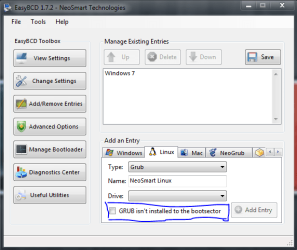
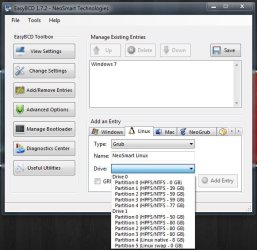
I can use EasyBCD, but never used it for linux (I have never been in linux before !) When I am trying to add a linux entry, I cannot add it to bootloader; it doesnot show the boot(system reserved) drive in linux tab. Now I want sobebody to help me in this issue please :
 

Attachments

  • Capture.PNG
    Capture.PNG
    21.3 KB · Views: 12
  • Untitled.jpg
    Untitled.jpg
    48.5 KB · Views: 6

My Computer My Computer

At a glance

Microsoft Windows 10 Pro Insider Preview 64-bitIntel(R) Core(TM) i3-4130 CPU @ 3.40GHzCorsair Vengence 4GB x2 (8.00GB Dual-Channel ...2047MB GeForce GTS 450 (ZOTAC International)
Computer type
PC/Desktop
Computer Manufacturer/Model Number
Self Assembled
OS
Microsoft Windows 10 Pro Insider Preview 64-bit
CPU
Intel(R) Core(TM) i3-4130 CPU @ 3.40GHz
Motherboard
Gigabyte Technology Co., Ltd. B85M-D3H
Memory
Corsair Vengence 4GB x2 (8.00GB Dual-Channel DDR3 @ 798MHz)
Graphics Card(s)
2047MB GeForce GTS 450 (ZOTAC International)
Sound Card
Onboard (Realtek High Definition Audio)
Monitor(s) Displays
LG Flatron E2040T
Screen Resolution
1600x900
Hard Drives
Western Digital 1 TB
Seagate 500 GB
PSU
Corsair VS550
Case
Cooler Master K380
Cooling
Cooler Master Seidon 120V Plus
Keyboard
Logitech MK260r
Mouse
Logitech MK260r
Internet Speed
PMPL Broadband
Antivirus
Windows Defender + MBAM
Browser
Firefox
Other Info
Dell Studio 15" Laptop
Thanks for your help, Robert.
I have just another question to you. If I boot Ubuntu and update grub there, will it bring Ubuntu the default boot in dual boot? I want windows 7 as default, because if I somehow forget to press the scroll buttons, I want to logon to windows 7.

However, I am trying to update grub. Thanks a lot to you again.
Arc;

"Update-grub" will only add missing OSs to the Grub menu, it will not change the Windows boot manager. You will have the choice in your BIOS to set your Windows hard drive as the boot drive and keep the Windows bootmgr as the default. You will also have the choice in your BIOS to set the Ubuntu hard drive as the boot drive and use the Grub boot menu to boot to Ubuntu or Windows. You can have it both ways. Call it a "backup plan", "plan B"!

You can also set Windows as the default choice in Grub, so that Windows will start if you "somehow forget to press the scroll buttons." ;)

Please look this thread over: http://www.sevenforums.com/installation-setup/62840-fixed-windows-but-now-grub-gone.html

Cheers!
Robert
 

My Computer My Computer

At a glance

...
OS
...
You can also set Windows as the default choice in Grub, so that Windows will start if you "somehow forget to press the scroll buttons." ;)

How can I do it? I think if I can do it, it would be the easiest way to have a properly functioning dual boot.
 

My Computer My Computer

At a glance

Microsoft Windows 10 Pro Insider Preview 64-bitIntel(R) Core(TM) i3-4130 CPU @ 3.40GHzCorsair Vengence 4GB x2 (8.00GB Dual-Channel ...2047MB GeForce GTS 450 (ZOTAC International)
Computer type
PC/Desktop
Computer Manufacturer/Model Number
Self Assembled
OS
Microsoft Windows 10 Pro Insider Preview 64-bit
CPU
Intel(R) Core(TM) i3-4130 CPU @ 3.40GHz
Motherboard
Gigabyte Technology Co., Ltd. B85M-D3H
Memory
Corsair Vengence 4GB x2 (8.00GB Dual-Channel DDR3 @ 798MHz)
Graphics Card(s)
2047MB GeForce GTS 450 (ZOTAC International)
Sound Card
Onboard (Realtek High Definition Audio)
Monitor(s) Displays
LG Flatron E2040T
Screen Resolution
1600x900
Hard Drives
Western Digital 1 TB
Seagate 500 GB
PSU
Corsair VS550
Case
Cooler Master K380
Cooling
Cooler Master Seidon 120V Plus
Keyboard
Logitech MK260r
Mouse
Logitech MK260r
Internet Speed
PMPL Broadband
Antivirus
Windows Defender + MBAM
Browser
Firefox
Other Info
Dell Studio 15" Laptop
You can also set Windows as the default choice in Grub, so that Windows will start if you "somehow forget to press the scroll buttons." ;)

How can I do it? I think if I can do it, it would be the easiest way to have a properly functioning dual boot.
Which version of Ubuntu are you using?
 

My Computer My Computer

At a glance

...
OS
...

My Computer My Computer

At a glance

Microsoft Windows 10 Pro Insider Preview 64-bitIntel(R) Core(TM) i3-4130 CPU @ 3.40GHzCorsair Vengence 4GB x2 (8.00GB Dual-Channel ...2047MB GeForce GTS 450 (ZOTAC International)
Computer type
PC/Desktop
Computer Manufacturer/Model Number
Self Assembled
OS
Microsoft Windows 10 Pro Insider Preview 64-bit
CPU
Intel(R) Core(TM) i3-4130 CPU @ 3.40GHz
Motherboard
Gigabyte Technology Co., Ltd. B85M-D3H
Memory
Corsair Vengence 4GB x2 (8.00GB Dual-Channel DDR3 @ 798MHz)
Graphics Card(s)
2047MB GeForce GTS 450 (ZOTAC International)
Sound Card
Onboard (Realtek High Definition Audio)
Monitor(s) Displays
LG Flatron E2040T
Screen Resolution
1600x900
Hard Drives
Western Digital 1 TB
Seagate 500 GB
PSU
Corsair VS550
Case
Cooler Master K380
Cooling
Cooler Master Seidon 120V Plus
Keyboard
Logitech MK260r
Mouse
Logitech MK260r
Internet Speed
PMPL Broadband
Antivirus
Windows Defender + MBAM
Browser
Firefox
Other Info
Dell Studio 15" Laptop
Which version of Ubuntu are you using?

I am using Ubuntu 9.04 Jaunty Jackalope.
You can manually edit the file:
In a terminal: sudo gedit /boot/grub/menu.lst

[ubuntu] [SOLVED] Trying to edit grub's menu.lst [Archive] - Ubuntu Forums

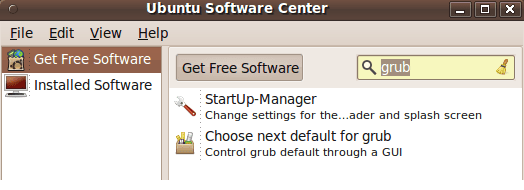
There are a couple utilities that will do that for you: Go to "Applications", "Add/Remove Applications" and search for "grub" (in "All Open Source applications"):

Startup-Manager

Choose next default for grub

grub_fix_09.PNG

Cheers!
Robert
 

My Computer My Computer

At a glance

...
OS
...
Back
Top