
Hi
I need some assistance. Recently bought a Western Digital Elements external hard drive which worked perfectly until now. Both my PC and laptop picks up my drive when I check under devices and printers but not showing it under "My computer" or Windows Explorer.
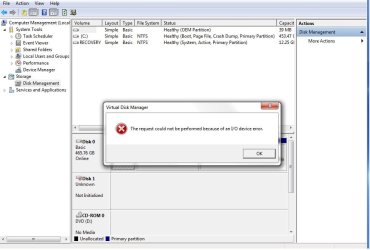
My drive displays under device manager "Disk drives" and shows that its working properly however, under disk management it shows "Not Initialized". When trying to initialize I get the error message "The request could not be performed because of an I/O device error."
This device did not fall or damge in transit as I used it the night before.
Please help!
I need some assistance. Recently bought a Western Digital Elements external hard drive which worked perfectly until now. Both my PC and laptop picks up my drive when I check under devices and printers but not showing it under "My computer" or Windows Explorer.
My drive displays under device manager "Disk drives" and shows that its working properly however, under disk management it shows "Not Initialized". When trying to initialize I get the error message "The request could not be performed because of an I/O device error."
This device did not fall or damge in transit as I used it the night before.
Please help!
Attachments
My Computer
- Computer type
- Laptop
- Computer Manufacturer/Model Number
- HP 630
- OS
- Windows 7 Home Basic 64 bit OS


