WD laptop HDD not loading

prashantsbhatia

New member
Local time
11:47 AM
Messages
38
Hello,

My WD hdd (model - WD3200BEVT) is not loading. My Dell laptop broke few months back post which I decided to take out the hard drive and make it external to transfer data.

I am facing below issues randomly.

1. Disk mgmt shows Dynamic disk 1 not initialized.
2. Disk mgmt shows disk 1 unknown not initialized.
3. At times it shows the capacity of hdd and at times it shows 0 GB.
4. The disk runs but then it makes clicking noise and runs again.

I have tried few things per the old threads I have seen.

1. Tried scanning the disk (whenever it gets detected) with minitool partition wizard but it just keeps scanning and nothing shows up.
2. Tried easy recovery software but same result as above.
3. Tried testdisk and it does show that it has 3 partitions but that's it...
4. Tried photorec but doesn't recover anything from the disk
5. I have tried WD Data Lifeguard Diagnostic for Windows
 

My Computer My Computer

Computer type
PC/Desktop
OS
win 8.1 64 bit
screenshots

I have attached word document which has screenshots and log of WD scan output. I would really appreciate if this can be looked at.

Thank You!
 

Attachments

Last edited:

My Computer My Computer

Computer type
PC/Desktop
OS
win 8.1 64 bit
Welcome to our forum prashantsbhatia.

First off, how did you hook up the drive externally?

Reason being, if the drive is getting less than needed voltage you will get that ticking. The drive is trying to work but can't because of low voltage.

Use this tutorial by Golden so we can see things.

Disk Management - Post a Screen Capture Image

Jack
 

My Computer My Computer

Computer type
PC/Desktop
Computer Manufacturer/Model Number
Home made Desktop
OS
Windows 10 Pro. 64/ version 1709 Windows 7 Pro/64
CPU
Intel i7-6800K @ 4.3
Motherboard
ASUS X-99 Deluxe II
Memory
Corsair Platinum 16 gig @2400
Graphics Card(s)
EVGA GTX 1070 OC
Monitor(s) Displays
Asus 27" LED LCD/VE278Q
Screen Resolution
1920-1080 or 1280-720 HDMI
Hard Drives
INTEL SSD 730-240 Gb Sata 3.0/
PSU
EVGA Platium 1200W
Case
Phanteks Luxe Tempered Glass 8 fans/ one radiator
Cooling
XSPC/ Water Cooled CPU
Keyboard
Das 4 Professional
Mouse
Logitech M705/MX Anywhere 2-S
Internet Speed
100 mbits
Antivirus
Microsoft Security Essentials/ Malwarebytes Premium 3.0/ SAS
Browser
I.E. 11 default/Firefox/ ISP Time Warner Cable/Spectrum
Other Info
LG BluRay Burner/
Sound system-KLipsch-THX/
Icy Dock ssd Hot Swap bays.
Thank You for your response Layback Bear, I am connecting it via usb to sata external casing. I have used two different casings and both give out same results as posted in my earlier post with screenshots.

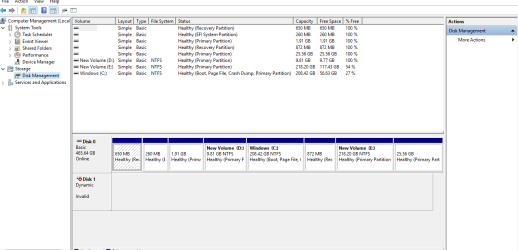
Nevertheless, I shall attach the screenshot per your request and shall go from there.

Thanks..
 

My Computer My Computer

Computer type
PC/Desktop
OS
win 8.1 64 bit
Hi Prashant S Bhatia,

If your system is a 64bit system, then download bootice 64bit version BOOTICEx64 v1.332 from here 【BOOTICE v1.3.3.2: 功能强大的启动维护工具】-子逸轩 The downloaded file : BOOTICEx64_v1.332.rar

Create a folder named Bootice64 on your C drive and extract the BOOTICEx64_v1.332.rar file into it. That folder will then contain the single BOOTICEx64.exe which you will run.

Caution: Remove all other external drives and flash drives from your system so that you do not perform the operation outlined here on a wrong drive.

Plugin only your external casing with the Dynamic Disk in it and then run bootice.

Select your external drive, and click on Sector Edit. Post the screenshot of sector 0. After taking the screenshot close that Window and then exit bootice.

On Bootice for info: My post #7 here : Lost partitions!

Screenshot: How to Use the Snipping Tool in Vista

Upload: Screenshots and Files - Upload and Post in Seven Forums
 

My Computer My Computer

OS
Windows 7 Home Premium 32 bit
Hello Jumanji,

I have attached the screenshots per your request in the .docx file which I am uploading with this post. Also, It consists the screenshot requested by Lay Bear...

Do let me know how to proceed. Thanks!
 

Attachments

My Computer My Computer

Computer type
PC/Desktop
OS
win 8.1 64 bit
Please do not put the screenshots in a word file. Upload the screenshots as jpg or png directly to Sevenforums and attach those.
Upload: Screenshots and Files - Upload and Post in Seven Forums

It will at once be visible in the post itself as below.

03-03-2017 21-04-30.jpg

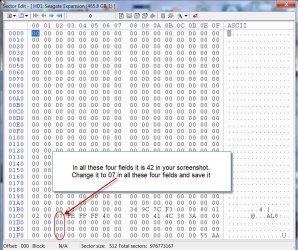
Now in your screenshot row 01C0, 01D0, 01E0, 01F0 Column 02 all the four fields are 42. You have to change it to 07 and save it. ( Zero Seven)

Run bootice and select your correct drive ( As already told have only the dynamic Disk external connected. Make sure you do not select your system drive) Click on sector Edit and your sector 0 window opens.

Click on digit 4. It will start flashing. Type 0. Now the next digit 2 will start flashing. Type 7.

Do the same for the other three 42 and change it to 07

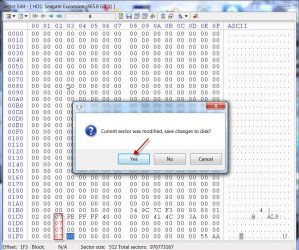
So then, all 42 will be 07 as shown in the screenshot below.

Make sure that you do not make any change to other preceding and succeeding fields or any other field..

Close the sector edit Window. You will be asked whether to save changes to the disk. Click on Yes to save.

Exit bootice.

03-03-2017 21-16-06.jpg

Shut down your PC and then boot again.

Are you now able to access the drive?

If not post a fresh screenshot of Windows Disk Management. You may need to bring it online or assign drive letters or you may need to do a Partition Recovery. Windows Disk Management screenshot will tell us. Let us see how it goes.
 

My Computer My Computer

OS
Windows 7 Home Premium 32 bit
No change after I made the changes per your post (screenshot attached of disk mgmt). But, when I re-open the bootice, the changes are reverted back to 42 in all four rows as it were before.

I am going to give it one more try and restart my system to see if I am lucky this time. Keep you posted...

Any clues why it does that?
 

My Computer My Computer

Computer type
PC/Desktop
OS
win 8.1 64 bit
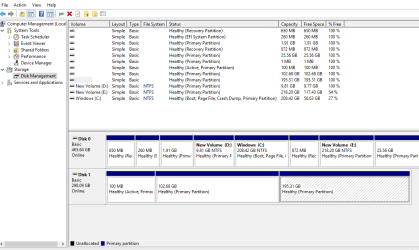
Attachment attached...I must also add that the information keeps changing from Disk 1 Dynamic to Disk 1 Unknown to Disk 1 Un-allocated...it's random.

Just restarted and this time, that setting has got saved. Not sure if it will sustain...but yeah not much change as I am not able to access the drive.
 

Attachments

  • Capture.PNG
    Capture.PNG
    20.1 KB · Views: 1

My Computer My Computer

Computer type
PC/Desktop
OS
win 8.1 64 bit
Good day prashantsbhatia.
Please follow jumanji instructions as you have been. He is the expert on such matters. I will sit back and watch.

I still have a concern about the ticking noise from your drive.

Jack
 

My Computer My Computer

Computer type
PC/Desktop
Computer Manufacturer/Model Number
Home made Desktop
OS
Windows 10 Pro. 64/ version 1709 Windows 7 Pro/64
CPU
Intel i7-6800K @ 4.3
Motherboard
ASUS X-99 Deluxe II
Memory
Corsair Platinum 16 gig @2400
Graphics Card(s)
EVGA GTX 1070 OC
Monitor(s) Displays
Asus 27" LED LCD/VE278Q
Screen Resolution
1920-1080 or 1280-720 HDMI
Hard Drives
INTEL SSD 730-240 Gb Sata 3.0/
PSU
EVGA Platium 1200W
Case
Phanteks Luxe Tempered Glass 8 fans/ one radiator
Cooling
XSPC/ Water Cooled CPU
Keyboard
Das 4 Professional
Mouse
Logitech M705/MX Anywhere 2-S
Internet Speed
100 mbits
Antivirus
Microsoft Security Essentials/ Malwarebytes Premium 3.0/ SAS
Browser
I.E. 11 default/Firefox/ ISP Time Warner Cable/Spectrum
Other Info
LG BluRay Burner/
Sound system-KLipsch-THX/
Icy Dock ssd Hot Swap bays.
Okay, got something different this time. I can see the partitions and am assigning drive letters...but not working....shows raw..
 

Attachments

  • Capture1.PNG
    Capture1.PNG
    22.3 KB · Views: 0

My Computer My Computer

Computer type
PC/Desktop
OS
win 8.1 64 bit
Jumanji, are you online? can you take a look at this? All the partitions show up, I assigned drive letters but it says the partition is in raw and hence needs to be formatted.
 

My Computer My Computer

Computer type
PC/Desktop
OS
win 8.1 64 bit
Latest screenshot attached
 

Attachments

  • Capture2.PNG
    Capture2.PNG
    21.9 KB · Views: 0

My Computer My Computer

Computer type
PC/Desktop
OS
win 8.1 64 bit
Yes jumanji is on line.
Notice the green square in the top right corner of his post.
I would recommend not doing anything unless jumanji instructs you to.

Jack
 

My Computer My Computer

Computer type
PC/Desktop
Computer Manufacturer/Model Number
Home made Desktop
OS
Windows 10 Pro. 64/ version 1709 Windows 7 Pro/64
CPU
Intel i7-6800K @ 4.3
Motherboard
ASUS X-99 Deluxe II
Memory
Corsair Platinum 16 gig @2400
Graphics Card(s)
EVGA GTX 1070 OC
Monitor(s) Displays
Asus 27" LED LCD/VE278Q
Screen Resolution
1920-1080 or 1280-720 HDMI
Hard Drives
INTEL SSD 730-240 Gb Sata 3.0/
PSU
EVGA Platium 1200W
Case
Phanteks Luxe Tempered Glass 8 fans/ one radiator
Cooling
XSPC/ Water Cooled CPU
Keyboard
Das 4 Professional
Mouse
Logitech M705/MX Anywhere 2-S
Internet Speed
100 mbits
Antivirus
Microsoft Security Essentials/ Malwarebytes Premium 3.0/ SAS
Browser
I.E. 11 default/Firefox/ ISP Time Warner Cable/Spectrum
Other Info
LG BluRay Burner/
Sound system-KLipsch-THX/
Icy Dock ssd Hot Swap bays.
You can bet on that Jack. I am not doing anything and not moving my hdd an inch till jumanji suggests anything. Want to make sure I get the data out from this hdd.

Again thanks to both of your perseverance in helping me out.

Prashant

PS - I couldn't agree with you more Jack on that noise that this hdd is making...gets me nervous at times..
 

My Computer My Computer

Computer type
PC/Desktop
OS
win 8.1 64 bit
Ok PrashanthBatia, Now safely remove your drive and keep it aside. Let me thinkover tonight and we shall continue tomorrow.

When you successfully remove the drive post a message.
 

My Computer My Computer

OS
Windows 7 Home Premium 32 bit
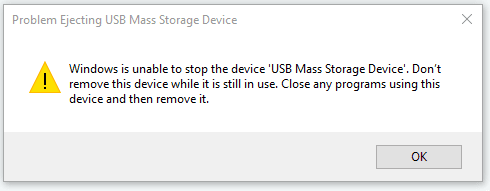
Attached is the message I normally get when I try to remove it by clicking on USB in system tray and try to eject it.

I have got nothing open which can keep the drive in question busy. I have closed disk management, windows explorer which were open earlier however I still receive same message.

Shall I keep the drive connected to my laptop overnight?
 

Attachments

  • Capture3.PNG
    Capture3.PNG
    3.7 KB · Views: 9

My Computer My Computer

Computer type
PC/Desktop
OS
win 8.1 64 bit
A HD making a clicking noise is not normally making a good sound. Hopefully, thread starter and jumanji will arrive at a solution soon.
 

My Computer My Computer

Computer type
PC/Desktop
Computer Manufacturer/Model Number
Antec desktop; Acer Aspire laptops
OS
Windows 7 Professional 64-bit
CPU
Desktop i5; Acers i5 & i7
Memory
desktop 16GB; 1 Acer 8GB & 1 Acer 16GB
Hard Drives
1TB split into 2 equal partitions [OS and data] usable by RJS
Internet Speed
AT&T DSL
Browser
FF, GChrome, msIE
Other Info
Windows 7 Firewall, Emsisoft AM/AV, MSE [scan-only], SpywareBlaster, Ruiware/BillP combine
A HD making a clicking noise is not normally making a good sound. Hopefully, thread starter and jumanji will arrive at a solution soon.

I agree Roland. Fingers crossed !!
 

My Computer My Computer

Computer type
PC/Desktop
OS
win 8.1 64 bit
Do a total Windows shutdown. When computer's completely off; remove the problem device and store until jumanji and you resume the next day. He will advise when to stick that HD back in.
 

My Computer My Computer

Computer type
PC/Desktop
Computer Manufacturer/Model Number
Antec desktop; Acer Aspire laptops
OS
Windows 7 Professional 64-bit
CPU
Desktop i5; Acers i5 & i7
Memory
desktop 16GB; 1 Acer 8GB & 1 Acer 16GB
Hard Drives
1TB split into 2 equal partitions [OS and data] usable by RJS
Internet Speed
AT&T DSL
Browser
FF, GChrome, msIE
Other Info
Windows 7 Firewall, Emsisoft AM/AV, MSE [scan-only], SpywareBlaster, Ruiware/BillP combine
Back
Top