Solved WD my passport not initializing

Rashmanadon

New member
Member
Local time
1:15 AM
Messages
27
Hey guys,

I know there's about a thousand of these threads around, but none of the solutions seem to be working.

The drive doesn't show up in my computer, but when I go to the disk manager tool, it's there, recognized as WD my passport, 500gb and says it needs to be initialized.

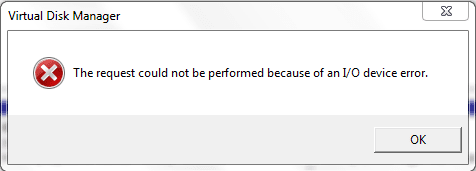
I click "initialize" and it tries to do something, then comes up with "The operation could not be performed due to an I/o error" or words to that effect.

I've run the WD diagnostics, and it says the capacity is 0gb and it doesn't pass the test. I've tried writing all 0's to it to reformat it using the WD tool, and again it says "The firmware on your device drive does not support the changing of block size of your WD external hard drive"

So I tried the Firmware updater, and that says "Update firmware to V 1.019"
Click yes

and it says "Update failed on specified drive. Please click "exit" then close all other open applications and then run the WD firmware updater again"

But - no other applications are open when doing it?!

So basically - it doesn't show up in my computer, I can't assign it a letter, I can't initialize the disk, and I can't partition it that I'm aware of.

Any other suggestions besides return it?

Running Windows 7 Home premium 64 bit
 

My Computer

OS
Win 7 Home Premium 64bit
Hello Rashmandon mate as you seemed to have tried all else personally I would try the tutorial from whs - http://www.sevenforums.com/tutorials/113967-ssd-alignment.html I know it says SSD but I do this for all the drives I put in or on my machines not that I have had the problem you have but what have you got to lose except your sanity:)

Having said that please don't go ahead if you think it isn't right the choice is yours I am only saying what I would try.
 

My Computer

Computer type
PC/Desktop
Computer Manufacturer/Model Number
Own build (new) Desk1 / Asus ROG Win 7 / Desk2 1st build
OS
Desk1 7 Home Prem / Desk2 10 Pro / Main lap Asus ROG 10 Pro 2 laptop Toshiba 7 Pro Asus P2520 7 & 10
CPU
Desk1 i5 3750K / Laptop i7 GTX 860M / Desk2 i5 2500
Motherboard
Desk1 Asus P877-V / Desk2 Gigabyte H67 UD3H / Laptop ?
Memory
Desk1 8GB (1866) / Desk2 16GB (1333) / Laptop 8Gb DDR3
Graphics Card(s)
Desk 1& 2NVidia GTX 650 & Laptops on board Intel
Sound Card
Desk 1 & 2 -XONAR DG Realtek High Def audio Laptop
Monitor(s) Displays
Desk 1 Benq HD 2450 / Desk2 Philips 24" / Laptop 17.5"
Screen Resolution
1920x1080 D1 & D2 & Laptop 1
Hard Drives
Desk1 Samsung 120GB 830 SSD
Asus ROG 256GB 850 Pro SSD
Desk2 Samsung 840 256 SSD
Toshiba 120GB EVO
PSU
Desk 1 Corsair HX 1050/ Laptop ? / Desk 2 Corsair HX 650
Case
Desk 1 Cooler HAF XM ? Toshiba laptop / Desk2 Coolermaster
Cooling
Fans on all Desk1 -2 Desk2 - all Coolermasters 5 Laptop ?
Keyboard
Desk 1 MS Sidewinder X6 Desk 2 MS Sidewinder X 4
Mouse
Desk 1&2 - Gigabyte MS 900 gamer - laptop - Logitec wireless
Internet Speed
ADSL2+
Other Info
One other Desktop (tester) and spare Toshba laptop both with SSD's
Running Kaspersky 2016 ISS on all machines config'd identically
Logitec audio stereo systems on each machine (x3)
Canon MG5250MFC
Router/modem TP-Link running WPA2SK
Can you format it? Try plugging it in another machine with a different OS.
 

My Computer

Computer Manufacturer/Model Number
Cooler Master
OS
Windows 7 Home Premium 64 Bit
CPU
Core I7 1155 3.4GHZ
Memory
8GB DDR 1600
Hard Drives
64 GB SSD - OS
1TB - DATA
PSU
340 Watt Corsair
Case
Cooler Master
Cooling
Cooler Master

My Computer

Computer type
PC/Desktop
Computer Manufacturer/Model Number
Own build (new) Desk1 / Asus ROG Win 7 / Desk2 1st build
OS
Desk1 7 Home Prem / Desk2 10 Pro / Main lap Asus ROG 10 Pro 2 laptop Toshiba 7 Pro Asus P2520 7 & 10
CPU
Desk1 i5 3750K / Laptop i7 GTX 860M / Desk2 i5 2500
Motherboard
Desk1 Asus P877-V / Desk2 Gigabyte H67 UD3H / Laptop ?
Memory
Desk1 8GB (1866) / Desk2 16GB (1333) / Laptop 8Gb DDR3
Graphics Card(s)
Desk 1& 2NVidia GTX 650 & Laptops on board Intel
Sound Card
Desk 1 & 2 -XONAR DG Realtek High Def audio Laptop
Monitor(s) Displays
Desk 1 Benq HD 2450 / Desk2 Philips 24" / Laptop 17.5"
Screen Resolution
1920x1080 D1 & D2 & Laptop 1
Hard Drives
Desk1 Samsung 120GB 830 SSD
Asus ROG 256GB 850 Pro SSD
Desk2 Samsung 840 256 SSD
Toshiba 120GB EVO
PSU
Desk 1 Corsair HX 1050/ Laptop ? / Desk 2 Corsair HX 650
Case
Desk 1 Cooler HAF XM ? Toshiba laptop / Desk2 Coolermaster
Cooling
Fans on all Desk1 -2 Desk2 - all Coolermasters 5 Laptop ?
Keyboard
Desk 1 MS Sidewinder X6 Desk 2 MS Sidewinder X 4
Mouse
Desk 1&2 - Gigabyte MS 900 gamer - laptop - Logitec wireless
Internet Speed
ADSL2+
Other Info
One other Desktop (tester) and spare Toshba laptop both with SSD's
Running Kaspersky 2016 ISS on all machines config'd identically
Logitec audio stereo systems on each machine (x3)
Canon MG5250MFC
Router/modem TP-Link running WPA2SK

My Computer

Computer Manufacturer/Model Number
Cooler Master
OS
Windows 7 Home Premium 64 Bit
CPU
Core I7 1155 3.4GHZ
Memory
8GB DDR 1600
Hard Drives
64 GB SSD - OS
1TB - DATA
PSU
340 Watt Corsair
Case
Cooler Master
Cooling
Cooler Master
Can you format it? Try plugging it in another machine with a different OS.
That is just what that tutorial is about Brad:)

MY bad. Thanks for pointing that out. I've not managed to have a read through it yet.
No probs Brad it is quite essential for SSD's but i just use it for everything.

Now for you and Rashamnaodon my favourite tutorial is http://www.sevenforums.com/tutorials/11728-optimize-windows-7-a.html?filter[2]=Performance Maintenance - if you don't mind losing some of the "bling" it will speed the system up and optimise it.

Rashamanodon please let us know how you go:)
 

My Computer

Computer type
PC/Desktop
Computer Manufacturer/Model Number
Own build (new) Desk1 / Asus ROG Win 7 / Desk2 1st build
OS
Desk1 7 Home Prem / Desk2 10 Pro / Main lap Asus ROG 10 Pro 2 laptop Toshiba 7 Pro Asus P2520 7 & 10
CPU
Desk1 i5 3750K / Laptop i7 GTX 860M / Desk2 i5 2500
Motherboard
Desk1 Asus P877-V / Desk2 Gigabyte H67 UD3H / Laptop ?
Memory
Desk1 8GB (1866) / Desk2 16GB (1333) / Laptop 8Gb DDR3
Graphics Card(s)
Desk 1& 2NVidia GTX 650 & Laptops on board Intel
Sound Card
Desk 1 & 2 -XONAR DG Realtek High Def audio Laptop
Monitor(s) Displays
Desk 1 Benq HD 2450 / Desk2 Philips 24" / Laptop 17.5"
Screen Resolution
1920x1080 D1 & D2 & Laptop 1
Hard Drives
Desk1 Samsung 120GB 830 SSD
Asus ROG 256GB 850 Pro SSD
Desk2 Samsung 840 256 SSD
Toshiba 120GB EVO
PSU
Desk 1 Corsair HX 1050/ Laptop ? / Desk 2 Corsair HX 650
Case
Desk 1 Cooler HAF XM ? Toshiba laptop / Desk2 Coolermaster
Cooling
Fans on all Desk1 -2 Desk2 - all Coolermasters 5 Laptop ?
Keyboard
Desk 1 MS Sidewinder X6 Desk 2 MS Sidewinder X 4
Mouse
Desk 1&2 - Gigabyte MS 900 gamer - laptop - Logitec wireless
Internet Speed
ADSL2+
Other Info
One other Desktop (tester) and spare Toshba laptop both with SSD's
Running Kaspersky 2016 ISS on all machines config'd identically
Logitec audio stereo systems on each machine (x3)
Canon MG5250MFC
Router/modem TP-Link running WPA2SK
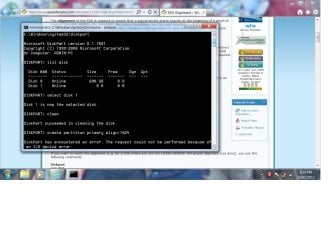
Thanks for the reply, running through the SSD formatting method, it has the same I/o error message as before :S
 

My Computer

OS
Win 7 Home Premium 64bit
Attached a ss of the error
 

Attachments

  • WDhDD.jpg
    WDhDD.jpg
    118 KB · Views: 36

My Computer

OS
Win 7 Home Premium 64bit
Have you got another device with the same Drive Letter assigned as the WD.
 

My Computer

Computer Manufacturer/Model Number
Cooler Master
OS
Windows 7 Home Premium 64 Bit
CPU
Core I7 1155 3.4GHZ
Memory
8GB DDR 1600
Hard Drives
64 GB SSD - OS
1TB - DATA
PSU
340 Watt Corsair
Case
Cooler Master
Cooling
Cooler Master
the HDD doesn't have a letter assigned to it, just Disk 1 (both in disk manager, and disk list) but they both show up as 0gb, even though if I remove the external hard drive, there's no disk 1 =/
 

My Computer

OS
Win 7 Home Premium 64bit
it takes a while to be recoginzed and makes a sorta ticking or clicking sound whilst it's getting recognized... maybe it is faulty and I need an RMA?
 

My Computer

OS
Win 7 Home Premium 64bit
it takes a while to be recoginzed and makes a sorta ticking or clicking sound whilst it's getting recognized... maybe it is faulty and I need an RMA?


Use WD tools to check the disc for errors.
 

My Computer

Computer Manufacturer/Model Number
Cooler Master
OS
Windows 7 Home Premium 64 Bit
CPU
Core I7 1155 3.4GHZ
Memory
8GB DDR 1600
Hard Drives
64 GB SSD - OS
1TB - DATA
PSU
340 Watt Corsair
Case
Cooler Master
Cooling
Cooler Master
which WD tool? I've got DriverUpdate, Firmware Update and quick formatter...

Driver update says fine, Firmware says I/o error and quick formatter says firmware won't allow disk change..

I plugged it in to an xp machine and it shows up as Mass storage device when you connect it, but doesn't show up under disk management... not even as an uninitialized device
 

My Computer

OS
Win 7 Home Premium 64bit
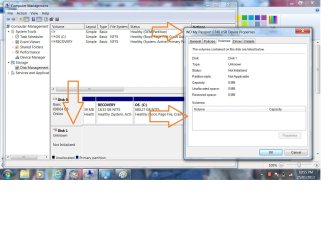
Not sure if this ss helps either. Shows the device listed as uninitialized on win7 disk management, and the properties found under Devices and Printers section. It doesn't have any volume apparently and is unpopulated?
 

Attachments

  • WDHDD2.jpg
    WDHDD2.jpg
    123.8 KB · Views: 14

My Computer

OS
Win 7 Home Premium 64bit
Um Rashmanodon Mate try Partition Wizard and see if the drive come up in that - if it does run a surface test on it.
If that works then we can do a disk wipe and reformat etc etc

Best Free Partition Manager Freeware and free partition magic for Windows 7, Windows 8, Windows Vista and Windows XP 32 bit & 64 bit. MiniTool Free Partition Manager Software Home Edition. < extremely handy tool for heaps of things.

There is another option yet but try this one and ley us know.

But I am beginning to think you have a controller problem on that drive:(
 

My Computer

Computer type
PC/Desktop
Computer Manufacturer/Model Number
Own build (new) Desk1 / Asus ROG Win 7 / Desk2 1st build
OS
Desk1 7 Home Prem / Desk2 10 Pro / Main lap Asus ROG 10 Pro 2 laptop Toshiba 7 Pro Asus P2520 7 & 10
CPU
Desk1 i5 3750K / Laptop i7 GTX 860M / Desk2 i5 2500
Motherboard
Desk1 Asus P877-V / Desk2 Gigabyte H67 UD3H / Laptop ?
Memory
Desk1 8GB (1866) / Desk2 16GB (1333) / Laptop 8Gb DDR3
Graphics Card(s)
Desk 1& 2NVidia GTX 650 & Laptops on board Intel
Sound Card
Desk 1 & 2 -XONAR DG Realtek High Def audio Laptop
Monitor(s) Displays
Desk 1 Benq HD 2450 / Desk2 Philips 24" / Laptop 17.5"
Screen Resolution
1920x1080 D1 & D2 & Laptop 1
Hard Drives
Desk1 Samsung 120GB 830 SSD
Asus ROG 256GB 850 Pro SSD
Desk2 Samsung 840 256 SSD
Toshiba 120GB EVO
PSU
Desk 1 Corsair HX 1050/ Laptop ? / Desk 2 Corsair HX 650
Case
Desk 1 Cooler HAF XM ? Toshiba laptop / Desk2 Coolermaster
Cooling
Fans on all Desk1 -2 Desk2 - all Coolermasters 5 Laptop ?
Keyboard
Desk 1 MS Sidewinder X6 Desk 2 MS Sidewinder X 4
Mouse
Desk 1&2 - Gigabyte MS 900 gamer - laptop - Logitec wireless
Internet Speed
ADSL2+
Other Info
One other Desktop (tester) and spare Toshba laptop both with SSD's
Running Kaspersky 2016 ISS on all machines config'd identically
Logitec audio stereo systems on each machine (x3)
Canon MG5250MFC
Router/modem TP-Link running WPA2SK
My computer keeps freezing every time i try to open up the program, just says the program has stopped responding, tried it on the other machine and got teh same thing?
 

My Computer

OS
Win 7 Home Premium 64bit
Hi

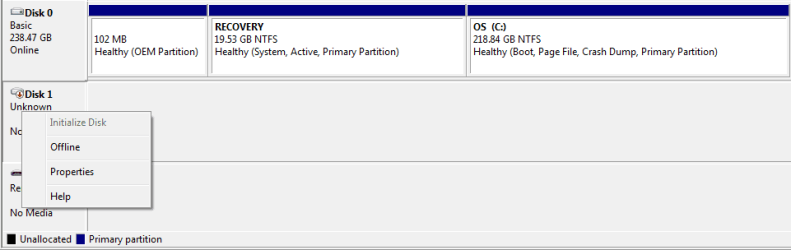
I a having the same problem with my 1 TB Western Digital My Passport. It doesn't get detected with my Windows 7, 64 bit or Ubuntu 12.04. Here is how it shows on Computer Management
right_click.png

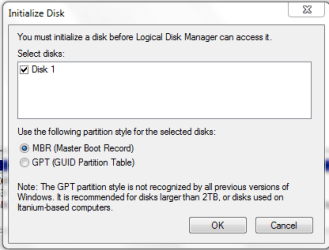
If I try to initialize it, initialize_disk.PNG

this window keeps popping
i_o_error.PNG

I tried Western Digital Data LifeGuard Diagnostics. It does show up but with 0B capacity.
wd_diag.PNG

I also tried Windows Disk Partition withe same result as Rashmanadon. I don't have much important data it. Is there any way to format and recover it?
 

My Computer

OS
Windows 7 Home Premium 64bit
yay someone else having same problem haha... I'll give it til the end of this wkend to see if anything I can do fixes it otherwise I'm returning it monday on warranty, just a pain in the butt having to spend money shipping a warranty issued product
 

My Computer

OS
Win 7 Home Premium 64bit
Just curious to know whether both of you are using the original cables that came with your drives since I remember to have read somewhere that WD Passports use a sort of proprietory cables with an extra power wire.
 

My Computer

OS
Windows 7 Home Premium 32 bit
yeah original cables, no other cable i've seen has the connection like the original one
 

My Computer

OS
Win 7 Home Premium 64bit
Back
Top