WD My Passport Ultra Metal 1TB

Can someone advise me a little as to the best way to do this on my Main machine. I suppose I should practice on a different machine, but here it goes.

I wonder which choice is better for the "Create a Windows PE Rescue Environment" as seen in this tutorial, the 4.0 or the 3.1?
Create a Windows PE Rescue Environment
This is a Windows 8 machine with Windows 7 PRO Installed in Legacy Mode I believe, I didn't do anything special during the Install.

Thanks, Nasty7
 

My Computer My Computer

At a glance

Windows 7 Home Premium 64bitAMD A8-3520M6.00GB DDR3 @ 674MHz (9-9-9-24)512MB ATI AMD Radeon HD 6620G
Computer type
Laptop
Computer Manufacturer/Model Number
HP Pavilion dv7-6c23cl
OS
Windows 7 Home Premium 64bit
CPU
AMD A8-3520M
Motherboard
Hewlett-Packard 180B (Socket FS1)
Memory
6.00GB DDR3 @ 674MHz (9-9-9-24)
Graphics Card(s)
512MB ATI AMD Radeon HD 6620G
Sound Card
IDT High Definition Audio CODEC
Monitor(s) Displays
Generic PnP Monitor
Screen Resolution
(1600x900@60Hz)
Hard Drives
Samsung 850 EVO 250GB SSD
Mouse
Logitec M525
Internet Speed
30-75Mbps
Antivirus
Avast Free, Unfortunately
Browser
Google Chrome, Firefox, IE
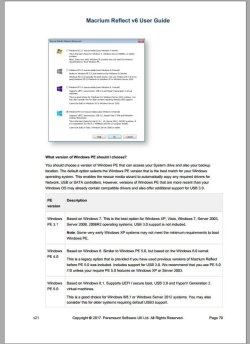
I pick pe 5 because of its usb 3 support.
From the user guide pg 70
Capture.JPG

Nothing stopping you making a pe 3 as well if you like but you will need to load usb 3 drivers manually or insert them using the DISM command.
 

My Computer My Computer

At a glance

Windows 7x64 Home Premium SP1Intel i7 2600kG.Skill Ripjaws (DDR3-1600) 2x4GBNvidia GeForce GTS 450; Intel HD Graphics 300...
Computer type
PC/Desktop
Computer Manufacturer/Model Number
Own build
OS
Windows 7x64 Home Premium SP1
CPU
Intel i7 2600k
Motherboard
ASUS P8Z68 Deluxe
Memory
G.Skill Ripjaws (DDR3-1600) 2x4GB
Graphics Card(s)
Nvidia GeForce GTS 450; Intel HD Graphics 3000(GT2+)
Monitor(s) Displays
Dell Ultrasharp IPS panel U2311H, Samsung SyncMaster P2350
Screen Resolution
1920x1080
Hard Drives
Samsung 850 Pro SSD 256GB, Samsung SSD 840 120GB, Seagates 1TB Barracuda ST31000528AS x2
PSU
Seasonic M12II 520W
Case
Lian Li Lancool PC-K60
Cooling
Case: 1x120mm, 3x140mm CPU: Hyper 212+
Keyboard
Logitech MK520 (wireless)
Mouse
Logitech MK520
Internet Speed
6-7 Mbps
Antivirus
Norton Security Premium, Malwarebytes on 2 (MSE on 3rd PC)
Browser
FireFox
Other Info
Audio: Logitech Z523 2.1
PE 5! HAHA, I didn't even see that. I looked at page 70 and didn't see this option, but will try to burn another with PE-5 if possible. I created the 3.1 and made a backup. Meant to leave this link above but it did not work. This is where I got the Directions to create the Recovery Media.
Create a Windows PE Rescue Environment

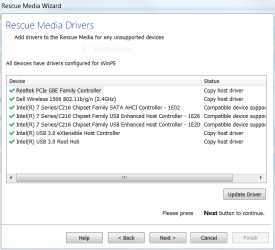
mjf, it looked to me that the drivers were Installed, am I incorrect? Maybe this is new since you did this that way, as it may or may not show at this link?
Rescue Media Wizard - WinPE drivers
 

Attachments

  • 2-Resque Media Drivers.PNG
    2-Resque Media Drivers.PNG
    17.1 KB · Views: 32

My Computer My Computer

At a glance

Windows 7 Home Premium 64bitAMD A8-3520M6.00GB DDR3 @ 674MHz (9-9-9-24)512MB ATI AMD Radeon HD 6620G
Computer type
Laptop
Computer Manufacturer/Model Number
HP Pavilion dv7-6c23cl
OS
Windows 7 Home Premium 64bit
CPU
AMD A8-3520M
Motherboard
Hewlett-Packard 180B (Socket FS1)
Memory
6.00GB DDR3 @ 674MHz (9-9-9-24)
Graphics Card(s)
512MB ATI AMD Radeon HD 6620G
Sound Card
IDT High Definition Audio CODEC
Monitor(s) Displays
Generic PnP Monitor
Screen Resolution
(1600x900@60Hz)
Hard Drives
Samsung 850 EVO 250GB SSD
Mouse
Logitec M525
Internet Speed
30-75Mbps
Antivirus
Avast Free, Unfortunately
Browser
Google Chrome, Firefox, IE
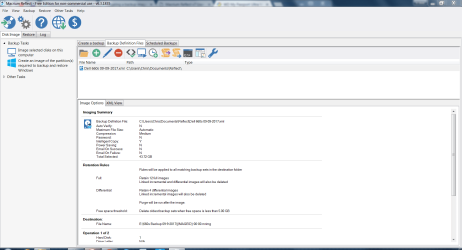
Now I'm unsure what to do with the "Backup Definition File"? in this Window. I created a Folder for it in Documents Folder. Do I just choose the Little Folder Icon and direct it to my Backup Definition File Folder?

Okay, I just set Backup Definition File as a Desktop Shortcut!:
 

Attachments

  • 9-Backup Definition Files.PNG
    9-Backup Definition Files.PNG
    55 KB · Views: 2
Last edited:

My Computer My Computer

At a glance

Windows 7 Home Premium 64bitAMD A8-3520M6.00GB DDR3 @ 674MHz (9-9-9-24)512MB ATI AMD Radeon HD 6620G
Computer type
Laptop
Computer Manufacturer/Model Number
HP Pavilion dv7-6c23cl
OS
Windows 7 Home Premium 64bit
CPU
AMD A8-3520M
Motherboard
Hewlett-Packard 180B (Socket FS1)
Memory
6.00GB DDR3 @ 674MHz (9-9-9-24)
Graphics Card(s)
512MB ATI AMD Radeon HD 6620G
Sound Card
IDT High Definition Audio CODEC
Monitor(s) Displays
Generic PnP Monitor
Screen Resolution
(1600x900@60Hz)
Hard Drives
Samsung 850 EVO 250GB SSD
Mouse
Logitec M525
Internet Speed
30-75Mbps
Antivirus
Avast Free, Unfortunately
Browser
Google Chrome, Firefox, IE

My Computer My Computer

At a glance

Windows 7x64 Home Premium SP1Intel i7 2600kG.Skill Ripjaws (DDR3-1600) 2x4GBNvidia GeForce GTS 450; Intel HD Graphics 300...
Computer type
PC/Desktop
Computer Manufacturer/Model Number
Own build
OS
Windows 7x64 Home Premium SP1
CPU
Intel i7 2600k
Motherboard
ASUS P8Z68 Deluxe
Memory
G.Skill Ripjaws (DDR3-1600) 2x4GB
Graphics Card(s)
Nvidia GeForce GTS 450; Intel HD Graphics 3000(GT2+)
Monitor(s) Displays
Dell Ultrasharp IPS panel U2311H, Samsung SyncMaster P2350
Screen Resolution
1920x1080
Hard Drives
Samsung 850 Pro SSD 256GB, Samsung SSD 840 120GB, Seagates 1TB Barracuda ST31000528AS x2
PSU
Seasonic M12II 520W
Case
Lian Li Lancool PC-K60
Cooling
Case: 1x120mm, 3x140mm CPU: Hyper 212+
Keyboard
Logitech MK520 (wireless)
Mouse
Logitech MK520
Internet Speed
6-7 Mbps
Antivirus
Norton Security Premium, Malwarebytes on 2 (MSE on 3rd PC)
Browser
FireFox
Other Info
Audio: Logitech Z523 2.1
There is nothing on pg70 about Windows PE?

I will check to see if I can see my new Image.
 

My Computer My Computer

At a glance

Windows 7 Home Premium 64bitAMD A8-3520M6.00GB DDR3 @ 674MHz (9-9-9-24)512MB ATI AMD Radeon HD 6620G
Computer type
Laptop
Computer Manufacturer/Model Number
HP Pavilion dv7-6c23cl
OS
Windows 7 Home Premium 64bit
CPU
AMD A8-3520M
Motherboard
Hewlett-Packard 180B (Socket FS1)
Memory
6.00GB DDR3 @ 674MHz (9-9-9-24)
Graphics Card(s)
512MB ATI AMD Radeon HD 6620G
Sound Card
IDT High Definition Audio CODEC
Monitor(s) Displays
Generic PnP Monitor
Screen Resolution
(1600x900@60Hz)
Hard Drives
Samsung 850 EVO 250GB SSD
Mouse
Logitec M525
Internet Speed
30-75Mbps
Antivirus
Avast Free, Unfortunately
Browser
Google Chrome, Firefox, IE
follow the link I gave and select complete user guide on the left
page70.jpg

I'm not sure what the problem is.
 

My Computer My Computer

At a glance

Windows 7x64 Home Premium SP1Intel i7 2600kG.Skill Ripjaws (DDR3-1600) 2x4GBNvidia GeForce GTS 450; Intel HD Graphics 300...
Computer type
PC/Desktop
Computer Manufacturer/Model Number
Own build
OS
Windows 7x64 Home Premium SP1
CPU
Intel i7 2600k
Motherboard
ASUS P8Z68 Deluxe
Memory
G.Skill Ripjaws (DDR3-1600) 2x4GB
Graphics Card(s)
Nvidia GeForce GTS 450; Intel HD Graphics 3000(GT2+)
Monitor(s) Displays
Dell Ultrasharp IPS panel U2311H, Samsung SyncMaster P2350
Screen Resolution
1920x1080
Hard Drives
Samsung 850 Pro SSD 256GB, Samsung SSD 840 120GB, Seagates 1TB Barracuda ST31000528AS x2
PSU
Seasonic M12II 520W
Case
Lian Li Lancool PC-K60
Cooling
Case: 1x120mm, 3x140mm CPU: Hyper 212+
Keyboard
Logitech MK520 (wireless)
Mouse
Logitech MK520
Internet Speed
6-7 Mbps
Antivirus
Norton Security Premium, Malwarebytes on 2 (MSE on 3rd PC)
Browser
FireFox
Other Info
Audio: Logitech Z523 2.1
I pick pe 5 because of its usb 3 support.
From the user guide pg 70.
Again, I see nothing about pe5 on page 70, but it's all good as it seems all is working well.
Puzzling. When you boot the rescue disc/usb can it see images on an external connected USB 3 HDD?
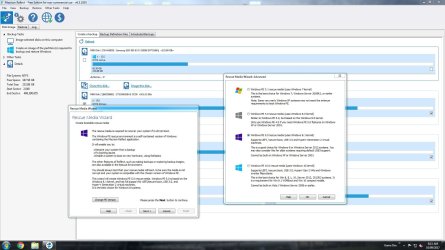
Here are the pe options I get. You need to select change pe versions.
I just booted rescue disc and it saw the backup Image, so thanks very much pushing me to check it. I also just went and took a look at the "change pe versions" and saw the options you presented. This will be nice to know when I do my Windows 8 machine!
 

My Computer My Computer

At a glance

Windows 7 Home Premium 64bitAMD A8-3520M6.00GB DDR3 @ 674MHz (9-9-9-24)512MB ATI AMD Radeon HD 6620G
Computer type
Laptop
Computer Manufacturer/Model Number
HP Pavilion dv7-6c23cl
OS
Windows 7 Home Premium 64bit
CPU
AMD A8-3520M
Motherboard
Hewlett-Packard 180B (Socket FS1)
Memory
6.00GB DDR3 @ 674MHz (9-9-9-24)
Graphics Card(s)
512MB ATI AMD Radeon HD 6620G
Sound Card
IDT High Definition Audio CODEC
Monitor(s) Displays
Generic PnP Monitor
Screen Resolution
(1600x900@60Hz)
Hard Drives
Samsung 850 EVO 250GB SSD
Mouse
Logitec M525
Internet Speed
30-75Mbps
Antivirus
Avast Free, Unfortunately
Browser
Google Chrome, Firefox, IE
I wonder, and feel stupid asking, but I can use this drive to Image other computers also right? and files or folders as long as they are all created with Macrium?

Thanks again, Nasty7
 

My Computer My Computer

At a glance

Windows 7 Home Premium 64bitAMD A8-3520M6.00GB DDR3 @ 674MHz (9-9-9-24)512MB ATI AMD Radeon HD 6620G
Computer type
Laptop
Computer Manufacturer/Model Number
HP Pavilion dv7-6c23cl
OS
Windows 7 Home Premium 64bit
CPU
AMD A8-3520M
Motherboard
Hewlett-Packard 180B (Socket FS1)
Memory
6.00GB DDR3 @ 674MHz (9-9-9-24)
Graphics Card(s)
512MB ATI AMD Radeon HD 6620G
Sound Card
IDT High Definition Audio CODEC
Monitor(s) Displays
Generic PnP Monitor
Screen Resolution
(1600x900@60Hz)
Hard Drives
Samsung 850 EVO 250GB SSD
Mouse
Logitec M525
Internet Speed
30-75Mbps
Antivirus
Avast Free, Unfortunately
Browser
Google Chrome, Firefox, IE
Again, I see nothing about pe5 on page 70, but it's all good as it seems all is working well.
I gave you a screenshot of the page in question referring to pe 5. The Macrium documentation specifically states that this pe 5 is useful for supporting usb 3 on a Windows 7 system.

I might try the pe 3.1 rescue and see if it sees my usb 3 connected drives.

Sorry, I don't understand your last question.
 

My Computer My Computer

At a glance

Windows 7x64 Home Premium SP1Intel i7 2600kG.Skill Ripjaws (DDR3-1600) 2x4GBNvidia GeForce GTS 450; Intel HD Graphics 300...
Computer type
PC/Desktop
Computer Manufacturer/Model Number
Own build
OS
Windows 7x64 Home Premium SP1
CPU
Intel i7 2600k
Motherboard
ASUS P8Z68 Deluxe
Memory
G.Skill Ripjaws (DDR3-1600) 2x4GB
Graphics Card(s)
Nvidia GeForce GTS 450; Intel HD Graphics 3000(GT2+)
Monitor(s) Displays
Dell Ultrasharp IPS panel U2311H, Samsung SyncMaster P2350
Screen Resolution
1920x1080
Hard Drives
Samsung 850 Pro SSD 256GB, Samsung SSD 840 120GB, Seagates 1TB Barracuda ST31000528AS x2
PSU
Seasonic M12II 520W
Case
Lian Li Lancool PC-K60
Cooling
Case: 1x120mm, 3x140mm CPU: Hyper 212+
Keyboard
Logitech MK520 (wireless)
Mouse
Logitech MK520
Internet Speed
6-7 Mbps
Antivirus
Norton Security Premium, Malwarebytes on 2 (MSE on 3rd PC)
Browser
FireFox
Other Info
Audio: Logitech Z523 2.1
ok I checked usb3 driver compatibility.
On one of my PCs with Intel usb3 drivers the pe3.1 appears ok (Haswell). On my main PC with Renesas usb3 driver pe3.1 is a no go. pe5 is fine on both PCs. - that is it deals with both Intel and Renesas. Also my main PC (see specs) uses an Intel 2700k (Sandy Bridge) which may be a factor.

My conclusion is that a pe5 rescue disc appears the most backward compatible for usb3 driver support - maybe?
 

My Computer My Computer

At a glance

Windows 7x64 Home Premium SP1Intel i7 2600kG.Skill Ripjaws (DDR3-1600) 2x4GBNvidia GeForce GTS 450; Intel HD Graphics 300...
Computer type
PC/Desktop
Computer Manufacturer/Model Number
Own build
OS
Windows 7x64 Home Premium SP1
CPU
Intel i7 2600k
Motherboard
ASUS P8Z68 Deluxe
Memory
G.Skill Ripjaws (DDR3-1600) 2x4GB
Graphics Card(s)
Nvidia GeForce GTS 450; Intel HD Graphics 3000(GT2+)
Monitor(s) Displays
Dell Ultrasharp IPS panel U2311H, Samsung SyncMaster P2350
Screen Resolution
1920x1080
Hard Drives
Samsung 850 Pro SSD 256GB, Samsung SSD 840 120GB, Seagates 1TB Barracuda ST31000528AS x2
PSU
Seasonic M12II 520W
Case
Lian Li Lancool PC-K60
Cooling
Case: 1x120mm, 3x140mm CPU: Hyper 212+
Keyboard
Logitech MK520 (wireless)
Mouse
Logitech MK520
Internet Speed
6-7 Mbps
Antivirus
Norton Security Premium, Malwarebytes on 2 (MSE on 3rd PC)
Browser
FireFox
Other Info
Audio: Logitech Z523 2.1
mjf, Thank you for all the research! This is the first day I've had Internet since the Hurricane hit Florida, I don't think it is going to last so I'll pick up on this asap. They said our tv. service will be out until the 17th, four days from now, but the internet works! lol...so weird. Television has been on since Monday night but no Internet, then Television is out until the 17th and Internet works LOL.

Again, the research you did is very valuable and well appreciated, hopefully I can get all this stuff learned soon.

The question I was asking before was: Can I use my new WD Drive to backup more than One computer? And, can I use it with Macrium only, or can I also use AOMEI to back up another computer, or even the Windows inbuilt Software? I understand I will need the rescue disk for each, but in general is this possible?

Thanks, Nasty7
 

My Computer My Computer

At a glance

Windows 7 Home Premium 64bitAMD A8-3520M6.00GB DDR3 @ 674MHz (9-9-9-24)512MB ATI AMD Radeon HD 6620G
Computer type
Laptop
Computer Manufacturer/Model Number
HP Pavilion dv7-6c23cl
OS
Windows 7 Home Premium 64bit
CPU
AMD A8-3520M
Motherboard
Hewlett-Packard 180B (Socket FS1)
Memory
6.00GB DDR3 @ 674MHz (9-9-9-24)
Graphics Card(s)
512MB ATI AMD Radeon HD 6620G
Sound Card
IDT High Definition Audio CODEC
Monitor(s) Displays
Generic PnP Monitor
Screen Resolution
(1600x900@60Hz)
Hard Drives
Samsung 850 EVO 250GB SSD
Mouse
Logitec M525
Internet Speed
30-75Mbps
Antivirus
Avast Free, Unfortunately
Browser
Google Chrome, Firefox, IE
The question I was asking before was: Can I use my new WD Drive to backup more than One computer? And, can I use it with Macrium only, or can I also use AOMEI to back up another computer, or even the Windows inbuilt Software? I understand I will need the rescue disk for each, but in general is this possible?

Thanks, Nasty7
Yes you can backup more than one computer on an ext HDD. Just create folders that describe the computer so you don't get confused.

I'm not familiar with AOMEI but I suspect again PC/folder descriptions should allow you to store these images along with Macrium in another folder.

Windows inbuilt is quite restrictive. It only recognizes the image folder [WindowsImageBackup] in the root of a HDD partition. If you want to store more then you need to do the folder rename workaround (see forum tutorials). It is a bit of a pain IMO.

You do need to create a rescue disc for each of your imaging software programs. (ie. one for all Macrium images one for all AOMEI images etc.). The simplest solution is to create rescue DVDs/USBs for each software program and check that they boot and recognize images stored on the ext HDD. Later on you can explore putting multiple rescue ISOs plus other useful tools on a single USB flash drive. That's another topic.
 

My Computer My Computer

At a glance

Windows 7x64 Home Premium SP1Intel i7 2600kG.Skill Ripjaws (DDR3-1600) 2x4GBNvidia GeForce GTS 450; Intel HD Graphics 300...
Computer type
PC/Desktop
Computer Manufacturer/Model Number
Own build
OS
Windows 7x64 Home Premium SP1
CPU
Intel i7 2600k
Motherboard
ASUS P8Z68 Deluxe
Memory
G.Skill Ripjaws (DDR3-1600) 2x4GB
Graphics Card(s)
Nvidia GeForce GTS 450; Intel HD Graphics 3000(GT2+)
Monitor(s) Displays
Dell Ultrasharp IPS panel U2311H, Samsung SyncMaster P2350
Screen Resolution
1920x1080
Hard Drives
Samsung 850 Pro SSD 256GB, Samsung SSD 840 120GB, Seagates 1TB Barracuda ST31000528AS x2
PSU
Seasonic M12II 520W
Case
Lian Li Lancool PC-K60
Cooling
Case: 1x120mm, 3x140mm CPU: Hyper 212+
Keyboard
Logitech MK520 (wireless)
Mouse
Logitech MK520
Internet Speed
6-7 Mbps
Antivirus
Norton Security Premium, Malwarebytes on 2 (MSE on 3rd PC)
Browser
FireFox
Other Info
Audio: Logitech Z523 2.1
mjf, Thanks! I just noticed I had not replied.

I have another question: Can I install AOMEI along side of Macrium Reflect?

I have not found the option in Macrium to Backup only System Files, so want to also use AOMEI on my main pc. Not sure how or if this will be better or not, but it seems to me that Imaging just the system files will take less time and less space. I don't keep to much on my OS, and looking to -SOMEDAY- LOL, partition, and keep all files on another partition. AOMEI also has a super simple Interface, I like that also, seems like it will keep me from making any mistakes. Seems like they both do about the same thing, though Macrium does a little more, or has a little more freedom/adjustability.

Thanks, Nasty7
 

My Computer My Computer

At a glance

Windows 7 Home Premium 64bitAMD A8-3520M6.00GB DDR3 @ 674MHz (9-9-9-24)512MB ATI AMD Radeon HD 6620G
Computer type
Laptop
Computer Manufacturer/Model Number
HP Pavilion dv7-6c23cl
OS
Windows 7 Home Premium 64bit
CPU
AMD A8-3520M
Motherboard
Hewlett-Packard 180B (Socket FS1)
Memory
6.00GB DDR3 @ 674MHz (9-9-9-24)
Graphics Card(s)
512MB ATI AMD Radeon HD 6620G
Sound Card
IDT High Definition Audio CODEC
Monitor(s) Displays
Generic PnP Monitor
Screen Resolution
(1600x900@60Hz)
Hard Drives
Samsung 850 EVO 250GB SSD
Mouse
Logitec M525
Internet Speed
30-75Mbps
Antivirus
Avast Free, Unfortunately
Browser
Google Chrome, Firefox, IE
Yes, you can install any number of backup / restore / clone programs alongside each other; just make you know which program produces which image (file extension). Backing up only system files can be done, I hope you back up all of the OS from time to time. Restoring only system files and not the whole OS could be problematic. Or, are you meaning: system files backup is the whole Windows OS backup?
 

My Computer My Computer

At a glance

Windows 7 Professional 64-bitDesktop i5; Acers i5 & i7desktop 16GB; 1 Acer 8GB & 1 Acer 16GB
Computer type
PC/Desktop
Computer Manufacturer/Model Number
Antec desktop; Acer Aspire laptops
OS
Windows 7 Professional 64-bit
CPU
Desktop i5; Acers i5 & i7
Memory
desktop 16GB; 1 Acer 8GB & 1 Acer 16GB
Hard Drives
1TB split into 2 equal partitions [OS and data] usable by RJS
Internet Speed
AT&T DSL
Browser
FF, GChrome, msIE
Other Info
Windows 7 Firewall, Emsisoft AM/AV, MSE [scan-only], SpywareBlaster, Ruiware/BillP combine
Or, are you meaning: system files backup is the whole Windows OS backup?
Yes Roland, the whole Windows OS Backup, at least that is what Aomei calls it. Seems simple enough, and I've used it on other less important pc's of mine.

Thanks for your help Roland, because I am not very strong in this area yet...and maybe never LOL.
 

My Computer My Computer

At a glance

Windows 7 Home Premium 64bitAMD A8-3520M6.00GB DDR3 @ 674MHz (9-9-9-24)512MB ATI AMD Radeon HD 6620G
Computer type
Laptop
Computer Manufacturer/Model Number
HP Pavilion dv7-6c23cl
OS
Windows 7 Home Premium 64bit
CPU
AMD A8-3520M
Motherboard
Hewlett-Packard 180B (Socket FS1)
Memory
6.00GB DDR3 @ 674MHz (9-9-9-24)
Graphics Card(s)
512MB ATI AMD Radeon HD 6620G
Sound Card
IDT High Definition Audio CODEC
Monitor(s) Displays
Generic PnP Monitor
Screen Resolution
(1600x900@60Hz)
Hard Drives
Samsung 850 EVO 250GB SSD
Mouse
Logitec M525
Internet Speed
30-75Mbps
Antivirus
Avast Free, Unfortunately
Browser
Google Chrome, Firefox, IE
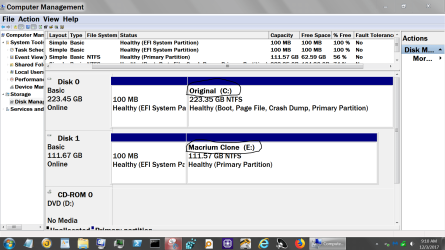
A suggestion.

Name your partition so you will know what is what no matter what method or program you use.

Example:

Disk Management.PNG

Jack
 

My Computer My Computer

At a glance

Windows 10 Pro. 64/ version 1709 Windows 7 Pr...Intel i7-6800K @ 4.3Corsair Platinum 16 gig @2400EVGA GTX 1070 OC
Computer type
PC/Desktop
Computer Manufacturer/Model Number
Home made Desktop
OS
Windows 10 Pro. 64/ version 1709 Windows 7 Pro/64
CPU
Intel i7-6800K @ 4.3
Motherboard
ASUS X-99 Deluxe II
Memory
Corsair Platinum 16 gig @2400
Graphics Card(s)
EVGA GTX 1070 OC
Monitor(s) Displays
Asus 27" LED LCD/VE278Q
Screen Resolution
1920-1080 or 1280-720 HDMI
Hard Drives
INTEL SSD 730-240 Gb Sata 3.0/
PSU
EVGA Platium 1200W
Case
Phanteks Luxe Tempered Glass 8 fans/ one radiator
Cooling
XSPC/ Water Cooled CPU
Keyboard
Das 4 Professional
Mouse
Logitech M705/MX Anywhere 2-S
Internet Speed
100 mbits
Antivirus
Microsoft Security Essentials/ Malwarebytes Premium 3.0/ SAS
Browser
I.E. 11 default/Firefox/ ISP Time Warner Cable/Spectrum
Other Info
LG BluRay Burner/
Sound system-KLipsch-THX/
Icy Dock ssd Hot Swap bays.
Would you guys help me out again. I'm doing well with simple backups. I think I may have asked this somewhere but went through this whole Thread and did not see it.

My question: Can I Sync a Folder (or in this case the contents of a USB) to the Same Drive I'm using to Backup System Images?

I've looked at the Macrium Backup and the AOMEI File Backup. But if possible, I would like to use the same Drive to Sync the Files and folders on my work USB to. I'm not sure if Macrium or AOMEI would be good for this? I see that they both do this, but the one I'm using now does nice Incremental Backups, and all is available to access. I sync them to a few other USB's.
Backing up files and folders - KnowledgeBase - Macrium Reflect Knowledgebase
Files and Folders Backup with Free AOMEI Backupper Software
I've been using Grsync on Linux to do this and it works flawlessly, but don't know if I dare use my WD Passport with all my pc Images on it do do this. I was thinking it would be safest to use one of the programs using now, Macrium or AOMEI, but have seen some good looking Syncing Programs for Windows that I was wanting to try.

I also have another drive I could use for this purpose, but it is 500GB and would never use all that for my Important USB's. Most of my stuff is files, so it don't take up to much space. One was about 128GB of data on a USB, but this one included customer files also. My personal USB with all my techie and personal data is only about 20GB if that.

Thanks, Nasty7
 

My Computer My Computer

At a glance

Windows 7 Home Premium 64bitAMD A8-3520M6.00GB DDR3 @ 674MHz (9-9-9-24)512MB ATI AMD Radeon HD 6620G
Computer type
Laptop
Computer Manufacturer/Model Number
HP Pavilion dv7-6c23cl
OS
Windows 7 Home Premium 64bit
CPU
AMD A8-3520M
Motherboard
Hewlett-Packard 180B (Socket FS1)
Memory
6.00GB DDR3 @ 674MHz (9-9-9-24)
Graphics Card(s)
512MB ATI AMD Radeon HD 6620G
Sound Card
IDT High Definition Audio CODEC
Monitor(s) Displays
Generic PnP Monitor
Screen Resolution
(1600x900@60Hz)
Hard Drives
Samsung 850 EVO 250GB SSD
Mouse
Logitec M525
Internet Speed
30-75Mbps
Antivirus
Avast Free, Unfortunately
Browser
Google Chrome, Firefox, IE
"....My question: Can I Sync a Folder (or in this case the contents of a USB) to the Same Drive I'm using to Backup System Images?" I believe you can! The sync material would simply be another folder (or file) on the HD containing backup image files.
 

My Computer My Computer

At a glance

Windows 7 Professional 64-bitDesktop i5; Acers i5 & i7desktop 16GB; 1 Acer 8GB & 1 Acer 16GB
Computer type
PC/Desktop
Computer Manufacturer/Model Number
Antec desktop; Acer Aspire laptops
OS
Windows 7 Professional 64-bit
CPU
Desktop i5; Acers i5 & i7
Memory
desktop 16GB; 1 Acer 8GB & 1 Acer 16GB
Hard Drives
1TB split into 2 equal partitions [OS and data] usable by RJS
Internet Speed
AT&T DSL
Browser
FF, GChrome, msIE
Other Info
Windows 7 Firewall, Emsisoft AM/AV, MSE [scan-only], SpywareBlaster, Ruiware/BillP combine
That's what I thought also Roland, but want to be sure, I'm not to good at fixing major problems I may cause myself.
 

My Computer My Computer

At a glance

Windows 7 Home Premium 64bitAMD A8-3520M6.00GB DDR3 @ 674MHz (9-9-9-24)512MB ATI AMD Radeon HD 6620G
Computer type
Laptop
Computer Manufacturer/Model Number
HP Pavilion dv7-6c23cl
OS
Windows 7 Home Premium 64bit
CPU
AMD A8-3520M
Motherboard
Hewlett-Packard 180B (Socket FS1)
Memory
6.00GB DDR3 @ 674MHz (9-9-9-24)
Graphics Card(s)
512MB ATI AMD Radeon HD 6620G
Sound Card
IDT High Definition Audio CODEC
Monitor(s) Displays
Generic PnP Monitor
Screen Resolution
(1600x900@60Hz)
Hard Drives
Samsung 850 EVO 250GB SSD
Mouse
Logitec M525
Internet Speed
30-75Mbps
Antivirus
Avast Free, Unfortunately
Browser
Google Chrome, Firefox, IE
Back
Top