WD Red 3TB external HDD showing up as 746GB

NotGettinJunger

New member
Local time
11:56 PM
Messages
8
Location
UK
Hi all, total newbie so I hope I'm posting in the right place & pls excuse any errors. I've been googling this issue all afternoon and it seems like a common problem, although none of the solutions I've found so far have worked for me, or there were slight differences (e.g. they were using as an internal HDD for a pc, not external usb drive for a laptop).

I've been using an Icy Box 2-bay external Jbod enclosure containing a Seagate Barracuda Green 2TB HDD with no problems, either attached directly to my Win 7 laptop via usb 2, or attached to my Buffalo Linkstation 1TB NAS. I needed to expand the storage, so I bought a Western Digital Red 3TB NAS HDD and put that in the second bay of the Icy Box. The problem is it only shows up as 746GB, not 3TB. In windows disk management, it shows up as 746.39 GB NTFS Healthy (Primary Partition).

Tried the following solutions from other threads:
I initialized it as GPT and formatted but could only get one partition, max 746GB.

Windows says the driver for the WD drive is up to date.

Tried downloading and installing Intel Rapid Storage Technology 10.1 but got error message “This computer does not meet the minimum requirements for installing”. IRST 12.9 works fine, but doesn't see the WD 3TB drive at all.

Tried installing EaseUS partition master, deleted the existing partition on the 3TB drive, but EaseUS only recognizes 746GB on this drive too. Can't move the partitions because it still only sees 746GB on the drive. Exactly the same as windows disk management.

I emailed WD. At first, they said the drive has the wrong firmware on it and I should return it to the reseller for an exchange. I asked whether I could upgrade the firmware, but they then said that the drive has got the wrong label on it. So, if I'm to understand correctly, I've been sold a 746GB drive with a label on it for a 3TB drive. I find this a bit odd, especially given how common this issue seems to be. I've asked them about the common issue of 3TB drives showing up as 746GB, and am awaiting reply.

In the meantime, I'd appreciate any other suggestions. At the moment I'm leaning toward sending it back and buying a 2TB Seagate drive instead, as I know these work with my setup.
Many thanks
 

My Computer My Computer

At a glance

Windows 7 Home Premium x64 SP1Intel Core i5 -3210M8 GB
Computer type
Laptop
Computer Manufacturer/Model Number
Lenovo Ideapad
OS
Windows 7 Home Premium x64 SP1
CPU
Intel Core i5 -3210M
Memory
8 GB
Antivirus
Avast
Browser
Chrome
Hmm, are you sure your enclosure support GPT drives? Also, is your other 2 TB HDD MBR or GPT? Maybe they don't mix well. Try removing the other HDD from enclosure and try with the 3TB only.
 

My Computer My Computer

At a glance

Windows 7 Ultimate x64 SP1AMD Phenom 2 1090T2x8GB Kingston HyperX Fury Black 1600Mhz Unga...MSI GTX 970 Gaming 4G
Computer type
PC/Desktop
Computer Manufacturer/Model Number
Custom Build
OS
Windows 7 Ultimate x64 SP1
CPU
AMD Phenom 2 1090T
Motherboard
Gigabyte GA-890FXA-UD5
Memory
2x8GB Kingston HyperX Fury Black 1600Mhz Unganged
Graphics Card(s)
MSI GTX 970 Gaming 4G
Sound Card
Realtek On-Board HD 7.1 Audio / Logitech G35
Monitor(s) Displays
3xAcer GD245HQ
Screen Resolution
1920x1080
Hard Drives
Samsung 850 Pro 512GB SSD - OS /
WD Caviar Black SATA 3 - 1 TBx2 - Dynamic RAID 0 /
WD Caviar Green SATA 2 - 640GBx2 - Dynamic RAID 0 /
WD Caviar Green SATA 2 - 640GB - Internal Backup /
Seagate Barracude SATA 3 - 3TB - External Backup/ Sync
PSU
HighPower 1000W
Case
Cooler Master HAF 932
Cooling
Noctua NH-D14
Keyboard
Logitech G19
Mouse
Logitech G500
Internet Speed
100/4 Mbit Cable (100GB quota)
Antivirus
ZoneAlarm Extreme Security / MBAM Pro / MBAE Free / SAS Free
Browser
IE 11 - Firefox - Chrome
Other Info
Logitech F710/ G27/ G940/ Z5500 // TrackIR 5 // Nvidia 3D Surround Vision
Hmm, are you sure your enclosure support GPT drives? Also, is your other 2 TB HDD MBR or GPT? Maybe they don't mix well. Try removing the other HDD from enclosure and try with the 3TB only.

Thanks, good question! It's a pretty old enclosure, but it does claim to support unlimited HDD capacity, which was why I thought I could push it a bit with a 3TB. No specific mention of GPT...here's the manual....
http://www.raidsonic.de/data/allgemeine_downloads/manuals_pdf/IB-3221/IB-3221StU-B.pdf
Could that be the problem?

The 2TB is MBR. I've tried changing the 3TB to MBR but made no difference. I couldn't change the 2TB to GPT until I've got somewhere else to put all the data (its full....hence the upgrade).

Removing the 2TB and just using the 3TB doesn't seem to make any difference.

The 10.1 version of Intel RST seems to have solved it for most people, any ideas why I can't install it on windows 7? *
 
Last edited:

My Computer My Computer

At a glance

Windows 7 Home Premium x64 SP1Intel Core i5 -3210M8 GB
Computer type
Laptop
Computer Manufacturer/Model Number
Lenovo Ideapad
OS
Windows 7 Home Premium x64 SP1
CPU
Intel Core i5 -3210M
Memory
8 GB
Antivirus
Avast
Browser
Chrome

My Computer My Computer

At a glance

Windows 7 Ultimate x64 SP1AMD Phenom 2 1090T2x8GB Kingston HyperX Fury Black 1600Mhz Unga...MSI GTX 970 Gaming 4G
Computer type
PC/Desktop
Computer Manufacturer/Model Number
Custom Build
OS
Windows 7 Ultimate x64 SP1
CPU
AMD Phenom 2 1090T
Motherboard
Gigabyte GA-890FXA-UD5
Memory
2x8GB Kingston HyperX Fury Black 1600Mhz Unganged
Graphics Card(s)
MSI GTX 970 Gaming 4G
Sound Card
Realtek On-Board HD 7.1 Audio / Logitech G35
Monitor(s) Displays
3xAcer GD245HQ
Screen Resolution
1920x1080
Hard Drives
Samsung 850 Pro 512GB SSD - OS /
WD Caviar Black SATA 3 - 1 TBx2 - Dynamic RAID 0 /
WD Caviar Green SATA 2 - 640GBx2 - Dynamic RAID 0 /
WD Caviar Green SATA 2 - 640GB - Internal Backup /
Seagate Barracude SATA 3 - 3TB - External Backup/ Sync
PSU
HighPower 1000W
Case
Cooler Master HAF 932
Cooling
Noctua NH-D14
Keyboard
Logitech G19
Mouse
Logitech G500
Internet Speed
100/4 Mbit Cable (100GB quota)
Antivirus
ZoneAlarm Extreme Security / MBAM Pro / MBAE Free / SAS Free
Browser
IE 11 - Firefox - Chrome
Other Info
Logitech F710/ G27/ G940/ Z5500 // TrackIR 5 // Nvidia 3D Surround Vision
Sorry to give you the bad news, this model doesn't support above 2TB.

Please read Google Translate

A Czech site, thanks to google translate :)

Oh, that's disappointing! The whole reason I bought the enclosure was because it claimed to have unlimited HDD capacity, and I planned to gradually add bigger drives as storage got cheaper, without having to keep buying a new enclosure every few years.

Kudos for finding that thread though, gotta love google translate!

3TB will be limited to 2.2TB if formatted MBR. You can try to create 2 partitions (2+1)TB MBR, but not sure if it would work with the enclosure.

MBR format of 3TB drive in Windows 7 - Hard Drives - Storage

How would I create the 2 partitions if both windows disk manager and EaseUS partition manager are only seeing 746GB total available space? I can't even make one 1TB partition. I tried initializing the HDD as MBR but the total space still showed as 746GB.

Do you think there's any likelihood that the WD tech support guy was right about the drive having the wrong label on it?
 

My Computer My Computer

At a glance

Windows 7 Home Premium x64 SP1Intel Core i5 -3210M8 GB
Computer type
Laptop
Computer Manufacturer/Model Number
Lenovo Ideapad
OS
Windows 7 Home Premium x64 SP1
CPU
Intel Core i5 -3210M
Memory
8 GB
Antivirus
Avast
Browser
Chrome
Can you take it a friend with a PC? That would clear any questions. Or perhaps take to the shop where you bought it.

Googling the drive name might help as well.

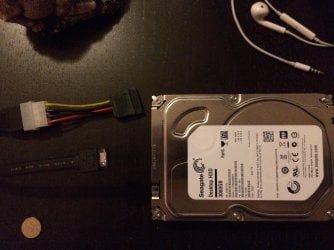
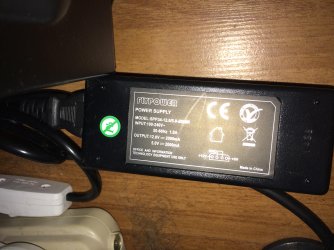
You can also connect it from ESATA, if your laptop has a port. It would be fast too. You can go as cheap as ESATA to SATA cable and a 12/5V 2Amp adapter with a molex/SATA power connector. Something like this:

Addonics Product: 12V Power Adapter for SATA Drive and External Drive System

Amazon.com: Coolerguys 100-240v AC to 12 & 5v DC 4pin Molex 2A Power Adapter: Electronics

Or get a dock for it (better of course).

I use the ESATA/SATA cable + power supply combo, as follows:
Esata connections.jpg

Esata power supply.jpg
 

My Computer My Computer

At a glance

Windows 7 Ultimate x64 SP1AMD Phenom 2 1090T2x8GB Kingston HyperX Fury Black 1600Mhz Unga...MSI GTX 970 Gaming 4G
Computer type
PC/Desktop
Computer Manufacturer/Model Number
Custom Build
OS
Windows 7 Ultimate x64 SP1
CPU
AMD Phenom 2 1090T
Motherboard
Gigabyte GA-890FXA-UD5
Memory
2x8GB Kingston HyperX Fury Black 1600Mhz Unganged
Graphics Card(s)
MSI GTX 970 Gaming 4G
Sound Card
Realtek On-Board HD 7.1 Audio / Logitech G35
Monitor(s) Displays
3xAcer GD245HQ
Screen Resolution
1920x1080
Hard Drives
Samsung 850 Pro 512GB SSD - OS /
WD Caviar Black SATA 3 - 1 TBx2 - Dynamic RAID 0 /
WD Caviar Green SATA 2 - 640GBx2 - Dynamic RAID 0 /
WD Caviar Green SATA 2 - 640GB - Internal Backup /
Seagate Barracude SATA 3 - 3TB - External Backup/ Sync
PSU
HighPower 1000W
Case
Cooler Master HAF 932
Cooling
Noctua NH-D14
Keyboard
Logitech G19
Mouse
Logitech G500
Internet Speed
100/4 Mbit Cable (100GB quota)
Antivirus
ZoneAlarm Extreme Security / MBAM Pro / MBAE Free / SAS Free
Browser
IE 11 - Firefox - Chrome
Other Info
Logitech F710/ G27/ G940/ Z5500 // TrackIR 5 // Nvidia 3D Surround Vision
May I suggest this -- Troubleshooting hard drive issues - ThinkPad - Lenovo Support (US)


--Idea--
You may actually have a problem with your BIOS on the laptop not reading larger drives, which would depend on your Laptop model / age. If this is the case, there may be a BIOS patch available from Lenovo for it.
--End--

Although because the Drive is still being forced through the Icybox, the 10% loss still applies to the drive. When you would format it in an operationally ready state, its actual amount would be about 2.7TB.

So it could be that the BIOS of your ICYbox cannot read the other platters in the disk drive. I would suggest hooking it up to a desktop or laptop for testing...
 

My Computer My Computer

At a glance

Windows 8.1Intel i5 3750k OC'd 4.0Ghz16GB Vengence CorsairGTX 770 OC 2GB Windforce
Computer type
PC/Desktop
Computer Manufacturer/Model Number
Custom Build
OS
Windows 8.1
CPU
Intel i5 3750k OC'd 4.0Ghz
Motherboard
P8Z77-V LX3
Memory
16GB Vengence Corsair
Graphics Card(s)
GTX 770 OC 2GB Windforce
Sound Card
C-Media 7.1 Surround Card
Monitor(s) Displays
Asus 3D 23" & BenQ 24" & LG 19"
Screen Resolution
1920*1080, 1920*1080, 1440*900
Hard Drives
Crucial 512GB SSD
WD 1.5 TB
WD 500Gb
PSU
850MW Silverstone
Case
inWin DragonRider
Cooling
4 * 140mm LED Akasa, One 140mm Fan Akasa
Keyboard
Corsair k95
Mouse
R.A.T 7 Contagion
Internet Speed
152 Mb Fiber Optic
Antivirus
ESET Nod32
Browser
Waterfox x64 / Chrome x64
Other Info
Freenas / Plex Media server
Q6600
6Gb DDR3
6TB ZFS Raid
500W PSu
2 x Intel NIC's
I hope you are correct Sniper :) it would save OP many trouble.
 

My Computer My Computer

At a glance

Windows 7 Ultimate x64 SP1AMD Phenom 2 1090T2x8GB Kingston HyperX Fury Black 1600Mhz Unga...MSI GTX 970 Gaming 4G
Computer type
PC/Desktop
Computer Manufacturer/Model Number
Custom Build
OS
Windows 7 Ultimate x64 SP1
CPU
AMD Phenom 2 1090T
Motherboard
Gigabyte GA-890FXA-UD5
Memory
2x8GB Kingston HyperX Fury Black 1600Mhz Unganged
Graphics Card(s)
MSI GTX 970 Gaming 4G
Sound Card
Realtek On-Board HD 7.1 Audio / Logitech G35
Monitor(s) Displays
3xAcer GD245HQ
Screen Resolution
1920x1080
Hard Drives
Samsung 850 Pro 512GB SSD - OS /
WD Caviar Black SATA 3 - 1 TBx2 - Dynamic RAID 0 /
WD Caviar Green SATA 2 - 640GBx2 - Dynamic RAID 0 /
WD Caviar Green SATA 2 - 640GB - Internal Backup /
Seagate Barracude SATA 3 - 3TB - External Backup/ Sync
PSU
HighPower 1000W
Case
Cooler Master HAF 932
Cooling
Noctua NH-D14
Keyboard
Logitech G19
Mouse
Logitech G500
Internet Speed
100/4 Mbit Cable (100GB quota)
Antivirus
ZoneAlarm Extreme Security / MBAM Pro / MBAE Free / SAS Free
Browser
IE 11 - Firefox - Chrome
Other Info
Logitech F710/ G27/ G940/ Z5500 // TrackIR 5 // Nvidia 3D Surround Vision
Can you take it a friend with a PC? That would clear any questions. Or perhaps take to the shop where you bought it.

Googling the drive name might help as well.

You can also connect it from ESATA, if your laptop has a port. It would be fast too. You can go as cheap as ESATA to SATA cable and a 12/5V 2Amp adapter with a molex/SATA power connector.

Hmm, I got it from amazon. They have approved a return for refund, so I always have the option to start over!

I have one of those SATA adapters somewhere that I bought when a laptop died and I needed to recover the data from the HDD. I'll have a look for it. Would need to get one of the power cables though. This might work for temporarily checking the drive but no good for long term use because the whole point of the setup was to have the drive attached to my NAS so I can backup & stream from around the house. I don't have much desk space so the extra drives are in a different room from where I work.


May I suggest this -- Troubleshooting hard drive issues - ThinkPad - Lenovo Support (US)

--Idea--
You may actually have a problem with your BIOS on the laptop not reading larger drives, which would depend on your Laptop model / age. If this is the case, there may be a BIOS patch available from Lenovo for it.
--End--

So it could be that the BIOS of your ICYbox cannot read the other platters in the disk drive. I would suggest hooking it up to a desktop or laptop for testing...

Thanks for this idea, I'll try contacting Lenovo, they may be able to tell me. The laptop is about 3 years old.
 

My Computer My Computer

At a glance

Windows 7 Home Premium x64 SP1Intel Core i5 -3210M8 GB
Computer type
Laptop
Computer Manufacturer/Model Number
Lenovo Ideapad
OS
Windows 7 Home Premium x64 SP1
CPU
Intel Core i5 -3210M
Memory
8 GB
Antivirus
Avast
Browser
Chrome
Although because the Drive is still being forced through the Icybox, the 10% loss still applies to the drive. When you would format it in an operationally ready state, its actual amount would be about 2.7TB.

So it could be that the BIOS of your ICYbox cannot read the other platters in the disk drive. I would suggest hooking it up to a desktop or laptop for testing...

May I suggest this -- Troubleshooting hard drive issues - ThinkPad - Lenovo Support (US)

--Idea--
You may actually have a problem with your BIOS on the laptop not reading larger drives, which would depend on your Laptop model / age. If this is the case, there may be a BIOS patch available from Lenovo for it.
--End--

So it could be that the BIOS of your ICYbox cannot read the other platters in the disk drive. I would suggest hooking it up to a desktop or laptop for testing...

Thanks for this idea, I'll try contacting Lenovo, they may be able to tell me. The laptop is about 3 years old.

I think you missed my last added comment in there. You may want to check this too.
 

My Computer My Computer

At a glance

Windows 8.1Intel i5 3750k OC'd 4.0Ghz16GB Vengence CorsairGTX 770 OC 2GB Windforce
Computer type
PC/Desktop
Computer Manufacturer/Model Number
Custom Build
OS
Windows 8.1
CPU
Intel i5 3750k OC'd 4.0Ghz
Motherboard
P8Z77-V LX3
Memory
16GB Vengence Corsair
Graphics Card(s)
GTX 770 OC 2GB Windforce
Sound Card
C-Media 7.1 Surround Card
Monitor(s) Displays
Asus 3D 23" & BenQ 24" & LG 19"
Screen Resolution
1920*1080, 1920*1080, 1440*900
Hard Drives
Crucial 512GB SSD
WD 1.5 TB
WD 500Gb
PSU
850MW Silverstone
Case
inWin DragonRider
Cooling
4 * 140mm LED Akasa, One 140mm Fan Akasa
Keyboard
Corsair k95
Mouse
R.A.T 7 Contagion
Internet Speed
152 Mb Fiber Optic
Antivirus
ESET Nod32
Browser
Waterfox x64 / Chrome x64
Other Info
Freenas / Plex Media server
Q6600
6Gb DDR3
6TB ZFS Raid
500W PSu
2 x Intel NIC's
I think you missed my last added comment in there. You may want to check this too.

Do you mean the bit about hooking it up to a laptop or desktop? This will actually be the most difficult option for me because none of my friends own desktops (yes really, I know, but then neither do I so I can't exactly complain!) and unless I'm mistaken hooking it up to the laptop will involve buying more stuff (the power cable etc)? I'll definitely look into buying the cables, but while I'm waiting for those to arrive I may miss my window of opportunity to get the refund from amazon, so I feel like I'm on borrowed time a bit here.

I've downloaded a BIOS update for my laptop, but a bit nervous about doing it, are there any risks? I don't have the laptop fully backed-up yet, that's what I bought the HDD for!
 

My Computer My Computer

At a glance

Windows 7 Home Premium x64 SP1Intel Core i5 -3210M8 GB
Computer type
Laptop
Computer Manufacturer/Model Number
Lenovo Ideapad
OS
Windows 7 Home Premium x64 SP1
CPU
Intel Core i5 -3210M
Memory
8 GB
Antivirus
Avast
Browser
Chrome
Do you mean the bit about hooking it up to a laptop or desktop? This will actually be the most difficult option for me because none of my friends own desktops (yes really, I know, but then neither do I so I can't exactly complain!) and unless I'm mistaken hooking it up to the laptop will involve buying more stuff (the power cable etc)? I'll definitely look into buying the cables, but while I'm waiting for those to arrive I may miss my window of opportunity to get the refund from amazon, so I feel like I'm on borrowed time a bit here.

I've downloaded a BIOS update for my laptop, but a bit nervous about doing it, are there any risks? I don't have the laptop fully backed-up yet, that's what I bought the HDD for!

Right,

This would be the easiest way in most circumstances sorry! Unfortunately you may be correct about the wait from Amazon. Is there a reason you went 3TB, or could you return it and live with the 2TB version?

As to updating the BIOS, yes there are risks as with anything you do on a PC. The largest risk is that you could end up bricking your motherboard. But at the same time, I have had no problems in the past with Vendor issued flashes. So whilst you should be absolutely fine, there is still a chance yes..
 

My Computer My Computer

At a glance

Windows 8.1Intel i5 3750k OC'd 4.0Ghz16GB Vengence CorsairGTX 770 OC 2GB Windforce
Computer type
PC/Desktop
Computer Manufacturer/Model Number
Custom Build
OS
Windows 8.1
CPU
Intel i5 3750k OC'd 4.0Ghz
Motherboard
P8Z77-V LX3
Memory
16GB Vengence Corsair
Graphics Card(s)
GTX 770 OC 2GB Windforce
Sound Card
C-Media 7.1 Surround Card
Monitor(s) Displays
Asus 3D 23" & BenQ 24" & LG 19"
Screen Resolution
1920*1080, 1920*1080, 1440*900
Hard Drives
Crucial 512GB SSD
WD 1.5 TB
WD 500Gb
PSU
850MW Silverstone
Case
inWin DragonRider
Cooling
4 * 140mm LED Akasa, One 140mm Fan Akasa
Keyboard
Corsair k95
Mouse
R.A.T 7 Contagion
Internet Speed
152 Mb Fiber Optic
Antivirus
ESET Nod32
Browser
Waterfox x64 / Chrome x64
Other Info
Freenas / Plex Media server
Q6600
6Gb DDR3
6TB ZFS Raid
500W PSu
2 x Intel NIC's
I'm sure 2TB would keep me going for ages.....I was originally going to get another 2TB seagate barracuda green to go with the other one, as I've had no problems with it. But of course, I went on amazon, and saw how much they had come down in price, and talked myself into the 3TB because I thought it couldn't do any harm to buy as much storage as I can reasonably afford. I also thought it would give me some space to have copies of the really important stuff on both drives, for a bit of redundancy, rather than a full RAID setup.

The enclosure only has 2 bays, so once the second 2TB fills up, I'll either have to upgrade to a 4-bay enclosure, or replace one of the 2TB......anyway that's all a way off yet so its not a problem. Just a shame that the manufacturers gave the impression I could pack unlimited capacity into that enclosure when it seems not to be the case.

AND really strange that WD are claiming the drive has the wrong label or the wrong firmware! I agree it would be nice to be able to test it properly before I send it back, just to be certain. If I ever have more space, time and money, I'd like to have a go at building my own desktop, it seems laptops can't replace them entirely.
 

My Computer My Computer

At a glance

Windows 7 Home Premium x64 SP1Intel Core i5 -3210M8 GB
Computer type
Laptop
Computer Manufacturer/Model Number
Lenovo Ideapad
OS
Windows 7 Home Premium x64 SP1
CPU
Intel Core i5 -3210M
Memory
8 GB
Antivirus
Avast
Browser
Chrome
As to updating the BIOS, yes there are risks as with anything you do on a PC. The largest risk is that you could end up bricking your motherboard. But at the same time, I have had no problems in the past with Vendor issued flashes. So whilst you should be absolutely fine, there is still a chance yes..

Might just wait till I've got a proper backup sorted to be on the safe side!
 

My Computer My Computer

At a glance

Windows 7 Home Premium x64 SP1Intel Core i5 -3210M8 GB
Computer type
Laptop
Computer Manufacturer/Model Number
Lenovo Ideapad
OS
Windows 7 Home Premium x64 SP1
CPU
Intel Core i5 -3210M
Memory
8 GB
Antivirus
Avast
Browser
Chrome
Hello NotGettinJunger!

I am sorry for this inconvenience!

First of, I researched your enclosure and in a few reviews it is said to have more or less unlimited HDD capacity. So the problem could lie somewhere else.

First of, the enclosure is JBOD, so it automatically makes your two drives to be seen as one in the system? If that is so two different partition tables won't work; since the 3TB needs to be GPT, it's better both to be GPT. But your first 2TB MBR drive is full and you can't change the partition table unless erasing the data.

I too would suggest you the easiest quickest way to try and fix the issue.

You need access to a PC with UEFI BIOS to connect the drive internally and initialize it in GPT and it should show up with its full 3TB capacity (2.7TB actually).

Until you are able to test the drive on such a PC or at least connect the drive with USB to SATA adapters to your laptop, the troubleshooting process becomes a bit harder. :/

Post back!

CK_WD
 

My Computer My Computer

At a glance

Windows 7 Home Premium x64
Computer type
PC/Desktop
OS
Windows 7 Home Premium x64
You need access to a PC with UEFI BIOS to connect the drive internally and initialize it in GPT and it should show up with its full 3TB capacity (2.7TB actually).

Hey CKWD, why the need to connect to a UEFI BIOS PC?

Enlighten please :)
 

My Computer My Computer

At a glance

Windows 7 Ultimate x64 SP1AMD Phenom 2 1090T2x8GB Kingston HyperX Fury Black 1600Mhz Unga...MSI GTX 970 Gaming 4G
Computer type
PC/Desktop
Computer Manufacturer/Model Number
Custom Build
OS
Windows 7 Ultimate x64 SP1
CPU
AMD Phenom 2 1090T
Motherboard
Gigabyte GA-890FXA-UD5
Memory
2x8GB Kingston HyperX Fury Black 1600Mhz Unganged
Graphics Card(s)
MSI GTX 970 Gaming 4G
Sound Card
Realtek On-Board HD 7.1 Audio / Logitech G35
Monitor(s) Displays
3xAcer GD245HQ
Screen Resolution
1920x1080
Hard Drives
Samsung 850 Pro 512GB SSD - OS /
WD Caviar Black SATA 3 - 1 TBx2 - Dynamic RAID 0 /
WD Caviar Green SATA 2 - 640GBx2 - Dynamic RAID 0 /
WD Caviar Green SATA 2 - 640GB - Internal Backup /
Seagate Barracude SATA 3 - 3TB - External Backup/ Sync
PSU
HighPower 1000W
Case
Cooler Master HAF 932
Cooling
Noctua NH-D14
Keyboard
Logitech G19
Mouse
Logitech G500
Internet Speed
100/4 Mbit Cable (100GB quota)
Antivirus
ZoneAlarm Extreme Security / MBAM Pro / MBAE Free / SAS Free
Browser
IE 11 - Firefox - Chrome
Other Info
Logitech F710/ G27/ G940/ Z5500 // TrackIR 5 // Nvidia 3D Surround Vision
Hi :)

I suppose I mentioned UEFI as it is standard nowadays to have it generally and when installing a drive larger than 2.2 TB. Practically, it's only obligatory if OP plans to eventually boot from that drive, otherwise he will just need Initializing in GPT.

I am eager to see OP's response to see what can be done further. :)

CK_WD
 

My Computer My Computer

At a glance

Windows 7 Home Premium x64
Computer type
PC/Desktop
OS
Windows 7 Home Premium x64
Thanks for the clarification, yes, larger ones work as data drives whether UEFI or not.
 

My Computer My Computer

At a glance

Windows 7 Ultimate x64 SP1AMD Phenom 2 1090T2x8GB Kingston HyperX Fury Black 1600Mhz Unga...MSI GTX 970 Gaming 4G
Computer type
PC/Desktop
Computer Manufacturer/Model Number
Custom Build
OS
Windows 7 Ultimate x64 SP1
CPU
AMD Phenom 2 1090T
Motherboard
Gigabyte GA-890FXA-UD5
Memory
2x8GB Kingston HyperX Fury Black 1600Mhz Unganged
Graphics Card(s)
MSI GTX 970 Gaming 4G
Sound Card
Realtek On-Board HD 7.1 Audio / Logitech G35
Monitor(s) Displays
3xAcer GD245HQ
Screen Resolution
1920x1080
Hard Drives
Samsung 850 Pro 512GB SSD - OS /
WD Caviar Black SATA 3 - 1 TBx2 - Dynamic RAID 0 /
WD Caviar Green SATA 2 - 640GBx2 - Dynamic RAID 0 /
WD Caviar Green SATA 2 - 640GB - Internal Backup /
Seagate Barracude SATA 3 - 3TB - External Backup/ Sync
PSU
HighPower 1000W
Case
Cooler Master HAF 932
Cooling
Noctua NH-D14
Keyboard
Logitech G19
Mouse
Logitech G500
Internet Speed
100/4 Mbit Cable (100GB quota)
Antivirus
ZoneAlarm Extreme Security / MBAM Pro / MBAE Free / SAS Free
Browser
IE 11 - Firefox - Chrome
Other Info
Logitech F710/ G27/ G940/ Z5500 // TrackIR 5 // Nvidia 3D Surround Vision
Sorry for the delay. I couldn't work out a way to get access to a PC (within a reasonable timeframe) so I took my chance to send it back. I hope this hasn't wasted anyone's time, I really appreciate the responses. I'll just go back to plan A and buy a cheaper 2TB seagate as that will definitely work with the enclosure....and postpone the problem till that one fills up!

CKWD - I wasn't planning to boot from that drive; it goes in the jbod enclosure and then attaches to my NAS to extend backup capacity. The 2 drives were showing up seperately in the system.
 
Last edited:

My Computer My Computer

At a glance

Windows 7 Home Premium x64 SP1Intel Core i5 -3210M8 GB
Computer type
Laptop
Computer Manufacturer/Model Number
Lenovo Ideapad
OS
Windows 7 Home Premium x64 SP1
CPU
Intel Core i5 -3210M
Memory
8 GB
Antivirus
Avast
Browser
Chrome
Sorry for the delay. I couldn't work out a way to get access to a PC (within a reasonable timeframe) so I took my chance to send it back. I hope this hasn't wasted anyone's time, I really appreciate the responses. I'll just go back to plan A and buy a cheaper 2TB seagate as that will definitely work with the enclosure....and postpone the problem till that one fills up!

CKWD - I wasn't planning to boot from that drive; it goes in the jbod enclosure and then attaches to my NAS to extend backup capacity. The 2 drives were showing up seperately in the system.

No problem what so ever!

Just a shame that we didn't have the news you were looking for!
 

My Computer My Computer

At a glance

Windows 8.1Intel i5 3750k OC'd 4.0Ghz16GB Vengence CorsairGTX 770 OC 2GB Windforce
Computer type
PC/Desktop
Computer Manufacturer/Model Number
Custom Build
OS
Windows 8.1
CPU
Intel i5 3750k OC'd 4.0Ghz
Motherboard
P8Z77-V LX3
Memory
16GB Vengence Corsair
Graphics Card(s)
GTX 770 OC 2GB Windforce
Sound Card
C-Media 7.1 Surround Card
Monitor(s) Displays
Asus 3D 23" & BenQ 24" & LG 19"
Screen Resolution
1920*1080, 1920*1080, 1440*900
Hard Drives
Crucial 512GB SSD
WD 1.5 TB
WD 500Gb
PSU
850MW Silverstone
Case
inWin DragonRider
Cooling
4 * 140mm LED Akasa, One 140mm Fan Akasa
Keyboard
Corsair k95
Mouse
R.A.T 7 Contagion
Internet Speed
152 Mb Fiber Optic
Antivirus
ESET Nod32
Browser
Waterfox x64 / Chrome x64
Other Info
Freenas / Plex Media server
Q6600
6Gb DDR3
6TB ZFS Raid
500W PSu
2 x Intel NIC's
Back
Top