Web pages not loading properly in IE & Firefox

t2380

New member
Local time
9:58 AM
Messages
3
I've been wrestling with this problem a while now and none of the solutions I've found so far has worked.
I'm having problems with IE 11 & Firefox 27.0 displaying web pages properly. I get tons of "This page can't be displayed", "The website declined to show this page" and additionally in Firefox only - "The connection was reset". but I can refresh the page and it loads correctly. I'm up-to-date as far as Windows Update & Flash Player are concerned.

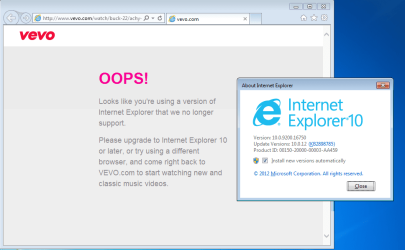
Also, IE plays videos on youtube with no problem but can't play them on vevo. Interestingly, I added vevo to IE 11's compatibility view and got a popup saying "Looks like you're using a version of Internet Explorer that we no longer support. Please upgrade to Internet Explorer 10 or later, or try using a different browser, and come back to VEVO.com to start watching new and classic videos".

Firefox plays videos on both youtube and vevo without problems.

Anyone have any ideas on what's going on?

Thanks,
t2380
 

My Computer My Computer

Computer type
Laptop
Computer Manufacturer/Model Number
HP dv7-6b78us
OS
Windows 7 Home Premium x64
Browser
IE 11 & Firefox 27
Hi welcome to SevenForums,
Update your browser is common for a website that doesn't recognize comp-view when it's being used by Internet explorer,
Press the F12 key when you get the popup message and verify what is being used,
For ie9-10 Click Browser mode and check ie10 if not checked.
You might see this to get rid of what ever comp-view lists that exist on your machine,
This applies to All versions of ie,
http://www.eightforums.com/tutorials/33571-google-search-display-issue-internet-explorer-11-fix.html
 

My Computer My Computer

Computer type
PC/Desktop
Computer Manufacturer/Model Number
Custom assembled by me :}
OS
Win-7-Pro64bit 7-H-Prem-64bit
CPU
i7-5930K 2nd i9-9940x both water blocked VRM's too
Motherboard
ASUS SABERTOOTH X99 2nd ASUS x299 Apex
Memory
Trident-z 3200C14 2nd Trident-z 3600C16
Graphics Card(s)
EVGA 1080ti ftw3 2nd Titan Xp both water blocked
Sound Card
Built-in Realtek
Monitor(s) Displays
1-AOC G2460PG 24"G-Sync 144Hz/ 2nd 1-ASUS VG248QE 24" 144Hz
Screen Resolution
1920 x 1080 144Hz
Hard Drives
2-Samsung M.2 Evo & Evo Plus
2-Samsung 850 EVO 500GB SSD's/ 3-2.5 W.D. Black 1tb-&3-1tb/3-3.5 WD Black 1tb hdd's
PSU
EVGA SuperNOVA 1000-P2 2nd 1200-P2
Case
2-Corsair Obsidian Series 450D Black ATX Mid Tower
Cooling
Custom water loops
Keyboard
Logitech G710+/ 2nd Logitech G910
Mouse
2-RedDragon M901 Perdition 16400 dpi Gaming mouse = wired
Internet Speed
Comcast Ping 19ms 89.31mbps download speed 6.12mbps upload
Antivirus
Malwarebytes Pro/ Superantispyware Pro
Browser
FireFox & Pale moon
Other Info
2nd ASUS X299 Apex/Intel i9-9940x with Custom water loop/7H-Prem-x64/Corsair 450D case/Ram Trident-z 3600C16 4x8gb / Samsung970Evo plus 500gb SSD/Dual ssd EZ swap evo/PSU EVGA SuperNova 1200w-P2 80+Platinum/GPU Titan Xp /8-ML-140 on push-pull on 2-280GTX rads
Appreciate the help.
I made a mistake using the word popup, the page just changes to show the message. Unchecking "Use Microsoft compatibility lists" and rebooting doesn't help. I'm wondering if it has something to do with video drivers or a problem with Flash and IE 11. Something else I noticed was in System and Security in the Control Panel it shows Flash Player (32-bit) even though when I downloaded Flash it said I was getting the 64-bit version.
I would try updating the video drivers but HP hasn't released updated drivers for my video card in years and the ones on the ATI site won't install and tell me I need to see my PC manufacturer for the driver.

thanks,
t2380
 

My Computer My Computer

Computer type
Laptop
Computer Manufacturer/Model Number
HP dv7-6b78us
OS
Windows 7 Home Premium x64
Browser
IE 11 & Firefox 27
If you think your driver is not quite working,
Switch to Software rendering,
http://www.sevenforums.com/tutorials/149063-internet-explorer-gpu-hardware-acceleration-turn-off.html
Otherwise I wouldn't worry about the 32 bit flash listing it's perfectly normal ie11 uses mostly 32 bit processes by default,
Unless you've activated Enhanced protection mode which if so I would doubt any videos would play,
http://www.sevenforums.com/tutorials/280434-internet-explorer-10-enable-32-bit-64-bit-ie10-windows-7-a.html
There's another option for flash though,
http://www.youtube.com/html5
But ultimately verify Gear symbol on the top right and Safety,
Make sure Activate x filtering is not effecting video playing on Vevo,
Cheers.

You would need to delete your browser history to complete getting rid of the comp-view lists from Microsoft,
I've personally never had to add a site to the comp-view list before ?
Clear your cache,
Open ie,
Use Ctrl+Shift+Delete or Gear symbol/ Safety/ Delete browser history,
Check All of the boxes/ Uncheck the very top box and Delete,
Close and reopen ie.
 

My Computer My Computer

Computer type
PC/Desktop
Computer Manufacturer/Model Number
Custom assembled by me :}
OS
Win-7-Pro64bit 7-H-Prem-64bit
CPU
i7-5930K 2nd i9-9940x both water blocked VRM's too
Motherboard
ASUS SABERTOOTH X99 2nd ASUS x299 Apex
Memory
Trident-z 3200C14 2nd Trident-z 3600C16
Graphics Card(s)
EVGA 1080ti ftw3 2nd Titan Xp both water blocked
Sound Card
Built-in Realtek
Monitor(s) Displays
1-AOC G2460PG 24"G-Sync 144Hz/ 2nd 1-ASUS VG248QE 24" 144Hz
Screen Resolution
1920 x 1080 144Hz
Hard Drives
2-Samsung M.2 Evo & Evo Plus
2-Samsung 850 EVO 500GB SSD's/ 3-2.5 W.D. Black 1tb-&3-1tb/3-3.5 WD Black 1tb hdd's
PSU
EVGA SuperNOVA 1000-P2 2nd 1200-P2
Case
2-Corsair Obsidian Series 450D Black ATX Mid Tower
Cooling
Custom water loops
Keyboard
Logitech G710+/ 2nd Logitech G910
Mouse
2-RedDragon M901 Perdition 16400 dpi Gaming mouse = wired
Internet Speed
Comcast Ping 19ms 89.31mbps download speed 6.12mbps upload
Antivirus
Malwarebytes Pro/ Superantispyware Pro
Browser
FireFox & Pale moon
Other Info
2nd ASUS X299 Apex/Intel i9-9940x with Custom water loop/7H-Prem-x64/Corsair 450D case/Ram Trident-z 3600C16 4x8gb / Samsung970Evo plus 500gb SSD/Dual ssd EZ swap evo/PSU EVGA SuperNova 1200w-P2 80+Platinum/GPU Titan Xp /8-ML-140 on push-pull on 2-280GTX rads

My Computer My Computer

Computer type
PC/Desktop
OS
Windows 10 Home x64
CPU
INTEL Core i5-750 Quad-Core 3.37GHz
Motherboard
ASUS P7P55D
Memory
HyperX Fury Black Series 8GB (2 x 4GB) 1866Mhz
Graphics Card(s)
EVGA GeForce GTX 750 Superclocked 1GB 128-Bit GDDR5
Monitor(s) Displays
LG 32MA68HY 32" IPS
Screen Resolution
1920 x 1080
Hard Drives
Samsung 840 Evo 120GB, SEAGATE 500GB Barracuda® 7200.12, SATA 3 Gb/s, 7200 RPM, 16MB cache
PSU
ANTEC TruePower New TP-550, 80 PLUS, 550W
Case
ANTEC Three Hundred Illusion
Cooling
COOLER MASTER Hyper 212 Plus, 4 x 120mm 1 x 140mm Noctua's
Internet Speed
85 + Mbps
Antivirus
Avast
Browser
Vivaldi
In Safe Mode with networking & IE I get the same old "...using a browser we don't recognize..." message as stated above. Sometime in the last few days vevo quit working in Firefox too. Problems with having to reload pages before they display properly persists.

t2380
 

My Computer My Computer

Computer type
Laptop
Computer Manufacturer/Model Number
HP dv7-6b78us
OS
Windows 7 Home Premium x64
Browser
IE 11 & Firefox 27
Post a link to the site where the issue is occurring,
Also use the Fill in your system spec's link above my hot signature,
So we might be able to see if there are any drivers available,
Cheers.
 

My Computer My Computer

Computer type
PC/Desktop
Computer Manufacturer/Model Number
Custom assembled by me :}
OS
Win-7-Pro64bit 7-H-Prem-64bit
CPU
i7-5930K 2nd i9-9940x both water blocked VRM's too
Motherboard
ASUS SABERTOOTH X99 2nd ASUS x299 Apex
Memory
Trident-z 3200C14 2nd Trident-z 3600C16
Graphics Card(s)
EVGA 1080ti ftw3 2nd Titan Xp both water blocked
Sound Card
Built-in Realtek
Monitor(s) Displays
1-AOC G2460PG 24"G-Sync 144Hz/ 2nd 1-ASUS VG248QE 24" 144Hz
Screen Resolution
1920 x 1080 144Hz
Hard Drives
2-Samsung M.2 Evo & Evo Plus
2-Samsung 850 EVO 500GB SSD's/ 3-2.5 W.D. Black 1tb-&3-1tb/3-3.5 WD Black 1tb hdd's
PSU
EVGA SuperNOVA 1000-P2 2nd 1200-P2
Case
2-Corsair Obsidian Series 450D Black ATX Mid Tower
Cooling
Custom water loops
Keyboard
Logitech G710+/ 2nd Logitech G910
Mouse
2-RedDragon M901 Perdition 16400 dpi Gaming mouse = wired
Internet Speed
Comcast Ping 19ms 89.31mbps download speed 6.12mbps upload
Antivirus
Malwarebytes Pro/ Superantispyware Pro
Browser
FireFox & Pale moon
Other Info
2nd ASUS X299 Apex/Intel i9-9940x with Custom water loop/7H-Prem-x64/Corsair 450D case/Ram Trident-z 3600C16 4x8gb / Samsung970Evo plus 500gb SSD/Dual ssd EZ swap evo/PSU EVGA SuperNova 1200w-P2 80+Platinum/GPU Titan Xp /8-ML-140 on push-pull on 2-280GTX rads
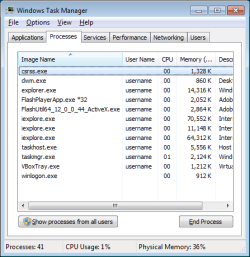
...Something else I noticed was in System and Security in the Control Panel it shows Flash Player (32-bit) even though when I downloaded Flash it said I was getting the 64-bit version....
It is easy to check - just look at task manager.

The 32bit flash app is the control panel applet. It can be used to set the properties of the 64bit flash app.
flash.png
The 64bit flash app is what plays the videos.

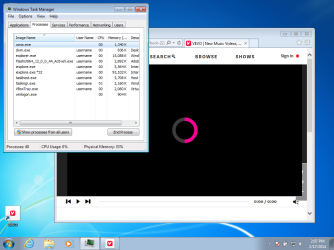
Vevo has a problem. I could not get a video to play using IE11 (64bit or 32bit), Pale Moon 24.3.2 (64bit), Chrome 32.0.1700.107 32bit.

Notice that even with EPM off, IE's 64bit parent process loads a 64bit flash player into a 32bit child window.
vevo.png


Attempts to play the video at this link...
http://www.vevo.com/watch/buck-22/achy-breaky-2/
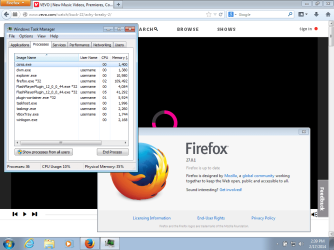
Are shown in the screenshot above and the screenshots below:
vevo8.png

vevo9.png

vevo10.png

The only version that did not give that error was IE11 - but it still would not play videos.
 

My Computer My Computer

Computer type
Laptop
Computer Manufacturer/Model Number
Employer provided Dell Latitude
OS
W7 Pro SP1 64bit
CPU
i7
Memory
8GB
Graphics Card(s)
Intel HD Graphics
Hard Drives
crappy SSD
Antivirus
Employer mandated Symantec Endpoint Protection
Browser
Pale Moon 64bit, IE11 64bit & Chrome 64bit
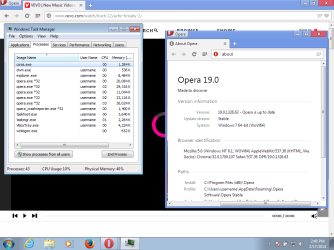
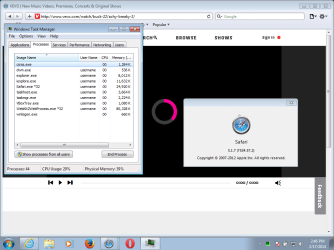
Also tried different DNS...
...with Firefox, Opera and Safari:

vevoff27.png

vevoO19.png

vevoS5.png
 

My Computer My Computer

Computer type
Laptop
Computer Manufacturer/Model Number
Employer provided Dell Latitude
OS
W7 Pro SP1 64bit
CPU
i7
Memory
8GB
Graphics Card(s)
Intel HD Graphics
Hard Drives
crappy SSD
Antivirus
Employer mandated Symantec Endpoint Protection
Browser
Pale Moon 64bit, IE11 64bit & Chrome 64bit

My Computer My Computer

Computer type
PC/Desktop
Computer Manufacturer/Model Number
Custom assembled by me :}
OS
Win-7-Pro64bit 7-H-Prem-64bit
CPU
i7-5930K 2nd i9-9940x both water blocked VRM's too
Motherboard
ASUS SABERTOOTH X99 2nd ASUS x299 Apex
Memory
Trident-z 3200C14 2nd Trident-z 3600C16
Graphics Card(s)
EVGA 1080ti ftw3 2nd Titan Xp both water blocked
Sound Card
Built-in Realtek
Monitor(s) Displays
1-AOC G2460PG 24"G-Sync 144Hz/ 2nd 1-ASUS VG248QE 24" 144Hz
Screen Resolution
1920 x 1080 144Hz
Hard Drives
2-Samsung M.2 Evo & Evo Plus
2-Samsung 850 EVO 500GB SSD's/ 3-2.5 W.D. Black 1tb-&3-1tb/3-3.5 WD Black 1tb hdd's
PSU
EVGA SuperNOVA 1000-P2 2nd 1200-P2
Case
2-Corsair Obsidian Series 450D Black ATX Mid Tower
Cooling
Custom water loops
Keyboard
Logitech G710+/ 2nd Logitech G910
Mouse
2-RedDragon M901 Perdition 16400 dpi Gaming mouse = wired
Internet Speed
Comcast Ping 19ms 89.31mbps download speed 6.12mbps upload
Antivirus
Malwarebytes Pro/ Superantispyware Pro
Browser
FireFox & Pale moon
Other Info
2nd ASUS X299 Apex/Intel i9-9940x with Custom water loop/7H-Prem-x64/Corsair 450D case/Ram Trident-z 3600C16 4x8gb / Samsung970Evo plus 500gb SSD/Dual ssd EZ swap evo/PSU EVGA SuperNova 1200w-P2 80+Platinum/GPU Titan Xp /8-ML-140 on push-pull on 2-280GTX rads
"My link" (http://www.vevo.com/watch/buck-22/achy-breaky-2/) was from a featured video on the main page. The main page has changed now. So perhaps I caught them at a bad time. However, I still get message to update the browser to IE10 or higher when using IE10. This happens using your link or my link.

Your link does eventually play for me :-)

Let's see what the OP finds.
 

My Computer My Computer

Computer type
Laptop
Computer Manufacturer/Model Number
Employer provided Dell Latitude
OS
W7 Pro SP1 64bit
CPU
i7
Memory
8GB
Graphics Card(s)
Intel HD Graphics
Hard Drives
crappy SSD
Antivirus
Employer mandated Symantec Endpoint Protection
Browser
Pale Moon 64bit, IE11 64bit & Chrome 64bit
Nothing on the front page or home page plays except the feature videos listings,
I never got any update your browser messages though ?
It's most likely the site/ Must be signed in and pretty much a paying customer for some content,
Most everything free there are nothing but previews,
It's better to go to Youtube for the videos if they're free they will be available there,
Cheers.
 

My Computer My Computer

Computer type
PC/Desktop
Computer Manufacturer/Model Number
Custom assembled by me :}
OS
Win-7-Pro64bit 7-H-Prem-64bit
CPU
i7-5930K 2nd i9-9940x both water blocked VRM's too
Motherboard
ASUS SABERTOOTH X99 2nd ASUS x299 Apex
Memory
Trident-z 3200C14 2nd Trident-z 3600C16
Graphics Card(s)
EVGA 1080ti ftw3 2nd Titan Xp both water blocked
Sound Card
Built-in Realtek
Monitor(s) Displays
1-AOC G2460PG 24"G-Sync 144Hz/ 2nd 1-ASUS VG248QE 24" 144Hz
Screen Resolution
1920 x 1080 144Hz
Hard Drives
2-Samsung M.2 Evo & Evo Plus
2-Samsung 850 EVO 500GB SSD's/ 3-2.5 W.D. Black 1tb-&3-1tb/3-3.5 WD Black 1tb hdd's
PSU
EVGA SuperNOVA 1000-P2 2nd 1200-P2
Case
2-Corsair Obsidian Series 450D Black ATX Mid Tower
Cooling
Custom water loops
Keyboard
Logitech G710+/ 2nd Logitech G910
Mouse
2-RedDragon M901 Perdition 16400 dpi Gaming mouse = wired
Internet Speed
Comcast Ping 19ms 89.31mbps download speed 6.12mbps upload
Antivirus
Malwarebytes Pro/ Superantispyware Pro
Browser
FireFox & Pale moon
Other Info
2nd ASUS X299 Apex/Intel i9-9940x with Custom water loop/7H-Prem-x64/Corsair 450D case/Ram Trident-z 3600C16 4x8gb / Samsung970Evo plus 500gb SSD/Dual ssd EZ swap evo/PSU EVGA SuperNova 1200w-P2 80+Platinum/GPU Titan Xp /8-ML-140 on push-pull on 2-280GTX rads
Back
Top