- Local time
- 10:03 AM
- Messages
- 715
First let me say I like IE8 much better than IE7.
I have two issues. I have made webpages for people over a period of time using Dreamweaver. The pages are generally very simple and nothing hight tech. Some use a password to access the webpage.
Here are issues:
Pages without a password requirement do NOT display the page, but does display the code for the page. NOT very usefull I would say.
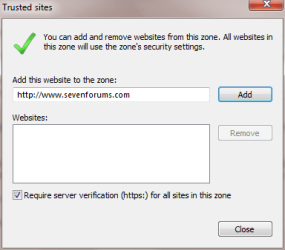
Pages requiring a password, will show a popup that tells the user that a response is needed to access the webpage, but to do this, in the tool bar you have to tell IE this is a trusted site. When OK is clicked, IE8 sends the user to never never land which what the Webpage would have done when a bad password is entered. So how do you tell IE that the Webpage is "Trusted"? As it stands now it is a catch 22.
Any enlightment would be appreciated.
I have two issues. I have made webpages for people over a period of time using Dreamweaver. The pages are generally very simple and nothing hight tech. Some use a password to access the webpage.
Here are issues:
Pages without a password requirement do NOT display the page, but does display the code for the page. NOT very usefull I would say.
Pages requiring a password, will show a popup that tells the user that a response is needed to access the webpage, but to do this, in the tool bar you have to tell IE this is a trusted site. When OK is clicked, IE8 sends the user to never never land which what the Webpage would have done when a bad password is entered. So how do you tell IE that the Webpage is "Trusted"? As it stands now it is a catch 22.
Any enlightment would be appreciated.
My Computer
- OS
- Windows 7 Pro
- CPU
- Intel(R) Pentium(R) Duel CPU E2200 2.20 Ghz
- Motherboard
- GA-G41M-ES2L
- Memory
- 4 gb 2.96 Usable
- Graphics Card(s)
- Onboard
- Sound Card
- Onboard
- Hard Drives
- 2 - 1TB WD Sata Drives