
Weird Windows 7 Problem please help!

bergiedrumma

New member
Local time
12:31 AM
Messages
5
Ok,

Problem: Windows explorer does not seem to update changes I've made to a file.
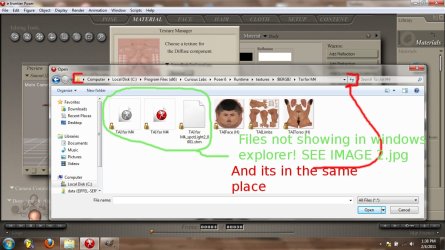
Image 1.jpg

image 2.jpg
eg. image 1 show the folder viewed through a program and image 2 is viewed though windows explorer.

Make sense? view images attached.

My pc spec: If it matters

Window 7 ultimate 64-bit
Celeron(R)dual core CPU T3000 @1.80Ghz 1.79Ghz
RAM 2.00GB

Please Help!
 

My Computer

OS
Windows 7 Ultimate x64
CPU
Celeron(R)dual core CPU T3000 @1.80Ghz 1.79Ghz
Memory
RAM 2.00GB
Hi

Have you tried viewing your hidden files?

You can do this by pressing alt, tools, folder options, view tab look for view hidden folders and files...


My Computer

Computer Manufacturer/Model Number
CustomBuild001
OS
7 ultimate x64
CPU
Intel core i7 2600K
Motherboard
ASUS P8Z68-V PRO
Memory
Vengeance™ — 16GB Triple Channel DDR3 PC16000
Graphics Card(s)
GeForce GTX 560 Ti
Monitor(s) Displays
HannsG 22" widescreen (HDMI)
Screen Resolution
1680x1050
Hard Drives
Samsung 1TB x2(RAID1) Deskstar 160G, Buffalo ExHD 500GB
PSU
Corsair 850HX
Case
Antec Three Hundred Gaming Tower Case
Cooling
CPU Freezer 7 Pro Rev. 2...ANTEC 3phase cooling, 2 intake.
Keyboard
microsoft intellitype 6000 v3.0
Mouse
microsoft sidewinder
Internet Speed
50Mb
Other Info
64GB SSD in pipeline for Intel Smart Response Technology.
It was already done that, fail. Also don't know if this info helps but, when I save a picture I've edited, I'd need to save it to my desktop and then copy it into the original folder! if I don't do that the edited picture does not show as updated
 

My Computer

OS
Windows 7 Ultimate x64
CPU
Celeron(R)dual core CPU T3000 @1.80Ghz 1.79Ghz
Memory
RAM 2.00GB
They are in C:\Users\[your_username]\AppData\Local\VirtualStore because you are trying to save then to a location you do not have write access. Use your user directory to save this stuff, not in Program Files you will then no longer have this issue.
 

My Computer

Computer type
PC/Desktop
Computer Manufacturer/Model Number
Alienware Aurora ALX R4
OS
Windows 10 Pro (x64)
CPU
Intel Core i7-3930K (3.2GHz - 4.5GHz)
Motherboard
Alienware Aurora-R4 x79
Memory
4x Samsung 4GB PC3-12800 DDR3 (16GB 1600MHz)
Graphics Card(s)
Nvidia Geforce GTX 690
Sound Card
SteelSeries Siberia Elite
Monitor(s) Displays
Dell UltraSharp U3011
Screen Resolution
2560x1600
Hard Drives
Samsung 850 Pro 256 GB, Seagate 1TB Desktop Hybrid HDD, 2x Western Digital 4TB Green HDD
PSU
875W Some Dell PSU <.<
Case
Alienware Aurora ALX
Cooling
Custom Liquid Cooling (EK CPU & GPU blocks) dual EK 480RAD
Keyboard
Logitech G710+ Mechanical
Mouse
Logitech G700s
Internet Speed
Verizon Fios (50 mbps average)
Other Info
Server: Intel NUC D54250WYK: i5-4250U, 16GB, 256 GB mSATA, Windows Server 2012 R2
Oh cool there they are! thanks! But How do i change it so that i have write access for every thing on my pc?
 

My Computer

OS
Windows 7 Ultimate x64
CPU
Celeron(R)dual core CPU T3000 @1.80Ghz 1.79Ghz
Memory
RAM 2.00GB
Uhh...You should leave it alone. Use your user directory, that is what it is for.
Reducing security is a really foolish thing to do.
 

My Computer

Computer type
PC/Desktop
Computer Manufacturer/Model Number
Alienware Aurora ALX R4
OS
Windows 10 Pro (x64)
CPU
Intel Core i7-3930K (3.2GHz - 4.5GHz)
Motherboard
Alienware Aurora-R4 x79
Memory
4x Samsung 4GB PC3-12800 DDR3 (16GB 1600MHz)
Graphics Card(s)
Nvidia Geforce GTX 690
Sound Card
SteelSeries Siberia Elite
Monitor(s) Displays
Dell UltraSharp U3011
Screen Resolution
2560x1600
Hard Drives
Samsung 850 Pro 256 GB, Seagate 1TB Desktop Hybrid HDD, 2x Western Digital 4TB Green HDD
PSU
875W Some Dell PSU <.<
Case
Alienware Aurora ALX
Cooling
Custom Liquid Cooling (EK CPU & GPU blocks) dual EK 480RAD
Keyboard
Logitech G710+ Mechanical
Mouse
Logitech G700s
Internet Speed
Verizon Fios (50 mbps average)
Other Info
Server: Intel NUC D54250WYK: i5-4250U, 16GB, 256 GB mSATA, Windows Server 2012 R2
But that doesnt make sence if all the programs on my pc refer to "C:\Program Files (x86)" and not "C:\Users\Lenovo G550\AppData\Local\VirtualStore\Program Files (x86)" my work pc never needs to saves it in that folder.

What a nuisance.
 

My Computer

OS
Windows 7 Ultimate x64
CPU
Celeron(R)dual core CPU T3000 @1.80Ghz 1.79Ghz
Memory
RAM 2.00GB
...You chose where you save your files do you not? Pick some place outside of the Program Files directory and you will never run into this issue in the future. Saving your files in Program Files is a bad habit, it is time you corrected that.
 

My Computer

Computer type
PC/Desktop
Computer Manufacturer/Model Number
Alienware Aurora ALX R4
OS
Windows 10 Pro (x64)
CPU
Intel Core i7-3930K (3.2GHz - 4.5GHz)
Motherboard
Alienware Aurora-R4 x79
Memory
4x Samsung 4GB PC3-12800 DDR3 (16GB 1600MHz)
Graphics Card(s)
Nvidia Geforce GTX 690
Sound Card
SteelSeries Siberia Elite
Monitor(s) Displays
Dell UltraSharp U3011
Screen Resolution
2560x1600
Hard Drives
Samsung 850 Pro 256 GB, Seagate 1TB Desktop Hybrid HDD, 2x Western Digital 4TB Green HDD
PSU
875W Some Dell PSU <.<
Case
Alienware Aurora ALX
Cooling
Custom Liquid Cooling (EK CPU & GPU blocks) dual EK 480RAD
Keyboard
Logitech G710+ Mechanical
Mouse
Logitech G700s
Internet Speed
Verizon Fios (50 mbps average)
Other Info
Server: Intel NUC D54250WYK: i5-4250U, 16GB, 256 GB mSATA, Windows Server 2012 R2
Ok cool thanks for the advice! I pronounce this Problem solved!
 

My Computer

OS
Windows 7 Ultimate x64
CPU
Celeron(R)dual core CPU T3000 @1.80Ghz 1.79Ghz
Memory
RAM 2.00GB
Back
Top