What is OEMLOADER?

adriansam

New member
Member
Local time
1:25 AM
Messages
69
Location
Tanza, Cavite
My OS was corrupted before so i have to reformat it
and I download installer of windows 7 64 bit home basic from microsoft

When reformatting i noticed the Last Partition of my drive,
it is the "OEM RESERVED", i ignore it before because i am new on Windows 7
So Install the new OS then enter my product key and everything was fine.

I saw this picture from my friends blog
2013-04-29_161837.png

I download the OS, knowing that the OEM reserved will be used when i do reformat again.
No my question is:
WHAT IF I INSTALL "WINDOWS 7 HOME BASIC SP1 64-bit OEM LOADER"?
will this installation use the OEM drive?

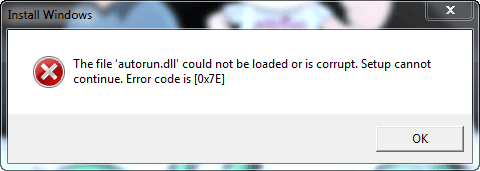
I got this error below when i mount the ISO file
 

Attachments

  • 2013-04-29_161858.png
    2013-04-29_161858.png
    10.3 KB · Views: 5

My Computer

Computer type
Laptop
Computer Manufacturer/Model Number
Lenovo
OS
Microsoft Windows 7 Ultimate 64-bit
CPU
Intel(R) Core(TM) i3 CPU M 370 @ 2.40GHz
Motherboard
LENOVO Base Board Product Name
Memory
465.76 GB
Graphics Card(s)
Intel(R) HD Graphics
Sound Card
(1) High Definition Audio Device (2) High Definition Audio
Hard Drives
(1) ST9500325AS
Don`t you have a recovery partition ?

No idea what a oem loader is.

Did you burn your iso to a dvd ?
 

My Computer

Computer type
PC/Desktop
Computer Manufacturer/Model Number
Skylake Special #666
OS
Windows 10 Pro x64
CPU
Intel Core i7 6700K
Motherboard
Asus Sabertooth Z170 Mark 1
Memory
GSkill TridentZ RGB 16GB 3600 16-16-16-36
Graphics Card(s)
EVGA GTX 980 Ti SC x2
Sound Card
Realtek High Definition
Monitor(s) Displays
AOC G2460PG
Screen Resolution
1920 x 1080 144Hz
Hard Drives
Samsung 860 Pro 256GB, Seagate Barracuda 4TB x2
PSU
EVGA 1000 P2, EVGA White Custom Braided Cables
Case
Corsair Vengeance C70 Gunmetal Black
Cooling
Corsair H100i v2, Corsair ML120 x2, Thermal Grizzly Kryonaut
Keyboard
Logitech G910 Orion Spectrum
Mouse
Logitech G700s
Internet Speed
Verizon Fios Quantum Gateway 75/75
Antivirus
Windows Defender, Malwarebytes Free 3.8.3
Browser
Chrome
Other Info
Corsair SP120 x4, LG Blu-ray Drive, Durabrand HT-395 100 Watt Dolby Digital Amp, Corsair H2100 Wireless 7.1 Headset

My Computer

Computer type
PC/Desktop
Computer Manufacturer/Model Number
Golden Mk. I.4
OS
Windows 10 Pro x64 ; Xubuntu x64
CPU
Intel i7 860 @ 2.80 GHz O/C'ed to 4.0GHz
Motherboard
Gigabyte P55A-UD3R Rev.1. Award BIOS F13
Memory
16GB Corsair Vengance DDR3 @ 661 MHz Dual Channel (9-9-9-24)
Graphics Card(s)
EVGA NVidia GTX 560 1024MB
Sound Card
Realtek Integrated
Monitor(s) Displays
Dual Samsung SyncMaster 2494HS
Screen Resolution
1920*1080 and 1920*1080
Hard Drives
1*Samsung 840 EVO 120GB SSD;
1*OCZ Vertex 2 60GB SSD;
2*Samsung F3 SpinPoint 1TB in RAID0;
1*Samsung F1 SpinPoint 1TB;
2*Western Digital 1TB External USB 3.0
1*Western Digital 500GB External USB 3.0
1*Seagate 500GB External USB 2.0
PSU
Thermaltake ToughPower QFan 750W
Case
Thermaltake Element S VK60001W2Z
Cooling
Corsair H60 Water Cooling, 2*230mm and 2*80mm case fans
Keyboard
Logitech G110
Mouse
Logitech MX518
Thanks for reply
now my only problem is how can i use the oem reserved partition?
cause it takes too much time when i do clean reinstall of windows.
 

My Computer

Computer type
Laptop
Computer Manufacturer/Model Number
Lenovo
OS
Microsoft Windows 7 Ultimate 64-bit
CPU
Intel(R) Core(TM) i3 CPU M 370 @ 2.40GHz
Motherboard
LENOVO Base Board Product Name
Memory
465.76 GB
Graphics Card(s)
Intel(R) HD Graphics
Sound Card
(1) High Definition Audio Device (2) High Definition Audio
Hard Drives
(1) ST9500325AS

My Computer

Computer type
Laptop
Computer Manufacturer/Model Number
Lenovo
OS
Microsoft Windows 7 Ultimate 64-bit
CPU
Intel(R) Core(TM) i3 CPU M 370 @ 2.40GHz
Motherboard
LENOVO Base Board Product Name
Memory
465.76 GB
Graphics Card(s)
Intel(R) HD Graphics
Sound Card
(1) High Definition Audio Device (2) High Definition Audio
Hard Drives
(1) ST9500325AS
Don`t you have a recovery partition ?

No idea what a oem loader is.

Did you burn your iso to a dvd ?

i dont have but i think that the OEM reserved is a back up drive
i think its contains driver for my lenovo laptop
i remember that the size of this drive was 6GB
 

My Computer

Computer type
Laptop
Computer Manufacturer/Model Number
Lenovo
OS
Microsoft Windows 7 Ultimate 64-bit
CPU
Intel(R) Core(TM) i3 CPU M 370 @ 2.40GHz
Motherboard
LENOVO Base Board Product Name
Memory
465.76 GB
Graphics Card(s)
Intel(R) HD Graphics
Sound Card
(1) High Definition Audio Device (2) High Definition Audio
Hard Drives
(1) ST9500325AS
Hi,

We should really check the MGADIAG to be sure this installation is OK:

1. Download and save this tool to your desktop:
http://go.microsoft.com/fwlink/?linkid=52012

2. Run the tool, and then click 'Copy' - ignore any errors if they appear

3. Use CTRL+V to paste the unedited results of the validation tool here in your next reply

More info: http://www.sevenforums.com/windows-...ne-activation-issue-posting-instructions.html

Code:
Diagnostic Report (1.9.0027.0):
-----------------------------------------
Windows Validation Data-->

Validation Code: 0
Cached Online Validation Code: N/A, hr = 0xc004f012
Windows Product Key: *****-*****-K3X4F-BG96F-WM3YB
Windows Product Key Hash: alHWsgfoSldjILHlOhqVF5HfDR4=
Windows Product ID: 00346-OEM-9604484-49762
Windows Product ID Type: 8
Windows License Type: COA SLP
Windows OS version: 6.1.7601.2.00010300.1.0.002
ID: {80172544-8851-450F-8B03-F243EE3F1ED6}(1)
Is Admin: Yes
TestCab: 0x0
LegitcheckControl ActiveX: N/A, hr = 0x80070002
Signed By: N/A, hr = 0x80070002
Product Name: Windows 7 Home Basic
Architecture: 0x00000009
Build lab: 7601.win7sp1_gdr.130318-1533
TTS Error: 
Validation Diagnostic: 
Resolution Status: N/A

Vista WgaER Data-->
ThreatID(s): N/A, hr = 0x80070002
Version: N/A, hr = 0x80070002

Windows XP Notifications Data-->
Cached Result: N/A, hr = 0x80070002
File Exists: No
Version: N/A, hr = 0x80070002
WgaTray.exe Signed By: N/A, hr = 0x80070002
WgaLogon.dll Signed By: N/A, hr = 0x80070002

OGA Notifications Data-->
Cached Result: N/A, hr = 0x80070002
Version: N/A, hr = 0x80070002
OGAExec.exe Signed By: N/A, hr = 0x80070002
OGAAddin.dll Signed By: N/A, hr = 0x80070002

OGA Data-->
Office Status: 109 N/A
OGA Version: N/A, 0x80070002
Signed By: N/A, hr = 0x80070002
Office Diagnostics: 025D1FF3-364-80041010_025D1FF3-229-80041010_025D1FF3-230-1_025D1FF3-517-80040154_025D1FF3-237-80040154_025D1FF3-238-2_025D1FF3-244-80070002_025D1FF3-258-3

Browser Data-->
Proxy settings: N/A
User Agent: Mozilla/4.0 (compatible; MSIE 8.0; Win32)
Default Browser: C:\Users\Adrian Samontina\AppData\Local\Google\Chrome\Application\chrome.exe
Download signed ActiveX controls: Prompt
Download unsigned ActiveX controls: Disabled
Run ActiveX controls and plug-ins: Allowed
Initialize and script ActiveX controls not marked as safe: Disabled
Allow scripting of Internet Explorer Webbrowser control: Disabled
Active scripting: Allowed
Script ActiveX controls marked as safe for scripting: Allowed

File Scan Data-->
File Mismatch: C:\Windows\system32\wat\watadminsvc.exe[Hr = 0x80070002]
File Mismatch: C:\Windows\system32\wat\npwatweb.dll[Hr = 0x80070002]
File Mismatch: C:\Windows\system32\wat\watux.exe[Hr = 0x80004005]
File Mismatch: C:\Windows\system32\wat\watweb.dll[Hr = 0x80070002]
File Mismatch: C:\Windows\system32\slc.dll[Hr = 0x800b0100]

Other data-->
Office Details: <GenuineResults><MachineData><UGUID>{80172544-8851-450F-8B03-F243EE3F1ED6}</UGUID><Version>1.9.0027.0</Version><OS>6.1.7601.2.00010300.1.0.002</OS><Architecture>x64</Architecture><PKey>*****-*****-*****-*****-WM3YB</PKey><PID>00346-OEM-9604484-49762</PID><PIDType>8</PIDType><SID>S-1-5-21-2800226031-2412055986-1456172179</SID><SYSTEM><Manufacturer>LENOVO</Manufacturer><Model>20042                           </Model></SYSTEM><BIOS><Manufacturer>LENOVO</Manufacturer><Version>29CN40WW(V2.17)</Version><SMBIOSVersion major="2" minor="6"/><Date>20110413000000.000000+000</Date></BIOS><HWID>E2D03207018400FC</HWID><UserLCID>0409</UserLCID><SystemLCID>0409</SystemLCID><TimeZone>Malay Peninsula Standard Time(GMT+08:00)</TimeZone><iJoin>0</iJoin><SBID><stat>3</stat><msppid></msppid><name></name><model></model></SBID><OEM><OEMID>LENOVO</OEMID><OEMTableID>CB-01   </OEMTableID></OEM><GANotification/></MachineData><Software><Office><Result>109</Result><Products/><Applications/></Office></Software></GenuineResults>  

Spsys.log Content: 0x80070002

Licensing Data-->
Software licensing service version: 6.1.7601.17514

Name: Windows(R) 7, HomeBasic edition
Description: Windows Operating System - Windows(R) 7, OEM_COA_SLP channel
Activation ID: 25a0d760-2580-4c99-adfb-d57ba93560f5
Application ID: 55c92734-d682-4d71-983e-d6ec3f16059f
Extended PID: 00346-00192-044-849762-02-1033-7601.0000-1082013
Installation ID: 015996657520168215346875766096755045658510938852095830
Processor Certificate URL: [URL]http://go.microsoft.com/fwlink/?LinkID=88338[/URL]
Machine Certificate URL: [URL]http://go.microsoft.com/fwlink/?LinkID=88339[/URL]
Use License URL: [URL]http://go.microsoft.com/fwlink/?LinkID=88341[/URL]
Product Key Certificate URL: [URL]http://go.microsoft.com/fwlink/?LinkID=88340[/URL]
Partial Product Key: WM3YB
License Status: Licensed
Remaining Windows rearm count: 3
Trusted time: 4/29/2013 6:36:14 PM

Windows Activation Technologies-->
HrOffline: 0x00000000
HrOnline: N/A
HealthStatus: 0x0000000000000000
Event Time Stamp: N/A
ActiveX: Not Registered - 0x80040154
Admin Service: Not Registered - 0x80040154
HealthStatus Bitmask Output:


HWID Data-->
HWID Hash Current: MgAAAAEAAQABAAEAAAABAAAABQABAAEA6GE0WLwtmEGunKwizMr8RdJU1Aj4twTnXF0=

OEM Activation 1.0 Data-->
N/A

OEM Activation 2.0 Data-->
BIOS valid for OA 2.0: yes
Windows marker version: 0x20001
OEMID and OEMTableID Consistent: yes
BIOS Information: 
  ACPI Table Name    OEMID Value    OEMTableID Value
  APIC            INTEL         Calpella
  FACP            LENOVO        CB-01   
  HPET            LENOVO        CB-01   
  BOOT            INTEL         Calpella
  MCFG            LENOVO        CB-01   
  WDRT            INTEL         Calpella
  ASF!            INTEL         Calpella
  SLIC            LENOVO        CB-01   
  ASPT            INTEL         Calpella
  SSDT            PmRef        CpuPm
  SSDT            PmRef        CpuPm
  SSDT            PmRef        CpuPm

 

My Computer

Computer type
Laptop
Computer Manufacturer/Model Number
Lenovo
OS
Microsoft Windows 7 Ultimate 64-bit
CPU
Intel(R) Core(TM) i3 CPU M 370 @ 2.40GHz
Motherboard
LENOVO Base Board Product Name
Memory
465.76 GB
Graphics Card(s)
Intel(R) HD Graphics
Sound Card
(1) High Definition Audio Device (2) High Definition Audio
Hard Drives
(1) ST9500325AS

My Computer

Computer type
Laptop
Computer Manufacturer/Model Number
Asus K52F or Lenovo B51-80
OS
Win 7 x64 Home Premium (and x86 VirtualBox VM)/Win10
CPU
i3 370M/i7 6500U
Motherboard
Asus/Lenovo
Memory
8GB - finally :)/8GB
Graphics Card(s)
it's an i3, dude!/dual Intel&nVidia
Sound Card
onboard
Monitor(s) Displays
15.6" built-in
Screen Resolution
1366x768/1920x1080
Hard Drives
750GB Seagate internal
Sundry external drives attached to other computers on the local network
1TB SSD on the Lenovo
PSU
n/a
Internet Speed
as much as I can get - usually on a dongle/phone, so <1MB/s
Antivirus
MSE/Defender
Browser
IE11/12/Edge/Chrome/FF(if I must)
Please install the KB971033 update from http://support.microsoft.com/kb/971033 , then validate using Internet Explorer at www.microsoft.com/genuine/validate - what happens?

post a new MGADiag report afterwards.

Code:
Diagnostic Report (1.9.0027.0):
-----------------------------------------
Windows Validation Data-->

Validation Code: 0x8004FE21
Cached Online Validation Code: N/A, hr = 0xc004f012
Windows Product Key: *****-*****-K3X4F-BG96F-WM3YB
Windows Product Key Hash: alHWsgfoSldjILHlOhqVF5HfDR4=
Windows Product ID: 00346-OEM-9604484-49762
Windows Product ID Type: 8
Windows License Type: COA SLP
Windows OS version: 6.1.7601.2.00010300.1.0.002
ID: {D37EA80D-F58E-4281-9555-02C4E5A8EBC7}(1)
Is Admin: Yes
TestCab: 0x0
LegitcheckControl ActiveX: N/A, hr = 0x80070002
Signed By: N/A, hr = 0x80070002
Product Name: Windows 7 Home Basic
Architecture: 0x00000009
Build lab: 7601.win7sp1_gdr.130318-1533
TTS Error: 
Validation Diagnostic: 
Resolution Status: N/A

Vista WgaER Data-->
ThreatID(s): N/A, hr = 0x80070002
Version: N/A, hr = 0x80070002

Windows XP Notifications Data-->
Cached Result: N/A, hr = 0x80070002
File Exists: No
Version: N/A, hr = 0x80070002
WgaTray.exe Signed By: N/A, hr = 0x80070002
WgaLogon.dll Signed By: N/A, hr = 0x80070002

OGA Notifications Data-->
Cached Result: N/A, hr = 0x80070002
Version: N/A, hr = 0x80070002
OGAExec.exe Signed By: N/A, hr = 0x80070002
OGAAddin.dll Signed By: N/A, hr = 0x80070002

OGA Data-->
Office Status: 109 N/A
OGA Version: N/A, 0x80070002
Signed By: N/A, hr = 0x80070002
Office Diagnostics: 025D1FF3-364-80041010_025D1FF3-229-80041010_025D1FF3-230-1_025D1FF3-517-80040154_025D1FF3-237-80040154_025D1FF3-238-2_025D1FF3-244-80070002_025D1FF3-258-3

Browser Data-->
Proxy settings: N/A
User Agent: Mozilla/4.0 (compatible; MSIE 8.0; Win32)
Default Browser: C:\Users\Adrian Samontina\AppData\Local\Google\Chrome\Application\chrome.exe
Download signed ActiveX controls: Prompt
Download unsigned ActiveX controls: Disabled
Run ActiveX controls and plug-ins: Allowed
Initialize and script ActiveX controls not marked as safe: Disabled
Allow scripting of Internet Explorer Webbrowser control: Disabled
Active scripting: Allowed
Script ActiveX controls marked as safe for scripting: Allowed

File Scan Data-->
File Mismatch: C:\Windows\system32\slc.dll[Hr = 0x800b0100]

Other data-->
Office Details: <GenuineResults><MachineData><UGUID>{2C6BCC6F-B3BE-45D3-A64C-28617E081ACE}</UGUID><Version>1.9.0027.0</Version><OS>6.1.7601.2.00010300.1.0.002</OS><Architecture>x64</Architecture><PKey>*****-*****-*****-*****-WM3YB</PKey><PID>00346-OEM-9604484-49762</PID><PIDType>8</PIDType><SID>S-1-5-21-2800226031-2412055986-1456172179</SID><SYSTEM><Manufacturer>LENOVO</Manufacturer><Model>20042                           </Model></SYSTEM><BIOS><Manufacturer>LENOVO</Manufacturer><Version>29CN40WW(V2.17)</Version><SMBIOSVersion major="2" minor="6"/><Date>20110413000000.000000+000</Date></BIOS><HWID>E2D03207018400FC</HWID><UserLCID>0409</UserLCID><SystemLCID>0409</SystemLCID><TimeZone>Malay Peninsula Standard Time(GMT+08:00)</TimeZone><iJoin>0</iJoin><SBID><stat>3</stat><msppid></msppid><name></name><model></model></SBID><OEM><OEMID>LENOVO</OEMID><OEMTableID>CB-01   </OEMTableID></OEM><GANotification/></MachineData><Software><Office><Result>109</Result><Products/><Applications/></Office></Software></GenuineResults>  

Spsys.log Content: 0x80070002

Licensing Data-->
Software licensing service version: 6.1.7601.17514

Name: Windows(R) 7, HomeBasic edition
Description: Windows Operating System - Windows(R) 7, OEM_COA_SLP channel
Activation ID: 25a0d760-2580-4c99-adfb-d57ba93560f5
Application ID: 55c92734-d682-4d71-983e-d6ec3f16059f
Extended PID: 00346-00192-044-849762-02-1033-7601.0000-1082013
Installation ID: 015996657520168215346875766096755045658510938852095830
Processor Certificate URL: [URL]http://go.microsoft.com/fwlink/?LinkID=88338[/URL]
Machine Certificate URL: [URL]http://go.microsoft.com/fwlink/?LinkID=88339[/URL]
Use License URL: [URL]http://go.microsoft.com/fwlink/?LinkID=88341[/URL]
Product Key Certificate URL: [URL]http://go.microsoft.com/fwlink/?LinkID=88340[/URL]
Partial Product Key: WM3YB
License Status: Licensed
Remaining Windows rearm count: 3
Trusted time: 4/29/2013 7:25:04 PM

Windows Activation Technologies-->
HrOffline: 0x8004FE21
HrOnline: N/A
HealthStatus: 0x0000000000000100
Event Time Stamp: N/A
ActiveX: Registered, Version: 7.1.7600.16395
Admin Service: Registered, Version: 7.1.7600.16395
HealthStatus Bitmask Output:
Tampered File: %systemroot%\system32\slc.dll|slc.dll.mui


HWID Data-->
HWID Hash Current: MgAAAAEAAQABAAEAAAABAAAABQABAAEA6GE0WLwtmEGunKwizMr8RdJU1Aj4twTnXF0=

OEM Activation 1.0 Data-->
N/A

OEM Activation 2.0 Data-->
BIOS valid for OA 2.0: yes
Windows marker version: 0x20001
OEMID and OEMTableID Consistent: yes
BIOS Information: 
  ACPI Table Name    OEMID Value    OEMTableID Value
  APIC            INTEL         Calpella
  FACP            LENOVO        CB-01   
  HPET            LENOVO        CB-01   
  BOOT            INTEL         Calpella
  MCFG            LENOVO        CB-01   
  WDRT            INTEL         Calpella
  ASF!            INTEL         Calpella
  SLIC            LENOVO        CB-01   
  ASPT            INTEL         Calpella
  SSDT            PmRef        CpuPm
  SSDT            PmRef        CpuPm
  SSDT            PmRef        CpuPm
 

My Computer

Computer type
Laptop
Computer Manufacturer/Model Number
Lenovo
OS
Microsoft Windows 7 Ultimate 64-bit
CPU
Intel(R) Core(TM) i3 CPU M 370 @ 2.40GHz
Motherboard
LENOVO Base Board Product Name
Memory
465.76 GB
Graphics Card(s)
Intel(R) HD Graphics
Sound Card
(1) High Definition Audio Device (2) High Definition Audio
Hard Drives
(1) ST9500325AS

My Computer

Computer type
PC/Desktop
Computer Manufacturer/Model Number
Golden Mk. I.4
OS
Windows 10 Pro x64 ; Xubuntu x64
CPU
Intel i7 860 @ 2.80 GHz O/C'ed to 4.0GHz
Motherboard
Gigabyte P55A-UD3R Rev.1. Award BIOS F13
Memory
16GB Corsair Vengance DDR3 @ 661 MHz Dual Channel (9-9-9-24)
Graphics Card(s)
EVGA NVidia GTX 560 1024MB
Sound Card
Realtek Integrated
Monitor(s) Displays
Dual Samsung SyncMaster 2494HS
Screen Resolution
1920*1080 and 1920*1080
Hard Drives
1*Samsung 840 EVO 120GB SSD;
1*OCZ Vertex 2 60GB SSD;
2*Samsung F3 SpinPoint 1TB in RAID0;
1*Samsung F1 SpinPoint 1TB;
2*Western Digital 1TB External USB 3.0
1*Western Digital 500GB External USB 3.0
1*Seagate 500GB External USB 2.0
PSU
Thermaltake ToughPower QFan 750W
Case
Thermaltake Element S VK60001W2Z
Cooling
Corsair H60 Water Cooling, 2*230mm and 2*80mm case fans
Keyboard
Logitech G110
Mouse
Logitech MX518
It wont do anything with the tamper there, Golden :)

@adriansam....


Please run a full CHKDSK and SFC scan....

Click on Start > All Programs > Accessories
Right-click on the Command Prompt entry
Select Run as Administrator and accept the UAC prompt - the Elevated Command Prompt window should pop up.

At the Command prompt, type

CHKDSK C: /R

and hit the Enter key.
You will be told that the drive is locked,
and the CHKDSK will run at he next boot - hit the Y key, press Enter, and then reboot.

The CHKDSK will take a few hours depending on the size of the drive, so be patient!

After the CHKDSK has run, Windows should boot normally (possibly after a second auto-reboot) -
then run the SFC.

SFC -System File Checker - Instructions
Click on Start > All Programs > Accessories
Right-click on the Command Prompt entry
Select Run as Administrator and accept the UAC prompt - the Elevated Command Prompt window should pop up.

At the Command prompt, type

SFC /SCANNOW

and hit the Enter key

Wait for the scan to finish - make a note of any error messages - and then reboot.


Copy the CBS.log file created (C:\Windows\Logs\CBS\CBS.log) to your desktop (you can't manipulate it directly) and then compress the copy and upload it to your SkyDrive Public folder (http://skydrive.live.com ) and post a link to it so that I can take a look.

Post a new MGADiag report with details of any error messages encountered.
 

My Computer

Computer type
Laptop
Computer Manufacturer/Model Number
Asus K52F or Lenovo B51-80
OS
Win 7 x64 Home Premium (and x86 VirtualBox VM)/Win10
CPU
i3 370M/i7 6500U
Motherboard
Asus/Lenovo
Memory
8GB - finally :)/8GB
Graphics Card(s)
it's an i3, dude!/dual Intel&nVidia
Sound Card
onboard
Monitor(s) Displays
15.6" built-in
Screen Resolution
1366x768/1920x1080
Hard Drives
750GB Seagate internal
Sundry external drives attached to other computers on the local network
1TB SSD on the Lenovo
PSU
n/a
Internet Speed
as much as I can get - usually on a dongle/phone, so <1MB/s
Antivirus
MSE/Defender
Browser
IE11/12/Edge/Chrome/FF(if I must)
OEM loader sounds like an activation exploit used to bootleg Win7. We not only don't support that here but it can get you banned to even discuss it if you are not working with us to get rid of it.

If you have a Lenovo laptop then it comes preinstalled with Windows that has a license you own for the life of the PC. There's no reason to use a bootleg OS on it

If Lenovo Factory Recovery will not run from its partition at boot, or using Recovery disks you should have made when you set it up, then follow these steps to Clean Reinstall - Factory OEM Windows 7 for the licensed version with the Product Key on the COA sticker. http://en.community.dell.com/suppor...fficial-iso-download-links-digital-river.aspx
 
Last edited:
OEM loader sounds like an activation exploit used to bootleg Win7. We not only don't support that here but it can get you banned to even discuss it if you are not working with us to get rid of it.

If you have a Lenovo laptop then it comes preinstalled with Windows that has a license you own for the life of the PC. There's no reason to use a bootleg OS on it

If Lenovo Factory Recovery will not run from its partition at boot, or using Recovery disks you should have made when you set it up, then follow these steps to Clean Reinstall - Factory OEM Windows 7 for the licensed version with the Product Key on the COA sticker.

Im just asking what oemloader is I thought it was the program to use the OEM reserved drive
why do i have to exploit activation if my laptop has genuine product key the sticker at the bottom part of this laptop
 

My Computer

Computer type
Laptop
Computer Manufacturer/Model Number
Lenovo
OS
Microsoft Windows 7 Ultimate 64-bit
CPU
Intel(R) Core(TM) i3 CPU M 370 @ 2.40GHz
Motherboard
LENOVO Base Board Product Name
Memory
465.76 GB
Graphics Card(s)
Intel(R) HD Graphics
Sound Card
(1) High Definition Audio Device (2) High Definition Audio
Hard Drives
(1) ST9500325AS
That's the point I am making. "Loader" is a loaded word here which sets off piracy alarms.

If you still have a Recovery partition left on your laptop you can try running it: How to use the pre-boot service partition to recover your software

It may be necessary to read the Manual or look at the Product Information on the Lenovo Support Downloads webpage for your model.

Sometimes if the Recovery partition will not run using its specified method you can Mark Recovery Partition as Active (Method Two) then reboot and see if it will start, if necessary again pressing the specified key(s).

There's a chance your Recovery partition will not run. In that case your options are to order Recovery Disks from Lenovo Tech Support, or do the superior Clean Reinstall - Factory OEM Windows 7. If you do the reinstall I'd delete all partitions during install as they no longer are working. There is more about this in the tutorial as well as a clean copy of the ISO to burn to DVD or write to flash stick.
 
Last edited:
That's the point I am making. "Loader" is a loaded word here which sets off piracy alarms.

If you still have a Recovery partition left on your laptop you can try running it. Find out how to do this by googling your make/model + Run Factory Recovery. This is what I find when I do this now: How to use the pre-boot service partition to recover your software

You can also read the Manual or look at the Product Information on the Lenovo Support Downloads webpage for your model.

There's a chance your Recovery partition will not run. In that case your options are to order Recovery Disks from Lenovo Tech Support, or do the superior Clean Reinstall - Factory OEM Windows 7. If you do the reinstall I'd delete all partitions during install as they no longer are working. There is more about this in the tutorial as well as a clean copy of the ISO to burn to DVD or write to flash stick.

Thanks for the first link, i think this is the answer on my question.
I cant understand the procedure about the diskette, what is it?
have you tried this method?
 

My Computer

Computer type
Laptop
Computer Manufacturer/Model Number
Lenovo
OS
Microsoft Windows 7 Ultimate 64-bit
CPU
Intel(R) Core(TM) i3 CPU M 370 @ 2.40GHz
Motherboard
LENOVO Base Board Product Name
Memory
465.76 GB
Graphics Card(s)
Intel(R) HD Graphics
Sound Card
(1) High Definition Audio Device (2) High Definition Audio
Hard Drives
(1) ST9500325AS
What diskette? I provided you with the ISO file to burn to DVD so you have the latest clean copy of the WIn7 installer for your licensed version.

Are you wanting to run Recovery? Have you tried all the methods given? I just added another method to my post above to mark Active the Recovery partition.

It would be helpful if you'd tell us exactly what you'd like to do
, or ask further questions to help decide.
 
It wont do anything with the tamper there, Golden :)

@adriansam....


Please run a full CHKDSK and SFC scan....

Click on Start > All Programs > Accessories
Right-click on the Command Prompt entry
Select Run as Administrator and accept the UAC prompt - the Elevated Command Prompt window should pop up.

At the Command prompt, type

CHKDSK C: /R

and hit the Enter key.
You will be told that the drive is locked,
and the CHKDSK will run at he next boot - hit the Y key, press Enter, and then reboot.

The CHKDSK will take a few hours depending on the size of the drive, so be patient!

After the CHKDSK has run, Windows should boot normally (possibly after a second auto-reboot) -
then run the SFC.

SFC -System File Checker - Instructions
Click on Start > All Programs > Accessories
Right-click on the Command Prompt entry
Select Run as Administrator and accept the UAC prompt - the Elevated Command Prompt window should pop up.

At the Command prompt, type

SFC /SCANNOW

and hit the Enter key

Wait for the scan to finish - make a note of any error messages - and then reboot.


Copy the CBS.log file created (C:\Windows\Logs\CBS\CBS.log) to your desktop (you can't manipulate it directly) and then compress the copy and upload it to your SkyDrive Public folder (http://skydrive.live.com ) and post a link to it so that I can take a look.

Post a new MGADiag report with details of any error messages encountered.

The Volume is clean

then

Windows resource protection found corrupt files and successfully repaired them. Details are included in the CBS.log windir\Logs\CBS\CBS.log.

View attachment 266015
 

My Computer

Computer type
Laptop
Computer Manufacturer/Model Number
Lenovo
OS
Microsoft Windows 7 Ultimate 64-bit
CPU
Intel(R) Core(TM) i3 CPU M 370 @ 2.40GHz
Motherboard
LENOVO Base Board Product Name
Memory
465.76 GB
Graphics Card(s)
Intel(R) HD Graphics
Sound Card
(1) High Definition Audio Device (2) High Definition Audio
Hard Drives
(1) ST9500325AS
What diskette? I provided you with the ISO file to burn to DVD so you have the latest clean copy of the WIn7 installer for your licensed version.

Are you wanting to run Recovery? Have you tried all the methods given? I just added another method to my post above to mark Active the Recovery partition.

It would be helpful if you'd tell us exactly what you'd like to do
, or ask further questions to help decide.

i have a DVD of windows 7 setup but the year modified was 2009
is it the latest version for WINDOWS 7 HOMEBASIC 64 bit?
i remember when i do reinstall of windows the update was about 1GB+

what will i do is reinstall my OS then do recovery, is this right?
 

My Computer

Computer type
Laptop
Computer Manufacturer/Model Number
Lenovo
OS
Microsoft Windows 7 Ultimate 64-bit
CPU
Intel(R) Core(TM) i3 CPU M 370 @ 2.40GHz
Motherboard
LENOVO Base Board Product Name
Memory
465.76 GB
Graphics Card(s)
Intel(R) HD Graphics
Sound Card
(1) High Definition Audio Device (2) High Definition Audio
Hard Drives
(1) ST9500325AS
Back
Top