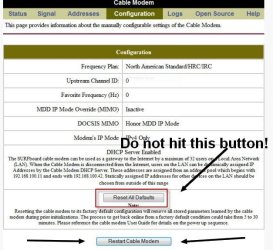
The reason why you can't access the modem with the proper IP of 192.168.100.1 is because the modem is not in bridging mode. I should have saw this earlier. What you need to do is pull the ethernet cable from the router to the modem and plug an ethernet cable connected to your PC to the modem directly where the router was plugged in at into the modem. Now try 192.168.100.1 to access the modem.
Once in the modem go in and hit the Restart Cable Modem button shown in the pic. DO NOT hit the Reset All Defaults button. That would reset your ISPs configuration for the modem and you'll lose Internet access.
Once the modem is reset, go into the modem's options and find something for bridging mode. Since you're using a router with your modem the modem needs to be in bridging mode. Once the modem is in bridging mode you can now reconnect the router.
The reason why you want to reset the modem is because
if you have a speed upgrade, this is generally what you need to do in order to obtain that new speed. Comcast (Your ISP) updated the profile in your modem and thus your modem needs to be rest to take advantage of it.
If you still don't get 100 Mbps on download, then try that smokping test I gave a link to. But read what I said about allowing pings in your router for 24 hours temporally. If the line is good from Smokeping then I suspect the router or modem is at fault with your bandwidth. It may even be the NIC in your computer. Does the network card in your PC use some kind of software? And if so, are there speed enhancements and what have you in that software? I asked this like twice now with no answer. NVIDIA nForce is a GPU driver, not a network driver. Run
this program and tell me what it says under Network. Take a screenshot of the information and post here.
Finally, instead of speedtest.net, try
SpeedOf.Me | Internet speed test instead.